 glincker/sslx
Una veloce e moderna alternativa alla CLI di OpenSSL - ispeziona, valuta e gestisci i certificati dal terminale.

openssl, ma senza dover cercare i flag su Google.
Un singolo binario che gestisce certificati, connessioni TLS e tutte quelle cose per cui normalmente servono tre diverse invocazioni di openssl. Realizzato con Rust e rustls, senza bisogno di OpenSSL di sistema.



cargo install sslx
Binari precompilati nella pagina delle release.
Homebrew:
brew install glincker/tap/sslx
Oppure scarica direttamente:
# macOS (Apple Silicon)
curl -fsSL https://github.com/glincker/sslx/releases/latest/download/sslx-macos-aarch64 -o sslx && chmod +x sslx

# Linux
curl -fsSL https://github.com/glincker/sslx/releases/latest/download/sslx-linux-x86_64 -o sslx && chmod +x sslx
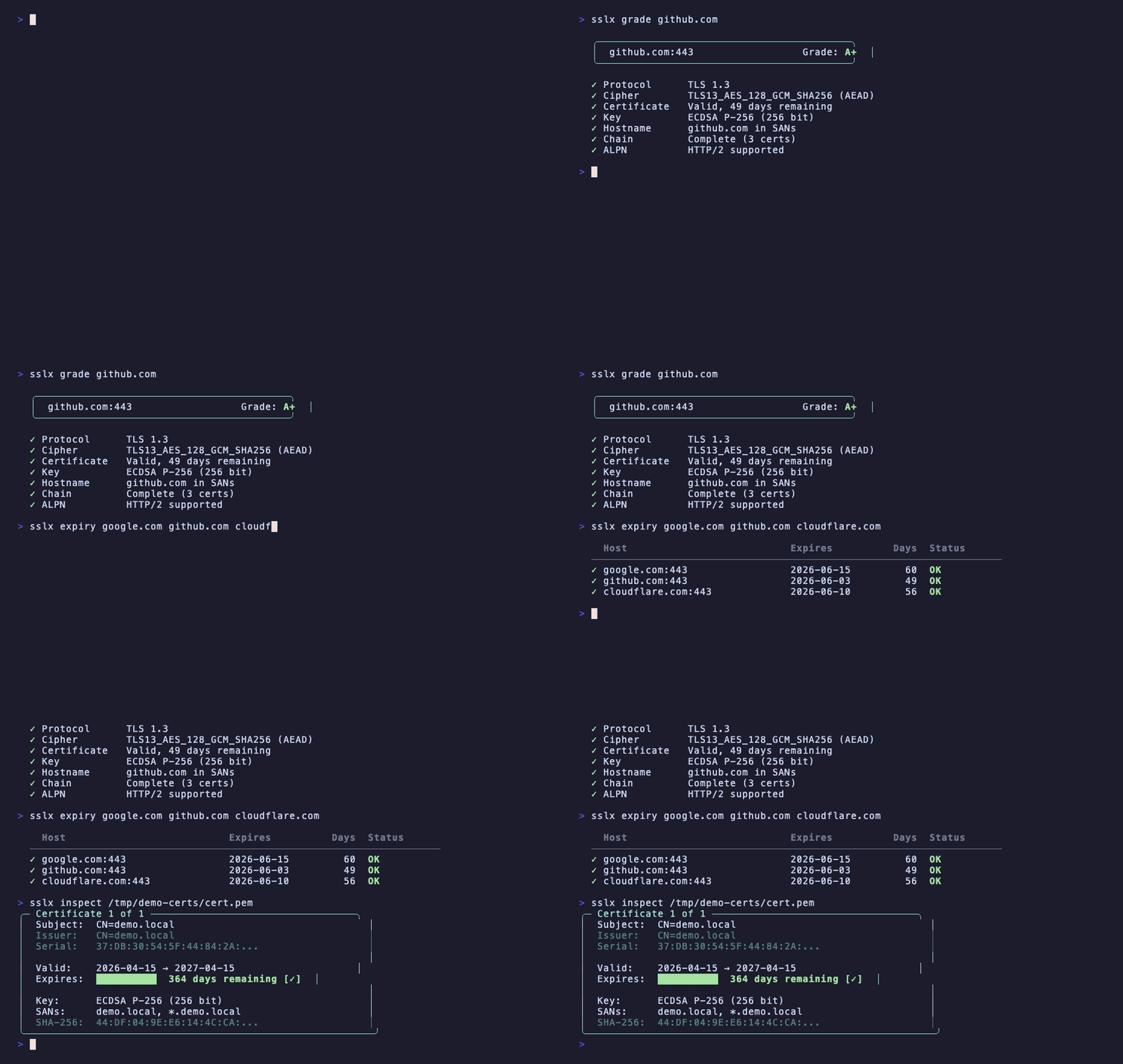
Valuta la configurazione TLS di qualsiasi host, come SSL Labs ma dal tuo terminale:
$ sslx grade github.com

  ╭──────────────────────────────────────────╮
  │  github.com:443                  Grade: A+  │
  ╰──────────────────────────────────────────╯

  ✓ Protocol      TLS 1.3
  ✓ Cipher        TLS13_AES_128_GCM_SHA256 (AEAD)
  ✓ Certificate   Valid, 49 days remaining
  ✓ Key           ECDSA P-256 (256 bit)
  ✓ Hostname      github.com in SANs
  ✓ Chain         Complete (3 certs)
  ✓ ALPN          HTTP/2 supported
Controlla versione del protocollo, forza del cifrario, validità del certificato, tipo di chiave, corrispondenza hostname, completezza della catena e ALPN. Assegna un voto in lettere da A+ a F.
Controlla la scadenza dei certificati su più host contemporaneamente:
$ sslx expiry google.com github.com cloudflare.com stripe.com

  Host                           Expires          Days  Status
  ────────────────────────────────────────────────────────────────
  ✓ google.com:443                 2026-06-15         61  OK
  ✓ github.com:443                 2026-06-03         49  OK
  ✓ cloudflare.com:443             2026-06-10         56  OK
  ✓ stripe.com:443                 2026-09-01        139  OK
Codice di uscita 1 se qualcosa scade entro 7 giorni. Utile in cron job o pipeline CI.
Legge un file certificato PEM o DER con output colorato:
$ sslx inspect cert.pem

╭─ Certificate 1 of 1 ──────────────────────────────────╮
│  Subject:  CN=*.example.com                             │
│  Issuer:   CN=Let's Encrypt Authority X3                │
│  Serial:   0A:1B:2C:3D...                               │
│                                                         │
│  Valid:    2026-01-15 → 2026-04-15                      │
│  Expires:  ██░░░░░░░░  12 days remaining [!]            │
│                                                         │
│  Key:      ECDSA P-256 (256 bit)                        │
│  SANs:     *.example.com, example.com                   │
│  SHA-256:  AB:CD:EF:12:34...                            │
╰──────────────────────────────────────────────────────────╯
Gestisce anche bundle multi-certificato. Rileva automaticamente PEM vs DER.
Visualizza i dettagli completi dell'handshake TLS e la catena di certificati per qualsiasi host:
$ sslx connect example.com

Connection to example.com:443

  TLS 1.3 · TLS13_AES_256_GCM_SHA384
  ALPN: h2

  Chain:
  ╭─ Certificate 1 of 3 ─────────────────────────╮
  │  Subject:  CN=*.example.com                    │
  │  Valid:    61 days remaining ✓                 │
  │  Key:      ECDSA P-256 (256 bit)              │
  ╰────────────────────────────────────────────────╯
    ↓ signed by
  ╭─ Certificate 2 of 3 (CA) ────────────────────╮
  │  ...                                          │
  ╰────────────────────────────────────────────────╯
Certificato autofirmato per sviluppo locale in un comando:
sslx generate --cn localhost --san "*.local,127.0.0.1"
Crea cert.pem e key.pem con EC P-256 per impostazione predefinita. Supporta anche ec384 e ed25519.
sslx csr --cn example.com --san "*.example.com,api.example.com"
Crea csr.pem e key.pem. Invia il CSR alla tua CA.
sslx convert cert.pem --to der           # PEM a DER
sslx convert cert.der --to pem           # DER a PEM
sslx convert bundle.p12 --to pem         # PKCS12 a PEM
Rileva automaticamente il formato di input.
$ sslx match cert.pem key.pem

  ✓ Certificate and key match (ECDSA P-256 (256 bit))
Niente più confronto manuale degli hash di modulo.
sslx extract bundle.p12 --password mypass --out ./certs
Estrae il certificato foglia, gli intermedi e la chiave in file PEM separati.
Passa un file o un token JWT e sslx capisce di cosa si tratta:
$ sslx decode eyJhbGciOiJIUzI1NiIsInR5cCI6IkpXVCJ9...

  ✓ Detected: JSON Web Token (JWT)

    Header:   {"alg":"HS256","typ":"JWT"}
    Payload:  {"sub":"1234567890","name":"John","iat":1516239022}
    Expires:  in 3 hours
Rileva anche certificati PEM, file DER, chiavi private, chiavi pubbliche e CSR.
sslx verify cert.pem --ca ca-bundle.pem
  ✓ Certificate is valid
    Chain:    complete (3 certs)
    Expiry:   328 days remaining
Segnala esattamente cosa non va se fallisce, con suggerimenti su come risolverlo.
| Cosa stai facendo | openssl | sslx |
|---|---|---|
| Osservare un certificato | openssl x509 -in cert.pem -text -noout | sslx inspect cert.pem |
| Handshake TLS | openssl s_client -connect host:443 2>/dev/null | openssl x509 -text | sslx connect host |
| Verificare catena | openssl verify -CAfile ca.pem cert.pem | sslx verify cert.pem --ca ca.pem |
| Certificato autofirmato | openssl req -x509 -newkey ec -pkeyopt ec_paramgen_curve:P-256 -keyout key.pem -out cert.pem -days 365 -nodes -batch -subj "/CN=localhost" | sslx generate --cn localhost |
| Creare CSR | openssl req -new -newkey ec -pkeyopt ec_paramgen_curve:P-256 -keyout key.pem -out csr.pem -batch -subj "/CN=example.com" | sslx csr --cn example.com |
| PEM a DER | openssl x509 -in cert.pem -outform DER -out cert.der | sslx convert cert.pem --to der |
| Controllo scadenza | echo | openssl s_client -connect host:443 2>/dev/null | openssl x509 -noout -enddate | sslx expiry host |
| Cert+key match | diff <(openssl x509 -noout -modulus -in cert.pem) <(openssl rsa -noout -modulus -in key.pem) | sslx match cert.pem key.pem |
| Valutazione TLS | (vai su ssllabs.com) | sslx grade host |
| Decodificare JWT | (vai su jwt.io) | sslx decode <token> |
Tutti i comandi supportano --json per scripting e CI:
# controlla i giorni fino alla scadenza
sslx connect example.com --json | jq '.chain.certificates[0].days_remaining'

# ottieni il voto
sslx grade example.com --json | jq '.grade'

# elenca tutti i SAN
sslx inspect cert.pem --json | jq '.certificates[0].sans'
| Codice | Significato |
|---|---|
| 0 | ok |
| 1 | certificato scaduto o in scadenza |
| 3 | catena non attendibile |
| 4 | connessione fallita |
| 5 | file danneggiato |
Mediana di 10 esecuzioni su macOS M2:
| sslx | openssl | |
|---|---|---|
| ispezione certificato | 2.1ms | 9.4ms |
| generazione certificato | 1.7ms | 4.5ms |
| avvio | 1.3ms |
