 dhondta/python-codext
Estensione Python codecs con strumenti CLI per codificare/decodificare qualsiasi cosa









CodExt è una libreria (compatibile con Python2-3) che estende la libreria nativa codecs (in particolare per aggiungere nuove codifiche personalizzate e mappature di caratteri) e fornisce 120+ nuovi codec, da cui il nome che combina CODecs EXTension. Offre anche una modalità guess per decodificare più strati di codifica e strumenti CLI per comodità.```sh
$ pip install codext
Vuoi contribuire con un nuovo codec? | Vuoi contribuire con una nuova macro?
:----------------------------------:|:------------------------------------:
Controlla prima la [documentazione](https://python-codext.readthedocs.io/en/latest/howto)<br>Poi [PR](https://github.com/dhondta/python-codext/pulls) il tuo nuovo codec | [PR](https://github.com/dhondta/python-codext/pulls) la tua versione aggiornata di [`macros.json`](https://github.com/dhondta/python-codext/blob/main/codext/macros.json)
## :mag: Dimostrazioni
<p align="center"><img src="https://assets.kitploit.com/production/public/readmes/4821/81514bb87e41cfa9d482c93830d7a2e579352988aae9b0934778095692265bde.gif" alt="Utilizzo di CodExt dalla riga di comando"></p>
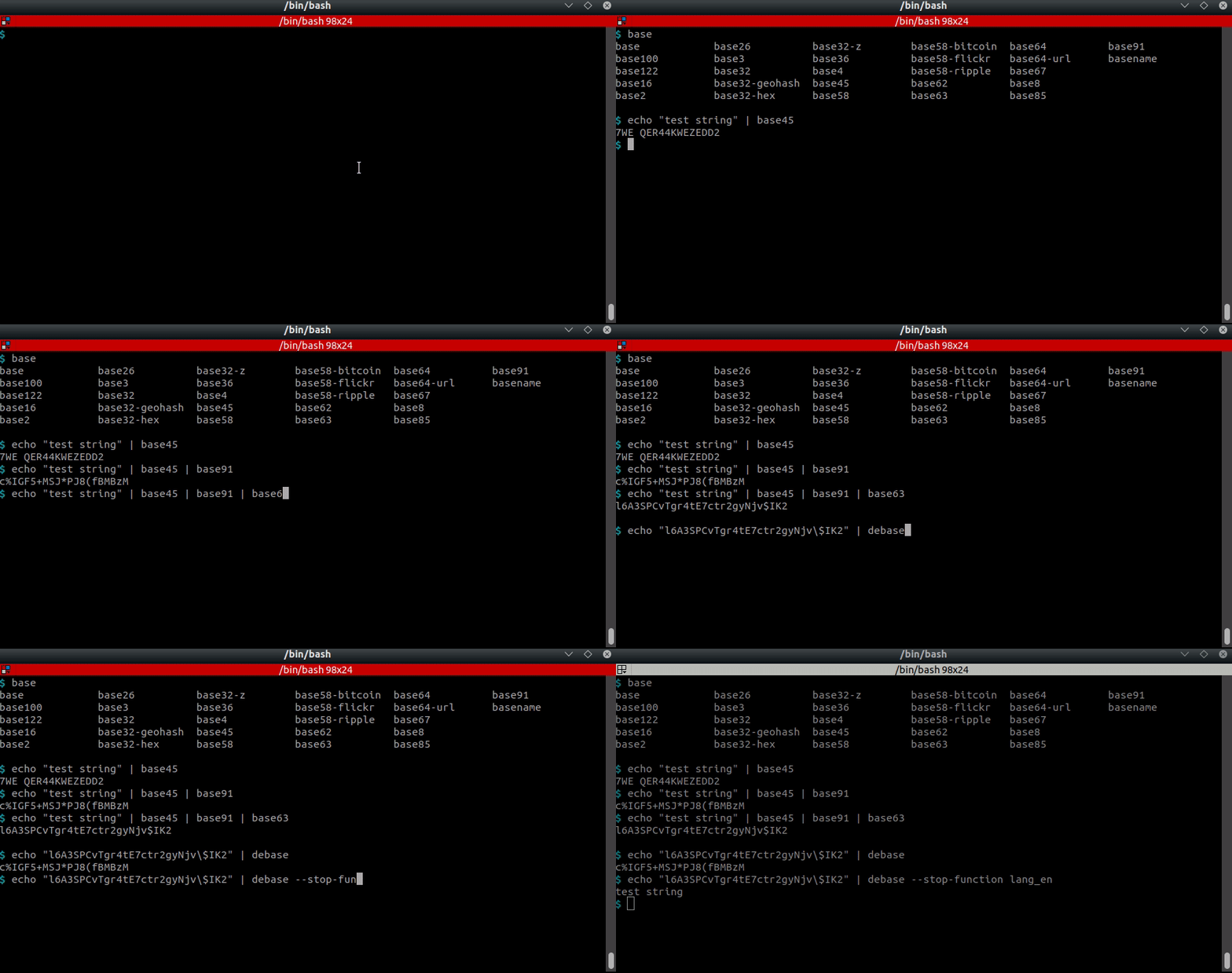
<p align="center"><img src="https://assets.kitploit.com/production/public/readmes/4821/fa4848c3f817288ed56845964755dbb4c4a0098c76af8a6ac6e5c89f849a8d5e.gif" alt="Utilizzo degli strumenti base dalla riga di comando"></p>
<p align="center">Utilizzo dello strumento da riga di comando unbase</p>
## :computer: Utilizzo (strumento principale CLI) <a href="https://twitter.com/intent/tweet?text=CodExt%20-%20Encode%2Fdecode%20anything.%0D%0APython%20tool%20for%20encoding%20and%20decoding%20almost%20anything,%20including%20a%20guess%20feature%20based%20on%20AI.%0D%0Ahttps%3a%2f%2fgithub%2ecom%2fdhondta%2fpython-codext%0D%0A&hashtags=python,encodings,codecs,cryptography,morse,base,stegano,steganography,ctftools"><img src="https://img.shields.io/badge/Tweet%20(codext)--lightgrey?logo=twitter&style=social" alt="Twitta su codext" height="20"/></a>```session
$ codext -i test.txt encode dna-1
GTGAGCGGGTATGTGA
$ echo -en "test" | codext encode morse
- . ... -
$ echo -en "test" | codext encode braille
⠞⠑⠎⠞
$ echo -en "test" | codext encode base100
👫👜👪👫
$ echo -en "Test string" | codext encode reverse gnirts tseT
$ echo -en "Test string" | codext encode reverse morse --. -. .. .-. - ... / - ... . -
$ echo -en "Test string" | codext encode reverse morse dna-2 AGTCAGTCAGTGAGAAAGTCAGTGAGAAAGTGAGTGAGAAAGTGAGTCAGTGAGAAAGTCAGAAAGTGAGTGAGTGAGAAAGTTAGAAAGTCAGAAAGTGAGTGAGTGAGAAAGTGAGAAAGTC
$ echo -en "Test string" | codext encode reverse morse dna-2 octal 101107124103101107124103101107124107101107101101101107124103101107124107101107101101101107124107101107124107101107101101101107124107101107124103101107124107101107101101101107124103101107101101101107124107101107124107101107124107101107101101101107124124101107101101101107124103101107101101101107124107101107124107101107124107101107101101101107124107101107101101101107124103
$ echo -en "AGTCAGTCAGTGAGAAAGTCAGTGAGAAAGTGAGTGAGAAAGTGAGTCAGTGAGAAAGTCAGAAAGTGAGTGAGTGAGAAAGTTAGAAAGTCAGAAAGTGAGTGAGTGAGAAAGTGAGAAAGTC" | codext -d dna-2 morse reverse test string
### :twisted_rightwards_arrows: Uso delle macro```sh
$ codext add-macro my-encoding-chain gzip base63 lzma base64

$ codext list macros
example-macro, my-encoding-chain

$ echo -en "Test string" | codext encode my-encoding-chain
CQQFAF0AAIAAABuTgySPa7WaZC5Sunt6FS0ko71BdrYE8zHqg91qaqadZIR2LafUzpeYDBalvE///ug4AA==

$ codext remove-macro my-encoding-chain

$ codext list macros
example-macro
--lightgrey?logo=twitter&style=social)
Giocando con le codifiche base.```session $ echo "Test string !" | base122 *.7!ft9�-f9Â
$ echo "Test string !" | base91 "ONK;WDZM%Z%xE7L
$ echo "Test string !" | base91 | base85 B2P|BJ6A+nO(j|-cttl%
$ echo "Test string !" | base91 | base85 | base36 | base58-flickr QVx5tvgjvCAkXaMSuKoQmCnjeCV1YyyR3WErUUErFf
$ echo "Test string !" | base91 | base85 | base36 | base58-flickr | base58-flickr -d | base36 -d | base85 -d | base91 -d Test string !
$ echo "Test string !" | base91 | base85 | base36 | base58-flickr | unbase -m 3
Test string !

$ echo "Test string !" | base91 | base85 | base36 | base58-flickr | unbase -f Test
Test string !
```
## :computer: Utilizzo (CLI)
