 dcarrero/mboxshell
mboxShell. Fast terminal viewer for MBOX files of any size. Open, search and export emails from Gmail Takeout backups (50GB+) without loading them into memory. Built in Rust.

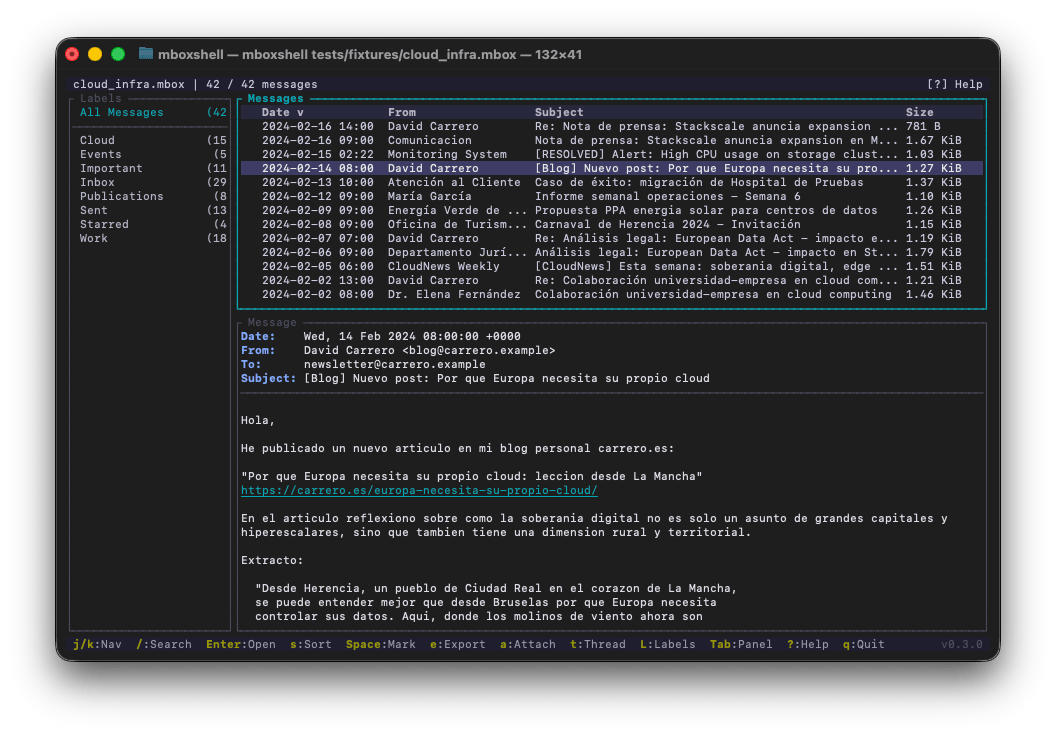
# mboxShell **Fast terminal viewer for MBOX files of any size. Open, search and export emails from Gmail Takeout backups (50 GB+) without loading them into memory.** [](LICENSE) [](https://www.rust-lang.org) [Leer en Espanol / Spanish](https://github.com/dcarrero/mboxshell/blob/main/README-ES.md) --- ## Why this project exists When you export your email from Gmail using Google Takeout, you get one or more `.mbox` files that can weigh tens of gigabytes — plus one more mailbox per Google Group you own, which is easy to miss and can be larger than the Gmail export itself. There is no cross-platform terminal tool that lets you open, search and browse those files efficiently without loading them entirely into memory. `mboxShell` was built to solve that problem: open a 50 GB MBOX in seconds, navigate hundreds of thousands of messages smoothly, search by sender, date or content, and export whatever you need. All from the terminal, with no GUI, no server, no external dependencies. ## Use cases - **Browse Gmail backups** (Google Takeout) with their original labels - **Read the groups you own**, exported by Takeout as their own mailboxes — often the largest files in the archive - **Analyze mail archives** on servers, during migrations or audits - **Search messages** in MBOX files from any source (Thunderbird, Unix servers, etc.) - **Export messages** to EML, CSV or plain text for further processing - **Extract attachments** individually or in bulk - **Merge multiple MBOX files** into one, removing duplicates ## Also on Mac: mboxViewer If you prefer a native graphical experience on macOS, check out [mboxViewer](https://mboxviewerpro.com) — a native Mac app built by the same team. It provides a familiar mailbox-style interface to open, browse and search MBOX files without ever importing them into a mail client. Drag and drop your `.mbox` file, and you get instant access to all your messages, attachments and labels in a clean macOS-native window. Ideal for users who want the power of mboxShell's parsing engine with the comfort of a desktop GUI. ## Also in your browser: Online Mbox Viewer Need to peek at an MBOX file without installing anything? Try [Online Mbox Viewer](https://onlinemboxviewer.com) — a free, MIT-licensed web app by the same author. It opens and renders `.mbox` files entirely in your browser: nothing is uploaded to any server, so your email stays on your machine. Perfect for a quick look from any device. Source code at [github.com/dcarrero/online-mbox-viewer](https://github.com/dcarrero/online-mbox-viewer). ## Features - **Never loads the file into memory.** Uses streaming I/O with a 1 MB buffer. A 100 GB MBOX uses roughly the same ~500 MB of RAM as a 1 GB one (only the metadata index lives in memory). - **Persistent indexing.** The first open creates a binary index (`.mboxshell.idx`) so subsequent opens take less than a second. - **Full Gmail support.** Detects and displays `X-Gmail-Labels` as virtual folders in a sidebar panel, letting you filter by Inbox, Sent, Starred, custom labels, etc. - **Google Groups mailboxes.** Reads the `topics.mbox` files a Takeout archive ships for every group you own, names them after the group instead of the meaningless file name, shows the group as a virtual label, and threads conversations by the exact `X-GM-THRID` id. - **Correct encodings.** Decodes RFC 2047 encoded-words, supports UTF-8, ISO-8859-1, Windows-1252, KOI8-R, and any charset recognized by `encoding_rs`. - **Conversation threading.** Groups messages into threads using the JWZ algorithm (the same one used by Netscape/Mozilla), or the mailbox's own conversation id when it has one. - **Advanced search.** Field-specific filtering (`from:`, `subject:`, `date:`, `body:`, `has:attachment`, `label:`, etc.), date ranges, size filters, AND/OR operators, and negation. - **Flexible export.** Individual or bulk export to EML, CSV (Excel-compatible), plain text, HTML, a new MBOX or a Maildir. Decoded attachment extraction. - **Single binary.** No runtime, no dependencies. A ~5 MB executable that runs on Linux, macOS and Windows. - **Full terminal UI.** Keyboard navigation (vi-style), three layout modes, interactive search bar, configurable shortcuts. - **Bilingual.** Interface available in English and Spanish, auto-detected from system locale. ## Installation ### Pre-built binaries (recommended) Download the latest release for your platform from the [Releases](https://github.com/dcarrero/mboxshell/releases) page: | Platform | Binary | |----------|--------| | Linux x86_64 | `mboxshell-linux-x86_64` | | Linux ARM64 | `mboxshell-linux-aarch64` | | Linux RISC-V 64 | `mboxshell-linux-riscv64` | | FreeBSD x86_64 | `mboxshell-freebsd-x86_64` | | macOS Intel | `mboxshell-macos-x86_64` | | macOS Apple Silicon | `mboxshell-macos-aarch64` | | Windows x86_64 | `mboxshell-windows-x86_64.exe` | | Windows ARM64 | `mboxshell-windows-arm64.exe` | After downloading, make it executable and move it to your PATH: ```bash # Linux / macOS chmod +x mboxshell-* sudo mv mboxshell-* /usr/local/bin/mboxshell # Or place it in a user-local directory mv mboxshell-* ~/.local/bin/mboxshell ``` On Windows, move `mboxshell-windows-x86_64.exe` to a folder in your `PATH`, or run it directly. ### Build from source Requirements: [Rust](https://www.rust-lang.org/tools/install) 1.85 or later. ```bash # Clone and build git clone https://github.com/dcarrero/mboxshell.git cd mboxshell cargo build --release # The binary is at target/release/mboxshell # Install it system-wide: sudo cp target/release/mboxshell /usr/local/bin/ # Or for the current user only: cp target/release/mboxshell ~/.local/bin/ ``` #### Cross-compiling for other platforms ```bash # Add the target you need rustup target add aarch64-apple-darwin # macOS Apple Silicon rustup target add x86_64-unknown-linux-gnu # Linux x86_64 rustup target add aarch64-unknown-linux-gnu # Linux ARM64 # Build for a specific target cargo build --release --target aarch64-apple-darwin ``` ### Install via Cargo ```bash cargo install --git https://github.com/dcarrero/mboxshell.git ``` ## Quick start ```bash # Open an MBOX file in the terminal UI mboxshell mail.mbox # Index and show statistics mboxshell index mail.mbox mboxshell stats mail.mbox # Search from the command line mboxshell search mail.mbox "from:[email protected] date:2024" mboxshell search mail.mbox "has:attachment subject:invoice" --json # Export messages mboxshell export mail.mbox --format eml --output ./emails/ mboxshell export mail.mbox --format csv --output summary.csv # Hand over only part of an archive: a new mailbox with just the matches mboxshell export mail.mbox --format mbox --query "from:[email protected]" -o handover.mbox # Convert to Maildir (read/replied/flagged state kept as Maildir flags) mboxshell export mail.mbox --format maildir -o ~/Maildir/Archive # Extract attachments mboxshell attachments mail.mbox --output ./attachments/ # Merge multiple MBOX files (duplicates are removed by default) mboxshell merge file1.mbox file2.mbox -o merged.mbox # Merge tagging every message with the mailbox it came from mboxshell merge Inbox.mbox Sent.mbox -o merged.mbox --source-header # Generate shell completions mboxshell completions bash > /etc/bash_completion.d/mboxshell mboxshell completions zsh > ~/.zfunc/_mboxshell mboxshell completions fish > ~/.config/fish/completions/mboxshell.fish ``` ## CLI commands | Command | Description | |---------|-------------| | `mboxshell [FILE]` | Open a file in the TUI (default action) | | `mboxshell open <path>` | Open an MBOX file in the TUI | | `mboxshell index <path> [-f/--force]` | Build or rebuild the binary index | | `mboxshell stats <path> [--json]` | Show statistics about an MBOX file | | `mboxshell search <path> <query> [--json]` | Search messages from the command line | | `mboxshell export <path> -f <format> -o <output> [--query <q>]` | Export messages (formats: eml, csv, txt, html, mbox, maildir) | | `mboxshell merge <files...> -o <output> [--no-dedup] [--source-header]` | Merge multiple MBOX files into one | | `mboxshell attachments <path> -o <output>` | Extract all attachments | | `mboxshell completions <shell>` | Generate shell completions (bash, zsh, fish, powershell, elvish) | | `mboxshell manpage` | Generate a man page | | `mboxshell config [path\|show\|defaults]` | Show where the config file is, its contents or the defaults | **Global flags:** | Flag | Description | |------|-------------| | `-f`, `--force` | Force rebuild index even if one exists (in `export`, `-f` is `--format` — spell out `--force` there) | | `-v`, `--verbose` | Increase log verbosity (-v info, -vv debug, -vvv trace) | | `--lang <en\|es>` | Force interface language (auto-detected by default) | **Merge flags:** | Flag | Description | |------|-------------| | `--no-dedup` | Skip duplicate detection and concatenate the inputs byte-for-byte, adding only a newline after an input that does not end in one (dedup is on by default: a message is a duplicate when both its Message-ID and its content match an earlier one) | | `--source-header` | Inject an `X-Mbox-Source: <mailbox name>` header into every message, so a merged archive stays traceable to the mailbox each email came from | The source label is the mailbox name you see: for an Apple Mail export — a directory `Inbox.mbox` containing a file literally called `mbox` — it reads `Inbox.mbox`, not `mbox`. Mailboxes that would end up sharing a label are disambiguated against each other (`Work/Inbox.mbox` vs `Personal/Inbox.mbox`). ## Terminal UI 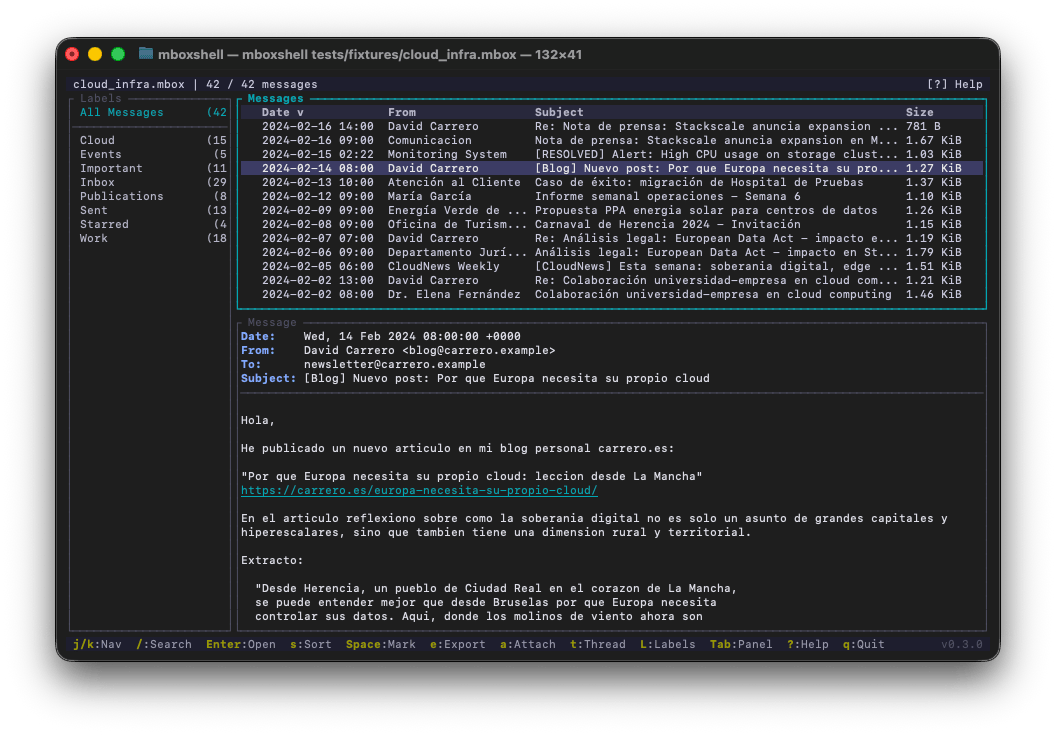 ## Keyboard shortcuts | Key | Action | |-----|--------| | `j` / `k` | Next / previous message | | `g` / `G` | First / last message | | `PgDn` / `PgUp` | Page down / up | | `Enter` | Open message / switch to message view | | `Shift-↑` / `Shift-↓` | Scroll selected message body (keeps list focus); a position indicator (`Top` / `NN%` / `Bot`) shows in the message border | | `Tab` / `Shift-Tab` | Cycle panel focus | | `Esc` | Back to list / close popup | | `/` | Open search bar | | `f` | Open search filter popup | | `n` / `N` | Next / previous search result | | `Space` | Mark / unmark message | | `*` | Mark / unmark all | | `s` | Cycle sort column (Date, From, Subject, Size) | | `S` | Toggle sort direction | | `e` | Export message (EML, TXT, CSV, Attachments) | | `a` | Show attachments (j/k to navigate, Enter to save, A to save all) | | `t` | Toggle threaded (conversation) view | | `l` | Show / focus / hide labels sidebar | | `h` | Toggle full headers | | `r` | Toggle raw message source | | `1` / `2` / `3` | Layout: list only / horizontal split / vertical split | | `?` | Help | | `q` | Quit | ## Search syntax ``` from:[email protected] Search by sender to:[email protected] Search by recipient cc:[email protected] Search by Cc recipient subject:invoice Search in subject line body:important text Search in message body (full-text) filename:report.pdf Search by attachment file name id:<message-id@domain> Search by Message-ID has:attachment Only messages with attachments has:no-attachment Only messages without attachments label:Inbox Filter by Gmail label date:2024-01 Messages from January 2024 date:2024-01-01..2024-06-30 Date range before:2024-06-01 Before a date (that day excluded) after:2024-01-01 From a date on (that day included) after:2024-01-01 before:2025-01-01 All of 2024 size:>1mb Messages larger than 1 MB size:>1mb size:<5mb Between 1 and 5 MB -subject:spam Exclude messages with "spam" in subject "exact phrase" Search for an exact phrase from:john subject:budget Implicit AND (both must match) term1 OR term2 Explicit OR from:a OR from:b subject:budget OR binds tighter: (a OR b) AND subject ``` ## Supported input formats | Format | Extension | Description | |--------|-----------|-------------| | MBOX (mboxrd/mboxo) | `.mbox` | Standard format. Google Takeout, Thunderbird, Unix servers | | Google Groups export | `topics.mbox` | Inside a Takeout archive, at `<group>@googlegroups.com/`. The file name is localised (`temas.mbox`, …), so the mailbox is named after the group — see [`docs/GOOGLE-GROUPS.md`](https://github.com/dcarrero/mboxshell/blob/main/docs/GOOGLE-GROUPS.md) | | Apple Mail package | `Name.mbox/mbox` | The inner file is what gets read; the mailbox is named after the package | ## Performance Tested with real Google Takeout MBOX files: | File size | Messages | Indexing | Re-open | |-----------|----------|----------|---------| | 500 MB | ~5,000 | ~3 s | < 1 s | | 5 GB | ~50,000 | ~30 s | < 1 s | | 50 GB | ~500,000 | ~5 min | < 1 s | Message list navigation is instantaneous thanks to virtual scrolling (only visible rows are rendered). ## Configuration Optional. `mboxshell config` prints where the file goes on your system (`~/.config/mboxshell/config.toml` on Linux, `~/Library/Application Support/mboxshell/config.toml` on macOS, `%APPDATA%\mboxshell\config.toml` on Windows, or `$MBOXSHELL_CONFIG`); `mboxshell config show` prints it and `mboxshell config defaults` prints every option with its default: ```toml [general] default_sort = "date" # date | from | subject | size sort_order = "desc" # desc | asc date_format = "%Y-%m-%d %H:%M" # strftime format for the message list log_level = "warn" # error | warn | info | debug | trace # cache_dir = "/path/to/dir" # fallback indexes and log (default: the system cache dir) [display] theme = "dark" # dark | light | terminal (NO_COLOR forces terminal) layout = "horizontal" # horizontal | vertical | list-only show_sidebar = true # label sidebar, when the mailbox has labels max_cached_messages = 50 # decoded messages kept in memory [export] csv_separator = "," # one character, e.g. ";" or "\t" attachment_dirname = "dts" # dts | seq-no | seq-no0 attachment_seq_width = 0 # minimum digits for seq-no names (0 = automatic) ``` See the [manual](https://github.com/dcarrero/mboxshell/blob/main/docs/MANUAL.md#9-configuration-file) for details. ## Architecture ``` src/ +-- main.rs # CLI with clap +-- lib.rs # Module re-exports +-- error.rs # Error types with thiserror +-- config.rs # TOML configuration +-- mailbox_naming.rs # Human-facing mailbox names (Apple Mail packages) +-- i18n/ # Internationalization (EN/ES) +-- parser/ | +-- mbox.rs # Streaming parser (never loads the file into memory) | +-- eml.rs # Individual EML file parser | +-- mime.rs # MIME decoding, multipart, charsets | +-- header.rs # RFC 5322 headers, RFC 2047 encoded-words +-- index/ | +-- builder.rs # Binary index construction | +-- reader.rs # Index queries | +-- format.rs # Binary format with SHA-256 integrity check +-- model/ | +-- mail.rs # MailEntry, MailBody | +-- attachment.rs # Attachment metadata | +-- address.rs # RFC 5322 address parsing +-- store/ | +-- reader.rs # Offset-based reading with LRU cache +-- search/ | +-- query.rs # Search query parser | +-- metadata.rs # Fast index search (O(n), < 200ms for 1M messages) | +-- fulltext.rs # Streaming full-text search +-- export/ | +-- eml.rs # Export to .eml | +-- csv.rs # Export summary to CSV (UTF-8 BOM) | +-- text.rs # Export to plain text | +-- attachment.rs # Attachment extraction | +-- mbox.rs # MBOX merge with deduplication and source header +-- tui/ +-- app.rs # Global state (Elm Architecture) +-- event.rs # Keyboard event handling +-- ui.rs # Layout and render dispatch +-- threading.rs # JWZ algorithm for conversation threads +-- theme.rs # Color theme +-- widgets/ # Visual components +-- mail_list.rs # List with virtual scrolling +-- mail_view.rs # Message viewer with scroll +-- sidebar.rs # Labels/folders panel +-- header_bar.rs # Top bar +-- status_bar.rs # Status bar +-- search_bar.rs # Search bar +-- search_popup.rs # Search filter popup +-- help_popup.rs # Help popup +-- attachment_popup.rs # Attachment popup +-- export_popup.rs # Export popup ``` ## Key dependencies | Crate | Purpose | |-------|---------| | `ratatui` + `crossterm` | Terminal UI | | `mail-parser` | MIME/RFC 5322 parsing | | `encoding_rs` | Charset decoding | | `chrono` | Dates and time zones | | `clap` | CLI argument parsing | | `serde` + `bincode` | Index serialization | | `sha2` | Index integrity verification | | `lru` | Decoded message cache | | `tracing` | Structured logging | ## Sponsors `mboxshell` is developed in the open and is supported by: <p align="center"> <a href="https://colorvivo.com"> <img src="https://assets.kitploit.com/production/public/readmes/11618/2e93d1557266a1757676dc70bf7e0bfb3ac1cbd1d1a6b5da72090b86ec7810eb.webp" alt="Colorvivo" height="70"> </a> <a href="https://www.stackscale.com"> <picture> <source media="(prefers-color-scheme: dark)" srcset="https://www.stackscale.com/wp-content/uploads/2019/12/Stackscale-GrupoAire-web-mini.png"> <img src="https://assets.kitploit.com/production/public/readmes/11618/c5e4c1de767e401b555b522b310441f54819b1fd904da12d910e73ff52a7070b.png" alt="Stackscale" height="50"> </picture> </a> </p> - **[Colorvivo](https://colorvivo.com)** — experts in WordPress, AI and digital media. - **[Stackscale](https://www.stackscale.com)** — experts in private cloud infrastructure. If your company finds `mboxshell` useful and wants to support its continued development, see [`.github/FUNDING.yml`](https://github.com/dcarrero/mboxshell/blob/main/.github/FUNDING.yml) or reach out via [carrero.es](https://carrero.es). ## Documentation The full user manual covers every command, keyboard shortcut, search operator, export option and config key: - [docs/MANUAL.md](https://github.com/dcarrero/mboxshell/blob/main/docs/MANUAL.md) — User manual (English) - [docs/MANUAL-ES.md](https://github.com/dcarrero/mboxshell/blob/main/docs/MANUAL-ES.md) — Manual de usuario (Español) ## Changelog See [CHANGELOG.md](https://github.com/dcarrero/mboxshell/blob/main/CHANGELOG.md) for the full release history. ## License [MIT](https://github.com/dcarrero/mboxshell/blob/main/LICENSE) - Copyright (c) 2026 David Carrero Fernandez-Baillo - [https://carrero.es](https://carrero.es) Source Code: [https://github.com/dcarrero/mboxshell](https://github.com/dcarrero/mboxshell)
