
agentic-threat-hunting-framework v0.19.0
ATHF è un framework per la caccia alle minacce agentica - costruire sistemi che possono ricordare, apprendere e agire con autonomia crescente.
Agentic Threat Hunting Framework (ATHF)




Quick Start • Installation • Documentation • Examples
Dai al tuo programma di threat hunting memoria e capacità di azione.
L'Agentic Threat Hunting Framework (ATHF) è il livello di memoria e automazione per il tuo programma di threat hunting. Dà alle tue cacce struttura, persistenza e contesto - rendendo ogni indagine passata accessibile sia agli esseri umani che all'IA.
ATHF funziona con qualsiasi metodologia di hunting (PEAK, TaHiTI o il tuo processo personale). Non è un sostituto; è il livello che rende il tuo processo esistente pronto per l'IA.
Cos'è ATHF?
ATHF fornisce struttura e persistenza per i programmi di threat hunting. È un framework basato su markdown che:
- Documenta le cacce usando il pattern LOCK (Learn → Observe → Check → Keep)
- Mantiene un repository ricercabile delle indagini passate
- Consente agli assistenti IA di fare riferimento al tuo ambiente e al lavoro precedente
- Funziona con qualsiasi piattaforma SIEM/EDR
- NOVITÀ: Include agenti di ricerca e generazione di ipotesi basati su IA (v0.3.0+)
Il Problema
La maggior parte dei programmi di threat hunting perde contesto prezioso una volta terminata una caccia. Le note vivono in Slack o nei ticket, le query vengono scritte una volta e dimenticate, e le lezioni apprese esistono solo nella testa degli analisti.
Anche gli strumenti IA partono da zero ogni volta senza accesso al tuo ambiente, ai tuoi dati o alle tue cacce passate.
ATHF cambia questo dando alle tue cacce struttura, persistenza e contesto.
Leggi di più: docs/why-athf.md
Il Pattern LOCK
Ogni threat hunt segue lo stesso ciclo di base: Learn → Observe → Check → Keep.
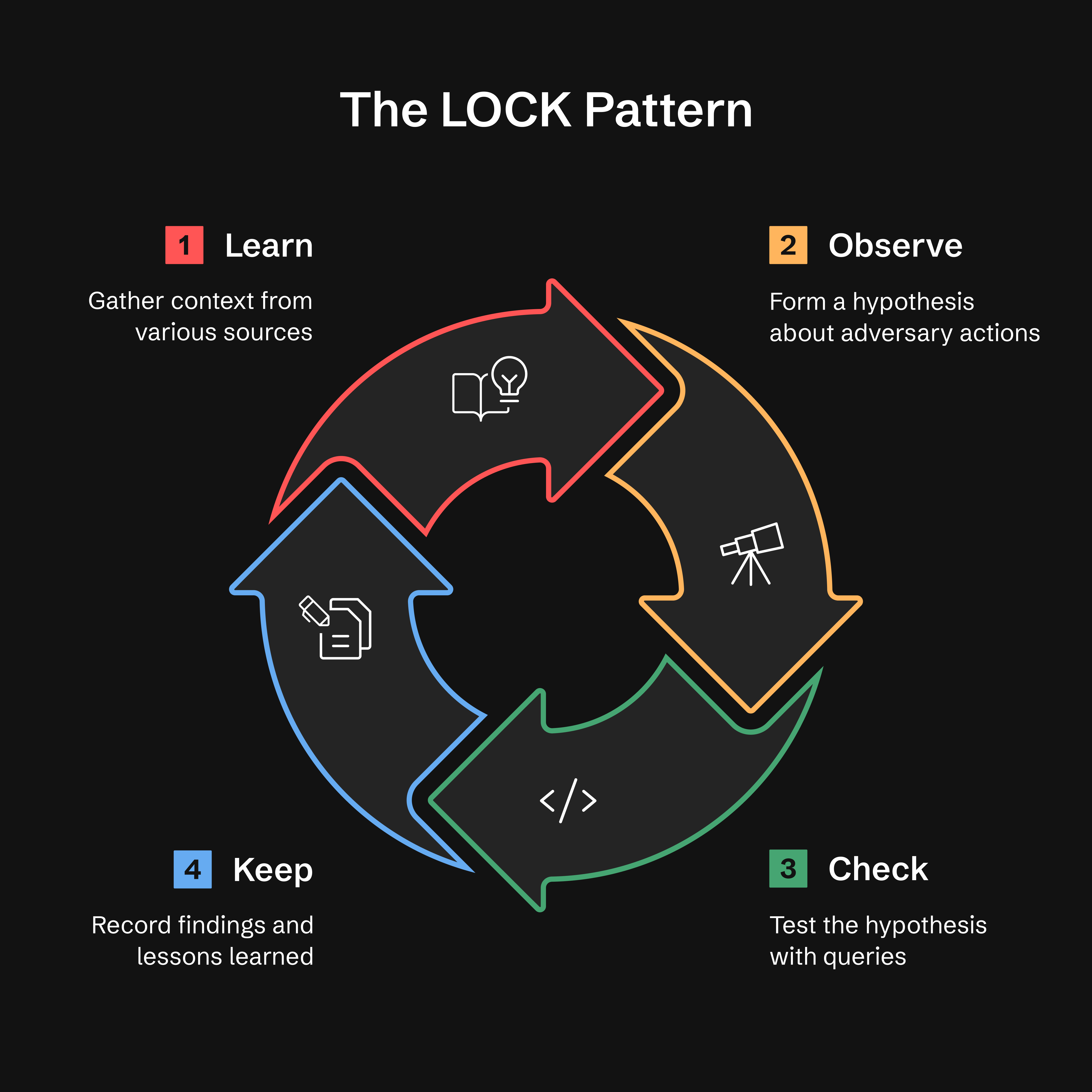
- Learn: Raccogli contesto da threat intel, alert o anomalie
- Observe: Formula un'ipotesi sul comportamento dell'avversario
- Check: Verifica le ipotesi con query mirate
- Keep: Registra i risultati e le lezioni apprese
Perché LOCK? È abbastanza piccolo da essere usato e abbastanza rigoroso da poter essere interpretato dagli agenti. Catturando ogni caccia in questo formato, ATHF rende possibile per gli assistenti IA richiamare il lavoro precedente e suggerire query raffinate basate sui risultati passati.
Leggi di più: docs/lock-pattern.md
Metodo GATES: Validazione della Promozione da Hunt a Detection
Dopo aver completato la fase KEEP di una caccia, il metodo GATES valida se i tuoi risultati dovrebbero essere promossi a detection di produzione, cacce ricorrenti o advisory.
Generalizable, Additive, Tunable, Exposure-tested, Sustainable
Nota: GATES è progettato per funzionare con il framework ATHF ed è stato ampiamente testato in quel contesto. Sebbene la metodologia (5 criteri BASE, tipi di verdetto) sia concettualmente portabile, raccomandiamo di usarla come parte del flusso di lavoro ATHF completo per ottenere i migliori risultati. Vedi
.claude/skills/gates/per l'integrazione completa.
Installazione: GATES è attualmente disponibile solo tramite
git clone. Gli utenti che hanno installato tramitepip installdovrebbero clonare il repository per accedere a GATES. Stiamo lavorando per includere GATES nella distribuzione pip (tracciato come Issue #21).
GATES valuta le detection derivate dalle cacce usando un framework a due livelli: 5 criteri BASE (valutati dai dati della caccia) identificano i candidati alla distribuzione, mentre 5 criteri ADVANCED (validati in produzione) garantiscono detection resilienti con bassi tassi di falsi positivi e falsi negativi:
| Gate | Domanda | Cosa intercetta |
|---|---|---|
| G - Generalizable | È ripetibile? | Regole basate su IOC che scadono rapidamente |
| A - Additive | Colma una lacuna di copertura? | Detection duplicate o ridondanti |
| T - Tunable | Possiamo distinguere un attacco dal normale? | Disallineamento del rumore di baseline (principale causa di FP) |
| E - Exposure-tested | Abbiamo coperto le evasioni? | Detection monodimensionali |
| S - Sustainable | Possiamo mantenerla? | Regole ad alto volume e basso TP |
I verdetti si basano sui punteggi BASE (/5). Vedi .claude/skills/gates/ per i metodi di validazione ADVANCED.
Quick Start — digita questo al tuo assistente; /gates è una skill, non un comando shell:
/gates --hunt H-0001
Tipi di verdetto:
- ✅ PROMOTE (4.0-5.0) - Distribuisci come rilevamento permanente
- ⚠️ CONDITIONAL (3.0-3.9) - Distribuisci dopo aver soddisfatto i prerequisiti
- ❌ HOLD (0.0-2.9) - Conserva la logica, non distribuire
- ⏱️ TIME_BOX - Specifico per campagna, aggiornamento ogni 90 giorni
- 🔄 RECURRING_HUNT - Esecuzione trimestrale, non 24/7
- 🚫 DROP - Non vale la pena rilevarlo; registrato per non riproporlo
Un gate FAIL sovrascrive la fascia di punteggio, e quando due gate falliscono vince la prima corrispondenza in
quest'ordine: A→DROP, G→TIME_BOX, E→HOLD, S→RECURRING_HUNT, T→CONDITIONAL. Le
fasce sopra si applicano solo quando nessun gate è FAILed. Regola completa:
.claude/skills/gates/SKILL.md Step 4.
Nota: Il verdetto "PROMOTE" di GATES significa distribuire una regola di rilevamento. Questo è distinto da athf hunt promote, che sposta i file di hunt tra directory.
Integrazione con ADEF (Detection Engineering Framework):
Dopo la validazione GATES, procedi con ADEF per l'ingegneria di rilevamento in produzione:
ATHF Workspace                    ADEF Workspace
──────────────                    ──────────────
Hunt (LOCK)
   ↓
GATES Validate
   ↓
H-XXXX_GATES.yaml  ────────────→  FORGE (F-O-R-G-E)
                                     ↓
                                  Production Rule
Workflow completo:
-
Nel workspace ATHF, convalidare la caccia — input dell'assistente, non un comando shell:
/gates --hunt H-0903→ scrive
hunt-promotion-analysis/H-0903_GATES.yaml(un file per hunt, N candidati all'interno). Un hunt il cui verdetto è archiviato (HOLD,DROP,TIME_BOX,RECURRING_HUNT) emette invece una narrazione.md— non c'è alcuna regola da costruire, quindi il passo 2 si applica solo all'output.yaml. -
Importa quel documento in ADEF:
adef hunt-promote --gates ~/athf-workspace/hunt-promotion-analysis/H-0903_GATES.yaml
# --dry-run first to preview what it would mint