एक संग्रहकर्ता और व्युत्पत्ति इंजन। यह आपके वातावरण का मानचित्रण करता है, प्रभावी अनुमतियों और विश्वास का मूल्यांकन करता है, और एक पूर्ण आक्रमण ग्राफ़ को एक ही .rage.ndjson फ़ाइल के रूप में लिखता है। बाकी सब कुछ के लिए इनपुट।

आपके पास 4,000 findings नहीं हैं। आपके पास अपने crown jewels तक छह रास्ते हैं।
एक CSPM आपको misconfigurations की एक सपाट, deduplicated, severity के अनुसार क्रमबद्ध सूची थमा देता है और आपको यह अनुमान लगाने के लिए छोड़ देता है कि कौन-सी मायने रखती हैं। Thunderstorm reachability पर विचार करता है: यह आपके cloud को read-only रूप से एकत्र करता है, इसे security capabilities के graph के रूप में मॉडल करता है, और आपको बताता है कि एक GitHub Actions OIDC trust चार hops में आपके production data lake तक पहुँचता है।
ऊपर दिए गए hops में से कोई भी अपने आप में एक finding नहीं है। एक public bucket, एक state file में एक key, एक assumable role, एक over-broad IAM action। path ही finding है, और path वह है जिसकी गणना लगभग कोई और नहीं करता।
जिस platform की ओर आप इसे इंगित करते हैं, उस पर गहराई तक। इसे किसी AWS account, Azure subscription, या GCP project के विरुद्ध चलाएँ, और यह उस एक environment को provider की अपनी शर्तों में map करता है: AWS में STS assume-role और IAM privilege escalation, Azure में RBAC और managed-identity chains, GCP में service-account impersonation। एक environment, एक graph, उसी तरह मॉडल किया गया जैसे वह cloud वास्तव में काम करता है।
बहुत से tools अधिक enumerate करते हैं। यहाँ दावा यह है कि Thunderstorm वास्तविक गहराई के साथ जो enumerate करता है उस पर विचार करता है: 219 resource types, 80 edge types, 2,400+ derivation rules, और 1,049 mapped credential-leak sites, सभी RAGE से sourced।
RAGE format है, Thunderstorm इसे produce करता है, Blaze इसे explore करता है।
ये वही हैं जो Thunderstorm एक single scan से produce करता है।
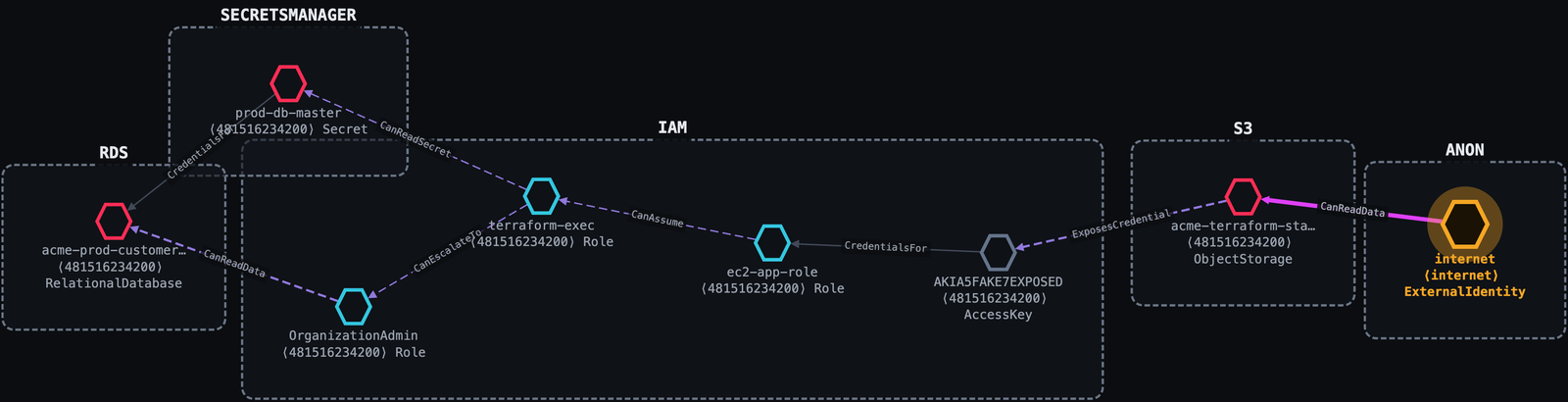
एक misconfigured S3 bucket। Thunderstorm इसे छह hops में production customer database तक trace करता है, और एक दूसरा route सीधे database master secret तक।
Internet ──public s3:GetObject──▶ acme-terraform-state (public bucket)
         ──ExposesCredential────▶ AKIA…            (access key leaked in tfstate)
         ──CredentialsFor───────▶ ec2-app-role
         ──CanAssume────────────▶ terraform-exec    (sts:AssumeRole)
         ──CanEscalateTo────────▶ OrganizationAdmin (iam:AttachRolePolicy)
         ──CanReadData──────────▶ acme-prod-customers (PII)
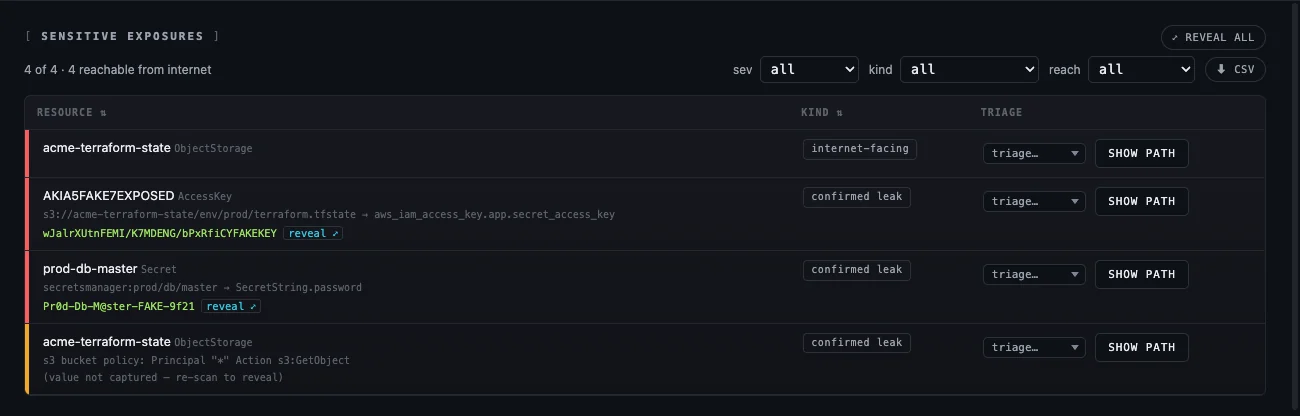
प्रत्येक hop उस permission को साथ लेकर चलता है जो इसे प्रदान करती है, वह evidence जो इसे सिद्ध करता है, और एक सरल-अंग्रेज़ी narrative। Leaked values इसके साथ बाहर आ जाती हैं:
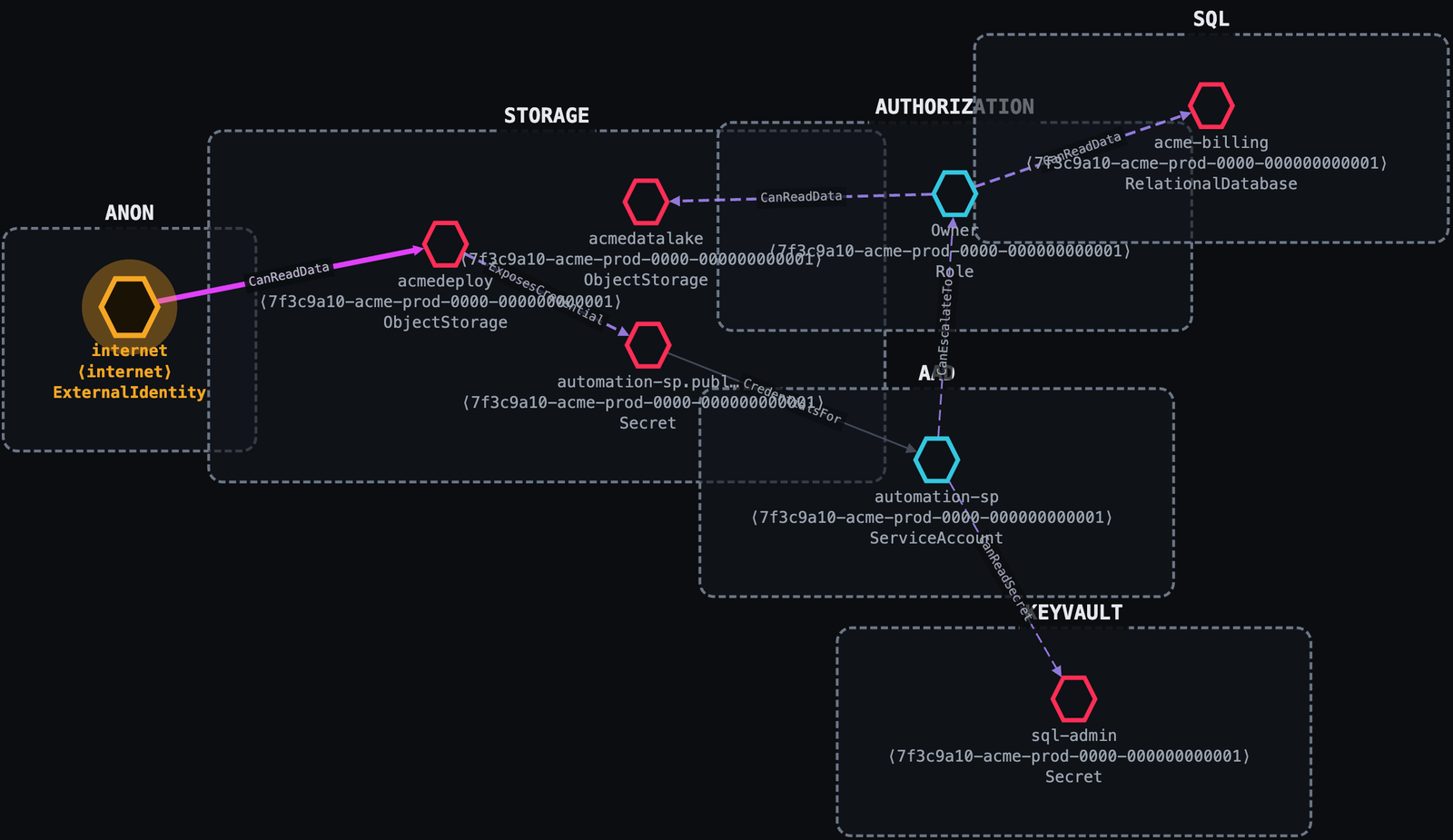
एक publicly readable blob एक service-principal secret leak करता है। एक Contributor एक अतिरिक्त permission के साथ स्वयं को subscription Owner में promote कर लेता है। कोई app exploit नहीं; बस cloud misconfiguration और IAM।
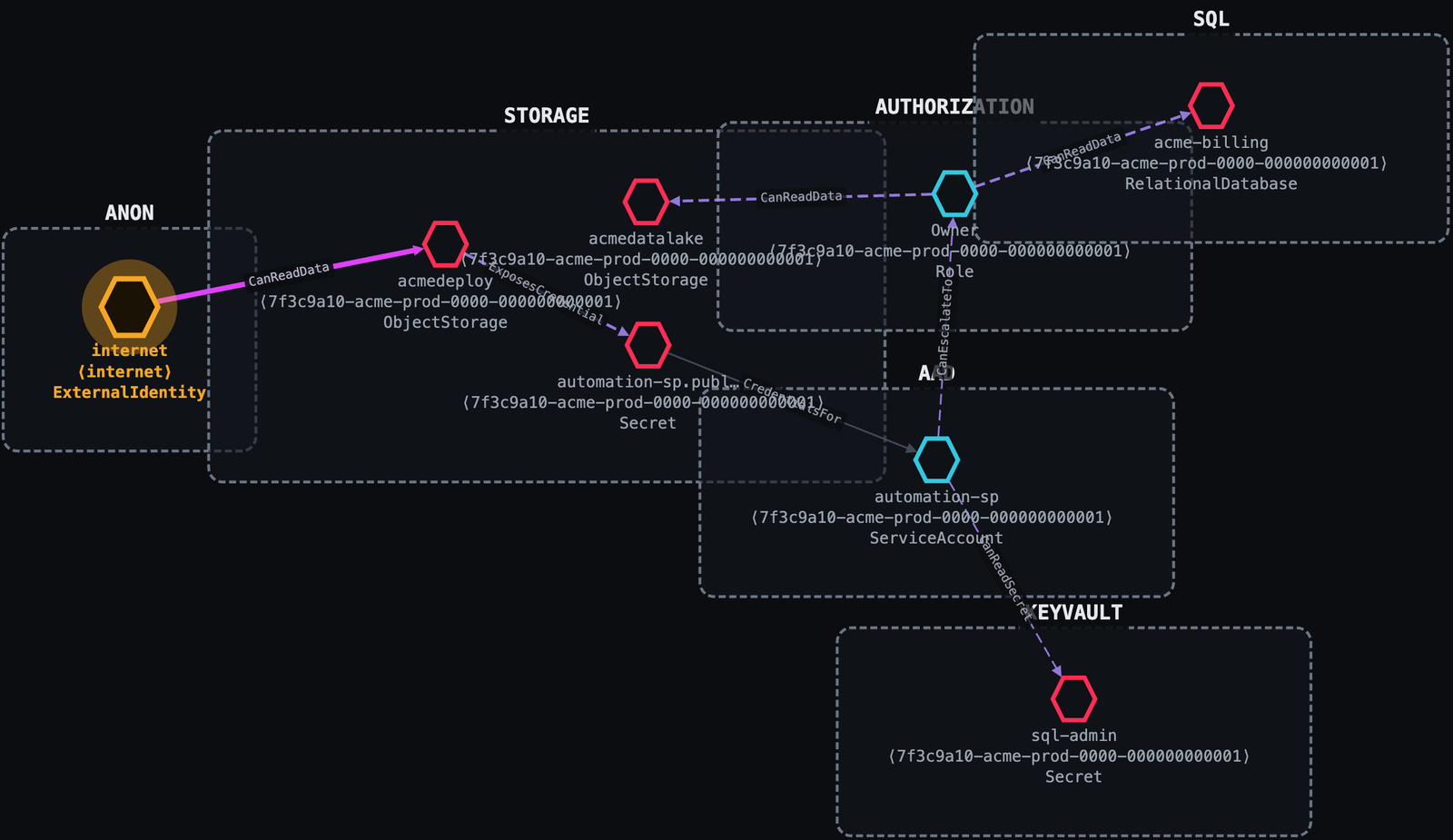
Internet ──anonymous blob read──▶ acmedeploy (public Storage account)
         ──ExposesCredential────▶ automation-sp secret (in a deploy config blob)
         ──CredentialsFor───────▶ automation-sp (Contributor)
         ──CanEscalateTo────────▶ Owner  (Microsoft.Authorization/roleAssignments/write)
         ──CanReadData──────────▶ acmedatalake
Service-account impersonation अधिकांश tooling के लिए अदृश्य है। Thunderstorm iam.serviceAccounts.getAccessToken को उस lateral-movement edge के रूप में मानता है जो यह वास्तव में है।
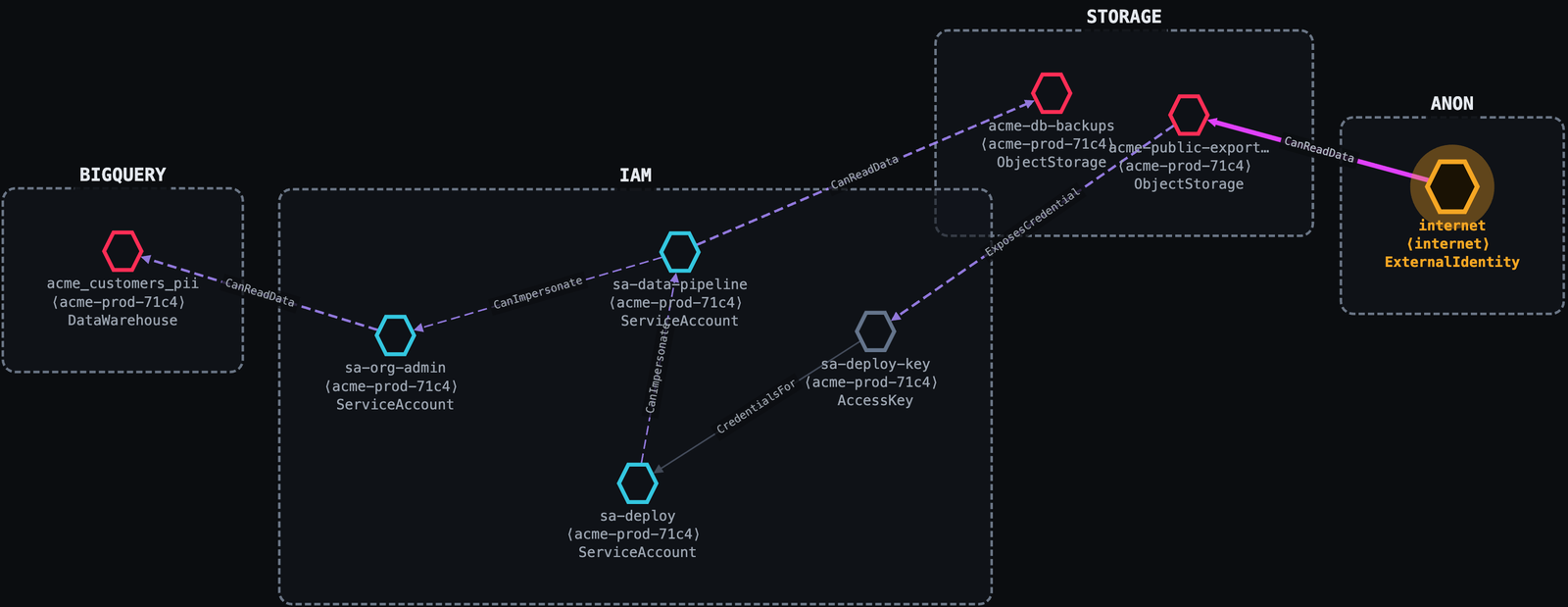
Internet ──public allUsers───▶ acme-public-exports (GCS)
         ──ExposesCredential─▶ sa-deploy-key
         ──CredentialsFor────▶ sa-deploy
         ──CanImpersonate────▶ sa-data-pipeline
         ──CanImpersonate────▶ sa-org-admin
         ──CanReadData───────▶ acme_customers_pii (BigQuery)
view इसे आपके browser में खोलता है; कुछ भी upload नहीं होता।collectors/, engine/)।Thunderstorm अपना कोई taxonomy, mappings, या rules नहीं रखता। यह RAGE standard को end-to-end consume करता है:
| Concern | RAGE में स्थित |
|---|---|
| Node / edge taxonomy, conditions | vocab/{node-types,edge-types,conditions}.json |
| Native→generic mappings + collection recipes | providers/{aws,gcp,azure}.json |
| Derivation rule corpus | rules/ |
| Credential-exposure catalog | exposure-db/{aws,gcp,azure}.json + vocabulary.json |
Version tie: RAGE का spec_version वह एकमात्र संख्या है जो Thunderstorm को एक RAGE release से pin करती है। Collector इसे उस RAGE से live पढ़ता है जिसके विरुद्ध इसे build किया गया था (thunderstorm version RAGE <v> print करता है) और इसे हर उस graph में stamp करता है जो यह emit करता है; Blaze Lite उस stamp को पढ़ता है और चेतावनी देता है जब कोई graph ऐसे version के विरुद्ध build किया गया हो जिसे वह support नहीं करता।
RAGE कैसे resolve होता है (पहला match जीतता है):
$RAGE_ROOT: एक live RAGE checkout, यदि आप इसे set करते हैं (dev override; edits बिना rebuild लागू होते हैं)।collectors/rage/ पर vendored snapshot, जो binary में embedded है।Snapshot को make RAGE_ROOT=/path/to/rage (या collectors/ में go generate ./...) से refresh करें। RAGE github.com/trustedsec/rage पर स्थित है।
Thunderstorm आपके मौजूदा cloud credentials का उपयोग करके read-only scan करता है; यह कभी secrets manage नहीं करता और कभी target पर लिखता नहीं। Provider के सामान्य tooling से log in करें, फिर scan को account / project / subscription पर इंगित करें।