 urbanadventurer/android-pin-bruteforce
एंड्रॉइड फ़ोन (या डिवाइस) को लॉकस्क्रीन PIN को ब्रूटफोर्स करके अनलॉक करें। अपने Kali Nethunter फ़ोन को एंड्रॉइड डिवाइसों के लिए ब्रूटफोर्स PIN क्रैकर में बदलें! (कोई रूट नहीं, कोई adb नहीं)

लॉकस्क्रीन PIN को ब्रूटफ़ोर्स करके एंड्रॉइड फ़ोन (या डिवाइस) को अनलॉक करें।
अपने Kali Nethunter फ़ोन को Android डिवाइसों के लिए ब्रूटफ़ोर्स PIN क्रैकर में बदलें!
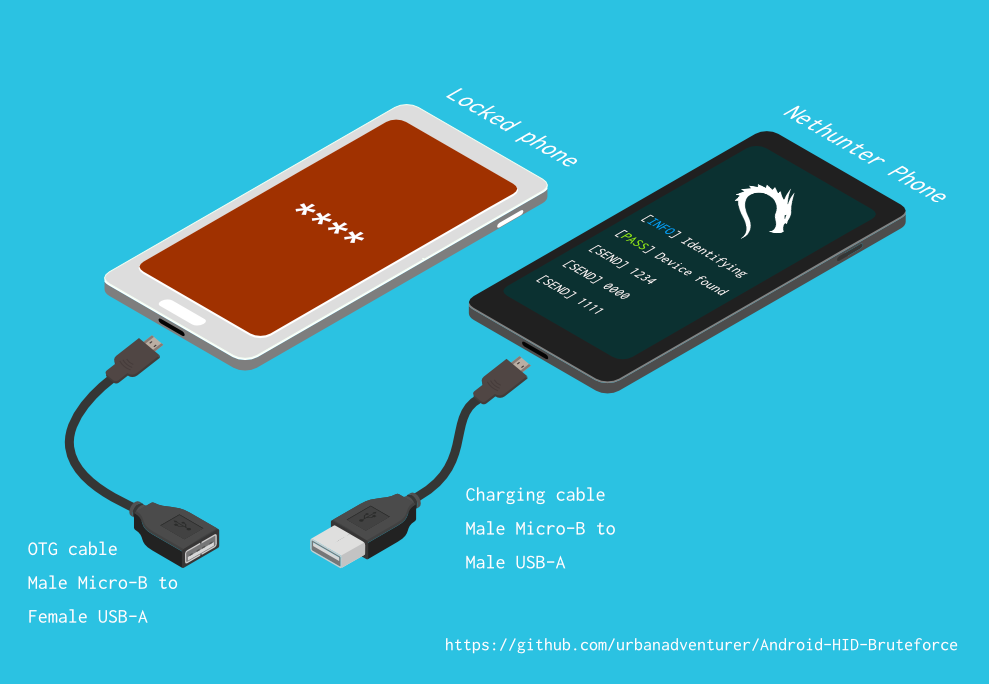
यह लॉक किए गए फ़ोन को Nethunter डिवाइस से जोड़ने के लिए USB OTG केबल का उपयोग करता है। यह कीबोर्ड का अनुकरण करता है, स्वचालित रूप से PIN आज़माता है, और बहुत अधिक गलत अनुमान लगाने के बाद प्रतीक्षा करता है।
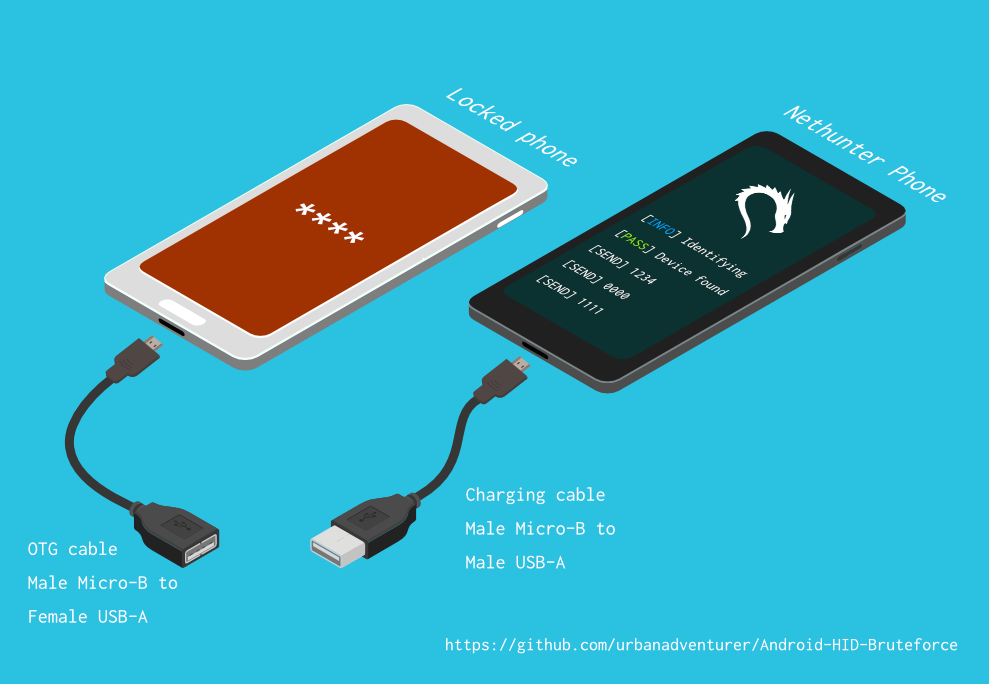
[Nethunter फ़ोन] <--> [USB केबल] <--> [USB OTG एडॉप्टर] <--> [लॉक किया गया Android फ़ोन]
USB HID गैजेट ड्राइवर USB ह्यूमन इंटरफ़ेस डिवाइस (HID) का अनुकरण प्रदान करता है। यह एक Android Nethunter डिवाइस को लॉक किए गए फ़ोन में कीबोर्ड इनपुट का अनुकरण करने में सक्षम बनाता है। यह बिल्कुल लॉक किए गए फ़ोन में कीबोर्ड प्लग करके कुंजियाँ दबाने जैसा है।
⏱ Samsung S5 के साथ सभी संभावित 4 अंकों के PIN आज़माने में सिर्फ 16.6 घंटे से थोड़ा अधिक समय लगता है, लेकिन अनुकूलित PIN सूची के साथ इसमें आपको बहुत कम समय लगना चाहिए।
TBC
यदि आपने स्क्रिप्ट को /sdcard/ में स्थापित किया है, तो आप इसे निम्नलिखित कमांड के साथ निष्पादित कर सकते हैं।bash ./android-pin-bruteforce
Note that Android mounts /sdcard with the noexec flag. You can verify this with mount.
Android-PIN-Bruteforce (0.2) का उपयोग Android फ़ोन (या डिवाइस) को लॉकस्क्रीन PIN को ब्रूटफ़ोर्स करके अनलॉक करने के लिए किया जाता है।
  अधिक जानकारी यहाँ प्राप्त करें: https://github.com/urbanadventurer/Android-PIN-Bruteforce

आदेश:
  crack                PIN क्रैक करना शुरू करें
  resume               चुने गए PIN से फिर से शुरू करें
  rewind               चुने गए PIN से उल्टे क्रम में PIN क्रैक करें
  diag                 डायग्नोस्टिक जानकारी प्रदर्शित करें
  version              संस्करण जानकारी प्रदर्शित करें और बाहर निकलें

विकल्प:
  -f, --from PIN       इस PIN से फिर से शुरू करें
  -a, --attempts       NUM गलत प्रयासों से शुरू करें
  -m, --mask REGEX     PIN में ज्ञात अंकों के लिए मास्क का उपयोग करें
  -t, --type TYPE      PIN या PATTERN क्रैकिंग चुनें
  -l, --length NUM     NUM लंबाई के PIN क्रैक करें
  -c, --config FILE    लोड करने के लिए कॉन्फ़िगरेशन फ़ाइल निर्दिष्ट करें
  -p, --pinlist FILE   एक कस्टम PIN सूची निर्दिष्ट करें
  -d, --dry-run        परीक्षण के लिए ड्राई रन। कोई कुंजी नहीं भेजता।
  -v, --verbose        विस्तृत लॉग आउटपुट करें

उपयोग:
  android-pin-bruteforce <command> [options]```


## Supported Android Phones/Devices

This has been successfully tested with various phones including the Samsung S5, S7, Motorola G4 Plus and G5 Plus.

It can unlock Android versions 6.0.1 through to 10.0. The ability to perform a bruteforce attack doesn't depend on the Android version in use. It depends on how the device vendor developed their own lockscreen.

Check the Phone Database for more details
https://github.com/urbanadventurer/Android-PIN-Bruteforce/wiki/Phone-Database

## 🎳 PIN Lists

Optimised PIN lists are used by default unless the user selects a custom PIN list.

### Cracking PINs of different lengths

Use the `--length` commandline option.

Use this command to crack a 3 digit PIN,
`./android-pin-bruteforce crack --length 3`

Use this command to crack a 6 digit PIN
`./android-pin-bruteforce crack --length 6`

### Where did the optimised PIN lists come from?

The optimised PIN lists were generated by extracting numeric passwords from database leaks then sorting by frequency. All PINs that did not appear in the password leaks were appended to the list.

The optimised PIN lists were generated from *Ga$$Pacc DB Leak* (21GB decompressed, 688M Accounts, 243 Databases, 138920 numeric passwords).

#### The 4 digit PIN list

The reason that the 4 digit PIN list is used from a different source is because it gives better results than the generated list from *Ga$$Pacc DB Leak*.

`optimised-pin-length-4.txt` is an optimised list of all possible 4 digit PINs, sorted by order of likelihood.
It can be found with the filename `pinlist.txt` at https://github.com/mandatoryprogrammer/droidbrute

This list is used with permission from Justin Engler & Paul Vines from Senior Security Engineer, iSEC Partners,
and was used in their Defcon talk, [Electromechanical PIN Cracking with Robotic Reconfigurable Button Basher (and C3BO)](https://www.defcon.org/html/defcon-21/dc-21-speakers.html#Engler)

### Cracking with Masks

Masks use regular expressions with the standard grep extended format.

`./android-pin-bruteforce crack --mask "...[45]" --dry-run`

- To try all years from 1900 to 1999, use a mask of `19..`
- To try PINs that have a 1 in the first digit, and a 1 in the last digit, use a mask of `1..1`
- To try PINs that end in 4 or 5, use `...[45]`

## 📱 Configuration for different phones

Device manufacturers create their own lock screens that are different to the default or stock Android.
To find out what keys your phone needs, plug a keyboard into the phone and try out different combinations.

Load a different configuration file, with the `--config FILE` commandline parameter.

Example:
`./android-pin-bruteforce --config ./config.samsung.s5 crack`

You can also edit the `config` file by customising the timing and keys sent.

The following configuration variables can be used to support a different phone's lockscreen.
DELAY_BETWEEN_KEYS=0.25
PROGRESSIVE_ARRAY_ATTEMPT_COUNT__________=(1 11 41) PROGRESSIVE_ARRAY_ATTEMPTS_UNTIL_COOLDOWN=(5 1 1) PROGRESSIVE_ARRAY_COOLDOWN_IN_SECONDS____=(30 30 60)
SEND_KEYS_DISMISS_POPUPS_N_SECONDS_BEFORE_COOLDOWN_END=5
SEND_KEYS_DISMISS_POPUPS_AT_COOLDOWN_END="enter enter enter"
KEYS_BEFORE_EACH_PIN="escape enter"
