iblessing एक iOS सुरक्षा शोषण टूलकिट है, इसमें मुख्य रूप से एप्लिकेशन जानकारी संग्रह, स्थैतिक विश्लेषण और गतिशील विश्लेषण शामिल है। इसका उपयोग रिवर्स इंजीनियरिंग, बाइनरी विश्लेषण और भेद्यता खनन के लिए किया जा सकता है।
☠️ ██╗██████╗ ██╗ ███████╗███████╗███████╗██╗███╗ ██╗ ██████╗ ██║██╔══██╗██║ ██╔════╝██╔════╝██╔════╝██║████╗ ██║██╔════╝ ██║██████╔╝██║ █████╗ ███████╗███████╗██║██╔██╗ ██║██║ ███╗ ██║██╔══██╗██║ ██╔══╝ ╚════██║╚════██║██║██║╚██╗██║██║ ██║ ██║██████╔╝███████╗███████╗███████║███████║██║██║ ╚████║╚██████╔╝ ╚═╝╚═════╝ ╚══════╝╚══════╝╚══════╝╚══════╝╚═╝╚═╝ ╚═══╝ ╚═════╝
iblessing एक iOS सुरक्षा शोषण टूलकिट है, इसमें मुख्य रूप से एप्लिकेशन जानकारी संग्रह, स्थैतिक विश्लेषण और गतिशील विश्लेषण शामिल है।iblessing unicorn engine, capstone engine और keystone engine पर आधारित है।🔥 क्रॉस-प्लेटफ़ॉर्म: macOS और Ubuntu पर परीक्षण किया गया।
iOS ऐप का स्थैतिक जानकारी निष्कर्षण, जिसमें मेटाडेटा, डीपलिंक्स, URL आदि शामिल हैं।
Mach-O पार्सर और dyld प्रतीक बाइंड सिम्युलेटर
Objective-C क्लास का साकारीकरण और पार्सिंग
स्कैनर जो arm64 असेंबली कोड के लिए गतिशील विश्लेषण करते हैं और महत्वपूर्ण जानकारी या हमले की सतह ढूंढते हैं
स्कैनर जो unicorn का उपयोग करके Mach-O arm64 कोड निष्पादन का आंशिक अनुकरण करते हैं और कुछ विशेषताएं ढूंढते हैं
जनरेटर जो स्कैनर की रिपोर्ट पर द्वितीयक प्रसंस्करण प्रदान कर सकते हैं, एक क्वेरी सर्वर शुरू करने के लिए, या IDA के लिए स्क्रिप्ट उत्पन्न कर सकते हैं
सुपर objc_msgSend xrefs स्कैनर 😄
परीक्षण
Android स्कैनर समर्थन
डायग्नोस्टिक लॉग
नए स्कैनर प्लगइन्स के लिए अधिक लचीला स्कैनर बुनियादी ढांचा
यदि आपको iblessing या इससे संबंधित किसी चीज़ के संबंध में समर्थन की आवश्यकता है, तो आप यह कर सकते हैं:
⚠️⚠️⚠️ बाइनरी स्कैनर्स को mach-o फ़ाइल लोड करने के लिए 12GB वर्चुअल मेमोरी स्पेस की आवश्यकता होती है, लेकिन वे इतना उपभोग नहीं करेंगे। इसलिए आपको यह सुनिश्चित करना होगा कि आपकी कार्य मशीन की भौतिक मेमोरी 12GB से अधिक है, या स्वैप फ़ाइल तंत्र के माध्यम से आवंटित करने योग्य वर्चुअल मेमोरी 12GB से अधिक है।
iblessing को संकलित करना शुरू करने के लिए, कृपया नीचे दिए गए चरणों का पालन करें:``` git clone --recursive -j4 https://github.com/Soulghost/iblessing cd iblessing ./compile-cmake.sh
## शॉर्टकट
- [मूल अवधारणाएँ](https://github.com/Soulghost/iblessing#basic-concepts)
- स्कैनर
- [AppInfos के लिए स्कैन करें](https://github.com/Soulghost/iblessing#scan-for-appinfos) ⚠️ वर्तमान में Linux पर उपलब्ध नहीं है
- [क्लास XREFs के लिए स्कैन करें](https://github.com/Soulghost/iblessing#scan-for-class-xrefs)
- [सभी objc_msgSend XREFs के लिए स्कैन करें](https://github.com/Soulghost/iblessing#scan-for-all-objc_msgsend-xrefs)
- [सरल सिंबल रैपर्स के लिए स्कैन करें](https://github.com/Soulghost/iblessing/blob/features/anti_wrapper/README.md#scan-for-symbol-wrappers)
- जनरेटर
- [objc_msgSend Xrefs क्वेरी सर्वर जनरेट करें](https://github.com/Soulghost/iblessing#generate-objc_msgsend-xrefs-query-server)
- [objc_msgSend xrefs के लिए IDA स्क्रिप्ट जनरेट करें](https://github.com/Soulghost/iblessing#generate-ida-scripts-for-objc_msgsend-xrefs)
- [objc फंक्शन रैपर रीनाम और प्रोटोटाइप संशोधन के लिए IDA स्क्रिप्ट जनरेट करें](https://github.com/Soulghost/iblessing/blob/features/anti_wrapper/README.md#genereate-ida-script-for-objc-runtime-function-rename-and-prototype-modification)
***यदि कोई त्रुटि होती है, तो आप मैन्युअल रूप से capstone और unicorn को कंपाइल कर सकते हैं, फिर libcapstone.a और libunicorn.a को Xcode प्रोजेक्ट के vendor/libs फ़ोल्डर में खींचें।***
यदि यह सब सफलतापूर्वक चलता है, तो आप build डायरेक्टरी में बाइनरी पा सकते हैं:```
> ls ./build
iblessing
> file ./build/iblessing
./build/iblessing: Mach-O 64-bit executable x86_64
$ iblessing -h
☠️
██╗██████╗ ██╗ ███████╗███████╗███████╗██╗███╗ ██╗ ██████╗
██║██╔══██╗██║ ██╔════╝██╔════╝██╔════╝██║████╗ ██║██╔════╝
██║██████╔╝██║ █████╗ ███████╗███████╗██║██╔██╗ ██║██║ ███╗
██║██╔══██╗██║ ██╔══╝ ╚════██║╚════██║██║██║╚██╗██║██║ ██║
██║██████╔╝███████╗███████╗███████║███████║██║██║ ╚████║╚██████╔╝
╚═╝╚═════╝ ╚══════╝╚══════╝╚══════╝╚══════╝╚═╝╚═╝ ╚═══╝ ╚═════╝
[] iblessing iOS Security Exploiting Toolkit Beta 0.1.1 (http://blog.asm.im) [] Author: Soulghost (高级页面仔) @ (https://github.com/Soulghost)
Usage: iblessing [options...] Options: -m, --mode mode selection: * scan: use scanner * generator: use generator -i, --identifier choose module by identifier: * : use specific scanner * : use specific generator -f, --file input file path -o, --output output file path -l, --list list available scanners -d, --data extra data -h, --help Shows this page
## मूल अवधारणाएँ
### स्कैनर
स्कैनर एक घटक है जो बाइनरी फ़ाइलों के स्थैतिक और गतिशील विश्लेषण के माध्यम से विश्लेषण रिपोर्ट आउटपुट करने के लिए उपयोग किया जाता है, उदाहरण के लिए, objc-msg-xref स्कैनर अधिकांश objc_msgSend क्रॉस संदर्भों का गतिशील रूप से विश्लेषण कर सकता है।```
[*] Scanner List:
- app-info: extract app infos
- objc-class-xref: scan for class xrefs
- objc-msg-xref: generate objc_msgSend xrefs record
- predicate: scan for NSPredicate xrefs and sql injection surfaces
- symbol-wrapper: detect symbol wrappers
जनरेटर एक घटक है जो स्कैनर द्वारा उत्पन्न रिपोर्ट पर द्वितीयक प्रसंस्करण करता है, उदाहरण के लिए, यह objc-msg-xref स्कैनर के cross references रिपोर्ट के आधार पर IDA स्क्रिप्ट उत्पन्न कर सकता है।``` [*] Generator List: - ida-objc-msg-xref: generator ida scripts to add objc_msgSend xrefs from objc-msg-xref scanner's report - objc-msg-xref-server: server to query objc-msg xrefs - objc-msg-xref-statistic: statistics among objc-msg-send reports
## मूल उपयोग
### AppInfos के लिए स्कैन करें
⚠️ **क्योंकि Cocoa पर कुछ निर्भरता अभी तक हटाई नहीं गई है (जैसे bplist parser), यह वर्तमान में Linux पर उपलब्ध नहीं है।**```
> iblessing -m scan -i app-info -f <path-to-app-bundle>
आइए WeChat को एक उदाहरण के रूप में लें:```
iblessing -m scan -i app-info -f WeChat.app [] set output path to /opt/one-btn/tmp/apps/WeChat/Payload [] input file is WeChat.app [] start App Info Scanner [+] find default plist file Info.plist! [] find version info: Name: 微信(WeChat) Version: 7.0.14(18E226) ExecutableName: WeChat [] Bundle Identifier: com.tencent.xin [] the app allows HTTP requests without exception domains! [+] find app deeplinks |-- wechat:// |-- weixin:// |-- fb290293790992170:// |-- weixinapp:// |-- prefs:// |-- wexinVideoAPI:// |-- QQ41C152CF:// |-- wx703:// |-- weixinULAPI:// [] find app callout whitelist |-- qqnews:// |-- weixinbeta:// |-- qqnewshd:// |-- qqmail:// |-- whatsapp:// |-- wxwork:// |-- wxworklocal:// |-- wxcphonebook:// |-- mttbrowser:// |-- mqqapi:// |-- mqzonev2:// |-- qqmusic:// |-- tenvideo2:// ... [+] find 507403 string literals in binary [] process with string literals, this maybe take some time [+] find self deeplinks URLs: |-- weixin://opennativeurl/devicerankview |-- weixin://dl/offlinepay/?appid=%@ |-- weixin://opennativeurl/rankmyhomepage ... [+] find other deeplinks URLs: |-- wxpay://f2f/f2fdetail |-- file://%@?lang=%@&fontRatio=%.2f&scene=%u&version=%u&type=%llu&%@=%d&qqFaceFolderPath=%@&platform=iOS&netType=%@&query=%@&searchId=%@&isHomePage=%d&isWeAppMore=%d&subType=%u&extParams=%@&%@=%@&%@=%@ ... [*] write report to path /opt/one-btn/tmp/apps/WeChat/Payload/WeChat.app_info.iblessing.txt
ls -alh -rw-r--r--@ 1 soulghost wheel 29K Jul 23 14:01 WeChat.app_info.iblessing.txt
### क्लास XREFs के लिए स्कैन करें
***सूचना: केवल ARM64 बाइनरी***```
iblessing -m scan -i objc-class-xref -f <path-to-binary> -d 'classes=<classname_to_scan>,<classname_to_scan>,...'
(no content provided)```
restore-symbol WeChat -o WeChat.restored iblessing -m scan -i objc-class-xref -f WeChat.restored -d 'classes=NSPredicate' [] set output path to /opt/one-btn/tmp/apps/WeChat/Payload [] input file is WeChat [+] detect mach-o header 64 [+] detect litten-endian [] start Objc Class Xref Scanner [] try to find OBJC_CLASS$_NSPredicate [] Step 1. locate class refs [+] find OBJC_CLASS$_NSPredicate at 0x108eb81d8 [] Step 2. find __TEXT,__text [+] find __TEXT,__text at 0x4000 [] Step 3. scan in __text [] start disassembler at 0x100004000 [] \ 0x1002e1a50/0x1069d9874 (2.71%) [+] find OBJC_CLASS$_NSPredicate ref at 0x1002e1a54 ... [] Step 4. symbolicate ref addresses [+] OBJC_CLASS$_NSPredicate -| [+] find OBJC_CLASS$_NSPredicate ref -[WCWatchNotificationMgr addYoCount:contact:type:] at 0x1002e1a54 [+] find OBJC_CLASS$_NSPredicate ref -[NotificationActionsMgr handleSendMsgResp:] at 0x1003e0e28 [+] find OBJC_CLASS$_NSPredicate ref -[FLEXClassesTableViewController searchBar:textDidChange:] at 0x1004a090c [+] find OBJC_CLASS$_NSPredicate ref +[GameCenterUtil parameterValueForKey:fromQueryItems:] at 0x1005a823c [+] find OBJC_CLASS$_NSPredicate ref +[GameCenterUtil getNavigationBarColorForUrl:defaultColor:] at 0x1005a8cd8 ...
### सभी objc_msgSend XREFs के लिए स्कैन करें
***सूचना: केवल ARM64 बाइनरी***
#### सरल मोड```
iblessing -m scan -i objc-msg-xref -f <path-to-binary>
iblessing -m scan -i objc-msg-xref -f WeChat -d 'antiWrapper=1'
एंटी-रैपर मोड `objc_msgSend` रैपर्स को पहचानेगा और रूपांतरण करेगा, जैसे:```arm
; __int64 __usercall objc_msgSend_X0_X22_X20@<X0>(void *obj@<X0>, const char *sel@<X22>, id anyObj@<X20>, ...)
objc_msgSend_X0_X22_X20:
MOV X1, X22
MOV X2, X20
B objc_msgSend
iblessing -m scan -i objc-msg-xref -f WeChat -d 'antiWrapper=1' [] set output path to /opt/one-btn/tmp/apps/WeChat/Payload [] input file is WeChat [+] detect mach-o header 64 [+] detect litten-endian
[] !!! Notice: enter anti-wrapper mode, start anti-wrapper scanner [] start Symbol Wrapper Scanner [] try to find wrappers for_objc_msgSend [] Step1. find __TEXT,__text [+] find __TEXT,__text at 0x100004000 [+] mapping text segment 0x100000000 ~ 0x107cb0000 to unicorn engine [] Step 2. scan in __text [] start disassembler at 0x100004000 [] / 0x1069d986c/0x1069d9874 (100.00%) [] reach to end of __text, stop [+] anti-wrapper finished
[] start ObjcMethodXrefScanner Exploit Scanner [] Step 1. realize all app classes [] realize classes 14631/14631 (100.00%) [+] get 667318 methods to analyze [] Step 2. dyld load non-lazy symbols [] Step 3. track all calls [] progress: 667318 / 667318 (100.00%) [] Step 4. serialize call chains to file [] saved to /opt/one-btn/tmp/apps/WeChat/Payload/WeChat_method-xrefs.iblessing.txt
ls -alh WeChat_method-xrefs.iblessing.txt -rw-r--r-- 1 soulghost wheel 63M Jul 23 14:46 WeChat_method-xrefs.iblessing.txt
head WeChat_method-xrefs.iblessing.txt iblessing methodchains,ver:0.2; chainId,sel,prefix,className,methodName,prevMethods,nextMethods 182360,0x1008a0ab8,+[A8KeyControl initialize],+,A8KeyControl,initialize,[],[4429#0x1008a1064@4376#0x1008a1050@13769#0x1008a10d0] 182343,0x1008a0ad0,+[A8KeyControl_QueryStringTransferCookie initialize],+,A8KeyControl_QueryStringTransferCookie,initialize,[],[4429#0x1008a1064@4376#0x1008a1050@13769#0x1008a10d0] 145393,0x1008c2220,+[A8KeyResultCookieWriter initWithDomain:weakWebView:andCompleteBlock:],+,A8KeyResultCookieWriter,initWithDomain:weakWebView:andCompleteBlock:,[145386#0x10036367c],[] 145396,0x1008c3df8,+[A8KeyResultCookieWriter setA8KeyCookieExpireTime:],+,A8KeyResultCookieWriter,setA8KeyCookieExpireTime:,[145386#0x1003636e8],[] 145397,0x1008c27e8,+[A8KeyResultCookieWriter writeCompleteMarkerCookieValue:forKey:],+,A8KeyResultCookieWriter,writeCompleteMarkerCookieValue:forKey:,[145386#0x10036380c],[] 253456,0x0,+[AAOperationReq init],+,AAOperationReq,init,[253455#0x1039a9d30],[] 253457,0x0,+[AAOperationReq setBaseRequest:],+,AAOperationReq,setBaseRequest:,[253455#0x1039a9d8c],[] 186847,0x0,+[AAOperationRes length],+,AAOperationRes,length,[186845#0x10342aa54],[]
रिपोर्ट का उपयोग जनरेटर द्वारा किया जा सकता है, अब चलते हैं।
### objc_msgSend Xrefs क्वेरी सर्वर जनरेट करें
आप सभी objc_msgSend xrefs को क्वेरी करने के लिए iblessing के objc-msg-xref-server जनरेटर के माध्यम से एक सर्वर शुरू कर सकते हैं।```
iblessing -m generator -i objc-msg-xref-server -f <path-to-report-generated-by-objc-msg-xref-scanner>
डिफ़ॉल्ट सुनने का पता 127.0.0.1:2345 है, आप इसे -d विकल्प द्वारा निर्दिष्ट कर सकते हैं।``` iblessing -m generator -i objc-msg-xref-server -f WeChat_method-xrefs.iblessing.txt -d 'host=0.0.0.0;port=12345'
#### उपयोग उदाहरण
***नोट: objc-msg-xref unicorn पर आधारित है, विश्लेषण को गति देने के लिए, हम किसी भी कॉल का अनुसरण नहीं करते हैं, इसलिए परिणाम आंशिक रूप से गायब है।***```
> iblessing -m generator -i objc-msg-xref-server -f WeChat_method-xrefs.iblessing.txt
[*] set output path to /opt/one-btn/tmp/apps/WeChat/Payload
[*] input file is WeChat_method-xrefs.iblessing.txt
[*] start ObjcMsgXREFServerGenerator
[*] load method-chain db for version iblessing methodchains,ver:0.2;
[*] table keys chainId,sel,prefix,className,methodName,prevMethods,nextMethods
[-] bad line 104467,0x0,+[TPLock P, ],+,TPLock,P, ,[104426#0x1043b9904],[]
[-] bad line 114905,0x0,?[0x108ce1578 (,],?,0x108ce1578,(,,[114900#0x1011e8c68],[]
[-] bad line 104464,0x0,?[? P, ],?,?,P, ,[104426#0x1043b98a8],[]
[-] bad line 139234,0x0,?[? X
[-] bad line ],?,?,X
[-] bad line ,[139205#0x1013c222c],[]
[+] load storage from disk succeeded!
[*] listening on http://127.0.0.1:2345
इसके बाद आप किसी भी objc_msgSend xref को क्वेरी करने के लिए ब्राउज़र में http://127.0.0.1:2345 खोल सकते हैं:

आप अपने रिवर्स इंजीनियरिंग अनुभव को तेज़ और आरामदायक बनाने के लिए objc-msg-xref स्कैनर से उत्पन्न objc_msgSend xrefs जोड़ सकते हैं।``` iblessing -m generator -i ida-objc-msg-xref -f
#### उपयोग उदाहरण
***नोट: objc-msg-xref unicorn पर आधारित है, विश्लेषण को गति देने के लिए, हम किसी भी कॉल का अनुसरण नहीं करते, इसलिए परिणाम आंशिक रूप से गायब है।***```
> iblessing -m generator -i ida-objc-msg-xref -f WeChat_method-xrefs.iblessing.txt
[*] set output path to /opt/one-btn/tmp/apps/WeChat/Payload
[*] input file is WeChat_method-xrefs.iblessing.txt
[*] start IDAObjMsgXREFGenerator
[*] load method-chain db for version iblessing methodchains,ver:0.2;
[*] table keys chainId,sel,prefix,className,methodName,prevMethods,nextMethods
[-] bad line 104467,0x0,+[TPLock P, ],+,TPLock,P, ,[104426#0x1043b9904],[]
[-] bad line 114905,0x0,?[0x108ce1578 (,],?,0x108ce1578,(,,[114900#0x1011e8c68],[]
[-] bad line 104464,0x0,?[? P, ],?,?,P, ,[104426#0x1043b98a8],[]
[-] bad line 139234,0x0,?[? X
[-] bad line ],?,?,X
[-] bad line ,[139205#0x1013c222c],[]
[+] load storage from disk succeeded!
[*] Generating XREF Scripts ...
[*] saved to /opt/one-btn/tmp/apps/WeChat/Payload/WeChat_method-xrefs.iblessing.txt_ida_objc_msg_xrefs.iblessing.py
> ls -alh WeChat_method-xrefs.iblessing.txt_ida_objc_msg_xrefs.iblessing.py
-rw-r--r-- 1 soulghost wheel 23M Jul 23 16:16 WeChat_method-xrefs.iblessing.txt_ida_objc_msg_xrefs.iblessing.py
> head WeChat_method-xrefs.iblessing.txt_ida_objc_msg_xrefs.iblessing.py
def add_objc_xrefs():
ida_xref.add_cref(0x10036367c, 0x1008c2220, XREF_USER)
ida_xref.add_cref(0x1003636e8, 0x1008c3df8, XREF_USER)
ida_xref.add_cref(0x10036380c, 0x1008c27e8, XREF_USER)
ida_xref.add_cref(0x103add16c, 0x700006e187a8, XREF_USER)
ida_xref.add_cref(0x102cbee0c, 0x101143ee8, XREF_USER)
ida_xref.add_cref(0x10085c92c, 0x1005e9360, XREF_USER)
ida_xref.add_cref(0x10085c8bc, 0x1005e9274, XREF_USER)
ida_xref.add_cref(0x10085c8dc, 0x1005e92bc, XREF_USER)
ida_xref.add_cref(0x10085c8cc, 0x1005e9298, XREF_USER)
अपना IDA खोलें -> File -> Script File और स्क्रिप्ट लोड करें, इस चरण में काफी समय लग सकता है। जब यह समाप्त हो जाए, तो आप objc विधि के लिए कई xrefs पा सकते हैं:

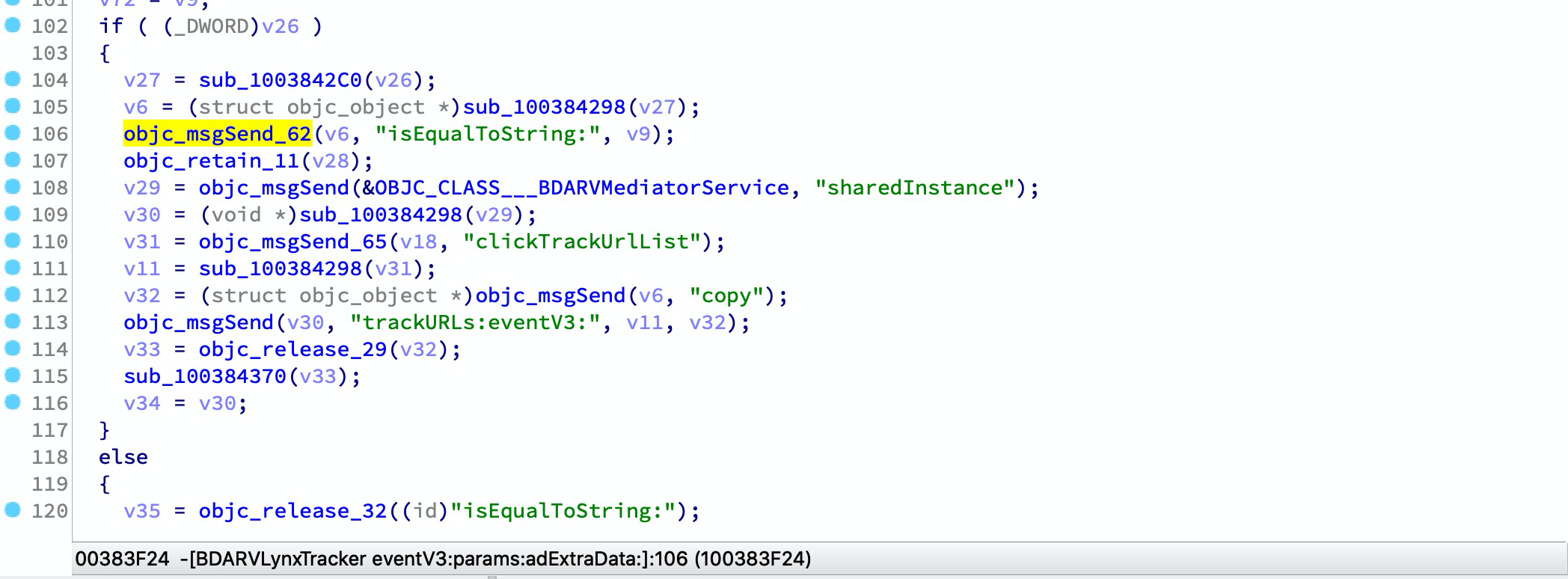
एक Mach-O फ़ाइल में सामान्यतः उपयोग की जाने वाली डायनामिक लाइब्रेरी आयातित प्रतीकों के कई रैपर हो सकते हैं, जैसे:```arm __text:00000001003842D8 sub_1003842CC ; CODE XREF: -[BDARVLynxTracker eventV3:params:adExtraData:]+168↑p __text:00000001003842D8 ; -[BDARVLynxTracker eventV3:params:adExtraData:]+214↑p ... __text:00000001003842D8 MOV X1, X27 __text:00000001003842DC MOV X2, X19 __text:00000001003842E0 B objc_msgSend
हम usercall द्वारा रैपर को परिवर्तित कर सकते हैं:```arm
__text:00000001003842CC ; id __usercall objc_msgSend_61@<X0>(id@<X23>, const char *@<X28>, ...)
__text:00000001003842CC _objc_msgSend_61 ; CODE XREF: -[BDARVLynxTracker eventV3:params:adExtraData:]+2CC↑p
__text:00000001003842CC ; -[BDARVLynxTracker eventV3:params:adExtraData:]+320↑p ...
__text:00000001003842CC MOV X0, X23
__text:00000001003842D0 MOV X1, X28
__text:00000001003842D4 B objc_msgSend
स्कैनर सभी रैपर्स को रिकॉर्ड करने के लिए एक रिपोर्ट तैयार कर सकता है, फिर आप ida-symbol-wrapper-naming जनरेटर का उपयोग करके आईडीए स्क्रिप्ट तैयार कर सकते हैं और इस रैपर का नाम बदलने और प्रोटोटाइप बदलने को लागू कर सकते हैं।
iblessing -m scan -i symbol-wrapper -f -d 'symbols=_objc_msgSend,_objc_retain,_objc_release' iblessing -m scan -i symbol-wrapper -f -d 'symbols=*'
#### उपयोग उदाहरण
हम TikTok China को एक उदाहरण के रूप में लेंगे:```
> iblessing -m scan -i symbol-wrapper -f /opt/one-btn/tmp/apps/抖音短视频/Payload/Aweme -d 'symbols=*'
[*] set output path to /Users/soulghost/Desktop/git/iblessing-public/iblessing/build/Debug
[*] input file is /opt/one-btn/tmp/apps/抖音短视频/Payload/Aweme
[+] detect mach-o header 64
[+] detect litten-endian
[*] start Symbol Wrapper Scanner
[*] try to find wrappers for_objc_autoreleaseReturnValue, _objc_msgSend, _objc_release, _objc_releaseAndReturn, _objc_retain, _objc_retainAutorelease, _objc_retainAutoreleaseAndReturn, _objc_retainAutoreleaseReturnValue, _objc_retainAutoreleasedReturnValue
[*] Step1. find __TEXT,__text
[+] find __TEXT,__text at 0x100004000
[+] mapping text segment 0x100000000 ~ 0x106da0000 to unicorn engine
[*] Step 2. scan in __text
[*] start disassembler at 0x100004000
[*] / 0x106b68a54/0x106b68a58 (100.00%)
[*] reach to end of __text, stop
[*] Step 3. serialize wrapper graph to file
[*] saved to /Users/soulghost/Desktop/git/iblessing-public/iblessing/build/Debug/Aweme_wrapper-graph.iblessing.txt
> head Aweme_wrapper-graph.iblessing.txt
iblessing symbol-wrappers,ver:0.1;
wrapperId;address;name;prototype
0;0x100022190;_objc_retainAutoreleasedReturnValue;id __usercall f@<x0>(id@<x0>)
1;0x100022198;_objc_retainAutoreleasedReturnValue;id __usercall f@<x0>(id@<x0>)
2;0x1000221a0;_objc_release;id __usercall f@<x0>(id@<x22>)
3;0x1000221a8;_objc_msgSend;id __usercall f@<x0>(id@<x0>, const char*@<x20>, ...)
4;0x100022448;_objc_release;id __usercall f@<x0>(id@<x21>)
5;0x10009c19c;_objc_autoreleaseReturnValue;id __usercall f@<x0>(id@<x0>)
6;0x1000b6f94;_objc_msgSend;id __usercall f@<x0>(id@<x0>, const char*@<x1>, ...)
7;0x100100248;_objc_autoreleaseReturnValue;id __usercall f@<x0>(id@<x0>)
अब, हम इस रिपोर्ट से ida स्क्रिप्ट उत्पन्न कर सकते हैं।
iblessing -m generator -i ida-symbol-wrapper-naming -f
#### उपयोग उदाहरण```
> iblessing -m generator -i ida-symbol-wrapper-naming -f Aweme_wrapper-graph.iblessing.txt
[*] set output path to /Users/soulghost/Desktop/git/iblessing-public/iblessing/build/Debug
[*] input file is Aweme_wrapper-graph.iblessing.txt
[*] start IDAObjMsgXREFGenerator
[*] load symbol-wrappers db for version iblessing symbol-wrappers,ver:0.1;
[*] table keys wrapperId;address;name;prototype
[*] Generating Naming Scripts ...
[*] saved to /Users/soulghost/Desktop/git/iblessing-public/iblessing/build/Debug/Aweme_wrapper-graph.iblessing.txt_ida_symbol_wrapper_naming.iblessing.py
> head Aweme_wrapper-graph.iblessing.txt_ida_symbol_wrapper_naming.iblessing.py
def namingWrappers():
idc.set_name(0x100022190, '_objc_retainAutoreleasedReturnValue', ida_name.SN_FORCE)
idc.apply_type(0x100022190, idc.parse_decl('id __usercall f@<x0>(id@<x0>)', idc.PT_SILENT))
idc.set_name(0x100022198, '_objc_retainAutoreleasedReturnValue', ida_name.SN_FORCE)
idc.apply_type(0x100022198, idc.parse_decl('id __usercall f@<x0>(id@<x0>)', idc.PT_SILENT))
idc.set_name(0x1000221a0, '_objc_release', ida_name.SN_FORCE)
idc.apply_type(0x1000221a0, idc.parse_decl('id __usercall f@<x0>(id@<x22>)', idc.PT_SILENT))
idc.set_name(0x1000221a8, '_objc_msgSend', ida_name.SN_FORCE)
idc.apply_type(0x1000221a8, idc.parse_decl('id __usercall f@<x0>(id@<x0>, const char*@<x20>, ...)', idc.PT_SILENT))
idc.set_name(0x100022448, '_objc_release', ida_name.SN_FORCE)
अब अपना IDA खोलें -> File -> Script File और स्क्रिप्ट लोड करें, इस चरण में काफी समय लग सकता है। और जब यह हो जाए, तो आप कुछ डीकंपाइल किए गए कोड में बदलाव देख सकते हैं:

⬇️ ⬇️ ⬇️