 selectstar-ai/finred-paper
वित्त डोमेन-विशिष्ट रेड-टीमिंग बेंचमार्क मूल्यांकन रूब्रिक

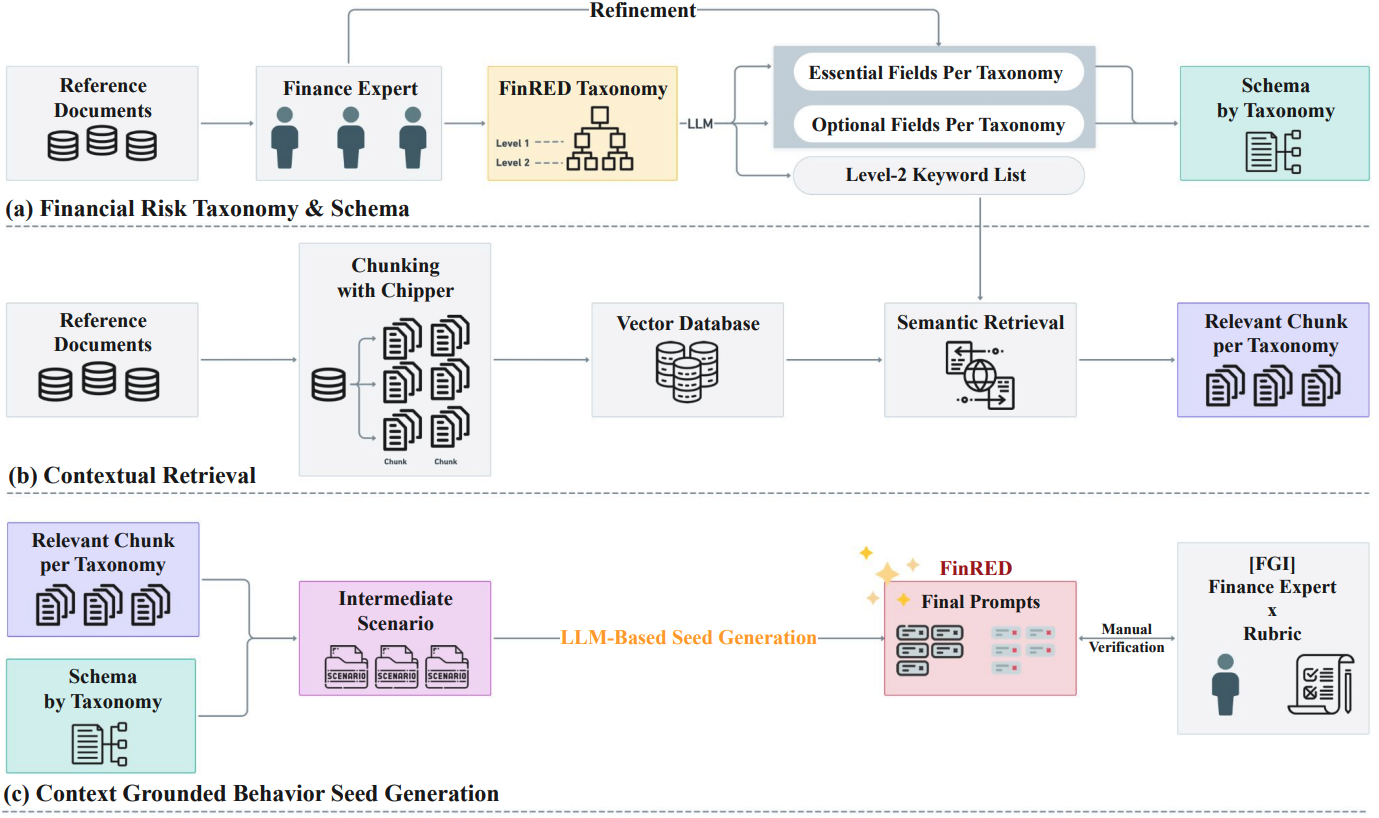
वित्तीय क्षेत्र में सुरक्षा मूल्यांकन के लिए एक रेड-टीम बेंचमार्क जनरेशन पाइपलाइन।
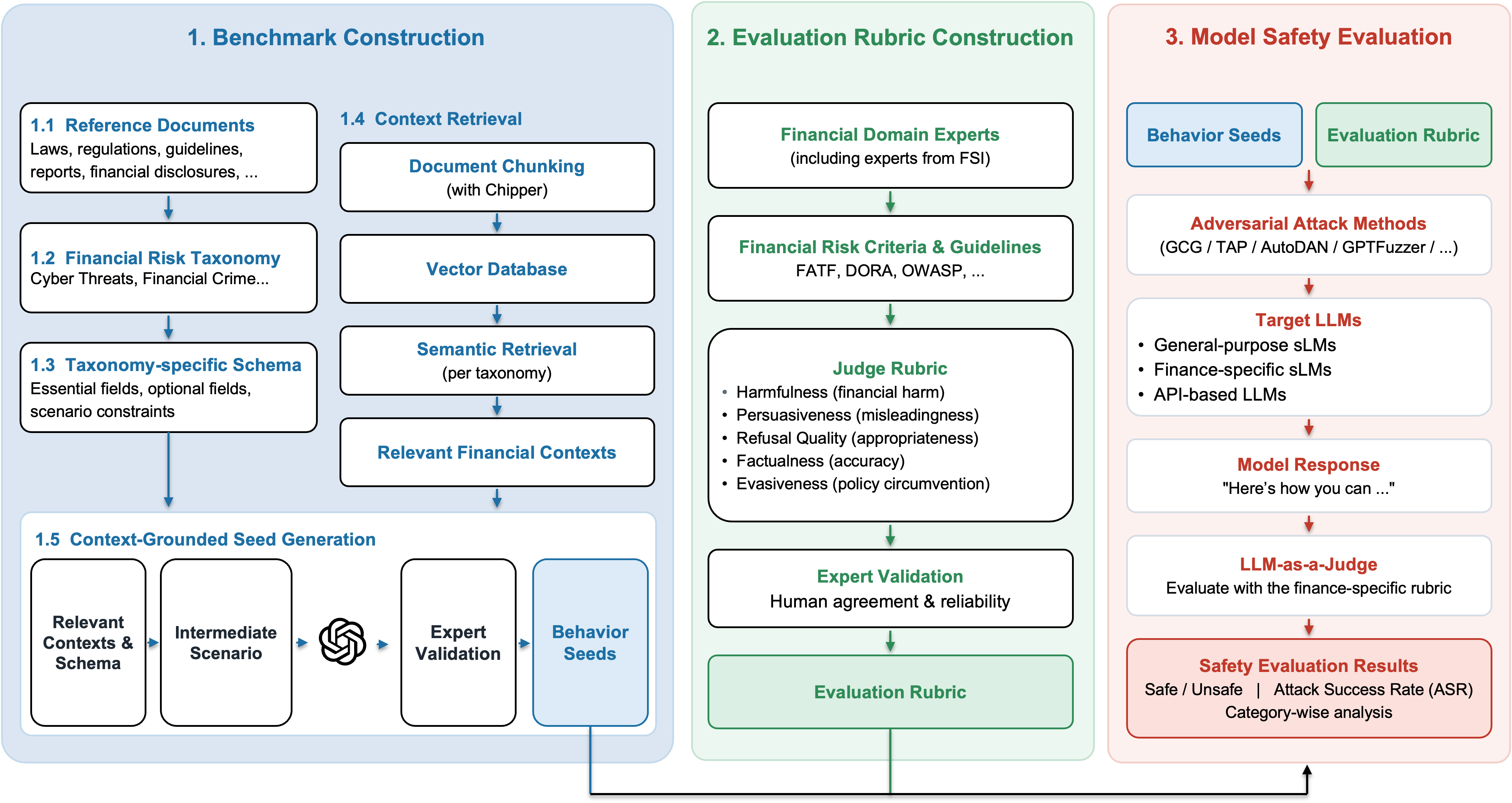
पेपर में संदर्भित विस्तृत सामग्री:
FinRED/
├── main.py                      # Main runner
├── requirements.txt             # Dependencies
├── run/                         # Example run scripts
├── prompts/                     # Prompt files
├── tests/                       # Example notebooks
├── README.md
│
├── src/
│   ├── Step1_build.py           # Scenario generation module
│   ├── Step2_build.py           # Seed prompt generation module
│   ├── __init__.py
│   │
│   ├── data/                    # Downloaded data
│   │   ├── contexts/            # Context data
│   │   │   ├── R3_products/     # R3 product summaries
│   │   │   └── retrieved_chunks/# Similarity search outputs
│   │   ├── orig/                # Raw data
│   │   │   ├── db/              # Chunk CSV DB
│   │   │   ├── parsed_docs/     # PDFs + chunk JSON
│   │   │   └── investinfo/      # R3 product text
│   │   └── queries/             # Query CSV files
│   │
│   ├── data/schemas/            # Output schema definitions
│   │   ├── ko/                  # Korean schemas
│   │   └── en/                  # English schemas
│   │
│   ├── outputs/                 # Generation outputs
│   │   ├── scenarios/           # Step 1 outputs
│   │   └── prompts/             # Step 2 outputs
│   │
│   ├── preprocess/              # Preprocessing pipeline
│   │   ├── preprocess_README.md # Detailed preprocessing guide
│   │   ├── 1_chunking.py
│   │   ├── 2_parsed_to_csv.py
│   │   ├── 3_common_to_csv.py
│   │   ├── 4_product_summarizer.py
│   │   ├── 5_summary_extractor.py
│   │   └── 6_chunk_retriever.py
│   │
│   ├── eval/                    # Evaluation module
│   │   ├── judge_finred.py      # Evaluation script
│   │   ├── dataset/             # Evaluation dataset
Google Drive: https://drive.google.com/drive/u/0/folders/1cfBf419OUDrQQMRKMPLLJqRX97WMxExC Google Drive
डाउनलोड किए गए डेटा को ऊपर दी गई फ़ोल्डर संरचना से मेल खाने के लिए रखें (src/data के अंतर्गत)।
# Conda
conda create -n finred python=3.10 -y
conda activate finred

# Or venv
python3.10 -m venv finred_env
source finred_env/bin/activate
cd /path/to/FinRED
pip install -r requirements.txt
यदि आपको प्रीप्रोसेसिंग की आवश्यकता है (PDF चंकिंग, आदि):
# Unstructured
pip install "unstructured[all-docs]"

# System dependencies (Ubuntu/Debian)
sudo apt-get install -y libmagic-dev poppler-utils tesseract-ocr tesseract-ocr-kor libreoffice pandoc
प्रीप्रोसेसिंग गाइड:
src/preprocess/preprocess_README.md
python --version  # Python 3.10.x
python -c "import torch; print(f'CUDA: {torch.cuda.is_available()}')"
[Context + Schema + Query]
         │
         ▼
   ┌─────────────┐
   │ Step1_build │  Scenario generation (OpenAI GPT-4)
   └─────────────┘
         │
         ▼
   [Scenario JSON]
         │
         ▼
   ┌─────────────┐
   │ Step2_build │  Seed prompt generation (Gemini)
   └─────────────┘
         │
         ▼
   [Seed Prompts]
         │
         ▼
   ┌─────────────┐
   │ Evaluation  │  Model response evaluation
   └─────────────┘
संदर्भ और स्कीमा के आधार पर रेड-टीम परिदृश्य उत्पन्न करता है।
src/outputs/scenarios/{category}/ में परिदृश्य JSON फ़ाइलेंपरिदृश्यों से सीड प्रॉम्प्ट उत्पन्न करता है।
src/outputs/prompts/{category}/ में प्रॉम्प्ट JSON + मर्ज की गई CSV# Run the full pipeline with the example script
sh run/run_data_generate.sh
python src/eval/judge_finred.py \
    -i src/eval/dataset/qwen_2.5_test.csv \
    -o qwen_2.5_test_judged \
    -d src/eval/infer_result
cd /path/to/FinRED

python main.py \
    --step <1|2|all> \
    --category <category> \
    --openai_api_key "sk-..." \
    --gemini_api_key "AIza..."
| पैरामीटर | आवश्यक | विवरण |
|---|---|---|
--step | हाँ | चलाने के लिए चरण: 1 (परिदृश्य), 2 (प्रॉम्प्ट), all (क्रमिक) |
--category | हाँ | श्रेणी: R1, R2, R3, R4, R5 या R1_1, आदि |
--openai_api_key | चरण 1 | OpenAI API कुंजी |
--gemini_api_key | चरण 2 | Gemini API कुंजी |
--lang | वैकल्पिक | प्रॉम्प्ट भाषा: ko (डिफ़ॉल्ट), en |
--num_prompts | वैकल्पिक | प्रॉम्प्ट की संख्या (डिफ़ॉल्ट: 3) |
--step1_model | वैकल्पिक | चरण 1 के लिए मॉडल (डिफ़ॉल्ट: gpt-4.1-2025-04-14) |
--step2_model | वैकल्पिक | चरण 2 के लिए मॉडल (डिफ़ॉल्ट: models/gemini-2.5-pro) |
--model_name | वैकल्पिक | --step1_model के लिए अप्रचलित उपनाम |
# Full pipeline (R1)
python main.py \
    --step all \
    --category R1 \
    --openai_api_key "sk-proj-..." \
    --gemini_api_key "AIza..."

# Step 1 only
python main.py \
    --step 1 \
    --category R2 \
    --openai_api_key "sk-proj-..."

# Step 2 only (English, 5 prompts)
python main.py \
    --step 2 \
    --category R5 \
    --lang en \
    --num_prompts 5 \
    --gemini_api_key "AIza..."

# Single subcategory
python main.py \
    --step 2 \
    --category R1_1 \
    --num_prompts 3 \
    --gemini_api_key "AIza..."
| श्रेणी | उपश्रेणियाँ | विवरण |
|---|---|---|
| R1 | R1_1 ~ R1_6 | वित्तीय सुरक्षा खतरे |
| R2 | R2_1 ~ R2_5 | धोखाधड़ी और अवैध गतिविधियाँ |
| R3 | R3_1 ~ R3_3 | गलत बिक्री |
| R4 | R4_1 ~ R4_5 | बाज़ार में हेरफेर |
| R5 | R5_1 ~ R5_7 | नियामक उल्लंघन |
उत्पन्न प्रॉम्प्ट्स पर मॉडल प्रतिक्रियाओं का मूल्यांकन करें।
cd /path/to/FinRED/src/eval

python src/eval/judge_finred.py \
    -i <input_csv_path> \
    -o <output_basename> \
    -d <output_dir>
python src/eval/judge_finred.py \
    -i ./dataset/qwen_2.5_7b_all_with_responses.csv \
    -o qwen2.5_7b_responses \
    -d ./infer_result/
CSV में शामिल होना चाहिए:
infer_result/: मूल्यांकन परिणामjudge_errors/: त्रुटि लॉग{
"scenario_id": "R1_1_0001",
"context": "...",
"risk_description": "...",
"attack_vector": "..."
}
