
Skip to content
KitploitKITPLOIT
उपकरणब्लॉग
जमा करें
उपकरणब्लॉग
जमा करें

हैकिंग, पेनटेस्ट और साइबर सुरक्षा उपकरण आपके सुरक्षा शस्त्रागार के लिए!

Kitploit हैकिंग, साइबर सुरक्षा और पेंटेस्टिंग टूल्स की एक निर्देशिका है। कमजोरियों को खोजने, सिस्टम का विश्लेषण करने, परीक्षण को स्वचालित करने और अपनी सुरक्षा को मजबूत करने के लिए नवीनतम प्रोजेक्ट अपडेट खोजें।

··फ़ीड·संपर्क·गोपनीयता·© 2026 Kitploit

टूल निर्देशिका

श्रेणियाँ

सभी श्रेणियाँ देखें
Loading categories
PRET — Printer Exploitation Toolkit - वह उपकरण जिसने डंपस्टर डाइविंग को अप्रचलित बना दिया। | Kitploit
उपकरण/GitHubGitHub/rub-nds/pret
एम्बेडेड सिस्टम सुरक्षाभेद्यता विश्लेषणशोषणजानकारी एकत्र करनाफज़िंगपेनिट्रेशन टेस्टिंगहार्डवेयर सुरक्षा
GitHubrub-nds/pret

PRET

Printer Exploitation Toolkit - वह उपकरण जिसने डंपस्टर डाइविंग को अप्रचलित बना दिया।

रिपॉजिटरी देखें
4.3k6513 साल पहलेKitploit द्वारा समीक्षित

सबसे लोकप्रिय

सभी देखें →

हमारे समुदाय द्वारा सबसे अधिक उपयोग किए जाने वाले उपकरण खोजें।

सभी उपकरण खोजें

हमारे उपकरणों का संग्रह ब्राउज़ करें

सभी उपकरण देखें →
साझा करें
वेबसाइट

PRET - प्रिंटर एक्सप्लॉइटेशन टूलकिट

क्या आपका प्रिंटर सुरक्षित है? किसी और के करने से पहले जाँच लें...

PRET रुहर यूनिवर्सिटी बोचुम में मास्टर थीसिस के दायरे में विकसित प्रिंटर सुरक्षा परीक्षण के लिए एक नया उपकरण है। यह नेटवर्क या USB के माध्यम से एक डिवाइस से कनेक्ट होता है और दिए गए प्रिंटर भाषा की सुविधाओं का शोषण करता है। वर्तमान में PostScript, PJL और PCL समर्थित हैं जो अधिकांश लेज़र प्रिंटर द्वारा बोली जाती हैं। यह प्रिंट जॉब्स को कैप्चर या हेरफेर करने, प्रिंटर के फ़ाइल सिस्टम और मेमोरी तक पहुँचने या डिवाइस को शारीरिक क्षति पहुँचाने जैसी शानदार चीज़ों की अनुमति देता है। सभी हमलों का Hacking Printers Wiki में विस्तार से दस्तावेज़ीकरण किया गया है।

PRET का मुख्य विचार अंतिम-उपयोगकर्ता और प्रिंटर के बीच संचार को सुविधाजनक बनाना है। इस प्रकार, UNIX जैसा कमांड दर्ज करने के बाद, PRET इसे PostScript, PJL या PCL में अनुवाद करता है, प्रिंटर को भेजता है, परिणाम का मूल्यांकन करता है और इसे उपयोगकर्ता-अनुकूल प्रारूप में वापस अनुवाद करता है। PRET प्रिंटर हमलों और फ़ज़िंग के लिए उपयोगी कमांड का एक पूरा समूह प्रदान करता है।
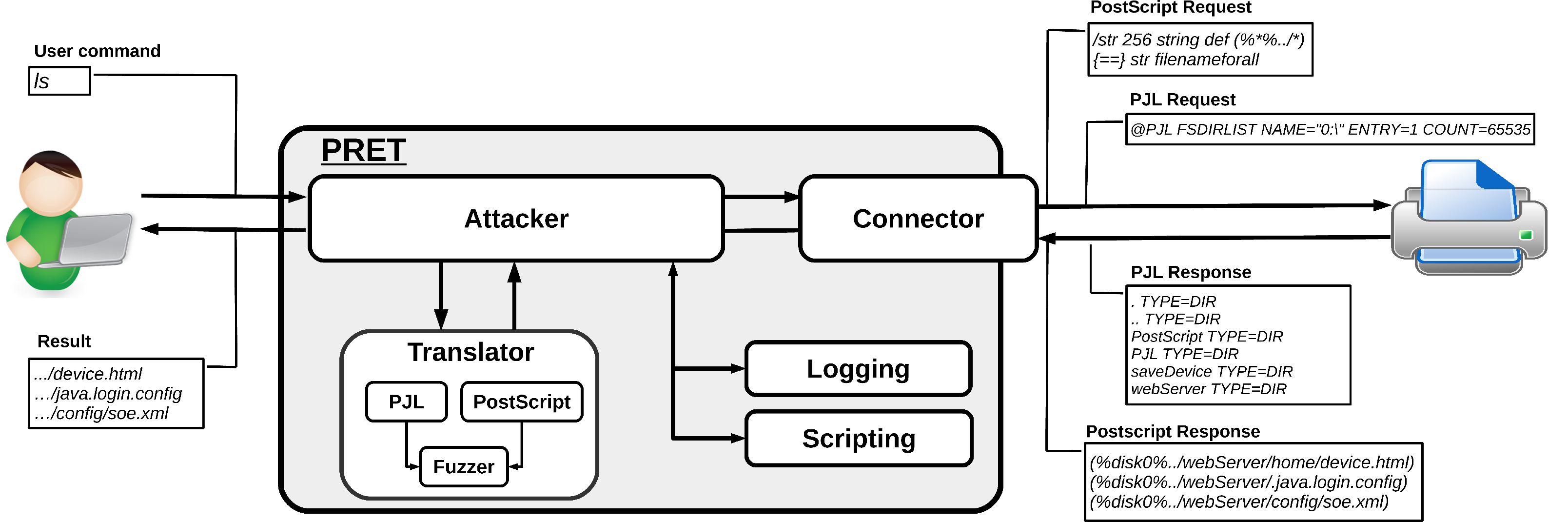
PRET design

स्थापना

PRET को केवल Python2 इंटरप्रेटर की आवश्यकता है। रंगीन आउटपुट और SNMP समर्थन के लिए, हालांकि, तृतीय-पक्ष मॉड्यूल स्थापित करने की आवश्यकता है:

root@kitploit:~
# pip install colorama pysnmp

यदि Windows कंसोल पर चल रहे हैं और यूनिकोड वर्ण सही ढंग से प्रदर्शित नहीं होते हैं, तो win_unicode_console मॉड्यूल स्थापित करें:

root@kitploit:~
# pip install win_unicode_console

प्रायोगिक, 'ड्राइवरलेस' प्रिंटिंग (प्रिंट कमांड देखें) के लिए, ImageMagick और GhostScript स्थापित करने की आवश्यकता है:

root@kitploit:~
# apt-get install imagemagick ghostscript

उपयोग

root@kitploit:~
usage: pret.py [-h] [-s] [-q] [-d] [-i file] [-o file] target {ps,pjl,pcl}

positional arguments:
  target                printer device or hostname
  {ps,pjl,pcl}          printing language to abuse

optional arguments:
  -h, --help            show this help message and exit
  -s, --safe            verify if language is supported
  -q, --quiet           suppress warnings and chit-chat
  -d, --debug           enter debug mode (show traffic)
  -i file, --load file  load and run commands from file
  -o file, --log file   log raw data sent to the target
उदाहरण उपयोग:
root@kitploit:~
$ ./pret.py laserjet.lan ps
$ ./pret.py /dev/usb/lp0 pjl
स्थितीय तर्क:

PRET को मान्य लक्ष्य और प्रिंटर भाषा तर्क के रूप में आवश्यक है। लक्ष्य या तो नेटवर्क प्रिंटर का IP पता/होस्टनाम (पोर्ट 9100/tcp खुला होने पर) या स्थानीय USB प्रिंटर के लिए /dev/usb/lp0 जैसा उपकरण हो सकता है। SNMP प्रसारण का उपयोग करके अपने सबनेट में सभी नेटवर्क प्रिंटरों को शीघ्रता से खोजने के लिए, बिना तर्कों के PRET चलाएँ:

root@kitploit:~
./pret.py
No target given, discovering local printers

address          device                       uptime    status                 
───────────────────────────────────────────────────────────────────────────────
192.168.1.5      hp LaserJet 4250             10:21:49   Ready                 
192.168.1.11     HP LaserJet M3027 MFP        13 days    Paper jam             
192.168.1.27     Lexmark X792                 153 days   Ready                 
192.168.1.28     Brother MFC-7860DW           16:31:17   Sleep mode            

दुरुपयोग की जाने वाली प्रिंटर भाषा ps, pjl या pcl में से एक होनी चाहिए। सभी भाषाएँ हर प्रिंटर द्वारा समर्थित नहीं हैं, इसलिए यदि आपको कोई प्रतिक्रिया नहीं मिलती है तो आप भाषाएँ बदल सकते हैं। प्रत्येक प्रिंटर भाषा PRET कमांड के एक अलग सेट से मैप की गई है और उसके पास शोषण करने की अलग-अलग क्षमताएँ हैं।

वैकल्पिक तर्क:

--safe कनेक्ट करने से पहले IPP, HTTP और SNMP के माध्यम से जाँच करने का प्रयास करता है कि चयनित प्रिंटिंग भाषा (PS/PJL/PCL) वास्तव में डिवाइस द्वारा समर्थित है या नहीं। गैर-नेटवर्क प्रिंटर (USB, समानांतर केबल) पर यह परीक्षण विफल हो जाएगा।

--quit प्रिंटर मॉडल निर्धारण, परिचय संदेश और कुछ अन्य बकवास को दबा देता है।

--debug डिवाइस को भेजा गया वास्तविक डेटास्ट्रीम और प्राप्त प्रतिक्रिया दिखाता है। ध्यान दें कि हेडर डेटा और अन्य ओवरहेड फ़िल्टर किए जाते हैं। पूरे ट्रैफ़िक को देखने के लिए, wireshark का उपयोग करें। डिबगिंग को PRET सत्र के भीतर debug कमांड का उपयोग करके चालू/बंद किया जा सकता है।

--load filename एक टेक्स्ट फ़ाइल से PRET कमांड पढ़ता है और निष्पादित करता है। यह स्वचालन के लिए उपयोगी है। कमांड फ़ाइलों को बाद में PRET सत्र के भीतर load कमांड के माध्यम से भी लागू किया जा सकता है।

--log filename प्रिंटर को भेजे गए कच्चे डेटास्ट्रीम की एक प्रति एक फ़ाइल में लिखता है। यह एक दुर्भावनापूर्ण प्रिंट जॉब फ़ाइल बनाने के लिए उपयोगी हो सकता है जिसे सीधे पहुँच योग्य नहीं होने वाले किसी अन्य प्रिंटर पर तैनात किया जा सकता है, उदाहरण के लिए USB ड्राइव से प्रिंट करके।

सामान्य कमांड

प्रिंटर डिवाइस से कनेक्ट होने के बाद, आप PRET शेल देखेंगे और विभिन्न कमांड निष्पादित कर सकते हैं:

root@kitploit:~
$ ./pret.py laserjet.lan pjl
      ________________
    _/_______________/|
   /___________/___//||   PRET | Printer Exploitation Toolkit v0.25
  |===        |----| ||    by Jens Mueller <[email protected]>
  |           |   ô| ||
  |___________|   ô| ||
  | ||/.´---.||    | ||        「 cause your device can be
  |-||/_____\||-.  | |´           more fun than paper jams 」
  |_||=L==H==||_|__|/

     (ASCII art by
     Jan Foerster)

Connection to laserjet.lan established
Device:   hp LaserJet 4250

Welcome to the pret shell. Type help or ? to list commands.
laserjet.lan:/> help

Available commands (type help <topic>):
=======================================
append  debug    edit    free  id    ls       open      restart   timeout  
cat     delete   env     fuzz  info  mirror   printenv  selftest  touch    
cd      df       exit    get   load  mkdir    put       set       traversal
chvol   disable  find    help  lock  nvram    pwd       site      unlock   
close   display  format  hold  loop  offline  reset     status    version  

laserjet.lan:/> ls ../../
-      834   .profile
d        -   bin
d        -   dev
d        -   etc
d        -   hp
d        -   hpmnt
-     1276   init
d        -   lib
d        -   pipe
d        -   tmp
laserjet.lan:/> exit

सामान्य PRET कमांड की एक सूची नीचे दी गई है:

root@kitploit:~
help      List available commands or get detailed help with 'help cmd'.
debug     Enter debug mode. Use 'hex' for hexdump:  debug [hex]
load      Run commands from file:  load cmd.txt
loop      Run command for multiple arguments:  loop <cmd> <arg1> <arg2> …
open      Connect to remote device:  open <target>
close     Disconnect from device.
timeout   Set connection timeout:  timeout <seconds>
discover  Discover local printer devices via SNMP.
print     Print image file or raw text:  print <file>|"text"
site      Execute custom command on printer:  site <command>
exit      Exit the interpreter.

PS/PJL/PCL विशिष्ट कार्यान्वयन के साथ सामान्य फ़ाइल सिस्टम संचालन हैं:

root@kitploit:~
┌───────────┬─────┬─────┬─────┬────────────────────────────────────────┐
│ Command   │ PS  │ PJL │ PCL │ Description                            │
├───────────┼─────┼─────┼─────┼────────────────────────────────────────┤
│ ls        │  ✓  │  ✓  │  ✓  │ List contents of remote directory.     │
│ get       │  ✓  │  ✓  │  ✓  │ Receive file: get <file>               │
│ put       │  ✓  │  ✓  │  ✓  │ Send file: put <local file>            │
│ append    │  ✓  │  ✓  │     │ Append to file: append <file> <str>    │
│ delete    │  ✓  │  ✓  │  ✓  │ Delete remote file: delete <file>      │
│ rename    │  ✓  │     │     │ Rename remote file: rename <old> <new> │
│ find      │  ✓  │  ✓  │     │ Recursively list directory contents.   │
│ mirror    │  ✓  │  ✓  │     │ Mirror remote filesystem to local dir. │
│ cat       │  ✓  │  ✓  │  ✓  │ Output remote file to stdout.          │
│ edit      │  ✓  │  ✓  │  ✓  │ Edit remote files with vim.            │
│ touch     │  ✓  │  ✓  │     │ Update file timestamps: touch <file>   │
│ mkdir     │  ✓  │  ✓  │     │ Create remote directory: mkdir <path>  │
├───────────┼─────┼─────┼─────┼────────────────────────────────────────┤
│ cd        │  ✓  │  ✓  │     │ Change remote working directory.       │
│ pwd       │  ✓  │  ✓  │     │ Show working directory on device.      │
│ chvol     │  ✓  │  ✓  │     │ Change remote volume: chvol <volume>   │
│ traversal │  ✓  │  ✓  │     │ Set path traversal: traversal <path>   │
├───────────┼─────┼─────┼─────┼────────────────────────────────────────┤
│ format    │  ✓  │  ✓  │     │ Initialize printer's file system.      │
│ fuzz      │  ✓  │  ✓  │     │ File system fuzzing: fuzz <category>   │
├─ ─ ─ ─ ─ ─┴─ ─ ─┴─ ─ ─┴─ ─ ─┴─ ─ ─ ─ ─ ─ ─ ─ ─ ─ ─ ─ ─ ─ ─ ─ ─ ─ ─ ─ ┤
│   path   - Explore fs structure with path traversal strategies.      │
│   write  - First put/append file, then check for its existence.      │
│   blind  - Read-only tests for existing files like /etc/passwd.      │
├───────────┬─────┬─────┬─────┬────────────────────────────────────────┤
│ df        │  ✓  │  ✓  │     │ Show volume information.               │
│ free      │  ✓  │  ✓  │  ✓  │ Show available memory.                 │
└───────────┴─────┴─────┴─────┴────────────────────────────────────────┘

PS मोड में कमांड

root@kitploit:~
id         Show device information.
version    Show PostScript interpreter version.
devices    Show available I/O devices.
uptime     Show system uptime (might be random).
date       Show printer's system date and time.
pagecount  Show printer's page counter.

lock       Set startjob and system parameters password.
unlock     Unset startjob and system parameters password.
restart    Restart PostScript interpreter.
reset      Reset PostScript settings to factory defaults.
disable    Disable printing functionality.
destroy    Cause physical damage to printer's NVRAM.
hang       Execute PostScript infinite loop.

overlay    Put overlay eps file on all hardcopies:  overlay <file.eps>
cross      Put printer graffiti on all hardcopies:  cross <font> <text>
replace    Replace string in documents to be printed:  replace <old> <new>
capture    Capture further jobs to be printed on this device.
hold       Enable job retention.

set        Set key to value in topmost dictionary:  set <key=value>
known      List supported PostScript operators:  known <operator>
search     Search all dictionaries by key:  search <key>
dicts      Return a list of dictionaries and their permissions.
resource   List or dump PostScript resource:  resource <category> [dump]

dump       Dump dictionary:  dump <dict>
  Dictionaries: - systemdict - statusdict - userdict 
                - globaldict - serverdict - errordict
                - internaldict - currentsystemparams
                - currentuserparams - currentpagedevice

config     Change printer settings:  config <setting>
  duplex        - Set duplex printing.
  copies #      - Set number of copies.
  economode     - Set economic mode.
  negative      - Set negative print.
  mirror        - Set mirror inversion.

सभी कमांड हर प्रिंटर द्वारा समर्थित नहीं हैं। विशेष रूप से Brother और Kyocera डिवाइस मूल 'Adobe PostScript' को लाइसेंस देने के बजाय अपने स्वयं के PostScript क्लोन – Br-Script और KPDL – का उपयोग करते हैं। PostScript भाषा के ऐसे स्वरूप 100% संगत नहीं हो सकते हैं, विशेष रूप से प्रिंट जॉब्स को कैप्चर करने जैसी सुरक्षा-संवेदनशील सुविधाओं के संबंध में। फ़ाइल सिस्टम तक पहुँच अधिकांश प्रिंटर द्वारा समर्थित है, हालांकि आमतौर पर एक निश्चित, सैंडबॉक्स्ड निर्देशिका तक सीमित होती है।

PJL मोड में कमांड

root@kitploit:~
id         Show device information.
status     Enable status messages.
version    Show firmware version or serial number (from 'info config').
pagecount  Manipulate printer's page counter:  pagecount <number>
printenv   Show printer environment variable:  printenv <VAR>
env        Show environment variables (alias for 'info variables').
set        Set printer environment variable:  set <VAR=VALUE>

display    Set printer's display message:  display <message>
offline    Take printer offline and display message:  offline <message>
restart    Restart printer.
reset      Reset to factory defaults.
selftest   Perform various printer self-tests.
disable    Disable printing functionality.
destroy    Cause physical damage to printer's NVRAM.
flood      Flood user input, may reveal buffer overflows.

lock       Lock control panel settings and disk write access.
unlock     Unlock control panel settings and disk write access.
hold       Enable job retention.

nvram      NVRAM operations:  nvram <operation>
  nvram dump [all]           - Dump (all) NVRAM to local file.
  nvram read addr            - Read single byte from address.
  nvram write addr value     - Write single byte to address.

info       Show information:  info <category>
  info config      - Provides configuration information.
  info filesys     - Returns PJL file system information.
  info id          - Provides the printer model number.
  info memory      - Identifies amount of memory available.
  info pagecount   - Returns the number of pages printed.
  info status      - Provides the current printer status.
  info ustatus     - Lists the unsolicited status variables.
  info variables   - Lists printer's environment variables.

कुछ कमांड विशेष रूप से HP प्रिंटर द्वारा समर्थित हैं, क्योंकि अन्य विक्रेताओं ने PJL मानक का केवल एक उपसमूह लागू किया है। यह विशेष रूप से PML आधारित कमांड जैसे restart या reset के लिए सत्य है। hold कमांड के माध्यम से दीर्घकालिक जॉब प्रतिधारण को सक्षम करना कुछ Epson उपकरणों के लिए ही संभव प्रतीत होता है। nvram कमांड के माध्यम से NVRAM तक पहुँच Brother प्रिंटर की एक मालिकाना सुविधा है। फ़ाइल सिस्टम तक सीमित पहुँच विभिन्न HP, OKI, Konica, Xerox, Epson और Ricoh उपकरणों द्वारा समर्थित है।

PCL मोड में कमांड

root@kitploit:~
selftest   Perform printer self-test.
info       Show information:  info <category>
  info fonts      - Show installed fonts.
  info macros     - Show installed macros.
  info patterns   - Show user-defined patterns.
  info symbols    - Show symbol sets.
  info extended   - Show extended fonts.

PCL एक बहुत ही सीमित पृष्ठ विवरण भाषा है जिसमें फ़ाइल सिस्टम तक पहुँच नहीं है। इसलिए get/put/ls कमांड PCL मैक्रोज़ पर आधारित एक आभासी फ़ाइल सिस्टम का उपयोग करते हैं, जो ज्यादातर हैक मूल्य के लिए लागू किया गया है। यह प्रूफ-ऑफ-कॉन्सेप्ट दर्शाता है कि PCL जैसी केवल न्यूनतम भाषाओं का समर्थन करने वाला एक उपकरण भी कॉपीराइट उल्लंघन सामग्री जैसी मनमानी फ़ाइलों को संग्रहीत करने के लिए उपयोग किया जा सकता है। हालांकि ऐसी फ़ाइल साझाकरण सेवा अपने आप में कोई सुरक्षा कमजोरी नहीं है, यह कॉर्पोरेट नीति के आधार पर 'सेवा का दुरुपयोग' के रूप में लागू हो सकती है।

फ़ाइल सूची

  • pret.py - निष्पादन योग्य मुख्य प्रोग्राम
  • capabilities.py - प्रिंटर भाषा समर्थन की जाँच करने की रूटीन
  • discovery.py - SNMP प्रसारण का उपयोग करके प्रिंटर सूचीबद्ध करने की रूटीन
  • printer.py - प्रिंटिंग डिवाइस का वर्णन करने के लिए सामान्य कोड
  • postscript.py - PS विशिष्ट कोड (प्रिंटर वर्ग से इनहेरिट करता है)
  • pjl.py - PJL विशिष्ट कोड (प्रिंटर वर्ग से इनहेरिट करता है)
  • pcl.py - PCL विशिष्ट कोड (प्रिंटर वर्ग से इनहेरिट करता है)
  • helper.py - आउटपुट, लॉगिंग, सॉकेट आदि के लिए सहायक फ़ंक्शन
  • codebook.py - PJL स्थिति/त्रुटि कोड की स्थिर तालिका
  • fuzzer.py - फ़ाइल सिस्टम फ़ज़िंग के लिए स्थिरांक
  • mibs/* - प्रिंटर विशिष्ट SNMP MIB
  • db/* - समर्थित मॉडलों का डेटाबेस

आरंभ करना

PostScript और PJL जैसी प्रिंटिंग भाषाओं में सुविधाओं और विभिन्न मालिकाना एक्सटेंशन को देखते हुए, प्रिंटर पर पेनटेस्ट करना एक तुच्छ काम नहीं है। PRET भाषा में ज्ञात मुद्दों की सहायता और सत्यापन करने में मदद कर सकता है। एक बार जब आप टूल के साथ खेल चुके हैं, तो आप एक व्यवस्थित प्रिंटर सुरक्षा विश्लेषण करना चाह सकते हैं। एक अच्छा प्रारंभिक बिंदु Printer Security Testing Cheat Sheet है।

हैप्पी हैकिंग!

टूल डाउनलोड करें
  • lpd/* - LPD फ़ज़िंग के लिए स्क्रिप्ट