 pvharmo2/gha-lab-6c3094af9e
अधिकृत सुरक्षा-अनुसंधान प्रयोगशाला CVE-2026-27941 (pull_request_target वर्कफ़्लो में pwn अनुरोध) का पुनरुत्पादन कर रही है — openlit/openlit का स्नैपशॉट

स्वचालित शोध आर्टिफैक्ट — अपस्ट्रीम प्रोजेक्ट नहीं।
यह रिपॉजिटरी Université Laval में मास्टर थीसिस के लिए एक स्वचालित हार्नेस द्वारा निर्मित एक डिस्पोजेबल लैब है, जो प्रकाशित GitHub Actions वर्कफ़्लो कमजोरियों को पुनः प्रस्तुत करने पर केंद्रित है। यह
openlit/openlitका एक शब्दशः स्नैपशॉट है, जो कमिट8529a7746ce2cae946bd2346cb3792c22f86cbee(2026-02-24) पर आधारित है, और इसे उस प्रोजेक्ट के अपने लाइसेंस के तहत पुनर्वितरित किया गया है, जिसकी फ़ाइल इस स्नैपशॉट में अपरिवर्तित शामिल है।अपस्ट्रीम प्रोजेक्ट शामिल नहीं है, उसे कभी लक्षित नहीं किया जाता है, और यहाँ अध्ययन की गई कमजोरी पहले से ही सार्वजनिक है। इस रिपॉजिटरी में हर सीक्रेट और वेरिएबल एक यादृच्छिक रूप से उत्पन्न डमी मान है — कोई वास्तविक क्रेडेंशियल मौजूद नहीं है। एक्शन रेफरेंस और रनर इमेज उसी पर पिन किए गए हैं जो 2026-02-24 को उन्होंने हल किया था; स्नैपशॉट में किए गए हर बदलाव के लिए हार्नेस आउटपुट में
pinning.mdदेखें।प्रश्न या आपत्तियाँ: [email protected]






OpenLIT आपको अपने AI विकास वर्कफ़्लो को सरल बनाने की अनुमति देता है, विशेष रूप से जनरेटिव AI और LLM के लिए। यह LLM के साथ प्रयोग करने, प्रॉम्प्ट को व्यवस्थित और वर्ज़न करने, और API कुंजियों को सुरक्षित रूप से संभालने जैसे आवश्यक कार्यों को सुव्यवस्थित करता है। कोड की सिर्फ एक पंक्ति के साथ, आप OpenTelemetry-नेटिव ऑब्ज़र्वेबिलिटी सक्षम कर सकते हैं, जो LLM, वेक्टर डेटाबेस और GPU सहित फुल-स्टैक मॉनिटरिंग प्रदान करती है। यह डेवलपर्स को आत्मविश्वास से AI सुविधाएँ और एप्लिकेशन बनाने में सक्षम बनाता है, परीक्षण से प्रोडक्शन तक सुचारू रूप से संक्रमण करते हुए।
यह प्रोजेक्ट OpenTelemetry समुदाय के साथ सेमेंटिक कन्वेंशन का गर्व से पालन और रखरखाव करता है, और ऑब्ज़र्वेबिलिटी में नवीनतम मानकों के साथ संरेखित करने के लिए लगातार अपडेट होता रहता है।
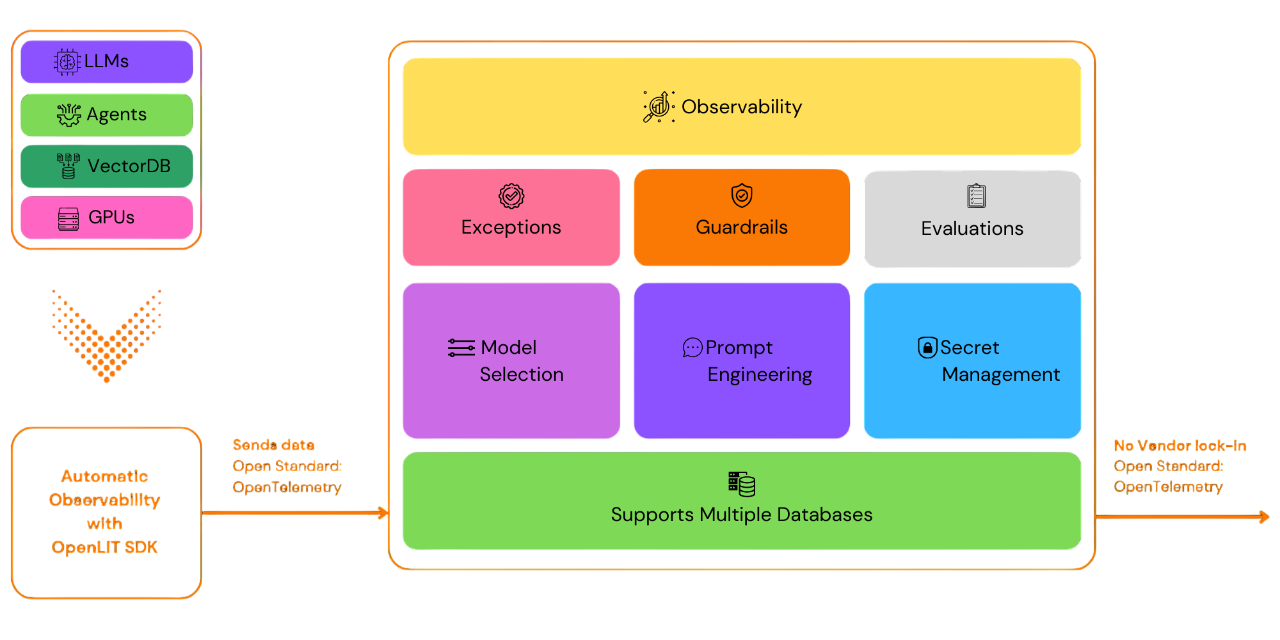
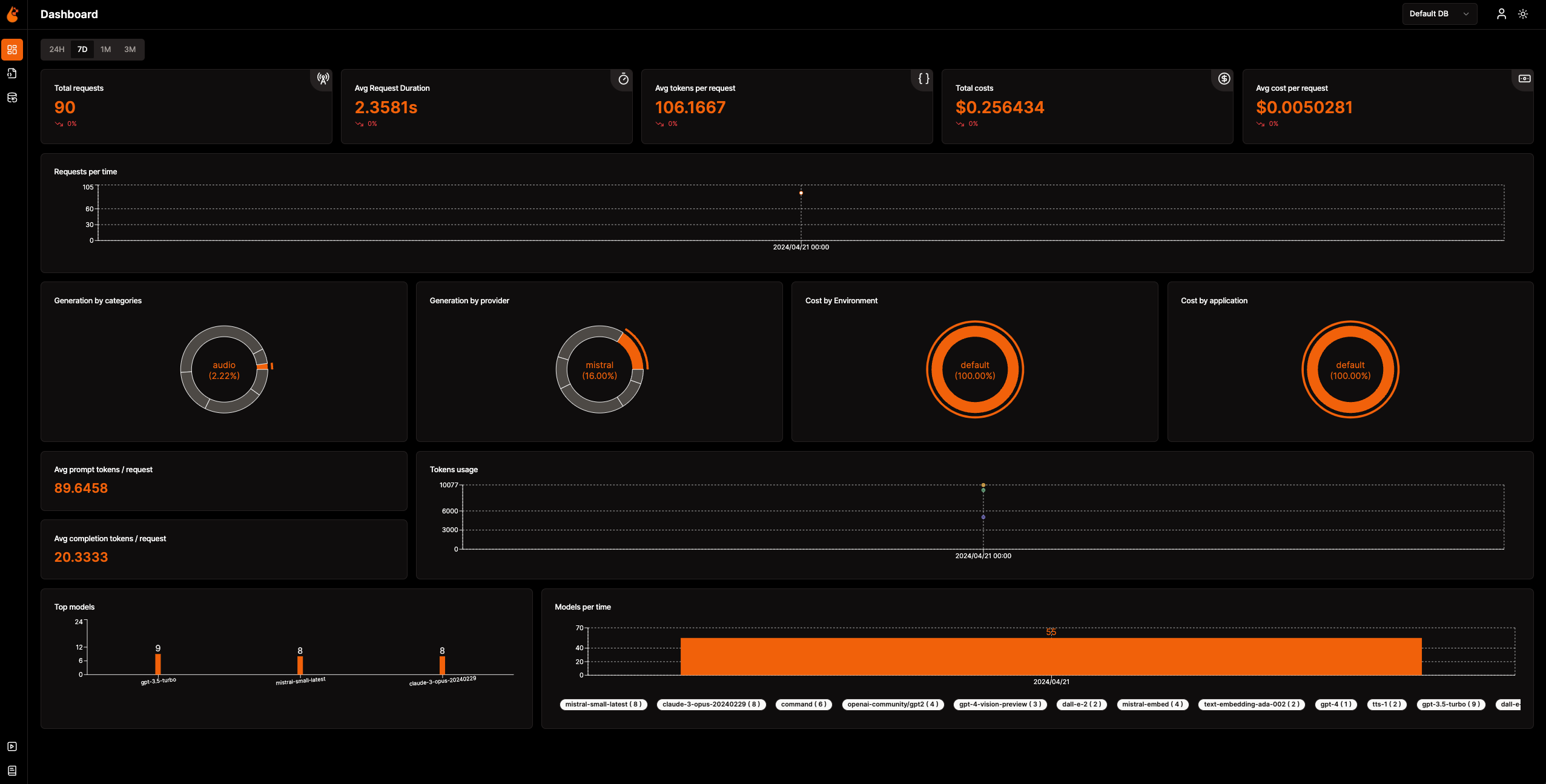
📈 एनालिटिक्स डैशबोर्ड: अपने AI एप्लिकेशन के स्वास्थ्य और प्रदर्शन की निगरानी विस्तृत डैशबोर्ड के साथ करें जो मेट्रिक्स, लागत और उपयोगकर्ता इंटरैक्शन को ट्रैक करते हैं, जो समग्र दक्षता का स्पष्ट दृश्य प्रदान करते हैं।
🔌 OpenTelemetry-नेटिव ऑब्ज़र्वेबिलिटी SDK: विक्रेता-तटस्थ SDK जो आपके मौजूदा ऑब्ज़र्वेबिलिटी टूल्स में ट्रेस और मेट्रिक्स भेजने के लिए हैं।
💲 कस्टम और फाइन-ट्यून किए गए मॉडल के लिए लागत ट्रैकिंग: सटीक बजट के लिए कस्टम प्राइसिंग फ़ाइलों का उपयोग करके विशिष्ट मॉडलों के लिए लागत अनुमान तैयार करें।
🐛 अपवाद निगरानी डैशबोर्ड: एक समर्पित मॉनिटरिंग डैशबोर्ड के साथ सामान्य अपवादों और त्रुटियों को ट्रैक करके समस्याओं को तुरंत पहचानें और हल करें।
💭 प्रॉम्प्ट प्रबंधन: Prompt Hub का उपयोग करके प्रॉम्प्ट को प्रबंधित और वर्ज़न करें, जिससे एप्लिकेशन में सुसंगत और आसान पहुँच सुनिश्चित हो।
🔑 API कुंजी और सीक्रेट प्रबंधन: अपनी API कुंजियों और सीक्रेट्स को केंद्रीय रूप से सुरक्षित रूप से संभालें, असुरक्षित प्रथाओं से बचते हुए।
🎮 विभिन्न LLM के साथ प्रयोग करें: OpenGround का उपयोग करके विभिन्न LLM को साथ-साथ एक्सप्लोर, परीक्षण और तुलना करें।
🚀 OpAMP प्रबंधन के लिए Fleet Hub: सुरक्षित TLS संचार के साथ OpAMP (ओपन एजेंट मैनेजमेंट प्रोटोकॉल) का उपयोग करके अपने इंफ्रास्ट्रक्चर में OpenTelemetry Collectors को केंद्रीय रूप से प्रबंधित और मॉनिटर करें।
flowchart TB; subgraph " " direction LR; subgraph " " direction LR; OpenLIT_SDK[OpenLIT SDK] -->|Sends Traces & Metrics| OTC[OpenTelemetry Collector]; OTC -->|Stores Data| ClickHouseDB[ClickHouse]; end subgraph " " direction RL; OpenLIT_UI[OpenLIT] -->|Pulls Data| ClickHouseDB; end end
### चरण 1: OpenLIT स्टैक तैनात करें

1. OpenLIT रिपॉजिटरी को Git Clone करें

   अपनी कमांड लाइन या टर्मिनल खोलें और चलाएँ:   ```shell
   git clone [email protected]:openlit/openlit.git
Docker का उपयोग करके सेल्फ-होस्ट करें
OpenLIT को निम्नलिखित कमांड के साथ डिप्लॉय और रन करें: ```shell docker compose up -d
Kubernetes में Helm का उपयोग करके इंस्टॉल करने के निर्देशों के लिए, Kubernetes Helm इंस्टॉलेशन गाइड देखें।
अपनी कमांड लाइन या टर्मिनल खोलें और चलाएँ:```bash pip install openlit
> TypeScript SDK का उपयोग करने के निर्देशों के लिए, [TypeScript SDK Installation guide](https://github.com/openlit/openlit/tree/main/sdk/typescript#-installation) पर जाएँ।

### चरण 3: अपने एप्लिकेशन में OpenLIT को आरंभ करें

अपने AI एप्लिकेशन में OpenLIT को एकीकृत करने के लिए, अपने कोड में निम्नलिखित पंक्तियाँ जोड़ें।```python
import openlit

openlit.init()
Configure the telemetry data destination as follows:
| Purpose | Parameter/Environment Variable | For Sending to OpenLIT |
|---|---|---|
| Send data to an HTTP OTLP endpoint | otlp_endpoint or OTEL_EXPORTER_OTLP_ENDPOINT | "http://127.0.0.1:4318" |
| Authenticate telemetry backends | otlp_headers or OTEL_EXPORTER_OTLP_HEADERS | Not required by default |
💡 Info: If the
otlp_endpointorOTEL_EXPORTER_OTLP_ENDPOINTis not provided, the OpenLIT SDK will output traces directly to your console, which is recommended during the development phase.
Add the following two lines to your application code: ```python import openlit
openlit.init( otlp_endpoint="http://127.0.0.1:4318", )
</details>

---

<details>

---

<summary>पर्यावरण चरों का उपयोग करके आरंभ करें</summary>

अपने एप्लिकेशन कोड में निम्नलिखित दो पंक्तियाँ जोड़ें:  ```python
import openlit

openlit.init()
फिर, अपने OTLP एंडपॉइंट को environment variable का उपयोग करके कॉन्फ़िगर करें: ```env export OTEL_EXPORTER_OTLP_ENDPOINT = "http://127.0.0.1:4318"
</details>
---
### चरण 4: विज़ुअलाइज़ करें और अनुकूलित करें
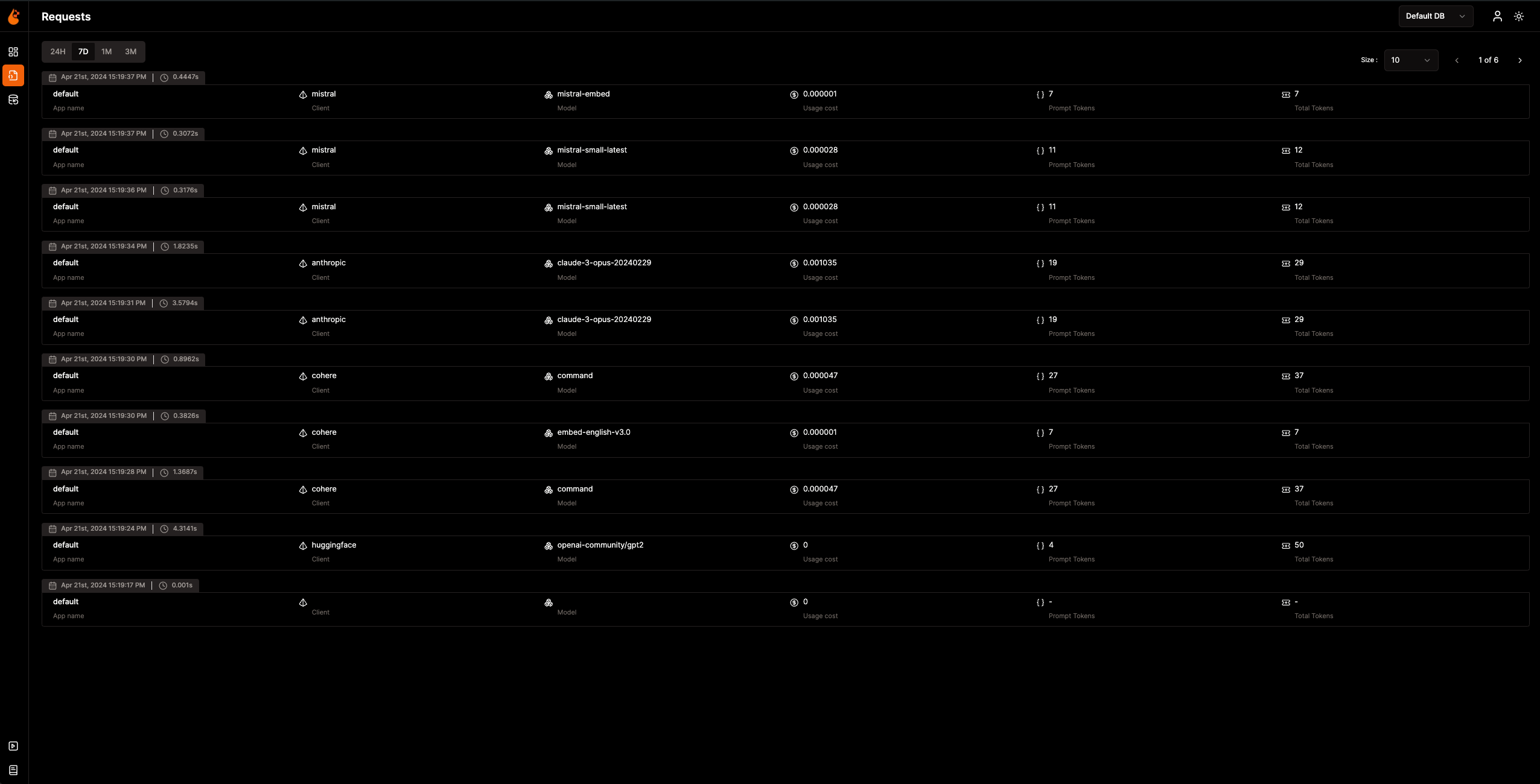
अब जब Observability डेटा एकत्र और OpenLIT को भेजा जा रहा है, तो अगला कदम इस डेटा को विज़ुअलाइज़ और विश्लेषित करना है ताकि आपके AI एप्लिकेशन के प्रदर्शन, व्यवहार के बारे में जानकारी मिल सके और सुधार के क्षेत्रों की पहचान हो सके।
बस अपने ब्राउज़र में `127.0.0.1:3000` पर OpenLIT पर जाएं और अन्वेषण शुरू करें। आप डिफ़ॉल्ट क्रेडेंशियल्स का उपयोग करके लॉगिन कर सकते हैं:
- **ईमेल**: `[email protected]`
- **पासवर्ड**: `openlituser`
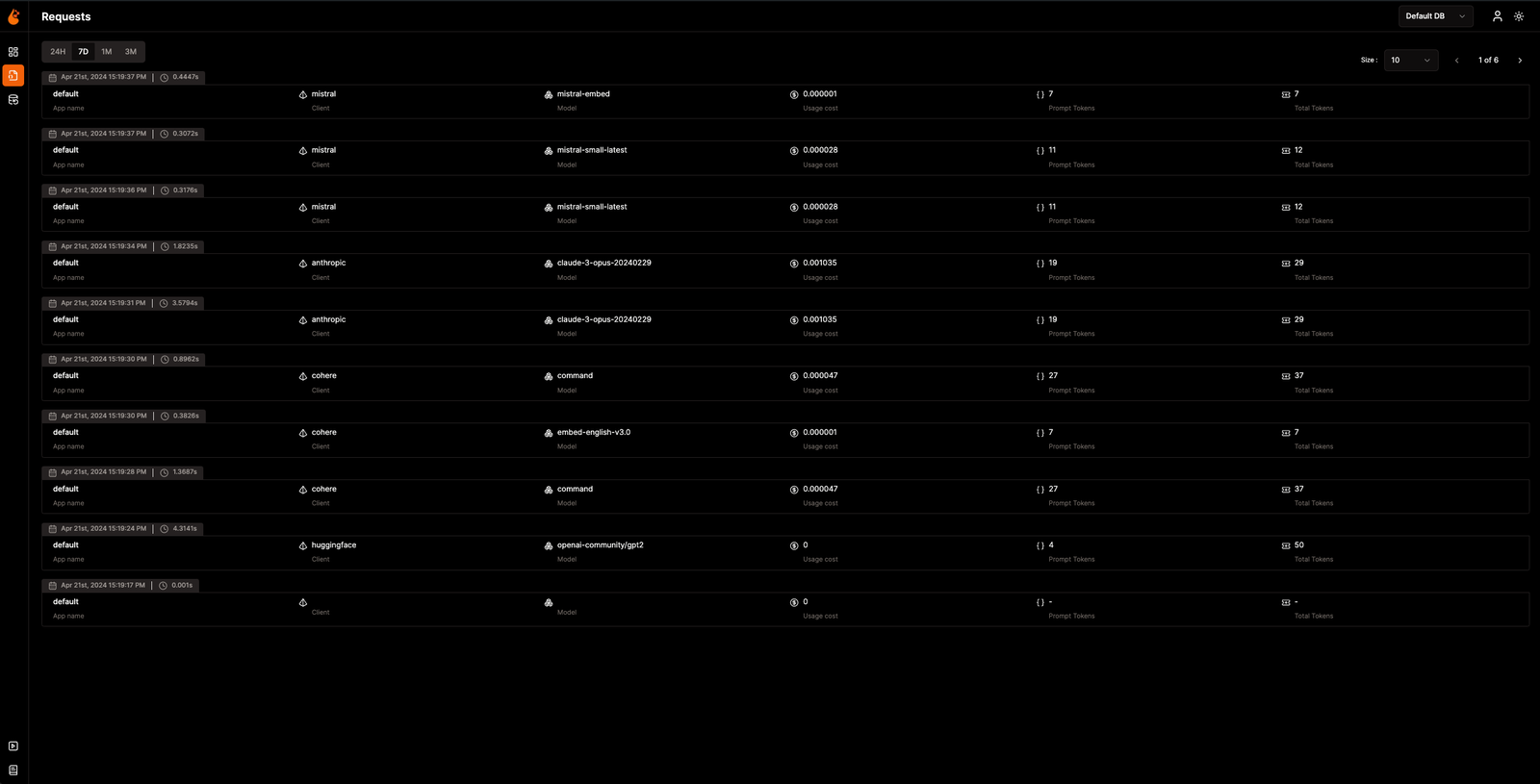
## 📦 समर्थित एकीकरण
OpenLIT कोड की एक पंक्ति के साथ **44+ LLM प्रदाताओं, AI फ्रेमवर्क और वेक्टर डेटाबेस** को स्वचालित रूप से इंस्ट्रूमेंट करता है। प्रत्येक एकीकरण [OpenTelemetry-नेटिव](https://opentelemetry.io/) ट्रेस और मेट्रिक्स उत्पन्न करता है। एकीकरण दस्तावेज़ देखने के लिए किसी भी कार्ड पर क्लिक करें।
<sub>
<img src="https://img.shields.io/badge/Python-3776AB?logo=python&logoColor=white&style=flat-square" height="16"> Python SDK
<img src="https://img.shields.io/badge/TypeScript-3178C6?logo=typescript&logoColor=white&style=flat-square" height="16"> TypeScript SDK
</sub>
### LLM प्रदाता
<table>
<tr>
<td align="center" width="160"><a href="https://docs.openlit.io/latest/sdk/integrations/openai"><b>OpenAI</b></a><br/><img src="https://img.shields.io/badge/Python-3776AB?logo=python&logoColor=white&style=flat-square" height="18"> <img src="https://img.shields.io/badge/TypeScript-3178C6?logo=typescript&logoColor=white&style=flat-square" height="18"></td>
<td align="center" width="160"><a href="https://docs.openlit.io/latest/sdk/integrations/anthropic"><b>Anthropic</b></a><br/><img src="https://img.shields.io/badge/Python-3776AB?logo=python&logoColor=white&style=flat-square" height="18"> <img src="https://img.shields.io/badge/TypeScript-3178C6?logo=typescript&logoColor=white&style=flat-square" height="18"></td>
<td align="center" width="160"><a href="https://docs.openlit.io/latest/sdk/integrations/cohere"><b>Cohere</b></a><br/><img src="https://img.shields.io/badge/Python-3776AB?logo=python&logoColor=white&style=flat-square" height="18"> <img src="https://img.shields.io/badge/TypeScript-3178C6?logo=typescript&logoColor=white&style=flat-square" height="18"></td>
<td align="center" width="160"><a href="https://docs.openlit.io/latest/sdk/integrations/mistral"><b>Mistral AI</b></a><br/><img src="https://img.shields.io/badge/Python-3776AB?logo=python&logoColor=white&style=flat-square" height="18"> <img src="https://img.shields.io/badge/TypeScript-3178C6?logo=typescript&logoColor=white&style=flat-square" height="18"></td>
</tr>
<tr>
<td align="center" width="160"><a href="https://docs.openlit.io/latest/sdk/integrations/groq"><b>Groq</b></a><br/><img src="https://img.shields.io/badge/Python-3776AB?logo=python&logoColor=white&style=flat-square" height="18"> <img src="https://img.shields.io/badge/TypeScript-3178C6?logo=typescript&logoColor=white&style=flat-square" height="18"></td>
<td align="center" width="160"><a href="https://docs.openlit.io/latest/sdk/integrations/google-ai-studio"><b>Google AI Studio</b></a><br/><img src="https://img.shields.io/badge/Python-3776AB?logo=python&logoColor=white&style=flat-square" height="18"> <img src="https://img.shields.io/badge/TypeScript-3178C6?logo=typescript&logoColor=white&style=flat-square" height="18"></td>
<td align="center" width="160"><a href="https://docs.openlit.io/latest/sdk/integrations/together"><b>Together AI</b></a><br/><img src="https://img.shields.io/badge/Python-3776AB?logo=python&logoColor=white&style=flat-square" height="18"> <img src="https://img.shields.io/badge/TypeScript-3178C6?logo=typescript&logoColor=white&style=flat-square" height="18"></td>
<td align="center" width="160"><a href="https://docs.openlit.io/latest/sdk/integrations/ollama"><b>Ollama</b></a><br/><img src="https://img.shields.io/badge/Python-3776AB?logo=python&logoColor=white&style=flat-square" height="18"> <img src="https://img.shields.io/badge/TypeScript-3178C6?logo=typescript&logoColor=white&style=flat-square" height="18"></td>
</tr>
<tr>
<td align="center" width="160"><a href="https://docs.openlit.io/latest/sdk/integrations/bedrock"><b>AWS Bedrock</b></a><br/><img src="https://img.shields.io/badge/Python-3776AB?logo=python&logoColor=white&style=flat-square" height="18"> <img src="https://img.shields.io/badge/TypeScript-3178C6?logo=typescript&logoColor=white&style=flat-square" height="18"></td>
<td align="center" width="160"><a href="https://docs.openlit.io/latest/sdk/integrations/azure-ai-inference"><b>Azure AI Inference</b></a><br/><img src="https://img.shields.io/badge/Python-3776AB?logo=python&logoColor=white&style=flat-square" height="18"></td>
<td align="center" width="160"><a href="https://docs.openlit.io/latest/sdk/integrations/vertexai"><b>Vertex AI</b></a><br/><img src="https://img.shields.io/badge/Python-3776AB?logo=python&logoColor=white&style=flat-square" height="18"></td>
<td align="center" width="160"><a href="https://docs.openlit.io/latest/sdk/integrations/vllm"><b>vLLM</b></a><br/><img src="https://img.shields.io/badge/Python-3776AB?logo=python&logoColor=white&style=flat-square" height="18"></td>
</tr>
<tr>
<td align="center" width="160"><a href="https://docs.openlit.io/latest/sdk/integrations/reka"><b>Reka</b></a><br/><img src="https://img.shields.io/badge/Python-3776AB?logo=python&logoColor=white&style=flat-square" height="18"></td>
<td align="center" width="160"><a href="https://docs.openlit.io/latest/sdk/integrations/litellm"><b>LiteLLM</b></a><br/><img src="https://img.shields.io/badge/Python-3776AB?logo=python&logoColor=white&style=flat-square" height="18"></td>
<td align="center" width="160"><a href="https://docs.openlit.io/latest/sdk/integrations/huggingface"><b>Hugging Face</b></a><br/><img src="https://img.shields.io/badge/Python-3776AB?logo=python&logoColor=white&style=flat-square" height="18"></td>
<td align="center" width="160"><a href="https://docs.openlit.io/latest/sdk/integrations/ai21"><b>AI21</b></a><br/><img src="https://img.shields.io/badge/Python-3776AB?logo=python&logoColor=white&style=flat-square" height="18"></td>
</tr>
<tr>
<td align="center" width="160"><a href="https://docs.openlit.io/latest/sdk/integrations/gpt4all"><b>GPT4All</b></a><br/><img src="https://img.shields.io/badge/Python-3776AB?logo=python&logoColor=white&style=flat-square" height="18"></td>
<td align="center" width="160"><a href="https://docs.openlit.io/latest/sdk/integrations/premai"><b>PremAI</b></a><br/><img src="https://img.shields.io/badge/Python-3776AB?logo=python&logoColor=white&style=flat-square" height="18"></td>
<td align="center" width="160"><a href="https://docs.openlit.io/latest/sdk/integrations/sarvam"><b>Sarvam AI</b></a><br/><img src="https://img.shields.io/badge/Python-3776AB?logo=python&logoColor=white&style=flat-square" height="18"></td>
<td align="center" width="160"><a href="https://docs.openlit.io/latest/sdk/integrations/julep-ai"><b>Julep</b></a><br/><img src="https://img.shields.io/badge/Python-3776AB?logo=python&logoColor=white&style=flat-square" height="18"></td>
</tr>
<tr>
<td align="center" width="160"><a href="https://docs.openlit.io/latest/sdk/integrations/multion"><b>MultiOn</b></a><br/><img src="https://img.shields.io/badge/Python-3776AB?logo=python&logoColor=white&style=flat-square" height="18"></td>
</tr>
</table>
### AI फ्रेमवर्क
<table>
<tr>
<td align="center" width="160"><a href="https://docs.openlit.io/latest/sdk/integrations/langchain"><b>LangChain</b></a><br/><img src="https://img.shields.io/badge/Python-3776AB?logo=python&logoColor=white&style=flat-square" height="18"> <img src="https://img.shields.io/badge/TypeScript-3178C6?logo=typescript&logoColor=white&style=flat-square" height="18"></td>
<td align="center" width="160"><a href="https://docs.openlit.io/latest/sdk/integrations/llama-index"><b>LlamaIndex</b></a><br/><img src="https://img.shields.io/badge/Python-3776AB?logo=python&logoColor=white&style=flat-square" height="18"> <img src="https://img.shields.io/badge/TypeScript-3178C6?logo=typescript&logoColor=white&style=flat-square" height="18"></td>
<td align="center" width="160"><a href="https://docs.openlit.io/latest/sdk/integrations/crewai"><b>CrewAI</b></a><br/><img src="https://img.shields.io/badge/Python-3776AB?logo=python&logoColor=white&style=flat-square" height="18"></td>
<td align="center" width="160"><a href="https://docs.openlit.io/latest/sdk/integrations/pydantic"><b>Pydantic AI</b></a><br/><img src="https://img.shields.io/badge/Python-3776AB?logo=python&logoColor=white&style=flat-square" height="18"></td>
</tr>
<tr>
<td align="center" width="160"><a href="https://docs.openlit.io/latest/sdk/integrations/phidata"><b>Agno</b></a><br/><img src="https://img.shields.io/badge/Python-3776AB?logo=python&logoColor=white&style=flat-square" height="18"></td>
<td align="center" width="160"><a href="https://docs.openlit.io/latest/sdk/integrations/browser-use"><b>Browser Use</b></a><br/><img src="https://img.shields.io/badge/Python-3776AB?logo=python&logoColor=white&style=flat-square" height="18"></td>
<td align="center" width="160"><a href="https://docs.openlit.io/latest/sdk/integrations/haystack"><b>Haystack</b></a><br/><img src="https://img.shields.io/badge/Python-3776AB?logo=python&logoColor=white&style=flat-square" height="18"></td>
<td align="center" width="160"><a href="https://docs.openlit.io/latest/sdk/integrations/letta"><b>Letta</b></a><br/><img src="https://img.shields.io/badge/Python-3776AB?logo=python&logoColor=white&style=flat-square" height="18"></td>
</tr>
<tr>
<td align="center" width="160"><a href="https://docs.openlit.io/latest/sdk/integrations/mem0"><b>Mem0</b></a><br/><img src="https://img.shields.io/badge/Python-3776AB?logo=python&logoColor=white&style=flat-square" height="18"></td>
<td align="center" width="160"><a href="https://docs.openlit.io/latest/sdk/integrations/ag2"><b>AG2 (AutoGen)</b></a><br/><img src="https://img.shields.io/badge/Python-3776AB?logo=python&logoColor=white&style=flat-square" height="18"></td>
<td align="center" width="160"><a href="https://docs.openlit.io/latest/sdk/integrations/controlflow"><b>Controlflow</b></a><br/><img src="https://img.shields.io/badge/Python-3776AB?logo=python&logoColor=white&style=flat-square" height="18"></td>
<td align="center" width="160"><a href="https://docs.openlit.io/latest/sdk/integrations/crawl4ai"><b>Crawl4AI</b></a><br/><img src="https://img.shields.io/badge/Python-3776AB?logo=python&logoColor=white&style=flat-square" height="18"></td>
</tr>
<tr>
<td align="center" width="160"><a href="https://docs.openlit.io/latest/sdk/integrations/dynamiq"><b>Dynamiq</b></a><br/><img src="https://img.shields.io/badge/Python-3776AB?logo=python&logoColor=white&style=flat-square" height="18"></td>
<td align="center" width="160"><a href="https://docs.openlit.io/latest/sdk/integrations/openai-agents"><b>OpenAI Agents</b></a><br/><img src="https://img.shields.io/badge/Python-3776AB?logo=python&logoColor=white&style=flat-square" height="18"></td>
<td align="center" width="160"><a href="https://docs.openlit.io/latest/sdk/integrations/firecrawl"><b>Firecrawl</b></a><br/><img src="https://img.shields.io/badge/Python-3776AB?logo=python&logoColor=white&style=flat-square" height="18"></td>
</tr>
</table>
### वेक्टर डेटाबेस
<table>
<tr>
<td align="center" width="160"><a href="https://docs.openlit.io/latest/sdk/integrations/pinecone"><b>Pinecone</b></a><br/><img src="https://img.shields.io/badge/Python-3776AB?logo=python&logoColor=white&style=flat-square" height="18"> <img src="https://img.shields.io/badge/TypeScript-3178C6?logo=typescript&logoColor=white&style=flat-square" height="18"></td>
<td align="center" width="160"><a href="https://docs.openlit.io/latest/sdk/integrations/chromadb"><b>ChromaDB</b></a><br/><img src="https://img.shields.io/badge/Python-3776AB?logo=python&logoColor=white&style=flat-square" height="18"></td>
<td align="center" width="160"><a href="https://docs.openlit.io/latest/sdk/integrations/qdrant"><b>Qdrant</b></a><br/><img src="https://img.shields.io/badge/Python-3776AB?logo=python&logoColor=white&style=flat-square" height="18"></td>
<td align="center" width="160"><a href="https://docs.openlit.io/latest/sdk/integrations/milvus"><b>Milvus</b></a><br/><img src="https://img.shields.io/badge/Python-3776AB?logo=python&logoColor=white&style=flat-square" height="18"></td>
</tr>
<tr>
<td align="center" width="160"><a href="https://docs.openlit.io/latest/sdk/integrations/astradb"><b>Astra DB</b></a><br/><img src="https://img.shields.io/badge/Python-3776AB?logo=python&logoColor=white&style=flat-square" height="18"></td>
<td align="center" width="160"><a href="https://docs.openlit.io/latest/sdk/integrations/psycopg"><b>PostgreSQL</b></a><br/><img src="https://img.shields.io/badge/Python-3776AB?logo=python&logoColor=white&style=flat-square" height="18"></td>
</tr>
</table>
### विशेष उपकरण
<table>
<tr>
<td align="center" width="160"><a href="https://docs.openlit.io/latest/sdk/integrations/elevenlabs"><b>ElevenLabs</b></a><br/><img src="https://img.shields.io/badge/Python-3776AB?logo=python&logoColor=white&style=flat-square" height="18"></td>
<td align="center" width="160"><a href="https://docs.openlit.io/latest/sdk/integrations/assemblyai"><b>AssemblyAI</b></a><br/><img src="https://img.shields.io/badge/Python-3776AB?logo=python&logoColor=white&style=flat-square" height="18"></td>
</tr>
</table>
## 🛣️ रोडमैप
हम OpenLIT को लगातार बेहतर बनाने के लिए समर्पित हैं। यहां देखें कि क्या पूरा हो चुका है और आगे क्या होने वाला है:
| फीचर | स्थिति |
| --------------------------------------------------------------------------------------------------------------------------------- | ------------- |
| [ट्रेसिंग और मेट्रिक्स के लिए OpenTelemetry-नेटिव Observability SDK](https://github.com/openlit/openlit/tree/text-upgrade/sdk/python) | ✅ पूर्ण |
| [OpenTelemetry-नेटिव GPU मॉनिटरिंग](https://docs.openlit.io/latest/features/gpu) | ✅ पूर्ण |
| [अपवाद और त्रुटि मॉनिटरिंग](https://docs.openlit.io/latest/features/exceptions) | ✅ पूर्ण |
| [प्रॉम्प्ट प्रबंधन और वर्जनिंग के लिए Prompt Hub](https://docs.openlit.io/latest/features/prompt-hub) | ✅ पूर्ण |
| [LLM परीक्षण और तुलना के लिए OpenGround](https://docs.openlit.io/latest/features/openground) | ✅ पूर्ण |
| [LLM API कुंजियों और रहस्यों के केंद्रीय प्रबंधन के लिए Vault](https://docs.openlit.io/latest/features/vault) | ✅ पूर्ण |
| [कस्टम मॉडल के लिए लागत ट्रैकिंग](https://docs.openlit.io/latest/features/pricing) | ✅ पूर्ण |
| [रीयल-टाइम गार्डरेल कार्यान्वयन](https://docs.openlit.io/latest/features/guardrails) | ✅ पूर्ण |
| [LLM प्रतिक्रिया के लिए प्रोग्रामेटिक मूल्यांकन](https://docs.openlit.io/latest/features/evaluations) | ✅ पूर्ण |
| [OpAMP प्रबंधन के लिए Fleet Hub](https://docs.openlit.io/latest/openlit/observability/fleet-hub) | ✅ पूर्ण |
| [उपयोग के आधार पर स्वचालित मूल्यांकन मेट्रिक्स](https://github.com/openlit/openlit/issues/470) | 🔜 जल्द आ रहा है |
| [LLM इवेंट्स के लिए मानव प्रतिक्रिया](https://github.com/openlit/openlit/issues/471) | 🔜 जल्द आ रहा है |
| [LLM इवेंट्स के आधार पर डेटासेट निर्माण](https://github.com/openlit/openlit/issues/472) | 🔜 जल्द आ रहा है |
| [ट्रेस पर खोज]() | 🔜 जल्द आ रहा है |
## 🌱 योगदान
चाहे वह बड़ा हो या छोटा, हमें योगदान पसंद है 💚। शुरू करने के लिए हमारी [योगदान मार्गदर्शिका](https://github.com/pvharmo2/gha-lab-6c3094af9e/blob/main/CONTRIBUTING.md) देखें
कहां से शुरू करें यह सुनिश्चित नहीं है? यहां कुछ तरीके दिए गए हैं जिनसे आप शामिल हो सकते हैं:
- विचारों पर चर्चा करने, प्रतिक्रिया साझा करने और हमारी टीम और व्यापक OpenLIT समुदाय दोनों से जुड़ने के लिए हमारे [Slack](https://join.slack.com/t/openlit/shared_invite/zt-2etnfttwg-TjP_7BZXfYg84oAukY8QRQ) या [Discord](https://discord.gg/rjvTm6zd) समुदाय से जुड़ें।
आपका इनपुट हमें बढ़ने और सुधारने में मदद करता है, और हम हर कदम पर आपका समर्थन करने के लिए यहां हैं।
[](https://www.producthunt.com/posts/openlit?embed=true&utm_source=badge-featured&utm_medium=badge&utm_souce=badge-openlit)
<a href="https://fazier.com/launches/openlit-2" target="_blank" rel="noopener noreferrer"><img src="https://fazier.com/api/v1/public/badges/embed_image.svg?launch_id=779&badge_type=daily" width="270" alt="Example Image" class="d-inline-block mt-3 p-3 rounded img-fluid" /></a>
## 💚 समुदाय और सहायता
सहायता, चर्चाओं और अपडेट के लिए OpenLIT समुदाय और अनुरक्षकों से जुड़ें:
- 🌟 यदि आपको यह पसंद है, तो हमारे [GitHub](https://github.com/openlit/openlit/) पर एक स्टार छोड़ें।
- 🌍 लाइव इंटरैक्शन और प्रश्नों के लिए हमारे [Slack](https://join.slack.com/t/openlit/shared_invite/zt-2etnfttwg-TjP_7BZXfYg84oAukY8QRQ) या [Discord](https://discord.gg/CQnXwNT3) समुदाय से जुड़ें।
- 🐞 OpenLIT को बेहतर बनाने में हमारी मदद करने के लिए हमारे [GitHub Issues](https://github.com/openlit/openlit/issues) पर बग रिपोर्ट करें।
- 𝕏 नवीनतम अपडेट और समाचार के लिए हमें [X](https://twitter.com/openlit_io) पर फॉलो करें।
## लाइसेंस
OpenLIT [Apache-2.0 लाइसेंस](https://github.com/pvharmo2/gha-lab-6c3094af9e/blob/main/LICENSE) के तहत उपलब्ध है।
## 🙇♂️ आभार
<p>इस परियोजना को गर्व से समर्थन प्राप्त है:</p>
<p>
<a href="https://www.testmuai.com/?utm_medium=sponsor&utm_source=openlit" target="_blank">
<img src="https://assets.kitploit.com/production/public/readmes/54232/59e406ce9676e24c2e228a1804d1810579038817584ead02e904e630264533c7/3ca662f501e7be9fcc4af3ff06d2755ca0712b463591ada282d81325365618bb-display-v1.webp" style={{ verticalAlign: 'middle' }} height="80" />
</a>
<a href="https://www.digitalocean.com/">
<img src="https://opensource.nyc3.cdn.digitaloceanspaces.com/attribution/assets/SVG/DO_Logo_horizontal_blue.svg" height="80px" width="200px">
</a>
</p>