
Virustotal और अन्य सेवाओं के लिए ऑनलाइन हैश जाँचकर्ता
_________ _ _ ______ _____ ______
| | | | | \ | | | | | | \ \ | | | | \ \ /.)
| | | | | | | | | | | | | | | | | | | | /)\|
|_| |_| |_| \_|__|_| |_| |_| _|_|_ |_| |_| // /
/'" "
वायरसटोटल और अन्य सेवाओं के लिए ऑनलाइन हैश जाँचकर्ता

फ्लोरियन रोथ
मुनिन एक ऑनलाइन हैश जाँचकर्ता उपयोगिता है जो विभिन्न ऑनलाइन स्रोतों से मूल्यवान जानकारी प्राप्त करता है
मुनिन का वर्तमान संस्करण निम्नलिखित सेवाओं से पूछताछ करता है:
डिफ़ॉल्ट मोड - फ़ाइल से हैश पढ़ें
usage: munin.py [-h] [-f path] [--vh search-string]
[--vhrule search-string] [-o output] [--vtwaitquota]
[--vtminav min-matches] [--limit hash-limit]
[--vhmaxage days] [-c cache-db] [-i ini-file]
[-s sample-folder] [--comment] [-p vt-comment-prefix]
[--download] [-d download_path] [--nocache] [--nocsv]
[--verifycert] [--sort] [--web] [-w port] [--cli]
[--rescan] [--debug]
Online Hash Checker
optional arguments:
-h, --help show this help message and exit
-f path File to process (hash line by line OR csv with hash
in each line - auto-detects position and comment)
--vh search-string Query Valhalla for hashes by keyword, tags, YARA
rule name, Mitre ATT&CK software (e.g. S0154),
technique (e.g. T1023) or threat group (e.g. G0049)
--vhrule search-string
Query Valhalla for hashes via rules by keyword,
tags, YARA rule name, Mitre ATT&CK software (e.g.
S0154), technique (e.g. T1023) or threat group
(e.g. G0049)
-o output Output file for results (CSV)
--vtwaitquota Do not continue if VT quota is exceeded but wait
for the next day
--vtminav min-matches
Minimum number of AV matches to query hash info
from VT"
--limit hash-limit Exit after handling this much new hashes in batch
mode (cache ignored).
--vhmaxage days Maximum age of sample on Valhalla to process
-c cache-db Name of the cache database file (default: vt-hash-
db.json)
-i ini-file Name of the ini file that holds the API keys
-s sample-folder Folder with samples to process
--comment Posts a comment for the analysed hash which
contains the comment from the log line
-p vt-comment-prefix Virustotal comment prefix
--download Enables Sample Download from Hybrid Analysis.
SHA256 of sample needed.
-d download_path Output Path for Sample Download from Hybrid
Analysis. Folder must exist
--nocache Do not use cache database file
--nocsv Do not write a CSV with the results
--verifycert Verify SSL/TLS certificates
--sort Sort the input lines
--web Run Munin as web service
-w port Web service port
--cli Run Munin in command line interface mode
--rescan Trigger a rescan of each analyzed file
--debug Debug output
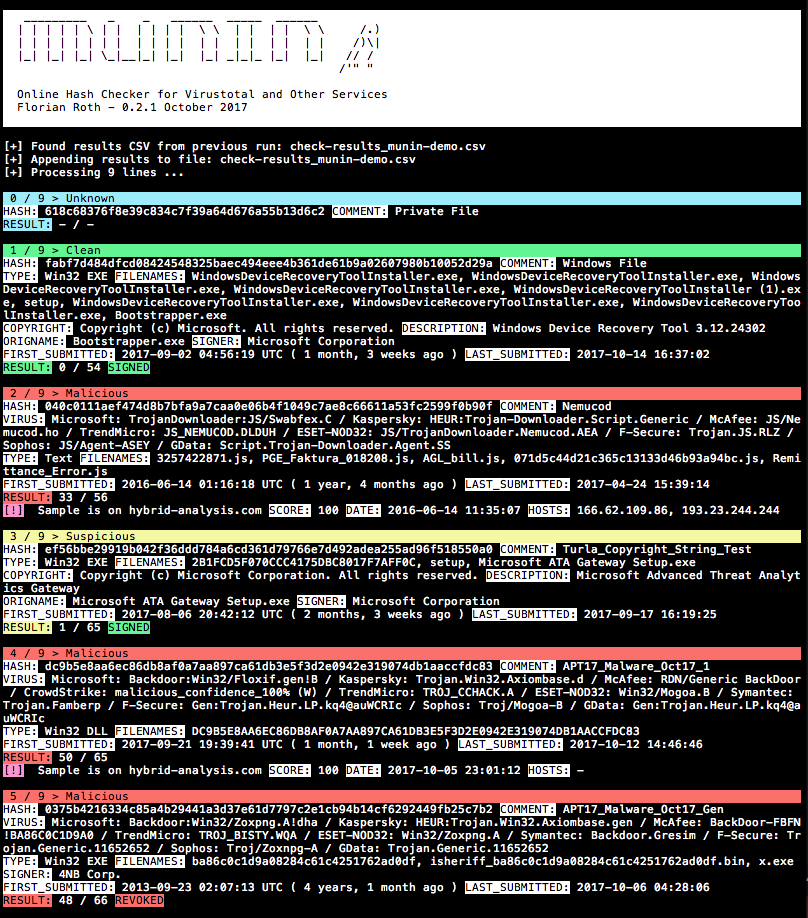
pip3 install -r requirements.txt (macOS पर --user जोड़ें)cp munin.ini my.ini (सहायता के लिए अनुभाग API कुंजियाँ प्राप्त करें देखें)python munin.py -i my.ini -f munin-demo.txtVirustotal Retrohunt परिणाम को संसाधित करें और जाँच करने से पहले पंक्तियों को क्रमबद्ध करें ताकि मिलान किए गए हस्ताक्षर ब्लॉक में जाँचे जा सकें
python3 munin.py -i my.ini -f ~/Downloads/retro_hunt
नमूनों वाली निर्देशिका को संसाधित करें और उनके हैश ऑनलाइन जाँचें
python3 munin.py -i my.ini -s ~/malware/case34
कमांड लाइन इंटरफ़ेस मोड का उपयोग करें (v0.14 में नया)
python3 munin.py -i my.ini
प्रोफ़ाइल > मेरी API कुंजी जाँचेंयहाँ पंजीकरण करें https://malshare.com/register.php
यहाँ पंजीकरण करें https://bazaar.abuse.ch/। आप अपनी API कुंजी अपने खाता अवलोकन में पा सकते हैं।
प्रोफ़ाइल > API कुंजी जाँचेंAuthkey का मान API कुंजी के रूप में उपयोग किया जाता हैवर्तमान में केवल ग्राहकों या आमंत्रित शोधकर्ताओं के लिए
https://valhalla.nextron-systems.com/
Hashlookup CIRCL का इंस्टेंस मुफ्त और सर्वोत्तम प्रयास के आधार पर प्रदान किया जाता है।
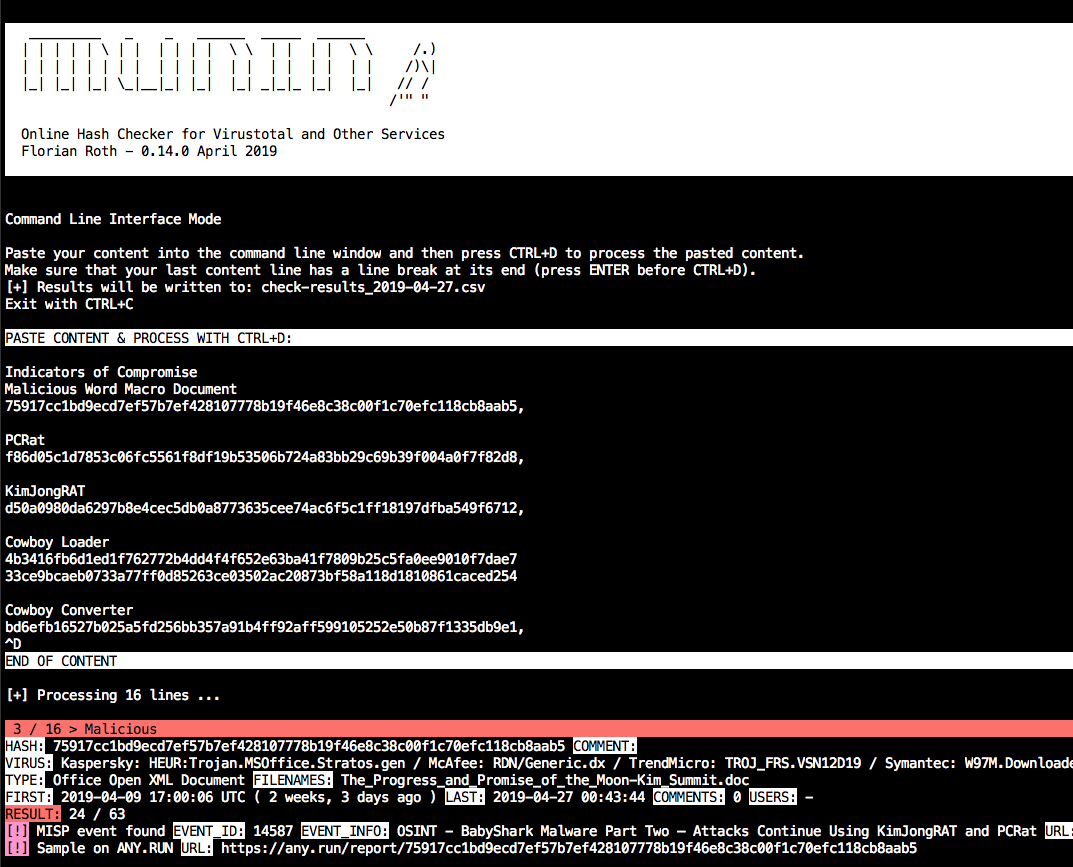
munin को --cli के साथ शुरू करें और निर्देशों का पालन करें।
उदाहरण:
python3 munin.py -i my.ini --cli
हैश मानों वाली सामग्री चिपकाएँ और फिर इनपुट को अंतिम रूप देने के लिए CTRL+D दबाएँ। अंतिम पंक्ति के अंत में एक पंक्ति विराम होना चाहिए।
डिफ़ॉल्ट रूप में, यह वर्तमान तिथि के साथ फ़ाइल नाम में एक CSV फ़ाइल बनाएगा।

munin को --web के साथ शुरू करें और वैकल्पिक रूप से एक पोर्ट चुनें -w port।
उदाहरण:
python3 munin.py -i my.ini --web -w 8080
वेब सेवा निम्नलिखित URL योजना में स्ट्रिंग की प्रतीक्षा करती है।
http://server:port/<string>
स्ट्रिंग बिना पंक्ति विराम के कोई भी स्ट्रिंग हो सकती है, जैसे
Emotet:1585ad28f7d1e0ca696e6c6c2f1d008a
ed01ebfbc9eb5bbea545af4d01bf5f1071661840480439c6e5babe8e080e41aa;IOC1
dc9b5e8aa6ec86db8af0a7aa897ca61db3e5f3d2e0942e319074db1aaccfdc83
परिणाम इस प्रकार दिखेगा:
{
"comment": "Emotet",
"commenter": "-",
"comments": "0",
"copyright": "Copyright (C) America Online, Inc. 1999 - 2004",
"description": "Utilities",
"expired": false,
"filenames": "sourcedev.exe, MISCUTIL, x8ykNnr_9WofXq7Nh_xuEzSPW.exe, jwuKBLWN681ztj6Zks.exe",
"filetype": "Win32 EXE",
"first_submitted": "2019-01-19 13:46:21 UTC ( 2 months, 2 weeks ago )",
"firstsubmission": "2019-01-19 13:46:21 UTC ( 2 months, 2 weeks ago )",
"harmless": false,
"hash": "1585ad28f7d1e0ca696e6c6c2f1d008a",
"hybrid_available": false,
"hybrid_compromised": "-",
"hybrid_date": "-",
"hybrid_score": "-",
"imphash": "2820d9bdc397f88a8a1e957e1a824482",
"last_submitted": "2019-02-27 09:44:03",
"malshare_available": false,
"md5": "1585ad28f7d1e0ca696e6c6c2f1d008a",
"misp_available": true,
"misp_events": "",
"misp_info": [],
"mssoft": false,
"origname": "-",
"positives": 48,
"rating": "malicious",
"res_color": "\u001b[41m",
"result": "48 / 64",
"revoked": false,
"sha1": "4561d0ad575d5f02fb06e062a37de15861c3bd89",
"sha256": "35e304d10d53834e3e41035d12122773c9a4d183a24e03f980ad3e6b2ecde7fa",
"signed": false,
"signer": "-",
"total": 64,
"urlhaus_available": true,
"vendor_results": {
"CrowdStrike": "win/malicious_confidence_100% (W)",
"ESET-NOD32": "a variant of Win32/Kryptik.GOUY",
"F-Secure": "Trojan.TR/AD.Emotet.pdiuu",
"GData": "Trojan.GenericKD.40960256",
"Kaspersky": "HEUR:Trojan.Win32.Generic",
"McAfee": "Emotet-FLL!1585AD28F7D1",
"Microsoft": "Trojan:Win32/Emotet.DN",
"Sophos": "Mal/Emotet-Q",
"Symantec": "Trojan.Gen.2",
"TrendMicro": "-"
},
"virus": "Microsoft: Trojan:Win32/Emotet.DN / Kaspersky: HEUR:Trojan.Win32.Generic / McAfee: Emotet-FLL!1585AD28F7D1 / CrowdStrike: win/malicious_confidence_100% (W) / ESET-NOD32: a variant of Win32/Kryptik.GOUY / Symantec: Trojan.Gen.2 / F-Secure: Trojan.TR/AD.Emotet.pdiuu / Sophos: Mal/Emotet-Q / GData: Trojan.GenericKD.40960256",
"virusbay_available": false,
"vt_positives": 48,
"vt_queried": false,
"vt_total": 64,
"vt_verbose_msg": "Scan finished, information embedded"
}
Virustotal को क्वेरी को थ्रॉटल करने की आवश्यकता है। इसलिए वेब सेवा एक कूलडाउन समय लागू करती है, जो 15 सेकंड की प्रतीक्षा समय से अन्य सभी प्लेटफार्मों को संसाधित करने में लगने वाले समय को घटाकर कम किया जाता है।
cooldown_time = vt_wait_time - process_time
कूलडाउन के दौरान, अनुरोध यह प्रतिक्रिया लौटाएँगे:
{"status": "VT cooldown active"}
कूलडाउन उन हैश के अनुरोध करने पर प्रासंगिक नहीं है जो पहले से लुकअप कैश में हैं।
मुनिन होस्ट और IP जाँचकर्ता स्क्रिप्ट (munin-host.py) IOC सूचियों में IP पतों और होस्ट/डोमेन नामों पर अधिक जानकारी प्राप्त करती है।
usage: munin-host.py [-h] [-f path] [-o output] [-m max-items] [-c cache-db]
[-i ini-file] [--nocache] [--nocsv] [--recursive]
[--download] [-d download_path] [--dups] [--noresolve]
[--ping] [--debug]
Virustotal Online Checker (IP/Domain)
optional arguments:
-h, --help show this help message and exit
-f path File to process (hash line by line OR csv with hash in
each line - auto-detects position and comment)
-o output Output file for results (CSV)
-m max-items Maximum number of items (urls, hosts, samples) to show
-c cache-db Name of the cache database file (default: vt-hosts-
db.json)
-i ini-file Name of the ini file that holds the API keys
--nocache Do not use the load the cache db (vt-check-cache.pkl)
--nocsv Do not write a CSV with the results
--recursive Process the resolved IPs as well
--download Try to download the URLs (directories with host/ip names)
-d download_path Store the downloads to the given directory
--dups Do not skip duplicate hashes
--noresolve Do not perform DNS resolve test on found domain names
--ping Perform ping check on IPs (speeds up process if many
public but internally routed IPs appear in text file)
--debug Debug output

डेमो फ़ाइल को पार्स करें, IP और होस्ट निकालें, केवल उन डोमेन की जाँच न करें जो अभी भी रिज़ॉल्वेबल हैं और दूरस्थ सिस्टम से सीधे नमूने डाउनलोड करें।
python3 munin-host.py -i your-key.ini -f ./munin-hosts-demo.txt --noresolve --download
IDS निगरानी वाले नेटवर्क में munin-host.py का उपयोग करने से कई अलर्ट होंगे क्योंकि munin-host.py दुर्भावनापूर्ण डोमेन के लिए DNS लुकअप करता है और इसमें दुर्भावनापूर्ण नमूने डाउनलोड करने का विकल्प है।
स्क्रिप्ट munin-host.py को मॉड्यूल pycurl की आवश्यकता है। macOS पर इसे काम करना कभी-कभी मुश्किल होता है क्योंकि इसमें openssl स्थापित होना आवश्यक है, जिसका उपयोग बिल्ड प्रक्रिया में किया जाता है।
यदि त्रुटियाँ आती हैं तो निम्नलिखित प्रयास करें (कुछ वातावरणों में pip3 की आवश्यकता होगी)
pip uninstall pycurl
brew update
brew reinstall openssl
export PKG_CONFIG_PATH="/usr/local/opt/openssl/lib/pkgconfig"
export LDFLAGS="-L/usr/local/opt/openssl/lib"
export CPPFLAGS="-I/usr/local/opt/openssl/include"
export PYCURL_SSL_LIBRARY=openssl
pip install pycurl --global-option="--with-openssl"
हुगिन स्क्रिप्ट (hugin.py) एक retrohunt में लौटाए गए सभी नमूनों की जानकारी प्राप्त करती और प्रदर्शित करती है। बड़ा लाभ यह है कि आपको प्रत्येक नमूना अनुरोध के बीच 15 सेकंड प्रतीक्षा नहीं करनी पड़ती, बल्कि Virustotal API के v3 के माध्यम से पूर्ण JSON परिणाम फ़ाइल खींच सकते हैं। इस तरह आपको अपने परिणाम तुरंत मिल जाते हैं। नुकसान यह है कि Any.run, Hybrid-Analysis, MISP या Valhalla जैसी अन्य सेवाओं से हुगिन के साथ पूछताछ नहीं की जाती।
usage: hugin.py [-h] [-r retrohunt-name] [-i ini-file]
[--csv-path CSV_PATH] [--debug] [--no-comments]
Retrohunt Checker
optional arguments:
-h, --help show this help message and exit
-r retrohunt-name Name for the queried retrohunt
-i ini-file Name of the ini file that holds the VT API key
--csv-path CSV_PATH Write a CSV with the results
--debug Debug output
--no-comments Skip VirusTotal comments
एक retrohunt को पार्स करें और परिणामों के साथ एक CSV फ़ाइल निर्यात करें।
python3 hugin.py -i config-with-your-key.ini -r retrohunt-123456789