
Skip to content
KitploitKITPLOIT
उपकरणब्लॉग
जमा करें
उपकरणब्लॉग
जमा करें

हैकिंग, पेनटेस्ट और साइबर सुरक्षा उपकरण आपके सुरक्षा शस्त्रागार के लिए!

Kitploit हैकिंग, साइबर सुरक्षा और पेंटेस्टिंग टूल्स की एक निर्देशिका है। कमजोरियों को खोजने, सिस्टम का विश्लेषण करने, परीक्षण को स्वचालित करने और अपनी सुरक्षा को मजबूत करने के लिए नवीनतम प्रोजेक्ट अपडेट खोजें।

··फ़ीड·संपर्क·गोपनीयता·© 2026 Kitploit

टूल निर्देशिका

श्रेणियाँ

सभी श्रेणियाँ देखें
Loading categories
GPT_Vuln-analyzer — ChatGPT API, Bard API, और Llama2, Python-Nmap, DNS Recon, PCAP और JWT recon मॉड्यूल का उपयोग करता है और Nmap स्कैन डेटा और DNS स्कैन जानकारी के आधार पर भेद्यता रिपोर्ट बनाने के लिए GPT3 मॉडल का उपयोग करता है। यह काफी हद तक सबडोमेन गणना भी कर सकता है। | Kitploit
उपकरण/GitHubGitHub/morpheuslord/gpt_vuln-analyzer
टोहीभेद्यता स्कैनरनेटवर्क मैपिंगपोर्ट स्कैनिंगभेद्यता विश्लेषणDNS और सबडोमेन गणनाजानकारी एकत्र करनापेनिट्रेशन टेस्टिंगDNS विश्लेषण

सबसे लोकप्रिय

सभी देखें →

हमारे समुदाय द्वारा सबसे अधिक उपयोग किए जाने वाले उपकरण खोजें।

सभी उपकरण खोजें

हमारे उपकरणों का संग्रह ब्राउज़ करें

सभी उपकरण देखें →
AI सुरक्षा
GitHubmorpheuslord/gpt_vuln-analyzer

GPT_Vuln-analyzer

ChatGPT API, Bard API, और Llama2, Python-Nmap, DNS Recon, PCAP और JWT recon मॉड्यूल का उपयोग करता है और Nmap स्कैन डेटा और DNS स्कैन जानकारी के आधार पर भेद्यता रिपोर्ट बनाने के लिए GPT3 मॉडल का उपयोग करता है। यह काफी हद तक सबडोमेन गणना भी कर सकता है।

रिपॉजिटरी देखें
595671 साल पहलेKitploit द्वारा समीक्षित
साझा करें

GPT_Vuln-analyzer

यह एक प्रूफ ऑफ कॉन्सेप्ट एप्लिकेशन है जो दर्शाता है कि कैसे AI का उपयोग करके कमजोरी विश्लेषण के लिए सटीक परिणाम उत्पन्न किए जा सकते हैं और साथ ही पहले से ही अत्यंत उपयोगी ChatGPT का आगे उपयोग संभव है, जो openai-api, python-nmap, dnsresolver पायथन मॉड्यूल का उपयोग करके बनाया गया है। साथ ही कोड के GUI संस्करण के लिए customtkinter और tkinter का उपयोग किया गया है। इस परियोजना में CLI और GUI इंटरफ़ेस भी है। यह नेटवर्क कमजोरी विश्लेषण, DNS एनुमरेशन और सबडोमेन एनुमरेशन करने में सक्षम है।

आवश्यकताएँ

  • Python 3.10 या उससे ऊपर
  • requirements.txt फ़ाइल में उल्लिखित सभी पैकेज
  • OpenAI API
  • Bard API (MakerSuite Palm)
  • Runpod सर्वरलेस एंडपॉइंट
  • IPGeolocation API
  • Docker
  • Wireshark और tshark (दोनों पथ में जोड़े गए)

उपयोग पैकेज

पैकेज आयात करें```bash

cd package && pip3/pip install .

root@kitploit:~
बस 3 पैकेजों में से किसी को भी इम्पोर्ट करें और फिर उसके अनुसार वेरिएबल्स को परिभाषित करें।```python
from GVA.scanner import NetworkScanner
from GVA.dns_recon import DNSRecon
from GVA.geo import geo_ip_recon
from GVA.jwt import JWTAnalyzer
from GVA.menus import Menus
from GVA.packet_analysis import PacketAnalysis
from GVA.ai_models import NMAP_AI_MODEL
from GVA.ai_models import DNS_AI_MODEL
from GVA.ai_models import JWT_AI_MODEL
from GVA.assets import Assets
from GVA.subdomain import sub_enum
from GVA import gui

# The components defined
dns_enum = DNSRecon()
geo_ip = geo_ip_recon()
p_ai_models = NMAP_AI_MODEL()
dns_ai_models = DNS_AI_MODEL()
port_scanner = NetworkScanner()
jwt_analizer = JWTAnalyzer()
sub_recon = sub_enum()
asset_codes = Assets()
packet_analysis = PacketAnalysis()

# KEEP IT BLANK IF YOU HAVE NO CLUE THE MENU WILL ASK TO FILL IT ONCE ACTIVE
lkey = "LLAMA API KEY"
lendpoint = "LLAMA ENDPOINT"
keyset = "AI API KEY"
output_loc = "OUTPUT LOCATION FOR PCAP"
threads = 200 # Default INT 200 but can be increased.
target_ip_hostname_or_token = "TARGET IP, HOSTNAME OR TOKEN"
profile_num = "PROFILE FOR NMAP SCAN"
ai_set = "AI OF CHOICE"
akey_set = "OPENAI API KEY"
bkey_set = "BARD API KEY"
ai_set_args = ""  # Keep it blank at any cost
llamakey = "LLAMA RUNPOD API KEY"
llamaendpoint = "LLAMA RUNPOD ENDPOINT"

Menus(
    lamma_key=lkey,
    llama_api_endpoint=lendpoint,
    initial_keyset=keyset,
    threads=threads,
    output_loc=output_loc,
    target=target_ip_hostname,
    profile_num=profile_num,
    ai_set=ai_set,
    openai_akey_set=akey_set,
    bard_key_set=bkey_set,
    ai_set_args=ai_set_args,
    llama_runpod_key=llamakey,
    llama_endpoint=llamaendpoint
)


gui.application()

update for passcracker in the package and gui is still in progress.

उपयोग CLI

  • पहले कोड के "OPENAI_API_KEY", "GEOIP_API_KEY" और "BARD_API_KEY" भाग को .env फ़ाइल में OpenAI API key और IPGeolocation API key से बदलें।
  • llama-api विकल्प या विशिष्ट llama runpod serverless endpoint deployment विकल्प के लिए आपको runpod से serverless endpoint ID और अपना RUNPOD API KEY दर्ज करना होगा।```python GEOIP_API_KEY = '' OPENAI_API_KEY = '' BARD_API_KEY = '' RUNPOD_ENDPOINT_ID = '' RUNPOD_API_KEY = ''
root@kitploit:~
- दूसरे, पैकेज इंस्टॉल करें```bash
pip3 install -r requirements.txt
or
pip install -r requirements.txt
  • कोड चलाएँ python3 gpt_vuln.py```bash

Regular Help Menu

python gpt_vuln.py --help

Rich Help Menu

python gpt_vuln.py --r help

Specify target with the attack

python gpt_vuln.py --target <IP/hostname/token> --attack dns/nmap/jwt

Specify target and profile for nmap

python gpt_vuln.py --target <IP/hostname/token> --attack nmap --profile <1-13> (Default:1)

Specify target for DNS no profile needed

python gpt_vuln.py --target <IP/hostname/token> --attack dns

Specify target for Subdomain Enumeration no profile used default list file

python gpt_vuln.py --target --attack sub

Specify target for Subdomain Enumeration no profile used custom list file

python gpt_vuln.py --target --attack sub --sub_list

Specify target for geolocation lookup

python gpt_vuln.py --target --attack geo

Specify PCAP file for packet analysis

python gpt_vuln.py --target --attack pcap --output --thread NUM of threads <200:default>

Specify the AI to be used for nmap

python gpt_vuln.py --target --attack nmap --profile <1-5> --ai llama /llama-api /bard / openai

Specify the AI to be used for dns

python gpt_vuln.py --target --attack dns --ai llama /llama-api /bard / openai

Specify the AI to be used for JWT analysis

python gpt_vuln.py --target --attack jwt --ai llama /llama-api /bard / openai

Password Cracker

python gpt_vuln.py --password_hash --wordlist_file --algorithm --parallel --complexity

Interactive step by step cli interface

python gpt_vuln.py --menu True

root@kitploit:~
#### CLI इंटरफ़ेस विकल्प```bash
  ________________________
| GVA Usage in progress... |
  ========================
                        \
                         \
                           ^__^
                           (oo)\_______
                           (__)\       )\/\
                               ||----w |
                               ||     ||
┏━━━━━━━━━┳━━━━━━━━━━━━━━━━┓
┃ Options ┃ Utility        ┃
┡━━━━━━━━━╇━━━━━━━━━━━━━━━━┩
│ 1       │ Nmap Enum      │
│ 2       │ DNS Enum       │
│ 3       │ Subdomain Enum │
│ 4       │ GEO-IP Enum    │
| 5       | JWT Analysis   |
| 6       | PCAP Analysis  |
| 6       | Hash Cracker   |
│ q       │ Quit           │
└─────────┴────────────────┘
Enter your choice:

CLI इंटरफ़ेस में कुछ बातें ध्यान देने योग्य हैं।

  • API कुंजियाँ मैन्युअल रूप से प्रदान की जानी चाहिए।
  • .env फ़ाइलों में परिभाषित कुंजियाँ args विकल्पों के साथ काम करती हैं।
  • प्रक्रिया समान है लेकिन अधिक संगठित है।

Bard पर मेरे विचार

यह OpenAI GPT3.5 के समान है लेकिन तेज़ है। यह समान उत्तर उत्पन्न कर सकता है लेकिन दोगुनी गति से।

समर्थित OS

कोड को समझना

प्रोफाइल:

प्रोफ़ाइल वह स्कैन प्रकार है जो nmap उपप्रक्रिया द्वारा निष्पादित किया जाएगा। IP या लक्ष्य argparse के माध्यम से प्रदान किया जाएगा। पहले, कस्टम nmap स्कैन चलाया जाता है जिसमें स्कैन जारी रखने के लिए सभी महत्वपूर्ण तर्क होते हैं। अगला, स्कैन डेटा nmap द्वारा संचालित डेटा के विशाल ढेर से निकाला जाता है। "scan" ऑब्जेक्ट में "tcp" के अंतर्गत उप-डेटा की एक सूची होती है, जिसमें प्रत्येक खोले गए पोर्ट के अनुसार लेबल किया जाता है। एक बार डेटा निकालने के बाद, डेटा एक प्रॉम्प्ट के माध्यम से openai API Davinci मॉडल को भेजा जाता है। प्रॉम्प्ट विशेष रूप से JSON आउटपुट के लिए पूछता है और डेटा को एक निश्चित तरीके से उपयोग करने के लिए भी कहता है।

OpenAI API को भेजे जाने वाले अनुरोध की पूरी संरचना प्रोग्राम के completion अनुभाग में डिज़ाइन की गई है।```python class NetworkScanner(): profile_arguments = { 1: '-Pn -sV -T4 -O -F', 2: '-Pn -T4 -A -v', 3: '-Pn -sS -sU -T4 -A -v', 4: '-Pn -p- -T4 -A -v', 5: '-Pn -sS -sU -T4 -A -PE -PP -PY -g 53 --script=vuln', 6: '-Pn -sV -p- -A', 7: '-Pn -sS -sV -O -T4 -A', 8: '-Pn -sC', 9: '-Pn -p 1-65535 -T4 -A -v', 10: '-Pn -sU -T4', 11: '-Pn -sV --top-ports 100', 12: '-Pn -sS -sV -T4 --script=default,discovery,vuln', 13: '-Pn -F' }

root@kitploit:~
def scanner(self, ip: Optional[str], profile: int, akey: Optional[str],
            bkey: Optional[str], lkey, lendpoint, AI: str) -> str:
    nm.scan(ip, arguments=self.profile_arguments.get(profile))
    json_data = nm.analyse_nmap_xml_scan()
    analyze = json_data["scan"]

    try:
        ai_methods = {
            'openai': lambda: AIModels.GPT_AI(akey, analyze),
            'bard': lambda: AIModels.BardAI(bkey, analyze),
            'llama': lambda: AIModels.Llama_AI(analyze, "local", lkey, lendpoint),
            'llama-api': lambda: AIModels.Llama_AI(analyze, "runpod", lkey, lendpoint)
        }

        if AI in ai_methods and (akey or bkey):
            response = ai_methods[AI]()
        else:
            raise ValueError("Invalid AI type or missing keys")

    except KeyboardInterrupt:
        print("Bye")
        quit()

    return str(response)
root@kitploit:~
# Regex

हम केवल कस्टम प्रॉम्प्ट से महत्वपूर्ण जानकारी निकालने के लिए Regex का उपयोग करते हैं, इससे अवांछित डेटा की कुल मात्रा कम हो जाती है।

AI कोड एक आउटपुट फ़ॉर्मेट परिभाषित करता है और AI को सटीकता बढ़ाने के लिए कुछ पूर्व निर्धारित नियमों का पालन करने का निर्देश देता है।
Regex निष्कर्षण कोड निष्कर्षण करता है और आगे मुख्य फ़ंक्शन उन्हें तालिकाओं में व्यवस्थित करता है।

## Bard AI का उपयोग करना

Bard AI का उपयोग करने के लिए आपको डेवलपर एक्सेस के लिए MakerSuit Palm API में साइन अप करना होगा और वहां से अपनी API कुंजी उत्पन्न करनी होगी। लिंक और यह कैसे काम करता है, इसके लिए आप इस वीडियो का उपयोग कर सकते हैं [MakerSuit](https://www.youtube.com/watch?v=Ce1AOchQMzA&t=128s)

API प्राप्त होने के बाद इसे `.env` फ़ाइल में जोड़ें और आप तैयार हैं।

## पुराना LLama2 कार्यान्वयन

LLama2 का उपयोग करना उपलब्ध सबसे अच्छे ऑफ़लाइन और मुफ़्त विकल्पों में से एक है। यह वर्तमान में सुधार के अधीन है, मैं एक प्रॉम्प्ट पर काम कर रहा हूं जो AI में साइबर सुरक्षा परिप्रेक्ष्य को बेहतर ढंग से शामिल करेगा।
मैं **@thisserand** और उनके [llama2_local](https://github.com/thisserand/llama2_local) रेपो और उनके YT वीडियो [YT_Video](https://youtu.be/WzCS8z9GqHw) का धन्यवाद करना चाहता हूं। वे बेहतरीन संसाधन थे। सच कहूं तो llama2 कोड 95% उनका है, मैंने बस कोड लिया और इसमें Flask API की कार्यक्षमता जोड़ दी।

AI की सटीकता ऑफ़लाइन और कोड के परीक्षण के बाहर बहुत अच्छी थी और openai या bard के बराबर थी, लेकिन कोड में रहते हुए इसे प्रॉम्प्टिंग और अन्य कारणों से कुछ समस्याओं का सामना करना पड़ा। मैं इसे ठीक करने का प्रयास करूंगा।
गति आपके सिस्टम और आपके पास मौजूद GPU और CPU कॉन्फ़िगरेशन पर निर्भर करती है। वर्तमान में यह `TheBloke/Llama-2-7B-Chat-GGML` मॉडल का उपयोग कर रहा है और इसे `portscanner` और `dnsrecon` फ़ाइलों के माध्यम से बदला जा सकता है।

अभी के लिए, llama कोड और स्कैन को अलग-अलग तरीके से संभाला जाता है। कुछ परीक्षणों के बाद, मैंने पाया कि llama को मेरे इच्छित तरीके से काम करने के लिए थोड़ा प्रशिक्षित करने की आवश्यकता है, इसलिए इसमें कुछ समय लगता है। मैं यह कैसे कर सकता हूं, इस पर कोई भी सुझाव इस रेपो की चर्चाओं में जोड़ा जा सकता है [Discussions Link](https://github.com/morpheuslord/GPT_Vuln-analyzer/discussions)। अभी के लिए, आउटपुट सभी डेटा की एक विभाजित सूची नहीं होगी, बल्कि AI द्वारा खोजी गई कमजोरियों या समस्याओं का स्पष्टीकरण होगा।

मॉडल उपयोग के लिए प्रॉम्प्ट इस प्रकार है:```prompt
[INST] <<SYS>> {user_instruction}<</SYS>> NMAP Data to be analyzed: {user_message} [/INST]

निर्देश इस प्रकार दिखते हैं:```prompt Do a NMAP scan analysis on the provided NMAP scan information. The NMAP output must return in a asked format accorging to the provided output format. The data must be accurate in regards towards a pentest report. The data must follow the following rules: 1) The NMAP scans must be done from a pentester point of view 2) The final output must be minimal according to the format given. 3) The final output must be kept to a minimal. 4) If a value not found in the scan just mention an empty string. 5) Analyze everything even the smallest of data. 6) Completely analyze the data provided and give a confirm answer using the output format. 7) mention all the data you found in the output format provided so that regex can be used on it. 8) avoid unnecessary explaination. 9) the critical score must be calculated based on the CVE if present or by the nature of the services open 10) the os information must contain the OS used my the target. 11) the open ports must include all the open ports listed in the data[tcp] and varifying if it by checking its states value. you should not negect even one open port. 12) the vulnerable services can be determined via speculation of the service nature or by analyzing the CVE's found. The output format: critical score: - Give info on the criticality "os information": - List out the OS information "open ports and services": - List open ports - List open ports services "vulnerable service": - Based on CVEs or nature of the ports opened list the vulnerable services "found cve": - List the CVE's found and list the main issues.

root@kitploit:~
Using the instruction set and the data provided via the prompt the llama AI generates its output.  
For the most usage I suggest you create a runpod serverless endpoint deployment of llama you can refer to this tutorial for that [ट्यूटोरियल](https://www.youtube.com/watch?v=Ftb4vbGUr7U). You can follow the tutorial for better use.  

### Llama2 Ollama  

This latest update uses an ollama docker image to implement the localized llama system and this increases the accuracy of the output for some reason maybe due to better configuration or something. I won't go into much detail about this but I will be working on the GPU integration part of the code for this so that we can add GPU power to the processing and make it more efficient. Thanks to @andr6 for starting the discussion, if anyone has a better understanding of this implementation feel free to improvise and create a PR.  

### Output  

#### JWT Output:```
                                            GVA Report for JWT
┏━━━━━━━━━━━━━━━━━━━━━┳━━━━━━━━━━━━━━━━━━━━━━━━━━━━━━━━━━━━━━━━━━━━━━━━━━━━━━━━━━━━━━━━━━━━━━━━━━━━━━━━━━┓
┃ Variables           ┃ Results                                                                          ┃
┡━━━━━━━━━━━━━━━━━━━━━╇━━━━━━━━━━━━━━━━━━━━━━━━━━━━━━━━━━━━━━━━━━━━━━━━━━━━━━━━━━━━━━━━━━━━━━━━━━━━━━━━━━┩
│ Algorithm Used      │ HS256                                                                            │
│ Header              │ eyJhbGciOiAiSFMyNTYiLCAidHlwIjogIkpXVCJ9                                         │
│ Payload             │ eyJzdWIiOiAiMTIzNDU2Nzg5MCIsICJuYW1lIjogIkpvaG4gRG9lIiwgImlhdCI6IDE1MTYyMzkwMjJ9 │
│ Signature           │                                                                                  │
│ PossibleAttacks     │ None identified                                                                  │
│ VulnerableEndpoints │ Unable to determine without additional information                               │
└─────────────────────┴──────────────────────────────────────────────────────────────────────────────────┘

Nmap आउटपुट:

OpenAI और Bard:```table

┏━━━━━━━━━━━━━━━━━━━━┳━━━━━━━━━━━━━━━━━━━━━━━━━━━━━━━━━━━━━━━━━━━━━━━━━━━━━┓ ┃ Elements ┃ Results ┃ ┡━━━━━━━━━━━━━━━━━━━━╇━━━━━━━━━━━━━━━━━━━━━━━━━━━━━━━━━━━━━━━━━━━━━━━━━━━━━┩ │ critical score │ High │ │ os information │ Microsoft Windows 11 21H2 │ │ open ports │ 80, 22, 445, 902, 912 │ │ open services │ http, ssh, microsoft-ds, vmware-auth, vmware-auth │ │ vulnerable service │ OpenSSH │ │ found cve │ CVE-2023-28531 │ └────────────────────┴─────────────────────────────────────────────────────┘

root@kitploit:~
##### LLama2```table
╭───────────────────────────────────────────── The GVA LLama2 ──────────────────────────────────────────────╮
│                                                                                                           │
│                                                                                                           │
│                                                                                                           │
│  Based on the provided NMAP data, I have conducted a thorough analysis of the target system's open ports  │
│  and services, vulnerabilities, and operating system information. Here is my findings: Critical Score:    │
│  The critical score for this target system is 7 out of 10. The system has several open ports that could   │
│  potentially be exploited, including port 80 (HTTP), port 135 (RPC), and port 445 (Microsoft DS). While   │
│  These ports are not necessarily vulnerable, they do indicate that the system is running services that    │
│  could be targeted by attackers. Additionally, the system has an outdated version of Microsoft IIS        │
│  running on port 80, which could be a potential vulnerability. OS Information: The target system is       │
│  running Microsoft Windows 10 1607. Open Ports and Services: The target system has the following open     │
│  ports:                                                                                                   │
│                                                                                                           │
│   • Port 80: HTTP (Microsoft IIS httpd)                                                                   │
│   • Port 135: RPC (Microsoft Windows RPC)                                                                 │
│   • Port 445: Microsoft DS                                                                                │
│   • Port 8000: Splunkd httpd All of these ports are currently open and have a state of "open".            │
│     Vulnerable Services: Based on the CVEs found in the NMAP data, there are several potential            │
│     vulnerabilities in the target system's services. These include:                                       │
│   • CVE-2019-1489: An elevation of privilege vulnerability in Microsoft IIS that could be exploited by    │
│     an attacker to gain control of the system. This vulnerability is related to the outdated version of   │
│     Microsoft IIS running on port 80.                                                                     │
│   • CVE-2017-0143: A remote code execution vulnerability in Microsoft Windows RPC that could be           │
│     exploited by an attacker to execute arbitrary code on the target system. This vulnerability is        │
│     related to the outdated version of Microsoft Windows RPC running on port 135.                         │
│   • CVE-2020-1362: A remote code execution vulnerability in Microsoft DS that could be exploited by an    │
│     attacker to execute arbitrary code on the target system. This vulnerability is related to the         │
│     outdated version of Microsoft DS running on port 445. Found CVEs: The following C                     │
│                                                                                                           │
╰───────────────────────────────────────────────────────────────────────────────────────────────────────────╯

DNS आउटपुट:

लक्ष्य jainuniversity.ac.in है```table ┏━━━━━━━━━━┳━━━━━━━━━━━━━━━━━━━━━━━━━━━━━━━━━━━━━━━━━━━━━━━━━━━━━━━━━━━━━━━━━━━━━━━━━━━━━━━━━━━━━━━━━━━━━━━━━━━━━━━━━━━━━━━━━━━┓ ┃ Elements ┃ Results ┃ ┡━━━━━━━━━━╇━━━━━━━━━━━━━━━━━━━━━━━━━━━━━━━━━━━━━━━━━━━━━━━━━━━━━━━━━━━━━━━━━━━━━━━━━━━━━━━━━━━━━━━━━━━━━━━━━━━━━━━━━━━━━━━━━━━┩ │ A │ 172.67.147.95", "104.21.41.132 │ │ AAA │ │ │ NS │ mia.ns.cloudflare.com.","paul.ns.cloudflare.com. │ │ MX │ 30 aspmx5.googlemail.com.","30 aspmx4.googlemail.com.","20 alt2.aspmx.l.google.com.","30 │ │ │ aspmx3.googlemail.com.","30 aspmx2.googlemail.com.","20 alt1.aspmx.l.google.com.","10 aspmx.l.google.com. │ │ PTR │ │ │ SOA │ mia.ns.cloudflare.com. dns.cloudflare.com. 2309618668 10000 2400 604800 3600 │ │ TXT │ atlassian-sending-domain-verification=5b358ce4-5ad3-404d-b4b4-005bf933603b","include:_spf.atlassian.net │ └──────────┴───────────────────────────────────────────────────────────────────────────────────────────────────────────────────┘

root@kitploit:~
#### GEO Location आउटपुट:```table
┏━━━━━━━━━━━━━━━━━━━━━━━━━━━━━┳━━━━━━━━━━━━━━━━━━━━━━━━━━━━━━━━━━━━━━━━━━━━━━━━━━━━━━━━━━━━━━━━━━━━━━━━━┓
┃ Identifiers                 ┃ Data                                                                    ┃
┡━━━━━━━━━━━━━━━━━━━━━━━━━━━━━╇━━━━━━━━━━━━━━━━━━━━━━━━━━━━━━━━━━━━━━━━━━━━━━━━━━━━━━━━━━━━━━━━━━━━━━━━━┩
│ ip                          │ █████████████                                                           │
│ continent_code              │ AS                                                                      │
│ continent_name              │ Asia                                                                    │
│ country_code2               │ IN                                                                      │
│ country_code3               │ IND                                                                     │
│ country_name                │ India                                                                   │
│ country_capital             │ New Delhi                                                               │
│ state_prov                  │ Haryana                                                                 │
│ state_code                  │ IN-HR                                                                   │
│ district                    │                                                                         │
│ city                        │ Gurugram                                                                │
│ zipcode                     │ 122003                                                                  │
│ latitude                    │ 28.44324                                                                │
│ longitude                   │ 77.05501                                                                │
│ is_eu                       │ False                                                                   │
│ calling_code                │ +91                                                                     │
│ country_tld                 │ .in                                                                     │
│ languages                   │ en-IN,hi,bn,te,mr,ta,ur,gu,kn,ml,or,pa,as,bh,sat,ks,ne,sd,kok,doi,mni,… │
│ country_flag                │ https://ipgeolocation.io/static/flags/in_64.png                         │
│ geoname_id                  │ 9148991                                                                 │
│ isp                         │ Bharti Airtel Limited                                                   │
│ connection_type             │                                                                         │
│ organization                │ Bharti Airtel Limited                                                   │
│ currency.code               │ INR                                                                     │
│ currency.name               │ Indian Rupee                                                            │
│ currency.symbol             │ ₹                                                                       │
│ time_zone.name              │ Asia/Kolkata                                                            │
│ time_zone.offset            │ 5.5                                                                     │
│ time_zone.current_time      │ 2023-07-11 17:08:35.057+0530                                            │
│ time_zone.current_time_unix │ 1689075515.057                                                          │
│ time_zone.is_dst            │ False                                                                   │
│ time_zone.dst_savings       │ 0                                                                       │
└─────────────────────────────┴─────────────────────────────────────────────────────────────────────────┘

PCAP आउटपुट```

Collecting Json Data Extracting IP details... Extracting DNS details... Extracting EAPOL details... Extracting TCP STREAMS details... TCP streams can take some time.. Total Streams combination: 252 Number of workers in progress: 250 Completed GVA Report for PCAP ┏━━━━━━━━━━━━━━━━━━━━━━━━━━━━━━━━━━━━┳━━━━━━━━━━━━━━━━━━━━━━━━━━━━━━━━━━━━━━━━━━━━━━━━━━━━━━━━━━━━━━━━━━━━━━━━━━━━━━━━━━━━━━━━━━━━━━━━━━━━┓ ┃ Identifiers ┃ Data ┃ ┡━━━━━━━━━━━━━━━━━━━━━━━━━━━━━━━━━━━━╇━━━━━━━━━━━━━━━━━━━━━━━━━━━━━━━━━━━━━━━━━━━━━━━━━━━━━━━━━━━━━━━━━━━━━━━━━━━━━━━━━━━━━━━━━━━━━━━━━━━━┩ │ PacketAnalysis.Services │ ['49943', '49958', '49934', '49944', '49931', '443', '49957'] │ │ PacketAnalysis.TCP Streams │ ['1', '4', '5', '2', '0', '3'] │ │ PacketAnalysis.Sources Address │ ['█████████████', '1.1.1.1', '█████████████', '█████████████', '█████████████', '█████████████'] │ │ PacketAnalysis.Destination Address │ ['█████████████', '1.1.1.1', '█████████████', '█████████████', '█████████████', '█████████████'] │ │ PacketAnalysis.DNS Resolved │ [] │ │ PacketAnalysis.DNS Query │ ['oneclient.sfx.ms'] │ │ PacketAnalysis.DNS Response │ ['oneclient.sfx.ms.edgekey.net', 'e9659.dspg.akamaiedge.net', 'oneclient.sfx.ms'] │ │ PacketAnalysis.EAPOL Data │ [] │ │ PacketAnalysis. Total Streams Data │ 126 │ └────────────────────────────────────┴────────────────────────────────────────────────────────────────────────────────────────────────────┘

root@kitploit:~
#### पासवर्ड क्रैकर आउटपुट```
  ________________________
| GVA Usage in progress... |
  ========================
                        \
                         \
                           ^__^
                           (oo)\_______
                           (__)\       )\/\
                               ||----w |
                               ||     ||
Cracking... ━━━━━━━━━━━━━━━━━━━━━━━━━━━━━━━━━━━━━━━━ 100% 0:00:00
╭────────────────────────────────────────────── The GVA Password Cracker  ──────────────────────────────────────────────╮      │                                                                                                                       │ │                                                                                                                       │
│                                        Password Cracked! Password:  legion                                            │
│                                                                                                                       │
╰───────────────────────────────────────────────────────────────────────────────────────────────────────────────────────╯

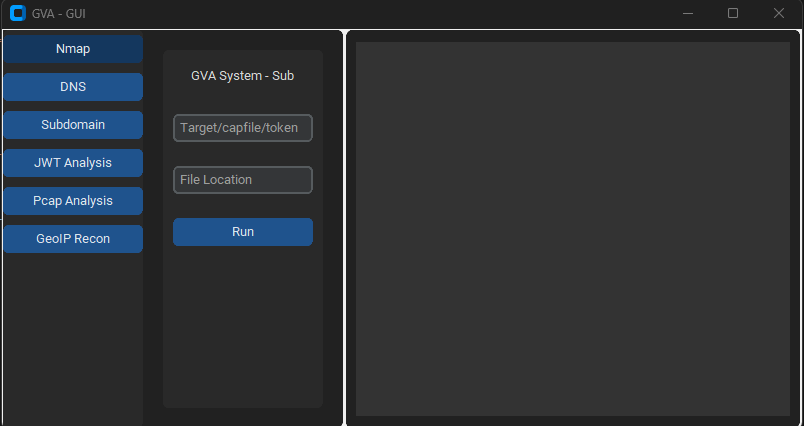
GUI का उपयोग

GUI कोड चलाने के लिए customtkinter का उपयोग करता है। इंटरफ़ेस सीधा है, केवल एक बात याद रखनी है:

  • dns attack का उपयोग करते समय प्रोफ़ाइल निर्दिष्ट न करें```bash python GVA_gui.py
root@kitploit:~
### प्रारंभिक विंडो

![init](https://assets.kitploit.com/production/public/readmes/5784/03469f428403c0d8ea05932b8b8854649e26d8b325f5468a7af7358d658464a7.png)

### NMAP विंडो

![nmap](https://assets.kitploit.com/production/public/readmes/5784/d795e0f39f8eda944ea6d76b5a150ef73bb4cce3f070e7bbcc76623f433b217a.png)

### DNS विंडो

![dns](https://assets.kitploit.com/production/public/readmes/5784/8420ce56819a0063f3268ca1650645fdd1faa3440c11b0cd699c6b66be67c00e.png)

### GEOIP विंडो

![geoip](https://assets.kitploit.com/production/public/readmes/5784/309b00715f1b645259b2d80f153f0b6be45622b34a4c4321cbd17cdaf707d1d8.png)

### PCAP विंडो

![pcap](https://assets.kitploit.com/production/public/readmes/5784/c25ebeee2e87706c1145382ade9142ca8449cfd77412000c849c1f000f115de0.png)

### सबडोमेन विंडो

![subdomain](https://assets.kitploit.com/production/public/readmes/5784/5ecffc756794097d6f77939aefbd029078575eb77ee3512add7174f03e7aacc2.png)

### JWT विंडो

![jwt](https://assets.kitploit.com/production/public/readmes/5784/f00ff0ff586b10ab3523a92bc62808875fcb4bb48fa3024f482614dc7dfdb3ef.png)
टूल डाउनलोड करें
PreviewCodeNameWorking StatusOpenAI StatusBard StatusLLama2 Status
LINGNU/Linux✅✅✅❌ [परीक्षण नहीं किया गया]
WINWindows✅✅✅✅
पैरामीटरवापसी डेटाविवरणNmap कमांड
p1jsonप्रभावी स्कैन-Pn -sV -T4 -O -F
p2jsonसरल स्कैन-Pn -T4 -A -v
p3jsonकम शक्ति स्कैन-Pn -sS -sU -T4 -A -v
p4jsonआंशिक गहन स्कैन-Pn -p- -T4 -A -v
p5jsonपूर्ण गहन स्कैन-Pn -sS -sU -T4 -A -PE -PP -PY -g 53 --script=vuln
p6jsonव्यापक सेवा संस्करण पहचान-Pn -sV -p- -A
p7jsonOS पहचान के साथ आक्रामक स्कैन-Pn -sS -sV -O -T4 -A
p8jsonसामान्य कमजोरियों के लिए स्क्रिप्ट स्कैन-Pn -sC
p9jsonगहन स्कैन, सभी TCP पोर्ट-Pn -p 1-65535 -T4 -A -v
p10jsonUDP स्कैन-Pn -sU -T4
p11jsonशीर्ष पोर्ट के लिए सेवा और संस्करण पहचान-Pn -sV --top-ports 100
p12jsonकमजोरियों के लिए NSE स्क्रिप्ट के साथ आक्रामक स्कैन-Pn -sS -sV -T4 --script=default,discovery,vuln
p13jsonसामान्य पोर्ट के लिए तेज़ स्कैन-Pn -F