
SSH सर्वर और क्लाइंट सुरक्षा ऑडिटिंग (बैनर, कुंजी विनिमय, एन्क्रिप्शन, MAC, संपीड़न, संगतता, सुरक्षा, आदि)
ssh-audit ssh सर्वर और क्लाइंट कॉन्फ़िगरेशन ऑडिटिंग के लिए एक उपकरण है।
jtesta/ssh-audit (v2.0+) ssh-audit का अद्यतन और अनुरक्षित संस्करण है, जो निष्क्रियता के कारण arthepsy/ssh-audit (v1.x) से फ़ोर्क किया गया है।
usage: ssh-audit.py [-h] [-4] [-6] [-b] [-c] [-d] [-g min1:pref1:max1[,min2:pref2:max2,...] / <x-y[:step]>] [-j] [-l {info,warn,fail}] [-L] [-M custom_policy.txt] [-m] [-n] [-P "Built-In Policy Name" / custom_policy.txt] [-p N] [-T targets.txt] [-t N] [-v] [--conn-rate-test N[:max_rate]] [--dheat N[:kex[:e_len]]] [--get-hardening-guide platform] [--list-hardening-guides] [--lookup alg1[,alg2,...]] [--skip-rate-test] [--socks5 host:port] [--threads N] [host]
positional arguments: host target hostname or IPv4/IPv6 address
optional arguments: -h, --help show this help message and exit -4, --ipv4 enable IPv4 (order of precedence) -6, --ipv6 enable IPv6 (order of precedence) -b, --batch batch output -c, --client-audit starts a server on port 2222 to audit client software config (use -p to change port; use -t to change timeout) -d, --debug enable debugging output -g min1:pref1:max1[,min2:pref2:max2,...] / <x-y[:step]>, --gex-test min1:pref1:max1[,min2:pref2:max2,...] / <x-y[:step]> conducts a very customized Diffie-Hellman GEX modulus size test. Tests an array of minimum, preferred, and maximum values, or a range of values with an optional incremental step amount -j, --json enable JSON output (use -jj to enable indentation for better readability) -l {info,warn,fail}, --level {info,warn,fail} minimum output level (default: info) -L, --list-policies list all the official, built-in policies. Combine with -v to view policy change logs -M custom_policy.txt, --make-policy custom_policy.txt creates a policy based on the target server (i.e.: the target server has the ideal configuration that other servers should adhere to), and stores it in the file path specified -m, --manual print the man page (Docker, PyPI, Snap, and Windows builds only) -n, --no-colors disable colors (automatic when the NO_COLOR environment variable is set) -P "Built-In Policy Name" / custom_policy.txt, --policy "Built-In Policy Name" / custom_policy.txt run a policy test using the specified policy (use -L to see built-in policies, or specify filesystem path to custom policy created by -M) -p N, --port N the TCP port to connect to (or to listen on when -c is used) -T targets.txt, --targets targets.txt a file containing a list of target hosts (one per line, format 'HOST[:PORT]'; for UNIX socket servers, use 'unix:///path/socket'). Use -p/--port to set the default port for all hosts. Use --threads to control concurrent scans -t N, --timeout N timeout (in seconds) for connection and reading (default: 5) -v, --verbose enable verbose output --conn-rate-test N[:max_rate] perform a connection rate test (useful for collecting metrics related to susceptibility of the DHEat vuln). Testing is conducted with N concurrent sockets with an optional maximum rate of connections per second --dheat N[:kex[:e_len]] continuously perform the DHEat DoS attack (CVE-2002-20001) against the target using N concurrent sockets. Optionally, a specific key exchange algorithm can be specified instead of allowing it to be automatically chosen. Additionally, a small length of the fake e value sent to the server can be chosen for a more efficient attack (such as 4). --get-hardening-guide platform retrieves the hardening guide for the specified platform name (use --list-hardening-guides to see list of available guides). --list-hardening-guides list all official, built-in hardening guides for common systems. Their full names can then be passed to --get-hardening-guide. Add -v to this option to view hardening guide change logs and prior versions. --lookup alg1[,alg2,...] looks up an algorithm(s) without connecting to a server. --skip-rate-test skip the connection rate test during standard audits (used to safely infer whether the DHEat attack is viable) --socks5 host:port connect via a SOCKS5 proxy (implies --skip-rate-test) --threads N number of threads to use when scanning multiple targets (-T/--targets) (default: 32)
* यदि दोनों IPv4 और IPv6 का उपयोग किया जाता है, तो प्राथमिकता का क्रम `-46` या `-64` का उपयोग करके निर्धारित किया जा सकता है।
* बैच फ़्लैग `-b` बिना हेडर और बिना खाली पंक्तियों के अनुभाग आउटपुट करेगा (verbose फ़्लैग को निहित करता है)।
* verbose फ़्लैग `-v` प्रत्येक पंक्ति में अनुभाग प्रकार और एल्गोरिदम नाम उपसर्ग के रूप में जोड़ेगा।
* एक exit कोड 0 तब लौटाया जाता है जब सभी एल्गोरिदम सुरक्षित माने जाते हैं (मानक ऑडिट के लिए), या जब कोई पॉलिसी जाँच पास होती है (पॉलिसी ऑडिट के लिए)।
बुनियादी सर्वर ऑडिटिंग:```
ssh-audit localhost
ssh-audit 127.0.0.1
ssh-audit 127.0.0.1:222
ssh-audit ::1
ssh-audit [::1]:222
ssh-audit unix:///run/ssh-unix-local/socket
कई सर्वरों के विरुद्ध एक मानक ऑडिट चलाने के लिए (लक्ष्यों को servers.txt में रखें, प्रत्येक पंक्ति पर एक, HOST[:PORT] के प्रारूप में):```
ssh-audit -T servers.txt
क्लाइंट कॉन्फ़िगरेशन का ऑडिट करने के लिए (डिफ़ॉल्ट रूप से पोर्ट 2222/tcp पर सुनता है; `ssh -p 2222 anything@localhost` का उपयोग करके कनेक्ट करें):```
ssh-audit -c
क्लाइंट कॉन्फ़िगरेशन का ऑडिट करने के लिए, पोर्ट 4567/tcp पर एक लिसनर के साथ:``` ssh-audit -c -p 4567
सभी आधिकारिक अंतर्निहित नीतियों को सूचीबद्ध करने के लिए (संकेत: `-P`/`--policy` के साथ परिणामी नीति नामों का उपयोग करें):```
ssh-audit -L
किसी सर्वर पर नीति ऑडिट चलाने के लिए:``` ssh-audit -P ["policy name" | path/to/server_policy.txt] targetserver
किसी क्लाइंट के विरुद्ध पॉलिसी ऑडिट चलाने के लिए:```
ssh-audit -c -P ["policy name" | path/to/client_policy.txt]
कई सर्वरों के विरुद्ध नीति ऑडिट चलाने के लिए:``` ssh-audit -T servers.txt -P ["policy name" | path/to/server_policy.txt]
किसी लक्ष्य सर्वर के आधार पर नीति बनाने के लिए (जिसे मैन्युअल रूप से संपादित किया जा सकता है):```
ssh-audit -M new_policy.txt targetserver
DHEat CPU exhaustion DoS हमले (CVE-2002-20001) को 10 समवर्ती सॉकेट्स का उपयोग करके किसी लक्ष्य के विरुद्ध चलाने के लिए:``` ssh-audit --dheat=10 targetserver
DHEat हमले को `diffie-hellman-group-exchange-sha256` कुंजी विनिमय एल्गोरिथ्म का उपयोग करके चलाने के लिए:```
ssh-audit --dheat=10:diffie-hellman-group-exchange-sha256 targetserver
diffie-hellman-group-exchange-sha256 कुंजी विनिमय एल्गोरिथम के साथ-साथ बहुत छोटी लेकिन गैर-मानक पैकेट लंबाई का उपयोग करके DHEat हमले को चलाने के लिए (इसके परिणामस्वरूप समान CPU थकावट हो सकती है, लेकिन प्रति सेकंड बहुत कम बाइट्स भेजे जाते हैं):```
ssh-audit --dheat=10:diffie-hellman-group-exchange-sha256:4 targetserver
## स्क्रीनशॉट
### सर्वर मानक ऑडिट उदाहरण
नीचे बिना हार्डनिंग वाली OpenSSH v5.3 सेवा से कनेक्ट करते समय मानक सर्वर-ऑडिट आउटपुट का स्क्रीनशॉट दिया गया है:

### सर्वर पॉलिसी ऑडिट उदाहरण
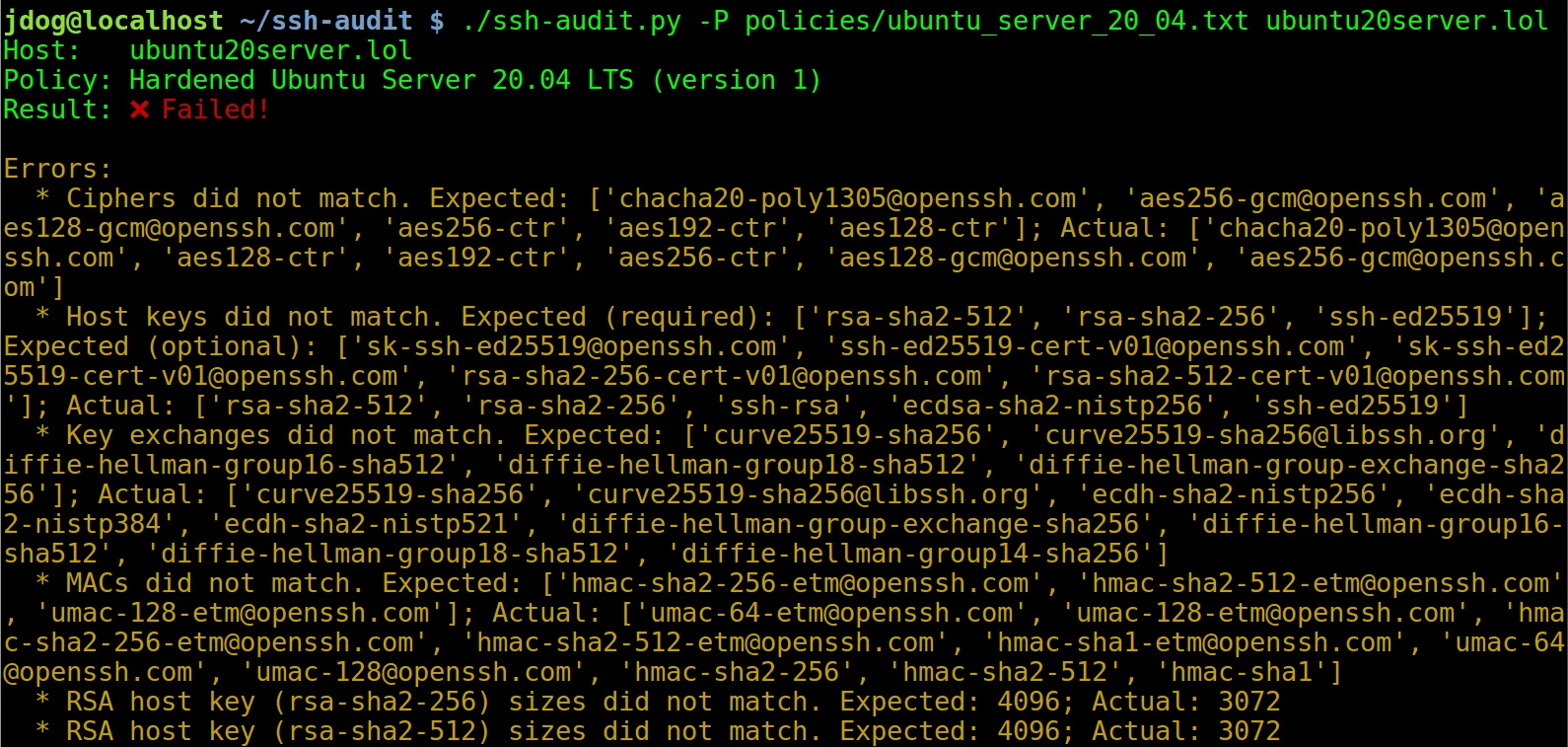
नीचे बिना हार्डनिंग वाली Ubuntu Server 20.04 मशीन से कनेक्ट करते समय पॉलिसी ऑडिट आउटपुट का स्क्रीनशॉट दिया गया है (संकेत: `-P`/`--policy` के साथ उपयोग करने हेतु अंतर्निर्मित पॉलिसियों के नाम देखने के लिए `-L`/`--list-policies` का उपयोग करें):

हार्डनिंग गाइड में दिए गए चरणों को लागू करने के बाद, आउटपुट निम्नलिखित बन जाता है:

### क्लाइंट मानक ऑडिट उदाहरण
नीचे बिना हार्डनिंग वाले OpenSSH v7.2 क्लाइंट के कनेक्ट होने पर क्लाइंट-ऑडिट आउटपुट का स्क्रीनशॉट दिया गया है:

## हार्डनिंग गाइड
सर्वर और क्लाइंट कॉन्फ़िगरेशन को हार्डन करने के लिए गाइड उपकरण में निर्मित हैं (`--list-hardening-guides` और `--get-hardening-guide` विकल्प देखें)। इसके अलावा, वे ऑनलाइन भी उपलब्ध हैं: [https://www.ssh-audit.com/hardening_guides.html](https://www.ssh-audit.com/hardening_guides.html)
## पूर्व-निर्मित पैकेज
Windows के लिए पूर्व-निर्मित पैकेज उपलब्ध हैं ([Releases](https://github.com/jtesta/ssh-audit/releases) पृष्ठ देखें), PyPI, Snap और Docker:
PyPI से स्थापित करने के लिए:```
$ pip3 install ssh-audit
Snap पैकेज स्थापित करने के लिए:``` $ snap install ssh-audit
Dockerhub से इंस्टॉल करने के लिए:```
$ docker pull docker.io/positronsecurity/ssh-audit
(फिर इसके साथ चलाएँ: docker run -it --rm -p 2222:2222 docker.io/positronsecurity/ssh-audit 10.1.1.1)
विभिन्न अन्य प्लेटफ़ॉर्म पैकेजों की स्थिति नीचे पाई जा सकती है (Repology के माध्यम से):
सुविधा के लिए, कमांड-लाइन टूल के शीर्ष पर एक वेब फ्रंट-एंड https://www.ssh-audit.com/ पर उपलब्ध है।
--list-hardening-guides और --get-hardening-guide)। पहले, वे केवल https://ssh-audit.com/hardening_guides.html पर उपलब्ध थे, लेकिन अब सुविधा के लिए वे अंतर्निहित हैं; आंशिक श्रेय oam7575।allow_hostkey_subset_and_reordering नीति विकल्प जोड़ा गया।getopt मॉड्यूल से argparse में स्थानांतरित किया गया; आंशिक श्रेय oam7575।-b) अब स्वचालित रूप से वर्बोज़ मोड सक्षम नहीं करता, क्योंकि कभी-कभी परिणाम भ्रामक होते थे; उपयोगकर्ता फ़्लैग का उपयोग करके अभी भी वर्बोज़ मोड को स्पष्ट रूप से सक्षम कर सकते हैं।-P और -T विकल्पों के साथ एक साथ चलाते समय क्रैश ठीक की गई।--conn-rate-test सुविधा ठीक की गई।-T/--targets का उपयोग करके), -p/--port विकल्प अब डिफ़ॉल्ट पोर्ट के रूप में उपयोग किया जाएगा (/ न दिए जाने पर 22 पर सेट होगा)। फ़ाइल में निर्दिष्ट होस्ट स्पष्ट पोर्ट संख्या (जैसे: "host1:1234") से इस डिफ़ॉल्ट को ओवरराइड कर सकते हैं। उदाहरण के लिए, का उपयोग करते समय, के सभी होस्ट जिनमें स्पष्ट रूप से पोर्ट संख्या शामिल नहीं है, डिफ़ॉल्ट रूप से 222 का उपयोग करेंगे; (बिना के) का उपयोग करते समय, सभी होस्ट डिफ़ॉल्ट 22 का उपयोग करेंगे।--dheat विकल्प; CVE-2002-20001)।ecdsa-sha2-nistp* CA हस्ताक्षरों की पार्सिंग ठीक की गई। इसके अतिरिक्त, मानक होस्ट कुंजियों की तरह, उन्हें अब संभावित रूप से बैक-डोर्ड के रूप में चिह्नित किया जाता है।-m, --manual) अब Windows बिल्ड के अतिरिक्त Docker, PyPI और Snap बिल्डों पर भी उपलब्ध है।python:3-slim से python:3-alpine में बदला गया, जिसके परिणामस्वरूप छवि आकार में 59% की कमी आई; श्रेय Daniel Thamdrup।-L -v का उपयोग करें)।allow_algorithm_subset_and_reordering निर्देश का समर्थन करती हैं। यह एक आधार रेखा नीति बनाने की अनुमति देता है जहाँ लक्ष्य वैकल्पिक रूप से सख्त नियंत्रण लागू कर सकते हैं; आंशिक श्रेय ।[email protected] और ssh-ed25519 को सभी प्रमाणपत्र प्रकारों के अंत में स्थानांतरित किया गया।additional_notes फ़ील्ड जोड़ा गया।ecdsa-sha2-curve25519, ecdsa-sha2-nistb233, ecdsa-sha2-nistb409, ecdsa-sha2-nistk163, ecdsa-sha2-nistk233, ecdsa-sha2-nistk283, , , , , , ।[email protected] से प्रयोगात्मक चेतावनी टैग हटा दिया गया।-g और --gex-test जोड़े गए; श्रेय Adam Russell।[email protected], [email protected], [email protected], , , , , , , , , , , , , , , , , , , , , , , , , , , , , , ।-jj उपयोग करने पर JSON को इंडेंट के साथ प्रिंट करता है (डिबगिंग के लिए उपयोगी)।-d/--debug विकल्प जोड़ा गया; श्रेय Adam Russell।rsa-sha2-512 और rsa-sha2-256 शामिल हों।gss-gex-sha1-eipGX3TCiQSrx573bT1o1Q==, gss-group1-sha1-eipGX3TCiQSrx573bT1o1Q== और gss-group14-sha1-eipGX3TCiQSrx573bT1o1Q==।hmac-ripemd160-96, AEAD_AES_128_GCM और AEAD_AES_256_GCM।-m/--manual); श्रेय Adam Russell।[email protected]।[email protected] और [email protected] होस्ट कुंजी प्रकारों के लिए सार्वजनिक कुंजी आकार पार्स करता है।[email protected] को विफलता के रूप में चिह्नित करता है।--lookup) अब समान एल्गोरिथमों की केस-असंवेदनशील खोज करता है; श्रेय Adam Russell।[email protected]।-L/--list-policies, -M/--make-policy और -P/--policy)। गहन ट्यूटोरियल के लिए, देखें https://www.positronsecurity.com/blog/2020-09-27-ssh-policy-configuration-checks-with-ssh-audit/।ssh-audit.1 फ़ाइल)।--lookup); श्रेय Adam Russell।ssh-rsa1, [email protected], , , , , , , , , ।[email protected], [email protected]।des, 3des।-c / --client-audit विकल्प देखें)।-j / --json विकल्प देखें; श्रेय Andreas Jaggi)।gss-group1-sha1-toWM5Slw5Ew8Mqkay+al2g==, gss-gex-sha1-toWM5Slw5Ew8Mqkay+al2g==, gss-group14-sha1-, gss-group14-sha1-toWM5Slw5Ew8Mqkay+al2g==, gss-group14-sha256-toWM5Slw5Ew8Mqkay+al2g==, gss-group15-sha512-toWM5Slw5Ew8Mqkay+al2g==, diffie-hellman-group15-sha256, ecdh-sha2-1.3.132.0.10, ।[email protected], [email protected], [email protected], diffie-hellman-group16-sha256, diffie-hellman-group17-sha512।des-cbc-ssh1, blowfish-ctr, twofish-ctr।hmac-sha2-56, hmac-sha2-224, hmac-sha2-384, , , , , , , ।-vunix:///path/to/socket से निर्दिष्ट करें)।--socks5 host:port से निर्दिष्ट करें); आंशिक श्रेय Michał Majchrowicz।mlkem768nistp256-sha256, mlkem1024nistp384-sha384।[email protected], mldsa-44, [email protected], mldsa-65, mldsa-87, ssh-mldsa-44, ssh-mldsa-65, ssh-mldsa-87, ssh-mldsa44, ssh-mldsa65, ssh-mldsa87।AEAD_CAMELLIA_128_GCM, AEAD_CAMELLIA_256_GCM।-p--port-T targets.txt -p 222targets.txt-T targets.txt-pgrasshopper-ctr128।mlkem768x25519-sha256, sntrup761x25519-sha512।allow_larger_keys निर्देश का समर्थन करती हैं। यह एक आधार रेखा नीति बनाने की अनुमति देता है जहाँ लक्ष्य वैकल्पिक रूप से सख्त नियंत्रण लागू कर सकते हैं; आंशिक श्रेय Damian Szuberski।NO_COLOR पर्यावरण चर सेट होने पर रंगीन आउटपुट अक्षम हो जाता है (देखें https://no-color.org/)।gss-nistp384-sha384-*।[email protected]।ecdsa-sha2-nistk409ecdsa-sha2-nistp224ecdsa-sha2-nistp192ecdsa-sha2-nistt571ssh-dsax509v3-sign-rsa-sha256[email protected], [email protected], [email protected], [email protected], [email protected], [email protected], [email protected], kexAlgoDH14SHA1, kexAlgoDH1SHA1, kexAlgoECDH256, kexAlgoECDH384, kexAlgoECDH521, sm2kep-sha2-nistp256, [email protected], [email protected]।[email protected], cast128-12-cbc, cast128-12-cfb, cast128-12-ecb, cast128-12-ofb, des-cfb, des-ecb, des-ofb।cbcmac-3des, cbcmac-aes, cbcmac-blowfish, cbcmac-des, cbcmac-rijndael, cbcmac-twofish, hmac-sha256-96, md5, md5-8, ripemd160, ripemd160-8, sha1, sha1-8, umac-128।nullpgp-sign-dsspgp-sign-rsaspki-sign-dssspki-sign-rsassh-rsa-sha2-256ssh-rsa-sha2-512x509v3-ecdsa-sha2-1.3.132.0.10x509v3-sign-dss-sha1x509v3-sign-rsa-sha1[email protected], diffie-hellman_group17-sha512, [email protected], [email protected], ecdh-sha2-1.2.840.10045.3.1.1, ecdh-sha2-1.2.840.10045.3.1.7, ecdh-sha2-1.3.132.0.1, ecdh-sha2-1.3.132.0.16, ecdh-sha2-1.3.132.0.26, ecdh-sha2-1.3.132.0.27, ecdh-sha2-1.3.132.0.33, ecdh-sha2-1.3.132.0.34, ecdh-sha2-1.3.132.0.35, ecdh-sha2-1.3.132.0.36, ecdh-sha2-1.3.132.0.37, ecdh-sha2-1.3.132.0.38, ecdh-sha2-4MHB+NBt3AlaSRQ7MnB4cg==, ecdh-sha2-5pPrSUQtIaTjUSt5VZNBjg==, ecdh-sha2-9UzNcgwTlEnSCECZa7V1mw==, ecdh-sha2-D3FefCjYoJ/kfXgAyLddYA==, ecdh-sha2-h/SsxnLCtRBh7I9ATyeB3A==, ecdh-sha2-m/FtSAmrV4j/Wy6RVUaK7A==, ecdh-sha2-mNVwCXAoS1HGmHpLvBC94w==, ecdh-sha2-qCbG5Cn/jjsZ7nBeR7EnOA==, ecdh-sha2-qcFQaMAMGhTziMT0z+Tuzw==, ecdh-sha2-VqBg4QRPjxx1EXZdV0GdWQ==, ecdh-sha2-wiRIU8TKjMZ418sMqlqtvQ==, ecdh-sha2-zD/b3hu/71952ArpUG4OjQ==, ecmqv-sha2, gss-13.3.132.0.10-sha256-*, gss-curve25519-sha256-*, gss-curve448-sha512-*, gss-gex-sha1-*, gss-gex-sha256-*, gss-group14-sha1-*, gss-group14-sha256-*, gss-group15-sha512-*, gss-group16-sha512-*, gss-group17-sha512-*, gss-group18-sha512-*, gss-group1-sha1-*, gss-nistp256-sha256-*, gss-nistp384-sha256-*, gss-nistp521-sha512-*, [email protected], [email protected]।3des-cfb, 3des-ecb, 3des-ofb, blowfish-cfb, blowfish-ecb, blowfish-ofb, [email protected], [email protected], [email protected], [email protected], [email protected], [email protected], cast128-cfb, cast128-ecb, cast128-ofb, [email protected], idea-cfb, idea-ecb, idea-ofb, [email protected], [email protected], [email protected], [email protected], [email protected], [email protected], twofish-cfb, twofish-ecb, twofish-ofb[email protected], [email protected], [email protected], [email protected], hmac-whirlpool।ssh-gost2001ssh-gost2012-256ssh-gost2012-512spki-sign-rsassh-ed448x509v3-ecdsa-sha2-nistp256x509v3-ecdsa-sha2-nistp384x509v3-ecdsa-sha2-nistp521x509v3-rsa2048-sha256diffie-hellman-group1-sha256, kexAlgoCurve25519SHA256, Curve25519SHA256, gss-group14-sha256-, gss-group15-sha512-, gss-group16-sha512-, gss-nistp256-sha256-, gss-curve25519-sha256-।blowfish, AEAD_AES_128_GCM, AEAD_AES_256_GCM, [email protected], [email protected]।[email protected], hmac-sha3-224, [email protected]।### v2.2.0 (2020-03-11)ssh-rsa होस्ट कुंजी प्रकार को व्यावहारिक SHA-1 टकरावों के कारण कमजोर के रूप में चिह्नित किया गया।ecdsa-sha2-1.3.132.0.10, x509v3-sign-dss, x509v3-sign-rsa, [email protected], x509v3-ssh-dss, x509v3-ssh-rsa, [email protected], [email protected], [email protected], और [email protected]।[email protected], [email protected], [email protected], [email protected], [email protected], [email protected], ecdh-sha2-curve25519, ecdh-sha2-nistb233, ecdh-sha2-nistb409, ecdh-sha2-nistk163, ecdh-sha2-nistk233, ecdh-sha2-nistk283, ecdh-sha2-nistk409, ecdh-sha2-nistp192, ecdh-sha2-nistp224, ecdh-sha2-nistt571, gss-gex-sha1-, और gss-group1-sha1-।camellia128-cbc, camellia128-ctr, camellia192-cbc, camellia192-ctr, camellia256-cbc, camellia256-ctr, aes128-gcm, aes256-gcm, और chacha20-poly1305।aes128-gcm और aes256-gcm।curve448-sha512ecdsa-sha2-1.3.132.0.10।idea-cbc, serpent128-cbc, serpent192-cbc, serpent256-cbc।[email protected], [email protected], hmac-ripemd, [email protected], [email protected], [email protected]।hmac-sha3-256hmac-sha3-384hmac-sha3-512hmac-sha256hmac-sha512-t / --timeout) जोड़ा गया।




