
विस्तारणीय Azure सुरक्षा उपकरण - दस्तावेज़ीकरण
विस्तारणीय Azure सुरक्षा उपकरण (बाद में E.A.S.T के रूप में संदर्भित) Azure और कुछ हद तक Azure AD सुरक्षा नियंत्रणों का आकलन करने का उपकरण है। EAST का प्राथमिक उपयोग मामला Azure आकलन में मूल्यांकन के लिए सुरक्षा डेटा संग्रह है। इस जानकारी (JSON सामग्री) का उपयोग विभिन्न रिपोर्टिंग उपकरणों में किया जा सकता है, जिसका उपयोग हम डेटा को और सहसंबंधित और जांचने के लिए करते हैं।
यह उपकरण MIT लाइसेंस के अंतर्गत लाइसेंस प्राप्त है।
विषय सूची
v 0.5
miGeneral.js हैquery.jsv 0.4
पूर्वावलोकन शाखा शुरू की गई
परिवर्तन:
इंस्टॉलेशन अब निर्भरताओं के संबंध में Azure Cloud Shell के अद्यतन संस्करण के उपयोग को ध्यान में रखता है (Cloud Shell में अब Node.JS v 16 संस्करण स्थापित है)
सलाह के अनुसार Databricks क्लस्टर प्रकारों की जाँच
Content.json में अब कुंजी और सामग्री आधारित सॉर्टिंग है। यह git diff HEAD^1 ¹ के साथ डेल्टा जाँच करने में सक्षम बनाता है क्योंकि content.json में परिणामों का पूर्व निर्धारित क्रम है
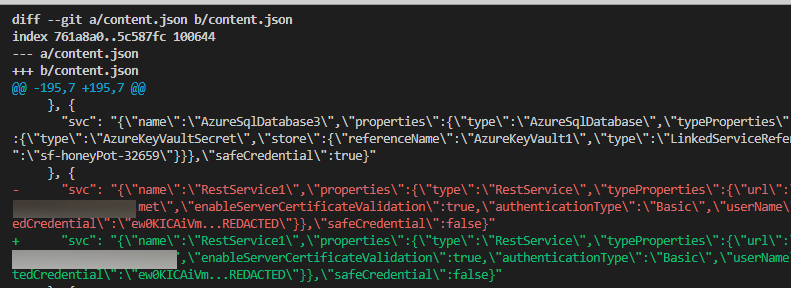
¹ ⚠️ सावधानी का शब्द, यदि content.json के डेल्टा की जाँच करना चाहते हैं, तो content.json को
.gitignoreसे "अअनदेखा" करने की आवश्यकता होगी, जिससे परिणाम आपके द्वारा कॉन्फ़िगर किए गए किसी भी अपस्ट्रीम के सामने आ जाएंगे।इस सुविधा का सावधानी से उपयोग करें, और सुनिश्चित करें कि आपने जिस शाखा के लिए इस सुविधा का उपयोग कर रहे हैं, उसके लिए सार्वजनिक अपस्ट्रीम सेट नहीं किया गया है
बड़े डेटासेट के साथ संभावित दौड़ स्थितियों से बचने के लिए प्रोग्रामिंग पैटर्न में बदलाव। यह मुख्य रूप से for await-शैली लूप में var से let के उपयोग में बदलाव है
⚠️ उपकरण की वर्तमान स्थिति बीटा है
exec() का उपयोग करता है - जबकि मैंने सभी पथों की समीक्षा नहीं की है, मेरा मानना है कि शेलकोड निष्पादन प्राप्त करना तुच्छ है। यह उपकरण शत्रुतापूर्ण इनपुट नहीं मानता है, इसलिए सिफारिश है कि आप पहले उनकी समीक्षा किए बिना लॉन्च तर्कों को कमांड लाइन में पेस्ट न करें।कोड की मात्रा कम करने के लिए हम संचालन और सौंदर्यशास्त्र के लिए निम्नलिखित निर्भरताओं का उपयोग करते हैं (इन शानदार पैकेजों के अनुरक्षकों को बधाई)
उपकरण चलाने के लिए अन्य निर्भरताएँ: यदि आप इसे Azure Cloud Shell में चलाने की योजना बना रहे हैं तो आपको Azure CLI स्थापित करने की आवश्यकता नहीं है:
Azure Cloud Shell (BASH) या applicable Linux Distro / WSL
| आवश्यकता | विवरण | स्थापना |
|---|---|---|
| ✅ AZ CLI | AZCLI उपयोग | curl -sL https://aka.ms/InstallAzureCLIDeb | sudo bash |
| ✅ Node.js runtime 14 | EAST के लिए Node.js रनटाइम | NVM के साथ स्थापित करें |
EAST तीन श्रेणियों के नियंत्रण प्रदान करता है: मूल, उन्नत और संयुक्त
मशीन-पठनीय नियंत्रण इस प्रकार दिखता है, प्रकार (मूल/उन्नत/संयुक्त) की परवाह किए बिना:```json { "name": "fn-sql-2079", "resource": "/subscriptions/6193053b-408b-44d0-b20f-4e29b9b67394/resourcegroups/rg-fn-2079/providers/microsoft.web/sites/fn-sql-2079", "controlId": "managedIdentity", "isHealthy": true, "id": "/subscriptions/6193053b-408b-44d0-b20f-4e29b9b67394/resourcegroups/rg-fn-2079/providers/microsoft.web/sites/fn-sql-2079", "Description": "\r\n Ensure The Service calls downstream resources with managed identity", "metadata": { "principalId": { "type": "SystemAssigned", "tenantId": "033794f5-7c9d-4e98-923d-7b49114b7ac3", "principalId": "cb073f1e-03bc-440e-874d-5ed3ce6df7f8" }, "roles": [{ "role": [{ "properties": { "roleDefinitionId": "/subscriptions/6193053b-408b-44d0-b20f-4e29b9b67394/providers/Microsoft.Authorization/roleDefinitions/b24988ac-6180-42a0-ab88-20f7382dd24c", "principalId": "cb073f1e-03bc-440e-874d-5ed3ce6df7f8", "scope": "/subscriptions/6193053b-408b-44d0-b20f-4e29b9b67394/resourceGroups/RG-FN-2079", "createdOn": "2021-12-27T06:03:09.7052113Z", "updatedOn": "2021-12-27T06:03:09.7052113Z", "createdBy": "4257db31-3f22-4c0f-bd57-26cbbd4f5851", "updatedBy": "4257db31-3f22-4c0f-bd57-26cbbd4f5851" }, "id": "/subscriptions/6193053b-408b-44d0-b20f-4e29b9b67394/resourceGroups/RG-FN-2079/providers/Microsoft.Authorization/roleAssignments/ada69f21-790e-4386-9f47-c9b8a8c15674", "type": "Microsoft.Authorization/roleAssignments", "name": "ada69f21-790e-4386-9f47-c9b8a8c15674", "RoleName": "Contributor" }] }] }, "category": "Access" },
### मूल
मूल नियंत्रणों में प्रारंभिक ARM ऑब्जेक्ट पर "चालू/बंद" टॉगल के सरल बूलियन सेटिंग्स की जाँच शामिल है।
**उदाहरण: Azure Container Registry adminUser**
[acr_adminUser](https://github.com/jsa2/east/blob/HEAD/providers/microsoft.containerregistry/functions/acr_adminUser.js)
Portal|EAST
-|-
 | ``if (item.properties?.adminUserEnabled == false ){returnObject.isHealthy = true }``
### उन्नत
उन्नत नियंत्रणों में प्रारंभिक ARM ऑब्जेक्ट से परे जाँच शामिल है। इसमें अक्सर दायरे में आने वाले संसाधन और अन्य सेवाओं से इसके संबंध के बारे में अधिक जानकारी प्राप्त करने के लिए नए अनुरोध किए जाते हैं।
**उदाहरण: Role Assignments**
सब्सक्रिप्शन की भूमिका असाइनमेंट की जाँच के अलावा, MFA के लिए Azure AD Conditional Access Reporting के माध्यम से अतिरिक्त जाँच की जाती है, और यह कि विशेषाधिकार प्राप्त खाते केवल पासवर्ड (क्लाइंट सीक्रेट वाले SPN) द्वारा संरक्षित नहीं हैं।
**उदाहरण: Azure Data Factory**
[ADF_pipeLineRuns](https://github.com/jsa2/east/blob/HEAD/providers/microsoft.datafactory/functions/ADF_pipeLineRuns.js)
Azure Data Factory पाइपलाइन मैपिंग पाइपलाइनों -> गतिविधियों -> और डेटा लक्ष्यों को एक साथ जोड़ती है और फिर उक्त गतिविधियों के रन हिस्ट्री के माध्यम से लॉग पर लीक हुए सीक्रेट की जाँच करती है।

---
### संयुक्त
संयुक्त नियंत्रण एक या अधिक नए नियंत्रण बनाने के लिए पाइपलाइन से दो या अधिक नियंत्रण परिणामों को जोड़ते हैं। कंपोजिट का उपयोग EAST के लिए दो उपयोग मामलों को हल करता है:
1. आप पाइपलाइन में नियंत्रण परिणामों के वापस आने के क्रम की गारंटी नहीं दे सकते।
2. आपको एकल जाँच से एक से अधिक नियंत्रण परिणाम वापस करने की आवश्यकता है।
**उदाहरण: [composite_resolve_alerts](https://github.com/jsa2/east/blob/HEAD/composites/composite_resolve_alerts.js)**
1. सब्सक्रिप्शन जाँच पर Microsoft Cloud Defender से अलर्ट प्राप्त करें
2. अलर्ट के लिए प्रति resourceProvider नए नियंत्रण बनाएं
## रिपोर्टिंग
EAST स्वचालित रिपोर्ट निर्माण प्रदान करने पर केंद्रित नहीं है, क्योंकि यह अधिकांशतः नियंत्रण और मूल्यांकन स्थिति के साथ JSON फ़ाइलें प्रदान करता है। विचार रिपोर्ट बनाने के लिए अलग टूलिंग का उपयोग करना है, जो कि मार्कडाउन निर्माण स्क्रिप्ट और [Pandoc](https://github.com/jgm/pandoc#the-universal-markup-converter) जैसे टूल के माध्यम से स्वचालित करना काफी सरल है।
- जबकि रिपोर्टिंग पर ध्यान केंद्रित नहीं है, इस रेपो में एकल दस्तावेज़ प्रारूप में परिणामों को पढ़ने में आसानी के लिए पैंडॉक के साथ रिपोर्ट निर्माण के लिए उदाहरण स्वचालन शामिल है।
जबकि यह उपकरण पैंडॉक वितरित नहीं करता है, इसका उपयोग रिपोर्ट बनाते समय किया जा सकता है, इस प्रकार निम्नलिखित उद्धरण जोड़ा गया है: https://github.com/jgm/pandoc/blob/master/CITATION.cff```
cff-version: 1.2.0
title: Pandoc
message: "If you use this software, please cite it as below."
type: software
url: "https://github.com/jgm/pandoc"
authors:
- given-names: John
family-names: MacFarlane
email: [email protected]
orcid: 'https://orcid.org/0000-0003-2557-9090'
- given-names: Albert
family-names: Krewinkel
email: [email protected]
orcid: '0000-0002-9455-0796'
- given-names: Jesse
family-names: Rosenthal
email: [email protected]
इस भाग में यह मार्गदर्शिका है कि इसे कैसे चलाएँ, या तो BASH@linux पर, या Azure Cloud Shell पर BASH (स्पष्ट रूप से Cloud Shell भी Linux है, लेकिन इसका उपयोग करने के लिए आपके पास अपना खुद का linux box होना आवश्यक नहीं है)
⚠️ यदि आप Cloud Shell में टूल चला रहे हैं, तो आपको कुछ इंस्टॉलेशन फिर से लागू करने की आवश्यकता हो सकती है क्योंकि Cloud Shell विभिन्न सत्र सेटिंग्स को स्थायी रूप से सहेजता नहीं है।
Cloud Shell पर prerequisites को सेट करें और भूल जाएँ```bash curl -o- https://raw.githubusercontent.com/jsa2/EAST/preview/sh/initForuse.sh | bash;
[अगले चरण पर जाएँ](#login-az-cli-and-run-the-scan)
#### विस्तृत पूर्वापेक्षाएँ (यह तब है जब आपने 'फायर एंड फॉरगेट' संस्करण न करने का विकल्प चुना है)
**पूर्वापेक्षाएँ**```bash
git clone https://github.com/jsa2/EAST --branch preview
cd EAST;
npm install
Pandoc क्लाउड शेल पर स्थापना```bash
wget "https://github.com/jgm/pandoc/releases/download/2.17.1.1/pandoc-2.17.1.1-linux-amd64.tar.gz"; tar xvzf "pandoc-2.17.1.1-linux-amd64.tar.gz" --strip-components 1 -C ~
**APT का समर्थन करने वाले वितरणों पर pandoc स्थापित करना**```bash
# Get pandoc for reporting (first time only)
sudo apt install pandoc
az account clear az login
cd EAST
subId=6193053b-408b-44d0-b20f-4e29b9b67394
node ./plugins/main.js --batch=10 --nativescope=true --roleAssignments=true --helperTexts=true --checkAad=true --scanAuditLogs --composites --subInclude=$subId

**रिपोर्ट उत्पन्न करें**
``cd EAST; node templatehelpers/eastReports.js --doc``
- यदि आप रिपोर्ट में सभी Azure Security Benchmark परिणाम शामिल करना चाहते हैं
``cd EAST; node templatehelpers/eastReports.js --doc --asb``
**क्लाउड शेल से रिपोर्ट निर्यात करें**
`` pandoc -s fullReport2.md -f markdown -t docx --reference-doc=pandoc-template.docx -o fullReport2.docx ``

**Azure Devops (प्रायोगिक)**
पाइपलाइन लॉग डंप करने के लिए Azure Devops नियंत्रण है। आप निम्नलिखित उदाहरण द्वारा नियंत्रण रन निर्दिष्ट कर सकते हैं:``` node ./plugins/main.js --batch=10 --nativescope=true --roleAssignments=true --helperTexts=true --checkAad=true --scanAuditLogs --composites --subInclude=$subId --azdevops "organizationName" ```
---
## Licensing
**Community use**
- Share relevant controls across multiple environments as community effort
**Company use**
- Companies have possibility to develop company specific controls which apply to company specific work. Companies can then control these implementations by decision to share, or not share them based on the operating principle of that company.
**Non IPR components**
- Code logic and functions are under MIT license. since code logic and functions are alredy based on open-source components & vendor API's, it does not make sense to restrict something that is already based on open source
If you use this tool as part of your commercial effort we only require, that you follow the very relaxed terms of [MIT license](https://github.com/jsa2/east/blob/HEAD/LICENSE)
[Read license](https://github.com/jsa2/EAST/blob/public/LICENSE)
---
# Tool operation documentation
## Principles
### AZCLI USE
**Existing tooling enhanced with Node.js runtime**
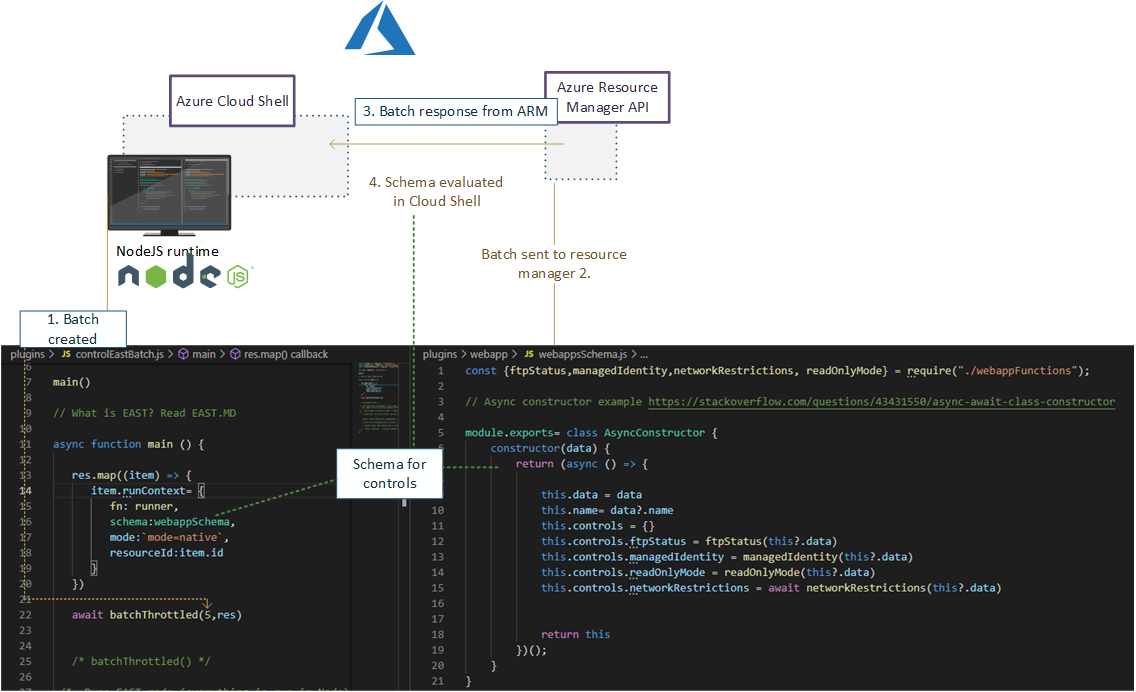
Use rich and maintained context of [Microsoft Azure CLI](https://github.com/Azure/azure-cli#microsoft-azure-cli) ``login & commands`` with Node.js control flow which supplies enhanced rest-requests and maps results to schema.
- This tool does not include or distribute Microsoft Azure CLI, but rather uses it when it has been installed on the source system (Such as Azure Cloud Shell, which is primary platform for running EAST)
### Speedup
View more [details](https://github.com/jsa2/east/blob/HEAD/speedup.md)
✅ Using Node.js runtime as orchestrator utilises Nodes asynchronous nature allowing batching of requests. Batching of requests utilizes the full extent of Azure Resource Managers incredible speed.
✅ Compared to running requests one-by-one, the speedup can be up to 10x, when Node executes the batch of requests instead of single request at time
## Parameters reference
**Example:**
```shell
node ./plugins/main.js --batch=10 --nativescope --roleAssignments --helperTexts=true --checkAad --scanAuditLogs --composites --shuffle --clearTokens```
Param| Description | Default if undefined
-|-|-
`` --nativescope `` | Currently mandatory parameter | no values
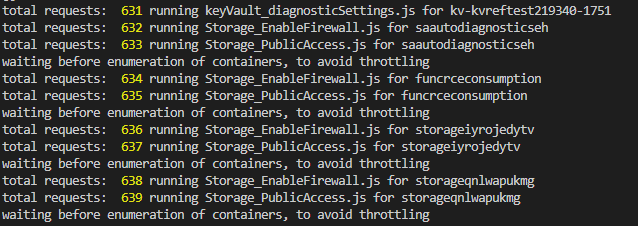
`` --shuffle `` | Can help with throttling. Shuffles the resource list to reduce the possibility of resource provider throttling threshold being met | no values
`` --roleAssignments `` | Checks controls as per [microsoft.authorization](https://github.com/jsa2/east/blob/HEAD/providers/microsoft.authorization/controls/) | no values
`` --includeRG `` | Checks controls with ResourceGroups as per [microsoft.authorization](https://github.com/jsa2/east/blob/HEAD/providers/microsoft.authorization/controls/) | no values
`` --checkAad `` | Checks controls as per [microsoft.azureactivedirectory](https://github.com/jsa2/east/blob/HEAD/providers/microsoft.azureactivedirectory/controls/) | no values
`` --subInclude `` | Defines subscription scope | no default, requires subscriptionID/s, if not defined will enumerate all subscriptions the user have access to
`` --namespace `` | text filter which matches full, or part of the resource ID <br> **example** `` /microsoft.storage/storageaccounts`` all storage accounts in the scope| optional parameter
`` --notIncludes `` | text filter which matches full, or part of the resource ID <br> **example** `` /microsoft.storage/storageaccounts`` all storage accounts in the scope are **excluded**| optional parameter
`` --batch `` | size of batch interval between throttles |5
`` --wait `` | size of batch interval between throttles | 1500
`` --scanAuditLogs `` | optional parameter. When defined in hours will toggle Azure Activity Log scanning for weak authentication events <br> **defined in:** [scanAuditLogs](https://github.com/jsa2/east/blob/HEAD/providers/microsoft.authorization/functions/scanAuditLogs.js) | 24h
`` --composites `` | read [composite](#composite)| no values
`` --clearTokens `` | clears tokens in session folder, use this if you get authorization errors, or have just changed to other `` az login `` account <br> use `` az account clear`` if you want to clear AZ CLI cache too | no values
`` --tag `` | Filter all results in the end based on single tag``--tag=svc=aksdev`` | no values
``--ignorePreCheck`` | use this option when used with browser delegated tokens| no values
``--helperTexts`` | Will append text descriptions from [general](https://github.com/jsa2/east/blob/HEAD/providers/microsoft.general/controls/) to manual controls| no values
``--reprocess`` | Will update results to existing content.json. Useful for incremental runs| no values
**Parameters reference for example report:**
```shell
node templatehelpers/eastReports.js --asb```
Param| Description | Default if undefined
-|-|-
`` --asb `` | gets all ASB results available to users | no values
`` --policy `` | gets all Policy results available to users | no values
`` --doc`` | prints pandoc string for export to console | no values
## (Highly experimental) Running in restricted environments where only browser use is available
Read here [Running in restricted environments](https://github.com/jsa2/EAST/tree/DelegationToken#highly-experimental---bypassing-trusted-device-requirements-for-azure-cli-in-highly-restricted-environments-where-apis-are-available-for-browser-sessions)
## Developing controls
Developer guide including control flow description is here [``dev-guide.md``](https://github.com/jsa2/east/blob/HEAD/dev-guide.md)
## Updates and examples
### Auditing Microsoft.Web provider (Functions and web apps)
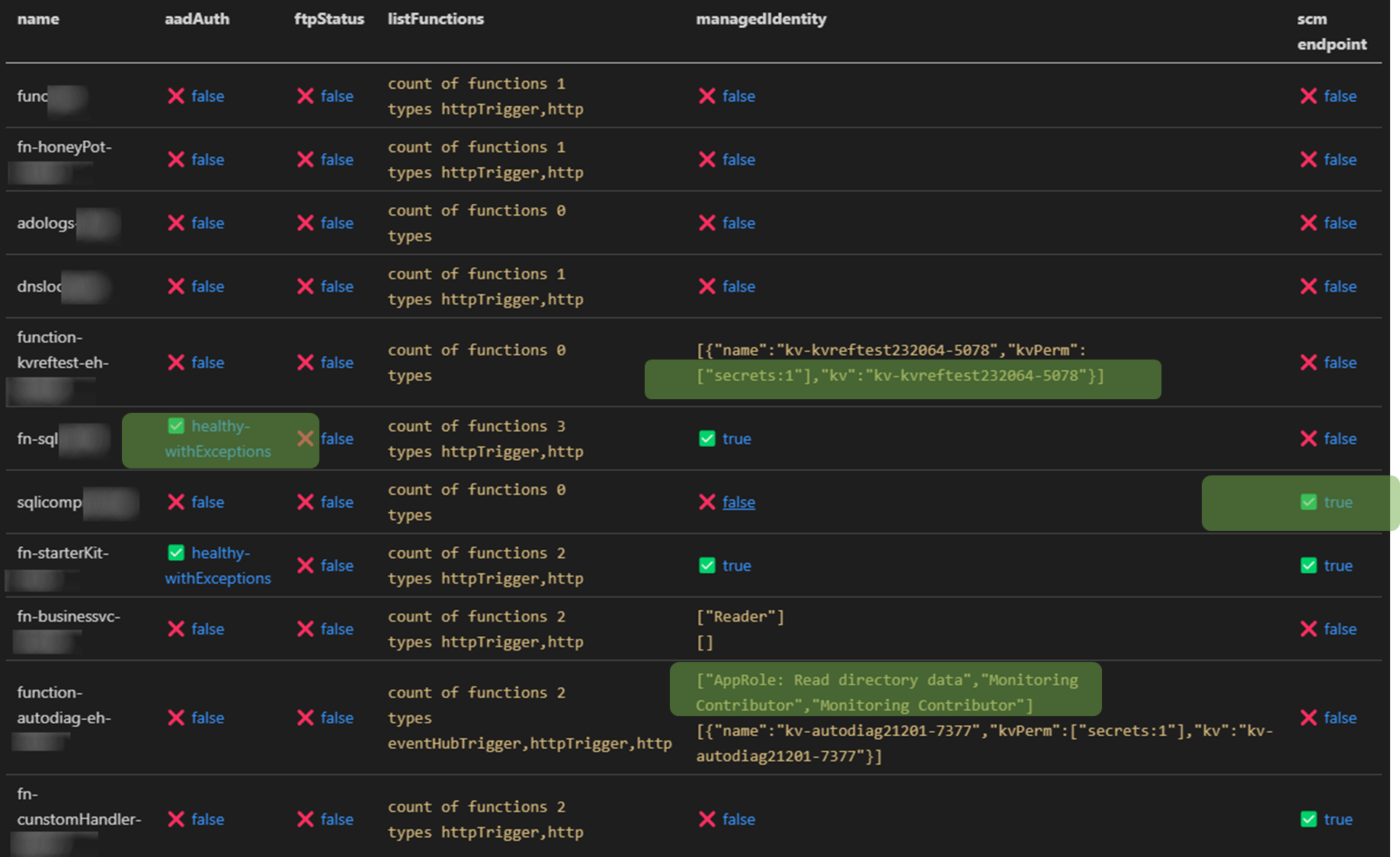
✅ Check roles that are assigned to function managed identity in Azure AD and all Azure Subscriptions the audit account has access to <br>
✅ Relation mapping, check which keyVaults the function uses across all subs the audit account has access to<br>
✅ Check if Azure AD authentication is enabled
✅ Check that generation of access tokens to the api requires assigment ``.appRoleAssignmentRequired`` <br>
✅ Audit bindings <br>
- Function or Azure AD Authentication enabled
- Count and type of triggers
<br>
✅ Check if [SCM](https://docs.microsoft.com/en-us/azure/azure-functions/security-concepts#secure-the-scm-endpoint) and [FTP](https://docs.microsoft.com/en-us/azure/azure-functions/security-concepts#disable-ftp) endpoints are secured

### Azure RBAC baseline authorization
⚠️ Detect principals in privileged subscriptions roles protected only by password-based single factor authentication.
- Checks for users without MFA policies applied for set of conditions
- Checks for ServicePrincipals protected only by password (as opposed to using Certificate Credential, workload federation and or workload identity CA policy)
Maps to [App Registration Best Practices](https://docs.microsoft.com/en-us/azure/active-directory/develop/security-best-practices-for-app-registration#credential-configuration)
- *An unused credential on an application can result in security breach. While it's convenient to use <span style="color:red">password</span>. secrets as a credential, we strongly recommend that you use x509 certificates as the only credential type for getting tokens for your application*
``✅State healthy`` - **User result example**
```JSON
{
"subscriptionName": "EAST -msdn",
"friendlyName": "[email protected]",
"mfaResults": {
"oid": "138ac68f-d8a7-4000-8d41-c10ff26a9097",
"appliedPol": [{
"GrantConditions": "challengeWithMfa",
"policy": "baseline",
"oid": "138ac68f-d8a7-4000-8d41-c10ff26a9097"
}],
"checkType": "mfa"
},
"basicAuthResults": {
"oid": "138ac68f-d8a7-4000-8d41-c10aa26a9097",
"appliedPol": [{
"GrantConditions": "challengeWithMfa",
"policy": "baseline",
"oid": "138ac68f-d8a7-4000-8d41-c10aa26a9097"
}],
"checkType": "basicAuth"
},
}
⚠️State unHealthy - Application principal example
{
"subscriptionName": "EAST - HoneyPot",
"friendlyName": "thx138-kvref-6193053b-408b-44d0-b20f-4e29b9b67394",
"creds": {
"@odata.context": "https://graph.microsoft.com/beta/$metadata#servicePrincipals(id,displayName,appId,keyCredentials,passwordCredentials,servicePrincipalType)/$entity",
"id": "babec804-037d-4caf-946e-7a2b6de3a45f",
"displayName": "thx138-kvref-6193053b-408b-44d0-b20f-4e29b9b67394",
"appId": "5af1760e-89ff-46e4-a968-0ac36a7b7b69",
"servicePrincipalType": "Application",
"keyCredentials": [],
"passwordCredentials": [],
"OnlySingleFactor": [{
"customKeyIdentifier": null,
"endDateTime": "2023-10-20T06:54:59.2014093Z",
"keyId": "7df44f81-a52c-4fd6-b704-4b046771f85a",
"startDateTime": "2021-10-20T06:54:59.2014093Z",
"secretText": null,
"hint": null,
"displayName": null
}],
"StrongSingleFactor": []
}
}
Following methods work for contributing for the time being:
| पैकेज | सौंदर्यशास्त्र | संचालन | लाइसेंस |
|---|
| axios | ✅ | MIT | |
| yargs | ✅ | MIT | |
| jsonwebtoken | ✅ | MIT | |
| chalk | ✅ | MIT | |
| js-beautify | ✅ | MIT |