 hahwul/deadfinder
वेबसाइटों, साइटमैप और URL सूचियों में टूटे हुए लिंक खोजने के लिए तेज़ CLI टूल, जिसमें समवर्ती वर्कर्स, कवरेज रिपोर्टिंग और कई आउटपुट प्रारूप शामिल हैं।


डेड-लिंक (टूटे हुए लिंक) खोजें


दस्तावेज़ • इंस्टॉलेशन • Github Action • योगदान • चेंजलॉग
डेड लिंक (टूटा हुआ लिंक) का अर्थ है किसी वेब पेज के भीतर ऐसा लिंक जिससे कनेक्ट नहीं किया जा सकता। ये लिंक SEO और सुरक्षा पर नकारात्मक प्रभाव डाल सकते हैं। यह टूल इन्हें पहचानना और संशोधित करना आसान बनाता है।
v1 (Ruby gem) खोज रहे हैं? यह अब
legacy/v1ब्रांच पर स्थित है और बग-फ़िक्स तथा सुरक्षा रिलीज़ के लिएdeadfindergem प्रकाशित करना जारी रखता है।mainमें Crystal रीराइट (v2+) होस्ट किया गया है।
brew install deadfinder
# https://formulae.brew.sh/formula/deadfinder
2.1.0 के बाद आने वाले रिलीज़ से शुरू करते हुए:
choco install deadfinder
docker run ghcr.io/hahwul/deadfinder:latest deadfinder url https://example.com
नवीनतम रिलीज़ से अपने प्लेटफ़ॉर्म के लिए आर्काइव डाउनलोड करें, उसे एक्सट्रैक्ट करें, और deadfinder (Windows पर deadfinder.exe) को अपने PATH पर रखें।
nix run github:hahwul/deadfinder
nix profile install github:hahwul/deadfinder
nix develop github:hahwul/deadfinder
Crystal >= 1.19.1 और cmake आवश्यक है (lexbor HTML पार्सर के postinstall के लिए — इसके बिना shards install 'cmake': No such file or directory के साथ विफल हो जाता है)।
# macOS
brew install crystal cmake

# Debian / Ubuntu
sudo apt install crystal cmake
shards install
crystal build src/cli_main.cr -o deadfinder --release
# or: just build
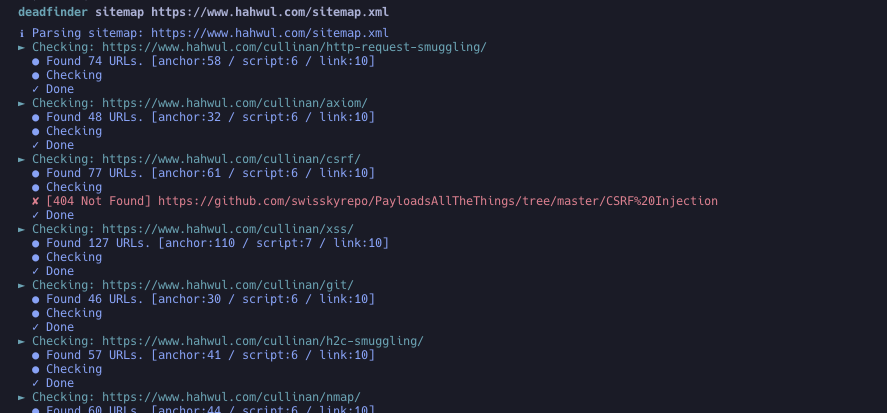
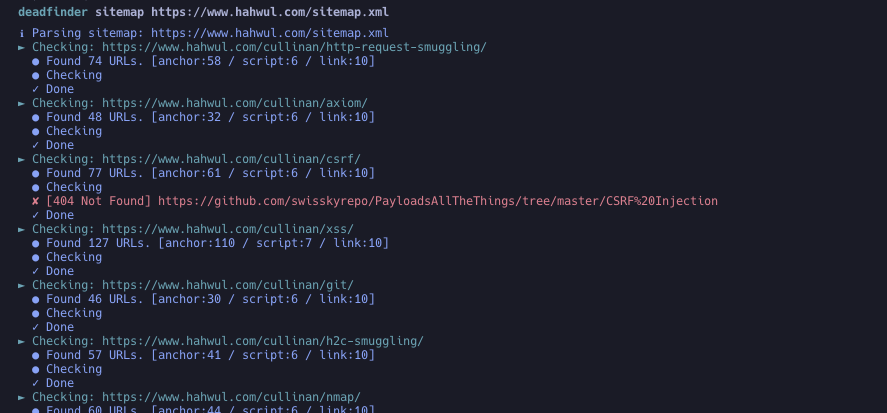
deadfinder sitemap https://www.hahwul.com/sitemap.xml
एक विशिष्ट रिलीज़ टैग पिन करें। @latest एक मान्य Actions ref नहीं है।
steps:
- name: Run DeadFinder
  uses: hahwul/deadfinder@v2       # tracks the latest 2.x — pin a specific tag (e.g. @2.1.0) for stricter reproducibility
  id: broken-link
  with:
    command: sitemap           # url / file / sitemap / pipe
    target: https://www.hahwul.com/sitemap.xml
    # timeout: 10
    # concurrency: 50
    # silent: false
    # headers: "X-API-Key: 123444"
    # worker_headers: "User-Agent: Deadfinder Bot"
    # include30x: false
    # user_agent: "Apple"
    # proxy: "http://localhost:8070"
    # proxy_auth: "id:pw"
    # insecure: false
    # match:  ""
    # ignore: ""
    # limit: 0
    # output_format: json
    # coverage: true
    # visualize: report.png
    # fail_on_dead: true       # fail the step when a dead link is found
    # method: auto             # auto / head / get
    # retry: 2
    # delay: 0                 # ms between requests to the same host
    # accept_status: "403,999"
    # dead_status: ""
    # target_concurrency: 10
    # check_anchors: false

- name: Output Handling
  run: echo '${{ steps.broken-link.outputs.output }}'
यदि आपको कोई डेड लिंक मिला है और आप उसे स्वचालित रूप से एक issue के रूप में जोड़ना चाहते हैं, तो कृपया "Automating Dead Link Detection" लेख देखें।
Usage: deadfinder <command> [options]

Commands:
  pipe                        Scan the URLs from STDIN
  file <FILE>                 Scan the URLs from File (`-` for STDIN)
  url <URL>                   Scan the Single URL
  sitemap <SITEMAP-URL>       Scan the URLs from sitemap
  completion <SHELL>          Generate completion script (bash/zsh/fish)
  version                     Show version

Options:
  -r, --include30x                 Include 30x redirections as dead links
  -c, --concurrency=N              Number of concurrent workers (default: 50)
      --target-concurrency=N       Targets scanned in parallel; total in-flight
                                   requests stay capped at -c (default: 10)
  -t, --timeout=N                  Timeout in seconds (default: 10)
      --method=METHOD              Link check method: auto, head, get (default: auto)
      --retry=N                    Retry transient failures N times (default: 2)
      --delay=MS                   Minimum ms between requests to the same host
      --accept-status=LIST         Statuses to treat as alive (e.g. 200,403,999)
      --dead-status=LIST           Statuses to treat as dead (e.g. 500-599)
      --exclude-status=LIST        Alias of --dead-status
  -o, --output=FILE                File to write results (`-` for stdout)
  -f, --output_format=FORMAT       Output format: json, yaml, toml, csv, sarif (default: json)
  -H, --headers=HEADER             Custom HTTP headers for initial request
      --worker_headers=HEADER      Custom HTTP headers for worker requests
      --user_agent=UA              User-Agent string
  -p, --proxy=PROXY                Proxy server (HTTP and HTTPS CONNECT)
      --proxy_auth=USER:PASS       Proxy authentication
  -k, --insecure                   Skip TLS certificate verification (not recommended)
  -m, --match=PATTERN              Match URL pattern (regex)
  -i, --ignore=PATTERN             Ignore URL pattern (regex)
  -s, --silent                     Silent mode
  -v, --verbose                    Verbose mode
      --debug                      Debug mode
      --limit=N                    Limit number of URLs to scan
      --check-anchors              Verify #fragment targets exist in the linked document
      --coverage                   Enable coverage tracking and reporting
  -F, --fail-on-dead               Exit with code 2 when anything dead is found
      --visualize=PATH             Generate visualization PNG
  -h, --help                       Show help
# Scan the URLs from STDIN (multiple URLs)
cat urls.txt | deadfinder pipe

# Scan the URLs from a file
deadfinder file urls.txt

# `-` and other non-regular files (process substitution, /dev/stdin, FIFOs) work too
deadfinder file -  < urls.txt
deadfinder file <(subfinder -d example.com -silent | httpx -silent)

# Scan a single URL
deadfinder url https://www.hahwul.com

# Scan the URLs from a sitemap
deadfinder sitemap https://www.hahwul.com/sitemap.xml
pipe / file)प्रति पंक्ति एक URL। स्कैनिंग से पहले सूची को सामान्यीकृत किया जाता है:
# टिप्पणियाँ छोड़ दी जाती हैंhttp:// / https:// URL नहीं हैं, उन्हें रिपोर्ट किया जाता है और छोड़ दिया जाता है--limit N केवल वास्तविक लक्ष्यों की गणना करता है, और सीमा तक पहुँचने पर इनपुट पढ़ना बंद कर देता है# production
https://www.hahwul.com
https://www.hahwul.com/cullinan/
# staging
https://staging.hahwul.com
deadfinder sitemap https://www.hahwul.com/sitemap.xml -o output.json
cat output.json | jq
