 gyulyvgc/sniffnet
आराम से अपने नेटवर्क ट्रैफ़िक की निगरानी करें 🕵️♂️

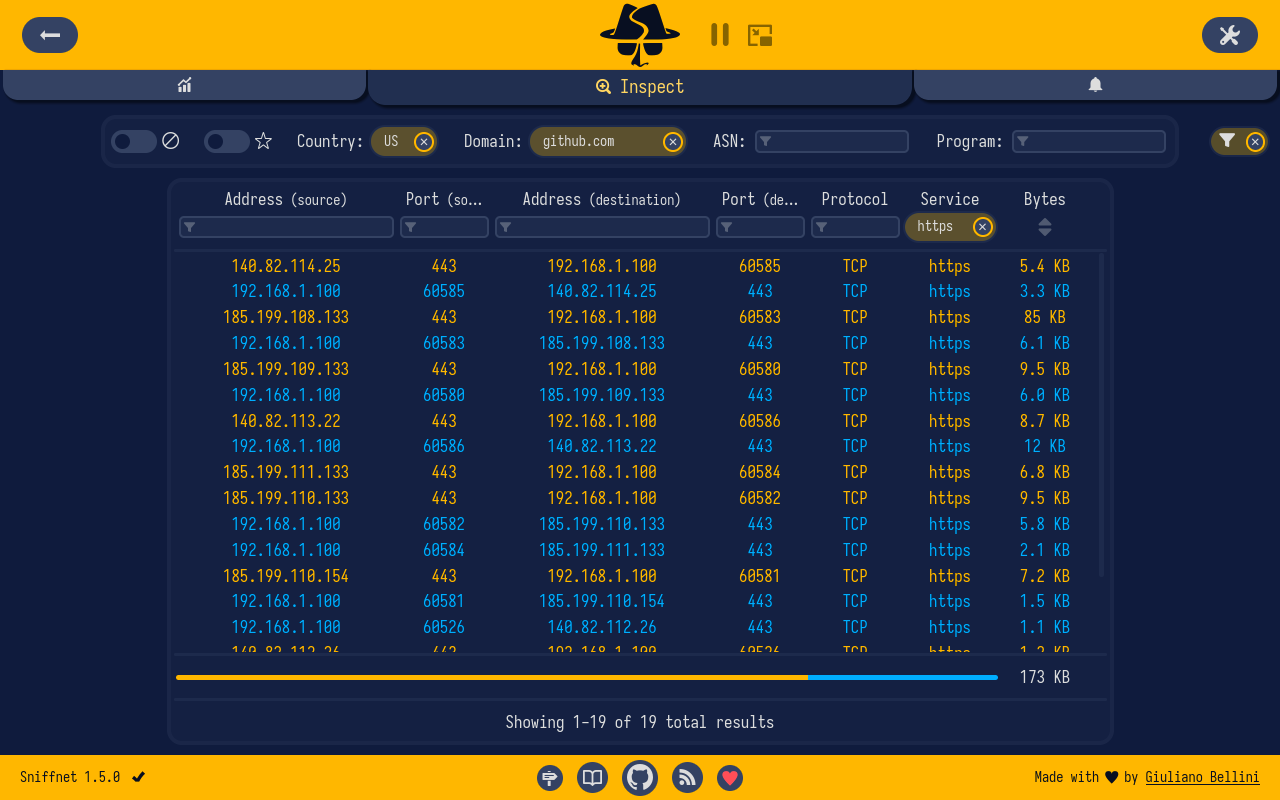
<div align="center"> <picture> <img alt="" title="Sniffnet" src="https://raw.githubusercontent.com/GyulyVGC/sniffnet/main/resources/repository/header_repository.png" width="95%"/> </picture> <a href="#download"><img alt="" title="डाउनलोड" src="https://raw.githubusercontent.com/GyulyVGC/sniffnet/main/resources/repository/badges/download.svg"/></a> <a href="https://github.com/GyulyVGC/sniffnet/blob/main/ROADMAP.md"><img alt="" title="रोडमैप" src="https://raw.githubusercontent.com/GyulyVGC/sniffnet/main/resources/repository/badges/roadmap.svg"/></a> <a href="https://sniffnet.app"><img alt="" title="वेबसाइट" src="https://raw.githubusercontent.com/GyulyVGC/sniffnet/main/resources/repository/badges/website.svg"/></a> <a href="https://github.com/GyulyVGC/sniffnet/wiki"><img alt="" title="विकि" src="https://raw.githubusercontent.com/GyulyVGC/sniffnet/main/resources/repository/badges/wiki.svg"/></a> अपने इंटरनेट ट्रैफ़िक को आराम से मॉनिटर करने के लिए एप्लिकेशन।<br> क्रॉस-प्लेटफ़ॉर्म। सहज। विश्वसनीय। इन भाषाओं में अनुवादित:<br> 🇨🇳 🇩🇪 🇫🇷 🇷🇺 🇵🇹 🇪🇦 🇮🇹 🇵🇱 [+ 18 और भाषाएँ](https://github.com/GyulyVGC/sniffnet/issues/60) </div> <p> <picture> <img alt="" src="https://raw.githubusercontent.com/GyulyVGC/sniffnet/main/resources/repository/hr.png" width="100%"/> </picture> </p> <div align="center"> <img alt="" title="अवलोकन पृष्ठ" src="https://raw.githubusercontent.com/GyulyVGC/sniffnet/main/resources/repository/pages/overview.png" width="95%"/> <img alt="" title="निरीक्षण पृष्ठ" src="https://raw.githubusercontent.com/GyulyVGC/sniffnet/main/resources/repository/pages/inspect.png" width="47%"/> <img alt="" title="सूचनाएँ पृष्ठ" src="https://raw.githubusercontent.com/GyulyVGC/sniffnet/main/resources/repository/pages/notifications.png" width="47%"/> <img alt="" title="कस्टम थीम" src="https://raw.githubusercontent.com/GyulyVGC/sniffnet/main/resources/repository/pages/deep_cosmos.png" width="47%"/> <img alt="" title="थंबनेल मोड" src="https://raw.githubusercontent.com/GyulyVGC/sniffnet/main/resources/repository/pages/thumbnail.png" width="47%"/> </div> <p> <picture> <img alt="" src="https://raw.githubusercontent.com/GyulyVGC/sniffnet/main/resources/repository/hr.png" width="100%"/> </picture> </p> ## _Sniffnet के विकास का समर्थन करें_ 💖 <i>Sniffnet पूरी तरह से मुफ़्त, ओपन-सोर्स सॉफ़्टवेयर है जिसे विकसित करने और बनाए रखने के लिए बहुत अधिक प्रयास और समय की आवश्यकता होती है। यदि आप Sniffnet की सराहना करते हैं, तो इसके [विकास](https://github.com/GyulyVGC/sniffnet/blob/main/ROADMAP.md) का समर्थन करने के लिए [प्रोजेक्ट को प्रायोजित करें](https://github.com/sponsors/GyulyVGC)। प्रायोजन संबंधी पूछताछ के लिए, बेझिझक `[email protected]` पर संपर्क करें। इन शानदार संगठनों और लोगों को एक विशेष धन्यवाद जो Sniffnet को प्रायोजित कर रहे हैं:</i> <table><tr><td> <a href="https://www.recall.ai/careers?ashby_jid=7b02811e-bc91-4ef2-925d-f56a5acac13b&utm_source=github&utm_medium=sponsorship&utm_campaign=sniffnet" title="recall.ai"> <img height="60" src="https://github.com/user-attachments/assets/5b46a13e-19e5-4924-9801-f142b651cf49" /> </a><br> <blockquote><i>पीक लोड पर 3TB/s से अधिक वीडियो प्रोसेस कर रहा है, <a href="https://www.recall.ai/careers?ashby_jid=7b02811e-bc91-4ef2-925d-f56a5acac13b&utm_source=github&utm_medium=sponsorship&utm_campaign=sniffnet">अभी SF में भर्ती कर रहा है</a></i></blockquote> </td></tr></table> <p> <a href="https://nlnet.nl" title="NLnet"><img src="https://nlnet.nl/logo/logo.svg" width="60px" alt="NLnet"/></a> <a href="https://www.coderabbit.ai/?utm_source=cr_org&utm_medium=github" title="CodeRabbit"><img src="https://avatars.githubusercontent.com/u/132028505?s=200&v=4" width="60px" alt="CodeRabbit"/></a> <a href="https://ipinfo.io" title="IPinfo"><img src="https://avatars.githubusercontent.com/ipinfo?v=4" width="60px" alt="IPinfo"/></a> <a href="https://ads.fund" title="ADS Fund"><img src="https://avatars.githubusercontent.com/ADS-Fund?v=4" width="60px" alt="ADS Fund"/></a> <a href="https://github.com/Cthulu201" title="Cthulu201"><img src="https://avatars.githubusercontent.com/Cthulu201?v=4" width="60px" alt="Cthulu201"/></a> <a href="https://github.com/ZEROF" title="ZEROF"><img src="https://avatars.githubusercontent.com/ZEROF?v=4" width="60px" alt="ZEROF"/></a> <a href="https://www.janwalter.org/" title="Jan Walter"><img src="https://avatars.githubusercontent.com/wahn?v=4" width="60px" alt="Jan Walter"/></a> <a href="https://linktr.ee/golanbenoni" title="Golan Ben-Oni"><img src="https://ugc.production.linktr.ee/eed0c0ea-b302-4286-b940-1e4740d4f54d_84D5JxCc-400x400.jpeg?io=true&size=avatar-v3_0" width="60px" alt="Golan Ben-Oni"/></a> </p> ## डाउनलोड <picture><img height="28px" alt="" title="डाउनलोड की संख्या" src="https://raw.githubusercontent.com/sniffnet/sniffnet.github.io/main/assets/img/badges/downloads_badge.svg"/></picture> <a href="https://github.com/GyulyVGC/sniffnet/releases/latest"><img height="28px" alt="" title="नवीनतम संस्करण" src="https://raw.githubusercontent.com/sniffnet/sniffnet.github.io/main/assets/img/badges/version_badge.svg"/></a> <table> <tr> <td> <picture><img alt="Windows" title="Windows" height="85px" src="https://raw.githubusercontent.com/GyulyVGC/sniffnet/main/resources/repository/badges/windows.svg"/></picture> </td> <td> <a href="https://github.com/GyulyVGC/sniffnet/releases/latest/download/Sniffnet_Windows_x64.msi">x64</a> | <a href="https://github.com/GyulyVGC/sniffnet/releases/latest/download/Sniffnet_Windows_arm64.msi">arm64</a> | <a href="https://github.com/GyulyVGC/sniffnet/releases/latest/download/Sniffnet_Windows_x86.msi">x86</a> </td> </tr> <tr> <td> <picture><img alt="macOS" title="macOS" height="85px" src="https://raw.githubusercontent.com/GyulyVGC/sniffnet/main/resources/repository/badges/macos.svg"/></picture> </td> <td> <a href="https://github.com/GyulyVGC/sniffnet/releases/latest/download/Sniffnet_macOS_Intel.dmg">Intel</a> | <a href="https://github.com/GyulyVGC/sniffnet/releases/latest/download/Sniffnet_macOS_AppleSilicon.dmg">Apple silicon</a> </td> </tr> <tr> <td> <picture><img alt="Linux" title="Linux" height="85px" src="https://raw.githubusercontent.com/GyulyVGC/sniffnet/main/resources/repository/badges/linux.svg"/></picture> </td> <td> AppImage: <a href="https://github.com/GyulyVGC/sniffnet/releases/latest/download/Sniffnet_LinuxAppImage_amd64.AppImage">amd64</a> | <a href="https://github.com/GyulyVGC/sniffnet/releases/latest/download/Sniffnet_LinuxAppImage_arm64.AppImage">arm64</a> | <a href="https://github.com/GyulyVGC/sniffnet/releases/latest/download/Sniffnet_LinuxAppImage_i386.AppImage">i386</a> | <a href="https://github.com/GyulyVGC/sniffnet/releases/latest/download/Sniffnet_LinuxAppImage_armhf.AppImage">armhf</a> <br> DEB: <a href="https://github.com/GyulyVGC/sniffnet/releases/latest/download/Sniffnet_LinuxDEB_amd64.deb">amd64</a> | <a href="https://github.com/GyulyVGC/sniffnet/releases/latest/download/Sniffnet_LinuxDEB_arm64.deb">arm64</a> | <a href="https://github.com/GyulyVGC/sniffnet/releases/latest/download/Sniffnet_LinuxDEB_i386.deb">i386</a> | <a href="https://github.com/GyulyVGC/sniffnet/releases/latest/download/Sniffnet_LinuxDEB_armhf.deb">armhf</a> <br> RPM: <a href="https://github.com/GyulyVGC/sniffnet/releases/latest/download/Sniffnet_LinuxRPM_x86_64.rpm">x86_64</a> | <a href="https://github.com/GyulyVGC/sniffnet/releases/latest/download/Sniffnet_LinuxRPM_aarch64.rpm">aarch64</a> </td> </tr> </table> ऊपर दी गई तालिका के लिंक Sniffnet का नवीनतम संस्करण सीधे [GitHub releases](https://github.com/GyulyVGC/sniffnet/releases) से डाउनलोड करेंगे। <br> आप जो खोज रहे हैं वह नहीं मिला? [वैकल्पिक इंस्टॉलेशन विधियाँ](https://github.com/GyulyVGC/sniffnet/wiki/Alternative-installation-methods) देखें। > [!NOTE] > > अपने ऑपरेटिंग सिस्टम के लिए [आवश्यक निर्भरताएँ](https://github.com/GyulyVGC/sniffnet/wiki/Required-dependencies) भी इंस्टॉल करना याद रखें। ## विशेषताएँ - 💻 निरीक्षण करने के लिए अपने पीसी का **नेटवर्क एडेप्टर** चुनें - 🏷️ देखे गए ट्रैफ़िक पर लागू करने के लिए **फ़िल्टर** का एक सेट चुनें - 📁 व्यापक कैप्चर रिपोर्ट को **PCAP** फ़ाइलों के रूप में **आयात** और **निर्यात** करें - 📊 अपने इंटरनेट ट्रैफ़िक के बारे में समग्र **आँकड़े** देखें - 📈 ट्रैफ़िक की तीव्रता के बारे में **रीयल-टाइम चार्ट** देखें - 🏠 अपने **लोकल नेटवर्क** में कनेक्शन पहचानें - 🌍 रिमोट होस्ट का **भौगोलिक स्थान** पता करें - 🌐 जिन होस्ट्स के साथ आप ट्रैफ़िक का आदान-प्रदान कर रहे हैं, उनका **डोमेन नाम** और **ASN** पता करें - 📖 **6000+ ऊपरी परत सेवाओं**, प्रोटोकॉल, ट्रोजन और वर्म्स की पहचान करें - 🎮 देखें कि कौन से **प्रोग्राम** नेटवर्क ट्रैफ़िक उत्पन्न कर रहे हैं - ⭐ अपने **पसंदीदा** नेटवर्क होस्ट, सेवाओं और प्रोग्राम को सहेजें - 📌 एप्लिकेशन के **मिनिमाइज़** होने पर भी अपने नेटवर्क पर नज़र रखें - ️🔎 रीयल टाइम में अपने प्रत्येक नेटवर्क कनेक्शन को खोजें और **निरीक्षण** करें - 🔉 परिभाषित नेटवर्क इवेंट होने पर आपको सूचित करने के लिए कस्टम **सूचनाएँ** सेट करें - 🚫 संभावित रूप से खतरनाक कनेक्शनों को उजागर करने के लिए कस्टम **IP ब्लैकलिस्ट** आयात करें - 🎨 कस्टम थीम समर्थन सहित, वह **शैली** चुनें जो आपको सबसे अधिक सूट करती है - ...और भी बहुत कुछ! ## उपयोगकर्ता मैनुअल क्या आप **और अधिक सीखना** चाहते हैं? <br> [**Sniffnet Wiki**](https://github.com/GyulyVGC/sniffnet/wiki) देखें, यह एक व्यापक मैनुअल है जो आपको बुनियादी सेटअप से लेकर सबसे उन्नत कार्यक्षमताओं तक एप्लिकेशन में पूरी तरह से महारत हासिल करने में मदद करेगा। <br> Wiki में चरण-दर-चरण गाइड, टिप्स, उपयोग के उदाहरण और अक्सर पूछे जाने वाले प्रश्नों के उत्तर शामिल हैं। <p align="center"> <a href="https://github.com/GyulyVGC/sniffnet/wiki"> <img alt="" title="Sniffnet विकि" src="https://raw.githubusercontent.com/GyulyVGC/sniffnet/main/resources/logos/wiki/wikilogo.svg" width="300px"/> </a> </p> ## समस्या निवारण <details> <summary>विवरण देखें</summary> ### गुम निर्भरताएँ उत्पन्न होने वाली अधिकांश त्रुटियाँ संभवतः आपके सिस्टम में नेटवर्क एडेप्टर का सही ढंग से विश्लेषण करने के लिए आवश्यक निर्भरताओं के गायब होने के कारण होती हैं। <br> अपने ऑपरेटिंग सिस्टम के आधार पर आगे बढ़ने के निर्देशों के लिए [आवश्यक निर्भरताएँ पृष्ठ](https://github.com/GyulyVGC/sniffnet/wiki/Required-dependencies) देखें। ### रेंडरिंग समस्याएँ कुछ परिस्थितियों में, विशेष रूप से यदि आप पुराने आर्किटेक्चर पर चल रहे हैं या आपके ग्राफिकल ड्राइवर अपडेटेड नहीं हैं, तो [iced](https://github.com/iced-rs/iced) द्वारा उपयोग किया जाने वाला `wgpu` डिफ़ॉल्ट रेंडरर बग प्रदर्शित कर सकता है (इंटरफ़ेस गड़बड़ाता है, कलर ग्रेडिएंट समर्थित नहीं होते, या कुछ आइकन पूरी तरह से काले होते हैं)। <br> ऐसे मामलों में आप `tiny-skia` रेंडरर पर स्विच करने के लिए एक एनवायरनमेंट वेरिएबल सेट कर सकते हैं, यह एक केवल-CPU सॉफ़्टवेयर रेंडरर है जो हर एनवायरनमेंट पर ठीक से काम करना चाहिए: ```sh ICED_BACKEND=tiny-skia ``` ### ***किसी भी स्थिति में, [एक issue खोलने](https://github.com/GyulyVGC/sniffnet/issues/new/choose) में संकोच न करें, और मैं आपकी मदद करने की पूरी कोशिश करूँगा!*** </details> ## आभार - Sniffnet के [सभी योगदानकर्ताओं](https://github.com/GyulyVGC/sniffnet/blob/main/CONTRIBUTORS.md) को बड़ा धन्यवाद! - ग्राफिकल यूजर इंटरफ़ेस को [iced](https://github.com/iced-rs/iced) के साथ बनाया गया है, जो Rust के लिए एक क्रॉस-प्लेटफ़ॉर्म GUI लाइब्रेरी है जो सरलता और टाइप-सुरक्षा पर केंद्रित है - IP जियोलोकेशन और ASN डेटा [MaxMind](https://www.maxmind.com) द्वारा प्रदान किया जाता है - Windows Installer के लिए निःशुल्क कोड साइनिंग [SignPath.io](https://about.signpath.io/) द्वारा प्रदान की जाती है, प्रमाणपत्र [SignPath Foundation](https://signpath.org/) द्वारा - [Sniffnet](https://ads.fund/token/0xadfc251f8ef00ceaeca2b5c1882dabe5db0833df) प्रोजेक्ट को ADS.FUND द्वारा समर्थन प्राप्त है - अंतिम लेकिन कम महत्वपूर्ण नहीं, [हर एक स्टारगेज़र](https://github.com/GyulyVGC/sniffnet/stargazers) को धन्यवाद: सभी प्रकार के समर्थन ने Sniffnet को बेहतर बनाते रहना संभव बनाया! ## जुड़े रहें रुकिए... अभी और भी है!<br>Sniffnet तेज़ी से विकसित हो रहा है, और नियमित रूप से नई सुविधाएँ जोड़ी जा रही हैं।<br> <a href="https://sniffnet.app/news"><b>समाचार</b></a> और Sniffnet के सोशल पेजों को फ़ॉलो करें ताकि कोई भी अपडेट न छूटे। <table align="center"> <tr> <td> <a href="https://bsky.app/profile/sniffnet.app"><img width="48" height="48" alt="Bluesky" title="Bluesky" src="https://raw.githubusercontent.com/GyulyVGC/sniffnet/main/resources/repository/badges/bluesky.svg"/></a> </td> <td> <a href="https://www.linkedin.com/company/sniffnet"><img width="48" height="48" alt="LinkedIn" title="LinkedIn" src="https://raw.githubusercontent.com/GyulyVGC/sniffnet/main/resources/repository/badges/linkedin.svg"/></a> </td> <td> <a href="https://mastodon.social/@sniffnet"><img width="48" height="48" alt="Mastodon" title="Mastodon" src="https://raw.githubusercontent.com/GyulyVGC/sniffnet/main/resources/repository/badges/mastodon.svg"/></a> </td> <td> <a href="https://t.me/sniffnet"><img width="48" height="48" alt="Telegram" title="Telegram" src="https://raw.githubusercontent.com/GyulyVGC/sniffnet/main/resources/repository/badges/telegram.svg"/></a> </td> <td> <a href="https://x.com/sniffnet"><img width="48" height="48" alt="Twitter / X" title="Twitter / X" src="https://raw.githubusercontent.com/GyulyVGC/sniffnet/main/resources/repository/badges/x.svg"/></a> </td> </tr> </table> आप हमें ईमेल द्वारा `[email protected]` पर भी संपर्क कर सकते हैं।
