
Skip to content
KitploitKITPLOIT
उपकरणब्लॉग
जमा करें
उपकरणब्लॉग
जमा करें

हैकिंग, पेनटेस्ट और साइबर सुरक्षा उपकरण आपके सुरक्षा शस्त्रागार के लिए!

Kitploit हैकिंग, साइबर सुरक्षा और पेंटेस्टिंग टूल्स की एक निर्देशिका है। कमजोरियों को खोजने, सिस्टम का विश्लेषण करने, परीक्षण को स्वचालित करने और अपनी सुरक्षा को मजबूत करने के लिए नवीनतम प्रोजेक्ट अपडेट खोजें।

··फ़ीड·संपर्क·गोपनीयता·© 2026 Kitploit

टूल निर्देशिका

श्रेणियाँ

सभी श्रेणियाँ देखें
Loading categories
magika — तेज़ और सटीक AI-संचालित फ़ाइल सामग्री प्रकारों का पता लगाना | Kitploit
उपकरण/GitHubGitHub/google/magika
सामान्य उपयोगिताएँस्थैतिक विश्लेषणकोड विश्लेषणफोरेंसिकमालवेयर विश्लेषणमशीन लर्निंग
GitHubgoogle/magika

magika

तेज़ और सटीक AI-संचालित फ़ाइल सामग्री प्रकारों का पता लगाना

रिपॉजिटरी देखें
17.9k1.1k21 दिन पहलेKitploit द्वारा समीक्षित

सबसे लोकप्रिय

सभी देखें →

हमारे समुदाय द्वारा सबसे अधिक उपयोग किए जाने वाले उपकरण खोजें।

सभी उपकरण खोजें

हमारे उपकरणों का संग्रह ब्राउज़ करें

सभी उपकरण देखें →
साझा करें
वेबसाइट

Magika

image NPM Version image image Go Version

OpenSSF Best Practices CodeQL Actions status PyPI Monthly Downloads PyPI Downloads

Magika एक नवीन AI-संचालित फ़ाइल प्रकार पहचान उपकरण है जो सटीक पहचान प्रदान करने के लिए डीप लर्निंग के हालिया प्रगति पर निर्भर करता है। अंदर की बात करें तो, Magika एक कस्टम, अत्यधिक अनुकूलित मॉडल का उपयोग करता है जिसका वजन केवल कुछ MB के आसपास होता है, और यह एकल CPU पर भी मिलीसेकंड के भीतर सटीक फ़ाइल पहचान को सक्षम करता है। Magika को ~100M नमूनों के डेटासेट पर 200+ सामग्री प्रकारों (बाइनरी और टेक्स्टुअल दोनों फ़ाइल प्रारूपों को कवर करते हुए) में प्रशिक्षित और मूल्यांकन किया गया है, और यह हमारे परीक्षण सेट पर औसत ~99% सटीकता प्राप्त करता है।

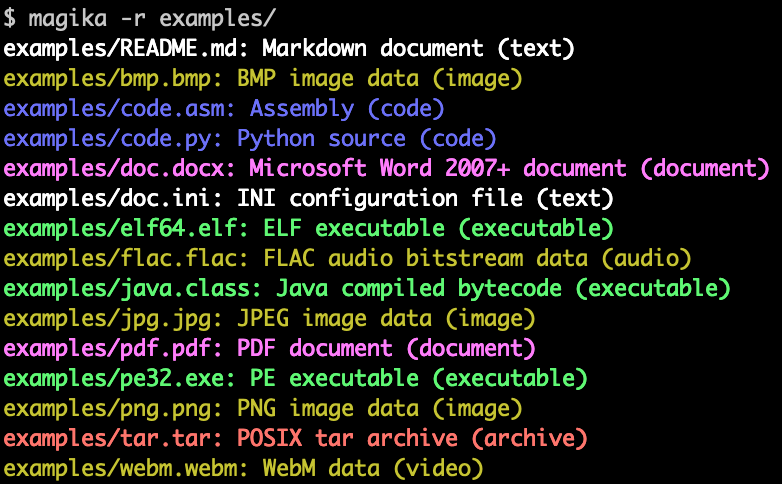
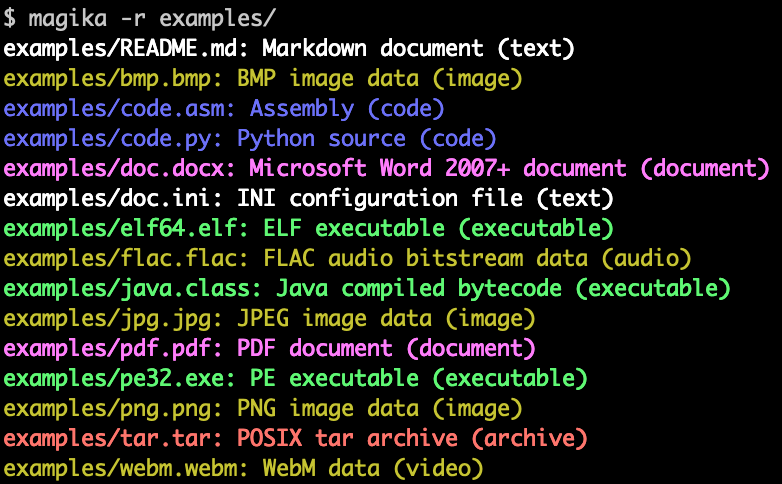
यहाँ Magika कमांड लाइन आउटपुट का एक उदाहरण दिया गया है:
Magika का उपयोग बड़े पैमाने पर Google उपयोगकर्ताओं की सुरक्षा में सुधार करने में मदद करने के लिए किया जाता है, Gmail, Drive, और Safe Browsing फ़ाइलों को उचित सुरक्षा और सामग्री नीति स्कैनर तक रूट करके, साप्ताहिक आधार पर सैकड़ों अरबों नमूनों को संसाधित करता है। Magika को VirusTotal (उदाहरण) और abuse.ch (उदाहरण) के साथ भी एकीकृत किया गया है।

अधिक संदर्भ के लिए आप Google के OSS ब्लॉग पर हमारी प्रारंभिक घोषणा पोस्ट पढ़ सकते हैं, आप Magika की वेबसाइट देख सकते हैं, और आप हमारे शोध पत्र में अधिक पढ़ सकते हैं, जो IEEE/ACM International Conference on Software Engineering (ICSE) 2025 में प्रकाशित हुआ है।

आप कुछ भी इंस्टॉल किए बिना हमारे वेब डेमो का उपयोग करके Magika आज़मा सकते हैं, जो आपके ब्राउज़र में स्थानीय रूप से चलता है!

मुख्य आकर्षण

  • Rust में लिखा गया कमांड लाइन उपकरण, एक Python API, और Rust, JavaScript/TypeScript (एक प्रायोगिक npm पैकेज के साथ, जो हमारे वेब डेमो को संचालित करता है), और GoLang (WIP) के लिए अतिरिक्त बाइंडिंग के रूप में उपलब्ध।
  • ~100M फ़ाइलों के डेटासेट पर 200+ सामग्री प्रकारों में प्रशिक्षित और मूल्यांकन किया गया।
  • हमारे परीक्षण सेट पर, Magika ~99% औसत प्रिसिजन और रिकॉल प्राप्त करता है, मौजूदा दृष्टिकोणों से बेहतर प्रदर्शन करता है - विशेष रूप से टेक्स्टुअल सामग्री प्रकारों पर।
  • मॉडल लोड होने के बाद (जो एक बार का ओवरहेड है), प्रति फ़ाइल अनुमान समय लगभग 5ms है, एकल CPU पर भी।
  • आप एक ही समय में हज़ारों फ़ाइलों के साथ Magika को कॉल कर सकते हैं। आप निर्देशिका को पुनरावर्ती रूप से स्कैन करने के लिए -r का भी उपयोग कर सकते हैं।
  • फ़ाइल आकार से स्वतंत्र, लगभग स्थिर अनुमान समय; Magika फ़ाइल की सामग्री के केवल एक सीमित उपसमूह का उपयोग करता है।
  • Magika एक प्रति-सामग्री-प्रकार थ्रेशोल्ड प्रणाली का उपयोग करता है जो यह निर्धारित करता है कि मॉडल के पूर्वानुमान पर "भरोसा" करना है या एक सामान्य लेबल वापस करना है, जैसे "Generic text document" या "Unknown binary data"।
  • त्रुटियों के प्रति सहनशीलता को विभिन्न पूर्वानुमान मोडों के माध्यम से नियंत्रित किया जा सकता है, जैसे high-confidence, medium-confidence, और best-guess।
  • क्लाइंट और बाइंडिंग पहले से ही ओपन सोर्स हैं, और जल्द ही और अधिक आ रहा है!

विषय-सूची

  1. आरंभ करना
    1. स्थापना
    2. त्वरित आरंभ
  2. दस्तावेज़ीकरण
  3. सुरक्षा कमज़ोरियाँ
  4. लाइसेंस
  5. अस्वीकरण

आरंभ करना

स्थापना

कमांड लाइन उपकरण

Magika Rust में लिखा गया CLI प्रदान करता है, और इसे कई तरीकों से स्थापित किया जा सकता है।

magika python पैकेज के माध्यम से:

root@kitploit:~
pipx install magika

brew के माध्यम से (macOS / Linux)

root@kitploit:~
brew install magika

इंस्टॉलर स्क्रिप्ट के माध्यम से:

root@kitploit:~
curl -LsSf https://securityresearch.google/magika/install.sh | sh

या:

root@kitploit:~
powershell -ExecutionPolicy Bypass -c "irm https://securityresearch.google/magika/install.ps1 | iex"

magika-cli Rust पैकेज के माध्यम से:

root@kitploit:~
cargo install --locked magika-cli

Python पैकेज

root@kitploit:~
pip install magika

JavaScript पैकेज

root@kitploit:~
npm install magika

त्वरित आरंभ

यहाँ आपको आरंभ करने के लिए कुछ त्वरित उदाहरण मिलेंगे।

Magika के आंतरिक कार्यों के बारे में जानने के लिए, Magika की वेबसाइट का Core Concepts अनुभाग देखें।

कमांड लाइन उपकरण उदाहरण

root@kitploit:~
% cd tests_data/basic && magika -r * | head
asm/code.asm: Assembly (code)
batch/simple.bat: DOS batch file (code)
c/code.c: C source (code)
css/code.css: CSS source (code)
csv/magika_test.csv: CSV document (code)
dockerfile/Dockerfile: Dockerfile (code)
docx/doc.docx: Microsoft Word 2007+ document (document)
docx/magika_test.docx: Microsoft Word 2007+ document (document)
eml/sample.eml: RFC 822 mail (text)
empty/empty_file: Empty file (inode)
root@kitploit:~
% magika ./tests_data/basic/python/code.py --json
[
  {
    "path": "./tests_data/basic/python/code.py",
    "result": {
      "status": "ok",
      "value": {
        "dl": {
          "description": "Python source",
          "extensions": [
            "py",
            "pyi"
          ],
          "group": "code",
          "is_text": true,
          "label": "python",
          "mime_type": "text/x-python"
        },
        "output": {
          "description": "Python source",
          "extensions": [
            "py",
            "pyi"
          ],
          "group": "code",
          "is_text": true,
          "label": "python",
          "mime_type": "text/x-python"
        },
        "score": 0.996999979019165
      }
    }
  }
]
root@kitploit:~
% cat tests_data/basic/ini/doc.ini | magika -
-: INI configuration file (text)
root@kitploit:~
% magika --help
Determines file content types using AI

Usage: magika [OPTIONS] [PATH]...

Arguments:
  [PATH]...
          List of paths to the files to analyze.

          Use a dash (-) to read from standard input (can only be used once).

Options:
  -r, --recursive
          Identifies files within directories instead of identifying the directory itself

      --no-dereference
          Identifies symbolic links as is instead of identifying their content by following them

      --colors
          Prints with colors regardless of terminal support

      --no-colors
          Prints without colors regardless of terminal support

  -s, --output-score
          Prints the prediction score in addition to the content type

  -i, --mime-type
          Prints the MIME type instead of the content type description

  -l, --label
          Prints a simple label instead of the content type description

      --json
          Prints in JSON format

      --jsonl
          Prints in JSONL format

      --format <CUSTOM>
          Prints using a custom format (use --help for details).

          The following placeholders are supported:

            %p  The file path
            %l  The unique label identifying the content type
            %d  The description of the content type
            %g  The group of the content type
            %m  The MIME type of the content type
            %e  Possible file extensions for the content type
            %s  The score of the content type for the file
            %S  The score of the content type for the file in percent
            %b  The model output if overruled (empty otherwise)
            %%  A literal %

  -h, --help
          Print help (see a summary with '-h')

  -V, --version
          Print version

CLI के बारे में अधिक उदाहरणों और दस्तावेज़ीकरण के लिए, https://crates.io/crates/magika-cli देखें।

Python उदाहरण

root@kitploit:~
>>> from magika import Magika
>>> m = Magika()
>>> res = m.identify_bytes(b'function log(msg) {console.log(msg);}')
>>> print(res.output.label)
javascript
root@kitploit:~
>>> from magika import Magika
>>> m = Magika()
>>> res = m.identify_path('./tests_data/basic/ini/doc.ini')
>>> print(res.output.label)
ini
root@kitploit:~
>>> from magika import Magika
>>> m = Magika()
>>> with open('./tests_data/basic/ini/doc.ini', 'rb') as f:
>>>     res = m.identify_stream(f)
>>> print(res.output.label)
ini

Python मॉड्यूल के बारे में अधिक उदाहरणों और दस्तावेज़ीकरण के लिए, Python Magika module अनुभाग देखें।

दस्तावेज़ीकरण

कृपया विस्तृत दस्तावेज़ीकरण के लिए Magika की वेबसाइट देखें:

  • Core Concepts
    • Magika कैसे काम करता है
    • मॉडल और सामग्री प्रकार
    • पूर्वानुमान मोड
    • आउटपुट को समझना
  • CLI और बाइंडिंग (Python मॉड्यूल, JavaScript मॉड्यूल, ...)
  • योगदान
  • FAQ
  • ...

सुरक्षा कमज़ोरियाँ

कृपया हमसे सीधे [email protected] पर संपर्क करें।

लाइसेंस

Apache 2.0; विवरण के लिए LICENSE देखें।

अस्वीकरण

यह प्रोजेक्ट कोई आधिकारिक Google प्रोजेक्ट नहीं है। यह Google द्वारा समर्थित नहीं है और Google विशेष रूप से इसकी गुणवत्ता, व्यापारिकता, या किसी विशेष उद्देश्य के लिए उपयुक्तता के संबंध में सभी वारंटियों को अस्वीकार करता है।

टूल डाउनलोड करें




