 cyberark/skywrapper
SkyWrapper AWS में अस्थायी टोकन के संदिग्ध निर्माण रूपों और उपयोगों का पता लगाने में मदद करता है




SkyWrapper एक ओपन-सोर्स प्रोजेक्ट है जो किसी दिए गए AWS खाते में बनाए गए अस्थायी टोकन के व्यवहार का विश्लेषण करता है। यह उपकरण खाते में दुर्भावनापूर्ण गतिविधि का पता लगाने के लिए अस्थायी टोकन के संदिग्ध निर्माण रूपों और उपयोगों को खोजने का लक्ष्य रखता है। यह उपकरण AWS खाते का विश्लेषण करता है और एक एक्सेल शीट बनाता है जिसमें वर्तमान में सक्रिय सभी अस्थायी टोकन शामिल होते हैं। प्रत्येक रन के बाद स्क्रीन पर निष्कर्षों का सारांश मुद्रित होता है।
SkyWrapper डेमो:
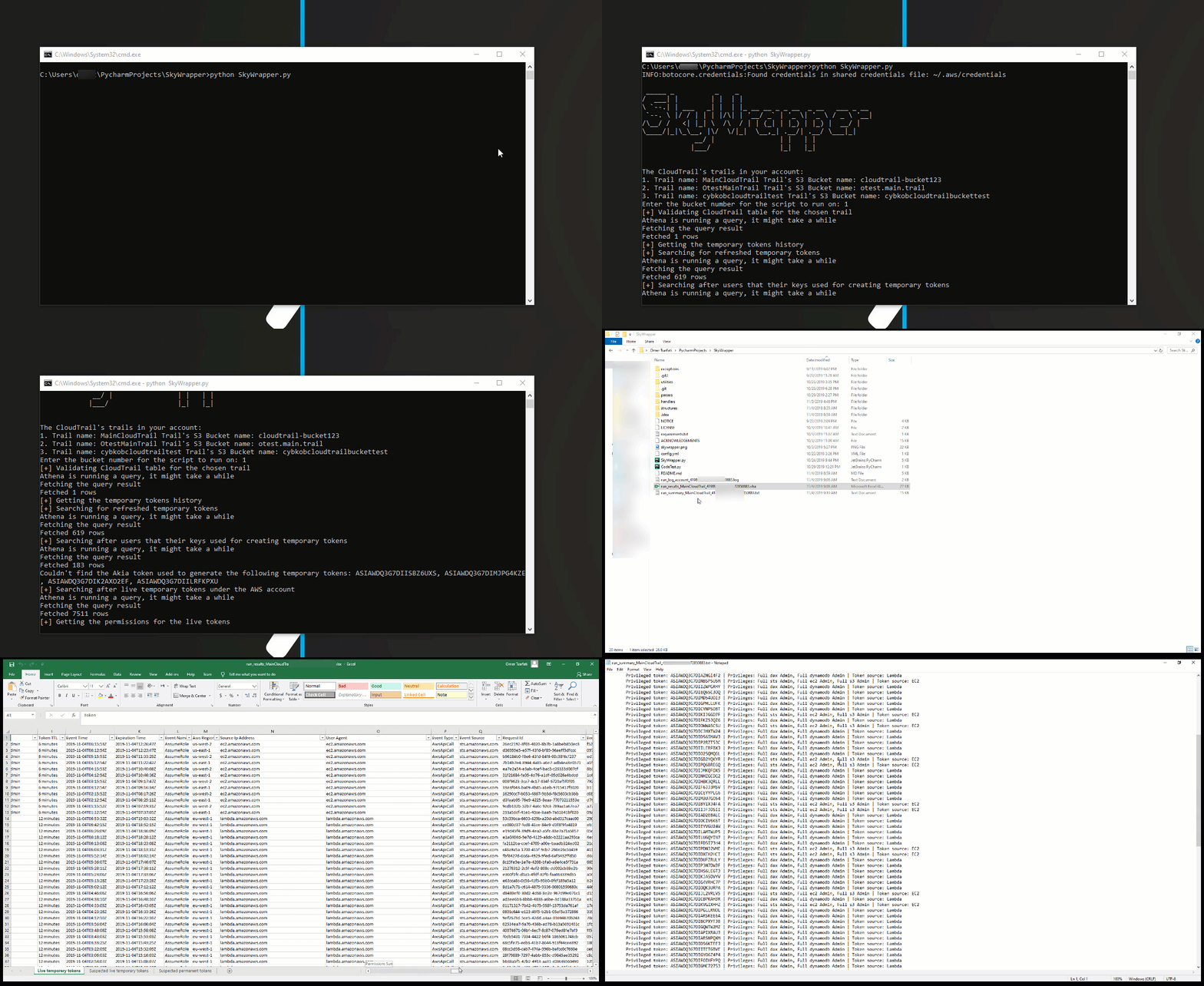
python SkyWrapper.py
इस स्क्रिप्ट को चलाने के लिए, आपको कम से कम निम्नलिखित अनुमति नीति की आवश्यकता होगी:
{
    "Version": "2012-10-17",
    "Statement": [
        {
            "Sid": "S3TrailBucketPermissions",
            "Effect": "Allow",
            "Action": [
                "s3:GetObject",
                "s3:ListBucketMultipartUploads",
                "s3:ListBucket",
                "s3:GetBucketLocation",
                "s3:ListMultipartUploadParts"
            ],
            "Resource": [
                "arn:aws:s3:::{cloudtrail_bucket_name}/*",
                "arn:aws:s3:::{cloudtrail_bucket_name}
            ]
        },
        {
            "Sid": "IAMReadPermissions",
            "Effect": "Allow",
            "Action": [
                "iam:ListAttachedRolePolicies",
                "iam:ListRolePolicies",
                "iam:GetRolePolicy",
                "iam:GetPolicyVersion",
                "iam:GetPolicy",
                "iam:ListRoles"
            ],
            "Resource": [
                "arn:aws:iam::*:policy/*",
                "arn:aws:iam::*:role/*"
            ]
        },
        {
            "Sid": "GLUEReadWritePermissions",
            "Effect": "Allow",
            "Action": [
                "glue:CreateTable",
                "glue:CreateDatabase",
                "glue:GetTable",
                "glue:GetDatabase"
            ],
            "Resource": "*"
        },
        {
            "Sid": "CLOUDTRAILReadPermissions",
            "Effect": "Allow",
            "Action": [
                "cloudtrail:DescribeTrails"
            ],
            "Resource": "*"
        },
        {
            "Sid": "ATHENAReadPermissions",
            "Effect": "Allow",
            "Action": [
                "athena:GetQueryResults",
                "athena:StartQueryExecution",
                "athena:GetQueryExecution"
            ],
            "Resource": "arn:aws:athena:*:*:workgroup/*"
        },
        {
            "Sid": "S3AthenaResultsBucketPermissions",
            "Effect": "Allow",
            "Action": [
                "s3:PutObject",
                "s3:GetObject",
                "s3:ListBucketMultipartUploads",
                "s3:CreateBucket",
                "s3:ListBucket",
                "s3:GetBucketLocation",
                "s3:ListMultipartUploadParts"
            ],
            "Resource": "arn:aws:s3:::aws-athena-query-results-*"
        }
    ]
}
सुनिश्चित करें कि आप "{trail_bucket}" को अपने ट्रेल के बकेट नाम से बदल दें!
यदि आपके पास एक से अधिक ट्रेल हैं, जिन पर आप स्क्रिप्ट का उपयोग करना चाहते हैं, तो आपको उन्हें नीति अनुमति संसाधन अनुभाग में भी जोड़ना होगा।
"config.yaml" कॉन्फ़िगरेशन फ़ाइल है। अधिकांश मामलों में, आप कॉन्फ़िगरेशन को वैसे ही छोड़ सकते हैं। यदि आपको इसे बदलने की आवश्यकता है, तो कॉन्फ़िगरेशन फ़ाइल दस्तावेज़ीकृत है।
athena: # Athena configuration
  database_name: default # The name of the database Athena uses for querying the trail bucket.
  table_name: cloudtrail_logs_{table_name} # The table name of the trail bucket name
  output_location: s3://aws-athena-query-results-{account_id}-{region}/ # The default output location bucket for the query results
output:
  excel_output_file: run_results_{trail}_{account_id}-{date}.xlsx # Excel results file
  summary_output_file: run_summary_{trail}_{account_id}-{date}.txt # Summary text results file
verify_https: True # Enable/ Disable verification of SSL certificates for HTTP requests
account:
    account_id: 0 # The account id - Keep it as 0 in case you don't know it
    aws_access_key_id: # If you keep it empty, the script will look after the default AWS credentials stored in ~/.aws/credentials
    aws_secret_access_key: # If you keep it empty, the script will look after the default AWS credentials stored in ~/.aws/credentials
    aws_session_token: # If you keep it empty, the script will look after the default AWS credentials stored in ~/.aws/credentials
अधिक टिप्पणियों, सुझावों या प्रश्नों के लिए, आप Omer Tsarfati (@OmerTsarfati) और CyberArk Labs से संपर्क कर सकते हैं। आप हमारे द्वारा विकसित और अधिक प्रोजेक्ट https://github.com/cyberark/ पर पा सकते हैं।
