 chenaotian/cve-2022-0185
CVE-2022-0185 POC और Docker विश्लेषण write up

[toc]
भेद्यता आईडी: CVE-2022-0185
भेद्यता स्कोर:
भेद्यता उत्पाद: linux kernel - fsconfig syscall
प्रभावित संस्करण: linux kernel 5.1-rc1 ~ 5.16.2
शोषण की शर्तें: linux स्थानीय; CAP_SYS_ADMIN cap अनुमति (unshare द्वारा सीधे प्राप्त किया जा सकता है, सीमा रहित के समान)
शोषण प्रभाव: स्थानीय विशेषाधिकार वृद्धि; कंटेनर बचाव
स्रोत कोड प्राप्त करें: git clone git://kernel.ubuntu.com/ubuntu/ubuntu-focal.git -b Ubuntu-hwe-5.11-5.11.0-27.29_20.04.1 --depth 1
या https://mirrors.edge.kernel.org/pub/linux/kernel/v5.x/
5.X कर्नेल संकलन पर्यावरण Docker: chenaotian/kernelcompile
भेद्यता विश्लेषण Docker: chenaotian/cve-2022-0185
/root/cve-2022-0185 में हैंboot_exp.sh exp को प्रारंभ करने और डिबग पर्यावरण को सत्यापित करने के लिए उपयोग किया जाता है, डिस्ट्रो 5.11.0-44 बिना सिग्नेचर कर्नेलboot_poc.sh poc को प्रारंभ करने और पर्यावरण को सत्यापित करने के लिए उपयोग किया जाता है, कर्नेल को क्रैश कर सकता है लेकिन exp चला नहीं सकता, स्वयं संकलित 5.13 सिग्नेड कर्नेलexp निर्देशिका, exp स्रोत कोड (लेखक: BitsByWill), सीधे exploit_fuse संकलित करें।qemu पर्यावरण: https://github.com/chenaotian/CVE-2022-0185/tree/main/qemuANDexp
ubuntu 20.04 वर्चुअल मशीन exp चलाने का वातावरण, मूल लेखक का exp चलाएं
ubuntu20.04 वर्चुअल मशीन तैयार करें, फिर कर्नेल बदलें:```shell apt-get install linux-image-5.11.0-44-generic
grep menuentry /boot/grub/grub.cfg vim /etc/default/grub #修改 GRUB_DEFAULT 选项为上面结果中想要启动内核的下标 update-grub #如果不生效的话则直接进入/boot 目录将之前的内核相关文件(带之前内核编号的文件)全部删掉,然后启动时候报找不到内核,然后手动选择内核启动也可以
#编译exp make fuse ./exploit
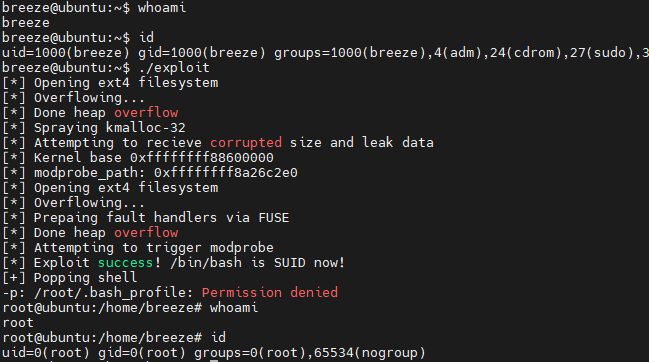
विशेषाधिकार वृद्धि प्रभाव
## भेद्यता सिद्धांत
भेद्यता उत्पन्न होने वाला सिस्टम कॉल `fsconfig` में `FSCONFIG_SET_STRING` ऑपरेशन विकल्प है। यह सिस्टम कॉल पहले से खोले गए फ़ाइल सिस्टम कॉन्टेक्स्ट के लिए कुछ कॉन्फ़िगरेशन करने के लिए उपयोग किया जाता है, **आवश्यक शर्त यह है कि `CAP_SYS_ADMIN` कैप क्षमता होनी चाहिए**:
> `fsopen` का मुख्य उद्देश्य एक फ़ाइल सिस्टम कॉन्टेक्स्ट बनाना है, और फिर इसे एक फ़ाइल डिस्क्रिप्टर से जोड़ना है, और फ़ाइल डिस्क्रिप्टर लौटाना है। `fsopen` के बाद `fsconfig` आता है, शाब्दिक अर्थ से अनुमान लगाया जा सकता है कि हमने ऊपर `fsopen` के माध्यम से एक फ़ाइल सिस्टम कॉन्टेक्स्ट बनाया है, और नीचे `fsconfig` संभवतः फ़ाइल सिस्टम कॉन्टेक्स्ट की सामग्री को कॉन्फ़िगर करने के लिए उपयोग किया जाता है। वास्तव में `fsconfig` मुख्य रूप से यह कॉन्फ़िगरेशन कार्य करता है, फ़ाइल सिस्टम कॉन्टेक्स्ट के अलावा, यह अन्य कार्यों का भी समर्थन करता है।
### भेद्यता उत्पन्न होने का स्थान
सबसे पहले, भेद्यता `legacy_parse_param` फ़ंक्शन में दिखाई देती है:
linux-5.11\fs\fs_context.c : 502 : legacy_parse_param```c
static int legacy_parse_param(struct fs_context *fc, struct fs_parameter *param)
{
struct legacy_fs_context *ctx = fc->fs_private;
unsigned int size = ctx->data_size;
size_t len = 0;
··· ···
··· ···
switch (param->type) {
case fs_value_is_string:
len = 1 + param->size;
fallthrough;
··· ···
}
if (len > PAGE_SIZE - 2 - size) //此处边界检查有问题
return invalf(fc, "VFS: Legacy: Cumulative options too large");
if (strchr(param->key, ',') ||
(param->type == fs_value_is_string &&
memchr(param->string, ',', param->size)))
return invalf(fc, "VFS: Legacy: Option '%s' contained comma",
param->key);
if (!ctx->legacy_data) {
ctx->legacy_data = kmalloc(PAGE_SIZE, GFP_KERNEL); //在第一次时会分配一页大小
if (!ctx->legacy_data)
return -ENOMEM;
}
ctx->legacy_data[size++] = ',';
len = strlen(param->key);
memcpy(ctx->legacy_data + size, param->key, len);
size += len;
if (param->type == fs_value_is_string) {
ctx->legacy_data[size++] = '=';
memcpy(ctx->legacy_data + size, param->string, param->size); //拷贝,可能越界
size += param->size;
}
ctx->legacy_data[size] = '\0';
ctx->data_size = size;
ctx->param_type = LEGACY_FS_INDIVIDUAL_PARAMS;
return 0;
}
मुख्य बात बाद के memcpy पर निर्भर करती है, जो हमारे द्वारा भेजे गए param->string को ctx->legacy_data में कॉपी करता है। कॉपी की सीमा से बाहर जाने की जाँच पिछली (len > PAGE_SIZE - 2 - size) शर्त में होती है। यहाँ पर यह जाँच समस्याग्रस्त है, क्योंकि जाँच का प्रकार size_t है, जो unsigned int है। यदि size > PAGE_SIZE - 2 होता है, तो पूर्णांक ओवरफ्लो उलट जाता है, जिससे len < PAGE_SIZE - 2 - size हो जाता है, और फिर जाँच पास हो जाती है। बाद में कॉपी करते समय size, PAGE_SIZE - 2 से बड़ा होता है, जिससे कॉपी सीमा से बाहर हो जाती है।
उपयोग में आने वाली कुछ डेटा संरचनाएँ:```c struct fs_context { const struct fs_context_operations ops; struct mutex uapi_mutex; / Userspace access mutex */ struct file_system_type *fs_type; void fs_private; / The filesystem's context */ void *sget_key; struct dentry root; / The root and superblock */ struct user_namespace user_ns; / The user namespace for this mount */ struct net net_ns; / The network namespace for this mount */ const struct cred cred; / The mounter's credentials / struct p_log log; / Logging buffer */ const char source; / The source name (eg. dev path) */ void security; / Linux S&M options / void s_fs_info; / Proposed s_fs_info / unsigned int sb_flags; / Proposed superblock flags (SB_) / unsigned int sb_flags_mask; / Superblock flags that were changed / unsigned int s_iflags; / OR'd with sb->s_iflags / unsigned int lsm_flags; / Information flags from the fs to the LSM / enum fs_context_purpose purpose:8; enum fs_context_phase phase:8; / The phase the context is in / bool need_free:1; / Need to call ops->free() / bool global:1; / Goes into &init_user_ns / bool oldapi:1; / Coming from mount(2) */ };
struct legacy_fs_context { char legacy_data; / Data page for legacy filesystems */ size_t data_size; enum legacy_fs_param param_type; };
struct fs_parameter { const char key; / Parameter name / enum fs_value_type type:8; / The type of value here */ union { char *string; void *blob; struct filename *name; struct file *file; }; size_t size; int dirfd; };
### कॉल पथ
नीचे हम फ़ंक्शन कॉल स्टैक का विश्लेषण करते हैं। प्रवेश बिंदु निश्चित रूप से `fsconfig` सिस्टम कॉल है:
linux-5.11\fs\fsopen.c : 314 : SYSCALL_DEFINE5(fsconfig,```c
SYSCALL_DEFINE5(fsconfig,
int, fd,
unsigned int, cmd,
const char __user *, _key,
const void __user *, _value,
int, aux)
{
struct fs_context *fc;
struct fd f;
int ret;
int lookup_flags = 0;
struct fs_parameter param = {
.type = fs_value_is_undefined,
};
··· ···
f = fdget(fd);
if (!f.file)
return -EBADF;
ret = -EINVAL;
if (f.file->f_op != &fscontext_fops)
goto out_f;
fc = f.file->private_data; //设置fc
··· ···
switch (cmd) {
··· ···
case FSCONFIG_SET_STRING:
param.type = fs_value_is_string;
//初始化结构体中的联合体中的string成员为用户传入的字符串
param.string = strndup_user(_value, 256);
if (IS_ERR(param.string)) {
ret = PTR_ERR(param.string);
goto out_key;
}
param.size = strlen(param.string);//设置size
break;
··· ···
··· ···
}
ret = mutex_lock_interruptible(&fc->uapi_mutex);
if (ret == 0) {
ret = vfs_fsconfig_locked(fc, cmd, ¶m);
mutex_unlock(&fc->uapi_mutex);
}
