
Skip to content
KitploitKITPLOIT
उपकरणएक्सप्लॉइटब्लॉग
Log in
जमा करें
उपकरणएक्सप्लॉइटब्लॉग
जमा करें

हैकिंग, पेनटेस्ट और साइबर सुरक्षा उपकरण आपके सुरक्षा शस्त्रागार के लिए!

Kitploit हैकिंग, साइबर सुरक्षा और पेंटेस्टिंग टूल्स की एक निर्देशिका है। कमजोरियों को खोजने, सिस्टम का विश्लेषण करने, परीक्षण को स्वचालित करने और अपनी सुरक्षा को मजबूत करने के लिए नवीनतम प्रोजेक्ट अपडेट खोजें।

फ़ीडसंपर्कगोपनीयता© 2026 Kitploit

टूल निर्देशिका

श्रेणियाँ

सभी श्रेणियाँ देखें
Loading categories
उपकरण/GitHubGitHub/center2055/onionhop
ReconnaissanceNetwork MappingNetwork SecurityPrivacyThreat IntelligenceDNS Analysis
GitHubcenter2055/onionhop

OnionHop

Privacy-first Desktop app that routes your traffic through Tor - Anonymous browsing made simple

रिपॉजिटरी देखें
64130833घं 52मि पहलेKitploit द्वारा समीक्षित
साझा करें
वेबसाइट
अनुरोधित भाषा में सामग्री उपलब्ध नहीं है। अंग्रेज़ी संस्करण दिखाया जा रहा है।

OnionHop V3

OnionHop Logo
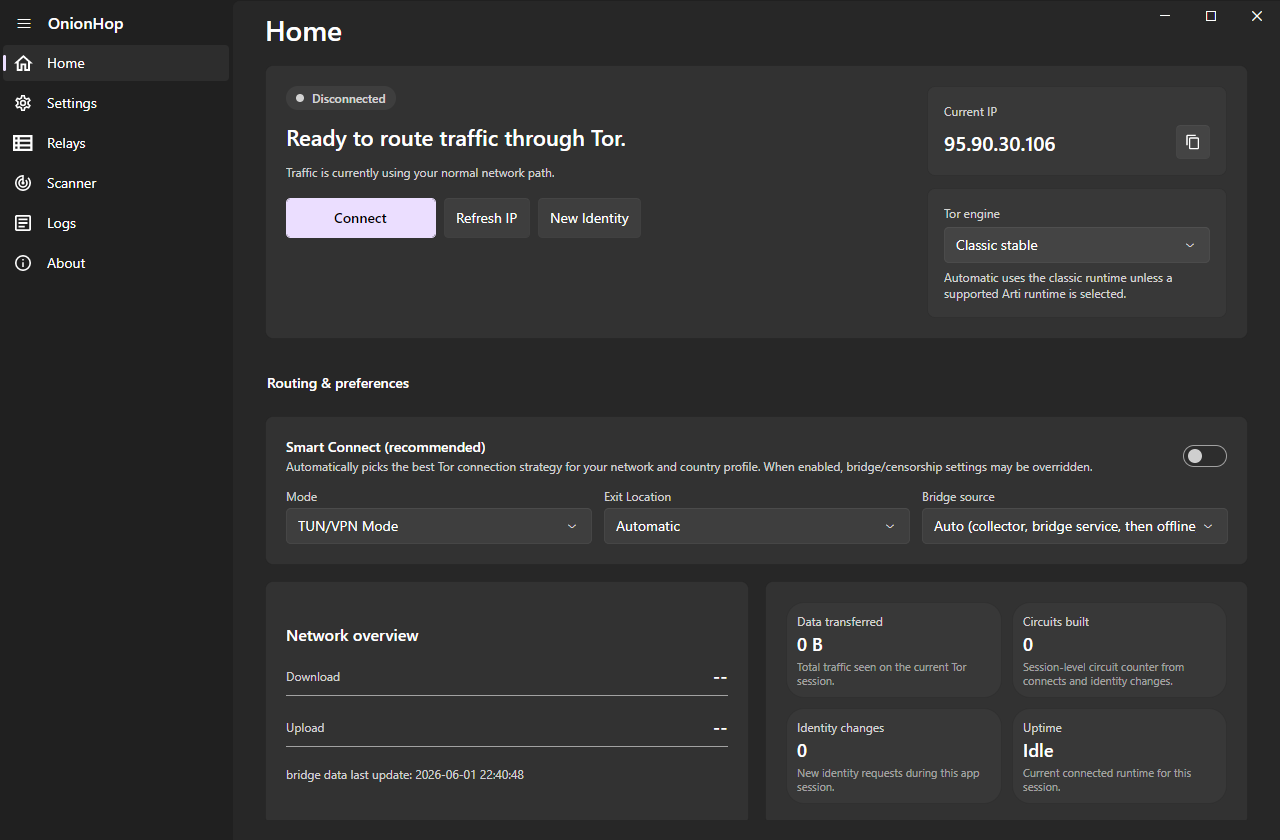
OnionHop V3 UI Screenshot
Download Latest Release Support on Ko-Fi
Windows macOS Linux

OnionHop V3 is a modern, cross-platform desktop app (Windows, macOS and Linux) that routes your traffic through Tor. It can run Tor as a local SOCKS proxy or as a system-wide tunnel, automatically pick a working connection strategy for your network with Smart Connect, scan and apply working bridges for censored networks across every transport, and even let you volunteer as a Snowflake proxy.

Disclaimer OnionHop is provided "as-is". Tor usage can be illegal or restricted in some jurisdictions. You are responsible for complying with local laws and regulations.


What's new in V3 (since v2.7)

V3 is a ground-up rebuild on a new cross-platform UI stack, with a much smarter connection engine and a far wider set of censorship-resistant transports.

  • Now cross-platform — native desktop builds for Windows, macOS (signed & notarized universal app) and Linux (AppImage). Same app, native look on each OS.
  • Redesigned UI — Fluent/native look (FluentAvalonia), light/dark/follow-system themes, an accent picker, an integrated chromeless title bar on Windows and native window chrome on macOS, and 8 languages (English, German, French, Chinese, Russian, Persian, Azerbaijani, and Sorani Kurdish).
  • Smart Connect — an offline censorship "brain" that auto-picks the best connection strategy for your network and country: it knows where Tor is blocked, prefers transports that survive there, pre-tests bridge reachability, races strategies in parallel, fails fast off dead paths, and remembers what worked on each network so the next connect is instant.
  • Three Tor engines — Classic (tor.exe, full control: bridges, country/entry/exit pinning, control-port New Identity), Arti (the Rust Tor implementation with native bridge/PT config), and ArtiHop (shortened 2-hop Guard→Exit circuits for lower latency).
  • More censorship-resistant transports — obfs4, snowflake (with optional AMP-cache fronting), webtunnel, conjure, meek, and dnstt (a DNS tunnel that gets Tor through when only DNS is allowed).
  • Bridge Scanner — fetch and reachability-test bridges of every transport, see color-coded latency, and one-click apply the ones that actually work on your network.
  • More bridge sources — the official Tor bridge service, the censorship-resistant OnionHop Bridges Collector (derived from Delta-Kronecker/Tor-Bridges-Collector), built-in community bridges, and a thin-set top-up so a tiny live fetch is automatically backed by bundled bridges.
  • Relays browser — search the live Tor relay list by nickname, country, role, flags and bandwidth, and pin a preferred entry/middle/exit.
  • Command-line interface — a full-featured TUI (OnionHopV3.Cli) with a live status dashboard, connect/scan/bridges/snowflake/relays commands and settings persistence. Windows, Linux and macOS packages are built by CI.
  • Stronger leak protection — optional full DNS-over-Tor, a kill switch, UDP blocking in TUN mode, and an in-app WebRTC/UDP privacy notice.
  • Tor-only mode (Windows): Windows Firewall lets only Tor out, also while OnionHop is disconnected or closed, until you turn it off (Settings, Privacy & Security; CLI: tor-only on|off|status).
  • Volunteer as a Snowflake proxy — help censored users reach Tor, straight from Settings.
  • Quality-of-life — decoupled system-proxy toggle (turn it off while Tor stays connected), an opt-in persistent admin helper to skip repeat UAC prompts in TUN mode (off by default), an in-app changelog, and Bitcoin donations.

Download

Grab the latest build for your platform from Releases:

PlatformFileNotes
WindowsOnionHop-Setup-v3.exeInstaller (self-contained, .NET runtime bundled); signed by Rana GmbH
WindowsOnionHopV3-Portable-…win-x64.zipPortable, no install; OnionHop's programs inside are signed
LinuxOnionHop-x86_64.AppImagechmod +x and run
Linux (ARM64)OnionHop-aarch64.AppImage64-bit ARM desktops and laptops; chmod +x and run
macOSOnionHop-3.x-macOS.dmgSigned & notarized; universal (Apple Silicon + Intel) — from the macOS repo
Windows CLIOnionHop-CLI-Setup-3.x.exe / portable ZIPTerminal interface; signed by Rana GmbH
Linux CLIOnionHopCLI-…linux-x64.tar.gzTerminal interface
Linux CLI (ARM)OnionHopCLI-…linux-arm64.tar.gz (64-bit) / …linux-arm.tar.gz (32-bit ARMv7)Raspberry Pi and other ARM boards; see Headless use
macOS CLIOnionHopCLI-…macos-arm64.tar.gz (Apple Silicon) / …macos-x64.tar.gz (Intel)Terminal interface; signed & notarized — from the macOS repo like the DMGs

The macOS .dmg is published from the dedicated, code-signing rana-gmbh/onionhopMac repository.

Since version 3.12, the Windows installers and OnionHop's own programs are signed by Rana GmbH, the company behind OnionHop. They are built and signed on GitHub's runners by the Build Windows release workflow, not on a developer's computer. To check a download, open its Properties and look at Digital Signatures, or run Get-AuthenticodeSignature .\OnionHop-Setup-v3.exe in PowerShell: the status is Valid and the signer is Rana GmbH. Tor, sing-box, Xray and the transports inside the package are other projects' programs and stay as those projects ship them.


Getting started

  1. Install the build for your OS (above). The Windows installer and the macOS/Linux bundles are self-contained — the .NET 9 runtime is bundled.

  2. Choose a mode

    • Proxy Mode (recommended, no admin): runs Tor locally and points the OS system proxy at Tor's local SOCKS5 endpoint. Best compatibility for proxy-aware apps.
    • TUN/VPN Mode (admin): system-wide routing via sing-box (Wintun on Windows, the system TUN on macOS/Linux); needed for apps that ignore proxy settings. Leak-resistant (DNS through Tor, UDP blocked).
टूल डाउनलोड करें

सबसे लोकप्रिय

सभी देखें →

हमारे समुदाय द्वारा सबसे अधिक उपयोग किए जाने वाले उपकरण खोजें।

  • 1

    OsintHunter

    letox4/osinthunter

    🎯 अंतिम OSINT टूलकिट: जाँच ग्राफ़, विश्वास स्कोरिंग, उपनाम परिवार, मानचित्र, टाइमलाइन और रिपोर्ट। 49 मॉड्यूल, 400+ साइटें, किसी API कुंजी की आवश्यकता नहीं।

    927
  • 2

    ghostlock-app

    yukonga/ghostlock-app

    # घोस्टलॉक वन-टैप निष्पादन ऐप (CVE-2026-43499)

    555
  • 3

    redforge

    cybersecurity91/redforge

    ब्राउज़र-साइड रेड टीम टूलकिट, जिसमें रेकॉन, पेलोड जनरेशन, क्रेडेंशियल हमलों, क्रिप्टो, एन्कोडिंग और एंगेजमेंट रिपोर्टिंग के लिए 102 ऑफ़लाइन टूल्स हैं।

    360
  • 4

    ARTEX

    baarai/artex

    प्लानर/वर्कर एजेंट, एसेट और एक्सप्लोरेशन ग्राफ़, MITM ट्रैफ़िक रिकॉर्डिंग, और भेद्यता पुनःपरीक्षण के साथ LLM मल्टी-एजेंट स्वायत्त पेनेट्रेशन टेस्टिंग प्लेटफ़ॉर्म।

    357
  • 5

    looking-glass

    anonghosty/looking-glass

    CSIRT प्लेटफ़ॉर्म जो Shadowserver रिपोर्ट्स को MongoDB में इनजेस्ट करता है और उन्हें इंटरैक्टिव मैप्स, विश्लेषण, निष्कर्षों, सलाहों और कार्यकारी डैशबोर्ड के रूप में पुनः प्रस्तुत करता है।

    324
  • 6

    CyberStrikeAI

    ed1s0nz/cyberstrikeai

    AI-मूल साइबरसुरक्षा के लिए कार्रवाई की प्रणाली—जहाँ इरादा नियंत्रित निष्पादन बन जाता है, साक्ष्य परिचालन स्मृति बन जाता है, और हर ऑपरेशन अगले को बेहतर बनाता है।

    289

सभी उपकरण खोजें

हमारे उपकरणों का संग्रह ब्राउज़ करें

सभी उपकरण देखें →