 brumbelow/layerleak
layerleak Docker Hub गुप्त स्कैनर


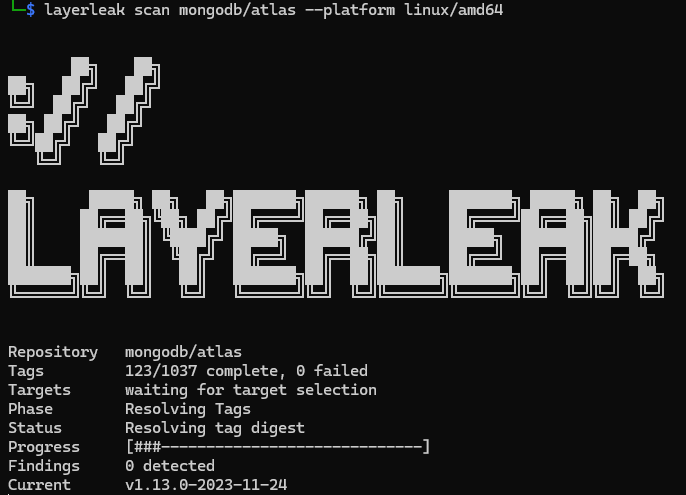
Layerleak एक read-only OCI image secret scanner है। यह Docker daemon के बिना public image references को resolve करता है, downloaded content को OCI digests के विरुद्ध verify करता है, layer state को reconstruct करता है, deleted artifacts और image metadata का निरीक्षण करता है, और redacted, provenance-rich findings लौटाता है।
यह Docker Hub, GHCR, Quay, GCR, MCR, Amazon ECR Public, और अन्य OCI-compatible registries का समर्थन करता है। परिणामों को JSON के रूप में सहेजा जा सकता है और bundled API के लिए PostgreSQL में persist किया जा सकता है।
यह development tree github.com/brumbelow/layerleak/v3 module path पर
3.0.0 line को document करता है। नीचे दिखाया गया release-candidate command
केवल उस exact tag के publish होने के बाद installable होता है। changelog और OpenAPI document में
3.0.0 labels जानबूझकर frozen हैं ताकि
एक accepted release candidate को उसी source commit से promote किया जा सके।
Layerleak untrusted image content को scan करता है, इसलिए इसके defaults जानबूझकर bounded और fail closed हैं:
partial या failed के रूप में report किया जाता है, कभी clean
scan के रूप में नहीं।Layerleak यह verify नहीं करता कि detected credential live है या नहीं। API में कोई
authorization model नहीं है: यह default रूप से open है, और opt-in
LAYERLEAK_API_BEARER_TOKENS shared-token check /api/ paths के लिए defence in depth है,
access control नहीं। इसे किसी भी स्थिति में केवल trusted network पर या
authenticated gateway के पीछे expose करें।
Layerleak के लिए Go 1.27.1 या नया आवश्यक है।```bash go install github.com/brumbelow/layerleak/v3@latest layerleak --version layerleak --help
`/v3` मॉड्यूल पथ विहित इंस्टॉल लक्ष्य है; इंस्टॉल की गई बाइनरी अभी भी
`layerleak` नाम से ही होती है। जब पुनरुत्पादनशीलता महत्वपूर्ण हो तो किसी स्थिर या रिलीज़ कैंडिडेट को स्पष्ट रूप से पिन करें:```bash
go install github.com/brumbelow/layerleak/[email protected]
go install github.com/brumbelow/layerleak/[email protected]
/v3 पथ पर @latest उच्चतम प्रकाशित v3 रिलीज़ का चयन करता है। एक स्थिर संस्करण मौजूद होने पर Go @latest से प्रीरिलीज़ को बाहर कर देता है, इसलिए जब तक केवल रिलीज़ कैंडिडेट प्रकाशित होते हैं, @latest नवीनतम कैंडिडेट पर हल होता है। /v3 के बिना रूट पथ github.com/brumbelow/layerleak हमेशा के लिए v1.0.0 पर बना रहता है; हमेशा /v3 शामिल करें। चेकआउट बिल्ड एक VCS-व्युत्पन्न विकास संस्करण रिपोर्ट करते हैं, जिसमें एक dirty-worktree मार्कर शामिल होता है, या VCS जानकारी के बिना dev। रिलीज़-इंस्टॉल किए गए बाइनरीज़ layerleak --version के माध्यम से हल किए गए मॉड्यूल संस्करण की रिपोर्ट करते हैं।
प्रत्येक रिलीज़ पूर्व-निर्मित CLI आर्काइव भी संलग्न करती है, इसलिए किसी Go टूलचेन की आवश्यकता नहीं है: linux और darwin के लिए amd64 और arm64 पर layerleak_<version>_<os>_<arch>.tar.gz (जिसमें layerleak, LICENSE और THIRD_PARTY_NOTICES.md शामिल हैं) और layerleak_<version>_windows_amd64.zip (layerleak.exe)। प्रत्येक रिलीज़ में रिलीज़ वर्कफ़्लो द्वारा keylessly हस्ताक्षरित एक layerleak_<version>_checksums.txt (layerleak_<version>_checksums.txt.sigstore.json) और प्रत्येक आर्काइव के लिए एक build-provenance attestation होता है। चलाने से पहले सत्यापित करें:```bash
version=v3.0.0
archive="layerleak_${version}linux_amd64.tar.gz"
checksums="layerleak${version}_checksums.txt"
base="https://github.com/brumbelow/layerleak/releases/download/${version}"
curl --fail --location --proto '=https' --tlsv1.2 --remote-name-all
"${base}/${archive}" "${base}/${checksums}" "${base}/${checksums}.sigstore.json"
sha256sum --check --ignore-missing "${checksums}"
cosign verify-blob
--bundle "${checksums}.sigstore.json"
--certificate-identity 'https://github.com/Brumbelow/layerleak/.github/workflows/container-release.yml@refs/heads/main'
--certificate-oidc-issuer 'https://token.actions.githubusercontent.com'
"${checksums}"
gh attestation verify "${archive}" --repo Brumbelow/layerleak
--signer-workflow Brumbelow/layerleak/.github/workflows/container-release.yml
--source-ref refs/heads/main --deny-self-hosted-runners
tar -xzf "${archive}" layerleak ./layerleak version
हस्ताक्षर साबित करता है कि checksums फ़ाइल इस रिपॉज़िटरी के `main` पर रिलीज़
वर्कफ़्लो से आई है, checksum उस फ़ाइल के साथ संग्रह को बाँधता है, और
attestation स्वतंत्र रूप से संग्रह को उस वर्कफ़्लो रन से बाँधता है जिसने इसे बनाया।
रिलीज़ पर `release-manifest.json` प्रत्येक संग्रह और उसके अंदर मौजूद
बाइनरी के digest को सूचीबद्ध करता है। एक स्थिर रिलीज़ स्वीकृत रिलीज़
कैंडिडेट के commit को स्थिर संस्करण स्ट्रिंग के साथ पुनर्निर्मित करती है और तब तक प्रकाशित करने से इंकार करती है
जब तक कि पुनर्निर्माण कैंडिडेट की बाइनरीज़ को बाइट-दर-बाइट पुनरुत्पादित न करे, इसलिए
`layerleak version` ठीक उसी टैग की रिपोर्ट करता है जिसे आपने डाउनलोड किया था।

### GitHub Action

रिपॉज़िटरी रूट एक composite action है जो रनर के लिए संग्रह डाउनलोड करता है,
इसे ऊपर के अनुसार सत्यापित करता है (checksum, checksums फ़ाइल का cosign bundle जिसमें
cosign रिलीज़ `scripts/release-tools.sh` में pinned है, और संग्रह
attestation) और `layerleak scan` चलाता है। इसे एक रिलीज़ टैग पर pin करें; मेल खाते
संग्रह उस रिलीज़ से डाउनलोड किए जाते हैं:```yaml
name: Image secrets
on: { push: { branches: [main] } }
permissions: { contents: read, security-events: write }
jobs:
  layerleak:
    runs-on: ubuntu-24.04
    steps:
      - id: scan
        uses: brumbelow/[email protected]
        with: { image: "ghcr.io/${{ github.repository }}:${{ github.sha }}", fail-on: none }
      - uses: github/codeql-action/upload-sarif@b96794f015dfd88f77b49b1c93e0fa7110f94c63 # v4.38.0
        if: ${{ always() && steps.scan.outputs.sarif-file != '' }}
        with: { sarif_file: "${{ steps.scan.outputs.sarif-file }}" }
| Input | Default | Meaning |
|---|---|---|
image | required | स्कैन करने के लिए इमेज संदर्भ; निजी रजिस्ट्रियाँ स्टेप env में LAYERLEAK_REGISTRY_USERNAME/LAYERLEAK_REGISTRY_PASSWORD का उपयोग करती हैं। |
version | uses: में टैग | वह रिलीज़ जिसका आर्काइव डाउनलोड किया जाता है; इसे केवल तब सेट करें जब uses: किसी ब्रांच या कमिट का नाम देता हो। |
format | sarif | summary, json या sarif। |
fail-on | low | --fail-on को पास किया जाता है; none स्टेप को विफल किए बिना रिपोर्ट करता है। |
allow-partial | false | --allow-partial पास करता है। |
platform | प्रत्येक linux मैनिफ़ेस्ट | --platform को पास किया जाता है। |
output-file | $RUNNER_TEMP/layerleak/results.<ext> | जहाँ फ़ॉर्मेट किया गया परिणाम लिखा जाता है। |
extra-args | खाली | आगे के layerleak scan फ़्लैग, व्हाइटस्पेस पर विभाजित और अंत में जोड़े गए (उदाहरण के लिए --all-tags --max-repository-tags 50)। |

