

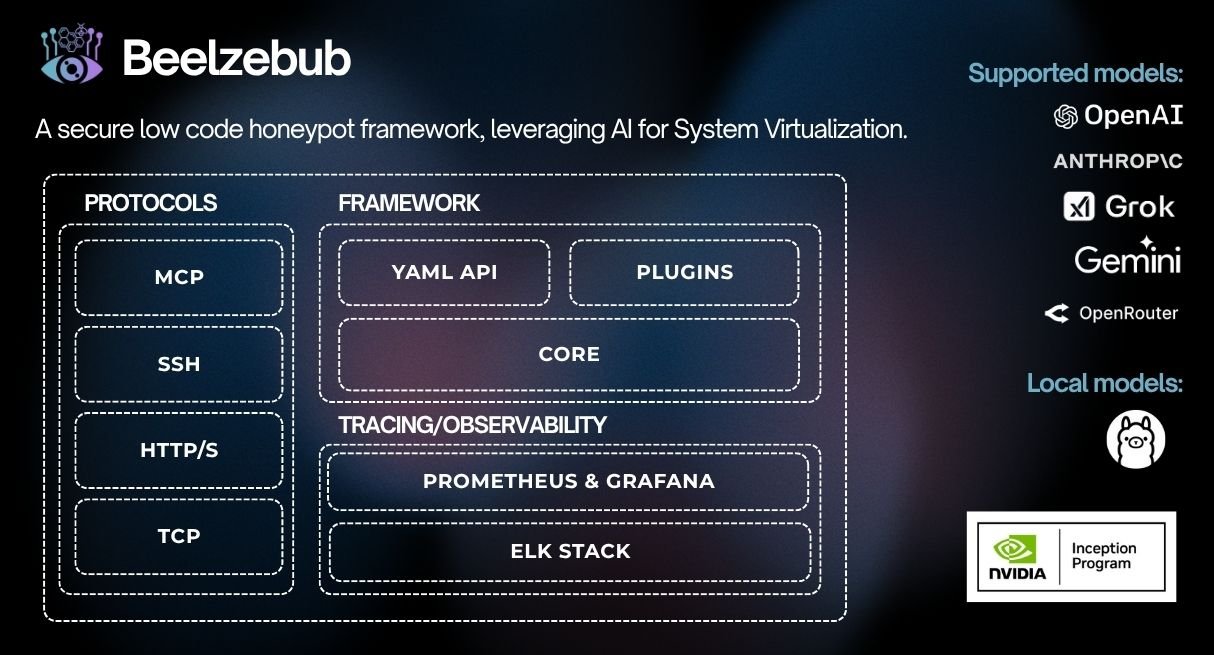
एक सुरक्षित लो-कोड डिसेप्शन रनटाइम फ्रेमवर्क, जो सिस्टम वर्चुअलाइज़ेशन के लिए AI का लाभ उठाता है।



डिसेप्शन रनटाइम फ्रेमवर्क
Beelzebub एक ओपन-सोर्स डिसेप्शन रनटाइम है जो SSH, HTTP, TCP, TELNET और MCP प्रोटोकॉल में अनुकूली, LLM-संचालित डिकॉय सेवाओं को तैनात करता है। यह निष्क्रिय हनीपॉट्स से आगे बढ़कर हमलावरों को यथार्थवादी इंटरैक्शन में सक्रिय रूप से शामिल करता है, उच्च-निष्ठा ख़तरा खुफिया जानकारी एकत्र करता है, और AI एजेंटों के विरुद्ध प्रॉम्प्ट इंजेक्शन हमलों का पता लगाता है।
CommandPlugin या HTTPPlugin इंटरफ़ेस लागू करें और init() के माध्यम से रजिस्टर करें — कोई कोर परिवर्तन आवश्यक नहीं
./install.sh # asks local or Docker, checks prerequisites, and starts it
गैर-इंटरैक्टिव: `./install.sh --local` या `./install.sh --docker`। स्थानीय रनटाइम शुरू किए बिना इंस्टॉल और बिल्ड करने के लिए `./install.sh --local --no-run` का उपयोग करें। गैर-रूट होस्ट पर, स्थानीय इंस्टॉलेशन स्वतः शुरू नहीं होता जब डिफ़ॉल्ट कॉन्फ़िगरेशन में विशेषाधिकार प्राप्त पोर्ट शामिल होते हैं।

### स्थानीय (Go)```bash
make start     # installs any declared plugins, compiles them in, and runs
make docker # builds an image with declared plugins baked in, then runs it
### Helm का उपयोग (Kubernetes)```bash
helm install beelzebub ./beelzebub-chart
# Upgrade:
helm upgrade beelzebub ./beelzebub-chart
Beelzebub एक संरचित CLI के साथ आता है। सभी उपलब्ध कमांड देखने के लिए beelzebub --help चलाएँ।
beelzebub runसभी कॉन्फ़िगर की गई डिसेप्शन सेवाओं को प्रारंभ करें।```bash beelzebub run [flags]
Flags: -c, --conf-core string Path to core configuration file (default "./configurations/beelzebub.yaml") -s, --conf-services string Path to services configuration directory (default "./configurations/services/") -m, --mem-limit-mib int Memory limit in MiB, -1 to disable (default 100)
### `beelzebub validate`

किसी भी सेवा को शुरू किए बिना सभी कॉन्फ़िगरेशन फ़ाइलों को पार्स और सत्यापित करें। CI पाइपलाइनों में उपयोगी। सत्यापन आर्किटेक्चर और नियम संदर्भ के लिए [Configuration Validation](https://github.com/beelzebub-labs/beelzebub/blob/main/docs/configuration-validation.md) देखें।```bash
beelzebub validate --conf-core ./configurations/beelzebub.yaml --conf-services ./configurations/services/
beelzebub pluginGitHub से प्राप्त प्लगइन्स को इंस्टॉल करें, सूचीबद्ध करें और हटाएँ। प्लगइन सिस्टम देखें।```bash beelzebub plugin install github.com/your-org/beelzebub-myplugin beelzebub plugin list beelzebub plugin remove myplugin
### `beelzebub version`

संस्करण, कमिट SHA, बिल्ड दिनांक, और Go runtime जानकारी प्रिंट करें।```bash
beelzebub version
Beelzebub कोर कोड को संशोधित किए बिना डिसेप्शन रनटाइम का विस्तार करने के लिए pkg/plugin पर एक स्थिर सार्वजनिक SDK उपलब्ध कराता है।
// CommandPlugin generates text responses for SSH, TCP, TELNET, and HTTP services. type CommandPlugin interface { Metadata() Metadata Execute(ctx context.Context, req CommandRequest) (string, error) }
// HTTPPlugin generates full HTTP responses with status code, headers, and body. type HTTPPlugin interface { Metadata() Metadata HandleHTTP(r *http.Request) HTTPResponse }
### प्लगइन लिखना```go
package myplugin

import (
    "context"
    "github.com/beelzebub-labs/beelzebub/v3/pkg/plugin"
)

type MyPlugin struct{}

func (p *MyPlugin) Metadata() plugin.Metadata {
    return plugin.Metadata{
        Name:        "MyPlugin",
        Description: "Custom deception response generator",
        Version:     "1.0.0",
        Author:      "your-name",
    }
}

func (p *MyPlugin) Execute(_ context.Context, req plugin.CommandRequest) (string, error) {
    return "simulated response to: " + req.Command, nil
}

func init() {
    plugin.Register(&MyPlugin{})
}
beelzebub plugin install github.com/your-org/myplugin # also appends to the config

