
subfinder v2.16.0
तेज़ निष्क्रिय सबडोमेन एन्यूमरेशन टूल।

तेज़ पैसिव सबडोमेन एन्यूमरेशन टूल।




विशेषताएँ • इंस्टॉल करें • उपयोग • API सेटअप • लाइब्रेरी • Discord से जुड़ें
subfinder एक सबडोमेन डिस्कवरी टूल है जो पैसिव ऑनलाइन स्रोतों का उपयोग करके वेबसाइटों के लिए मान्य सबडोमेन लौटाता है। इसकी एक सरल, मॉड्यूलर आर्किटेक्चर है और इसे गति के लिए अनुकूलित किया गया है। subfinder केवल एक ही काम करने के लिए बनाया गया है - पैसिव सबडोमेन एन्यूमरेशन, और यह इसे बहुत अच्छी तरह करता है।
हमने इसे सभी उपयोग किए गए पैसिव स्रोतों के लाइसेंस और उपयोग प्रतिबंधों का पालन करने के लिए बनाया है। पैसिव मॉडल वह गति और गोपनीयता सुनिश्चित करता है जिसका लाभ पेनेट्रेशन टेस्टर और बग बाउंटी हंटर दोनों समान रूप से उठा सकते हैं।
विशेषताएँ
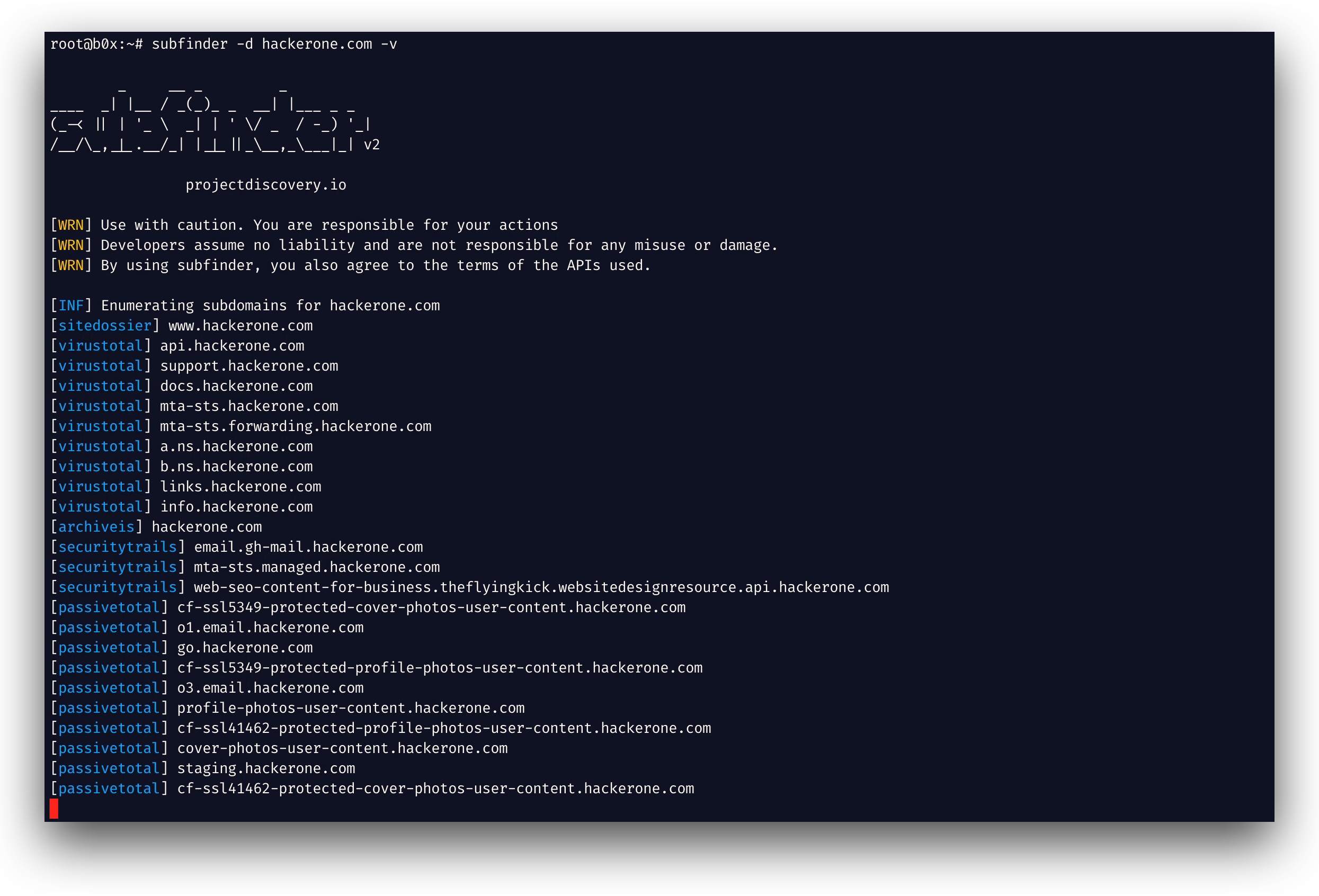
- तेज़ और शक्तिशाली रेज़ोल्यूशन और वाइल्डकार्ड एलिमिनेशन मॉड्यूल
- परिणामों को अधिकतम करने के लिए क्यूरेटेड पैसिव स्रोत
- कई आउटपुट फ़ॉर्मेट समर्थित (JSON, फ़ाइल, stdout)
- गति के लिए अनुकूलित और संसाधनों पर हल्का
- STDIN/OUT समर्थन वर्कफ़्लो में आसान एकीकरण सक्षम करता है
उपयोग
subfinder -h
यह टूल के लिए सहायता प्रदर्शित करेगा। यहाँ वे सभी स्विच दिए गए हैं जिन्हें यह समर्थित करता है।
Usage:
  ./subfinder [flags]

Flags:
INPUT:
  -d, -domain string[]  domains to find subdomains for
  -dL, -list string     file containing list of domains for subdomain discovery

SOURCE:
  -s, -sources string[]           specific sources to use for discovery (-s crtsh,github). Use -ls to display all available sources.
  -recursive                      use only sources that can handle subdomains recursively (e.g. subdomain.domain.tld vs domain.tld)
  -all                            use all sources for enumeration (slow)
  -es, -exclude-sources string[]  sources to exclude from enumeration (-es alienvault,zoomeyeapi)

FILTER:
  -m, -match string[]     subdomain or list of subdomain to match (file or comma separated)
  -f, -filter string[]     subdomain or list of subdomain to filter (file or comma separated)
  -match-regex string[]   regex or list of regex to match on output subdomain (cli, file)
  -filter-regex string[]  regex or list of regex to filter on output subdomain (cli, file)

RATE-LIMIT:
  -rl, -rate-limit int  maximum number of http requests to send per second
  -rls value            maximum number of http requests to send per second for providers in key=value format (-rls "hackertarget=10/s,shodan=15/s")
  -t int                number of concurrent goroutines for resolving (-active only) (default 10)

UPDATE:
  -up, -update                 update subfinder to latest version
  -duc, -disable-update-check  disable automatic subfinder update check

OUTPUT:
  -o, -output string       file to write output to
  -oJ, -json               write output in JSONL format
  -oD, -output-dir string  directory to write output (-dL only)
  -cs, -collect-sources    include all sources in the output (-json only)
  -oI, -ip                 include host IP in output (-active only)

CONFIGURATION:
  -config string                flag config file (default "$CONFIG/subfinder/config.yaml")
  -pc, -provider-config string  provider config file (default "$CONFIG/subfinder/provider-config.yaml")
  -r string[]                   comma separated list of resolvers to use
  -rL, -rlist string            file containing list of resolvers to use
  -nW, -active                  display active subdomains only
  -proxy string                 http proxy to use with subfinder
  -ei, -exclude-ip              exclude IPs from the list of domains
  -mr, -max-results int         limit the number of results per source (0 = unlimited; honored by paginating sources)

DEBUG:
  -silent             show only subdomains in output
  -version            show version of subfinder
  -v                  show verbose output
  -nc, -no-color      disable color in output
  -ls, -list-sources  list all available sources (-oJ for JSON)

OPTIMIZATION:
  -timeout int                  seconds to wait before timing out (default 30)
  -max-time int                 minutes to wait for enumeration results (default 10)
  -rsr, -response-size-read int max response body size to read in bytes from passive sources (0 = unlimited)
Environment Variables
Subfinder कॉन्फ़िगरेशन फ़ाइलों के लिए कस्टम पथ निर्दिष्ट करने हेतु environment variables का समर्थन करता है:
SUBFINDER_CONFIG- config.yaml फ़ाइल का पथ (डिफ़ॉल्ट$CONFIG/subfinder/config.yamlको ओवरराइड करता है)SUBFINDER_PROVIDER_CONFIG- provider-config.yaml फ़ाइल का पथ (डिफ़ॉल्ट$CONFIG/subfinder/provider-config.yamlको ओवरराइड करता है)
Installation
subfinder को सफलतापूर्वक इंस्टॉल करने के लिए go1.26.10 आवश्यक है। नवीनतम संस्करण इंस्टॉल करने के लिए निम्नलिखित कमांड चलाएँ:
go install -v github.com/projectdiscovery/subfinder/v2/cmd/subfinder@latest
subfinder को इंस्टॉल करने के और तरीकों के बारे में यहाँ जानें: https://docs.projectdiscovery.io/tools/subfinder/install.
इंस्टॉलेशन के बाद के निर्देश
subfinder का उपयोग इंस्टॉलेशन के तुरंत बाद किया जा सकता है, हालाँकि कई स्रोतों को काम करने के लिए API कुंजियों की आवश्यकता होती है। यहाँ और जानें: https://docs.projectdiscovery.io/tools/subfinder/install#post-install-configuration.
Subfinder चलाना
Subfinder को कैसे चलाना है, इसके बारे में यहाँ जानें: https://docs.projectdiscovery.io/tools/subfinder/running.
नियमित अभिव्यक्तियों के साथ परिणामों को फ़िल्टर करना
-match-regex और -filter-regex Go नियमित अभिव्यक्तियाँ लेते हैं, जिन्हें दोहराया जा सकता है या किसी फ़ाइल से लिया जा सकता है (प्रति पंक्ति एक), और -match और -filter के साथ संयोजित किया जाता है:
subfinder -d example.com -match-regex '^(api|web)[0-9]{1,3}\.' -filter-regex '(^|\.)dev\.'
Subfinder Go लाइब्रेरी
Subfinder का उपयोग लाइब्रेरी के रूप में भी किया जा सकता है और subfinder SDK का उपयोग करने का एक न्यूनतम उदाहरण यहाँ उपलब्ध है
संसाधन
लाइसेंस
subfinder को projectdiscovery टीम द्वारा 🖤 के साथ बनाया गया है। समुदाय के योगदान ने इस परियोजना को वह बनाया है जो यह आज है। अधिक जानकारी के लिए
THANKS.md फ़ाइल देखें।
उपयोग अस्वीकरण DISCLAIMER.md पर पढ़ें और किसी भी API हटाने के लिए हमसे संपर्क करें।