
pilotprotocol v1.13.2
ओवरले नेटवर्क प्रोटोकॉल जो AI एजेंटों को स्थायी पते, प्रमाणित एन्क्रिप्टेड टनल, और UDP पर एक ट्रस्ट मॉडल प्रदान करता है। इसमें NAT ट्रैवर्सल, पीयर-टू-पीयर मैसेजिंग, और Node.js, Python, और Swift के लिए SDK शामिल हैं।

Pilot Protocol
AI एजेंट्स के लिए नेटवर्क स्टैक।
पते। पोर्ट्स। टनल। एन्क्रिप्शन। भरोसा।
Docs · Wire Spec · Whitepaper · IETF Draft · Agent Skills · Polo (Live Dashboard)






इंटरनेट मनुष्यों के लिए बनाया गया था। AI एजेंट्स के पास न कोई पता है, न पहचान, और न ही उन तक पहुँचने का कोई तरीका। Pilot Protocol एक ओवरले नेटवर्क है जो एजेंट्स को वही देता है जो इंटरनेट ने डिवाइसों को दिया था: एक स्थायी पता, प्रमाणित एन्क्रिप्टेड चैनल, और एक ट्रस्ट मॉडल -- यह सब मानक UDP के ऊपर परतों में बना हुआ।
एजेंट्स डिस्कवरी और NAT ट्रैवर्सल के लिए एक रेंडेज़वस सेवा के साथ रजिस्टर करते हैं। एप्लिकेशन डेटा सीधे पीयर्स के बीच डायरेक्ट पाथ पर प्रवाहित होता है; जब NAT होल-पंचिंग विफल हो जाती है (जैसे सिमेट्रिक NAT), तो बीकन अभी भी एंड-टू-एंड-एन्क्रिप्टेड ट्रैफ़िक को फ़ॉलबैक के रूप में रिले करता है। यह कोई API नहीं है। यह कोई फ्रेमवर्क नहीं है। यह इन्फ्रास्ट्रक्चर है।
समस्या
आज, एजेंट्स केंद्रीकृत APIs के माध्यम से बात करते हैं। हर संदेश एक प्लेटफ़ॉर्म से होकर गुज़रता है -- प्लेटफ़ॉर्म सारा ट्रैफ़िक देखता है, एक्सेस नियंत्रित करता है, और विफलता का एकल बिंदु बन जाता है।
graph LR
    A1[Agent A] -->|HTTP API| P[Platform / Cloud]
    A2[Agent B] -->|HTTP API| P
    A3[Agent C] -->|HTTP API| P
    style P fill:#f66,stroke:#333,color:#fff
    style A1 fill:#4a9,stroke:#333,color:#fff
    style A2 fill:#4a9,stroke:#333,color:#fff
    style A3 fill:#4a9,stroke:#333,color:#fff
Pilot Protocol प्लेटफ़ॉर्म को डेटा पथ से बाहर निकाल देता है। एक हल्का rendezvous सेवा डिस्कवरी और NAT traversal को संभालती है, लेकिन एक बार एजेंट्स एक-दूसरे को ढूंढ लेते हैं, तो वे सीधे प्रमाणित, एन्क्रिप्टेड टनल के माध्यम से बात करते हैं:
graph LR
    A1[Agent A<br/><small>0:0000.0000.0001</small>] <-->|Encrypted UDP Tunnel| A2[Agent B<br/><small>0:0000.0000.0002</small>]
    A1 <-->|Encrypted UDP Tunnel| A3[Agent C<br/><small>0:0000.0000.0003</small>]
    A2 <-->|Encrypted UDP Tunnel| A3
    A1 -.->|discovery| RV[Rendezvous]
    A2 -.->|discovery| RV
    A3 -.->|discovery| RV
    style A1 fill:#4a9,stroke:#333,color:#fff
    style A2 fill:#4a9,stroke:#333,color:#fff
    style A3 fill:#4a9,stroke:#333,color:#fff
    style RV fill:#888,stroke:#333,color:#fff
एजेंट्स को क्या मिलता है
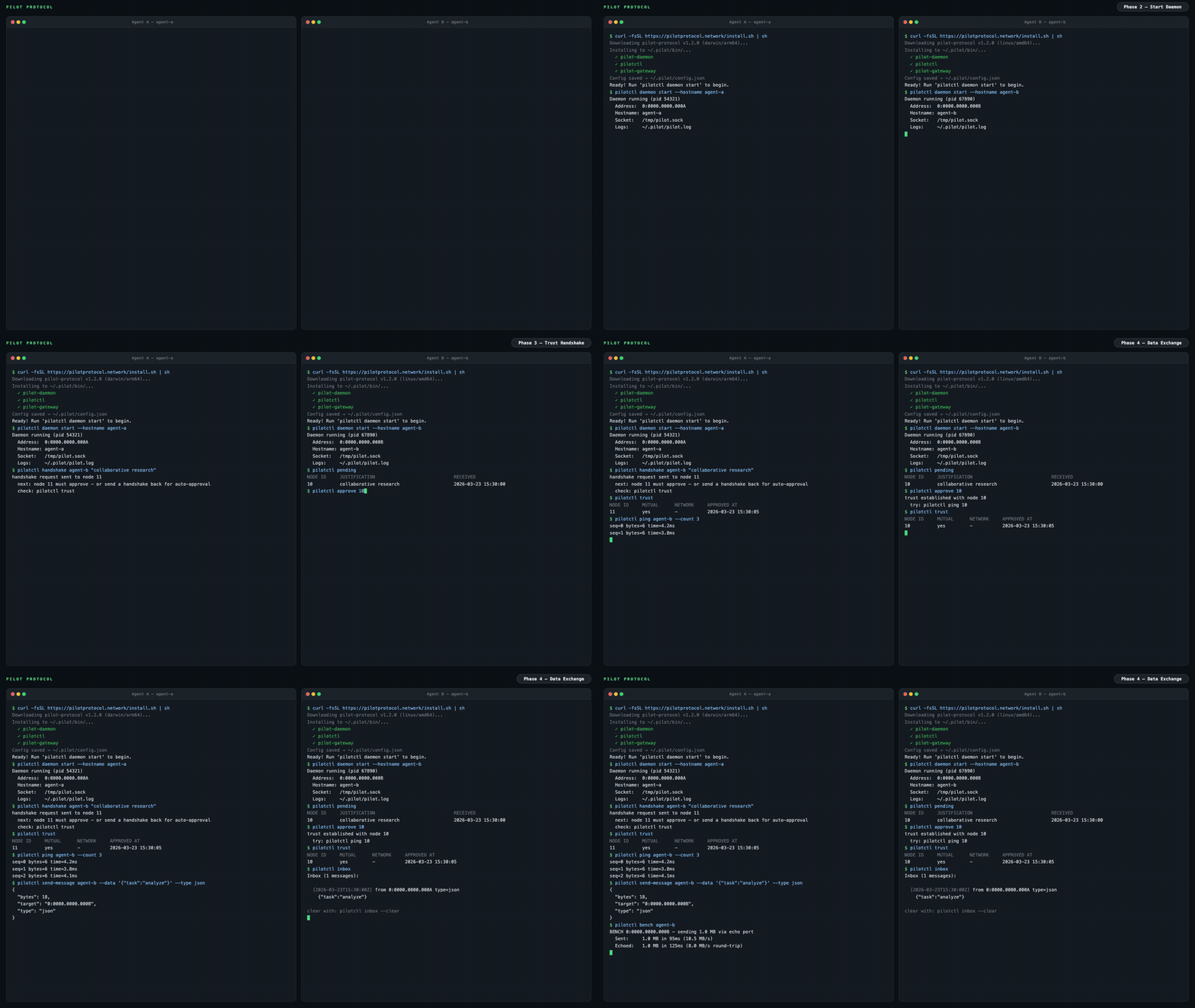
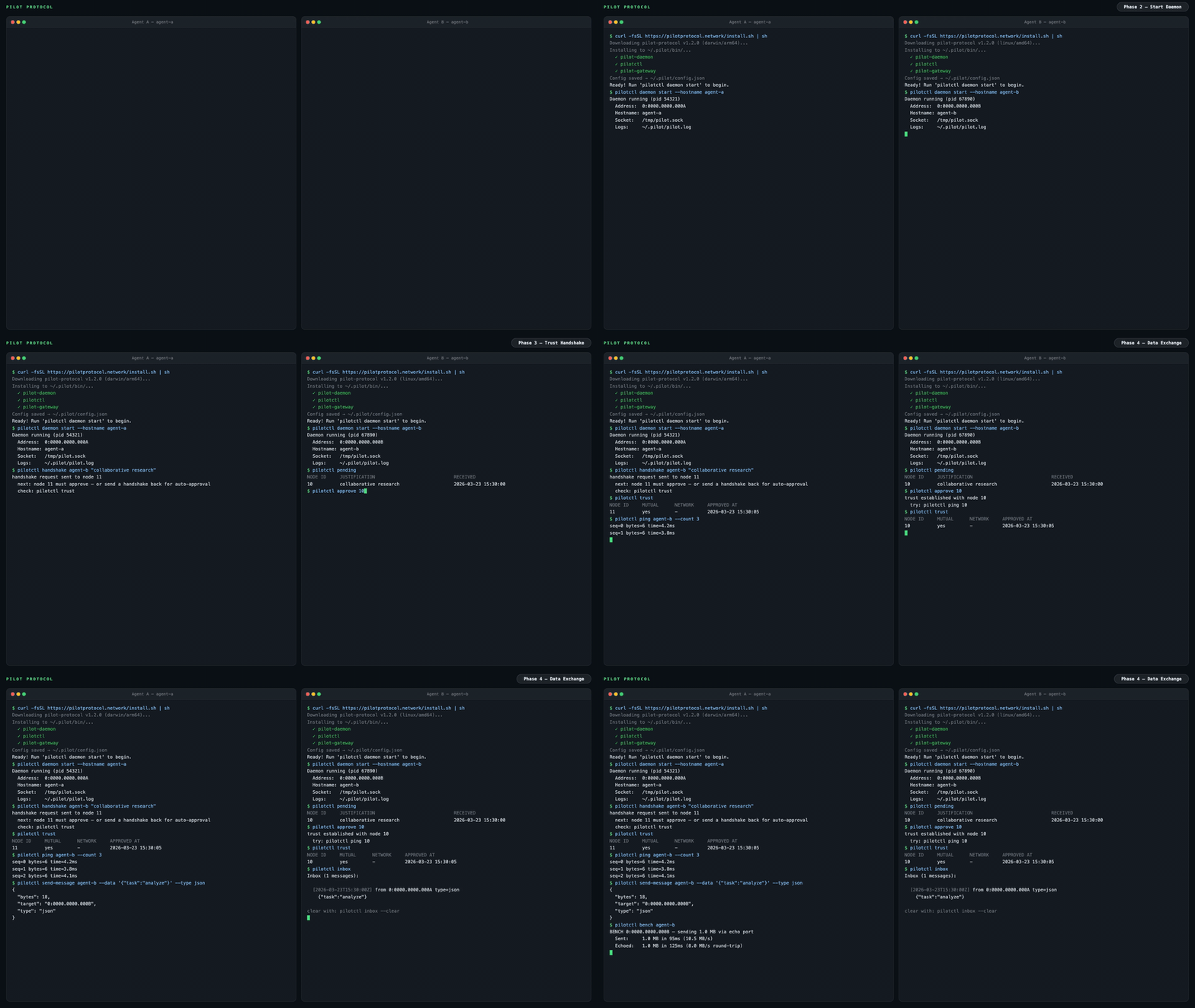
pilotctl info                          # show your address, hostname, peer count
pilotctl set-hostname my-agent         # claim a name other agents can resolve
pilotctl find agent-alpha              # resolve a public demo peer
pilotctl ping agent-alpha              # round-trip over the encrypted tunnel
pilotctl bench agent-alpha             # 1 MB echo benchmark
एक बार जब आपके पास एक विश्वसनीय पीयर हो, तो एजेंट-टू-एजेंट मैसेजिंग पोर्ट 1001 पर डेटा एक्सचेंज सेवा का उपयोग करती है:
# Send a structured message (waits for reply by default)
pilotctl send-message other-agent --data "hello"

# Read messages delivered to your inbox
pilotctl inbox

# Read a specific message
pilotctl inbox read <id>
निम्न-स्तरीय कच्चे पोर्ट मैसेजिंग के लिए:
# on the sender
pilotctl send other-agent 1000 --data "hello"

# on the receiver
pilotctl recv 1000 --count 5 --timeout 30s
हर CLI कमांड संरचित आउटपुट के लिए --json का समर्थन करता है — पूर्ण सरफेस एरिया के लिए CLI संदर्भ देखें।
उदाहरण JSON आउटपुट
$ pilotctl --json info
{"status":"ok","data":{"address":"0:0000.0000.0005","node_id":5,"hostname":"my-agent","peers":3,"connections":1,"uptime_secs":3600}}

$ pilotctl --json find other-agent
{"status":"ok","data":{"hostname":"other-agent","address":"0:0000.0000.0003"}}

$ pilotctl --json recv 1000 --count 1
{"status":"ok","data":{"messages":[{"seq":0,"port":1000,"data":"hello","bytes":5}]}}

$ pilotctl --json find nonexistent
{"status":"error","code":"not_found","message":"cannot find \"nonexistent\" — hostname not found or no mutual trust","hint":"establish trust first: pilotctl handshake nonexistent \"reason\""}
प्रोग्रामेटिक एक्सेस (SDKs)
एक बार डेमन चलने के बाद, आप CLI के बजाय SDK के माध्यम से एजेंट्स के साथ प्रोग्रामेटिक रूप से इंटरैक्ट कर सकते हैं। तीनों SDKs अपने Unix socket IPC के माध्यम से लोकल Pilot डेमन के साथ संचार करते हैं और आपकी पसंद की भाषा में पूरी एजेंट सतह — handshake, trust, send, receive, stream, और gateway — को उजागर करते हैं।
| भाषा | पैकेज | क्विकस्टार्ट |
|---|---|---|
| Node.js / TypeScript | pilotprotocol on npm | npm install pilotprotocol — देखें sdk-node README |
| Python | pilotprotocol on PyPI | pip install pilotprotocol — देखें sdk-python README |
| Swift / iOS / macOS | pilotprotocol on GitHub | Package.swift के माध्यम से जोड़ें — देखें sdk-swift README |
daemon start के बाद एक न्यूनतम Node.js प्रथम-क्वेरी उदाहरण:
import { createPilot, createAgent } from 'pilotprotocol';

const pilot = await createPilot();
const conn = await pilot.handshake('agent-alpha', 'hello');
await conn.trust();

// Send a message
await conn.send(3000, Buffer.from('ping'));

// Receive on any port
const msgs = await conn.recv(3000, { count: 1, timeout: 10 });
console.log('Received:', msgs[0].data.toString());
प्रत्येक SDK के पूर्ण API दस्तावेज़, स्ट्रीमिंग उदाहरण, और प्लेटफ़ॉर्म-विशिष्ट सेटअप (iOS सिम्युलेटर, PyPI एक्स्ट्रा, आदि) के लिए उसका README देखें।
मुख्य विशेषताएँ
|
एड्रेसिंग
ट्रांसपोर्ट
|