अपडेट पर वापस जाएँ
New releaseJul 22, 2026

rev-dep v2.19.0

आधुनिक JavaScript और TypeScript कोडबेस के लिए निर्भरता विश्लेषण और अनुकूलन टूलकिट। एक बहुत तेज़ CLI के साथ निर्भरता ग्राफ स्वच्छता लागू करें और अप्रयुक्त कोड हटाएं।

साझा करें

Rev-dep

Rev-dep लोगो

क्षमताएँ  •   स्थापना  •   प्रलेखन  •   अन्वेषणात्मक टूलकिट  •   CLI संदर्भ

आधुनिक JavaScript और TypeScript कोडबेस के लिए निर्भरता विश्लेषण और अनुकूलन टूलकिट।
एक अत्यंत तेज़ CLI के साथ निर्भरता ग्राफ़ की स्वच्छता लागू करें और अनुपयोगी कोड हटाएँ।

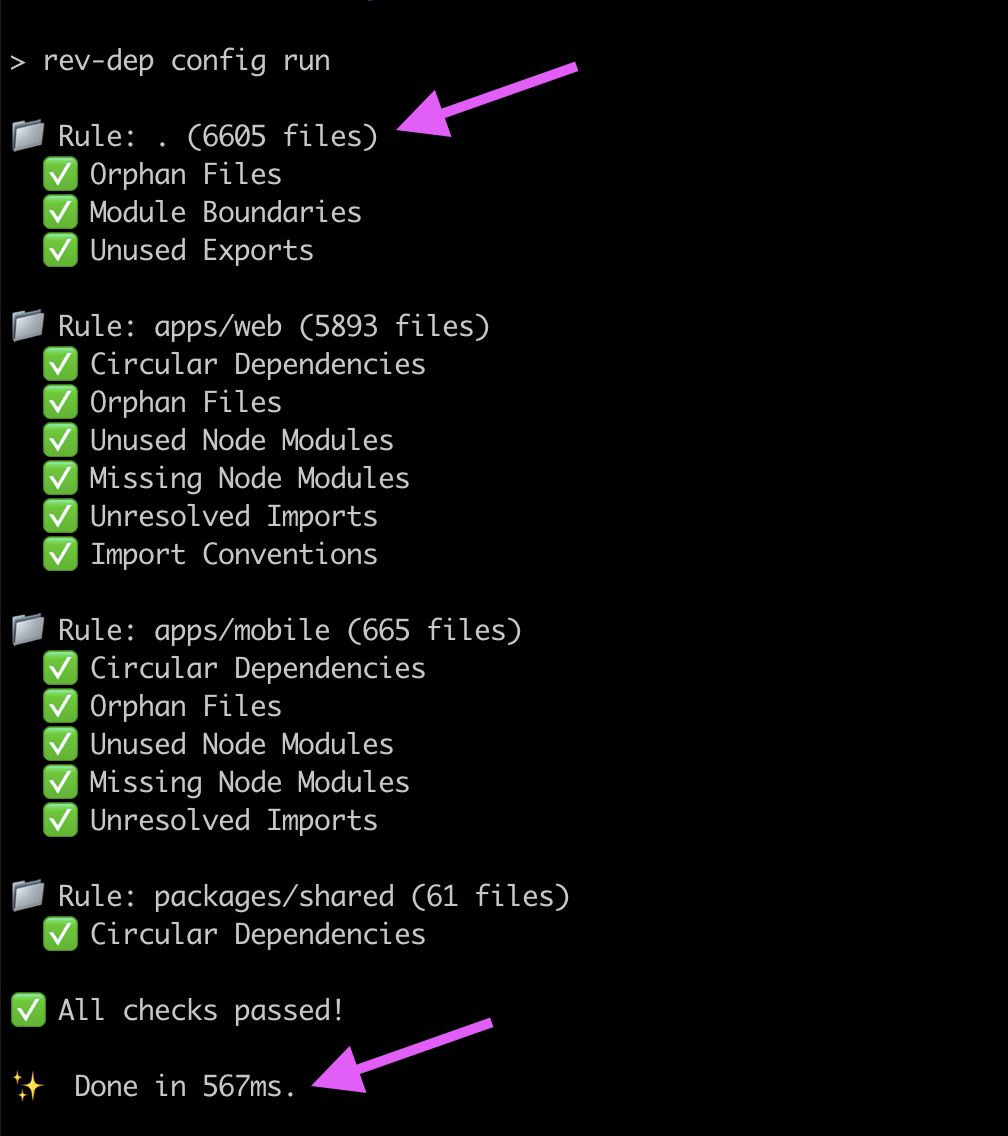
Rev-dep कॉन्फ़िग निष्पादन CLI आउटपुट


rev-dep संस्करण rev-dep लाइसेंस rev-dep PR स्वागत योग्य

परिचय 📣

जैसे-जैसे कोडबेस बड़े होते हैं, निर्भरताओं का मानसिक मानचित्र बनाए रखना असंभव हो जाता है। Rev-dep एक उच्च-गति वाला स्थैतिक विश्लेषण उपकरण है, जिसे बड़े पैमाने के JS/TS प्रोजेक्ट्स में आर्किटेक्चर अखंडता और निर्भरता स्वच्छता लागू करने के लिए डिज़ाइन किया गया है।

Rev-dep को अपने निर्भरता ग्राफ़ के लिए एक उच्च-गति लिंटर मानें।

कई धीमे टूल्स से किए जाने वाले खंडित, अनुक्रमिक जाँचों को एक ही उच्च-प्रदर्शन इंजन में समेकित करें। Rev-dep एक पूर्ण शासन-जाँच सुइट निष्पादित करता है — जिसमें चक्रीयता, अनाथ फ़ाइलें, मॉड्यूल सीमाएँ और भी बहुत कुछ शामिल हैं — एक समानांतर पास में। Go में लागू होने के कारण, यह Node-आधारित विश्लेषण की प्रदर्शन बाधाओं को दरकिनार करता है, और लगभग 150ms में 500k+ LoC प्रोजेक्ट का ऑडिट कर सकता है। प्रदर्शन तुलना देखें

स्वचालित कोडबेस शासन

Rev-dep निष्क्रिय स्कैनिंग से आगे बढ़कर सक्रिय प्रवर्तन करता है, कठिन प्रश्नों के उत्तर देता है (और CI को विफल करता है):

  • आर्किटेक्चर अखंडता: "क्या मेरा 'डोमेन A' अवैध रूप से 'डोमेन B' से इम्पोर्ट कर रहा है?"
  • मृत कोड और विस्तार: "क्या ये फ़ाइलें अगम्य हैं, या क्या ये node_modules अनुपयोगी हैं?"
  • रीफैक्टरिंग सुरक्षा: "कौन-से एंट्री पॉइंट वास्तव में इस यूटिलिटी का उपयोग करते हैं, और क्या चक्रीय श्रृंखलाएँ मौजूद हैं?"
  • वर्कस्पेस स्वच्छता: "क्या मेरे इम्पोर्ट सुसंगत हैं और क्या सभी निर्भरताएँ घोषित हैं?"

Rev-dep आपके CI के लिए एक उच्च-गति गेटकीपर के रूप में कार्य करता है, यह सुनिश्चित करता है कि आपका निर्भरता ग्राफ़ सुगठित रहे और आपकी आर्किटेक्चर बरकरार रहे, जब आप पुनरावृत्ति करते हैं।

Rev-dep क्यों? 🤔

🏗️ प्रथम श्रेणी का monorepo समर्थन

आधुनिक वर्कस्पेस (pnpm, yarn, npm) के लिए डिज़ाइन किया गया। Rev-dep मूल रूप से package.json exports/imports मैप्स, TypeScript एलियासेस को हल करता है और पैकेज सीमाओं के पार निर्भरताओं का पता लगाता है।

🛡️ कॉन्फ़िग-आधारित कोडबेस शासन

निष्क्रिय स्कैनिंग से आगे बढ़ें। मॉड्यूल सीमाएँ और इम्पोर्ट सम्मेलन लागू करने के लिए कॉन्फ़िगरेशन इंजन का उपयोग करें। स्वच्छता जाँचों का पूरा सुइट (चक्रीयता, अनाथ फ़ाइलें, अनुपयोगी मॉड्यूल और अधिक) एक ही, समानांतर पास में निष्पादित करें, जो आपके CI के लिए उच्च-गति गेटकीपर के रूप में कार्य करता है।

🔍 अन्वेषणात्मक टूलकिट

CLI टूलकिट जो फ़ाइलों के बीच निर्भरताओं से जुड़ी समस्याओं को डीबग करने में मदद करता है। फ़ाइलों के बीच संक्रामक संबंध समझें और समस्याएँ ठीक करें।

गति और CI दक्षता के लिए निर्मित

Go में लागू होने के कारण, यह Node-आधारित विश्लेषण की प्रदर्शन लागत को समाप्त करता है। फ़ाइलों को समानांतर में संसाधित करके, Rev-dep विकल्पों की तुलना में 17x-90x तेज़ निष्पादन प्रदान करता है, जिससे CI लागत और डेवलपर प्रतीक्षा-स्थितियाँ काफी कम हो जाती हैं।

Rev-dep लगभग 150ms में 500k+ LoC प्रोजेक्ट का ऑडिट कर सकता है। प्रदर्शन तुलना देखें

क्षमताएँ 🚀

शासन और रखरखाव (कॉन्फ़िग-आधारित) 🛡️

सभी पैकेजों के लिए एक पास में कई जाँचें निष्पादित करने हेतु rev-dep config run का उपयोग करें।

उपलब्ध जाँचें:

  • moduleBoundaries - मॉड्यूलों के बीच आर्किटेक्चर सीमाएँ लागू करें।
  • importConventions - इम्पोर्ट शैली सम्मेलन लागू करें (ऑटोफ़िक्स प्रदान करता है)।
  • unusedExportsDetection - उन एक्सपोर्ट्स का पता लगाएं जिनका कभी उपयोग नहीं होता (ऑटोफ़िक्स प्रदान करता है)।
  • orphanFilesDetection - मृत/अनाथ फ़ाइलों का पता लगाएं (ऑटोफ़िक्स प्रदान करता है)।
  • unusedNodeModulesDetection - घोषित लेकिन उपयोग न की गई निर्भरताओं का पता लगाएं।
  • missingNodeModulesDetection - package json में लुप्त इम्पोर्ट्स का पता लगाएं।
  • unresolvedImportsDetection - अनसुलझे इम्पोर्ट अनुरोधों का पता लगाएं।
  • circularImportsDetection - चक्रीय इम्पोर्ट्स का पता लगाएं।
  • duplicatedCodeDetection - कॉपी-पेस्ट किए गए कोड का पता लगाएं (दोहराए गए ब्लॉक और JSX तत्व)।
  • devDepsUsageOnProdDetection - उत्पादन कोड में उपयोग की गई dev निर्भरताओं का पता लगाएं।
  • restrictedImportsDetection - चयनित एंट्री पॉइंट्स से निषिद्ध फ़ाइलों/मॉड्यूलों के इम्पोर्ट को ब्लॉक करें।
  • restrictedImportersDetection - व्हाइटलिस्ट करें कि कौन-से एंट्री पॉइंट संक्रामक रूप से फ़ाइलों/मॉड्यूलों के एक सेट तक पहुँच सकते हैं।
  • restrictedDirectImportersDetection - सीमित करें कि कौन-सी फ़ाइलें सीधे फ़ाइलों/मॉड्यूलों के एक सेट को इम्पोर्ट कर सकती हैं (गैर-संक्रामक)।

अन्वेषणात्मक विश्लेषण (CLI-आधारित) 🔍

अस्थायी निर्भरता अन्वेषण के लिए CLI कमांड का उपयोग करें:

  • entry-points - प्रोजेक्ट एंट्री पॉइंट खोजें।
  • files - किसी दिए गए एंट्री पॉइंट के लिए निर्भरता ट्री फ़ाइलें सूचीबद्ध करें।
  • resolve - फ़ाइलों के बीच निर्भरता पथों का पता लगाएं (यह फ़ाइल किसे इम्पोर्ट करती है)।
  • imported-by - किसी फ़ाइल के प्रत्यक्ष इम्पोर्टर्स सूचीबद्ध करें।
  • circular - चक्रीय निर्भरता श्रृंखलाएँ सूचीबद्ध करें।
  • duplicated-code - कॉपी-पेस्ट किए गए कोड ब्लॉक और JSX तत्व खोजें।
  • node-modules - used, unused, missing और installed नोड मॉड्यूल का निरीक्षण करें।
  • lines-of-code - प्रभावी LOC गिनें।
  • unresolved - उन इम्पोर्ट्स को सूचीबद्ध करें जिन्हें हल नहीं किया जा सका, फ़ाइल के अनुसार समूहीकृत।
  • list-cwd-files - CWD में सभी स्रोत कोड फ़ाइलें सूचीबद्ध करें
  • debug - निरीक्षण करें कि rev-dep आंतरिक रूप से क्या पार्स, रिज़ॉल्व और खोजता है।

स्थापना 📦

पूर्ण प्रलेखन: rev-dep.com/docs/intro

प्रोजेक्ट जाँच स्क्रिप्ट सेट अप करने के लिए स्थानीय रूप से स्थापित करें``` yarn add -D rev-dep

उपरोक्त /usr के अंतर्गत एक नई Radare2 स्थापना बनाएगा।  
इसके बाद, आपको भाषा सर्वर प्रोटोकॉल और tree-sitter-r2.js स्थापित करने की आवश्यकता होगी।  
`$ make release`  
अंतिम कमांड भाषा सर्वर प्रोटोकॉल को /usr/bin में और tree-sitter-r2 को /usr/lib/radare2/last/ में स्थापित करेगा।  

#### पूर्व-निर्मित पैकेज  

Nix के माध्यम से पूर्व-निर्मित पैकेज भी उपलब्ध हैं।  
`$ nix profile install github:nowarp/iaito`  

> **नोट:** tree-sitter-r2 बाइनरी वर्तमान में npm रजिस्ट्री पर प्रकाशित नहीं है। रिलीज़ पेज से मैन्युअल डाउनलोड आवश्यक है।  

---

### ModuleNotFoundError (Python)```
npm install -D rev-dep
  • Snaffler आधुनिक विंडोज पर चलता है``` pnpm add -D rev-dep
त्वरित आरंभ के लिए कॉन्फ़िग फ़ाइल बनाएँ:```
npx rev-dep config init

CLI टूल के रूप में उपयोग करने के लिए ग्लोबली इंस्टॉल करें:``` yarn global add rev-dep

जब -n विकल्प निर्दिष्ट किया जाता है, Zloader इंजेक्शन तकनीक शेलकोड के अंदर ntdll कॉपी फ़ाइल नाम को ढूंढने और बदलने का प्रयास करेगा (डिफ़ॉल्ट, -n ntd2.dll)```
npm install -g rev-dep

The input chunk is empty — there is no content to translate.``` pnpm global add rev-dep

### चरण-दर-चरण एकीकरण मार्गदर्शिकाएँ

अपने प्रोजेक्ट के अनुरूप मार्गदर्शिका का पालन करें और शून्य से एक कार्यशील सेटअप तक पहुँचें:

- [Monorepo एकीकरण मार्गदर्शिका](https://rev-dep.com/docs/monorepo-integration-guide) - `pnpm`/`yarn`/`npm` वर्कस्पेस के लिए।
- [एकल वर्कस्पेस एकीकरण मार्गदर्शिका](https://rev-dep.com/docs/single-workspace-integration-guide) - एकल-पैकेज प्रोजेक्ट के लिए।

## **त्वरित उदाहरण 💡**

इस टूल की समझ पाने के लिए कुछ तुरंत-उपयोग उदाहरण:```bash

# Detect circular imports/dependencies
rev-dep circular

# Find copy-pasted code
rev-dep duplicated-code

# Detect unused node modules
rev-dep node-modules unused

# List all entry points in the project
rev-dep entry-points

# Check which files an entry point imports
rev-dep files --entry-point src/index.ts

# Find every entry point that depends on a file
rev-dep resolve --file src/utils/math.ts

# Resolve dependency path between files
rev-dep resolve --file src/utils/math.ts --entry-point src/index.ts

Config-Based Checks 🛡️

Rev-dep परियोजना जाँचों के आयोजन के लिए एक कॉन्फ़िगरेशन प्रणाली प्रदान करता है। कॉन्फ़िग दृष्टिकोण गति के लिए डिज़ाइन किया गया है और परियोजना जाँचों को लागू करने का पसंदीदा तरीका है, क्योंकि यह सभी जाँचों को एक ही पास में निष्पादित कर सकता है, जो कई अलग-अलग कमांड को अलग-अलग चलाने की तुलना में काफी तेज़ है।

उपलब्ध जाँचें हैं:

  • moduleBoundaries - मॉड्यूलों के बीच आर्किटेक्चर सीमाओं को लागू करें।
  • importConventions - आयात शैली परंपराओं को लागू करें (ऑटोफिक्स प्रदान करता है)।
  • unusedExportsDetection - उन निर्यातों का पता लगाएं जिनका कभी उपयोग नहीं होता (ऑटोफिक्स प्रदान करता है)।
  • orphanFilesDetection - मृत/अनाथ फ़ाइलों का पता लगाएं (ऑटोफिक्स प्रदान करता है)।
  • unusedNodeModulesDetection - घोषित लेकिन उपयोग न की गई निर्भरताओं का पता लगाएं।
  • missingNodeModulesDetection - package json से गायब आयातों का पता लगाएं।
  • unresolvedImportsDetection - अनसुलझे आयात अनुरोधों का पता लगाएं।
  • circularImportsDetection - चक्रीय आयातों का पता लगाएं।
  • duplicatedCodeDetection - कॉपी-पेस्ट किए गए कोड ब्लॉकों और JSX तत्वों का पता लगाएं।
  • devDepsUsageOnProdDetection - उत्पादन कोड में उपयोग की जाने वाली dev निर्भरताओं का पता लगाएं।
  • restrictedImportsDetection - चयनित एंट्री पॉइंट्स से निषिद्ध फ़ाइलों/मॉड्यूलों के आयात को ब्लॉक करें।
  • restrictedImportersDetection - श्वेतसूची बनाएं कि कौन से एंट्री पॉइंट्स फ़ाइलों/मॉड्यूलों के एक सेट तक ट्रांज़िटिव रूप से पहुंच सकते हैं।
  • restrictedDirectImportersDetection - सीमित करें कि कौन सी फ़ाइलें सीधे फ़ाइलों/मॉड्यूलों के एक सेट को आयात कर सकती हैं (गैर-ट्रांज़िटिव)।

जाँचें कार्यस्थानों में समूहीकृत होती हैं। आपके पास कई कार्यस्थान हो सकते हैं, जैसे प्रत्येक मोनोरेपो पैकेज के लिए।

आरंभ करना

अपने प्रोजेक्ट में एक कॉन्फ़िगरेशन फ़ाइल आरंभ करें:```bash

Create a default configuration file

rev-dep config init

Behavior of `rev-dep config init`:

- Monorepo root: वर्कस्पेस रूट पर `rev-dep config init` चलाने से एक रूट वर्कस्पेस और प्रत्येक खोजे गए वर्कस्पेस पैकेज के लिए एक वर्कस्पेस बनता है।
- Monorepo workspace package या नियमित प्रोजेक्ट: किसी निर्देशिका के अंदर `rev-dep config init` चलाने से इस निर्देशिका के लिए `path: "."` वाला एक एकल वर्कस्पेस कॉन्फ़िगरेशन बनता है।

सभी कॉन्फ़िगर की गई जाँचें चलाएँ (ड्राई रन, अभी फिक्स लागू नहीं किए गए हैं):```bash
# Execute all workspaces and checks defined in the config
rev-dep config run

सभी पहचानी गई समस्याओं की सूची बनाएं:```bash

Lists all detected issues, by default lists first five issues for each check

rev-dep config run --list-all-issues

सभी सुधार योग्य जाँचों को ठीक करें:```bash
# Fix checks configured with autofix
rev-dep config run --fix

कॉन्फ़िगरेशन संरचना

कॉन्फ़िगरेशन फ़ाइल (rev-dep.config.json(c) या .rev-dep.config.json(c)) आपको कई वर्कस्पेस परिभाषित करने की अनुमति देती है, जिनमें से प्रत्येक आपके कोडबेस के विभिन्न भागों को लक्षित करता है और विशेष जाँचें सक्षम होती हैं।

त्वरित प्रारंभ कॉन्फ़िगरेशन```jsonc

{ "configVersion": "2.0", "$schema": "https://github.com/jayu/rev-dep/blob/master/config-schema/2.0.schema.json?raw=true", "nodeModulesResolution": { "resolutionType": "entry-package", "includeDevDepsFromRoot": false }, "workspaces": [ { "path": ".", "prodEntryPoints": ["src/main.tsx", "src/pages//*.tsx"], "devEntryPoints": ["scripts/", "**/.test."], "unusedExportsDetection": { "enabled": true, "autofix": true }, "orphanFilesDetection": { "enabled": true, "autofix": true }, "unusedNodeModulesDetection": { "enabled": true }, "circularImportsDetection": { "enabled": true }, "devDepsUsageOnProdDetection": { "enabled": true, "ignoreTypeImports": true } } ] }

#### व्यापक कॉन्फ़िग उदाहरण

यहाँ सभी उपलब्ध प्रॉपर्टीज़ को दर्शाने वाला एक व्यापक उदाहरण है:```jsonc
{
  "configVersion": "1.10",
  "$schema": "https://github.com/jayu/rev-dep/blob/master/config-schema/1.10.schema.json?raw=true", // enables json autocompletion
  "conditionNames": ["import", "default"],
  "ignoreFiles": ["**/*.test.*"],
  "nodeModulesResolution": { "resolutionType": "entry-package", "includeDevDepsFromRoot": false },
  "workspaces": [
    {
      "path": ".",
      "followMonorepoPackages": true,
      "prodEntryPoints": ["src/main.tsx", "src/pages/**/*.tsx", "src/server.ts"],
      "devEntryPoints": ["scripts/**", "**/*.test.*"],
      "ignoreEntryPoints": ["src/legacy/oldDashboard.tsx"],
      "moduleBoundaries": [
        {
          "name": "ui-components",
          "pattern": "src/components/**/*",
          "allow": ["src/utils/**/*", "src/types/**/*"],
          "deny": ["src/api/**/*"]
        },
        {
          "name": "api-layer",
          "pattern": "src/api/**/*",
          "allow": ["src/utils/**/*", "src/types/**/*"],
          "deny": ["src/components/**/*"]
        }
      ],
      "importConventions": [
        {
          "rule": "relative-internal-absolute-external",
          "autofix": true,
          "domains": [
            {
              "path": "src/features/auth",
              "alias": "@auth",
              "enabled": true
            },
            {
              "path": "src/shared/ui",
              "alias": "@ui-kit",
              "enabled": false // checks disabled for this domain, but alias is still used for absolute imports from other domains
            }
          ]
        }
      ],
      "circularImportsDetection": {
        "enabled": true,
        "ignoreTypeImports": true
      },
      "orphanFilesDetection": {
        "enabled": true,
        "ignoreTypeImports": true,
        "graphExclude": ["**/*.test.*", "**/stories/**/*"],
        "autofix": true
      },
      "unusedNodeModulesDetection": {
        "enabled": true,
        "includeModules": ["@myorg/**"],
        "excludeModules": ["@types/**"],
        "pkgJsonFieldsWithBinaries": ["scripts", "bin"],
        "filesWithBinaries": ["scripts/check-something.sh"],
        "filesWithModules": [".storybook/main.ts"],
        "outputType": "groupByModule"
      },
      "missingNodeModulesDetection": {
        "enabled": true,
        "includeModules": ["lodash", "axios"],
        "excludeModules": ["@types/**"],
        "outputType": "groupByFile"
      },
      "unusedExportsDetection": {
        "enabled": true,
        "autofix": true,
        "ignoreTypeExports": true,
        "graphExclude": ["**/*.stories.tsx"],
        "ignore": {
          "src/types.ts": "B*",
          "**/generated/**/*.ts": "*"
        },
        "ignoreFiles": ["**/*.generated.ts"],
        "ignoreExports": ["default", "unused*"],
      },
      "unresolvedImportsDetection": {
        "enabled": true,
        "ignore": {
          "src/index.ts": "legacy-*"
        },
        "ignoreFiles": ["**/*.generated.ts"],
        "ignoreImports": ["@internal/*"]
      },
      "devDepsUsageOnProdDetection": {
        "enabled": true,
        "ignoreTypeImports": true
      },
      "restrictedImportsDetection": {
        "enabled": true,
        "entryPoints": ["src/server.ts", "src/server/**/*.ts"],
        "graphExclude": ["some-file-coupling-other-files.ts"],
        "denyFiles": ["**/*.tsx"],
        "denyModules": ["react", "react-*"],
        "ignoreMatches": ["src/server/allowed-view.tsx", "react-awsome-lib"],
        "ignoreTypeImports": true
      }
    }
  ]
}

उपलब्ध प्रॉपर्टीज़

रूट स्तर की प्रॉपर्टीज़

  • configVersion (आवश्यक): कॉन्फ़िगरेशन संस्करण स्ट्रिंग
  • $schema (वैकल्पिक): सत्यापन के लिए JSON स्कीमा संदर्भ
  • conditionNames (वैकल्पिक): एक्सपोर्ट्स रिज़ॉल्यूशन के लिए कंडीशन नामों की सरणी
  • customAssetExtensions (वैकल्पिक): अतिरिक्त एसेट एक्सटेंशन जिन्हें रिज़ॉल्व करने योग्य इम्पोर्ट के रूप में माना जाता है (जैसे ["glb", "mp3"])। डिफ़ॉल्ट सूची में फ़ॉन्ट्स, इमेजेस, कॉन्फ़िग फ़ाइलों के सामान्य एक्सटेंशन शामिल हैं।
  • ignoreFiles (वैकल्पिक): सभी वर्कस्पेस में अनदेखा करने के लिए वैश्विक फ़ाइल पैटर्न। Git द्वारा अनदेखी की गई फ़ाइलें डिफ़ॉल्ट रूप से छोड़ दी जाती हैं।
  • processIgnoredFiles (वैकल्पिक): वैश्विक फ़ाइल पैटर्न जिन्हें gitignore या ignoreFiles से मेल खाने पर भी प्रोसेस किया जाए।
  • nodeModulesResolution (वैकल्पिक): missingNodeModules, unusedNodeModules, और unresolvedImports जाँचों के लिए प्रत्येक थर्ड-पार्टी इम्पोर्ट को किस package.json के विरुद्ध मान्य किया जाता है। इसे एक ऑब्जेक्ट के रूप में कॉन्फ़िगर करें { "resolutionType": ..., "includeDevDepsFromRoot": ... } - यह वही रूप है जो rev-dep config init उत्पन्न करता है। resolutionType या तो "entry-package" (डिफ़ॉल्ट, वर्कस्पेस की एंट्री package.json के विरुद्ध मान्य करता है) या "nearest-package" (प्रत्येक फ़ाइल के स्वामी package.json के विरुद्ध मान्य करता है - pnpm के डिफ़ॉल्ट लेआउट के लिए उपयोग करें, जहाँ प्रत्येक पैकेज केवल अपनी स्वयं की डिपेंडेंसी रिज़ॉल्व करता है)। includeDevDepsFromRoot (डिफ़ॉल्ट false) पैकेज कोड को मोनोरेपो रूट पर ही घोषित डेव डिपेंडेंसी का उपयोग करने देता है, बिना missingNodeModules या unresolvedImports उन्हें ध्वजांकित किए। एक सादा स्ट्रिंग (जैसे "nearest-package") भी resolutionType के लिए बैकवर्ड-संगत शॉर्टहैंड के रूप में स्वीकार की जाती है। सभी वर्कस्पेस पर लागू होती है। दस्तावेज़ देखें।
  • workspaces (आवश्यक): वर्कस्पेस ऑब्जेक्ट्स की सरणी

वर्कस्पेस प्रॉपर्टीज़

प्रत्येक वर्कस्पेस में निम्नलिखित प्रॉपर्टीज़ हो सकती हैं:

  • path (आवश्यक): इस वर्कस्पेस के लिए लक्ष्य निर्देशिका पथ (या तो . या सब डायरेक्टरी नाम से शुरू होने वाला पथ)
  • followMonorepoPackages (वैकल्पिक): मोनोरेपो पैकेज रिज़ॉल्यूशन को नियंत्रित करता है। true सभी वर्कस्पेस पैकेजों का अनुसरण करता है (डिफ़ॉल्ट), false इसे अक्षम करता है, सरणी केवल चयनित पैकेज नामों का अनुसरण करती है।
  • prodEntryPoints (वैकल्पिक): डिटेक्टर डिफ़ॉल्ट के लिए वर्कस्पेस-स्तरीय प्रोडक्शन एंट्री पॉइंट पैटर्न
  • devEntryPoints (वैकल्पिक): डिटेक्टर डिफ़ॉल्ट के लिए वर्कस्पेस-स्तरीय डेवलपमेंट एंट्री पॉइंट पैटर्न
  • ignoreEntryPoints (वैकल्पिक): पुराने एंट्री पॉइंट्स के लिए वर्कस्पेस-स्तरीय पैटर्न जिनकी आपको अब परवाह नहीं है। इन पैटर्न से मेल खाने वाली फ़ाइलों को समस्या के रूप में प्रोसेस नहीं किया जाता - उन्हें कभी भी अनाथ फ़ाइलों के रूप में रिपोर्ट नहीं किया जाता, और उनके अप्रयुक्त एक्सपोर्ट्स की रिपोर्ट नहीं की जाती। उन फ़ाइलों के लिए उपयोगी है जिन्हें कमिट रहना चाहिए लेकिन अब ऐप में वायर्ड नहीं हैं।
  • moduleBoundaries (वैकल्पिक): मॉड्यूल बाउंड्री नियमों की सरणी
  • circularImportsDetection (वैकल्पिक): सर्कुलर इम्पोर्ट डिटेक्शन कॉन्फ़िगरेशन (एकल ऑब्जेक्ट या ऑब्जेक्ट्स की सरणी)
  • duplicatedCodeDetection (वैकल्पिक): डुप्लिकेटेड कोड डिटेक्शन कॉन्फ़िगरेशन (एकल ऑब्जेक्ट या ऑब्जेक्ट्स की सरणी)
  • orphanFilesDetection (वैकल्पिक): अनाथ फ़ाइल डिटेक्शन कॉन्फ़िगरेशन (एकल ऑब्जेक्ट या ऑब्जेक्ट्स की सरणी)
  • unusedNodeModulesDetection (वैकल्पिक): अप्रयुक्त नोड मॉड्यूल डिटेक्शन कॉन्फ़िगरेशन (एकल ऑब्जेक्ट या ऑब्जेक्ट्स की सरणी)
  • missingNodeModulesDetection (वैकल्पिक): लापता नोड मॉड्यूल डिटेक्शन कॉन्फ़िगरेशन (एकल ऑब्जेक्ट या ऑब्जेक्ट्स की सरणी)
  • unusedExportsDetection (वैकल्पिक): अप्रयुक्त एक्सपोर्ट्स डिटेक्शन कॉन्फ़िगरेशन (एकल ऑब्जेक्ट या ऑब्जेक्ट्स की सरणी)
  • unresolvedImportsDetection (वैकल्पिक): अनरिज़ॉल्व्ड इम्पोर्ट्स डिटेक्शन कॉन्फ़िगरेशन (एकल ऑब्जेक्ट या ऑब्जेक्ट्स की सरणी)
  • devDepsUsageOnProdDetection (वैकल्पिक): प्रतिबंधित डेव डिपेंडेंसी उपयोग डिटेक्शन कॉन्फ़िगरेशन (एकल ऑब्जेक्ट या ऑब्जेक्ट्स की सरणी)
  • restrictedImportsDetection (वैकल्पिक): चयनित एंट्री पॉइंट्स से अस्वीकृत फ़ाइलों/मॉड्यूलों को इम्पोर्ट करने पर प्रतिबंध (एकल ऑब्जेक्ट या ऑब्जेक्ट्स की सरणी)
  • restrictedImportersDetection (वैकल्पिक): व्हाइटलिस्ट करें कि कौन से एंट्री पॉइंट परोक्ष रूप से फ़ाइलों/मॉड्यूलों के एक सेट तक पहुँच सकते हैं (एकल ऑब्जेक्ट या ऑब्जेक्ट्स की सरणी)
  • restrictedDirectImportersDetection (वैकल्पिक): नियंत्रित करें कि कौन सी फ़ाइलें सीधे फ़ाइलों/मॉड्यूलों के एक सेट को इम्पोर्ट कर सकती हैं; गैर-संक्रामक (एकल ऑब्जेक्ट या ऑब्जेक्ट्स की सरणी)
  • importConventions (वैकल्पिक): इम्पोर्ट कन्वेंशन नियमों की सरणी

मॉड्यूल बाउंड्री प्रॉपर्टीज़

  • name (आवश्यक): बाउंड्री का नाम
  • pattern (आवश्यक): इस बाउंड्री में फ़ाइलों के लिए ग्लोब पैटर्न
  • allow (वैकल्पिक): अनुमत इम्पोर्ट पैटर्न की सरणी
  • deny (वैकल्पिक): अस्वीकृत इम्पोर्ट पैटर्न की सरणी (allow को ओवरराइड करता है)

इम्पोर्ट कन्वेंशन प्रॉपर्टीज़

  • rule (आवश्यक): नियम का प्रकार, वर्तमान में केवल relative-internal-absolute-external
  • autofix (वैकल्पिक): क्या इम्पोर्ट कन्वेंशन उल्लंघनों को स्वचालित रूप से ठीक करना है (डिफ़ॉल्ट: false)
  • domains (आवश्यक): डोमेन परिभाषाओं की सरणी। एक स्ट्रिंग (ग्लोब पैटर्न) या एक ऑब्जेक्ट हो सकती है जिसमें:
    • path (आवश्यक): डोमेन फ़ाइलों वाली निर्देशिका
    • alias (वैकल्पिक): इस डोमेन से कोड के निरपेक्ष इम्पोर्ट के लिए उपयोग किया जाने वाला उपनाम
    • enabled (वैकल्पिक): इस डोमेन के लिए जाँच छोड़ने हेतु false सेट करें (डिफ़ॉल्ट: true)

डिटेक्शन विकल्प प्रॉपर्टीज़

प्रत्येक डिटेक्शन प्रॉपर्टी को इस रूप में कॉन्फ़िगर किया जा सकता है:

  • एक एकल ऑब्जेक्ट (एक डिटेक्टर इंस्टेंस), या
  • ऑब्जेक्ट्स की एक सरणी (एक ही वर्कस्पेस के भीतर मूल्यांकित किए गए एकाधिक डिटेक्टर इंस्टेंस)।

CircularImportsDetection:

  • enabled (आवश्यक): सर्कुलर इम्पोर्ट डिटेक्शन सक्षम/अक्षम करें
  • ignoreTypeImports (वैकल्पिक): ग्राफ़ बनाते समय केवल-प्रकार वाले इम्पोर्ट को बाहर करें (डिफ़ॉल्ट: false)

DuplicatedCodeDetection:

  • enabled (आवश्यक): डुप्लिकेटेड कोड डिटेक्शन सक्षम/अक्षम करें
  • blindIdentifiers (वैकल्पिक): नामों को वाइल्डकार्ड के रूप में मानें, ताकि नाम बदली हुई प्रति भी गिनी जाए (डिफ़ॉल्ट: false)
  • blindStrings (वैकल्पिक): स्ट्रिंग और टेम्पलेट सामग्री को वाइल्डकार्ड के रूप में मानें (डिफ़ॉल्ट: false)
  • blindNumbers (वैकल्पिक): संख्यात्मक लिटरल को वाइल्डकार्ड के रूप में मानें (डिफ़ॉल्ट: false)
  • minTokens (वैकल्पिक): रिपोर्ट करने योग्य सबसे छोटा डुप्लिकेशन, टोकन में (डिफ़ॉल्ट: 50)
  • minLines (वैकल्पिक): रिपोर्ट करने योग्य सबसे छोटा डुप्लिकेशन, पंक्तियों में (डिफ़ॉल्ट: 3)
  • minDepth (वैकल्पिक): सबसे छोटी नेस्टिंग गहराई, ब्लॉक को स्वयं गिनते हुए। 2 के लिए कम से कम एक नेस्टेड स्तर आवश्यक है (डिफ़ॉल्ट: 0)
  • minStatements (वैकल्पिक): सबसे छोटी स्टेटमेंट संख्या; केवल स्टेटमेंट ब्लॉक पर लागू होती है (डिफ़ॉल्ट: 0)
  • minDuplicates (वैकल्पिक): रिपोर्ट होने से पहले एक चंक की कितनी प्रतियाँ चाहिए (डिफ़ॉल्ट: 2)
  • skipObjects (वैकल्पिक): केवल ऑब्जेक्ट लिटरल वाले डुप्लिकेशन की रिपोर्ट न करें (डिफ़ॉल्ट: false)
  • ignoreFiles (वैकल्पिक): विश्लेषण से बाहर रखने हेतु ग्लोब पैटर्न
  • snapshotPath (वैकल्पिक): स्वीकृत डुप्लिकेशन के प्रतिबद्ध बेसलाइन का पथ, वर्कस्पेस के सापेक्ष। इसके साथ जाँच कुल के बजाय बताती है कि क्या बदला है

OrphanFilesDetection:

  • enabled (आवश्यक): अनाथ फ़ाइल डिटेक्शन सक्षम/अक्षम करें
  • validEntryPoints (वैकल्पिक): मान्य एंट्री पॉइंट पैटर्न की सरणी। यदि छोड़ दिया जाए, तो वर्कस्पेस स्तर से prodEntryPoints + devEntryPoints पर डिफ़ॉल्ट होता है।
  • ignoreTypeImports (वैकल्पिक): ग्राफ़ बनाते समय केवल-प्रकार वाले इम्पोर्ट को बाहर करें (डिफ़ॉल्ट: false)
  • graphExclude (वैकल्पिक): ग्राफ़ विश्लेषण से बाहर रखने हेतु फ़ाइल पैटर्न
  • autofix (वैकल्पिक): rev-dep config run --fix चलाते समय पाई गई अनाथ फ़ाइलों को स्वचालित रूप से हटाएँ (डिफ़ॉल्ट: false)

UnusedNodeModulesDetection:

  • enabled (आवश्यक): अप्रयुक्त मॉड्यूल डिटेक्शन सक्षम/अक्षम करें
  • includeModules (वैकल्पिक): विश्लेषण में शामिल करने हेतु मॉड्यूल पैटर्न
  • excludeModules (वैकल्पिक): विश्लेषण से बाहर रखने हेतु मॉड्यूल पैटर्न
  • pkgJsonFieldsWithBinaries (वैकल्पिक): बाइनरी संदर्भ वाले Package.json फ़ील्ड (जैसे lint-staged)। सादा-पाठ लुकअप करता है
  • filesWithBinaries (वैकल्पिक): बाइनरी उपयोग खोजने हेतु फ़ाइल पैटर्न। सादा-पाठ लुकअप करता है
  • filesWithModules (वैकल्पिक): मॉड्यूल इम्पोर्ट खोजने हेतु गैर JS/TS फ़ाइल पैटर्न (जैसे शेल स्क्रिप्ट)। सादा-पाठ लुकअप करता है
  • outputType (वैकल्पिक): आउटपुट प्रारूप - "list", "groupByModule", "groupByFile"

MissingNodeModulesDetection:

  • enabled (आवश्यक): लापता मॉड्यूल डिटेक्शन सक्षम/अक्षम करें
  • includeModules (वैकल्पिक): विश्लेषण में शामिल करने हेतु मॉड्यूल पैटर्न
  • excludeModules (वैकल्पिक): विश्लेषण से बाहर रखने हेतु मॉड्यूल पैटर्न
  • outputType (वैकल्पिक): आउटपुट प्रारूप - "list", "groupByModule", "groupByFile", "groupByModuleFilesCount"

UnusedExportsDetection:

  • enabled (आवश्यक): अप्रयुक्त एक्सपोर्ट्स डिटेक्शन सक्षम/अक्षम करें
  • validEntryPoints (वैकल्पिक): उन फ़ाइलों के लिए ग्लोब पैटर्न जिनके एक्सपोर्ट कभी भी अप्रयुक्त के रूप में रिपोर्ट नहीं होते। यदि छोड़ दिया जाए, तो वर्कस्पेस स्तर से prodEntryPoints + devEntryPoints पर डिफ़ॉल्ट होता है।
  • ignoreTypeExports (वैकल्पिक): विश्लेषण से export type / export interface छोड़ें (डिफ़ॉल्ट: false)
  • graphExclude (वैकल्पिक): अप्रयुक्त एक्सपोर्ट्स विश्लेषण से बाहर रखने हेतु फ़ाइल पैटर्न
  • ignore (वैकल्पिक): फ़ाइल पथ ग्लोब (वर्कस्पेस पथ निर्देशिका के सापेक्ष) का मानचित्र जो दबाने हेतु एक्सपोर्ट नाम/स्पेसिफायर ग्लोब से मेल खाता है; प्रत्येक मान एक स्ट्रिंग या स्ट्रिंग्स की सरणी हो सकती है
  • ignoreFiles (वैकल्पिक): फ़ाइल पथ ग्लोब; मेल खाती फ़ाइलों से सभी अप्रयुक्त एक्सपोर्ट्स दबा दिए जाते हैं
  • ignoreExports (वैकल्पिक): वैश्विक रूप से दबाने हेतु एक्सपोर्ट नाम/स्पेसिफायर (या ग्लोब) ("default" समर्थित है)
  • autofix (वैकल्पिक): rev-dep config run --fix चलाते समय सुधार योग्य अप्रयुक्त एक्सपोर्ट्स परिवर्तनों को स्वचालित रूप से लागू करें (डिफ़ॉल्ट: false)

UnresolvedImportsDetection:

  • enabled (आवश्यक): अनरिज़ॉल्व्ड इम्पोर्ट्स डिटेक्शन सक्षम/अक्षम करें
  • ignore (वैकल्पिक): फ़ाइल पथ ग्लोब (वर्कस्पेस पथ निर्देशिका के सापेक्ष) का मानचित्र जो दबाने हेतु इम्पोर्ट अनुरोध ग्लोब से मेल खाता है; प्रत्येक मान एक स्ट्रिंग या स्ट्रिंग्स की सरणी हो सकती है
  • ignoreFiles (वैकल्पिक): फ़ाइल पथ ग्लोब; मेल खाती फ़ाइलों से सभी अनरिज़ॉल्व्ड इम्पोर्ट्स दबा दिए जाते हैं
  • ignoreImports (वैकल्पिक): अनरिज़ॉल्व्ड परिणामों में वैश्विक रूप से दबाने हेतु इम्पोर्ट अनुरोध (या ग्लोब)

DevDepsUsageOnProdDetection:

  • enabled (आवश्यक): प्रतिबंधित डेव डिपेंडेंसी उपयोग डिटेक्शन सक्षम/अक्षम करें
  • prodEntryPoints (वैकल्पिक): डिपेंडेंसी ट्रेस करने हेतु प्रोडक्शन एंट्री पॉइंट पैटर्न। यदि छोड़ दिया जाए, तो वर्कस्पेस-स्तरीय prodEntryPoints पर डिफ़ॉल्ट होता है।
  • ignoreTypeImports (वैकल्पिक): ग्राफ़ ट्रैवर्सल और मॉड्यूल मिलान से केवल-प्रकार वाले इम्पोर्ट को बाहर करें (डिफ़ॉल्ट: false)

RestrictedImportsDetection:

  • enabled (आवश्यक): प्रतिबंधित इम्पोर्ट्स डिटेक्शन सक्षम/अक्षम करें
  • entryPoints (सक्षम होने पर आवश्यक): पहुँच योग्य डिपेंडेंसी ग्राफ़ बनाने हेतु एंट्री पॉइंट पैटर्न (यहाँ वर्कस्पेस-स्तरीय एंट्री पॉइंट लागू नहीं होते)
  • graphExclude (वैकल्पिक): प्रतिबंधित इम्पोर्ट्स ग्राफ़ विश्लेषण से बाहर रखने हेतु फ़ाइल पैटर्न
  • denyFiles (वैकल्पिक): अस्वीकृत फ़ाइल पथ पैटर्न (जैसे ["**/*.tsx"])
  • denyModules (वैकल्पिक): अस्वीकृत मॉड्यूल पैटर्न (जैसे ["react", "react-*"])
  • ignoreMatches (वैकल्पिक): प्रतिबंधित इम्पोर्ट परिणामों से दबाने हेतु फ़ाइल/मॉड्यूल पैटर्न
  • ignoreTypeImports (वैकल्पिक): ट्रैवर्सल से केवल-प्रकार वाले इम्पोर्ट को बाहर करें (डिफ़ॉल्ट: false)

प्रदर्शन लाभ

कॉन्फ़िगरेशन दृष्टिकोण महत्वपूर्ण प्रदर्शन लाभ प्रदान करता है:

  • एकल डिपेंडेंसी ट्री निर्माण: सभी वर्कस्पेस के लिए एक व्यापक डिपेंडेंसी ट्री बनाता है
  • समानांतर वर्कस्पेस निष्पादन: कई वर्कस्पेस को एक साथ प्रोसेस करता है
  • समानांतर जाँच निष्पादन: प्रत्येक वर्कस्पेस के भीतर सभी सक्षम जाँचों को समानांतर में चलाता है
  • अनुकूलित फ़ाइल खोज: फ़ाइलों को एक बार खोजता है और सभी जाँचों में पुनः उपयोग करता है

यह कॉन्फ़िगर-आधारित जाँचों को व्यक्तिगत कमांडों को क्रमिक रूप से चलाने की तुलना में तेज़ बनाता है, विशेष रूप से कई सब-पैकेजों वाले बड़े कोडबेस के लिए।

एक्सप्लोरेटरी टूलकिट 🔧

व्यावहारिक उदाहरण दिखाते हैं कि अपने प्रोजेक्ट के लिए कोड गुणवत्ता जाँचों का अन्वेषण, डीबग या निर्माण करने हेतु rev-dep CLI कमांडों का उपयोग कैसे करें।

प्रोजेक्ट में किसी फ़ाइल का उपयोग कहाँ होता है, यह कैसे पहचानें```

rev-dep resolve --file path/to/file.ts

आपको उन सभी एंट्री पॉइंट्स दिखेंगे जो अप्रत्यक्ष रूप से उस फ़ाइल की आवश्यकता रखते हैं, साथ ही रिज़ॉल्यूशन पथ भी।

### **किसी फ़ाइल का उपयोग कैसे जाँचें**```
rev-dep resolve --file path/to/file.ts --compact-summary

दिखाता है कि कितने प्रवेश बिंदु अप्रत्यक्ष रूप से फ़ाइल पर निर्भर करते हैं।

मृत फ़ाइलों की पहचान कैसे करें```

rev-dep entry-points

आवश्यकता होने पर `--result-exclude` का उपयोग करके फ्रेमवर्क एंट्री पॉइंट्स को बाहर करें।

उदाहरण के लिए, pages राउटर का उपयोग करते समय Next.js के वैध एंट्री पॉइंट्स को बाहर करें, scripts निर्देशिका को बाहर करें - scripts वैध एंट्री-पॉइंट्स हैं - और सभी टेस्ट फाइलों को बाहर करें:```
rev-dep entry-points --result-exclude "pages/**","scripts/**","**/*.test.*"

एंट्री पॉइंट द्वारा आयातित सभी फ़ाइलों को सूचीबद्ध कैसे करें```

rev-dep files --entry-point path/to/file.ts

भारी घटकों या अनपेक्षित निर्भरताओं की पहचान करने के लिए उपयोगी।

### **किसी एंट्री पॉइंट के लिए अनावश्यक इम्पोर्ट कैसे कम करें**

1. इम्पोर्ट की गई सभी फ़ाइलों की सूची बनाएं:   ```
   rev-dep files --entry-point path/to/entry.ts
  1. संदिग्ध फ़ाइलों की पहचान करें।
  2. पता लगाएं कि वे क्यों शामिल हैं: ``` rev-dep resolve --file path/to/suspect --entry-points path/to/entry.ts --all

चक्रीय निर्भरताओं का पता कैसे लगाएं```

rev-dep circular

### **डुप्लिकेट कोड का पता कैसे लगाएं**```
rev-dep duplicated-code

Reports repeated code blocks and JSX elements - units you can extract - rather than repeated lines. Add --blind-identifiers to catch copies whose variables were renamed.

How to find unused node modules```

rev-dep node-modules unused

### **लापता नोड मॉड्यूल कैसे खोजें**```
rev-dep node-modules missing

node_modules का स्थान उपयोग कैसे जांचें```

rev-dep node-modules dirs-size

### **प्रोडक्शन कोड में उपयोग की जाने वाली डेव निर्भरताओं का पता कैसे लगाएं**```
rev-dep config run

जब आपके कॉन्फ़िग में devDepsUsageOnProdDetection सक्षम होता है, तो rev-dep निम्न कार्य करेगा:

  1. आपके निर्दिष्ट प्रोडक्शन एंट्री पॉइंट्स से डिपेंडेंसी ग्राफ़ ट्रेस करेगा
  2. उन एंट्री पॉइंट्स से पहुंच योग्य सभी फ़ाइलों की पहचान करेगा
  3. जाँच करेगा कि क्या कोई आयातित मॉड्यूल package.json में devDependencies में सूचीबद्ध है
  4. उल्लंघनों की रिपोर्ट करेगा जो दिखाते हैं कि कौन सी dev डिपेंडेंसी कहाँ उपयोग होती हैं

उदाहरण आउटपुट:``` ❌ Restricted Dev Dependencies Usage Issues (2): lodash (dev dependency) - src/components/Button.tsx (from entry point: src/pages/index.tsx) - src/utils/helpers.ts (from entry point: src/pages/index.tsx) eslint (dev dependency) - src/config/eslint-config.js (from entry point: src/server.ts)

**महत्वपूर्ण नोट्स:**
- Type-only इम्पोर्ट्स (जैसे `import type { ReactNode } from 'react'`) को तब अनदेखा किया जाता है जब `ignoreTypeImports` सक्षम हो
- package.json में `devDependencies` से केवल डिपेंडेंसियों को फ़्लैग किया जाता है
- `dependencies` से प्रोडक्शन डिपेंडेंसियों की अनुमति है
- प्रोडक्शन बिल्ड्स में रनटाइम विफलताओं को रोकने में मदद करता है

## मोनोरेपो के साथ काम करना 🏗️

Rev-dep मोनोरेपो प्रोजेक्ट्स के लिए प्रथम-श्रेणी का समर्थन प्रदान करता है, जो वर्कस्पेस पैकेजों में सटीक डिपेंडेंसी विश्लेषण सक्षम करता है।

### followMonorepoPackages फ़्लैग

`--follow-monorepo-packages` फ़्लैग मोनोरेपो वर्कस्पेस पैकेजों से इम्पोर्ट्स के समाधान (resolution) को सक्षम करता है। डिफ़ॉल्ट रूप से, यह फ़्लैग एकल-पैकेज प्रोजेक्ट्स के साथ संगतता बनाए रखने के लिए `false` पर सेट होता है।```bash
# Enable monorepo package resolution
rev-dep circular --follow-monorepo-packages
rev-dep resolve --file src/utils.ts --follow-monorepo-packages
rev-dep entry-points --follow-monorepo-packages

When enabled, rev-dep निम्नलिखित करेगा:

  • वर्कस्पेस पैकेजों का पता लगाएगा स्वचालित रूप से monorepo कॉन्फ़िगरेशन को स्कैन करके
  • वर्कस्पेस के भीतर पैकेजों के बीच imports को हल करेगा
  • उचित module resolution के लिए package.json exports का अनुसरण करेगा

Exports Map समर्थन

Rev-dep पूरी तरह से exports फ़ील्ड को समर्थन करता है package.json फ़ाइलों में, जो आधुनिक Node.js प्रोजेक्ट्स में पैकेज एंट्री पॉइंट्स को परिभाषित करने का मानक तरीका है।

एक्सपोर्ट्स मैप समर्थन में शामिल हैं:

  • कंडीशनल एक्सपोर्ट्स node, import, default, और कस्टम कंडीशन जैसी स्थितियों का उपयोग करते हुए
  • वाइल्डकार्ड पैटर्न लचीले उपपथ मैपिंग के लिए
  • शुगर सिंटैक्स सरल मुख्य export परिभाषाओं के लिए
  • नेस्टेड कंडीशन जटिल resolution परिदृश्यों के लिए

कंडीशन नाम फ़्लैग

यह नियंत्रित करने के लिए कि कौन से कंडीशनल एक्सपोर्ट्स को हल किया जाए, --condition-names फ़्लैग का उपयोग करें। यह आपको पैकेज exports को हल करते समय कंडीशनों की प्राथमिकता निर्दिष्ट करने की अनुमति देता है:```bash

Resolve exports for different environments

rev-dep circular --condition-names=node,import,default rev-dep resolve --file src/utils.ts --condition-names=import,node rev-dep entry-points --condition-names=default,node,import

शर्तों को निर्दिष्ट क्रम में संसाधित किया जाता है, और पहली मिलान वाली शर्त का उपयोग किया जाता है। सामान्य शर्तों में शामिल हैं:
- `node` - Node.js वातावरण
- `import` - ES मॉड्यूल
- `require` - CommonJS
- `default` - फॉलबैक शर्त
- आपके प्रोजेक्ट या बिल्ड टूल्स के लिए विशिष्ट कस्टम शर्तें

exports के साथ उदाहरण package.json:```json
{
  "name": "@myorg/utils",
  "exports": {
    ".": {
      "import": "./dist/index.mjs",
      "require": "./dist/index.js",
      "default": "./dist/index.js"
    },
    "./helpers": "./dist/helpers.js",
    "./types/*": "./dist/types/*.d.ts"
  }
}

मोनोरिपो रिज़ॉल्यूशन कैसे काम करता है

  1. मोनोरिपो पहचान: जब followMonorepoPackages सक्षम होता है, rev-dep वर्कस्पेस कॉन्फ़िगरेशन (pnpm-workspace.yaml, package.json workspaces, आदि) के लिए स्कैन करता है।

  2. पैकेज रिज़ॉल्यूशन: वर्कस्पेस पैकेजों के आयात पैकेज के exports कॉन्फ़िगरेशन का उपयोग करके हल किए जाते हैं, और जब exports परिभाषित नहीं होते हैं तो main/module फ़ील्ड का सहारा लिया जाता है।

  3. निर्भरता सत्यापन: यह टूल सत्यापित करता है कि क्रॉस-पैकेज आयात केवल तभी अनुमत हैं जब लक्ष्य पैकेज उपभोक्ता की dependencies या devDependencies में सूचीबद्ध हो।

  4. पथ रिज़ॉल्यूशन: सभी पथ उनके संबंधित पैकेज रूट के सापेक्ष हल किए जाते हैं, जिससे पूरे मोनोरिपो में सटीक निर्भरता ट्रैकिंग सुनिश्चित होती है।

इससे rev-dep बड़े पैमाने के मोनोरिपो प्रोजेक्ट्स के लिए विशेष रूप से प्रभावी हो जाता है, जहाँ क्रॉस-पैकेज निर्भरताओं को समझना कोड गुणवत्ता और आर्किटेक्चर बनाए रखने के लिए महत्वपूर्ण होता है।

प्रदर्शन तुलना ⚡

Rev-dep लगभग 150ms में कई सब-पैकेजों वाले 500k+ LoC मोनोरिपो पर कई जाँचें कर सकता है।

यह Madge, dpdm, dependency-cruiser, skott, knip, depcheck और अन्य समान टूल्स से बेहतर प्रदर्शन करता है।

यहाँ rev-dep और विकल्पों के बीच विशिष्ट कार्यों की प्रदर्शन तुलना दी गई है:

कार्यनिष्पादन समय [ms]विकल्पविकल्प समय [ms]rev-dep से धीमा
चक्रीय निर्भरताएँ खोजें151knip3 04020x
अप्रयुक्त एक्सपोर्ट खोजें186knip3 17617x
अप्रयुक्त फ़ाइलें खोजें168knip3 00618x
अप्रयुक्त नोड मॉड्यूल खोजें170knip3 06918x
लापता नोड मॉड्यूल खोजें160knip3 07619x
किसी एंट्री पॉइंट द्वारा आयातित सभी फ़ाइलें सूचीबद्ध करें81madge6 59181x
एंट्री पॉइंट खोजें149madge13 63292x
मॉड्यूल सीमाएँ लागू करें164dependency-cruiser8 14050x
प्रतिबंधित आयात खोजें170dependency-cruiser10 99565x
प्रतिबंधित आयातक खोजें179dependency-cruiser9 23452x
फ़ाइलों के बीच निर्भरता पथ हल करें221कृपया सुझाव दें
कोड की पंक्तियाँ गिनें251कृपया सुझाव दें
node_modules निर्देशिका के आकारों का विश्लेषण करें561कृपया सुझाव दें

प्लेटफ़ॉर्म: WSL Linux Debian Intel(R) Core(TM) i9-14900KF CPU

मापन: hyperfine -w 4 -r 8 (4 वार्म-अप + 8 मापित रन)

प्रोजेक्ट: 580k कोड की पंक्तियाँ, 6024 सोर्स कोड फ़ाइलें next.js ऐप

चक्रीय जाँच प्रदर्शन तुलना

नीचे दी गई तालिका विभिन्न टूल्स के बीच चक्रीय आयात का पता लगाने के प्रदर्शन तुलना प्रस्तुत करती है।

rev-dep की चक्रीय जाँच सबसे तेज़ विकल्प से ~20 गुना तेज़ है।

टूलसंस्करणसमय [ms]
🥇 rev-dep3.0.0154
🥈 knip *6.29.03 040
🥉 circular-dependency-scanner3.0.13 355
dpdm-fast1.0.146 070
dpdm4.2.06 667
dependency-cruiser18.1.08 258
madge8.0.013 569
skott0.35.1161 613

* knip हमेशा केवल-प्रकार आयात किनारों को अनदेखा करता है और उन्हें शामिल करने के लिए कोई फ़्लैग प्रदान नहीं करता। इस कोडबेस में हर चक्र में कम से कम एक ऐसा किनारा होता है, इसलिए knip 0 चक्र रिपोर्ट करता है - इसका 3 040 ms वास्तविक पूर्ण विश्लेषण है, केवल एक छोटे ग्राफ़ का। rev-dep circular -t, जो समान नियम लागू करता है, बिल्कुल सहमत है (0 चक्र) 143.3 ms ± 10.3 में।

प्लेटफ़ॉर्म: WSL Linux Debian Intel(R) Core(TM) i9-14900KF CPU

मापन: hyperfine -w 4 -r 8 (4 वार्म-अप + 8 मापित रन)

प्रोजेक्ट: 580k कोड की पंक्तियाँ, 6024 सोर्स कोड फ़ाइलें next.js ऐप

विस्तृत मापन, औसत समय और उपयोग किए गए कमांड PERFORMANCE.md में देखें।

CLI संदर्भ 📖

rev-dep circular

अपने प्रोजेक्ट में चक्रीय निर्भरताएँ पहचानें

सारांश

परियोजना का विश्लेषण करके मॉड्यूलों के बीच चक्रीय निर्भरताएँ खोजता है। चक्रीय निर्भरताएँ कठिन डिबगिंग समस्याएँ पैदा कर सकती हैं और आम तौर पर इनसे बचा जाना चाहिए।``` rev-dep circular [flags]

#### उदाहरण```
rev-dep circular --ignore-types-imports

विकल्प```

  --condition-names strings                                     List of conditions for package.json imports resolution (e.g. node, imports, default)

-c, --cwd string Working directory for the command (default "$PWD") --follow-monorepo-packages strings Enable resolution of imports from monorepo workspace packages. Pass without value to follow all, or pass package names -h, --help help for circular -t, --ignore-type-imports Exclude type imports from the analysis --process-ignored-files strings Glob patterns to process even if they are ignored by gitignore or exclude patterns --tsconfig-json string Path to tsconfig.json (default: ./tsconfig.json) -v, --verbose Show warnings and verbose output

### rev-dep config

rev-dep कॉन्फ़िगरेशन फ़ाइलें बनाएं और निष्पादित करें

#### सारांश

rev-dep कॉन्फ़िगरेशन फ़ाइलें बनाने और निष्पादित करने के लिए कमांड।

#### विकल्प```
  -c, --cwd string   Working directory (default "$PWD")
  -h, --help         help for config

rev-dep config run

(.)rev-dep.config.json(c) में परिभाषित सभी जाँचें निष्पादित करें

सारांश

प्रोसेस करें (.)rev-dep.config.json(c) और सभी सक्षम जाँचें (circular imports, orphan files, module boundaries, import conventions, node modules, unused exports, unresolved imports, restricted imports and restricted dev deps usage) प्रति वर्कस्पेस निष्पादित करें।``` rev-dep config run [flags]

#### विकल्प```
  -c, --cwd string                  Working directory (default "$PWD")
      --fix                         Automatically fix fixable issues
      --format string               Output format (json, issues-list)
  -h, --help                        help for run
      --lint-config                 Also lint the config after running; prints only error/warning counts and fails (non-zero exit) on any lint error. Use 'config lint' for details and --fix
      --lint-config-rules strings   Which lint rules to run with --lint-config (comma-separated). Default: all. Implies --lint-config
      --list-all-issues             List all issues instead of limiting output
      --recheck                     Run all checks again after '--fix' to validate the final state
      --update-snapshot             Rewrite every configured duplicated-code snapshot from this run, acknowledging what it found.
  -v, --verbose                     Show warnings and verbose output
      --workspaces strings          Subset of workspaces to run (comma-separated list of workspace paths)

rev-dep config init

एक नई rev-dep.config.json फ़ाइल प्रारंभ करें

सारांश

वर्तमान निर्देशिका में डिफ़ॉल्ट सेटिंग्स के साथ एक नई rev-dep.config.json कॉन्फ़िगरेशन फ़ाइल बनाएँ।``` rev-dep config init [flags]

#### विकल्प```
  -c, --cwd string   Working directory (default "$PWD")
  -h, --help         help for init

rev-dep config lint

ऐसे कॉन्फ़िग glob/path पैटर्न की रिपोर्ट करें (और वैकल्पिक रूप से हटाएँ) जो किसी भी चीज़ से मेल नहीं खाते

सारांश

(.)rev-dep.config.json(c) को "मृत" glob और path पैटर्न के लिए स्कैन करें - ignore पैटर्न, entry point पैटर्न, workspace पथ, graph excludes, अस्वीकृत फ़ाइलें/मॉड्यूल और समान - जो अब किसी भी खोजी गई फ़ाइल या मॉड्यूल से मेल नहीं खाते। समय के साथ कॉन्फ़िग्स उन फ़ाइलों के लिए पैटर्न जमा कर लेते हैं जिनका नाम बदला गया या जिन्हें हटा दिया गया; यह कमांड उन्हें सामने लाता है ताकि कॉन्फ़िग सुव्यवस्थित बनी रहे।

--fix के साथ, मृत पैटर्न उसी स्थान पर हटा दिए जाते हैं, जिससे सभी टिप्पणियाँ और फ़ॉर्मेटिंग संरक्षित रहती हैं। कुछ पैटर्न रिपोर्ट किए जाते हैं लेकिन कभी स्वतः हटाए नहीं जाते क्योंकि उन्हें हटाने से किसी जाँच का व्यवहार बदल सकता है या कॉन्फ़िग अमान्य हो सकता है - workspace पथ, आवश्यक entry points / फ़ाइलें / मॉड्यूल, और module-boundary selectors। इन्हें "not auto-removed" के रूप में चिह्नित किया गया है; इन्हें हाथ से हल करें।``` rev-dep config lint [flags]

#### विकल्प```
  -c, --cwd string      Working directory (default "$PWD")
      --fix             Remove dead patterns from the config file (preserves comments and formatting)
  -h, --help            help for lint
      --rules strings   Lint rules to run (comma-separated): orphan-file-globs, orphan-module-globs, overlapping-globs, trailing-commas, compact. Default: all. orphan-file-globs/overlapping-globs use file discovery; orphan-module-globs parses the dependency tree; trailing-commas and compact only read the config file.
  -v, --verbose         Show warnings and verbose output

rev-dep config migrate

v2 कॉन्फ़िग को v3 (2.0) स्कीमा में अपग्रेड करें

सारांश

(.)rev-dep.config.json(c) को v2 स्कीमा से v3 (कॉन्फ़िग संस्करण 2.0) में अपग्रेड करें।

यह सुरक्षित, असंदिग्ध परिवर्तनों को यथास्थान लागू करता है (शीर्ष-स्तरीय 'rules' सरणी का नाम बदलकर 'workspaces' करना, 'configVersion' को 2.0 तक बढ़ाना, और बंद किए गए 'algorithm' विकल्प को circular-imports डिटेक्टरों से हटाना), सभी टिप्पणियों और फ़ॉर्मेटिंग को संरक्षित करते हुए। कमिट करने से पहले git के साथ परिवर्तन की समीक्षा करें।

इसके बाद यह सूचीबद्ध करता है कि यह आपके लिए क्या नहीं बदल सका: glob पैटर्न जिनका मिलान सेट v3 के सख्त, gitignore-संरेखित नियमों के तहत स्थानांतरित हो सकता है, और व्यवहार परिवर्तन जिन्हें कोई कॉन्फ़िग संपादन हल नहीं कर सकता। उन्हें मैन्युअल रूप से समीक्षा करें - v3 breaking-changes गाइड देखें।``` rev-dep config migrate [flags]

#### विकल्प```
  -c, --cwd string   Working directory (default "$PWD")
  -h, --help         help for migrate

rev-dep debug

पार्सर और रिज़ॉल्वर की आंतरिक कार्यप्रणाली का निरीक्षण करने के लिए डिबगिंग उपकरण

सारांश

डिबगिंग उपकरण यह जाँचने के लिए कि rev-dep फ़ाइलों को कैसे पार्स करता है और निर्भरताओं को कैसे हल करता है। आउटपुट semver का पालन नहीं करता है।

विकल्प```

-h, --help help for debug

### rev-dep debug get-tree-for-cwd

डीबग: विश्लेषण के लिए पूर्ण निर्भरता ट्री दिखाएँ

#### सारांश

पूर्ण निर्भरता ट्री का निरीक्षण करने के लिए डीबगिंग टूल। आउटपुट semver का पालन नहीं करता है।```
rev-dep debug get-tree-for-cwd [flags]

विकल्प```

  --condition-names strings                                     List of conditions for package.json imports resolution (e.g. node, imports, default)
  --cwd string                                                  Working directory for the command (default "$PWD")
  --follow-monorepo-packages strings                            Enable resolution of imports from monorepo workspace packages. Pass without value to follow all, or pass package names

-h, --help help for get-tree-for-cwd -t, --ignore-type-imports Exclude type imports from the analysis --include-dev-deps-from-root Treat the monorepo root package.json devDependencies as available to package code, so they are not reported as missing or unresolved. Mirrors config nodeModulesResolution.includeDevDepsFromRoot --node-modules-resolution string Which package.json each import is validated against: 'entry-package' (the cwd package.json, default) or 'nearest-package' (each file's own nearest package.json) (default "entry-package") --tsconfig-json string Path to tsconfig.json (default: ./tsconfig.json) -v, --verbose Show warnings and verbose output

### rev-dep debug list-cwd-files

वर्तमान कार्य निर्देशिका में सभी फ़ाइलों की सूची बनाएं

#### सारांश

निर्दिष्ट निर्देशिका में सभी फ़ाइलों को पुनरावर्ती रूप से सूचीबद्ध करता है,
परिणामों को फ़िल्टर करने के विकल्पों के साथ।```
rev-dep debug list-cwd-files [flags]

उदाहरण```

rev-dep debug list-cwd-files --include='.ts' --exclude='.test.ts'

#### विकल्प```
      --count             Only display the count of matching files
      --cwd string        Directory to list files from (default "$PWD")
      --exclude strings   Exclude files matching these glob patterns
  -h, --help              help for list-cwd-files
      --include strings   Only include files matching these glob patterns

rev-dep debug parse-file

Debug: किसी एक फ़ाइल के लिए पार्स किए गए आयात दिखाएँ

सारांश

डिबगिंग उपकरण यह जाँचने के लिए कि पार्सर किसी विशेष फ़ाइल को कैसे प्रोसेस करता है। आउटपुट semver का पालन नहीं करता है।``` rev-dep debug parse-file [flags]

#### विकल्प```
      --condition-names strings                                     List of conditions for package.json imports resolution (e.g. node, imports, default)
      --cwd string                                                  Working directory for the command (default "$PWD")
      --file string                                                 file to parse
      --follow-monorepo-packages strings                            Enable resolution of imports from monorepo workspace packages. Pass without value to follow all, or pass package names
  -h, --help                                                        help for parse-file
      --include-dev-deps-from-root                                  Treat the monorepo root package.json devDependencies as available to package code, so they are not reported as missing or unresolved. Mirrors config nodeModulesResolution.includeDevDepsFromRoot
      --node-modules-resolution string                              Which package.json each import is validated against: 'entry-package' (the cwd package.json, default) or 'nearest-package' (each file's own nearest package.json) (default "entry-package")
      --tsconfig-json string                                        Path to tsconfig.json (default: ./tsconfig.json)
  -v, --verbose                                                     Show warnings and verbose output

rev-dep debug parse-tsconfig

Debug: पार्स किए गए TypeScript कॉन्फ़िगरेशन उपनाम दिखाएँ

सारांश

TypeScript कॉन्फ़िगरेशन को कैसे पार्स किया जाता है और कौन से उपनाम निकाले जाते हैं, यह जाँचने के लिए डिबगिंग टूल। आउटपुट semver का पालन नहीं करता है।``` rev-dep debug parse-tsconfig [flags]

#### विकल्प```
  -h, --help              help for parse-tsconfig
      --tsconfig string   Path to TypeScript configuration file

rev-dep duplicated-code

प्रोजेक्ट की फ़ाइलों में (और उनके भीतर) डुप्लिकेट कोड खोजें

सारांश

हर सोर्स फ़ाइल में कॉपी-पेस्ट करने योग्य खंडों को स्कैन करता है - ब्रेस ब्लॉक और JSX एलिमेंट्स, हर नेस्टिंग स्तर पर - और उन खंडों को रिपोर्ट करता है जो एक से अधिक बार दिखाई देते हैं।

तुलना फ़ॉर्मेटिंग और टिप्पणियों को पूरी तरह अनदेखा करती है, इसलिए दोबारा इंडेंट की गई कॉपियाँ फिर भी मेल खाती हैं।

चार फ़िल्टर तय करते हैं कि किसे रिपोर्ट करने लायक माना जाए। --min-tokens और --min-lines आकार मापते हैं; --min-depth और --min-statements जटिलता मापते हैं, जो कि एक डुप्लिकेटेड तीन-कुंजी कॉन्फ़िग ऑब्जेक्ट को डुप्लिकेटेड लॉजिक से अलग करता है - कोई आकार सीमा ऐसा नहीं कर सकती, क्योंकि ऑब्जेक्ट की कुंजियाँ और स्ट्रिंग मान लंबे हो सकते हैं। --min-duplicates यह तय करता है कि योग्य होने के लिए कितनी कॉपियाँ चाहिए।

डिफ़ॉल्ट रूप से, कोड को जैसा लिखा गया है वैसे ही मेल खाना चाहिए। प्रत्येक --blind-* फ़्लैग तुलना से टोकन की एक श्रेणी हटा देता है, और ये स्वतंत्र रूप से संयोजित हो सकते हैं:

--blind-identifiers नाम वाइल्डकार्ड होते हैं, इसलिए ऐसी कॉपी जिसके वेरिएबल, फ़ंक्शन या कॉम्पोनेंट्स का नाम बदल दिया गया हो, फिर भी रिपोर्ट की जाती है --blind-strings स्ट्रिंग और टेम्पलेट की सामग्री वाइल्डकार्ड होती है --blind-numbers संख्यात्मक लिटरल वाइल्डकार्ड होते हैं``` rev-dep duplicated-code [flags]

#### उदाहरण```
rev-dep duplicated-code --cwd ./src --blind-identifiers

विकल्प```

  --blind-identifiers               Ignore the spelling of names, so a copy whose variables, functions or components were renamed still counts as duplication.
  --blind-numbers                   Ignore the value of numeric literals, so a copy with different constants still counts
  --blind-strings                   Ignore the text of string and template literals, so a copy with different messages or keys still counts

-c, --cwd string Working directory for the command (default "$PWD") -f, --format string Output format: "human" or "json". JSON reports every finding with its canonical hash and the byte and line range of each occurrence, for comparing against another run or another tool (default "human") -h, --help help for duplicated-code --ignore-files strings Glob patterns of files to leave out of the analysis. --json-snippets Include the source of each finding in JSON output. Off by default because snippets dominate the file size and a comparison keyed on ranges does not need them --min-depth int Smallest duplication to report, in nesting levels counting the block itself. 1 admits everything; 2 requires at least one nested level, which is what filters out flat objects and single JSX elements however long their keys or strings are --min-duplicates int How many copies a chunk needs before it is reported. Raise to 3 to ignore code that has only been copied once (default 2) --min-lines int Smallest duplication to report, in lines of the first occurrence (default 3) --min-statements int Smallest duplication to report, in statements directly inside the block. Applies only to statement blocks (function and control-flow bodies); object literals and JSX elements are expressions and are not filtered by it - use --min-depth for those --min-tokens int Smallest duplication to report, in tokens. Tokens rather than characters because the count does not change when a --blind-* flag is applied, so one number means the same amount of code whatever is being ignored (default 50) --process-ignored-files strings Glob patterns to analyse even when gitignore excludes them. --skip-objects Do not report duplications that are only object literals. --snapshot string Path to a JSON snapshot of acknowledged duplications. With it, the command reports what changed since the snapshot instead of everything that exists, and exits non-zero on any difference --update-snapshot Rewrite the --snapshot file from this run, acknowledging everything it found. Always explicit: nothing updates a snapshot on its own

### rev-dep entry-points

Discover and list all entry points in the project

#### सारांश

परियोजना संरचना का विश्लेषण करके सभी संभावित प्रवेश बिंदुओं की पहचान करता है।
आपके एप्लिकेशन की वास्तुकला और निर्भरताओं को समझने के लिए उपयोगी है।```
rev-dep entry-points [flags]

उदाहरण```

rev-dep entry-points --print-deps-count

#### विकल्प```
      --condition-names strings                                     List of conditions for package.json imports resolution (e.g. node, imports, default)
  -n, --count                                                       Only display the number of entry points found
  -c, --cwd string                                                  Working directory for the command (default "$PWD")
      --follow-monorepo-packages strings                            Enable resolution of imports from monorepo workspace packages. Pass without value to follow all, or pass package names
      --graph-exclude strings                                       Exclude files matching these glob patterns from analysis
  -h, --help                                                        help for entry-points
  -t, --ignore-type-imports                                         Exclude type imports from the analysis
      --print-deps-count                                            Show the number of dependencies for each entry point
      --process-ignored-files strings                               Glob patterns to process even if they are ignored by gitignore or exclude patterns
      --result-exclude strings                                      Exclude files matching these glob patterns from results
      --result-include strings                                      Only include files matching these glob patterns in results
      --tsconfig-json string                                        Path to tsconfig.json (default: ./tsconfig.json)
  -v, --verbose                                                     Show warnings and verbose output

rev-dep files

किसी एंट्री पॉइंट के निर्भरता ट्री में सभी फ़ाइलों की सूची बनाएं

सारांश

निर्दिष्ट एंट्री पॉइंट द्वारा आवश्यक सभी फ़ाइलों को पुनरावर्ती रूप से खोजता है और सूचीबद्ध करता है।``` rev-dep files [flags]

#### उदाहरण```
rev-dep files --entry-point src/index.ts

विकल्प```

  --condition-names strings                                     List of conditions for package.json imports resolution (e.g. node, imports, default)

-n, --count Only display the count of files in the dependency tree -c, --cwd string Working directory for the command (default "$PWD") -p, --entry-point string Entry point file to analyze (required) --follow-monorepo-packages strings Enable resolution of imports from monorepo workspace packages. Pass without value to follow all, or pass package names -h, --help help for files -t, --ignore-type-imports Exclude type imports from the analysis --process-ignored-files strings Glob patterns to process even if they are ignored by gitignore or exclude patterns --tsconfig-json string Path to tsconfig.json (default: ./tsconfig.json) -v, --verbose Show warnings and verbose output

### rev-dep imported-by

उन सभी फ़ाइलों की सूची बनाएँ जो निर्दिष्ट फ़ाइल को सीधे आयात करती हैं

#### सारांश

प्रोजेक्ट में उन सभी फ़ाइलों को खोजता है और सूचीबद्ध करता है जो निर्दिष्ट फ़ाइल को सीधे आयात करती हैं।
यह किसी विशेष फ़ाइल में परिवर्तन के प्रभाव को समझने के लिए उपयोगी है।```
rev-dep imported-by [flags]

उदाहरण```

rev-dep imported-by --file src/utils/helpers.ts

#### विकल्प```
      --condition-names strings                                     List of conditions for package.json imports resolution (e.g. node, imports, default)
  -n, --count                                                       Only display the count of importing files
  -c, --cwd string                                                  Working directory for the command (default "$PWD")
  -f, --file string                                                 Target file to find importers for (required)
      --follow-monorepo-packages strings                            Enable resolution of imports from monorepo workspace packages. Pass without value to follow all, or pass package names
  -h, --help                                                        help for imported-by
      --list-imports                                                List the import identifiers used by each file
      --process-ignored-files strings                               Glob patterns to process even if they are ignored by gitignore or exclude patterns
      --tsconfig-json string                                        Path to tsconfig.json (default: ./tsconfig.json)
  -v, --verbose                                                     Show warnings and verbose output

rev-dep lines-of-code

प्रोजेक्ट में कोड की वास्तविक पंक्तियों की गणना करें, टिप्पणियों और खाली पंक्तियों को छोड़कर।``` rev-dep lines-of-code [flags]

#### उदाहरण```
rev-dep lines-of-code

विकल्प```

-c, --cwd string Directory to analyze (default "$PWD") -h, --help help for lines-of-code

### rev-dep list-cwd-files

वर्तमान कार्यशील निर्देशिका में सभी फ़ाइलों की सूची बनाएं

#### सारांश

निर्दिष्ट निर्देशिका में सभी फ़ाइलों को पुनरावर्ती रूप से सूचीबद्ध करता है,
परिणामों को फ़िल्टर करने के विकल्पों के साथ।```
rev-dep list-cwd-files [flags]

उदाहरण```

rev-dep list-cwd-files --include='.ts' --exclude='.test.ts'

#### विकल्प```
      --count             Only display the count of matching files
      --cwd string        Directory to list files from (default "$PWD")
      --exclude strings   Exclude files matching these glob patterns
  -h, --help              help for list-cwd-files
      --include strings   Only include files matching these glob patterns

rev-dep unresolved

प्रोजेक्ट में अनसुलझे इम्पोर्ट की सूची बनाएँ

सारांश

इम्पोर्ट रिज़ॉल्यूशन के दौरान जिन इम्पोर्ट का समाधान नहीं किया जा सका, उन्हें पहचानें और सूचीबद्ध करें। इम्पोर्ट को फ़ाइल के अनुसार समूहित करता है।``` rev-dep unresolved [flags]

#### विकल्प```
      --condition-names strings                                     List of conditions for package.json imports resolution (e.g. node, imports, default)
      --custom-asset-extensions strings                             Additional asset extensions treated as resolvable (e.g. glb,mp3)
  -c, --cwd string                                                  Working directory for the command (default "$PWD")
      --follow-monorepo-packages strings                            Enable resolution of imports from monorepo workspace packages. Pass without value to follow all, or pass package names
  -h, --help                                                        help for unresolved
      --ignore stringToString                                       Map of file path (relative to cwd) to exact import request to ignore (e.g. --ignore src/index.ts=some-module) (default [])
      --ignore-files strings                                        File path glob patterns to ignore in unresolved output
      --ignore-imports strings                                      Import requests to ignore globally in unresolved output
      --include-dev-deps-from-root                                  Treat the monorepo root package.json devDependencies as available to package code, so they are not reported as missing or unresolved. Mirrors config nodeModulesResolution.includeDevDepsFromRoot
      --node-modules-resolution string                              Which package.json each import is validated against: 'entry-package' (the cwd package.json, default) or 'nearest-package' (each file's own nearest package.json) (default "entry-package")
      --process-ignored-files strings                               Glob patterns to process even if they are ignored by gitignore or exclude patterns
      --tsconfig-json string                                        Path to tsconfig.json (default: ./tsconfig.json)
  -v, --verbose                                                     Show warnings and verbose output

rev-dep node-modules

Node.js निर्भरताओं का विश्लेषण और प्रबंधन करें

सारांश

Node.js मॉड्यूल निर्भरताओं के विश्लेषण और प्रबंधन के लिए उपकरण। आपके प्रोजेक्ट में अप्रयुक्त, लापता या डुप्लिकेट निर्भरताओं की पहचान करने में मदद करता है।

उदाहरण```

rev-dep node-modules used -p src/index.ts rev-dep node-modules unused --exclude-modules=@types/* rev-dep node-modules missing --entry-points=src/main.ts

#### विकल्प```
  -h, --help   help for node-modules

rev-dep node-modules analyze-size

node_modules के डिस्क उपयोग का विश्लेषण करें

सारांश

node_modules निर्देशिका का विस्तृत आकार विश्लेषण प्रदान करता है। स्थान घेरने वाली निर्भरताओं की पहचान करने में मदद करता है।``` rev-dep node-modules analyze-size [flags]

#### उदाहरण```
rev-dep node-modules analyze-size

विकल्प```

-c, --cwd string Working directory for the command (default "$PWD") -h, --help help for analyze-size

### rev-dep node-modules dirs-size

node_modules निर्देशिकाओं में संचयी फ़ाइल आकार की गणना करता है

#### सारांश

वर्तमान निर्देशिका और उपनिर्देशिकाओं में node_modules फ़ोल्डरों
के आकार की गणना और प्रदर्शन करता है। आकार डिस्क पर लिए गए वास्तविक फ़ाइल आकार से छोटे होंगे। यह टूल डिस्क पर फ़ाइल आकार के बजाय वास्तविक फ़ाइल आकार की गणना करता है (डिस्क ब्लॉक उपयोग से संबंधित)।```
rev-dep node-modules dirs-size [flags]

उदाहरण```

rev-dep node-modules dirs-size

#### विकल्प```
  -c, --cwd string   Working directory for the command (default "$PWD")
  -h, --help         help for dirs-size

rev-dep node-modules installed-duplicates

डुप्लिकेट पैकेज इंस्टॉलेशन खोजें और अनुकूलित करें

सारांश

उन पैकेजों की पहचान करता है जो node_modules में कई बार इंस्टॉल किए गए हैं। डुप्लिकेट पैकेजों के बीच symlinks बनाकर स्टोरेज को अनुकूलित किया जा सकता है।``` rev-dep node-modules installed-duplicates [flags]

#### उदाहरण```
rev-dep node-modules installed-duplicates --optimize --size-stats

विकल्प```

-c, --cwd string Working directory for the command (default "$PWD") -h, --help help for installed-duplicates --isolate Create symlinks only within the same top-level node_module directories. By default optimize creates symlinks between top-level node_module directories (eg. when workspaces are used). Needs --optimize flag to take effect --optimize Automatically create symlinks to deduplicate packages --size-stats Print node modules dirs size before and after optimization. Might take longer than optimization itself --verbose Show detailed information about each optimization

### rev-dep node-modules installed

प्रोजेक्ट में स्थापित सभी npm पैकेजों की सूची बनाएं

#### सारांश

node_modules निर्देशिकाओं को पुनरावर्ती रूप से स्कैन करके सभी स्थापित पैकेजों की सूची बनाता है।
मोनोरिपो (monorepos) में निर्भरताओं (dependencies) का ऑडिट करने के लिए उपयोगी है।```
rev-dep node-modules installed [flags]

उदाहरण```

rev-dep node-modules installed --include-modules=@myorg/*

#### विकल्प```
  -c, --cwd string                Working directory for the command (default "$PWD")
  -e, --exclude-modules strings   list of modules to exclude from the output
  -h, --help                      help for installed
  -i, --include-modules strings   list of modules to include in the output

rev-dep node-modules missing

package.json में सूचीबद्ध नहीं किए गए आयातित पैकेज खोजें

Synopsis

उन पैकेजों की पहचान करता है जो आपके कोड में आयातित हैं लेकिन घोषित नहीं हैं आपकी package.json निर्भरताओं में।``` rev-dep node-modules missing [flags]

#### उदाहरण```
rev-dep node-modules missing --entry-points=src/main.ts

विकल्प```

  --condition-names strings                                     List of conditions for package.json imports resolution (e.g. node, imports, default)

-n, --count Only display the count of modules -c, --cwd string Working directory for the command (default "$PWD") -p, --entry-points strings Entry point file(s) to start analysis from (default: auto-detected) -e, --exclude-modules strings list of modules to exclude from the output -b, --files-with-binaries strings Additional files to search for binary usages. Use paths relative to cwd -m, --files-with-node-modules strings Additional files to search for module imports. Use paths relative to cwd --follow-monorepo-packages strings Enable resolution of imports from monorepo workspace packages. Pass without value to follow all, or pass package names --group-by-file Organize output by project file path --group-by-module Organize output by npm package name --group-by-module-files-count Organize output by npm package name and show count of files using it -h, --help help for missing -t, --ignore-type-imports Exclude type imports from the analysis --include-dev-deps-from-root Treat the monorepo root package.json devDependencies as available to package code, so they are not reported as missing or unresolved. Mirrors config nodeModulesResolution.includeDevDepsFromRoot -i, --include-modules strings list of modules to include in the output --node-modules-resolution string Which package.json each import is validated against: 'entry-package' (the cwd package.json, default) or 'nearest-package' (each file's own nearest package.json) (default "entry-package") --pkg-fields-with-binaries strings Additional package.json fields to check for binary usages --tsconfig-json string Path to tsconfig.json (default: ./tsconfig.json) -v, --verbose Show warnings and verbose output --zero-exit-code Use this flag to always return zero exit code

### rev-dep node-modules prune-docs

स्थापित node_modules पैकेजों से markdown/docs जैसी फ़ाइलें हटाएँ

#### सारांश

ग्लोब पैटर्न के आधार पर स्थापित node_modules पैकेजों से फ़ाइलें हटाता है।
README/LICENSE/docs फ़ाइलों को हटाकर डिपेंडेंसी का आकार कम करने के लिए उपयोगी।```
rev-dep node-modules prune-docs [flags]

उदाहरण```

rev-dep node-modules prune-docs --defaults rev-dep node-modules prune-docs --patterns ".md,README.md,docs/**" rev-dep node-modules prune-docs --defaults --patterns ".txt"

#### विकल्प```
  -c, --cwd string         Working directory for the command (default "$PWD")
      --defaults           Use default prune patterns: LICENSE, README.md, docs/**
  -h, --help               help for prune-docs
      --pattern strings    Alias for --patterns
  -p, --patterns strings   Glob patterns (relative to each package root) of files to remove, e.g. "*.md,README.md,docs/**"

rev-dep node-modules अप्रयुक्त

अपने कोड में आयात नहीं किए गए इंस्टॉल किए गए पैकेज खोजें

सारांश

आपके कोडबेस में वास्तविक आयातों के साथ package.json निर्भरताओं की तुलना करके संभावित रूप से अप्रयुक्त पैकेजों की पहचान करता है।``` rev-dep node-modules unused [flags]

#### उदाहरण```
rev-dep node-modules unused --exclude-modules=@types/*

विकल्प```

  --condition-names strings                                     List of conditions for package.json imports resolution (e.g. node, imports, default)

-n, --count Only display the count of modules -c, --cwd string Working directory for the command (default "$PWD") -p, --entry-points strings Entry point file(s) to start analysis from (default: auto-detected) -e, --exclude-modules strings list of modules to exclude from the output -b, --files-with-binaries strings Additional files to search for binary usages. Use paths relative to cwd -m, --files-with-node-modules strings Additional files to search for module imports. Use paths relative to cwd --follow-monorepo-packages strings Enable resolution of imports from monorepo workspace packages. Pass without value to follow all, or pass package names -h, --help help for unused -t, --ignore-type-imports Exclude type imports from the analysis --include-dev-deps-from-root Treat the monorepo root package.json devDependencies as available to package code, so they are not reported as missing or unresolved. Mirrors config nodeModulesResolution.includeDevDepsFromRoot -i, --include-modules strings list of modules to include in the output --node-modules-resolution string Which package.json each import is validated against: 'entry-package' (the cwd package.json, default) or 'nearest-package' (each file's own nearest package.json) (default "entry-package") --pkg-fields-with-binaries strings Additional package.json fields to check for binary usages --tsconfig-json string Path to tsconfig.json (default: ./tsconfig.json) -v, --verbose Show warnings and verbose output --zero-exit-code Use this flag to always return zero exit code

### rev-dep द्वारा प्रयुक्त node-modules

अपने कोड में आयात किए गए सभी npm पैकेजों की सूची बनाएं

#### सारांश

आपके कोड का विश्लेषण करके यह पहचानता है कि कौन से npm पैकेज वास्तव में उपयोग किए जा रहे हैं।
यह आपके प्रोजेक्ट की रनटाइम निर्भरताओं पर नज़र रखने में मदद करता है।```
rev-dep node-modules used [flags]

उदाहरण```

rev-dep node-modules used -p src/index.ts --group-by-module

#### विकल्प```
      --condition-names strings                                     List of conditions for package.json imports resolution (e.g. node, imports, default)
  -n, --count                                                       Only display the count of modules
  -c, --cwd string                                                  Working directory for the command (default "$PWD")
  -p, --entry-points strings                                        Entry point file(s) to start analysis from (default: auto-detected)
  -e, --exclude-modules strings                                     list of modules to exclude from the output
  -b, --files-with-binaries strings                                 Additional files to search for binary usages. Use paths relative to cwd
  -m, --files-with-node-modules strings                             Additional files to search for module imports. Use paths relative to cwd
      --follow-monorepo-packages strings                            Enable resolution of imports from monorepo workspace packages. Pass without value to follow all, or pass package names
      --group-by-entry-point                                        Organize output by entry point file path
      --group-by-entry-point-modules-count                          Organize output by entry point and show count of unique modules
      --group-by-file                                               Organize output by project file path
      --group-by-module                                             Organize output by npm package name
      --group-by-module-entry-points-count                          Organize output by npm package name and show count of entry points using it
      --group-by-module-files-count                                 Organize output by npm package name and show count of files using it
      --group-by-module-show-entry-points                           Organize output by npm package name and list entry points using it
  -h, --help                                                        help for used
  -t, --ignore-type-imports                                         Exclude type imports from the analysis
      --include-dev-deps-from-root                                  Treat the monorepo root package.json devDependencies as available to package code, so they are not reported as missing or unresolved. Mirrors config nodeModulesResolution.includeDevDepsFromRoot
  -i, --include-modules strings                                     list of modules to include in the output
      --node-modules-resolution string                              Which package.json each import is validated against: 'entry-package' (the cwd package.json, default) or 'nearest-package' (each file's own nearest package.json) (default "entry-package")
      --pkg-fields-with-binaries strings                            Additional package.json fields to check for binary usages
      --tsconfig-json string                                        Path to tsconfig.json (default: ./tsconfig.json)
  -v, --verbose                                                     Show warnings and verbose output

rev-dep resolve

अपने प्रोजेक्ट में फ़ाइलों के बीच निर्भरता पथ को ट्रेस और प्रदर्शित करें

सारांश

निर्दिष्ट फ़ाइलों के बीच निर्भरता श्रृंखला का विश्लेषण और प्रदर्शन करें। यह समझने में मदद करता है कि आपके कोडबेस के विभिन्न भाग कैसे जुड़े हुए हैं।``` rev-dep resolve [flags]

#### उदाहरण```
rev-dep resolve -p src/index.ts -f src/utils/helpers.ts

विकल्प```

-a, --all Show all possible resolution paths, not just the first one --compact-summary Display a compact summary of found paths --condition-names strings List of conditions for package.json imports resolution (e.g. node, imports, default) -c, --cwd string Working directory for the command (default "$PWD") -p, --entry-points strings Entry point file(s) or glob pattern(s) to start analysis from (default: auto-detected) -f, --file string Target file to check for dependencies --follow-monorepo-packages strings Enable resolution of imports from monorepo workspace packages. Pass without value to follow all, or pass package names --graph-exclude strings Glob patterns to exclude files from dependency analysis -h, --help help for resolve -t, --ignore-type-imports Exclude type imports from the analysis --include-dev-deps-from-root Treat the monorepo root package.json devDependencies as available to package code, so they are not reported as missing or unresolved. Mirrors config nodeModulesResolution.includeDevDepsFromRoot --module string Target node module name to check for dependencies --node-modules-resolution string Which package.json each import is validated against: 'entry-package' (the cwd package.json, default) or 'nearest-package' (each file's own nearest package.json) (default "entry-package") --process-ignored-files strings Glob patterns to process even if they are ignored by gitignore or exclude patterns --tsconfig-json string Path to tsconfig.json (default: ./tsconfig.json) -v, --verbose Show warnings and verbose output

<!-- cli-docs-end -->


## शब्दावली 📚

समस्या-क्षेत्र में उपयोग होने वाले कुछ शब्द जिन्हें **rev-dep** कवर करता है, भ्रमित करने वाले हो सकते हैं।
अवधारणाओं को समझने में आपकी मदद के लिए यहाँ एक छोटी शब्दावली है।

### निर्भरता

*निर्भरता* (dependency) को शाब्दिक रूप से समझा जा सकता है। किसी प्रोजेक्ट के डिपेंडेंसी ग्राफ के संदर्भ में, यह निम्न को संदर्भित कर सकती है:

* एक **node module / पैकेज** (पैकेज किसी प्रोजेक्ट या फ़ाइल की निर्भरता होता है), या
* एक **सोर्स कोड फ़ाइल** (एक फ़ाइल किसी अन्य फ़ाइल की निर्भरता होती है यदि वह उसे import करती है)।

### एंट्री पॉइंट

*एंट्री पॉइंट* एक सोर्स फ़ाइल है जिसे **किसी अन्य फ़ाइल द्वारा import नहीं किया जाता**।
यह निम्न को दर्शा सकता है:

* एप्लिकेशन का मुख्य एंट्री
* एक अलग पेज या फीचर
* कॉन्फ़िगरेशन या टेस्ट बूटस्ट्रैप फ़ाइलें

- प्रोजेक्ट संरचना के आधार पर।

### अनुपयोगी / डेड फ़ाइल

एक फ़ाइल को *अनुपयोगी* या *डेड* तब माना जाता है जब:

* वह एक **एंट्री पॉइंट** हो (कोई उसे import नहीं करता), **और**
* उसे चलाने पर **कोई सार्थक आउटपुट या साइड इफेक्ट** उत्पन्न नहीं होता।

व्यवहार में, ऐसी फ़ाइलों को अक्सर सुरक्षित रूप से हटाया जा सकता है।

### सर्कुलर डिपेंडेंसी

*सर्कुलर डिपेंडेंसी* तब उत्पन्न होती है जब कोई फ़ाइल import की एक श्रृंखला के माध्यम से **प्रत्यक्ष या अप्रत्यक्ष रूप से स्वयं को import करती है**।

इससे अनपेक्षित रनटाइम व्यवहार, अप्रारंभिक मान, या सूक्ष्म बग उत्पन्न हो सकते हैं।
हालाँकि, **TypeScript type-only imports** के बीच सर्कुलर डिपेंडेंसी आमतौर पर हानिरहित होती है।

### रिवर्स डिपेंडेंसी (या "dependents")

वे फ़ाइलें जो किसी दी गई फ़ाइल को *import* करती हैं।
इस प्रश्न का उत्तर देने के लिए उपयोगी: "यदि मैं इस फ़ाइल को बदलता या हटाता हूँ तो क्या टूटेगा?"

### Import ग्राफ / डिपेंडेंसी ग्राफ

एक दृश्य प्रस्तुति कि फ़ाइलें या मॉड्यूल एक-दूसरे को कैसे import करते हैं।

### मिसिंग डिपेंडेंसी / अनुपयोगी node module

एक मॉड्यूल जिसे आपका कोड import करता है लेकिन जो **package.json में सूचीबद्ध नहीं है**।

### अनुपयोगी डिपेंडेंसी / अनुपयोगी node module

एक डिपेंडेंसी जो **package.json में सूचीबद्ध** है लेकिन **सोर्स कोड में कभी import नहीं की जाती**।

### रूट डायरेक्टरी / प्रोजेक्ट रूट

शीर्ष-स्तरीय डायरेक्टरी जिसे डिपेंडेंसी विश्लेषण के प्रारंभिक बिंदु के रूप में उपयोग किया जाता है।

## टेलीमेट्री

Rev-Dep केवल `rev-dep config run` के दौरान एक एकल **अनाम** इवेंट एकत्र करता है। [Telemetry docs](https://rev-dep.com/docs/telemetry) में और पढ़ें।

`REV_DEP_TELEMETRY_OFF=true` सेट करके पूरी तरह से ऑप्ट आउट करें।

## 🇵🇱 और 🇯🇵 में 🧠 द्वारा [@jayu](https://github.com/jayu) के साथ बनाया गया

मुझे उम्मीद है कि सॉफ्टवेयर का यह छोटा सा टुकड़ा आपको आपके प्रोजेक्ट की जटिलता को खोजने और समझने में मदद करेगा, जिससे रिफैक्टरिंग के दौरान आप अधिक आत्मविश्वासी बनेंगे। यदि यह टूल उपयोगी था, तो इसे ⭐ देने में संकोच न करें!

### मेरे अन्य प्रोजेक्ट

- [CodeQue - Structural code search](https://codeque.co)
- [Structural Code Search VSCode](https://marketplace.visualstudio.com/items?itemName=CodeQue.codeque)

श्रेणियाँ