 xalgord/xalgorix
Autonomous AI pentesting agents — real-time reconnaissance, vulnerability detection, and exploitation orchestration. Go + TypeScript.

<div align="center">
<img src="https://assets.kitploit.com/production/public/readmes/7609/1363d4b7afad3e9efce9b0a7ad64cd226f5c872732dbc9d321011960b54e109e/85a7c42195feff4a5118b3e7aa0b13ce6e9e357e934b8f23fbba23e991cfaae8-display-v1.webp" alt="Xalgorix — AI Autonomous Penetration Testing Platform" width="860" />
<br />
[](https://go.dev)
[](LICENSE)
[](#-installation)
[](https://www.xalgorix.com/?utm_source=github&utm_medium=readme&utm_campaign=oss_to_cloud&utm_content=hero_badge)
[](https://github.com/xalgorix/xalgorix/stargazers)
[](https://github.com/xalgorix/xalgorix/network/members)
[](https://github.com/xalgorix/xalgorix/releases)
</div>
<h1 align="center">Xalgorix — Open-source AI pentester that <em>proves</em> vulnerabilities</h1>
<p align="center">
<strong>Most scanners detect. Xalgorix proves.</strong> An autonomous LLM agent works a full pentest methodology, then an <strong>independent verifier re-exploits every finding</strong> before it's reported — so you get proof, not a pile of maybes to triage. Self-hosted, private, and bring-your-own-LLM. Built in Go + TypeScript.
</p>
<p align="center">
<a href="#-quick-start">🚀 Quick Start</a> ·
<a href="#-why-xalgorix">💡 Why Xalgorix</a> ·
<a href="#-features">✨ Features</a> ·
<a href="#-use-cases">🎯 Use Cases</a> ·
<a href="#self-host-or-cloud">☁️ Self-host or Cloud</a> ·
<a href="https://docs.xalgorix.com/?utm_source=github&utm_medium=readme&utm_campaign=oss_docs&utm_content=hero_nav">📖 Docs</a> ·
<a href="https://github.com/xalgorix/xalgorix/discussions">💬 Discussions</a>
</p>
| 🖥️ **Self-host** — this repo | ☁️ **[Xalgorix Cloud](https://www.xalgorix.com/?utm_source=github&utm_medium=readme&utm_campaign=oss_to_cloud&utm_content=two_ways_title)** — nothing to install |
| --- | --- |
| Free and Apache-2.0. Runs on your machine with your own LLM key, or fully local with Ollama. Findings and reports stay on your infrastructure. | The same exploit-verified engine in your browser. Model, out-of-band callbacks and scheduling are managed for you. Packs from $10; credits never expire. |
| [**Install in two commands ↓**](#-quick-start) | [**Compare self-hosted vs Cloud →**](https://www.xalgorix.com/hosted-vs-self-hosted?utm_source=github&utm_medium=readme&utm_campaign=oss_to_cloud&utm_content=two_ways_compare) |
<p align="center">🤖 Only need PR reviews? The <a href="https://github.com/apps/xalgorix">free Xalgorix GitHub App</a> comments a security review on every pull request — no account, no API key.</p>
---
## 📸 Screenshots
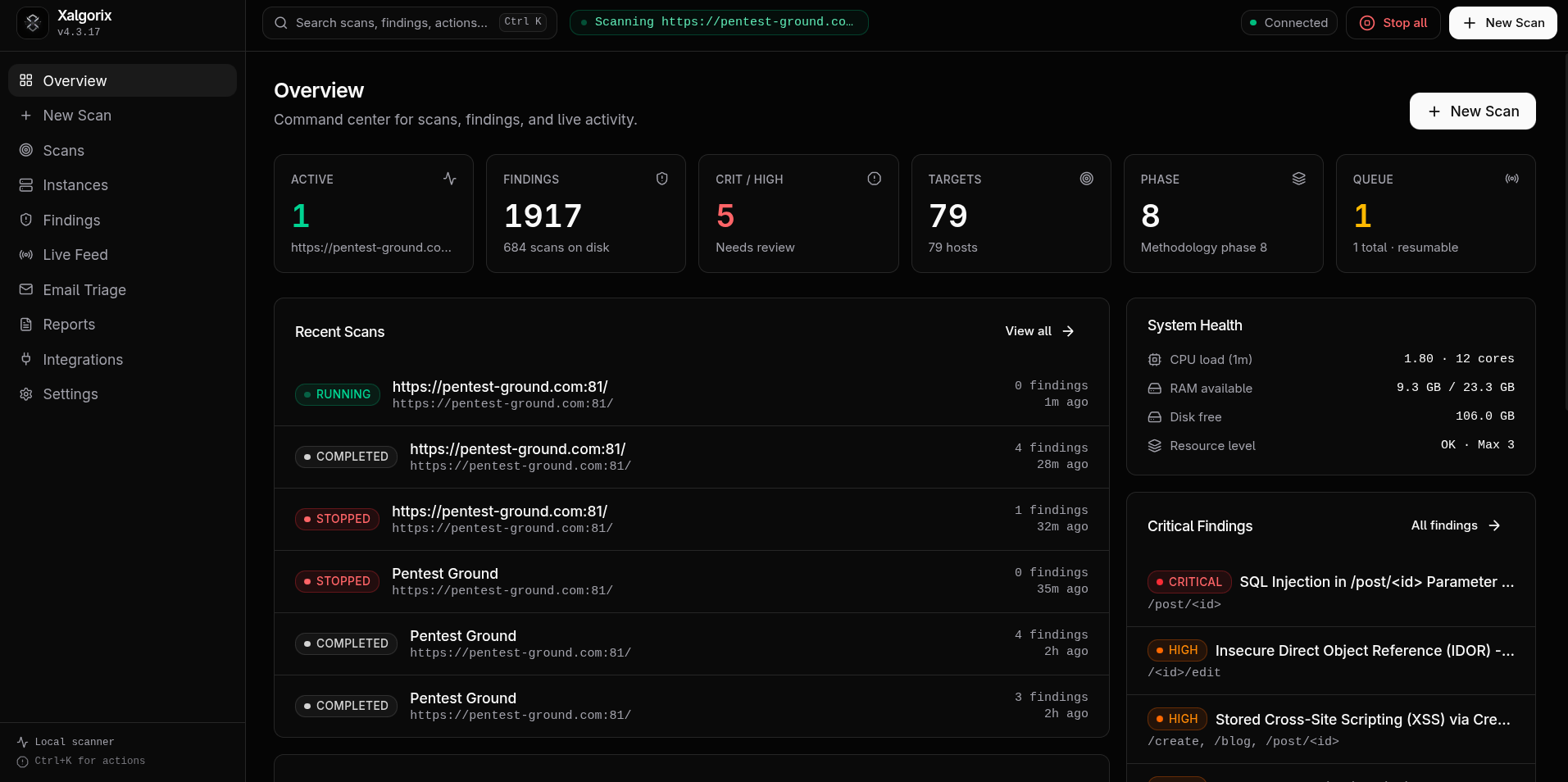
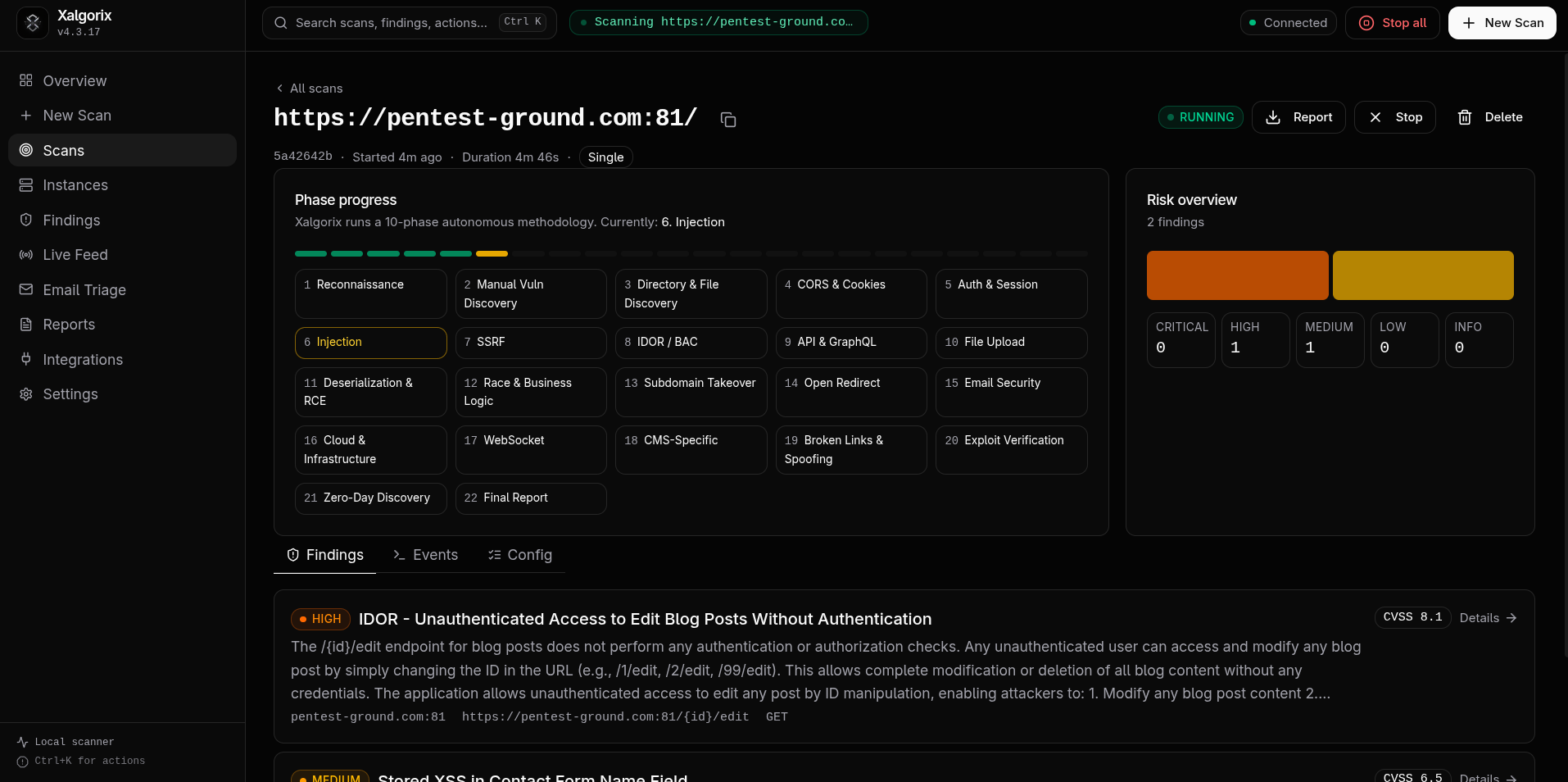
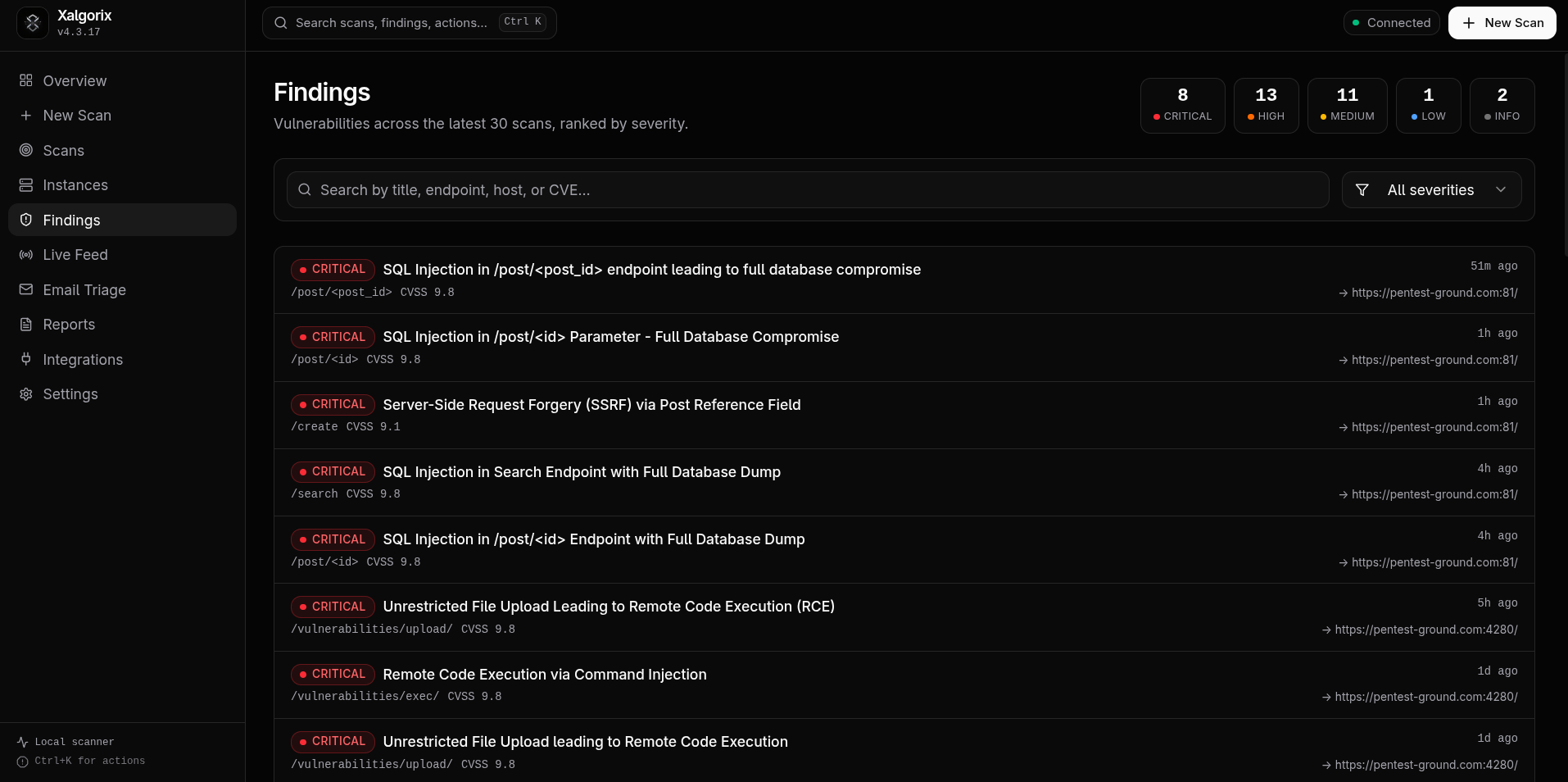
**🖥️ Self-hosted dashboard** — runs locally on `127.0.0.1:9137`
| Overview dashboard | Scan detail | Findings |
| ------------------------------------------------------- | ------------------------------------------------ | --------------------------------------------- |
|  |  |  |
**☁️ Xalgorix Cloud dashboard** — the managed version at [www.xalgorix.com](https://www.xalgorix.com/?utm_source=github&utm_medium=readme&utm_campaign=oss_to_cloud&utm_content=screenshot_caption)
<a href="https://www.xalgorix.com/?utm_source=github&utm_medium=readme&utm_campaign=oss_to_cloud&utm_content=screenshot"><img src="https://assets.kitploit.com/production/public/readmes/7609/0f0cd85ee290ed7b78306cfe4e615c58db993746bbe2f6554b0bfa5c29b9e0b4/280f2d9d40385acb9d3aded8d3896b25a95dbd42e45f0c384a2dd36cc90fb145-display-v1.webp" alt="Xalgorix Cloud dashboard showing security score, vulnerability trends, remediation metrics, and open issues by category" width="860" /></a>
---
---
## 🤝 Sponsors
Xalgorix is supported by these proxy-infrastructure partners — handy for checking how your own apps behave across regions. Both speak **HTTP(S) and SOCKS5**, the protocols Xalgorix uses.
<table>
<tr>
<td align="center" valign="middle" width="50%">
<a href="https://www.swiftproxy.net/?ref=xalgorix"><img src="https://assets.kitploit.com/production/public/readmes/7609/cca63417f9af2e1840f4531e5394ac2e0cd48edf93d27bb7c792e44ba96b25ab/59b3ed4965b30c782781bad6e76901b31d10b5aad229d5576252ec086ebb9149-display-v1.webp" alt="Swiftproxy" height="132" /></a>
</td>
<td align="center" valign="middle" width="50%">
<a href="https://proxy-seller.com/?partner=11571212D46044C9"><img src="https://assets.kitploit.com/production/public/readmes/7609/a839cfa28ebd327f87133889b265326a2f709c2a6e8cd824945b6417370a6893/32dcbee3a3de3f48c7554312d4ee04e1e9189c556f0971308eb6fbc8ae865afb-display-v1.webp" alt="Proxy-Seller" height="132" /></a>
</td>
</tr>
<tr>
<td align="center" valign="top">
<b><a href="https://www.swiftproxy.net/?ref=xalgorix">Swiftproxy</a></b><br/>
<sub>Residential proxies from $0.70/GB · location targeting · sticky sessions<br/>Xalgorix users get <b>10% off</b> with <code>PROXY90</code></sub>
</td>
<td align="center" valign="top">
<b><a href="https://proxy-seller.com/?partner=11571212D46044C9">Proxy-Seller</a></b><br/>
<sub>47M+ residential IPs · 220+ locations · residential, mobile, ISP & datacenter<br/>Xalgorix users get <b>15% off</b> with <code>XALGORIX</code></sub>
</td>
</tr>
</table>
---
## 🚀 Quick Start
**Install (one line):**
```bash
curl -sSL https://www.xalgorix.com/install | bash
```
This downloads the prebuilt binary for your platform (Linux or macOS, amd64/arm64) from the latest release.
**Or install with Go 1.26 or newer:**
```bash
go install github.com/xalgord/xalgorix/v4/cmd/xalgorix@latest
```
Ensure `$(go env GOPATH)/bin` (or your `GOBIN`) is on your `PATH` before running `xalgorix`.
Then run the interactive setup wizard:
```bash
xalgorix --setup
```
Choose your provider, confirm a model, and enter the API key when prompted. For best results, use a current frontier model with strong reasoning, long-context performance, and reliable tool calling—such as the latest capable GPT, Claude, or Gemini model available to you. Smaller or local models remain supported, but may require more supervision during long autonomous scans. Xalgorix stores the key privately in `~/.xalgorix.env` (mode `0600`) and can launch the dashboard for you. Local Ollama needs no API key.
If you choose not to launch immediately, start later with `xalgorix --web` and open `http://127.0.0.1:9137`. You can change providers or advanced options at any time under **Settings → LLM**, or rerun `xalgorix --setup`.
**Or run with Docker — batteries included, no toolchain needed:**
```bash
docker run --rm -p 9137:9137 \
--privileged \
-v xalgorix-data:/data \
xalgord/xalgorix:latest
```
`--privileged` gives the toolset the same host-like access it has when run natively as root. Docker's default sandbox drops capabilities (like `NET_ADMIN`) and applies a seccomp filter, which breaks low-level tools (iptables/route changes, ARP-spoof/MITM, tun/tap VPNs, ptrace-based debuggers, masscan interface tuning). Since an image can't grant itself these, they must be set at run time. The container is a disposable, network-isolated scanning sandbox running as root — privileged is the intended posture; never expose the dashboard publicly without auth. Prefer least-privilege? Swap `--privileged` for `--cap-add=NET_ADMIN --cap-add=NET_RAW --cap-add=SYS_PTRACE --security-opt seccomp=unconfined`.
Open `http://localhost:9137`. You **don't need an LLM key to start** — the dashboard launches without one; set the model + API key under **Settings → LLM** (it persists to the `/data` volume). If you don't pass `XALGORIX_USERNAME`/`XALGORIX_PASSWORD`, a random admin password is generated and printed to the container logs on first run.
**Machine-to-machine API access** — give automation (your own backend, CI, scripts) a dedicated `Authorization: Bearer` token instead of dashboard credentials: set `XALGORIX_API_TOKEN` (or `XALGORIX_API_TOKENS` for a comma-separated rotation set). Machine tokens authorize `/api/*` routes and the scan-event WebSocket only — never the dashboard UI or operator-only settings routes — never create browser sessions, never interact with the dashboard login rate limiter, and are matched against stored SHA-256 digests with constant-time comparison. The human dashboard login (`XALGORIX_USERNAME` + `XALGORIX_PASSWORD_HASH`) keeps working unchanged alongside them.
**Easiest — Docker Compose** (maps the port + a persistent volume for you):
```bash
curl -sSLO https://raw.githubusercontent.com/xalgorix/xalgorix/main/docker-compose.yml
docker compose up -d
docker compose logs -f # shows the generated admin password on first start
```
The image ships an extensive offensive-security toolset preinstalled (nmap, nuclei, httpx, subfinder, katana, ffuf, gobuster, sqlmap, masscan, dalfox, feroxbuster, and more) **and** keeps every package manager (apt, go, cargo, pipx, npm) available so the agent can still auto-install anything missing at runtime. It runs as root inside the container by design — treat the container as a disposable, network-isolated scanning sandbox and never expose the dashboard without auth. Images are published for both amd64 and arm64.
**Or build from source** (needs Go 1.26+ and Node.js):
```bash
git clone https://github.com/xalgorix/xalgorix.git
cd xalgorix
make build
sudo install -m 755 build/xalgorix /usr/local/bin/xalgorix
```
> [!TIP]
> **Rather skip the setup?** [Xalgorix Cloud](https://www.xalgorix.com/signup?utm_source=github&utm_medium=readme&utm_campaign=oss_to_cloud&utm_content=quickstart_tip) runs the same exploit-verified engine in your browser — no install, no LLM key, no token bill. Packs from $10, no subscription; credits never expire.
### 🤖 Review pull requests automatically — free GitHub App
Want a security review on every pull request with zero setup? Install the **[Xalgorix GitHub App](https://github.com/apps/xalgorix)**. It reads each PR's diff and comments a security review — injection, broken auth/IDOR, SSRF, secrets, unsafe patterns — right on the pull request. Updates in place on new commits, and you can comment **`@xalgorix review`** to re-run on demand. No workflow file, no API key, no account — and it's free.
<div align="center">
[**➕ Add Xalgorix to GitHub →**](https://github.com/apps/xalgorix/installations/new)
</div>
Need merge gating or a full exploit-verified pentest of the running app? Start a [Cloud scan from your CI](https://www.xalgorix.com/docs/api?utm_source=github&utm_medium=readme&utm_campaign=gh_app_to_cloud&utm_content=app_block_ci) with the REST API and gate on verified findings at the severity you choose.
> [!IMPORTANT]
> Use Xalgorix only on systems you own or have explicit permission to test.
## 📚 Contents
| | | |
| --- | --- | --- |
| 📸 [Screenshots](#-screenshots) | 🔩 [Configuration](#-configuration) | 🧾 [Environment Variables](#-environment-variables) |
| 🚀 [Quick Start](#-quick-start) | 🆙 [Upgrading](#-upgrading-from-previous-versions) | 🔤 [Provider Prefixes](#-provider-prefixes) |
| 🔎 [Overview](#-overview) | 🏃 [Running](#-running) | 💻 [CLI Reference](#-cli-reference) |
| 💡 [Why Xalgorix](#-why-xalgorix) | 🧰 [Service Mode](#-service-mode) | 📡 [API Summary](#-api-summary) |
| 🎯 [Use Cases](#-use-cases) | 🔁 [Web UI Workflow](#-web-ui-workflow) | 💾 [Data Storage](#-data-storage) |
| ✨ [Features](#-features) | 🔀 [Scan Modes](#-scan-modes) | 🧪 [Development](#-development) |
| 📥 [Installation](#-installation) | 📂 [Scan Your Code](#-scan-your-code-no-target-needed) | 🚨 [Safety Notes](#-safety-notes) |
| 🧭 [Methodology](#-methodology) | 📄 [Reports](#-reports) | 📜 [License](#-license) |
| 🔧 [Settings](#-settings) | 🔗 [Links](#-links) | 🤝 [Sponsors](#-sponsors) |
## 🔎 Overview
Xalgorix is a self-hosted AI penetration testing platform for authorized security testing, vulnerability assessment, and bug bounty workflows. It combines an LLM-driven autonomous agent, browser automation, terminal tooling, a comprehensive 22-phase testing methodology, live WebSocket telemetry, finding management with CVSS scoring, branded PDF report generation, and integrations for AgentMail, Discord, and Telegram.
Unlike cloud-only DAST scanners, Xalgorix runs entirely on your machine. You bring your own LLM provider (OpenAI, Anthropic, DeepSeek, Gemini, Groq, Ollama, MiniMax) and control the model, reasoning effort, rate limits, and proxy configuration. Nothing is sent to Xalgorix: scan context goes only to the LLM provider you configure (or stays local with Ollama), and blind-vulnerability callbacks use public Interactsh servers unless you set `XALGORIX_INTERACTSH_SERVER` to your own.
The default experience is the Web UI. From one local dashboard you can start scans, monitor active runs, inspect findings, configure model/provider settings, manage environment variables, generate branded PDF reports, and delete or resume historical scans.
## 💡 Why Xalgorix
Most scanners **detect**. Xalgorix **proves**. An autonomous agent works through a 22-phase methodology, then an independent verifier re-tests every candidate finding before it is reported — so you get exploit-verified results with evidence, not a wall of "maybes" to triage.
- 🧠 **An AI agent, not a template engine** — reasons about auth flows, business logic, IDOR/BOLA, and chained exploits that signature scanners miss.
- ✅ **Exploit-verified findings** — a separate verifier independently reproduces each finding; inconclusive ones are flagged for review, never dressed up as confirmed.
- 🔒 **Self-hosted and private** — runs on your machine with your own LLM key; nothing is sent to Xalgorix, and with a local model plus your own OOB server, nothing leaves your network except traffic to the target.
- 🧩 **Bring your own LLM** — OpenAI, Anthropic, DeepSeek, Gemini, Groq, Ollama, or MiniMax — or any OpenAI-compatible gateway like [LiteLLM](#-litellm--openai-compatible-gateways-github-copilot-claude-opus-codex-openrouter-azure-local-models) (GitHub Copilot, Codex, OpenRouter, Azure). You control model, reasoning effort, and cost.
- 📄 **Audit-ready reports** — branded PDFs with CVSS scores, proof-of-concept, and remediation.
### 📊 How it compares
| | **Xalgorix** | Template scanners (e.g. Nuclei) | Crawling scanners (e.g. OWASP ZAP) | Commercial DAST |
| -------------------------------------------- | ------------------------ | ------------------------------- | ---------------------------------- | ---------------------- |
| Approach | Autonomous AI agent | Signatures / templates | Spider + active rules | Signatures + heuristics |
| Business logic / IDOR / auth-bypass coverage | ✅ | Limited | Limited | Partial |
| Exploit-verified (proves impact) | ✅ independent verifier | ❌ | ❌ | Partial |
| False-positive load | Low — re-exploited first | Template-dependent | High | Medium |
| Self-hosted / data stays local | ✅ | ✅ | ✅ | Usually cloud |
| Bring-your-own LLM | ✅ | — | — | ❌ |
| Branded PDF reports | ✅ | ❌ | Basic | ✅ |
| Cost | Open source + your LLM | Free | Free | $$$ |
> Directional comparison — Nuclei and ZAP are excellent at what they do. Xalgorix adds the reasoning-heavy discovery and exploit-verification layer on top.
<a name="self-host-or-cloud"></a>
### ☁️ Self-hosted or Xalgorix Cloud?
Xalgorix is free and open source — self-host it forever, no strings attached. [Xalgorix Cloud](https://www.xalgorix.com/?utm_source=github&utm_medium=readme&utm_campaign=oss_to_cloud&utm_content=compare_intro) runs the **same** exploit-verified engine for people who would rather not manage LLM keys and token bills, a ~6–8 GB privileged toolbox container, or their own callback infrastructure. Both are first-class — pick what fits.
| | **Self-hosted** (this repo) | **[Xalgorix Cloud](https://www.xalgorix.com/?utm_source=github&utm_medium=readme&utm_campaign=oss_to_cloud&utm_content=compare_table_header)** |
| ---------------------------------- | ------------------------------------------------------------ | ------------------------------------------------------ |
| Price to start | Free engine, Apache-2.0 | Packs from $10 (no subscription) or plans from $49/mo — [pricing](https://www.xalgorix.com/pricing?utm_source=github&utm_medium=readme&utm_campaign=oss_to_cloud&utm_content=compare_table_price) |
| LLM | Bring your own key — or run fully local with Ollama | Included — no key, no token bill |
| Cost per scan | Your LLM tokens — varies with target size and model | 1 credit per target or live host (very long scans: up to 3) — [how credits work](https://www.xalgorix.com/pricing?utm_source=github&utm_medium=readme&utm_campaign=oss_to_cloud&utm_content=compare_table_credits) |
| Setup & ops | One-line installer, or Docker (~6–8 GB image, `--privileged`) | Nothing to run — start from the browser |
| Blind-vuln callbacks (OOB) | Public Interactsh by default, or your own OOB server | Managed DNS/HTTP/SMTP listeners |
| Scheduling & alerts | Built-in scheduler + Discord/Telegram, on your host | Managed daily schedules + Slack/Discord/webhooks (Pro/Max) |
| Sharing | Single-operator dashboard, PDF reports | Share links (password-protected on Pro/Max); private deployments via [sales](mailto:[email protected]) |
| Updates | Binary auto-updates from GitHub Releases; Docker: pull a new tag | Engine updates managed for you |
| Data residency / offline | ✅ stays on your infra · air-gap OK with local models | Runs on our infra (DPA available) |
**Self-host if** data must stay on your network, you want full control, or you'll run offline/air-gapped — that's exactly what it's for. **Use Cloud if** you'd rather skip the API keys, infrastructure and surprise token bills, and pay per target instead of per token.
<div align="center">
[**☁️ Start a Cloud scan →**](https://www.xalgorix.com/signup?utm_source=github&utm_medium=readme&utm_campaign=oss_to_cloud&utm_content=cta_signup) · [**💳 See pricing**](https://www.xalgorix.com/pricing?utm_source=github&utm_medium=readme&utm_campaign=oss_to_cloud&utm_content=cta_pricing) · [**⚖️ Full comparison & cost calculator**](https://www.xalgorix.com/hosted-vs-self-hosted?utm_source=github&utm_medium=readme&utm_campaign=oss_to_cloud&utm_content=cta_compare)
</div>
If Xalgorix saves you a triage cycle, please **[⭐ star the repo](https://github.com/xalgorix/xalgorix)** — it genuinely helps others find it.
## 🎯 Use Cases
| Use Case | How Xalgorix helps |
| -------- | ------------------ |
| **Penetration testing** | Run a full 22-phase methodology against authorized targets. The AI agent handles reconnaissance, vulnerability discovery, injection testing, SSRF, IDOR, auth bypass, race conditions, and more — then verifies findings before reporting. |
| **Bug bounty hunting** | Point Xalgorix at an in-scope target and let the agent enumerate the attack surface, test for common vulnerability classes, and surface verified findings with CVSS scores and proof-of-concept evidence. |
| **Red team operations** | Use wildcard and multi-target scan modes to map an organization's external attack surface. Browser-assisted DAST handles auth flows, forms, and runtime behavior that static scanners miss. |
| **Security research** | The novel-vulnerability-discovery phase pushes the agent beyond known template matching. Bring your own LLM (OpenAI, Anthropic, DeepSeek, Gemini, Ollama, MiniMax) to control reasoning depth and cost. |
| **Continuous security testing** | Run as a system service with `xalgorix --start`. Scan on a schedule, stream findings to Discord or Telegram, and generate branded PDF reports for stakeholders. |
| **DAST automation** | Browser-driven testing for web applications — auth flows, forms, JavaScript-rendered content, and runtime behavior. Integrates with Caido for proxy traffic inspection. |
## ✨ Features
| Area | Capabilities |
| -------------- | --------------------------------------------------------------------------------------------------------------------------- |
| 📊 Dashboard | Local Web UI on `127.0.0.1:9137` by default, scan management, live status, bulk scan actions, and historical scan recovery. |
| 🔍 Scanning | Single target, DAST, wildcard, and multi-target flows with selectable methodology phases. |
| 📡 Live telemetry | Tool calls, agent messages, findings, errors, HTTP activity, and LLM activity over WebSockets. |
| 🐞 Findings | Scan detail pages, severity filters, CVSS details, finding index, and verified finding workflows. |
| 📄 Reporting | Branded PDF reports with target/company name, uploaded logo, report list, open/download/delete actions. |
| 🔔 Integrations | AgentMail test inboxes, verification emails, OTP flows, email triage events, Discord and Telegram notifications. |
| ⚙️ Configuration | Dashboard settings for LLM, AgentMail, Discord, Telegram, proxy, runtime, browser, auth, rate limits, and resources. |
| 🛡️ Runtime safety | Resource-aware instance limits and loopback-only binding unless external access is explicitly configured with auth. |
## 📥 Installation
Use a prebuilt binary, Go, or a container.
### ⚡ One-line install (prebuilt binary)
```bash
curl -sSL https://www.xalgorix.com/install | bash
```
Downloads the latest release binary for your platform (Linux or macOS, `amd64`/`arm64`) and installs it to `/usr/local/bin` (or `~/.local/bin` without sudo). Override with `XALGORIX_INSTALL_DIR` or pin a version with `XALGORIX_VERSION=vX.Y.Z`.
Complete first-time configuration interactively—no manual environment-file editing required:
```bash
xalgorix --setup
```
The wizard preserves existing settings when rerun, hides API-key input in a terminal, and optionally launches the Web UI when finished.
### 📦 Install with Go
With Go 1.26 or newer:
```bash
go install github.com/xalgord/xalgorix/v4/cmd/xalgorix@latest
```
Go installs the binary to `GOBIN`, or to `$(go env GOPATH)/bin` when `GOBIN` is unset. Add that directory to your `PATH`, then run `xalgorix --setup`.
### 🐳 Docker
```bash
docker run --rm -p 9137:9137 \
--privileged \
-e XALGORIX_LLM=openai/gpt-5.6 \
-e XALGORIX_API_KEY=your_openai_api_key \
-v xalgorix-data:/data \
ghcr.io/xalgord/xalgorix:latest
```
`--privileged` (or the narrower `--cap-add=NET_ADMIN --cap-add=NET_RAW --cap-add=SYS_PTRACE --security-opt seccomp=unconfined`) gives the toolset host-like access. Docker's default sandbox drops capabilities and filters syscalls, which breaks low-level tooling (iptables/route/interface changes, ARP-spoof/MITM, tun/tap VPNs, ptrace-based debuggers). An image can't grant these to itself — they're a run-time decision — so pass the flag, or use the provided `docker-compose.yml`, which sets it for you.
The image is **batteries-included**: an extensive offensive-security toolset is preinstalled (nmap, nuclei, httpx, subfinder, dnsx, naabu, katana, ffuf, gobuster, dalfox, feroxbuster, sqlmap, masscan, nikto, whatweb, hydra, and more), plus Chromium for browser-assisted DAST. It also keeps the full package-manager set (apt, go, cargo, pipx, npm) available, so the agent auto-installs anything missing at runtime. Scan data persists to the `/data` volume, and the server binds `0.0.0.0` inside the container — set `XALGORIX_USERNAME`/`XALGORIX_PASSWORD` before exposing it beyond localhost.
The container runs as root by design (the engine only enables runtime auto-install for uid 0, and apt/go/cargo installs need system write access). Treat it as a disposable, network-isolated scanning sandbox. The same tags publish a multi-platform manifest for `linux/amd64` and `linux/arm64`, so Docker selects the native image automatically.
On first run, if you don't set dashboard auth the container **generates a random admin password and prints it to the logs** (the image binds `0.0.0.0`, which the engine won't do without auth). Set `XALGORIX_USERNAME` + `XALGORIX_PASSWORD` (or `XALGORIX_PASSWORD_HASH`) to use your own. The binary never self-updates inside the container (`XALGORIX_NO_AUTO_UPDATE=1`) — pull a new image tag to upgrade. The **nuclei** engine and its vuln templates are refreshed to the latest on every image build (the release CI and `redeploy.sh` force this); pass `--build-arg NUCLEI_VERSION=vX.Y.Z` to pin the engine, or `NUCLEI_REFRESH=0 ./redeploy.sh` to reuse Docker's cache.
### ☸️ Kubernetes (Helm)
A Helm chart is included in the repository at [`deploy/chart`](https://github.com/xalgord/xalgorix/blob/main/deploy/chart). There is no hosted chart repository, so install from a git checkout:
```bash
git clone https://github.com/xalgorix/xalgorix.git
cd xalgorix
helm install xalgorix deploy/chart \
--namespace xalgorix --create-namespace \
--set auth.username=admin \
--set auth.password=change-me \
--set env.secret.XALGORIX_LLM=openai/gpt-5.6 \
--set env.secret.XALGORIX_API_KEY=your_openai_api_key
```
- The dashboard listens on port `9137`. Expose it with `ingress.enabled` (Ingress controller) or `httproute.enabled` (Gateway API) — never without dashboard auth.
- Scan data and persisted dashboard settings live on a PVC mounted at `/data` (see `persistence` in `values.yaml`). Settings changed in the dashboard's Settings UI are written to `/data/.xalgorix.env` and take precedence over chart-provided env vars on restart.
- Any `XALGORIX_*` variable can be passed through `env.raw`, `env.config`, or `env.secret`. Dashboard credentials go in `auth`, or point `auth.existingSecret` at a Secret containing `XALGORIX_USERNAME`/`XALGORIX_PASSWORD`.
- The bundled toolset expects the same elevated permissions as the Docker run (`NET_ADMIN`, `NET_RAW`, `SYS_PTRACE`, seccomp `Unconfined`) — see the `securityContext` examples in `values.yaml`.
### 📋 Requirements (build from source)
| Requirement | Notes |
| -------------- | ------------------------------------------------------------ |
| OS | Linux or macOS (`amd64`/`arm64`). |
| Go | `1.26` or newer. |
| Node.js + npm | Required when building the bundled React Web UI from source. |
| Security tools | Installed on demand only when auto-install is enabled. |
Check your Go version:
```bash
go version
```
### 🔨 Build From Source
```bash
git clone https://github.com/xalgorix/xalgorix.git
cd xalgorix
make build
sudo install -m 755 build/xalgorix /usr/local/bin/xalgorix
```
`make build` builds the React Web UI into `internal/web/static`, then builds the Go binary.
## 🔩 Configuration
Xalgorix loads configuration in this order. Later sources override earlier ones.
| Order | Source |
| ----- | -------------------------------------------------------------- |
| 1 | `/etc/xalgorix.env` |
| 2 | `/home/<sudo-user>/.xalgorix.env` when launched through `sudo` |
| 3 | `~/.xalgorix.env` |
| 4 | Environment variables already present in the process |
Create the local environment file:
```bash
nano ~/.xalgorix.env
```
### 🧩 Minimal Config
For the strongest autonomous scanning results, select a current frontier model. The model ID below is a concrete example; newer compatible model IDs can be entered without waiting for a Xalgorix release.
```bash
XALGORIX_LLM=openai/gpt-5.6
XALGORIX_API_KEY=your_openai_api_key
```
### 🔌 Provider Examples
OpenAI:
```bash
XALGORIX_LLM=openai/gpt-5.6
XALGORIX_API_KEY=sk-...
```
Custom OpenAI-compatible provider:
```bash
XALGORIX_LLM=custom/security-model
XALGORIX_API_BASE=https://your-provider.example/v1
XALGORIX_API_KEY=your_provider_api_key
```
#### 🌉 LiteLLM / OpenAI-compatible gateways (GitHub Copilot, Claude Opus, Codex, OpenRouter, Azure, local models)
Because `XALGORIX_API_BASE` accepts any OpenAI-compatible `/v1/chat/completions` endpoint,
Xalgorix works with a [LiteLLM](https://docs.litellm.ai/) proxy out of the box — no
Xalgorix-side changes needed. LiteLLM handles the upstream provider auth (Copilot device
login, Azure keys, OpenRouter, Ollama, etc.); Xalgorix just talks OpenAI to the gateway.
Run LiteLLM (example `config.yaml`):
```yaml
model_list:
- model_name: claude-opus-5
litellm_params:
model: github_copilot/claude-opus-5 # or openrouter/…, azure/…, ollama/…
general_settings:
master_key: sk-local-litellm-key
```
Point Xalgorix at it — use the `custom/` prefix so the model name is sent verbatim and the
OpenAI chat-completions protocol is used:
```bash
XALGORIX_LLM=custom/claude-opus-5 # the LiteLLM model_name
XALGORIX_API_BASE=http://localhost:4000/v1 # your LiteLLM proxy
XALGORIX_API_KEY=sk-local-litellm-key # LiteLLM master_key / virtual key
```
The same pattern covers GitHub Copilot Business/CLI, Claude Opus, Codex-style models,
OpenRouter, Azure OpenAI, and local Ollama models — anything LiteLLM can route. Keep the
`custom/` (or `openai/`) prefix and a non-Anthropic/Gemini `XALGORIX_API_BASE` so Xalgorix
uses the standard OpenAI request shape that LiteLLM expects.
### 🔔 Optional Integrations
```bash
GEMINI_API_KEY=AIza...
AGENTMAIL_POD=am_us_pod_47
AGENTMAIL_API_KEY=ak_...
XALGORIX_DISCORD_WEBHOOK=https://discord.com/api/webhooks/...
XALGORIX_DISCORD_MIN_SEVERITY=high
```
### 🔐 Dashboard Authentication
```bash
XALGORIX_USERNAME=admin
XALGORIX_PASSWORD=change-this-password
```
> [!TIP]
> Prefer `XALGORIX_PASSWORD_HASH` for production deployments.
---
[Read more](https://github.com/xalgord/xalgorix)
