 feder-cr/invisible_playwright
Playwright that anti-bots cannot see, so no captchas: same API, anti-detect stealth headless Firefox, undetected fingerprint, bypass bot detection, Python web scraping and browser automation.


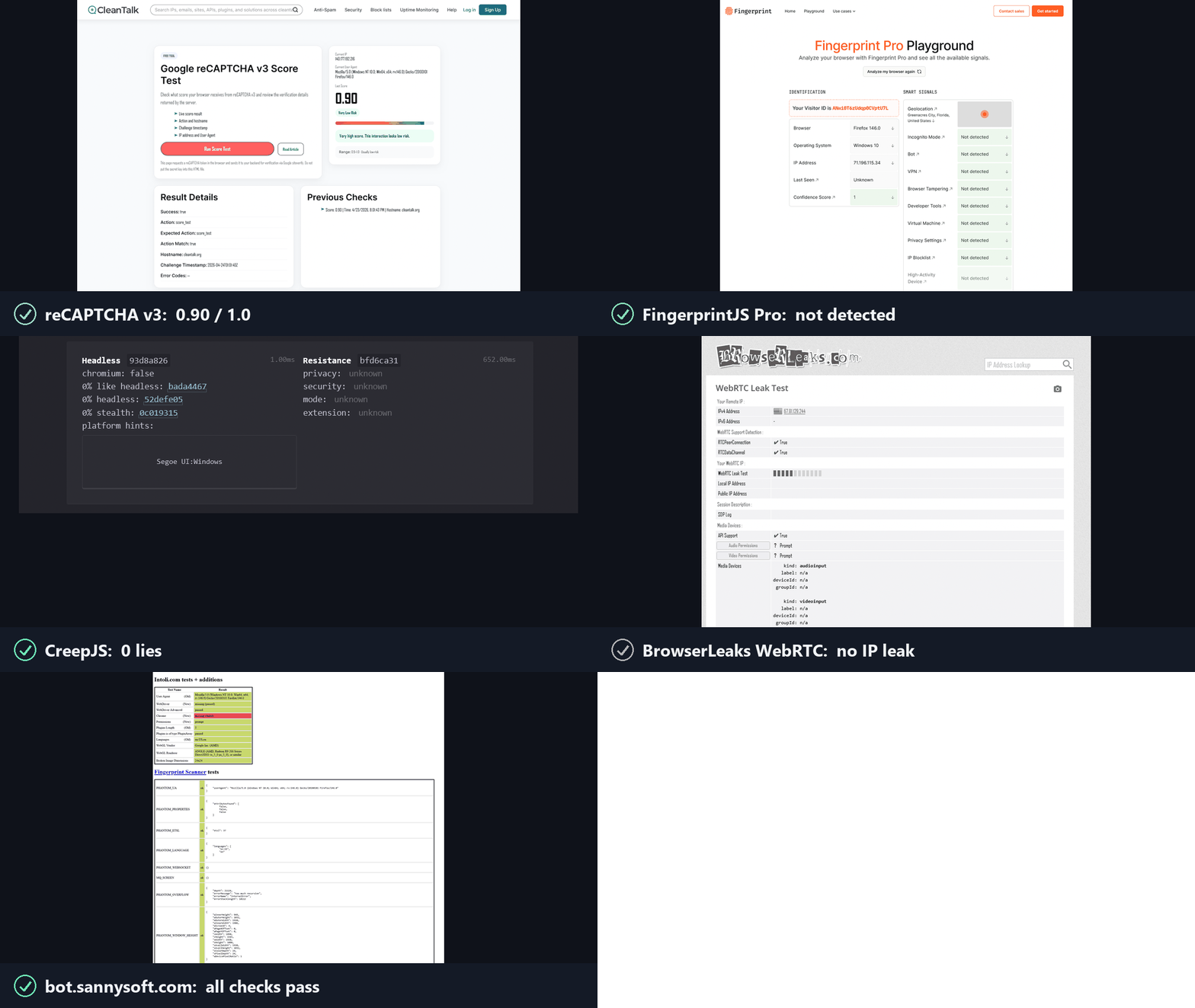
Anti-bots ask two questions, and reCAPTCHA, hCaptcha and Cloudflare Turnstile score the answers. invisible_playwright answers yes to both.
1. Is this a real browser? Yes. It is Firefox, patched at the C++ source level.
2. Is a real person using it? Yes. The actions are humanized in the driver.
pip install invisible-playwright
python -m invisible_playwright fetch      # one-time download, sha256-verified: 240 MB (Windows) / 262 MB (Linux x86_64) / 253 MB (Linux arm64), about 550 MB unpacked
Requires Python 3.11 or newer.
Supported platforms: Windows x86_64, Linux x86_64 / arm64.
Playwright's API, sync and async, with no code changes. The same objects, the same calls, the same return values. A few surfaces are out of scope - tracing, HAR, CDP, the API request context - and each one refuses with a sentence saying why rather than misbehaving quietly. If you already use Playwright, switching is two lines:
- from playwright.sync_api import sync_playwright
- with sync_playwright() as p:
-     browser = p.firefox.launch()
+ from invisible_playwright import InvisiblePlaywright
+ with InvisiblePlaywright() as browser:
Every session gets a distinct fingerprint (GPU, audio, fonts, screen, ~200 fields) and Bezier-curve mouse motion.
Sync
from invisible_playwright import InvisiblePlaywright

with InvisiblePlaywright(proxy={"server": "socks5://...", "username": "u", "password": "p"}) as browser:
    page = browser.new_page()
    page.goto("https://example.com")
    page.click("#submit")   # mouse arcs to the button on a Bezier curve
Async
from invisible_playwright.async_api import InvisiblePlaywright

async with InvisiblePlaywright(proxy={"server": "socks5://...", "username": "u", "password": "p"}) as browser:
    page = await browser.new_page()
    await page.goto("https://example.com")
    await page.click("#submit")
The browser object is a playwright.sync_api.Browser / playwright.async_api.Browser - every Playwright method works as-is.
Log the seed to replay a run:
sf = InvisiblePlaywright()
with sf as browser:
    print("seed =", sf.seed)
    # ...
with InvisiblePlaywright(seed=42) as browser:
    ...   # same GPU, same canvas hash, same audio context, every run
proxy = {
    "server": "socks5://gate.example.com:1080",
    "username": "user",
    "password": "pass",
}
with InvisiblePlaywright(proxy=proxy) as browser:
    ...
Schemes supported: socks5, socks4, http, https. DNS is routed through the proxy by default, no local leak.
The browser timezone follows timezone=:
# default: timezone is auto-derived from the egress IP (proxy egress if a
# proxy is set, otherwise the host's own public IP)
with InvisiblePlaywright(proxy=proxy) as browser:
    ...

# explicit IANA zone always wins, the only way to force a specific zone
with InvisiblePlaywright(proxy=proxy, timezone="America/New_York") as browser:
    ...
By default everything comes from seed. To force specific values while the rest stays seed-derived:
with InvisiblePlaywright(
    seed=42,
    pin={
        "gpu.renderer": "ANGLE (AMD, Radeon R9 200 Series Direct3D11 vs_5_0 ps_5_0, D3D11)",
        "gpu.vendor":   "Google Inc. (AMD)",
        "screen.width":  2560,
        "screen.height": 1440,
        "hardware.concurrency": 16,
    },
) as browser:
    ...
A GPU pin picks one of the validated personas rather than setting a free string,
because the ~81 getParameter values and the extension list travel with the
renderer name and a detector cross-checks them against it. A name the pool does
not carry raises, and the error lists the ones it does.
Full list of pinnable keys, how pinning interacts with the Bayesian sampler, and common patterns are in docs/pinning.md.
The installed command is invisible-playwright, with a hyphen. python -m invisible_playwright works identically and needs nothing on PATH.
invisible-playwright fetch    # download the engine if missing, check every cached
                              # one against the seal, print the path
invisible-playwright version  # wrapper, core and engine versions, and where the
                              # engine is cached
If you would rather prompt than script. This page is the engine, as a Python
library. Two ways to use it without writing code, both one line: from an MCP client
you already have (Claude Code, Claude Desktop, Cursor),
claude mcp add stealth -- uvx aihawk, see
the MCP server page; or with an
interface and a model included, needing only an OpenRouter key,
uvx aihawk ui --openrouter-key sk-or-..., see
AIHawk. Same engine underneath, and the second
is a client of the first.
All of it reads better, and is searchable, in the wiki, organised into four sections instead of one flat list:
