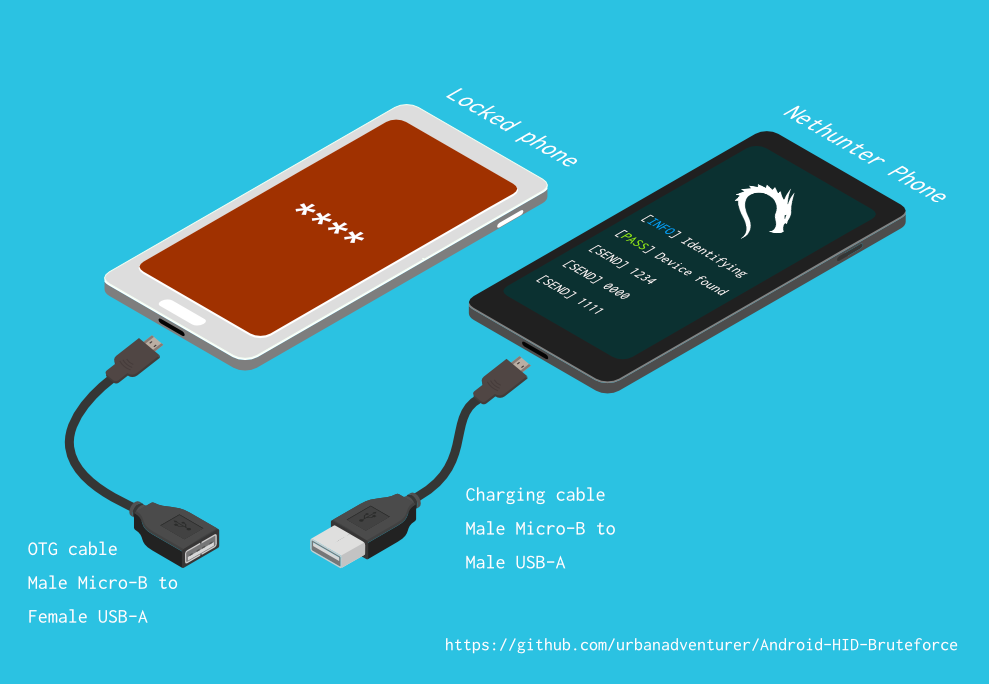

Desbloquea un teléfono Android (o dispositivo) mediante fuerza bruta en el PIN de la pantalla de bloqueo. ¡Convierte tu teléfono Kali Nethunter en un cracker de PIN por fuerza bruta para dispositivos Android! (sin root, sin adb)
Desbloquea un teléfono Android (o dispositivo) mediante fuerza bruta en el PIN de la pantalla de bloqueo.
Convierte tu teléfono Kali Nethunter en un cracker de PIN por fuerza bruta para dispositivos Android!
Usa un cable USB OTG para conectar el teléfono bloqueado al dispositivo Nethunter. Emula un teclado, prueba automáticamente PINs y espera después de intentar demasiadas conjeturas incorrectas.
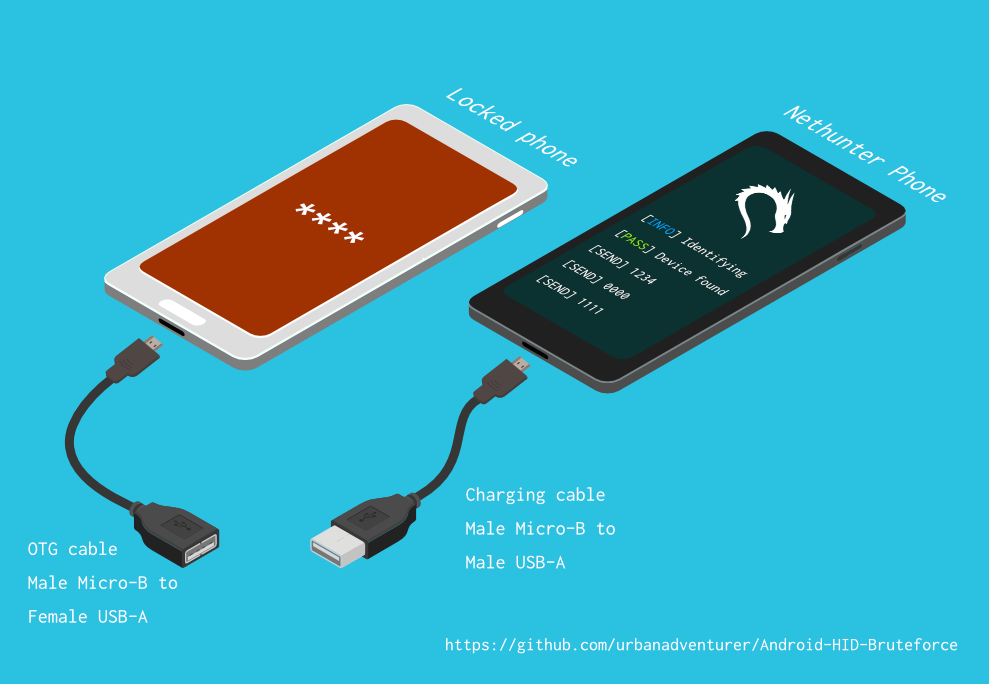
[Teléfono Nethunter] <--> [Cable USB] <--> [Adaptador USB OTG] <--> [Teléfono Android bloqueado]
El controlador USB HID Gadget proporciona emulación de dispositivos de interfaz humana (HID) USB. Esto permite que un dispositivo Android Nethunter emule la entrada del teclado al teléfono bloqueado. Es como conectar un teclado al teléfono bloqueado y presionar teclas.
⏱ Esto toma un poco más de 16.6 horas con un Samsung S5 para probar todos los PINs posibles de 4 dígitos, pero con la lista optimizada de PINs debería tomarte mucho menos tiempo.
TBC
Si instalaste el script en /sdcard/, puedes ejecutarlo con el siguiente comando.bash ./android-pin-bruteforce
Note that Android mounts /sdcard with the noexec flag. You can verify this with mount.
Android-PIN-Bruteforce (0.2) se utiliza para desbloquear un teléfono Android (o dispositivo) mediante la fuerza bruta del PIN de la pantalla de bloqueo.
Encuentre más información en: https://github.com/urbanadventurer/Android-PIN-Bruteforce
Commands:
crack Comenzar a descifrar PINs
resume Reanudar desde un PIN elegido
rewind Descifrar PINs en orden inverso desde un PIN elegido
diag Mostrar información de diagnóstico
version Mostrar información de versión y salir
Options:
-f, --from PIN Reanudar desde este PIN
-a, --attempts Comenzar desde NUM intentos incorrectos
-m, --mask REGEX Usar una máscara para dígitos conocidos en el PIN
-t, --type TYPE Seleccionar descifrado de PIN o PATRÓN
-l, --length NUM Descifrar PINs de longitud NUM
-c, --config FILE Especificar archivo de configuración a cargar
-p, --pinlist FILE Especificar una lista de PINs personalizada
-d, --dry-run Simulación para pruebas. No envía ninguna tecla.
-v, --verbose Mostrar registros detallados
Usage:
android-pin-bruteforce <comando> [opciones]```
## Supported Android Phones/Devices
This has been successfully tested with various phones including the Samsung S5, S7, Motorola G4 Plus and G5 Plus.
It can unlock Android versions 6.0.1 through to 10.0. The ability to perform a bruteforce attack doesn't depend on the Android version in use. It depends on how the device vendor developed their own lockscreen.
Check the Phone Database for more details
https://github.com/urbanadventurer/Android-PIN-Bruteforce/wiki/Phone-Database
## 🎳 PIN Lists
Optimised PIN lists are used by default unless the user selects a custom PIN list.
### Cracking PINs of different lengths
Use the `--length` commandline option.
Use this command to crack a 3 digit PIN,
`./android-pin-bruteforce crack --length 3`
Use this command to crack a 6 digit PIN
`./android-pin-bruteforce crack --length 6`
### Where did the optimised PIN lists come from?
The optimised PIN lists were generated by extracting numeric passwords from database leaks then sorting by frequency. All PINs that did not appear in the password leaks were appended to the list.
The optimised PIN lists were generated from *Ga$$Pacc DB Leak* (21GB decompressed, 688M Accounts, 243 Databases, 138920 numeric passwords).
#### The 4 digit PIN list
The reason that the 4 digit PIN list is used from a different source is because it gives better results than the generated list from *Ga$$Pacc DB Leak*.
`optimised-pin-length-4.txt` is an optimised list of all possible 4 digit PINs, sorted by order of likelihood.
It can be found with the filename `pinlist.txt` at https://github.com/mandatoryprogrammer/droidbrute
This list is used with permission from Justin Engler & Paul Vines from Senior Security Engineer, iSEC Partners,
and was used in their Defcon talk, [Electromechanical PIN Cracking with Robotic Reconfigurable Button Basher (and C3BO)](https://www.defcon.org/html/defcon-21/dc-21-speakers.html#Engler)
### Cracking with Masks
Masks use regular expressions with the standard grep extended format.
`./android-pin-bruteforce crack --mask "...[45]" --dry-run`
- To try all years from 1900 to 1999, use a mask of `19..`
- To try PINs that have a 1 in the first digit, and a 1 in the last digit, use a mask of `1..1`
- To try PINs that end in 4 or 5, use `...[45]`
## 📱 Configuration for different phones
Device manufacturers create their own lock screens that are different to the default or stock Android.
To find out what keys your phone needs, plug a keyboard into the phone and try out different combinations.
Load a different configuration file, with the `--config FILE` commandline parameter.
Example:
`./android-pin-bruteforce --config ./config.samsung.s5 crack`
You can also edit the `config` file by customising the timing and keys sent.
The following configuration variables can be used to support a different phone's lockscreen.
DELAY_BETWEEN_KEYS=0.25
PROGRESSIVE_ARRAY_ATTEMPT_COUNT__________=(1 11 41) PROGRESSIVE_ARRAY_ATTEMPTS_UNTIL_COOLDOWN=(5 1 1) PROGRESSIVE_ARRAY_COOLDOWN_IN_SECONDS____=(30 30 60)
SEND_KEYS_DISMISS_POPUPS_N_SECONDS_BEFORE_COOLDOWN_END=5
SEND_KEYS_DISMISS_POPUPS_AT_COOLDOWN_END="enter enter enter"
KEYS_BEFORE_EACH_PIN="escape enter"
KEYS_STAY_AWAKE_DURING_COOLDOWN="enter"
SEND_KEYS_STAY_AWAKE_DURING_COOLDOWN_EVERY_N_SECONDS=5
DELAY_BEFORE_STARTING=2
KEYS_BEFORE_STARTING="enter"```
We send keys before the end of the cooldown period, or optionally during the cooldown period. This is to keep the lockscreen app active and to dismiss any popups about the number of incorrect PIN attempts or a low battery warning.
Use ssh from your laptop to the NetHunter phone, and use this command to test sending keys:
In this example, the enter key is sent.
echo "enter" | /system/xbin/hid-keyboard /dev/hidg0 keyboard
In this example, ctrl-escape is sent.
echo "left-ctrl escape" | /system/xbin/hid-keyboard /dev/hidg0 keyboard
Note: Sending combinations of keys in config file variables is different. Currently only ctrl_escape is supported.
In this example, keys a, b, c are sent.
echo a b c | /system/xbin/hid-keyboard /dev/hidg0 keyboard
This Android app is a virtual USB Keyboard that you can use to test sending keys.
https://store.nethunter.com/en/packages/remote.hid.keyboard.client/
Use this list for the following variables:
To send special keys use the following labels. This list can be found in the hid_gadget_test source code.
To send more than one key at the same time, use the following list:
If you need more key combinations please open a new issue in the GitHub issues list.
The following section of the config file controls the progressive cooldown.
## Las variables PROGRESSIVE_COOLDOWN_ARRAY actúan como un arreglo multidimensional para personalizar el enfriamiento progresivo
## PROGRESSIVE_ARRAY_ATTEMPT_COUNT__________ es el número de intento
## PROGRESSIVE_ARRAY_ATTEMPTS_UNTIL_COOLDOWN es cuántos intentos realizar antes de enfriar
## PROGRESSIVE_ARRAY_COOLDOWN_IN_SECONDS____ es el enfriamiento en segundos
PROGRESSIVE_ARRAY_ATTEMPT_COUNT__________=(1 11 41)
PROGRESSIVE_ARRAY_ATTEMPTS_UNTIL_COOLDOWN=(5 1 1)
PROGRESSIVE_ARRAY_COOLDOWN_IN_SECONDS____=(30 30 60)```
The array is the same as this table.
| attempt number | attempts until cooldown | cooldown |
| ---------------- | ------------------------ | ---------- |
| 1 | 5 | 30 |
| 11 | 1 | 30 |
| 41 | 1 | 60 |
### Why can't you use a laptop, or is a Windows or Linux version coming soon?
This script works by emulating USB Human Interface Devices (HID), in this case it is keyboard and mouse input. Laptops have uni-directional USB ports and an Android mobile device/ phone has a bi-directional USB port. A bi-directional port is required to emulate a keyboard.
This might change in the future as USB-C is supposed to be uni-directional.
### How Android emulates a keyboard
Keys are sent using `/system/xbin/hid-keyboard`. To test this and send the key 1 you can use `echo 1 | /system/xbin/hid-keyboard dev/hidg0 keyboard`
In Kali Nethunter, `/system/xbin/hid-keyboard` is a compiled copy of `hid_gadget_test.c`. This is a small program for testing the HID gadget driver that is included in the Linux Kernel. The source code for this file can be found at https://www.kernel.org/doc/html/latest/usb/gadget_hid.html and https://github.com/aagallag/hid_gadget_test.
## 🔧 Troubleshooting
### If it is not bruteforcing PINs
#### Check the orientation of the cables
The Nethunter phone should have a regular USB cable attached, while the locked phone should have an OTG adaptor attached.
The OTG cable should be connected to the locked Android phone. The regular USB cable should be connected to the Nethunter phone.
Refer to the graphic on how to connect the phones.
#### Check it is emulating a keyboard
You can verify that the NetHunter phone is succesfully emulating a keyboard by connecting it to a computer using a regular charging/data USB cable. Open a text editor like Notepad while it is cracking and you should see it entering PIN numbers into the text editor.
Note that you will not need an OTG cable for this.
#### Try restarting the phones
Try powering off the phones and even taking out the batteries if that is possible.
#### Try new cables
Try using new cables/adaptors as you may have a faulty cable/adaptor.
### If it doesn't unlock the phone with a correct PIN
You might be sending keys too fast for the phone to process. Increase the DELAY_BETWEEN_KEYS variable in the config file.
💡 If you don't see 4 dots come up on the phone's screen then maybe it is not receiving 4 keys.
### 🔋 Managing Power Consumption
If your phone runs out of power too soon, follow these steps:
- Make sure both phones are fully charged to 100% before you begin
- Reduce the screen brightness on both the victim phone and NetHunter phone if possible
- Place both phones into Airplane mode, however you may want to enable WiFi to access the NetHunter phone via SSH.
- The locked phone will power the NetHunter phone, because it appears as a keyboard accessory
- Use a USB OTG cable with a Y splitter for an external power supply, to allow charging of the NetHunter phone while cracking
- Take breaks to charge your devices. Pause the script with CTRL-Z and resume with the `fg` shell command.
- Avoid the SEND_KEYS_STAY_AWAKE_DURING_COOLDOWN_EVERY_N_SECONDS configuration option. This will cause the locked phone to use more battery to keep the screen powered. Instead use the SEND_KEYS_DISMISS_POPUPS_N_SECONDS_BEFORE_COOLDOWN_END option (Default).
### Check the Diagnostics Report
Use the command `diag` display diagnostic information.
```bash ./android-pin-bruteforce diag```
Si recibes este mensaje cuando el cable USB está conectado, intenta sacar la batería del teléfono Android bloqueado y reiniciarlo.```[FAIL] HID USB device not ready. Return code from /system/xbin/hid-keyboard was 5.```
### How the usb-devices command works
The diagnostics command uses the `usb-devices` script but it is only necessary as part of determining whether the USB cables are incorrectly connected. This can be downloaded from
https://github.com/gregkh/usbutils/blob/master/usb-devices
### Use verbose output
Use the `--verbose` option to check the configuration is as expected. This is especially useful when you are modifying the configuration.
### Use the dry-run
Use the `--dry-run` option to check how it operates without sending any keys to a device. This is especially useful when you are modifying the configuration or during development.
Dry run will:
- Not send any keys
- Will continue instead of aborting if the `KEYBOARD_DEVICE` or `HID_KEYBOARD` is missing.
### HID USB Mode
Try this command in a shell on the NetHunter phone:
```/system/bin/setprop sys.usb.config hid```
## 💣 Problemas Conocidos
- No se puede detectar cuando se adivina el PIN correcto y el teléfono se desbloquea.
- Es posible que la batería 🔋 de tus teléfonos se agote antes de encontrar el PIN correcto.
- No confíes en archivos de configuración de teléfono de fuentes desconocidas sin revisarlos primero. Los archivos de configuración son scripts de shell y podrían incluir comandos maliciosos.
## 🚀 Hoja de Ruta
- [HECHO] Funciona
- [HECHO] Detecta fallos de USB HID
- [HECHO] Mejorar el uso y las opciones de línea de comandos/archivos de configuración
- [HECHO] Añadir fuerza bruta para PINs de n dígitos
- [HECHO] Máscara para dígitos conocidos
- [HECHO] Romper lista de PIN en orden inverso (para encontrar qué PIN reciente desbloqueó el dispositivo)
- [HECHO] Implementar mensaje de pantalla de bloqueo configurable
- [HECHO] Implementar cambio de tiempo de espera después de 10 intentos
- [EN TRABAJO] Encontrar/probar más dispositivos para fuerza bruta
- Añadir barra de progreso
- Añadir ETA
- Arte ASCII
- Mejor interfaz gráfica para NetHunter
- Implementar para iPhone
- Detectar cuándo un teléfono está desbloqueado (¿Usar la cámara de Nethunter como sensor?)
- Romper patrones de Android (probar patrones comunes primero)
## 🙋 Contribuir
Las solicitudes de extracción son bienvenidas. Para cambios importantes, abre primero un issue para discutir lo que te gustaría cambiar.
Asegúrate de actualizar las pruebas según corresponda.
## 😎 Autores y Reconocimiento
Desarrollado por Andrew Horton (@urbanadventurer).
👏 Las siguientes personas han sido de gran ayuda:
- Vlad Filatov (@v1adf): Probando muchos teléfonos para la Base de Datos de Teléfonos Wiki
### Motivación
Mi motivación original para desarrollar esto fue desbloquear un teléfono Android Samsung S5. Había pertenecido a alguien que había fallecido, y su familia necesitaba acceder a los datos que contenía. Como no tenía un USB Rubber Ducky ni ningún otro hardware a mano, probé varios métodos, y finalmente me di cuenta de que tenía que desarrollar algo nuevo.
### Crédito
La lista optimizada de PIN es de Justin Engler (@justinengler) y Paul Vines, de Senior Security Engineer, iSEC Partners
y se utilizó en su charla de Defcon, [Electromechanical PIN Cracking with Robotic Reconfigurable Button Basher (and C3BO).](https://www.defcon.org/html/defcon-21/dc-21-speakers.html#Engler).
### Gráficos
Diseñados por Andrew Horton y usando agradecidamente estos paquetes de vectores gratuitos:
- [USB Ports Isometric Free Vector by VisionHeldup](https://www.vecteezy.com/vector-art/159576-usb-ports-isometric-free-vector)
- [HDMI and USB Vector Set by Mary Winkler](https://www.vecteezy.com/vector-art/107006-hdmi-and-usb-vector-set)
- [Isometric Data Security Illustration by Rizal.Medanguide](https://www.vecteezy.com/vector-art/661831-isometric-data-security-illustration)
- Logo de Kali NetHunter
## 🗿 Comparación con otros proyectos y métodos para desbloquear un teléfono Android bloqueado
### ¿Qué hace único a este proyecto?
Me han preguntado qué hace único a este proyecto cuando existen otros proyectos de código abierto para romper PINs de Android.
Android-PIN-Bruteforce es único porque rompe el PIN en teléfonos Android desde un teléfono NetHunter y no necesita que el teléfono bloqueado esté previamente hackeado.
Funciona:
- Sin tener que comprar hardware especial, como un Rubber Ducky, Celebrite o XPIN Clip.
- Sin acceso ADB ni root (el teléfono no tiene que estar previamente hackeado).
| Proyecto | Depuración ADB/USB | Requiere root | Requiere hardware $ | Comercial |
| ------------------------------------------------------ | ------------------ | ------------- | ------------------- | --------- |
| ⭐ Android-PIN-Bruteforce | No | No | Teléfono Nethunter | No |
| github.com/PentesterES/AndroidPINCrack | Sí | Sí | No | No |
| github.com/ByteRockstar1996/Cracking-Android-Pin-Lock | Sí | Sí | No | No |
| github.com/sch3m4/androidpatternlock | Sí | Sí | No | No |
| github.com/georgenicolaou/androidlockcracker | Sí | Sí | No | No |
| github.com/MGF15/P-Decode | Sí | Sí | No | No |
| github.com/BitesFor/ABL | Sí | Sí | No | No |
| github.com/wuseman/WBRUTER | Sí | No | No | No |
| github.com/Gh005t/Android-BruteForce | Sí | No | No | No |
| github.com/mandatoryprogrammer/droidbrute | No | No | Rubber Ducky $ | No |
| github.com/hak5darren/USB-Rubber-Ducky | No | No | Rubber Ducky $ | Sí |
| github.com/bbrother/stm32f4androidbruteforce | No | No | Placa STM32F4 dev $ | No |
| hdb-team.com/product/hdbox/ | No | No | HDBOX $$ | Sí |
| xpinclip.com | No | No | XPINClip $$ | Sí |
| cellebrite.com/en/ufed/ | No | No | Cellebrite UFED $$$ | Sí |
Algunos de estos proyectos/productos son realmente impresionantes pero logran un objetivo diferente al de Android-PIN-Bruteforce.
Si un proyecto requiere un archivo gestures.key o password.key, lo he listado como que requiere root.
Si un proyecto requiere un cargador de arranque personalizado, lo he listado como que requiere tanto ADB como root.
Si deseas que tu proyecto aparezca en esta tabla, abre un nuevo issue.
Hay enlaces a cada uno de estos proyectos en la sección 📚 Proyectos Relacionados y Lecturas Adicionales.
### 😭 Usuarios de teléfonos normales
- Prueba los 20 PIN principales del [análisis de PIN de DataGenetics](https://datagenetics.com/blog/september32012/index.html) que aparentemente desbloquea el 26.83% de los teléfonos.
- Usa una aplicación de omisión de pantalla de bloqueo por SMS (requiere instalar la aplicación antes de que el teléfono se bloquee)
- Usa Samsung Find My Mobile (requiere configurarlo antes de que el teléfono se bloquee)
- Bloquear la interfaz de usuario de la pantalla de bloqueo (Android 5.0 y 5.1)
- Usar la función Olvidé patrón, Olvidé PIN u Olvidé contraseña de Google (Android 4.4 KitKat y anteriores)
- Restablecimiento de fábrica (pierdes todos tus datos 😭)
### 🤖 Usuarios que ya han reemplazado su ROM de Android
Si el teléfono ya tiene root, depuración USB habilitada o adb habilitado.
- Flashear el ZIP `Pattern Password Disable` usando una recuperación personalizada (Requiere TWRP, CMW, Xrec, etc.)
- Eliminar `/data/system/gesture.key` o `password.key` (requiere root y adb en el dispositivo bloqueado)
- Romper `/data/system/gesture.key` y `password.key` (requiere root y adb en el dispositivo bloqueado)
- Actualizar la base de datos sqlite3 `settings.db` (requiere root y adb en el dispositivo bloqueado)
### 🔬 Investigadores forenses
Estos métodos pueden ser costosos y normalmente solo los utilizan investigadores forenses de teléfonos especializados.
En orden de dificultad y costo:
- Aprovechar que la depuración USB está habilitada (Oxygen Forensic Suite)
- Fuerza bruta con emulación de teclado (⭐ Android-PIN-Bruteforce, ataque RubberDucky, XPIN Clip, HBbox)
- JTAG (Interfaz con TAPs (Puertos de Acceso de Prueba) en la placa del dispositivo)
- Programación en el Sistema (ISP) (Implica conectar directamente a pines en los chips de memoria flash en la placa del dispositivo)
- Extracción de Chip (Desoldar y quitar los chips de memoria flash del dispositivo)
- Glitching de reloj / Inyección de fallos de voltaje (Ataques de temporización de CPU por hardware para eludir restricciones de PIN)
- Exploits del cargador de arranque (Exploits de día cero que atacan el cargador de arranque. GrayKey de Grayshift y Cellebrite)
Las técnicas JTAG, ISP y extracción de chip son menos útiles ahora porque la mayoría de los dispositivos están cifrados.
No conozco ningún ataque práctico sobre PINs de teléfonos que use glitching de reloj; si conoces un producto que use esta técnica, por favor házmelo saber para incluirlo.
### 🕵 Profesionales de seguridad y usuarios técnicos de teléfonos
Usa la fuerza bruta de teclado USB HID con algún hardware dedicado.
- Un RubberDucky y el script de fuerza bruta de Darren Kitchen's Hak5
- Escribe un script para un USB Teensy
- Compra hardware forense caro
- ¡O puedes usar Android-PIN-Bruteforce con tu teléfono NetHunter!
Los intentos de usar el proyecto Duck Hunter, que por lo demás es impresionante, para emular un payload de RubberDucky para el craqueo de PIN de Android no funcionaron. Bloqueó el teléfono probablemente debido a la longitud del payload.
## 📚 Proyectos Relacionados y Lecturas Adicionales
### Hardware USB HID sin NetHunter
hak5 12x17: Hackea cualquier PIN de Android de 4 dígitos en 16 horas con un USB Rubber Ducky
https://archive.org/details/hak5_12x17
Hak5: USB Rubber Ducky
https://shop.hak5.org/products/usb-rubber-ducky-deluxe
Payloads de USB-Rubber-Ducky
https://github.com/hak5darren/USB-Rubber-Ducky/wiki/Payloads
Teensy
https://www.pjrc.com/teensy/
Fuerza bruta a un teléfono Android con una placa de desarrollo STM32F4Discovery
https://github.com/bbrother/stm32f4androidbruteforce
https://hackaday.com/2013/11/10/brute-forcing-an-android-phone/
Ataque automatizado de fuerza bruta contra el PIN de EFI de Mac (Usando un Teensy)
https://orvtech.com/atacar-efi-pin-macbook-pro-en.html
https://hackaday.io/project/2196-efi-bruteforcer
Droidbrute: Un payload de USB rubber ducky para craqueo de PIN de Android hecho eficiente con una lista de palabras generada estadísticamente.
https://github.com/mandatoryprogrammer/droidbrute
Foro de discusión sobre el episodio de hak5 y la fuerza bruta de PIN de Android de 4 dígitos
https://forums.hak5.org/topic/28165-payload-android-brute-force-4-digit-pin/
### Ataques de teclado HID de NetHunter
Ataques de teclado HID de NetHunter
https://www.kali.org/docs/nethunter/nethunter-hid-attacks/
### Soporte HID del kernel de Linux
Dispositivos de Interfaz Humana (HID)
https://www.kernel.org/doc/html/latest/hid/index.html#
Controlador de gadget USB HID de Linux y programa de teclado HID
https://www.kernel.org/doc/html/latest/usb/gadget_hid.html
https://github.com/aagallag/hid_gadget_test
El script usb-devices
https://github.com/gregkh/usbutils/blob/master/usb-devices
### Cracking de archivos PIN y Patrón de Android
AndroidPINCrack - fuerza bruta al código de acceso de Android dado el hash y la sal (requiere root en el teléfono)
https://github.com/PentesterES/AndroidPINCrack
Android Pattern Lock Cracker - fuerza bruta al patrón de Android dado un hash SHA1 (requiere root en el teléfono)
https://github.com/sch3m4/androidpatternlock
### Métodos de recuperación generales
[Android][Guía]Hackeando y omitiendo la contraseña/patrón/rostro/PI de Android
https://forum.xda-developers.com/showthread.php?t=2620456
Fuerza bruta de Android usando ADB y scripting de shell
https://github.com/Gh005t/Android-BruteForce
### Métodos y hardware forenses
PATCtech Digital Forensics: Cómo superar el código de acceso de Android
http://patc.com/online/a/Portals/965/Android%20Passcode.pdf
XPIN Clip
https://xpinclip.com/
HDBox de HDB Team
https://hdb-team.com/product/hdbox/
Cellebrite UFED
https://www.cellebrite.com/en/ufed/
GrayKey de Grayshift
https://www.grayshift.com/graykey/
### Análisis de PIN
Electromechanical PIN Cracking with Robotic Reconfigurable Button Basher (and C3BO)
https://www.defcon.org/html/defcon-21/dc-21-speakers.html#Engler
Análisis de PIN de DataGenetics https://datagenetics.com/blog/september32012/index.html
| Key label | Key label |
|---|
| left-ctrl | f6 |
| right-ctrl | f7 |
| left-shift | f8 |
| right-shift | f9 |
| left-alt | f10 |
| right-alt | f11 |
| left-meta | f12 |
| right-meta | insert |
| return | home |
| esc | pageup |
| bckspc | del |
| tab | end |
| spacebar | pagedown |
| caps-lock | right |
| f1 | left |
| f2 | down |
| f3 | kp-enter |
| f4 | up |
| f5 | num-lock |