 thewhiteh4t/seeker
Localiza smartphones con precisión mediante ingeniería social





Disponible en




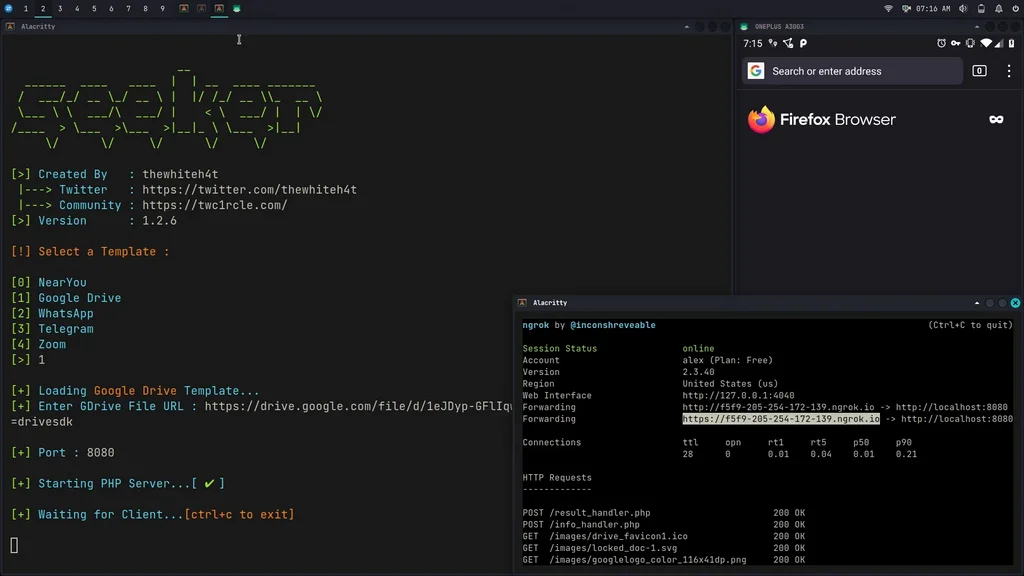
El concepto detrás de Seeker es simple: así como alojamos páginas de phishing para obtener credenciales, ¿por qué no alojar una página falsa que solicite tu ubicación como muchos sitios web populares basados en ubicación? Lee más en el blog de thewhiteh4t .Seeker aloja un sitio web falso que solicita permiso de ubicación y, si el objetivo lo permite, podemos obtener:
Junto con la información de ubicación, también obtenemos Información del Dispositivo sin ningún permiso:
Se realiza un Reconocimiento Automático de Direcciones IP después de recibir la información anterior.
Esta herramienta es una Prueba de Concepto y es solo para Fines Educativos. Seeker muestra qué datos puede recopilar un sitio web malicioso sobre ti y tus dispositivos, y por qué no debes hacer clic en enlaces aleatorios ni permitir permisos críticos como la Ubicación, etc.
Otras herramientas y servicios ofrecen Geolocalización por IP, que NO es precisa en absoluto y no da la ubicación del objetivo, sino la ubicación aproximada del ISP.
Seeker utiliza la API HTML y solicita permiso de ubicación, luego obtiene Longitud y Latitud mediante el hardware GPS presente en el dispositivo, por lo que Seeker funciona mejor con teléfonos inteligentes; si el hardware GPS no está presente, como en una laptop, Seeker recurre a la Geolocalización por IP o busca coordenadas en caché.
Generalmente, si un usuario acepta el permiso de ubicación, la precisión de la información recibida es precisa aproximadamente a 30 metros
La precisión depende de múltiples factores que puedes o no controlar, como:
Plantillas disponibles:
¡Crea tu propia plantilla! Los pasos para crear tu plantilla se describen en este how-to
Una vez que tu plantilla esté lista, no olvides proponerla a la comunidad mediante un PR (pull request)
git clone https://github.com/thewhiteh4t/seeker.git
cd seeker/
chmod +x install.sh
./install.sh
sudo pacman -S seeker
docker pull thewhiteh4t/seeker
git clone https://github.com/thewhiteh4t/seeker.git
cd seeker/
python3 seeker.py
Para ejecutar en modo túnel, instala ngrok ejecutando este comando en la terminal:
brew install ngrok/ngrok/ngrok

ngrok http 8080
python3 seeker.py -h

usage: seeker.py [-h] [-k KML] [-p PORT] [-u] [-v] [-t TEMPLATE] [-d] [--telegram token:chatId] [--webhook WEBHOOK]

options:
  -h, --help                            show this help message and exit
  -k KML, --kml KML                     KML filename
  -p PORT, --port PORT                  Web server port [ Default : 8080 ]
  -u, --update                          Check for updates
  -v, --version                         Prints version
  -t TEMPLATE, --template TEMPLATE      Auto choose the template with the given index
  -d, --debugHTTP                       Disable auto http --> https redirection for testing purposes
                                        (only works for the templates having index_temp.html file)
  --telegram                            Send info to a telegram bot, provide telegram token and chat to use
                                        format = token:chatId separated by a colon
  --webhook                             Send events to a webhook endpoint to be processed
                                        Note : endpoint must be unauthenticated and accept POST request

#########################
# Environment Variables #
#########################

Some of the options above can also be enabled via environment variables, to ease deployment.
Other parameters can be provided via environment variables to avoid interactive mode.

Variables:
  DEBUG_HTTP            Same as -d, --debugHTTP
  PORT                  Same as -p, --port
  TEMPLATE              Same as -t, --template
  TITLE                 Provide the group title or the page title
  REDIRECT              Provide the URL to redirect the user to, after the job is done
  IMAGE                 Provide the image to use, can either be remote (http or https) or local
                        Note : Remote image will be downloaded locally during the startup
  DESC                  Provide the description of the item (group or webpage depending on the template)
  SITENAME              Provide the name of the website
  DISPLAY_URL           Provide the URL to display on the page
  MEM_NUM               Provide the number of group membres (Telegram so far)
  ONLINE_NUM            Provide the number of the group online members (Telegram so far)
  TELEGRAM              Provide telegram token and chat to use to send info to a telegram bot
                        format = token:chatId separated by a colon
  WEBHOOK               Provide the webhook url to forward the events to
                        Note : endpoint should be unauthenticated and accept POST method


##################
# Usage Examples #
##################

# Step 1 : In first terminal
$ python3 seeker.py
