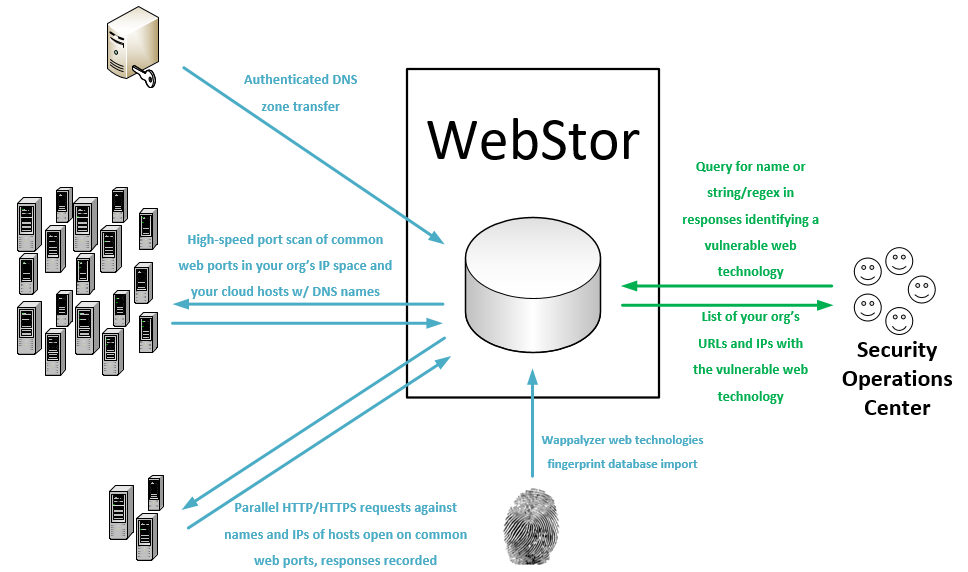

Enumera todos los sitios web a través de las redes de una organización mediante transferencias de zona DNS y masscan, almacena las respuestas y permite consultar tecnologías web vulnerables conocidas y patrones de expresiones regulares personalizados.
WebStor es una herramienta implementada en Python bajo la licencia MIT para enumerar rápidamente todos los sitios web en todas las redes de su organización, almacenar sus respuestas y consultar tecnologías web y versiones conocidas, como aquellas con vulnerabilidades de día cero. Está pensada, en particular, para resolver el problema único que se presenta en organizaciones de tamaño mediano a grande con administración descentralizada, donde puede ser casi imposible rastrear todas las tecnologías web implementadas por varios administradores distribuidos en diferentes unidades y redes.
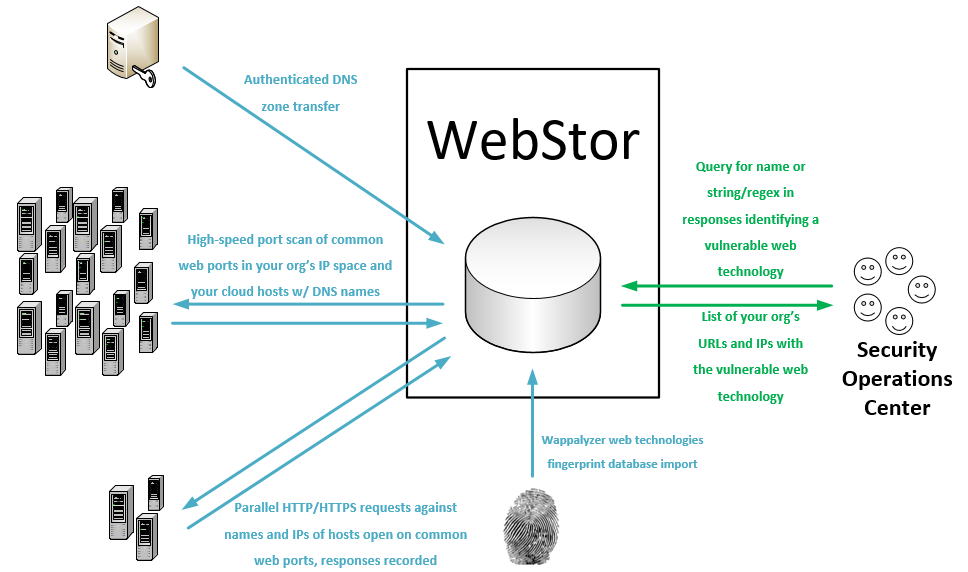
WebStor logra su objetivo realizando las siguientes acciones:
WebStor actualmente se ejecutará en sistemas Linux. Como está escrito en Python, la conversión para admitir Windows sería trivial y es probable que ocurra en el futuro.
webstor.py [-h] [--ADD-HTTP-PORT HTTPPORTTOADD] [--CLEAR-HTTP]
[--ADD-HTTPS-PORT HTTPSPORTTOADD] [--CLEAR-HTTPS]
[--ADD-CUSTOM-FINGERPRINT FINGERPRINT]
[--DELETE-CUSTOM-FINGERPRINT FINGERPRINTNAMETODELETE]
[--IMPORT-CUSTOM-FINGERPRINT IMPORTFINGERPRINTFILE]
[--CLEAR-CUSTOM-FINGERPRINTS] [--SHOW-CONFIG]
[--SHOW-CONFIG-FULL] [--RUN-MASSCAN]
[--SET-MASSCAN-RANGES SETSCANRANGES]
[--ADD-RANGE RANGETOADD] [--DELETE-RANGE RANGETODELETE]
[--IMPORT-MASSCAN-RANGES IMPORTSCANRANGES]
[--ADD-PATH PATHTOADD] [--DELETE-PATH PATHTODELETE]
[--CLEAR-PATHS] [--REFRESH-RESPONSES]
[--RESPONSES-ADD-FOR-PATH RESPONSESADDFORPATH]
[--SEARCH-PATTERN SEARCHPATTERN]
[--SEARCH-CUSTOM-FINGERPRINT SEARCHFINGERPRINT]
[--SEARCH-WAPPALYZER SEARCHWAPPALYZER] [--NO-TSIG-KEY]
[--TSIG-KEY-IMPORT IMPORTTSIGFILE]
[--TSIG-KEY-REPLACE REPLACEMENTTSIGFILE]
[--DELETE-TSIG TSIGTODELETE]
[--USE-TSIG-FILE-ONLY USETSIGFILEONLY]
[--DOWNLOAD-NEW-WAPPALYZER] [--LIST-WAPPALYZER-TECH-NAMES]
[--ZONE-XFER] [--ADD-DOMAIN DOMAINDETAILS]
[--DELETE-DOMAIN DOMAINTODELETE]
[--IMPORT-ZONE-FILE IMPORTZONEFILE] [--CLEAR-DOMAINS]
[--LIST-DOMAINS] [--LIST-OUTSIDE] [--SQL-CREDS SQLCREDSFILE]
optional arguments:
-h, --help show this help message and exit
--ADD-HTTP-PORT HTTPPORTTOADD, -a HTTPPORTTOADD
Add a custom HTTP port.
--CLEAR-HTTP, -aC Clear any custom HTTP ports and revert to default of
80.
--ADD-HTTPS-PORT HTTPSPORTTOADD, -b HTTPSPORTTOADD
Add a custom HTTPS port.
--CLEAR-HTTPS, -bC Clear any custom HTTPS ports and revert to default of
443.
--ADD-CUSTOM-FINGERPRINT FINGERPRINT, -c FINGERPRINT
Add a custom fingerprint in the form <Name>,<RegEx>.
--DELETE-CUSTOM-FINGERPRINT FINGERPRINTNAMETODELETE, -cD FINGERPRINTNAMETODELETE
Delete a custom fingerprint by name.
--IMPORT-CUSTOM-FINGERPRINT IMPORTFINGERPRINTFILE, -cI IMPORTFINGERPRINTFILE
Import a custom fingerprint file with the path
specified.
--CLEAR-CUSTOM-FINGERPRINTS, -cC
Clears all custom fingerprints stored in DB.
--SHOW-CONFIG, -g Show current WebStor configuration (brief).
--SHOW-CONFIG-FULL, -gF
Show current WebStor configuration (full).
--RUN-MASSCAN, -m Runs a new port scan with Masscan on all configured
TCP ports for HTTP and HTTPS, against all configured
ranges and any IP addresses from DNS records that are
outside those ranges.
--SET-MASSCAN-RANGES SETSCANRANGES, -mR SETSCANRANGES
Scan range or ranges, replaces existing ranges in DB,
comma separated, such as: -s
10.10.0.0/16,10.13.0.0/16,192.168.1.0/24
--IMPORT-MASSCAN-RANGES IMPORTSCANRANGES, -mI IMPORTSCANRANGES
Import scan ranges (CIDR blocks) from a specified
file.
--DELETE-RANGE RANGETODELETE, -mD RANGETODELETE
Delete scan range.
--ADD-PATH PATHTOADD, -p PATHTOADD
Add paths for which to request and store responses
besides '/'.
--DELETE-PATH PATHTODELETE, -pD PATHTODELETE
Delete paths for which to request and store responses
besides '/'.
--CLEAR-PATHS, -pC Clear any custom URL request paths and revert to
default of '/'.
--REFRESH-RESPONSES, -r
Refresh URL responses in DB.
--RESPONSES-ADD-FOR-PATH RESPONSESADDFORPATH, -rP RESPONSESADDFORPATH
Add URL responses for a one-time path in with the
current responses in the DB.
--SEARCH-PATTERN SEARCHPATTERN, -sP SEARCHPATTERN
Search for string or regular expression in WebStor
database.
--SEARCH-CUSTOM-FINGERPRINT SEARCHFINGERPRINT, -sC SEARCHFINGERPRINT
Search for technology by name of user-provided custom
fingerprint.
--SEARCH-WAPPALYZER SEARCHWAPPALYZER, -sW SEARCHWAPPALYZER
Search for technology by name (from Wappalyzer Tech
DB) in WebStor DB.
--NO-TSIG-KEY, -tN Do not use DNSSec TSIG key stored in database or a
file, even if present.
--TSIG-KEY-IMPORT IMPORTTSIGFILE, -tI IMPORTTSIGFILE
Import a specified TSIG key file into the database
--TSIG-KEY-REPLACE REPLACEMENTTSIGFILE, -tR REPLACEMENTTSIGFILE
Replace a TSIG key in the database with a specified
file
--DELETE-TSIG TSIGTODELETE, -dT TSIGTODELETE
Delete a TSIG key from the database by name.
--USE-TSIG-FILE-ONLY USETSIGFILEONLY, -tF USETSIGFILEONLY
Only use tsig file specified (full path), do not use
TSIGs stored in the DB. Applies to all domains,
limiting WebStor to one TSIG for zone transfers in the
current execution.
--DOWNLOAD-NEW-WAPPALYZER, -w
Download a new Wappalyzer fingerprints file directly
from GitHub. Overwrites existing Wappalyzer
fingerprint data.
--LIST-WAPPALYZER-TECH-NAMES, -wL
List the names of all Wappalyzer technologies in the
database.
--ZONE-XFER, -z Forces a new zone transfer using all domains, servers,
and associated TSIG keys in DB
--ADD-DOMAIN DOMAINDETAILS, -zA DOMAINDETAILS
Add a domain in the form <Domain name>,<Server>,<TSIG
Key Name>.
--DELETE-DOMAIN DOMAINTODELETE, -zD DOMAINTODELETE
Delete a DNS domain from the database by name.
--IMPORT-ZONE-FILE IMPORTZONEFILE, -zI IMPORTZONEFILE
Add domains for zone transfers from a file.
--CLEAR-DOMAINS, -zC Clears all DNS domains stored in DB.
--LIST-DOMAINS, -zL Lists all DNS domains stored in DB.
--LIST-OUTSIDE, -e Prints a list of all names and IPs from our zone
transfers that are outside defined net ranges.
--SQL-CREDS SQLCREDSFILE, -q SQLCREDSFILE
Use SQL credentials in file at specified path.
NOTA: Estos pasos asumen que su organización usa solo una clave TSIG para las transferencias de zona y que todos los registros se pueden consultar desde un servidor DNS. Si este no es el caso, consulte la sección de casos de uso seguros/esotéricos a continuación.
# Buscar una cadena/expresión regular asociada con una tecnología web:
./webstor.py -sP "content=\"wordpress 4.[7-9]"
# Se devolverá una lista de sitios con esta expresión regular, respuestas esperadas de sitios Wordpress v4.7-9.
# Para guardar la expresión regular del ejemplo anterior como una huella digital personalizada que pueda consultar
# por nombre (y no necesite recordar la expresión regular cada vez):
./webstor.py -c "wordpress4.7-9,content=\"wordpress 4.[7-9]"
# Después de ejecutar el comando anterior, la consulta se puede realizar simplemente con:
./webstor.py -sC wordpress4.7-9
# Usar WebStor para buscar sitios Wordpress a través de definiciones de Wappalyzer:
./webstor.py -sW wordpress
# Se devolverá una lista de sitios Wordpress accesibles en las redes de su organización. NOTA: Las búsquedas de Wappalyzer pueden ser más lentas que las búsquedas de patrones/expresiones regulares
# debido a la cantidad de propiedades que se consultan para verificar.
Los sitios se consultan según las respuestas tanto a nombres como a direcciones IP. Esto es importante porque algunos servidores web alojan múltiples sitios bajo múltiples nombres. Algunos otros servidores pueden servir solo un sitio predeterminado o una respuesta predeterminada del proveedor de alojamiento cuando se solicitan por IP (por ejemplo, https://68.66.216.42), y un sitio real de línea de negocio cuando se consultan por nombre (por ejemplo, https://www.seekerdlp.com). Por esta razón, si tiene un sitio nombrado que también se sirve cuando se solicita la IP del servidor web, verá resultados de consulta para ambos.
Se recomienda que configure un trabajo cron para ejecutar WebStor diariamente para que sus resultados de consulta siempre reflejen el estado actual de su red.
Si no desea usar las credenciales predeterminadas de MariaDB (root, contraseña en blanco), puede usar la opción -q para especificar la ruta a un archivo con credenciales. La primera línea del archivo debe ser el servidor, por ejemplo, localhost. La segunda línea debe ser el nombre de usuario de sql. La tercera línea debe ser la contraseña.
Si no desea almacenar su TSIG en la base de datos, puede usar la opción -tF para especificar la ruta a un archivo de clave TSIG con ACL.
Si su organización utiliza múltiples claves TSIG, deberá almacenarlas en la base de datos. Cada una se puede agregar con la opción -tI y los dominios se pueden agregar mediante las opciones normales, especificando la clave y el servidor adecuados.
WebStor utiliza la base de datos de tecnologías de Wappalyzer para búsquedas de tecnología previamente pobladas e indexadas por nombre contra las respuestas almacenadas de WebStor. Wappalyzer tiene licencia bajo los términos de la licencia MIT.
WebStor fue escrito por Ross Geerlings <rjgeer@umich.edu>, <ross@seekerdlp.com>.
WebStor está licenciado bajo los términos de la licencia MIT, reproducida a continuación.
La licencia MIT
Copyright (c) 2020-2024 The University of Michigan Board of Regents.
Por la presente se concede permiso, sin cargo, a cualquier persona que obtenga una copia de este software y la documentación fime-les asociada (el "Software"), para tratar el Software sin restricción, incluyendo, sin limitación, los derechos para usar, copiar, modificar, fusionar, publicar, distribuir, sublicenciar, y/o vender copias del Software, y para permitir a las personas a quienes se les proporcione el Software hacer lo mismo, sujeto a las siguientes condiciones:
El aviso de copyright anterior y este aviso de permiso se incluirán en todas las copias o partes sustanciales del Software.
EL SOFTWARE SE PROPORCIONA "TAL CUAL", SIN GARANTÍA DE NINGÚN TIPO, EXPRESA O IMPLÍCITA, INCLUYENDO, PERO NO LIMITADO A, LAS GARANTÍAS DE COMERCIABILIDAD, ADECUACIÓN PARA UN PROPÓSITO PARTICULAR Y NO INFRACCIÓN. EN NINGÚN CASO LOS AUTORES O TITULARES DEL COPYRIGHT SERÁN RESPONSABLES POR CUALQUIER RECLAMO, DAÑOS U OTRA RESPONSABILIDAD, YA SEA EN UNA ACCIÓN DE CONTRATO, AGRAVIO O DE OTRO MODO, QUE SURJA DE, O EN CONEXIÓN CON, EL SOFTWARE O EL USO U OTRO TRATO EN EL SOFTWARE.