 projectdiscovery/tldfinder
Una herramienta optimizada para descubrir TLDs privados para la investigación de seguridad.




Características • Instalación • Uso • Ejecutar tldfinder • Únete a Discord
Una herramienta optimizada para descubrir TLD privados para la investigación de seguridad.
tldfinder requiere Go 1.21 para instalarse correctamente. Para instalarlo, simplemente ejecuta el siguiente comando o descarga el binario precompilado desde la página de lanzamientos.
go install github.com/projectdiscovery/tldfinder/cmd/tldfinder@latest
tldfinder -h
Esto mostrará la ayuda de la herramienta. Aquí están todas las opciones que soporta.
A streamlined tool for discovering private TLDs for security research.

Usage:
  ./tldfinder [flags]

Flags:
INPUT:
   -d, -domain string[]  domain or list of domains for discovery (file or comma separated)

SOURCE:
   -s, -sources string[]           specific sources to use for discovery (-s censys,dnsrepo). Use -ls to display all available sources.
   -es, -exclude-sources string[]  sources to exclude from enumeration (-es censys,dnsrepo)
   -dm, -discovery-mode value      discovery mode (dns,tld,domain) (default dns)
   -all                            use all sources for enumeration (slow)

FILTER:
   -m, -match string[]   domain or list of domain to match (file or comma separated)
   -f, -filter string[]   domain or list of domain to filter (file or comma separated)

RATE-LIMIT:
   -rl, -rate-limit int      maximum number of http requests to send per second (global)
   -rls, -rate-limits value  maximum number of http requests to send per second four providers in key=value format (-rls hackertarget=10/m) (default ["waybackarchive=15/m", "whoisxmlapi=50/s", "whoisxmlapi=30/s"])
   -t int                    number of concurrent goroutines for resolving (-active only) (default 10)

UPDATE:
   -up, -update                 update tldfinder to latest version
   -duc, -disable-update-check  disable automatic tldfinder update check

OUTPUT:
   -o, -output string       file to write output to
   -oJ, -json               write output in JSONL(ines) format
   -oD, -output-dir string  directory to write output (-dL only)
   -cs, -collect-sources    include all sources in the output (-json only)
   -oI, -ip                 include host IP in output (-active only)

CONFIGURATION:
   -config string                flag config file (default "/Users/user/Library/Application Support/tldfinder/config.yaml")
   -pc, -provider-config string  provider config file (default "/Users/user/Library/Application Support/tldfinder/provider-config.yaml")
   -r string[]                   comma separated list of resolvers to use
   -rL, -rlist string            file containing list of resolvers to use
   -nW, -active                  display active domains only
   -proxy string                 http proxy to use with tldfinder
   -ei, -exclude-ip              exclude IPs from the list of domains

DEBUG:
   -silent             show only domains in output
   -version            show version of tldfinder
   -v                  show verbose output
   -nc, -no-color      disable color in output
   -ls, -list-sources  list all available sources
   -stats              report source statistics

OPTIMIZATION:
   -timeout int   seconds to wait before timing out (default 30)
   -max-time int  minutes to wait for enumeration results (default 10)
tldfinder está diseñado para fines de investigación de seguridad con el objetivo de descubrir TLD privados. Acepta un dominio o un TLD privado como entrada.
Usa -domain o -d para especificar la entrada, y proporciona múltiples valores como entrada separada por comas.
[!NOTE] Solo se aceptan TLD privados, ya que tldfinder está pensado para el descubrimiento de TLD privados.
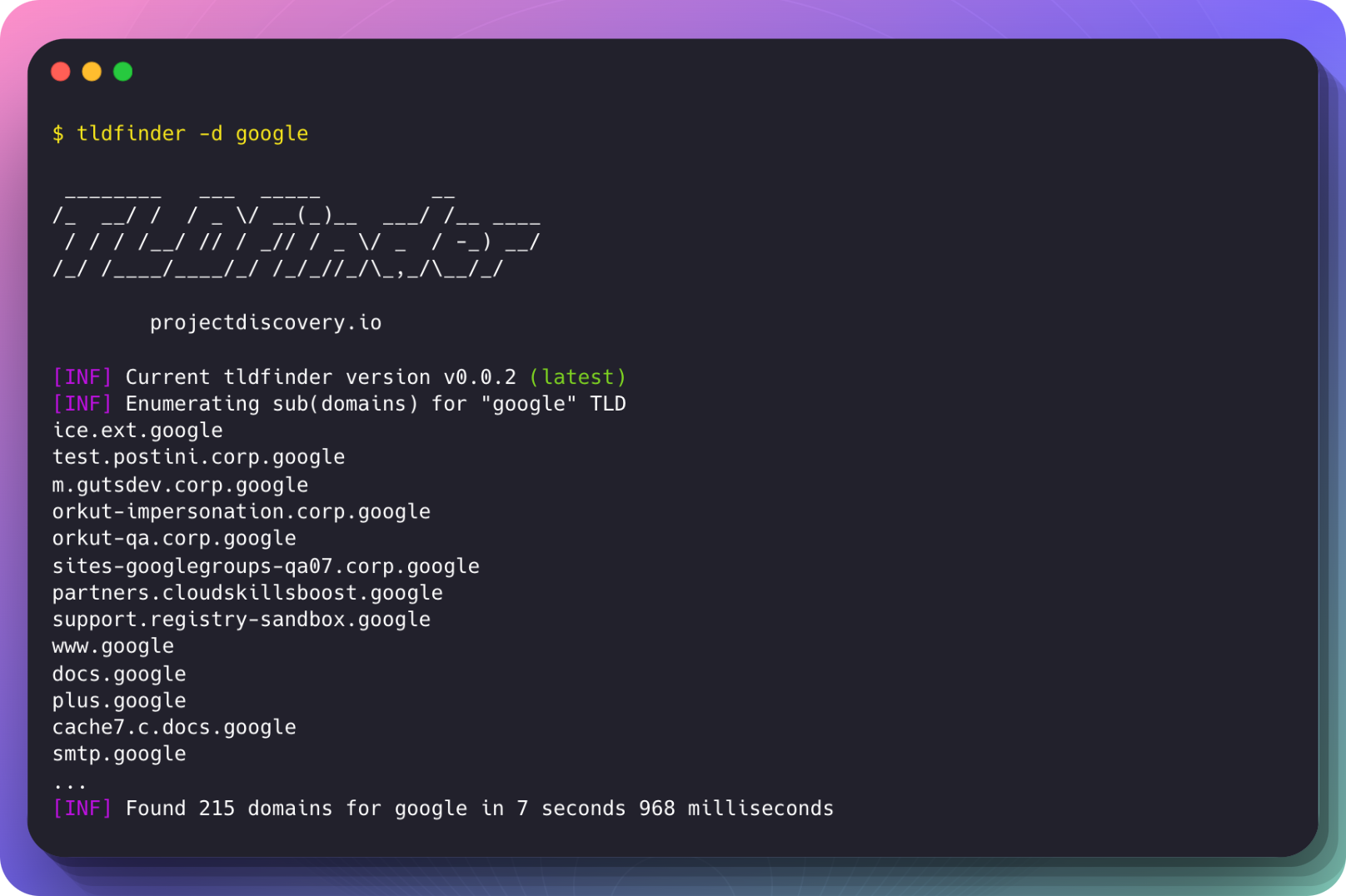
Ejemplo de ejecución:
$ tldfinder -d google

 ________   ___  _____         __
/_  __/ /  / _ \/ __(_)__  ___/ /__ ____
 / / / /__/ // / _// / _ \/ _  / -_) __/
/_/ /____/____/_/ /_/_//_/\_,_/\__/_/

      projectdiscovery.io

[INF] Current tldfinder version v0.0.2 (latest)
[INF] Enumerating sub(domains) for "google" TLD
ice.ext.google
test.postini.corp.google
m.gutsdev.corp.google
orkut-impersonation.corp.google
orkut-qa.corp.google
sites-googlegroups-qa07.corp.google
partners.cloudskillsboost.google
support.registry-sandbox.google
www.google
docs.google
plus.google
cache7.c.docs.google
smtp.google
...
[INF] Found 215 domains for google in 7 seconds 968 milliseconds
tldfinder está hecho con ❤️ por el equipo de projectdiscovery y distribuido bajo Licencia MIT.