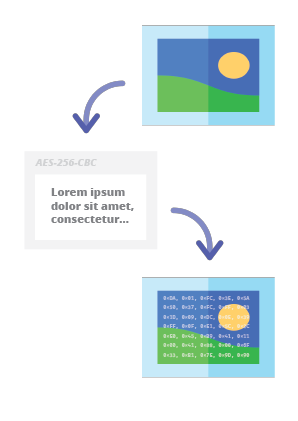

Codec esteganográfico en línea que permite ocultar un mensaje cifrado con contraseña dentro de imágenes y fotos mediante el algoritmo de cifrado AES con una clave derivada de PBKDF2 de 256 bits.
Steganographic Online Codec te permite ocultar un mensaje cifrado con contraseña dentro de imágenes y fotos utilizando el algoritmo de cifrado AES con una clave derivada de PBKDF2 de 256 bits.
Puedes usarlo de forma gratuita en:
https://www.pelock.com/products/steganography-online-codec
Este SDK proporciona acceso programático al codec y a sus funciones de codificación y decodificación a través de una interfaz WebAPI.
La esteganografía es un término que describe el arte y la ciencia de ocultar información incrustando mensajes dentro de otros archivos de imagen aparentemente inofensivos.
En este caso, los bits individuales del mensaje oculto cifrado se guardan como los bits menos significativos (LSB) en los componentes de color RGB de los píxeles de la imagen seleccionada.
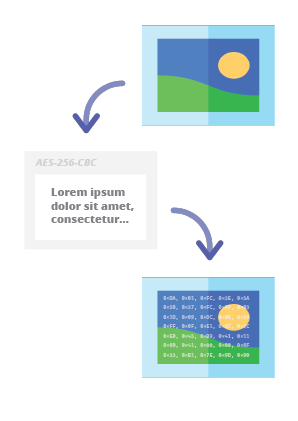
Con nuestro codificador esteganográfico podrás ocultar cualquier mensaje de texto en la imagen de forma segura y enviarlo sin levantar sospechas. Solo será posible leer el mensaje después de proporcionar una contraseña de descifrado válida.
La forma preferida de instalación del SDK de Web API es a través de NPM (Node Package Manager).
Ejecuta:
npm i steganography-online-codec
O añade esta entrada:
"dependencies": {
"steganography-online-codec": "latest"
},
directamente a tu package.json en la sección dependencies.
El paquete de instalación está disponible en https://www.npmjs.com/package/steganography-online-codec
Los paquetes de instalación se han subido a los repositorios de varios lenguajes de programación populares y sus códigos fuente se han publicado en GitHub:
Si no quieres usar el módulo de Python, puedes importar directamente desde el archivo:
from pelock.steganography_online_codec import *
"use strict";
/******************************************************************************
*
* Steganography Online Codec WebApi interface usage example.
*
* In this example shows how to hide an encrypted secret message in an image file.
*
* Version : v1.00
* Language : JavaScript
* Author : Bartosz Wójcik (original example)
* Project : https://www.pelock.com/products/steganography-online-codec
* Homepage : https://www.pelock.com
*
* @link https://www.pelock.com/products/steganography-online-codec
* @copyright Copyright (c) 2020-2025 PELock LLC
* @license Apache-2.0
*
/*****************************************************************************/
// include Steganography Online Codec module
import { SteganographyOnlineCodec, Errors } from 'steganography-online-codec';
// or if tested locally use:
//import { SteganographyOnlineCodec, Errors } from '../src/SteganographyOnlineCodec.mjs';
// create Steganography Online Codec class instance (we are using our activation key)
const mySteganographyOnlineCodec = new SteganographyOnlineCodec('YOUR-WEB-API-KEY');
// encode a hidden message (encrypted with your password) within an image file
(async () => {
const inputFile = 'input_file.jpg';
const secretMessage = 'Secret message';
const password = 'Pa$$word';
const outputFile = 'output_file_with_hidden_secret_message.png';
try {
const result = await mySteganographyOnlineCodec.encode(inputFile, secretMessage, password, outputFile);
// result object holds the encoding results as well as other information
console.log('Secret messaged encoded and saved to the output PNG file.');
} catch (err) {
console.error('Encoding failed:', err.error_message || err.message || String(err));
}
})();
"use strict";
/******************************************************************************
*
* Steganography Online Codec WebApi interface usage example.
*
* In this example, we will see how to hide an encrypted message in an
* image file using our codec.
*
* Version : v1.00
* Language : JavaScript
* Author : Bartosz Wójcik
* Project : https://www.pelock.com/products/steganography-online-codec
* Homepage : https://www.pelock.com
*
* @link https://www.pelock.com/products/steganography-online-codec
* @copyright Copyright (c) 2020-2025 PELock LLC
* @license Apache-2.0
*
/*****************************************************************************/
// include Steganography Online Codec module
import { SteganographyOnlineCodec, Errors } from 'steganography-online-codec';
// or if tested locally use:
//import { SteganographyOnlineCodec, Errors } from '../src/SteganographyOnlineCodec.mjs';
// create Steganography Online Codec class instance (we are using our activation key)
const mySteganographyOnlineCodec = new SteganographyOnlineCodec('YOUR-WEB-API-KEY');
// encode a hidden message within the source image file
(async () => {
// full version image size limit is set to 10 MB (demo 50 kB max)
// supported image formats are PNG, JPG, GIF, BMP, WBMP, GD2, AVIF, WEBP (mail me for more)
const inputFilePath = 'input_file.webp';
// full version message size is unlimited (demo 16 chars max)
const secretMessage = 'Secret message';
// full version password length is 128 characters max (demo 8 chars max)
const password = 'Pa$$word';
// where to save encoded image with the secret message
const outputFilePath = 'output_file_with_hidden_secret_message.png';
try {
// encode a hidden message (encrypted with your password) within an image file
const result = await mySteganographyOnlineCodec.encode(inputFilePath, secretMessage, password, outputFilePath);
// result object holds the encoding results as well as other information
const versionType = result.license && result.license.activationStatus ? 'full' : 'demo';
console.log(`You are running in ${versionType} version`);
console.log(`Secret messaged encoded and saved to ${outputFilePath}`);
if (result.license && result.license.usagesCount !== undefined) {
console.log(`Remaining number of usage credits - ${result.license.usagesCount}`);
}
} catch (err) {
const errorCode = err.error;
switch (errorCode) {
case Errors.INVALID_INPUT:
console.log(`Invalid input file ${inputFilePath} or file doesn't exist`);
break;
case Errors.MESSAGE_TOO_LONG:
console.log('Message is too long for the provided image file, use larger file');
break;
case Errors.IMAGE_TOO_BIG:
console.log(`Image file is too big, current limit is set to ${err.raw?.limits?.maxFileSize ?? 'unknown'}`);
break;
case Errors.LIMIT_MESSAGE:
console.log(`Message is too long, current limit is set to ${err.raw?.limits?.maxMessageLen ?? 'unknown'}`);
break;
case Errors.LIMIT_PASSWORD:
console.log(`Password is too long, current limit is set to ${err.raw?.limits?.maxPasswordLen ?? 'unknown'}`);
break;
case Errors.INVALID_PASSWORD:
console.log('Invalid password');
break;
default:
console.log(`An error occurred: ${err.error_message ?? `Error code ${errorCode}`}`);
}
}
})();
"use strict";
/******************************************************************************
*
* Steganography Online Codec WebApi interface usage example.
*
* In this example, we will see how to extract a previously encrypted & hidden
* secret message from an image file.
*
* Version : v1.00
* Language : JavaScript
* Author : Bartosz Wójcik
* Project : https://www.pelock.com/products/steganography-online-codec
* Homepage : https://www.pelock.com
*
* @link https://www.pelock.com/products/steganography-online-codec
* @copyright Copyright (c) 2020-2025 PELock LLC
* @license Apache-2.0
*
/*****************************************************************************/
// include Steganography Online Codec module
import { SteganographyOnlineCodec, Errors } from 'steganography-online-codec';
// or if tested locally use:
//import { SteganographyOnlineCodec, Errors } from '../src/SteganographyOnlineCodec.mjs';
// create Steganography Online Codec class instance (we are using our activation key)
const mySteganographyOnlineCodec = new SteganographyOnlineCodec('YOUR-WEB-API-KEY');
// extract a hidden message from the previously encoded image file
(async () => {
// full version image size limit is set to 10 MB (demo 50 kB max)
// supported image format is PNG and only PNG!
const inputFilePath = 'output_file_with_hidden_secret_message.png';
// full version password length is 128 characters max (demo 8 chars max)
const password = 'Pa$$word';
try {
// extract a hidden message from the image (PNG files only)
const result = await mySteganographyOnlineCodec.decode(inputFilePath, password);
// result object holds the decoding results as well as other information
console.log(`You are running in ${result.license?.activationStatus ? 'full' : 'demo'} version`);
console.log(`Secret message is "${result.message}"`);
if (result.license && result.license.usagesCount !== undefined) {
console.log(`Remaining number of usage credits - ${result.license.usagesCount}`);
}
} catch (err) {
switch (err.error) {
case Errors.INVALID_INPUT:
console.log(`Invalid input file ${inputFilePath} or file doesn't exist`);
break;
case Errors.IMAGE_TOO_BIG:
console.log(`Image file is too big, current limit is set to ${err.raw?.limits?.maxFileSize ?? 'unknown'}`);
break;
case Errors.LIMIT_MESSAGE:
console.log(`Extracted message is too long, current limit is set to ${err.raw?.limits?.maxMessageLen ?? 'unknown'}`);
break;
case Errors.LIMIT_PASSWORD:
console.log(`Password is too long, current limit is set to ${err.raw?.limits?.maxPasswordLen ?? 'unknown'}`);
break;
case Errors.INVALID_PASSWORD:
console.log('Invalid password');
break;
default:
console.log(`An error occurred: ${err.error_message ?? String(err)}`);
}
}
})();
"use strict";
/******************************************************************************
*
* Steganography Online Codec WebApi interface usage example.
*
* In this example we will verify our activation key status.
*
* Version : v1.00
* Language : JavaScript
* Author : Bartosz Wójcik
* Project : https://www.pelock.com/products/steganography-online-codec
* Homepage : https://www.pelock.com
*
* @link https://www.pelock.com/products/steganography-online-codec
* @copyright Copyright (c) 2020-2025 PELock LLC
* @license Apache-2.0
*
/*****************************************************************************/
// include Steganography Online Codec module
import { SteganographyOnlineCodec, Errors } from 'steganography-online-codec';
// or if tested locally use:
//import { SteganographyOnlineCodec, Errors } from '../src/SteganographyOnlineCodec.mjs';
// create Steganography Online Codec class instance (we are using our activation key)
const mySteganographyOnlineCodec = new SteganographyOnlineCodec('YOUR-WEB-API-KEY');
// login to the service
(async () => {
try {
const result = await mySteganographyOnlineCodec.login();
// result object holds the information about the license & current limits
const versionType = result.license && result.license.activationStatus ? 'full' : 'demo';
console.log(`You are running in ${versionType} version`);
// information about the current license
if (result.license && result.license.activationStatus) {
console.log(`Registered for - ${result.license.userName}`);
const licenseType = result.license.type === 0 ? 'personal' : 'company';
console.log(`License type - ${licenseType}`);
console.log(`Total number of purchased usage credits - ${result.license.usagesTotal}`);
console.log(`Remaining number of usage credits - ${result.license.usagesCount}`);
}
// current limits (different for DEMO and FULL versions)
if (result.limits) {
console.log(`Max. password length - ${result.limits.maxPasswordLen}`);
const msgLen = result.limits.maxMessageLen === -1 ? 'unlimited' : result.limits.maxMessageLen;
console.log(`Max. message length - ${msgLen}`);
console.log(`Max. input image file size - ${mySteganographyOnlineCodec.convert_size(result.limits.maxFileSize)}`);
}
} catch (err) {
console.error(`Login failed: ${err.error_message || String(err)}`);
}
})();
Si estás interesado en la Web API de Steganography Online Codec o tienes alguna pregunta sobre los paquetes SDK, cuestiones técnicas o si algo no está claro, por favor contáctame. Estaré encantado de responder a todas tus preguntas.
Bartosz Wójcik
| Repositorio | Lenguaje | Instalación | Paquete | GitHub |
|---|
![]() | Python | Ejecuta pip install steganography-online-codec | PyPI | Fuentes |
![]() | JavaScript, TypeScript | Ejecuta npm i steganography-online-codec o añade "steganography-online-codec": "latest" bajo dependencies en package.json | NPM | Fuentes |
![]() | Rust | Ejecuta cargo add steganography-online-codec o añade steganography-online-codec = "1" a Cargo.toml (opcional: git / path para compilaciones no publicadas o vendidas) | crates.io | Fuentes |