 p0dalirius/extractbitlockerkeys
Un script de administración del sistema o post-explotación para extraer automáticamente las claves de recuperación de BitLocker de un dominio.


Un script de administración de sistemas o post-explotación para extraer automáticamente las claves de recuperación de BitLocker de un dominio.



[!WARNING] No almacene esta copia de seguridad en un recurso compartido SMB en línea del dominio. Es preferible imprimirla y almacenarla físicamente en una caja fuerte cerrada con llave.
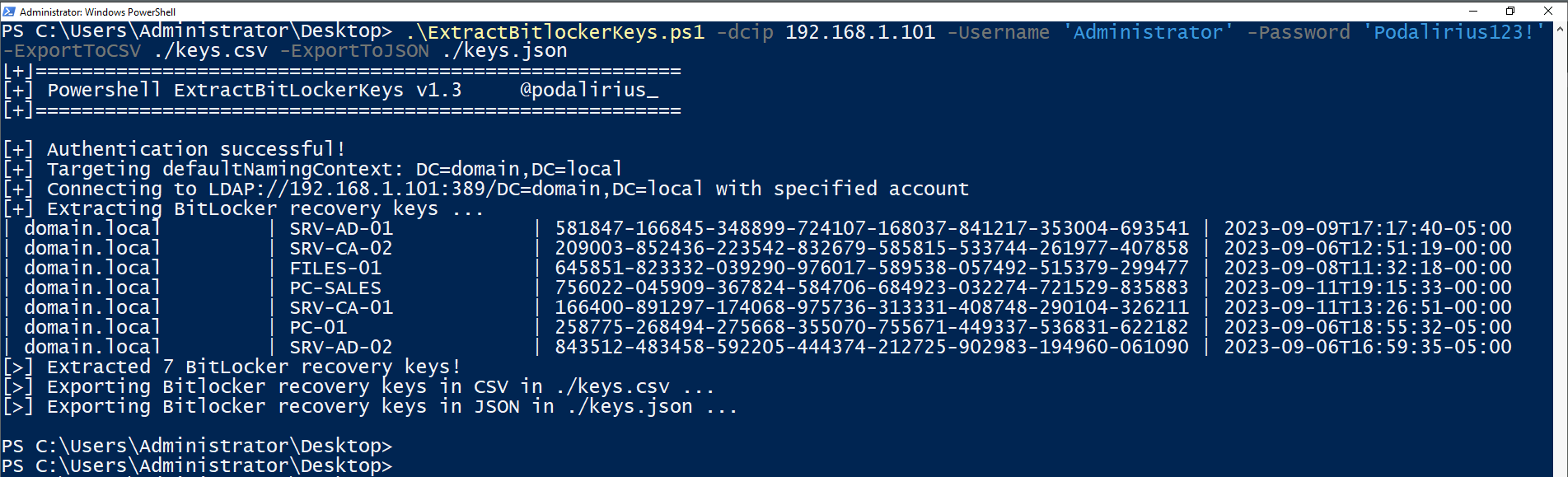
Para extraer las claves de recuperación de BitLocker de todos los equipos del dominio domain.local, puede usar este comando:
./ExtractBitlockerKeys.py -d 'domain.local' -u 'Administrator' -p 'Podalirius123!' --dc-ip 192.168.1.101
Obtendrá la siguiente salida:
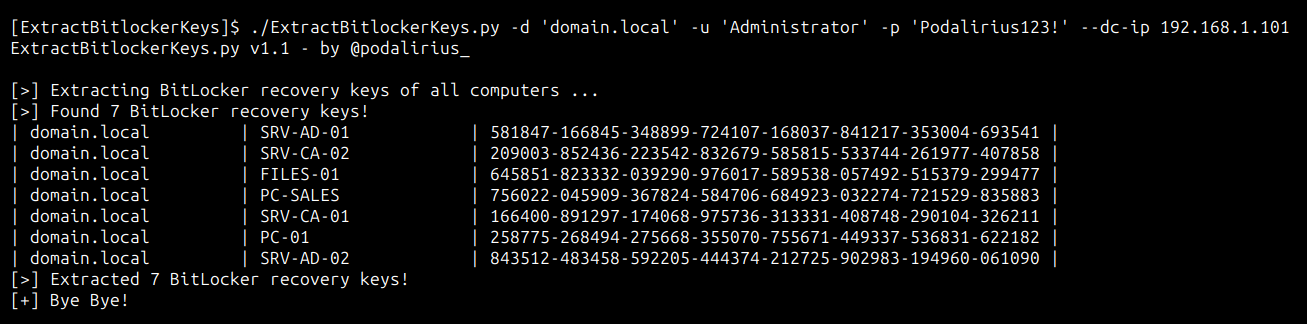
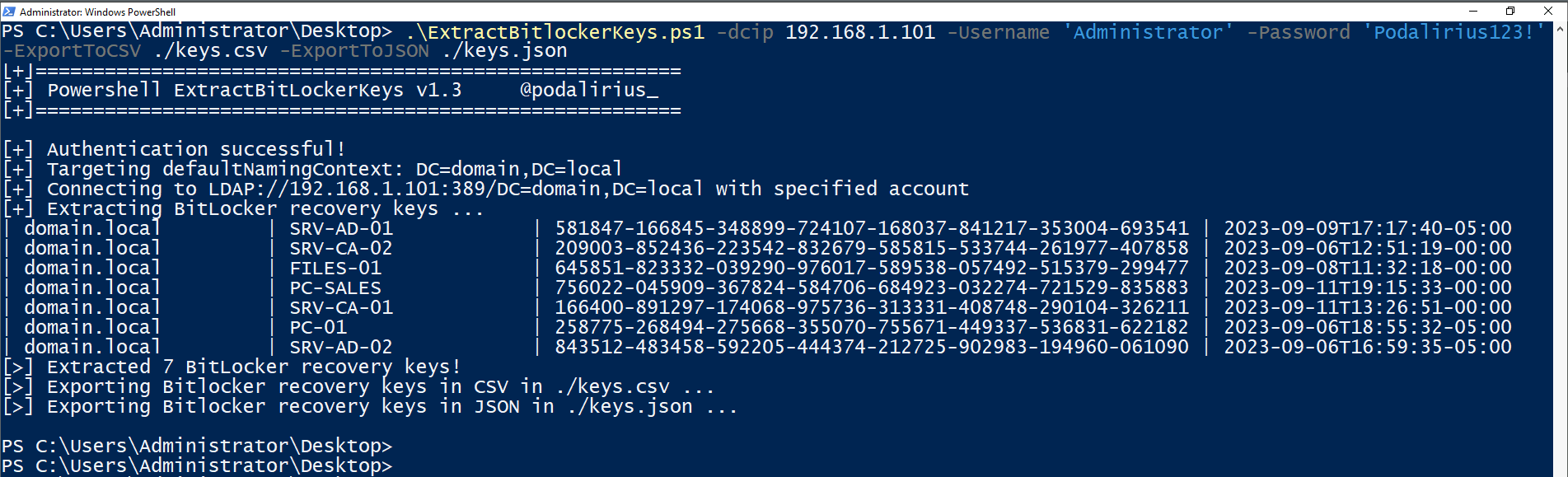
Para extraer las claves de recuperación de BitLocker de todos los equipos del dominio domain.local, puede usar este comando:
.\ExtractBitlockerKeys.ps1 -dcip 192.168.1.101 -ExportToCSV ./keys.csv -ExportToJSON ./keys.json
Obtendrá la siguiente salida:
$ ./ExtractBitlockerKeys.py -h
ExtractBitlockerKeys.py v1.1 - by Remi GASCOU (Podalirius)

usage: ExtractBitlockerKeys.py [-h] [-v] [-q] [-t THREADS] [--export-xlsx EXPORT_XLSX] [--export-json EXPORT_JSON] [--export-sqlite EXPORT_SQLITE] --dc-ip ip address [-d DOMAIN] [-u USER]
                               [--no-pass | -p PASSWORD | -H [LMHASH:]NTHASH | --aes-key hex key] [-k]

options:
  -h, --help            show this help message and exit
  -v, --verbose         Verbose mode. (default: False)
  -q, --quiet           Show no information at all.
  -t THREADS, --threads THREADS
                        Number of threads (default: 4).

Output files:
  --export-xlsx EXPORT_XLSX
                        Output XLSX file to store the results in.
  --export-json EXPORT_JSON
                        Output JSON file to store the results in.
  --export-sqlite EXPORT_SQLITE
                        Output SQLITE3 file to store the results in.

Authentication & connection:
  --dc-ip ip address    IP Address of the domain controller or KDC (Key Distribution Center) for Kerberos. If omitted it will use the domain part (FQDN) specified in the identity parameter
  -d DOMAIN, --domain DOMAIN
                        (FQDN) domain to authenticate to
  -u USER, --user USER  user to authenticate with

Credentials:
  --no-pass             Don't ask for password (useful for -k)
  -p PASSWORD, --password PASSWORD
                        Password to authenticate with
  -H [LMHASH:]NTHASH, --hashes [LMHASH:]NTHASH
                        NT/LM hashes, format is LMhash:NThash
  --aes-key hex key     AES key to use for Kerberos Authentication (128 or 256 bits)
  -k, --kerberos        Use Kerberos authentication. Grabs credentials from .ccache file (KRB5CCNAME) based on target parameters. If valid credentials cannot be found, it will use the ones specified in the command line.
Las solicitudes de extracción son bienvenidas. No dude en abrir un issue si desea agregar otras funcionalidades.
