
 p0dalirius/apachetomcatscanner
Un script de Python para escanear vulnerabilidades del servidor Apache Tomcat.


Un script en Python para escanear vulnerabilidades de servidores Apache Tomcat.



-tt/--target.-tu/--target-url./manager/html.--list-cves, mostrar descripciones detalladas de CVEs con --show-cves-descriptions.Ahora puedes instalarlo desde PyPI (la última versión es
sudo python3 -m pip install apachetomcatscanner
$ ./ApacheTomcatScanner.py -h
Apache Tomcat Scanner v3.4 - by Remi GASCOU (Podalirius)

usage: ApacheTomcatScanner.py [-h] [-v] [--debug] [-C] [--show-cves-descriptions] [-T THREADS] [-s] [--no-colors] [--only-http] [--only-https] [--export-xlsx EXPORT_XLSX] [--export-json EXPORT_JSON] [--export-sqlite EXPORT_SQLITE]
                              [-PI PROXY_IP] [-PP PROXY_PORT] [-rt REQUEST_TIMEOUT] [--tomcat-username TOMCAT_USERNAME] [--tomcat-usernames-file TOMCAT_USERNAMES_FILE] [--tomcat-password TOMCAT_PASSWORD]
                              [--tomcat-passwords-file TOMCAT_PASSWORDS_FILE] [-tf TARGETS_FILE] [-tt TARGET] [-tu TARGET_URL] [-tp TARGET_PORTS] [-ad AUTH_DOMAIN] [-ai AUTH_DC_IP] [-au AUTH_USER] [-ap AUTH_PASSWORD]
                              [-ah AUTH_HASHES] [--ldaps] [--subnets]

A python script to scan for Apache Tomcat server vulnerabilities.

options:
  -h, --help            show this help message and exit
  -v, --verbose         Verbose mode. (default: False)
  --debug               Debug mode, for huge verbosity. (default: False)
  -C, --list-cves       List CVE ids affecting each version found. (default: False)
  --show-cves-descriptions
                        Show description of found CVEs. (default: False)
  -T THREADS, --threads THREADS
                        Number of threads (default: 250)
  -s, --servers-only    If querying ActiveDirectory, only get servers and not all computer objects. (default: False)
  --no-colors           Disable colored output. (default: False)
  --only-http           Scan only with HTTP scheme. (default: False, scanning with both HTTP and HTTPs)
  --only-https          Scan only with HTTPs scheme. (default: False, scanning with both HTTP and HTTPs)

Export results:
  --export-xlsx EXPORT_XLSX
                        Output XLSX file to store the results in.
  --export-json EXPORT_JSON
                        Output JSON file to store the results in.
  --export-sqlite EXPORT_SQLITE
                        Output SQLITE3 file to store the results in.

Advanced configuration:
  -PI PROXY_IP, --proxy-ip PROXY_IP
                        Proxy IP.
  -PP PROXY_PORT, --proxy-port PROXY_PORT
                        Proxy port
  -rt REQUEST_TIMEOUT, --request-timeout REQUEST_TIMEOUT
                        Set the timeout of HTTP requests.
  --tomcat-username TOMCAT_USERNAME
                        Single tomcat username to test for login.
  --tomcat-usernames-file TOMCAT_USERNAMES_FILE
                        File containing a list of tomcat usernames to test for login
  --tomcat-password TOMCAT_PASSWORD
                        Single tomcat password to test for login.
  --tomcat-passwords-file TOMCAT_PASSWORDS_FILE
                        File containing a list of tomcat passwords to test for login

Targets:
  -tf TARGETS_FILE, --targets-file TARGETS_FILE
                        Path to file containing a line by line list of targets.
  -tt TARGET, --target TARGET
                        Target IP, FQDN or CIDR.
  -tu TARGET_URL, --target-url TARGET_URL
                        Target URL to the tomcat manager.
  -tp TARGET_PORTS, --target-ports TARGET_PORTS
                        Target ports to scan top search for Apache Tomcat servers.
  -ad AUTH_DOMAIN, --auth-domain AUTH_DOMAIN
                        Windows domain to authenticate to.
  -ai AUTH_DC_IP, --auth-dc-ip AUTH_DC_IP
                        IP of the domain controller.
  -au AUTH_USER, --auth-user AUTH_USER
                        Username of the domain account.
  -ap AUTH_PASSWORD, --auth-password AUTH_PASSWORD
                        Password of the domain account.
  -ah AUTH_HASHES, --auth-hashes AUTH_HASHES
                        LM:NT hashes to pass the hash for this user.
  --ldaps               Use LDAPS (default: False)
  --subnets             Get all subnets from the domain and use them as targets (default: False)
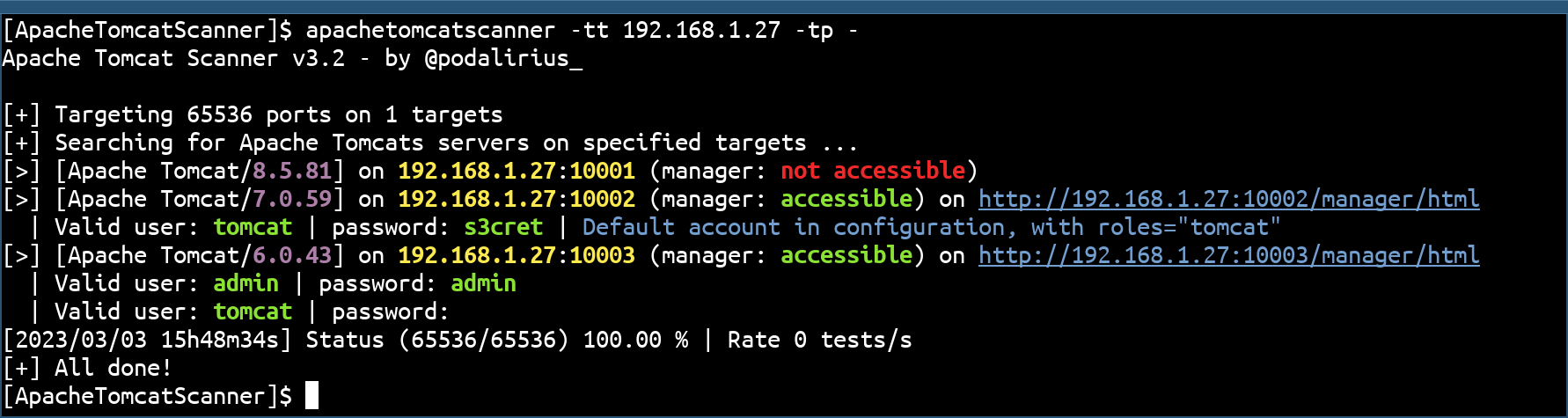
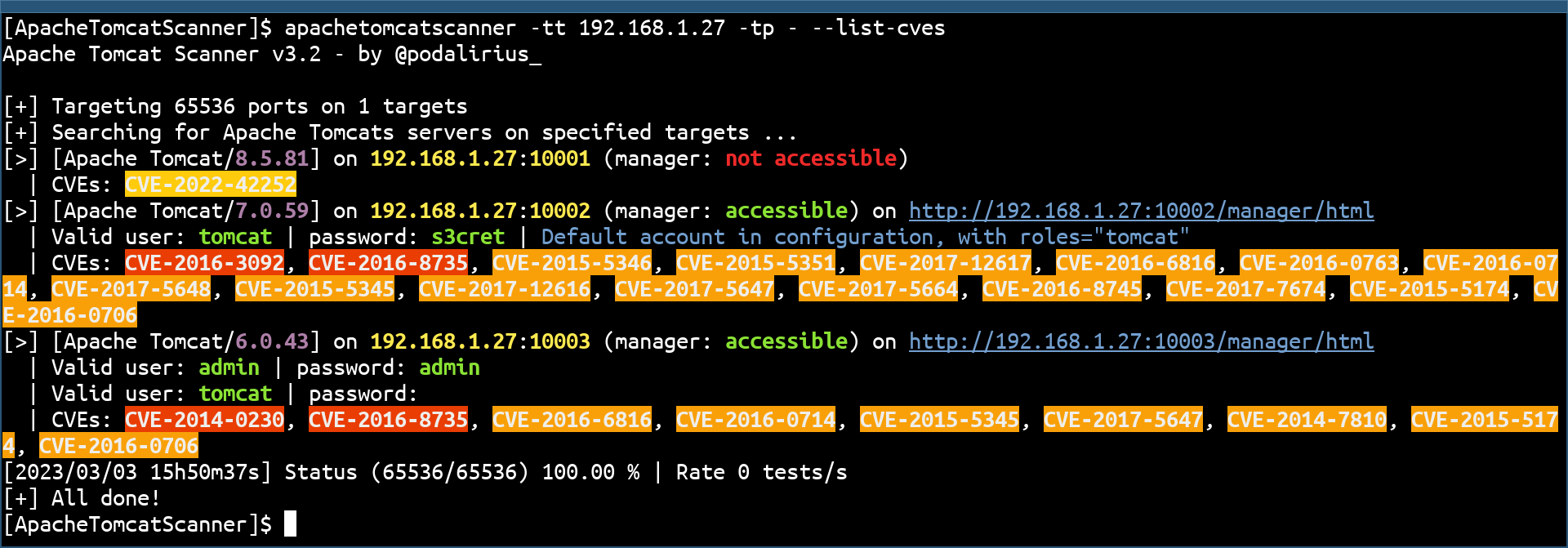
También puedes listar los CVEs de cada versión con la opción --list-cves:
El escáner incluye una comprobación automática de actualización de la base de datos de CVEs para asegurar que siempre tengas los datos de vulnerabilidades más recientes.
Cuando ejecutas el escáner, automáticamente verifica si la base de datos de CVEs tiene más de 30 días. Si está desactualizada, verás:
[!] CVE database is outdated (last update: 2025-11-01T13:00:00)
[*] You can update it by running: python apachetomcatscanner/data/update_db_nvd.py
[?] Would you like to update now? This may take several minutes. (y/N):
Escribe y para actualizar inmediatamente, o presiona Enter para saltar y continuar escaneando.
Para omitir la comprobación de actualización por completo, usa la opción --no-auto-update:
python ApacheTomcatScanner.py -tt target.com --list-cves --no-auto-update
Puedes actualizar manualmente la base de datos de CVEs en cualquier momento:
cd apachetomcatscanner/data
python update_db_nvd.py
Nota: Las actualizaciones usan la API oficial de NVD con límite de velocidad (5 solicitudes cada 30 segundos). El proceso puede tardar varios minutos, pero puede interrumpirse y reanudarse en cualquier momento. Considera obtener una clave API gratuita de NVD para actualizaciones más rápidas: https://nvd.nist.gov/developers/request-an-api-key
Las solicitudes de extracción son bienvenidas. No dudes en abrir un issue si deseas añadir otras características.
