 nebulock-inc/agentic-threat-hunting-framework
ATHF es un framework para la caza de amenazas agéntica: creación de sistemas que pueden recordar, aprender y actuar con una autonomía cada vez mayor.

# Agentic Threat Hunting Framework (ATHF)
[](https://pypi.org/project/agentic-threat-hunting-framework/)
[](https://pypi.org/project/agentic-threat-hunting-framework/)
[](https://www.python.org/downloads/)
[](https://github.com/Nebulock-Inc/agentic-threat-hunting-framework/blob/main/LICENSE)
[](https://github.com/Nebulock-Inc/agentic-threat-hunting-framework/stargazers)
**[Quick Start](#-quick-start)** • **[Installation](#installation)** • **[Documentation](#documentation)** • **[Examples](https://github.com/Nebulock-Inc/agentic-threat-hunting-framework/blob/main/SHOWCASE.md)**
*Give your threat hunting program memory and agency.*
The **Agentic Threat Hunting Framework (ATHF)** is the memory and automation layer for your threat hunting program. It gives your hunts structure, persistence, and context - making every past investigation accessible to both humans and AI.
ATHF works with any hunting methodology (PEAK, TaHiTI, or your own process). It's not a replacement; it's the layer that makes your existing process AI-ready.
## What is ATHF?
ATHF provides structure and persistence for threat hunting programs. It's a markdown-based framework that:
- Documents hunts using the LOCK pattern (Learn → Observe → Check → Keep)
- Maintains a searchable repository of past investigations
- Enables AI assistants to reference your environment and previous work
- Works with any SIEM/EDR platform
- **NEW:** Includes AI-powered research and hypothesis generation agents (v0.3.0+)
## The Problem
Most threat hunting programs lose valuable context once a hunt ends. Notes live in Slack or tickets, queries are written once and forgotten, and lessons learned exist only in analysts' heads.
Even AI tools start from zero every time without access to your environment, your data, or your past hunts.
ATHF changes that by giving your hunts structure, persistence, and context.
**Read more:** [docs/why-athf.md](https://github.com/Nebulock-Inc/agentic-threat-hunting-framework/blob/main/docs/why-athf.md)
## The LOCK Pattern
Every threat hunt follows the same basic loop: **Learn → Observe → Check → Keep**.
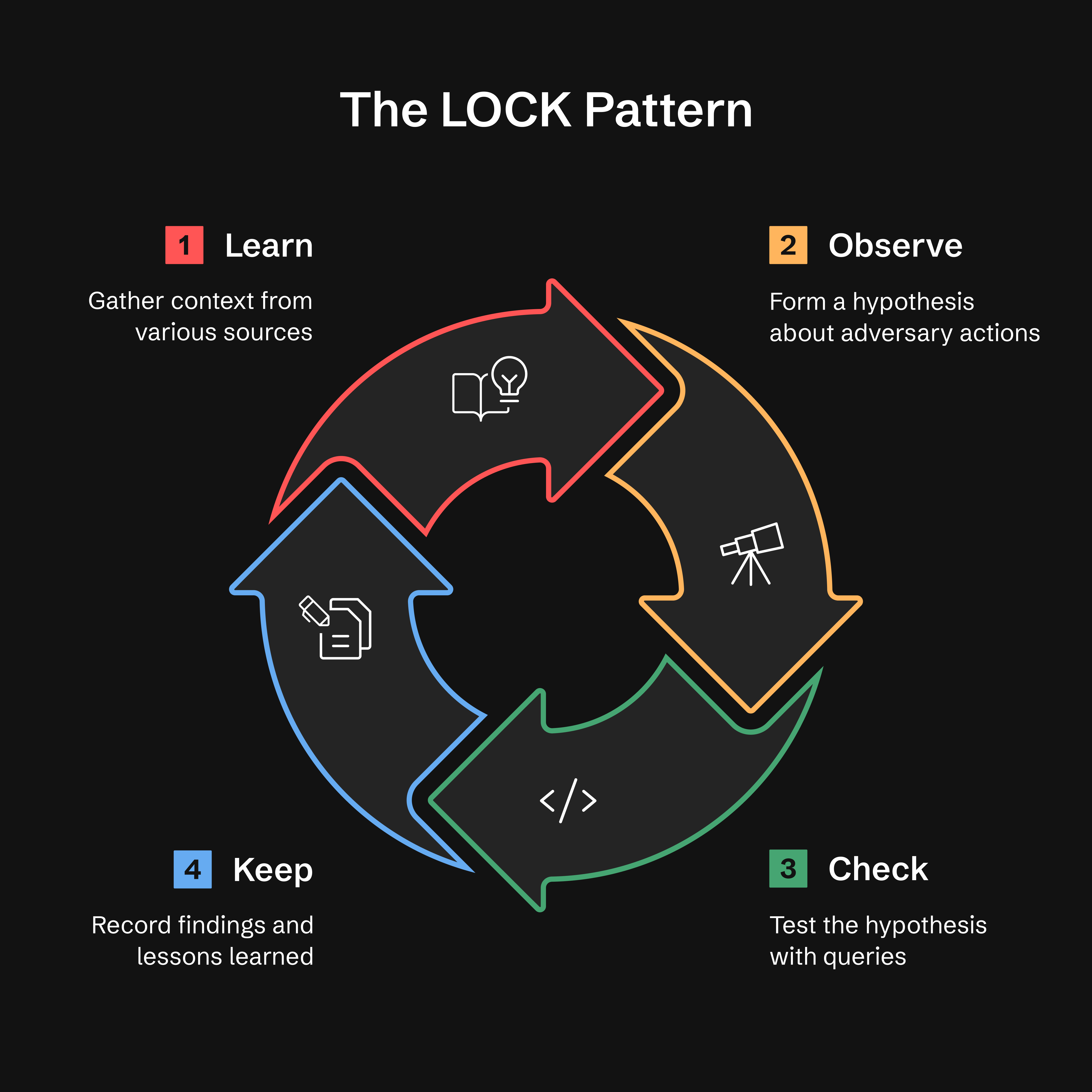
- **Learn:** Gather context from threat intel, alerts, or anomalies
- **Observe:** Form a hypothesis about adversary behavior
- **Check:** Test hypotheses with targeted queries
- **Keep:** Record findings and lessons learned
**Why LOCK?** It's small enough to use and strict enough for agents to interpret. By capturing every hunt in this format, ATHF makes it possible for AI assistants to recall prior work and suggest refined queries based on past results.
**Read more:** [docs/lock-pattern.md](https://github.com/Nebulock-Inc/agentic-threat-hunting-framework/blob/main/docs/lock-pattern.md)
## GATES Method: Hunt-to-Detection Promotion Validation
After completing a hunt's **KEEP** phase, the **GATES method** validates whether your findings should be promoted to production detections, recurring hunts, or advisories.
**G**eneralizable, **A**dditive, **T**unable, **E**xposure-tested, **S**ustainable
> **Note:** GATES is designed to work with the ATHF framework and has been extensively tested in that context. While the methodology (5 BASE criteria, verdict types) is conceptually portable, we recommend using it as part of the complete ATHF workflow for best results. See `.claude/skills/gates/` for the full integration.
> **Installation:** GATES is currently available via `git clone` only. Users who installed via `pip install` should clone the repository to access GATES. We're working on including GATES in the pip distribution (tracked as Issue #21).
GATES evaluates hunt-derived detections using a two-tier framework: 5 BASE criteria (assessed from hunt data) identify deployment candidates, while 5 ADVANCED criteria (validated in production) ensure **resilient detections with low false positive and false negative rates**:
| Gate | Question | Catches |
|------|----------|---------|
| **G** - Generalizable | Is this repeatable? | IOC-based rules that expire quickly |
| **A** - Additive | Does it fill a coverage gap? | Duplicate or redundant detections |
| **T** - Tunable | Can we distinguish attack from normal? | Baseline noise mismatch (top FP cause) |
| **E** - Exposure-tested | Did we cover evasions? | Single-dimensional detections |
| **S** - Sustainable | Can we maintain this? | High-volume, low-TP rules |
Verdicts are based on BASE scores (/5). See `.claude/skills/gates/` for ADVANCED validation methods.
**Quick Start** — type this to your assistant; `/gates` is a skill, not a shell command:
```text
/gates --hunt H-0001
```
**Tipos de veredicto:**
- ✅ **PROMOTE** (4.0-5.0) - Desplegar como detección permanente
- ⚠️ **CONDITIONAL** (3.0-3.9) - Desplegar tras cumplir los requisitos previos
- ❌ **HOLD** (0.0-2.9) - Preservar la lógica, no desplegar
- ⏱️ **TIME_BOX** - Específico de campaña, actualización cada 90 días
- 🔄 **RECURRING_HUNT** - Ejecución trimestral, no 24/7
- 🚫 **DROP** - No merece la pena detectarlo; se registra para que no se vuelva a proponer
Un **gate FAIL anula la banda de puntuación**, y cuando dos gates fallan gana la primera coincidencia en
este orden: A→DROP, G→TIME_BOX, E→HOLD, S→RECURRING_HUNT, T→CONDITIONAL. Las
bandas anteriores se aplican solo cuando ningún gate ha fallado. Regla completa:
`.claude/skills/gates/SKILL.md` Paso 4.
**Nota:** El veredicto "PROMOTE" de GATES significa desplegar una regla de detección. Esto es distinto de `athf hunt promote`, que mueve archivos de hunt entre directorios.
**Integración con ADEF (Detection Engineering Framework):**
Tras la validación de GATES, proceda a ADEF para la ingeniería de detección en producción:
```
ATHF Workspace ADEF Workspace
────────────── ──────────────
Hunt (LOCK)
↓
GATES Validate
↓
H-XXXX_GATES.yaml ────────────→ FORGE (F-O-R-G-E)
↓
Production Rule
```
**Flujo de trabajo completo:**
1. En el espacio de trabajo de ATHF, valida la búsqueda — entrada del asistente, no un comando de shell:
```text
/gates --hunt H-0903
```
→ escribe `hunt-promotion-analysis/H-0903_GATES.yaml` (un archivo por hunt, N
candidatos dentro). Un hunt cuyo veredicto es archivístico (`HOLD`, `DROP`, `TIME_BOX`,
`RECURRING_HUNT`) emite una narrativa `.md` en su lugar — no hay regla que construir, por lo que
el paso 2 aplica únicamente a la salida `.yaml`.
2. Importa ese documento en ADEF:
```bash
adef hunt-promote --gates ~/athf-workspace/hunt-promotion-analysis/H-0903_GATES.yaml
# --dry-run first to preview what it would mint
```
Los candidatos desplegables llegan a la etapa Find con un `D-XXXX`, un registro de catálogo
y un diario; los de archivo se reportan como omitidos. No se necesita `cd` — ADEF resuelve
su espacio de trabajo desde `ADEF_WORKSPACE` (por defecto `~/work/adef-workspace/`). Confirma que tu
ADEF tiene este modo con `adef hunt-promote --help`.
**Repositorio de ADEF:** https://github.com/Nebulock-Inc/agentic-detection-engineering-framework
GATES garantiza que despliegues las detecciones correctas de la manera correcta, evitando la fatiga de alertas y la fricción operativa.
**Lee más:** [.claude/skills/gates/README.md](https://github.com/Nebulock-Inc/agentic-threat-hunting-framework/blob/main/.claude/skills/gates/README.md)
## Los Cinco Niveles de la Caza Agéntica
ATHF define un modelo de madurez simple. Cada nivel se construye sobre el anterior.
**La mayoría de los equipos vivirán en los Niveles 1–2. Todo lo que va más allá es madurez opcional.**
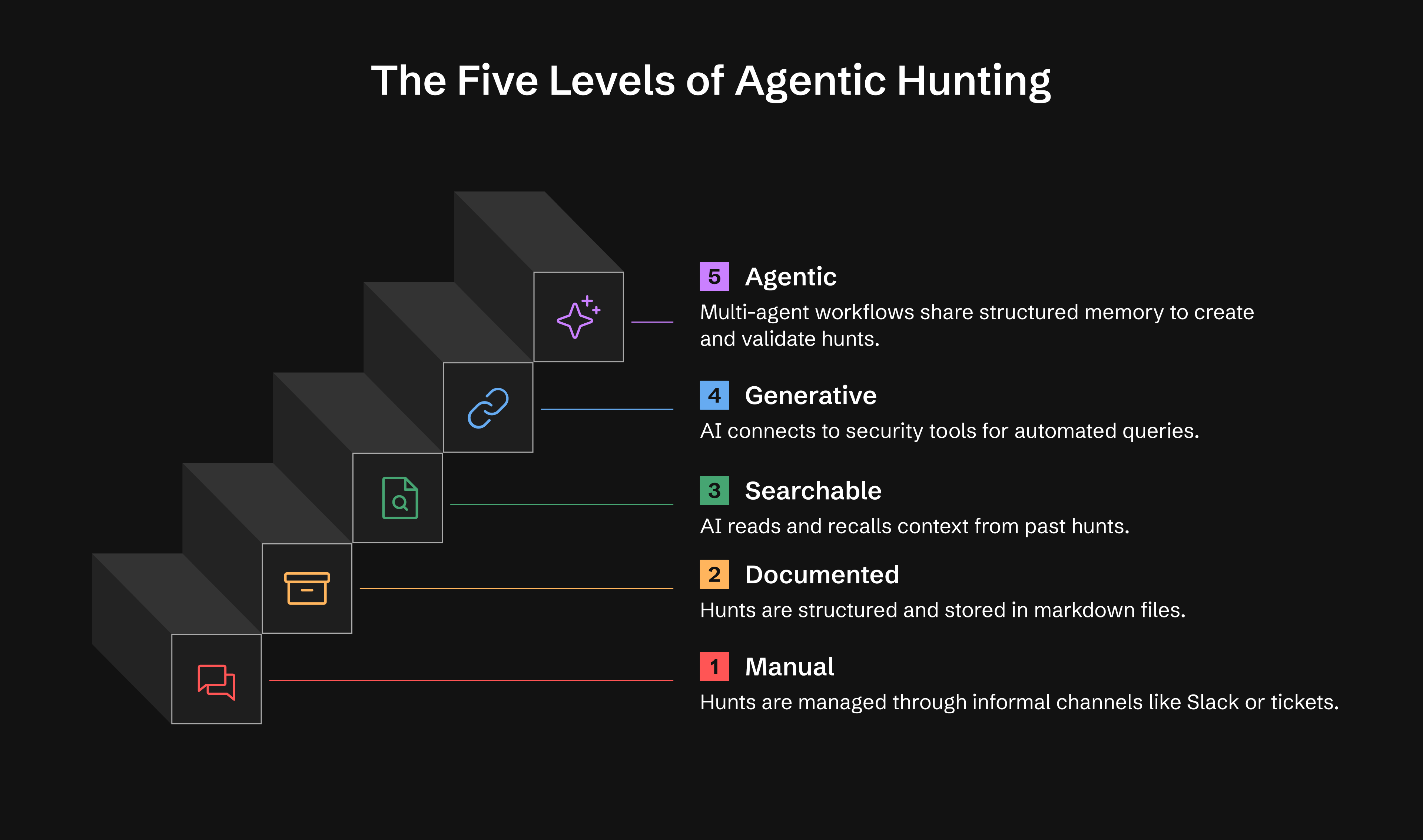
| Nivel | Capacidad | Lo Que Obtienes |
|-------|-----------|--------------|
| **0** | Ad-hoc | Las cacerías existen en Slack, tickets o notas de analistas |
| **1** | Documentado | Registros de cacería persistentes usando LOCK |
| **2** | Buscable | La IA lee y recuerda tus cacerías |
| **3** | Generativo | La IA ejecuta consultas mediante herramientas MCP, realiza investigación |
| **4** | Agéntico | Agentes autónomos monitorean y actúan, generan hipótesis |
**Nivel 1:** Operativo en un día
**Nivel 2:** Operativo en una semana
**Nivel 3:** 2-4 semanas (opcional)
**Nivel 4:** 1-3 meses (opcional)
**Lee más:** [docs/maturity-model.md](https://github.com/Nebulock-Inc/agentic-threat-hunting-framework/blob/main/docs/maturity-model.md)
## 🚀 Inicio Rápido
### Opción 1: Instalar desde PyPI (Recomendado)
```bash
# Install ATHF
pip install agentic-threat-hunting-framework
# Initialize your hunt program
athf init
# NEW: Conduct research before hunting (5-skill methodology)
athf research new --topic "LSASS dumping" --technique T1003.001
# Create your first hunt (link to research)
athf hunt new --technique T1003.001 --title "LSASS Credential Dumping" --research R-0001
```
### Opción 2: Instalar desde el código fuente (Desarrollo)
```bash
# Clone and install from source
git clone https://github.com/Nebulock-Inc/agentic-threat-hunting-framework
cd agentic-threat-hunting-framework
pip install -e .
# Initialize and start hunting
athf init
athf hunt new --technique T1003.001
```
### Opción 3: Markdown puro (sin instalación)
```bash
# Clone the repository
git clone https://github.com/Nebulock-Inc/agentic-threat-hunting-framework
cd agentic-threat-hunting-framework
# Copy a template and start documenting
mkdir -p hunts
cp athf/data/templates/HUNT_LOCK.md hunts/H-0001.md
# Customize AGENTS.md with your environment
# Add your SIEM, EDR, and data sources
```
**Elige tu asistente de IA:** Claude Code, GitHub Copilot o Cursor: cualquier herramienta que pueda leer los archivos de tu repositorio.
**Guía completa:** [docs/getting-started.md](https://github.com/Nebulock-Inc/agentic-threat-hunting-framework/blob/main/docs/getting-started.md)
## 🔧 Comandos de CLI
ATHF incluye una CLI con todas las funciones para gestionar tus búsquedas. Aquí tienes una referencia rápida:
### Inicializar el espacio de trabajo
```bash
athf init # Interactive setup
athf init --non-interactive # Use defaults
```
### Investigación y generación de hipótesis (NUEVO en v0.3.0)
```bash
# Conduct thorough pre-hunt research (15-20 min)
athf research new --topic "LSASS dumping" --technique T1003.001
# Quick research for urgent hunts (5 min)
athf research new --topic "Pass-the-Hash" --depth basic
# Generate AI-powered hypothesis from threat intel
athf agent run hypothesis-generator --threat-intel "APT29 targeting SaaS"
# List research and agents
athf research list
athf agent list
```
### Crear Hunts
```bash
athf hunt new # Interactive mode
athf hunt new \
--technique T1003.001 \
--title "LSASS Dumping Detection" \
--platform windows \
--hunt-type baseline \
--research R-0001 # Link to research document
# --hunt-type: hypothesis (default) | baseline | model-assisted
```
### Listar y Buscar
```bash
athf hunt list # Show all hunts
athf hunt list --status completed # Filter by status
athf hunt list --directory test # Filter by environment (test/production)
athf hunt list --hunt-type baseline # Filter by hunt category
athf hunt list --output json # JSON output
athf hunt search "kerberoasting" # Full-text search
athf hunt search "credential" --directory production # Search with directory filter
athf research search "credential" # Search research docs
```
### Validar y Estadísticas
```bash
athf hunt validate # Validate all hunts
athf hunt validate H-0001 # Validate specific hunt
athf hunt stats # Show statistics (incl. hunts by type)
athf hunt stats --by hunt_type --status completed --output json # Category breakdown
athf hunt coverage # MITRE ATT&CK coverage
athf research stats # Research metrics
```
La calidad de detección se puntúa mediante la **skill** GATES, que tu asistente invoca —
no forma parte de la CLI `athf`, por lo que no pertenece al bloque de shell anterior:
```text
/gates --hunt H-0001
```
### Gestión de datos ATT&CK (NUEVO en v0.11.0)
```bash
# Install STIX support (optional)
pip install 'agentic-threat-hunting-framework[attack]'
# Download live ATT&CK data (835+ techniques with full metadata)
athf attack update
# Check provider status
athf attack status
# Look up technique metadata
athf attack lookup T1003.001
# List techniques for a tactic
athf attack techniques credential-access
```
Sin `mitreattack-python`, ATHF utiliza un fallback v14 hardcodeado (14 tácticas, recuentos aproximados). Con él, obtienes metadatos completos de técnicas: plataformas, fuentes de datos, sub-técnicas y recuentos precisos.
### Servidor MCP (NUEVO en v0.11.0)
```bash
# Install MCP dependencies
pip install 'agentic-threat-hunting-framework[mcp]'
# Start MCP server (for Claude Code, Copilot, Cursor, etc.)
athf mcp serve --workspace /path/to/hunts
```
Configura en `~/.claude/mcp-servers.json`:
```json
{
"athf": {
"command": "athf-mcp",
"env": { "ATHF_WORKSPACE": "/path/to/your/hunts" }
}
}
```
El punto de entrada independiente `athf-mcp` autodetecta tu espacio de trabajo desde el cwd o la variable de entorno `ATHF_WORKSPACE`. Usa `athf mcp serve --workspace /path` para rutas explícitas.
> **Nota de seguridad:** los transportes `sse` y `streamable-http` se enlazan a `127.0.0.1` y **no están autenticados**. Cada herramienta lee todo tu espacio de trabajo y algunas invocan agentes LLM a tu costa. Solo pasa `--host` para enlazar una interfaz enrutable, y coloca un proxy de autenticación delante cuando lo hagas. El transporte `stdio` predeterminado no abre ningún socket.
Expone 17 herramientas: gestión de hunts, búsqueda semántica, cobertura de ATT&CK, investigación, investigaciones y generación de hipótesis impulsada por IA — todo accesible directamente desde tu asistente de codificación con IA.
**Documentación completa:** [Referencia de CLI](https://github.com/Nebulock-Inc/agentic-threat-hunting-framework/blob/main/docs/CLI_REFERENCE.md)
## 📺 Míralo en Acción
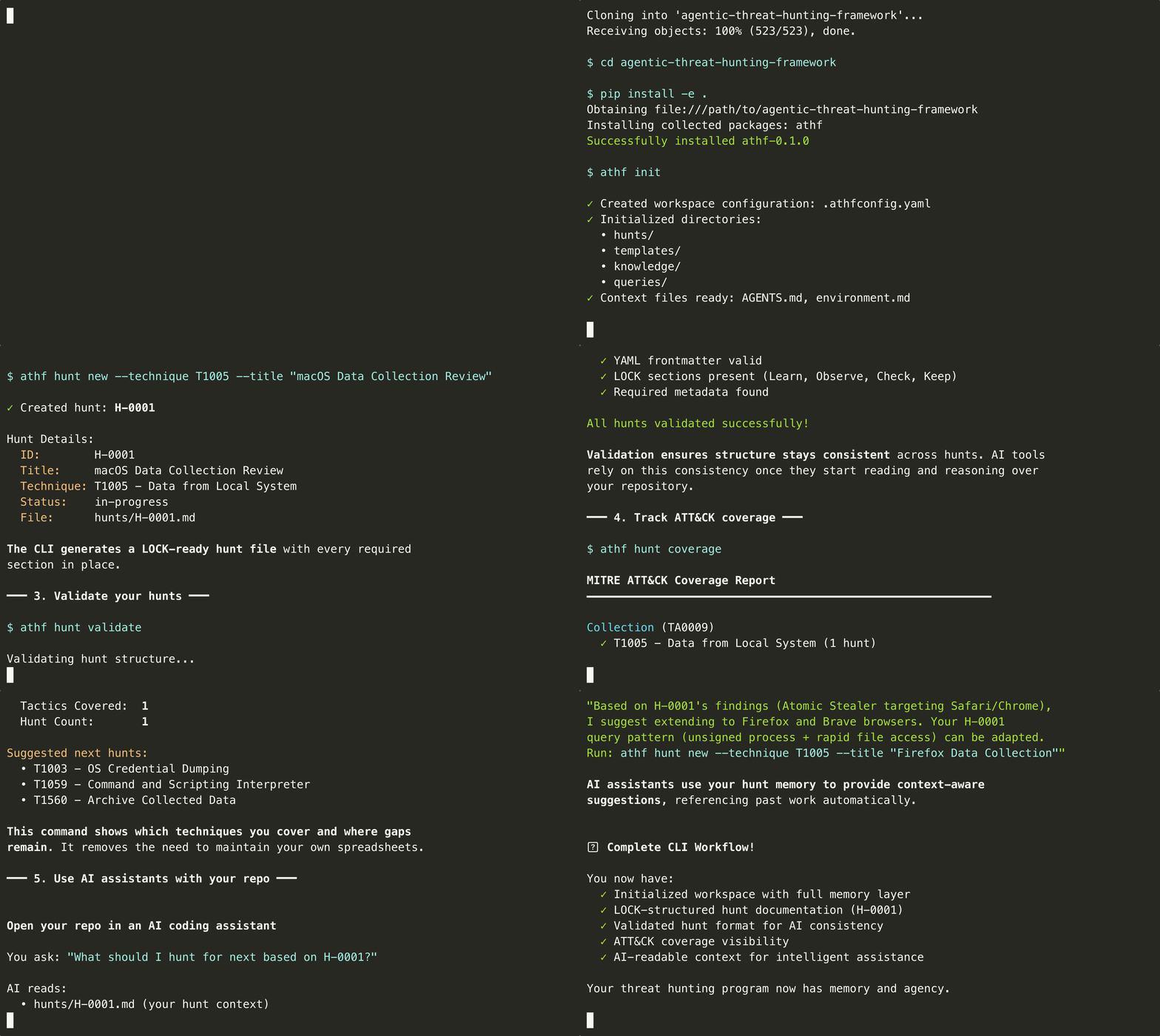
Mira ATHF en acción: inicializa un espacio de trabajo, crea hunts y explora tu catálogo de threat hunting en menos de 60 segundos.
**[Ver hunts de ejemplo →](https://github.com/Nebulock-Inc/agentic-threat-hunting-framework/blob/main/SHOWCASE.md)**
## Instalación
Consulta la sección [Inicio Rápido](#-quick-start) anterior para las opciones de instalación (PyPI, código fuente o markdown puro).
**Requisitos previos:**
- Python 3.11 o superior (para la opción de CLI)
- Tu asistente de código con IA favorito
## Documentación
### Conceptos Básicos
- [Por qué existe ATHF](https://github.com/Nebulock-Inc/agentic-threat-hunting-framework/blob/main/docs/why-athf.md) - El problema y la solución
- [El Patrón LOCK](https://github.com/Nebulock-Inc/agentic-threat-hunting-framework/blob/main/docs/lock-pattern.md) - Estructura para todos los hunts
- [Modelo de Madurez](https://github.com/Nebulock-Inc/agentic-threat-hunting-framework/blob/main/docs/maturity-model.md) - Los cinco niveles explicados
- [Primeros Pasos](https://github.com/Nebulock-Inc/agentic-threat-hunting-framework/blob/main/docs/getting-started.md) - Incorporación paso a paso
### Guías Específicas por Nivel
- [Nivel 1: Hunts Documentados](https://github.com/Nebulock-Inc/agentic-threat-hunting-framework/blob/main/docs/maturity-model.md#level-1-documented-hunts)
- [Nivel 2: Memoria Buscable](https://github.com/Nebulock-Inc/agentic-threat-hunting-framework/blob/main/docs/maturity-model.md#level-2-searchable-memory)
- [Nivel 3: Capacidades Generativas](https://github.com/Nebulock-Inc/agentic-threat-hunting-framework/blob/main/docs/level4-agentic-workflows.md)
- [Nivel 4: Flujos de Trabajo Agénticos](https://github.com/Nebulock-Inc/agentic-threat-hunting-framework/blob/main/docs/level4-agentic-workflows.md)
### Integración y Personalización
- [Instalación y Desarrollo](https://github.com/Nebulock-Inc/agentic-threat-hunting-framework/blob/main/docs/INSTALL.md) - Configuración, personalización de fork, pruebas
- [Método GATES](https://github.com/nebulock-inc/agentic-threat-hunting-framework/blob/main/.claude/skills/gates/README.md) - Habilidad de validación de detección (conecta LOCK → ADEF)
- [Catálogo MCP](https://github.com/Nebulock-Inc/agentic-threat-hunting-framework/blob/main/integrations/MCP_CATALOG.md) - Integraciones de herramientas disponibles
- [Guías de Inicio Rápido](https://github.com/Nebulock-Inc/agentic-threat-hunting-framework/tree/main/integrations/quickstart/) - Configuración para herramientas específicas
- [Uso de ATHF](https://github.com/Nebulock-Inc/agentic-threat-hunting-framework/blob/main/USING_ATHF.md) - Adopción y personalización
## 🎖️ Hunts Destacados
### H-0001: Detección de Information Stealer en macOS
Se detectó Atomic Stealer recolectando cookies de Safari mediante AppleScript.
**Resultado:** 1 verdadero positivo, host aislado antes de la exfiltración.
**Hallazgo clave:** La detección basada en comportamiento superó a los enfoques basados en firmas. La validación de firmas de procesos identificó malware sin firmar intentando recolectar datos.
[Ver hunt completo →](https://github.com/Nebulock-Inc/agentic-threat-hunting-framework/blob/main/hunts/H-0001.md) | [Ver más ejemplos →](https://github.com/Nebulock-Inc/agentic-threat-hunting-framework/blob/main/SHOWCASE.md)
## Por Qué Esto Importa
Quizás te preguntes cómo interactúa esto con frameworks como [PEAK](https://www.splunk.com/en_us/blog/security/peak-threat-hunting-framework.html). PEAK te ofrece un método sólido sobre cómo cazar. ATHF se construye sobre esa base dándote estructura, memoria y continuidad. PEAK guía el trabajo. ATHF asegura que captures el trabajo, lo organices y lo reutilices en futuros hunts.
El threat hunting agéntico no se trata de reemplazar a los analistas. Se trata de construir sistemas que puedan:
- Recordar lo que se ha hecho antes
- Aprender de éxitos y errores pasados
- Apoyar el juicio humano con recuperación contextual
Cuando tu framework tiene memoria, dejas de perder conocimiento por rotación de personal o notas olvidadas. Cuando tu asistente de IA puede referenciar esa memoria, se convierte en un multiplicador de fuerza.
## 💬 Comunidad y Adopción
- **GitHub Discussions:** [Haz preguntas, comparte hunts](https://github.com/Nebulock-Inc/agentic-threat-hunting-framework/discussions)
- **Issues:** [Reporta errores o solicita funcionalidades](https://github.com/Nebulock-Inc/agentic-threat-hunting-framework/issues)
- **LinkedIn:** [Nebulock Inc.](https://www.linkedin.com/company/nebulock-inc) - Síguenos para actualizaciones
**Usando ATHF en Tu Organización:** ATHF es un framework para internalizar, no una plataforma para extender. Hazle fork, personalízalo, hazlo tuyo. Consulta [USING_ATHF.md](https://github.com/Nebulock-Inc/agentic-threat-hunting-framework/blob/main/USING_ATHF.md) para orientación sobre adopción. Tus hunts siguen siendo tuyos—compartir de vuelta es opcional pero apreciado.
**Repositorio:** [https://github.com/Nebulock-Inc/agentic-threat-hunting-framework](https://github.com/Nebulock-Inc/agentic-threat-hunting-framework)
El objetivo es ayudar a cada equipo de threat hunting a pasar de la memoria ad-hoc a una capacidad estructurada y agéntica.
---
## 🛠️ Desarrollo y Personalización
ATHF está diseñado para ser bifurcado y personalizado para tu organización.
**Consulta [docs/INSTALL.md#development--customization](https://github.com/Nebulock-Inc/agentic-threat-hunting-framework/blob/main/docs/INSTALL.md#development--customization) para:**
- Configurar tu fork para desarrollo
- Hooks de pre-commit para calidad de código
- Pruebas y verificación de tipos
- Ejemplos de personalización
- Integración CI/CD
Inicio rápido:
```bash
pip install -e ".[dev]" # Install dev dependencies
pre-commit install # Set up quality checks
pytest tests/ -v # Run tests
```
---
## 👤 Autor
Creado por **Sydney Marrone** © 2025
---
**Empieza poco a poco. Documenta una búsqueda. Añade estructura. Construye memoria.**
La memoria es el multiplicador. La agencia es la fuerza.
Una vez que tu programa puede recordar, todo lo demás se vuelve posible.
¡Feliz caza!