Un fuzzer basado en gramática con retroalimentación
Nautilus es un fuzzer basado en gramática y guiado por cobertura. Puedes usarlo para mejorar tu cobertura de pruebas y encontrar más errores. Al especificar la gramática de entradas semi válidas, Nautilus es capaz de realizar mutaciones complejas y descubrir casos de prueba más interesantes. Muchas de las ideas detrás de este fuzzer están documentadas en un artículo publicado en NDSS 2019.
La versión 2.0 ha añadido muchas mejoras a este prototipo inicial y ahora es 100% compatible con AFL++. Además de las mejoras generales de usabilidad, la versión 2.0 incluye muchas características nuevas y brillantes:
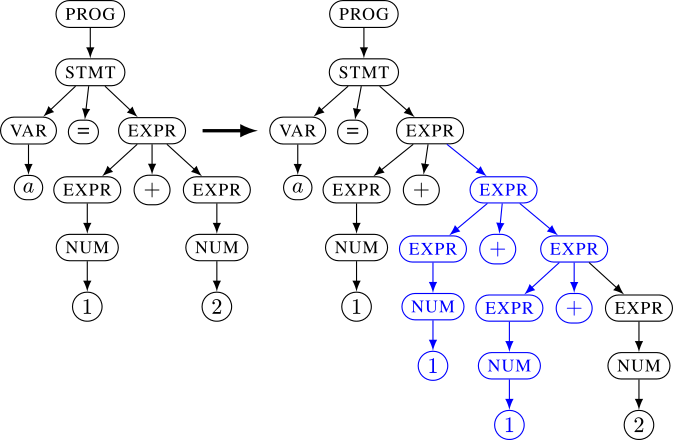
Especificas una gramática usando reglas como EXPR -> EXPR + EXPR o EXPR -> NUM y NUM -> 1. A partir de estas reglas, el fuzzer construye un árbol. Esta representación interna permite aplicar mutaciones mucho más complejas que bytes sin procesar. Luego, este árbol se convierte en una entrada real para la aplicación objetivo. En las gramáticas libres de contexto normales, este proceso es sencillo: todas las hojas se concatenan. El árbol izquierdo en el ejemplo a continuación se desempaquetaría (unparse) en la entrada y el derecho en . Para aumentar la expresividad de tus gramáticas, usando Nautilus puedes proporcionar funciones de Python para el proceso de desempaquetado (unparsing) para permitir especificaciones mucho más complejas.
a=1+2a=1+1+1+2
# checkout the git
git clone '[email protected]:nautilus-fuzz/nautilus.git'
cd nautilus
/path/to/AFLplusplus/afl-clang-fast test.c -o test #afl-clang-fast as provided by AFL
# all arguments can also be set using the config.ron file
cargo run --release -- -g grammars/grammar_py_example.py -o /tmp/workdir -- ./test @@
# or if you want to use QEMU mode:
cargo run /path/to/AFLplusplus/afl-qemu-trace -- ./test_bin @@
Aquí, usamos Python para generar una gramática para entradas válidas similares a XML. Observa el uso de una regla de script para asegurar que las etiquetas de apertura y cierre coincidan.
#ctx.rule(NONTERM: string, RHS: string|bytes) adds a rule NONTERM->RHS. We can use {NONTERM} in the RHS to request a recursion.
ctx.rule("START","<document>{XML_CONTENT}</document>")
ctx.rule("XML_CONTENT","{XML}{XML_CONTENT}")
ctx.rule("XML_CONTENT","")
#ctx.script(NONTERM:string, RHS: [string]], func) adds a rule NONTERM->func(*RHS).
# In contrast to normal `rule`, RHS is an array of nonterminals.
# It's up to the function to combine the values returned for the NONTERMINALS with any fixed content used.
ctx.script("XML",["TAG","ATTR","XML_CONTENT"], lambda tag,attr,body: b"<%s %s>%s</%s>"%(tag,attr,body,tag) )
ctx.rule("ATTR","foo=bar")
ctx.rule("TAG","some_tag")
ctx.rule("TAG","other_tag")
#sometimes we don't want to explore the set of possible inputs in more detail. For example, if we fuzz a script
#interpreter, we don't want to spend time on fuzzing all different variable names. In such cases we can use Regex
#terminals. Regex terminals are only mutated during generation, but not during normal mutation stages, saving a lot of time.
#The fuzzer still explores different values for the regex, but it won't be able to learn interesting values incrementally.
#Use this when incremantal exploration would most likely waste time.
ctx.regex("TAG","[a-z]+")
Para probar tus gramáticas puedes usar el generador:
$ cargo run --bin generator -- -g grammars/grammar_py_exmaple.py -t 100
<document><some_tag foo=bar><other_tag foo=bar><other_tag foo=bar><some_tag foo=bar></some_tag></other_tag><some_tag foo=bar><other_tag foo=bar></other_tag></some_tag><other_tag foo=bar></other_tag><some_tag foo=bar></some_tag></other_tag><other_tag foo=bar></other_tag><some_tag foo=bar></some_tag></some_tag></document>
También puedes usar Nautilus en combinación con AFL. Simplemente apunta AFL -o al mismo directorio de trabajo, y AFL se sincronizará con Nautilus. Ten en cuenta que esto es unidireccional. AFL importa las entradas de Nautilus, pero no al revés.
#Terminal/Screen 1
./afl-fuzz -Safl -i /tmp/seeds -o /tmp/workdir/ ./test @@
#Terminal/Screen 2
cargo run --release -- -o /tmp/workdir -- ./test @@