 mozilla/cipherscan
Una forma muy sencilla de averiguar qué conjuntos de cifrado SSL están soportados por un objetivo.


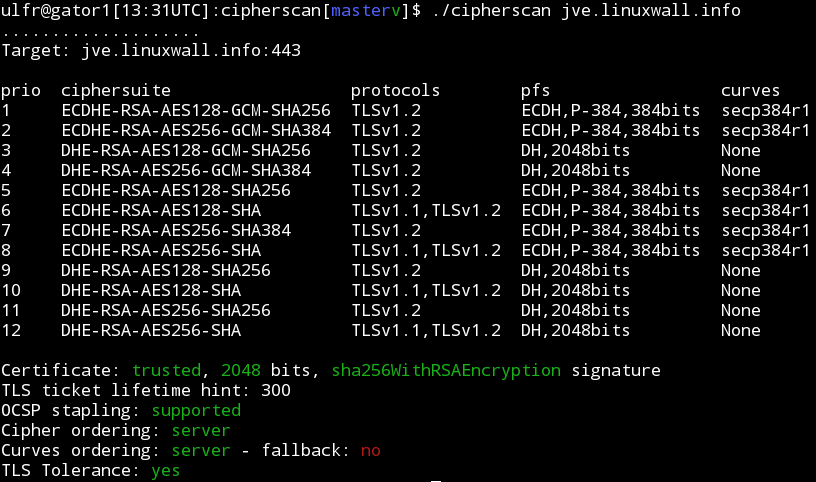
CipherScan prueba el orden de los cifrados SSL/TLS en un objetivo dado, para todas las versiones principales de SSL y TLS. También extrae información de certificados, opciones TLS, OCSP stapling y más. CipherScan es un envoltorio sobre la línea de comandos openssl s_client.
CipherScan está diseñado para ejecutarse en todas las variantes de Unix. Incluye su propia compilación de OpenSSL para Linux/64 y Darwin/64. En otras plataformas, usará la versión de openssl proporcionada por el sistema operativo (que puede tener soporte limitado de cifrados), o su propia versión indicada mediante la opción de línea de comandos -o.
Prueba básica:
$ ./cipherscan google.com
...................
Target: google.com:443

prio  ciphersuite                  protocols                    pfs                 curves
1     ECDHE-RSA-CHACHA20-POLY1305  TLSv1.2                      ECDH,P-256,256bits  prime256v1
2     ECDHE-RSA-AES128-GCM-SHA256  TLSv1.2                      ECDH,P-256,256bits  prime256v1
3     ECDHE-RSA-AES128-SHA         TLSv1.1,TLSv1.2              ECDH,P-256,256bits  prime256v1
4     ECDHE-RSA-RC4-SHA            SSLv3,TLSv1,TLSv1.1,TLSv1.2  ECDH,P-256,256bits  prime256v1
5     AES128-GCM-SHA256            TLSv1.2                      None                None
6     AES128-SHA256                TLSv1.2                      None                None
7     AES128-SHA                   TLSv1.1,TLSv1.2              None                None
8     RC4-SHA                      SSLv3,TLSv1,TLSv1.1,TLSv1.2  None                None
9     RC4-MD5                      SSLv3,TLSv1,TLSv1.1,TLSv1.2  None                None
10    ECDHE-RSA-AES256-GCM-SHA384  TLSv1.2                      ECDH,P-256,256bits  prime256v1
11    ECDHE-RSA-AES256-SHA384      TLSv1.2                      ECDH,P-256,256bits  prime256v1
12    ECDHE-RSA-AES256-SHA         SSLv3,TLSv1,TLSv1.1,TLSv1.2  ECDH,P-256,256bits  prime256v1
13    AES256-GCM-SHA384            TLSv1.2                      None                None
14    AES256-SHA256                TLSv1.2                      None                None
15    AES256-SHA                   SSLv3,TLSv1,TLSv1.1,TLSv1.2  None                None
16    ECDHE-RSA-AES128-SHA256      TLSv1.2                      ECDH,P-256,256bits  prime256v1
17    ECDHE-RSA-DES-CBC3-SHA       SSLv3,TLSv1,TLSv1.1,TLSv1.2  ECDH,P-256,256bits  prime256v1
18    DES-CBC3-SHA                 SSLv3,TLSv1,TLSv1.1,TLSv1.2  None                None

Certificate: trusted, 2048 bit, sha1WithRSAEncryption signature
TLS ticket lifetime hint: 100800
OCSP stapling: not supported
Cipher ordering: server
Probando STARTTLS:
darwin$ $ ./cipherscan --curves -starttls xmpp jabber.ccc.de:5222
................................
Target: jabber.ccc.de:5222

prio  ciphersuite                  protocols              pfs                 curves
1     ECDHE-RSA-AES256-GCM-SHA384  TLSv1.2                ECDH,P-256,256bits  prime256v1
2     ECDHE-RSA-AES256-SHA384      TLSv1.2                ECDH,P-256,256bits  prime256v1
3     ECDHE-RSA-AES256-SHA         TLSv1,TLSv1.1,TLSv1.2  ECDH,P-256,256bits  prime256v1
4     DHE-RSA-AES256-GCM-SHA384    TLSv1.2                DH,1024bits         None
5     DHE-RSA-AES256-SHA256        TLSv1.2                DH,1024bits         None
6     DHE-RSA-AES256-SHA           TLSv1,TLSv1.1,TLSv1.2  DH,1024bits         None
7     DHE-RSA-CAMELLIA256-SHA      TLSv1,TLSv1.1,TLSv1.2  DH,1024bits         None
8     AES256-GCM-SHA384            TLSv1.2                None                None
9     AES256-SHA256                TLSv1.2                None                None
10    AES256-SHA                   TLSv1,TLSv1.1,TLSv1.2  None                None
11    CAMELLIA256-SHA              TLSv1,TLSv1.1,TLSv1.2  None                None
12    ECDHE-RSA-AES128-GCM-SHA256  TLSv1.2                ECDH,P-256,256bits  prime256v1
13    ECDHE-RSA-AES128-SHA256      TLSv1.2                ECDH,P-256,256bits  prime256v1
14    ECDHE-RSA-AES128-SHA         TLSv1,TLSv1.1,TLSv1.2  ECDH,P-256,256bits  prime256v1
15    DHE-RSA-AES128-GCM-SHA256    TLSv1.2                DH,1024bits         None
16    DHE-RSA-AES128-SHA256        TLSv1.2                DH,1024bits         None
17    DHE-RSA-AES128-SHA           TLSv1,TLSv1.1,TLSv1.2  DH,1024bits         None
18    DHE-RSA-SEED-SHA             TLSv1,TLSv1.1,TLSv1.2  DH,1024bits         None
19    DHE-RSA-CAMELLIA128-SHA      TLSv1,TLSv1.1,TLSv1.2  DH,1024bits         None
20    AES128-GCM-SHA256            TLSv1.2                None                None
21    AES128-SHA256                TLSv1.2                None                None
22    AES128-SHA                   TLSv1,TLSv1.1,TLSv1.2  None                None
23    SEED-SHA                     TLSv1,TLSv1.1,TLSv1.2  None                None
24    CAMELLIA128-SHA              TLSv1,TLSv1.1,TLSv1.2  None                None

Certificate: UNTRUSTED, 2048 bit, sha1WithRSAEncryption signature
TLS ticket lifetime hint: None
OCSP stapling: not supported
Cipher ordering: client
Curves ordering: server
Curves fallback: False
Exportando a JSON con la opción de línea de comandos -j:
$ ./cipherscan --curves -j www.ebay.com | j
{
    "curves_fallback": "False",
    "serverside": "True",
    "target": "www.ebay.com:443",
    "utctimestamp": "2015-04-03T14:54:31.0Z",
    "ciphersuite": [
        {
            "cipher": "AES256-SHA",
            "ocsp_stapling": "False",
            "pfs": "None",
            "protocols": [
                "TLSv1",
                "TLSv1.1",
                "TLSv1.2"
            ],
            "pubkey": [
                "2048"
            ],
            "sigalg": [
                "sha1WithRSAEncryption"
            ],
            "ticket_hint": "None",
            "trusted": "True"
        },
        {
            "cipher": "ECDHE-RSA-DES-CBC3-SHA",
            "curves": [
                "prime256v1",
                "secp384r1",
                "secp224r1",
                "secp521r1"
            ],
            "curves_ordering": "server",
            "ocsp_stapling": "False",
            "pfs": "ECDH,P-256,256bits",
            "protocols": [
                "TLSv1",
                "TLSv1.1",
                "TLSv1.2"
            ],
            "pubkey": [
                "2048"
            ],
            "sigalg": [
                "sha1WithRSAEncryption"
            ],
            "ticket_hint": "None",
            "trusted": "True"
        }
    ]
}
La motivación detrás de CipherScan es ayudar a los operadores a configurar buen TLS en sus puntos finales. Para ayudar más en esto, el script analyze.py compara los resultados de un cipherscan con las guías TLS de https://wiki.mozilla.org/Security/Server_Side_TLS y genera un nivel y recomendaciones.
$ ./analyze.py -t jve.linuxwall.info
jve.linuxwall.info:443 has intermediate tls

Changes needed to match the old level:
* consider enabling SSLv3
* add cipher DES-CBC3-SHA
* use a certificate with sha1WithRSAEncryption signature
* consider enabling OCSP Stapling

Changes needed to match the intermediate level:
* consider enabling OCSP Stapling

Changes needed to match the modern level:
* remove cipher AES128-GCM-SHA256
* remove cipher AES256-GCM-SHA384
* remove cipher AES128-SHA256
* remove cipher AES128-SHA
* remove cipher AES256-SHA256
* remove cipher AES256-SHA
* disable TLSv1
* consider enabling OCSP Stapling
