
Skip to content
KitploitKITPLOIT
HerramientasBlog
Enviar
HerramientasBlog
Enviar

¡Herramientas de Hacking, PenTest y Ciberseguridad para tu Arsenal de Seguridad!

Kitploit es un directorio de herramientas de hacking, ciberseguridad y pentesting. Descubre las últimas actualizaciones de proyectos para encontrar vulnerabilidades, analizar sistemas, automatizar pruebas y fortalecer tu seguridad.

··Feeds·Contacto·Privacidad·© 2026 Kitploit

Directorio de Herramientas

Categorías

Ver todas las categorías
Loading categories
GPT_Vuln-analyzer — Usa la API de ChatGPT, la API de Bard y Llama2, Python-Nmap, DNS Recon, módulos de reconocimiento de PCAP y JWT, y utiliza el modelo GPT3 para crear informes de vulnerabilidades basados en datos de escaneo de Nmap e información de escaneo de DNS. También puede realizar enumeración de subdominios en gran medida. | Kitploit
Herramientas/GitHubGitHub/morpheuslord/gpt_vuln-analyzer
ReconocimientoEscáneres de VulnerabilidadesMapeo de RedesEscaneo de PuertosAnálisis de VulnerabilidadesEnumeración de DNS y SubdominiosRecopilación de InformaciónPruebas de PenetraciónAnálisis de DNS

Más Populares

Ver todos →

Descubre las herramientas más usadas por nuestra comunidad.

Explora todas las herramientas

Explora nuestra colección de herramientas

Ver todas las herramientas →
Seguridad de IA
GitHubmorpheuslord/gpt_vuln-analyzer

GPT_Vuln-analyzer

Ver Repositorio
595679hace 1 añoRevisado por Kitploit

Acerca de

Usa la API de ChatGPT, la API de Bard y Llama2, Python-Nmap, DNS Recon, módulos de reconocimiento de PCAP y JWT, y utiliza el modelo GPT3 para crear informes de vulnerabilidades basados en datos de escaneo de Nmap e información de escaneo de DNS. También puede realizar enumeración de subdominios en gran medida.

Compartir

GPT_Vuln-analyzer

Esta es una aplicación de Prueba de Concepto que demuestra cómo la IA puede ser utilizada para generar resultados precisos para el análisis de vulnerabilidades y también permite una mayor utilización del ya súper útil ChatGPT hecho usando openai-api, python-nmap, dnsresolver módulos de python y también usa customtkinter y tkinter para la versión GUI del código. Este proyecto también tiene una interfaz CLI y GUI, es capaz de realizar análisis de vulnerabilidades de red, enumeración de DNS y también enumeración de subdominios.

Requisitos

  • Python 3.10 o superior
  • Todos los paquetes mencionados en el archivo requirements.txt
  • OpenAI API
  • Bard API (MakerSuite Palm)
  • Runpod serverless endpoint
  • IPGeolocation API
  • Docker
  • Wireshark y tshark (ambos añadidos al PATH)

Uso del paquete

Importar paquetes```bash

cd package && pip3/pip install .

root@kitploit:~
Simplemente importe cualquiera de los 3 paquetes y luego defina las variables en consecuencia.```python
from GVA.scanner import NetworkScanner
from GVA.dns_recon import DNSRecon
from GVA.geo import geo_ip_recon
from GVA.jwt import JWTAnalyzer
from GVA.menus import Menus
from GVA.packet_analysis import PacketAnalysis
from GVA.ai_models import NMAP_AI_MODEL
from GVA.ai_models import DNS_AI_MODEL
from GVA.ai_models import JWT_AI_MODEL
from GVA.assets import Assets
from GVA.subdomain import sub_enum
from GVA import gui

# The components defined
dns_enum = DNSRecon()
geo_ip = geo_ip_recon()
p_ai_models = NMAP_AI_MODEL()
dns_ai_models = DNS_AI_MODEL()
port_scanner = NetworkScanner()
jwt_analizer = JWTAnalyzer()
sub_recon = sub_enum()
asset_codes = Assets()
packet_analysis = PacketAnalysis()

# KEEP IT BLANK IF YOU HAVE NO CLUE THE MENU WILL ASK TO FILL IT ONCE ACTIVE
lkey = "LLAMA API KEY"
lendpoint = "LLAMA ENDPOINT"
keyset = "AI API KEY"
output_loc = "OUTPUT LOCATION FOR PCAP"
threads = 200 # Default INT 200 but can be increased.
target_ip_hostname_or_token = "TARGET IP, HOSTNAME OR TOKEN"
profile_num = "PROFILE FOR NMAP SCAN"
ai_set = "AI OF CHOICE"
akey_set = "OPENAI API KEY"
bkey_set = "BARD API KEY"
ai_set_args = ""  # Keep it blank at any cost
llamakey = "LLAMA RUNPOD API KEY"
llamaendpoint = "LLAMA RUNPOD ENDPOINT"

Menus(
    lamma_key=lkey,
    llama_api_endpoint=lendpoint,
    initial_keyset=keyset,
    threads=threads,
    output_loc=output_loc,
    target=target_ip_hostname,
    profile_num=profile_num,
    ai_set=ai_set,
    openai_akey_set=akey_set,
    bard_key_set=bkey_set,
    ai_set_args=ai_set_args,
    llama_runpod_key=llamakey,
    llama_endpoint=llamaendpoint
)


gui.application()

la actualización para passcracker en el paquete y gui aún está en progreso.

Uso CLI

  • Primero Cambia la parte "OPENAI_API_KEY", "GEOIP_API_KEY" y "BARD_API_KEY" del código con la clave de API de OpenAI y la clave de API de IPGeolocation en el archivo .env
  • Para la opción llama-api o específicamente la opción de despliegue de endpoint serverless llama de runpod requiere que ingreses el serverless endpoint ID de runpod y también tu `RUNPOD API KEY````python GEOIP_API_KEY = '' OPENAI_API_KEY = '' BARD_API_KEY = '' RUNPOD_ENDPOINT_ID = '' RUNPOD_API_KEY = ''
root@kitploit:~
- segundo instala los paquetes```bash
pip3 install -r requirements.txt
or
pip install -r requirements.txt
  • Ejecute el código python3 gpt_vuln.py```bash

Regular Help Menu

python gpt_vuln.py --help

Rich Help Menu

python gpt_vuln.py --r help

Specify target with the attack

python gpt_vuln.py --target <IP/hostname/token> --attack dns/nmap/jwt

Specify target and profile for nmap

python gpt_vuln.py --target <IP/hostname/token> --attack nmap --profile <1-13> (Default:1)

Specify target for DNS no profile needed

python gpt_vuln.py --target <IP/hostname/token> --attack dns

Specify target for Subdomain Enumeration no profile used default list file

python gpt_vuln.py --target --attack sub

Specify target for Subdomain Enumeration no profile used custom list file

python gpt_vuln.py --target --attack sub --sub_list

Specify target for geolocation lookup

python gpt_vuln.py --target --attack geo

Specify PCAP file for packet analysis

python gpt_vuln.py --target --attack pcap --output --thread NUM of threads <200:default>

Specify the AI to be used for nmap

python gpt_vuln.py --target --attack nmap --profile <1-5> --ai llama /llama-api /bard / openai

Specify the AI to be used for dns

python gpt_vuln.py --target --attack dns --ai llama /llama-api /bard / openai

Specify the AI to be used for JWT analysis

python gpt_vuln.py --target --attack jwt --ai llama /llama-api /bard / openai

Password Cracker

python gpt_vuln.py --password_hash --wordlist_file --algorithm --parallel --complexity

Interactive step by step cli interface

python gpt_vuln.py --menu True

root@kitploit:~
#### Opción de interfaz CLI```bash
  ________________________
| GVA Usage in progress... |
  ========================
                        \
                         \
                           ^__^
                           (oo)\_______
                           (__)\       )\/\
                               ||----w |
                               ||     ||
┏━━━━━━━━━┳━━━━━━━━━━━━━━━━┓
┃ Options ┃ Utility        ┃
┡━━━━━━━━━╇━━━━━━━━━━━━━━━━┩
│ 1       │ Nmap Enum      │
│ 2       │ DNS Enum       │
│ 3       │ Subdomain Enum │
│ 4       │ GEO-IP Enum    │
| 5       | JWT Analysis   |
| 6       | PCAP Analysis  |
| 6       | Hash Cracker   |
│ q       │ Quit           │
└─────────┴────────────────┘
Enter your choice:

La interfaz CLI tiene algunos aspectos a tener en cuenta.

  • Las claves API deben proporcionarse manualmente.
  • Las que están definidas en los archivos .env funcionan con las opciones de argumentos.
  • El proceso es similar pero más organizado.

Mi opinión sobre Bard

Es lo mismo que OpenAI GPT3.5 pero más rápido. Puede generar la misma respuesta pero al doble de velocidad.

SO compatibles

Vista previaCódigoNombreEstado de funcionamientoEstado de OpenAIEstado de BardEstado de LLama2
LINGNU/Linux✅✅✅❌ [no probado]
WINWindows✅✅✅✅

Entendiendo el código

Perfiles:

ParámetroDatos devueltosDescripciónComando Nmap
p1jsonEscaneo efectivo-Pn -sV -T4 -O -F
p2jsonEscaneo simple-Pn -T4 -A -v
p3jsonEscaneo de baja potencia-Pn -sS -sU -T4 -A -v
p4jsonEscaneo intenso parcial-Pn -p- -T4 -A -v
p5jsonEscaneo intenso completo-Pn -sS -sU -T4 -A -PE -PP -PY -g 53 --script=vuln
p6jsonDetección completa de versión de servicios-Pn -sV -p- -A
p7jsonEscaneo agresivo con detección de SO-Pn -sS -sV -O -T4 -A
p8jsonEscaneo de scripts para vulnerabilidades comunes-Pn -sC
p9jsonEscaneo intenso, todos los puertos TCP-Pn -p 1-65535 -T4 -A -v
p10jsonEscaneo UDP

El perfil es el tipo de escaneo que ejecutará el subproceso de nmap. La IP o el objetivo se proporcionarán mediante argparse. Al principio, se ejecuta el escaneo nmap personalizado que contiene todos los argumentos cruciales para que el escaneo continúe. A continuación, los datos del escaneo se extraen del enorme conjunto de datos generados por nmap. El objeto "scan" tiene una lista de subdatos bajo "tcp", cada uno etiquetado según los puertos abiertos. Una vez que los datos son extraídos, se envían al modelo Davinci de la API de OpenAI mediante un aviso. El aviso solicita específicamente una salida en JSON y que los datos se utilicen de una manera determinada.

Toda la estructura de la solicitud que debe enviarse a la API de OpenAI está diseñada en la sección de finalización del programa.```python class NetworkScanner(): profile_arguments = { 1: '-Pn -sV -T4 -O -F', 2: '-Pn -T4 -A -v', 3: '-Pn -sS -sU -T4 -A -v', 4: '-Pn -p- -T4 -A -v', 5: '-Pn -sS -sU -T4 -A -PE -PP -PY -g 53 --script=vuln', 6: '-Pn -sV -p- -A', 7: '-Pn -sS -sV -O -T4 -A', 8: '-Pn -sC', 9: '-Pn -p 1-65535 -T4 -A -v', 10: '-Pn -sU -T4', 11: '-Pn -sV --top-ports 100', 12: '-Pn -sS -sV -T4 --script=default,discovery,vuln', 13: '-Pn -F' }

root@kitploit:~
def scanner(self, ip: Optional[str], profile: int, akey: Optional[str],
            bkey: Optional[str], lkey, lendpoint, AI: str) -> str:
    nm.scan(ip, arguments=self.profile_arguments.get(profile))
    json_data = nm.analyse_nmap_xml_scan()
    analyze = json_data["scan"]

    try:
        ai_methods = {
            'openai': lambda: AIModels.GPT_AI(akey, analyze),
            'bard': lambda: AIModels.BardAI(bkey, analyze),
            'llama': lambda: AIModels.Llama_AI(analyze, "local", lkey, lendpoint),
            'llama-api': lambda: AIModels.Llama_AI(analyze, "runpod", lkey, lendpoint)
        }

        if AI in ai_methods and (akey or bkey):
            response = ai_methods[AI]()
        else:
            raise ValueError("Invalid AI type or missing keys")

    except KeyboardInterrupt:
        print("Bye")
        quit()

    return str(response)
root@kitploit:~
# Regex

Usamos Regex para extraer solo la información importante del prompt personalizado proporcionado, esto reduce la cantidad total de datos no deseados.

El código de IA define un formato de salida y ordena a la IA seguir algunas reglas predefinidas para aumentar la precisión.
El código de extracción de regex realiza la extracción y además la función principal organiza los datos en tablas.

## Usando Bard AI

Para usar Bard AI, debes registrarte en MakerSuit Palm API para obtener acceso de desarrollador y generar tu clave de API desde allí. Para enlaces y cómo funciona, puedes usar este video [MakerSuit](https://www.youtube.com/watch?v=Ce1AOchQMzA&t=128s)

Una vez obtenida la API, simplemente agrega la clave al archivo `.env` y estás listo.

## Implementación antigua de LLama2

Usar LLama2 es una de las mejores opciones offline y gratuitas disponibles. Actualmente está en mejora; estoy trabajando en un prompt que incorpore mejor la perspectiva de ciberseguridad en la IA.
Tengo que agradecer a **@thisserand** y su repositorio [llama2_local](https://github.com/thisserand/llama2_local) y también su video de YT [YT_Video](https://youtu.be/WzCS8z9GqHw). Fueron grandes recursos. Para ser sincero, el código de llama2 es 95% suyo; yo solo tomé el código y le añadí funcionalidad de API Flask.

La precisión de la IA fuera de línea y fuera de las pruebas de código fue excelente y tenía una precisión igual a la de OpenAI o Bard, pero dentro del código enfrentaba algunos problemas debido a las indicaciones y demás. Intentaré solucionarlo.
La velocidad depende de tu sistema y de las configuraciones de GPU y CPU que tengas. Actualmente, está usando el modelo `TheBloke/Llama-2-7B-Chat-GGML` y se puede cambiar mediante los archivos `portscanner` y `dnsrecon`.

Por ahora, el código de llama y los escaneos se manejan de manera diferente. Después de algunas pruebas, descubrí que llama necesita ser entrenado un poco para funcionar como pretendía, por lo que necesita algo de tiempo. Cualquier sugerencia sobre cómo hacerlo se puede agregar a las discusiones de este repositorio [Enlace de discusiones](https://github.com/morpheuslord/GPT_Vuln-analyzer/discussions). Por ahora, la salida no será una lista dividida de todos los datos, sino una explicación de la vulnerabilidad o los problemas descubiertos por la IA.

El prompt para el uso del modelo se ve así:```prompt
[INST] <<SYS>> {user_instruction}<</SYS>> NMAP Data to be analyzed: {user_message} [/INST]

Las instrucciones se ven así:```prompt Do a NMAP scan analysis on the provided NMAP scan information. The NMAP output must return in a asked format accorging to the provided output format. The data must be accurate in regards towards a pentest report. The data must follow the following rules: 1) The NMAP scans must be done from a pentester point of view 2) The final output must be minimal according to the format given. 3) The final output must be kept to a minimal. 4) If a value not found in the scan just mention an empty string. 5) Analyze everything even the smallest of data. 6) Completely analyze the data provided and give a confirm answer using the output format. 7) mention all the data you found in the output format provided so that regex can be used on it. 8) avoid unnecessary explaination. 9) the critical score must be calculated based on the CVE if present or by the nature of the services open 10) the os information must contain the OS used my the target. 11) the open ports must include all the open ports listed in the data[tcp] and varifying if it by checking its states value. you should not negect even one open port. 12) the vulnerable services can be determined via speculation of the service nature or by analyzing the CVE's found. The output format: critical score: - Give info on the criticality "os information": - List out the OS information "open ports and services": - List open ports - List open ports services "vulnerable service": - Based on CVEs or nature of the ports opened list the vulnerable services "found cve": - List the CVE's found and list the main issues.

root@kitploit:~
Usando el conjunto de instrucciones y los datos proporcionados a través del prompt, la IA llama genera su salida.

Para el uso más común, sugiero que crees una implementación de endpoint serverless de runpod de llama; puedes consultar este tutorial para eso [tutorial](https://www.youtube.com/watch?v=Ftb4vbGUr7U). Puedes seguir el tutorial para un mejor uso.

### Llama2 Ollama

Esta última actualización utiliza una imagen docker de ollama para implementar el sistema llama localizado, y esto aumenta la precisión de la salida por alguna razón, quizás debido a una mejor configuración o algo así. No entraré en muchos detalles sobre esto, pero trabajaré en la parte de integración de GPU del código para esto, para que podamos agregar potencia de GPU al procesamiento y hacerlo más eficiente. Gracias a @andr6 por iniciar la discusión; si alguien tiene una mejor comprensión de esta implementación, siéntase libre de improvisar y crear un PR.

### Salida

#### Salida JWT:```
                                            GVA Report for JWT
┏━━━━━━━━━━━━━━━━━━━━━┳━━━━━━━━━━━━━━━━━━━━━━━━━━━━━━━━━━━━━━━━━━━━━━━━━━━━━━━━━━━━━━━━━━━━━━━━━━━━━━━━━━┓
┃ Variables           ┃ Results                                                                          ┃
┡━━━━━━━━━━━━━━━━━━━━━╇━━━━━━━━━━━━━━━━━━━━━━━━━━━━━━━━━━━━━━━━━━━━━━━━━━━━━━━━━━━━━━━━━━━━━━━━━━━━━━━━━━┩
│ Algorithm Used      │ HS256                                                                            │
│ Header              │ eyJhbGciOiAiSFMyNTYiLCAidHlwIjogIkpXVCJ9                                         │
│ Payload             │ eyJzdWIiOiAiMTIzNDU2Nzg5MCIsICJuYW1lIjogIkpvaG4gRG9lIiwgImlhdCI6IDE1MTYyMzkwMjJ9 │
│ Signature           │                                                                                  │
│ PossibleAttacks     │ None identified                                                                  │
│ VulnerableEndpoints │ Unable to determine without additional information                               │
└─────────────────────┴──────────────────────────────────────────────────────────────────────────────────┘

Salida de Nmap:

OpenAI y Bard:```table

┏━━━━━━━━━━━━━━━━━━━━┳━━━━━━━━━━━━━━━━━━━━━━━━━━━━━━━━━━━━━━━━━━━━━━━━━━━━━┓ ┃ Elements ┃ Results ┃ ┡━━━━━━━━━━━━━━━━━━━━╇━━━━━━━━━━━━━━━━━━━━━━━━━━━━━━━━━━━━━━━━━━━━━━━━━━━━━┩ │ critical score │ High │ │ os information │ Microsoft Windows 11 21H2 │ │ open ports │ 80, 22, 445, 902, 912 │ │ open services │ http, ssh, microsoft-ds, vmware-auth, vmware-auth │ │ vulnerable service │ OpenSSH │ │ found cve │ CVE-2023-28531 │ └────────────────────┴─────────────────────────────────────────────────────┘

root@kitploit:~
##### LLama2```table
╭───────────────────────────────────────────── The GVA LLama2 ──────────────────────────────────────────────╮
│                                                                                                           │
│                                                                                                           │
│                                                                                                           │
│  Based on the provided NMAP data, I have conducted a thorough analysis of the target system's open ports  │
│  and services, vulnerabilities, and operating system information. Here is my findings: Critical Score:    │
│  The critical score for this target system is 7 out of 10. The system has several open ports that could   │
│  potentially be exploited, including port 80 (HTTP), port 135 (RPC), and port 445 (Microsoft DS). While   │
│  These ports are not necessarily vulnerable, they do indicate that the system is running services that    │
│  could be targeted by attackers. Additionally, the system has an outdated version of Microsoft IIS        │
│  running on port 80, which could be a potential vulnerability. OS Information: The target system is       │
│  running Microsoft Windows 10 1607. Open Ports and Services: The target system has the following open     │
│  ports:                                                                                                   │
│                                                                                                           │
│   • Port 80: HTTP (Microsoft IIS httpd)                                                                   │
│   • Port 135: RPC (Microsoft Windows RPC)                                                                 │
│   • Port 445: Microsoft DS                                                                                │
│   • Port 8000: Splunkd httpd All of these ports are currently open and have a state of "open".            │
│     Vulnerable Services: Based on the CVEs found in the NMAP data, there are several potential            │
│     vulnerabilities in the target system's services. These include:                                       │
│   • CVE-2019-1489: An elevation of privilege vulnerability in Microsoft IIS that could be exploited by    │
│     an attacker to gain control of the system. This vulnerability is related to the outdated version of   │
│     Microsoft IIS running on port 80.                                                                     │
│   • CVE-2017-0143: A remote code execution vulnerability in Microsoft Windows RPC that could be           │
│     exploited by an attacker to execute arbitrary code on the target system. This vulnerability is        │
│     related to the outdated version of Microsoft Windows RPC running on port 135.                         │
│   • CVE-2020-1362: A remote code execution vulnerability in Microsoft DS that could be exploited by an    │
│     attacker to execute arbitrary code on the target system. This vulnerability is related to the         │
│     outdated version of Microsoft DS running on port 445. Found CVEs: The following C                     │
│                                                                                                           │
╰───────────────────────────────────────────────────────────────────────────────────────────────────────────╯

Salida de DNS:

objetivo es jainuniversity.ac.in```table ┏━━━━━━━━━━┳━━━━━━━━━━━━━━━━━━━━━━━━━━━━━━━━━━━━━━━━━━━━━━━━━━━━━━━━━━━━━━━━━━━━━━━━━━━━━━━━━━━━━━━━━━━━━━━━━━━━━━━━━━━━━━━━━━━┓ ┃ Elements ┃ Results ┃ ┡━━━━━━━━━━╇━━━━━━━━━━━━━━━━━━━━━━━━━━━━━━━━━━━━━━━━━━━━━━━━━━━━━━━━━━━━━━━━━━━━━━━━━━━━━━━━━━━━━━━━━━━━━━━━━━━━━━━━━━━━━━━━━━━┩ │ A │ 172.67.147.95", "104.21.41.132 │ │ AAA │ │ │ NS │ mia.ns.cloudflare.com.","paul.ns.cloudflare.com. │ │ MX │ 30 aspmx5.googlemail.com.","30 aspmx4.googlemail.com.","20 alt2.aspmx.l.google.com.","30 │ │ │ aspmx3.googlemail.com.","30 aspmx2.googlemail.com.","20 alt1.aspmx.l.google.com.","10 aspmx.l.google.com. │ │ PTR │ │ │ SOA │ mia.ns.cloudflare.com. dns.cloudflare.com. 2309618668 10000 2400 604800 3600 │ │ TXT │ atlassian-sending-domain-verification=5b358ce4-5ad3-404d-b4b4-005bf933603b","include:_spf.atlassian.net │ └──────────┴───────────────────────────────────────────────────────────────────────────────────────────────────────────────────┘

root@kitploit:~
#### Salida de ubicación GEO:```table
┏━━━━━━━━━━━━━━━━━━━━━━━━━━━━━┳━━━━━━━━━━━━━━━━━━━━━━━━━━━━━━━━━━━━━━━━━━━━━━━━━━━━━━━━━━━━━━━━━━━━━━━━━┓
┃ Identifiers                 ┃ Data                                                                    ┃
┡━━━━━━━━━━━━━━━━━━━━━━━━━━━━━╇━━━━━━━━━━━━━━━━━━━━━━━━━━━━━━━━━━━━━━━━━━━━━━━━━━━━━━━━━━━━━━━━━━━━━━━━━┩
│ ip                          │ █████████████                                                           │
│ continent_code              │ AS                                                                      │
│ continent_name              │ Asia                                                                    │
│ country_code2               │ IN                                                                      │
│ country_code3               │ IND                                                                     │
│ country_name                │ India                                                                   │
│ country_capital             │ New Delhi                                                               │
│ state_prov                  │ Haryana                                                                 │
│ state_code                  │ IN-HR                                                                   │
│ district                    │                                                                         │
│ city                        │ Gurugram                                                                │
│ zipcode                     │ 122003                                                                  │
│ latitude                    │ 28.44324                                                                │
│ longitude                   │ 77.05501                                                                │
│ is_eu                       │ False                                                                   │
│ calling_code                │ +91                                                                     │
│ country_tld                 │ .in                                                                     │
│ languages                   │ en-IN,hi,bn,te,mr,ta,ur,gu,kn,ml,or,pa,as,bh,sat,ks,ne,sd,kok,doi,mni,… │
│ country_flag                │ https://ipgeolocation.io/static/flags/in_64.png                         │
│ geoname_id                  │ 9148991                                                                 │
│ isp                         │ Bharti Airtel Limited                                                   │
│ connection_type             │                                                                         │
│ organization                │ Bharti Airtel Limited                                                   │
│ currency.code               │ INR                                                                     │
│ currency.name               │ Indian Rupee                                                            │
│ currency.symbol             │ ₹                                                                       │
│ time_zone.name              │ Asia/Kolkata                                                            │
│ time_zone.offset            │ 5.5                                                                     │
│ time_zone.current_time      │ 2023-07-11 17:08:35.057+0530                                            │
│ time_zone.current_time_unix │ 1689075515.057                                                          │
│ time_zone.is_dst            │ False                                                                   │
│ time_zone.dst_savings       │ 0                                                                       │
└─────────────────────────────┴─────────────────────────────────────────────────────────────────────────┘

SALIDA PCAP```

Collecting Json Data Extracting IP details... Extracting DNS details... Extracting EAPOL details... Extracting TCP STREAMS details... TCP streams can take some time.. Total Streams combination: 252 Number of workers in progress: 250 Completed GVA Report for PCAP ┏━━━━━━━━━━━━━━━━━━━━━━━━━━━━━━━━━━━━┳━━━━━━━━━━━━━━━━━━━━━━━━━━━━━━━━━━━━━━━━━━━━━━━━━━━━━━━━━━━━━━━━━━━━━━━━━━━━━━━━━━━━━━━━━━━━━━━━━━━━┓ ┃ Identifiers ┃ Data ┃ ┡━━━━━━━━━━━━━━━━━━━━━━━━━━━━━━━━━━━━╇━━━━━━━━━━━━━━━━━━━━━━━━━━━━━━━━━━━━━━━━━━━━━━━━━━━━━━━━━━━━━━━━━━━━━━━━━━━━━━━━━━━━━━━━━━━━━━━━━━━━┩ │ PacketAnalysis.Services │ ['49943', '49958', '49934', '49944', '49931', '443', '49957'] │ │ PacketAnalysis.TCP Streams │ ['1', '4', '5', '2', '0', '3'] │ │ PacketAnalysis.Sources Address │ ['█████████████', '1.1.1.1', '█████████████', '█████████████', '█████████████', '█████████████'] │ │ PacketAnalysis.Destination Address │ ['█████████████', '1.1.1.1', '█████████████', '█████████████', '█████████████', '█████████████'] │ │ PacketAnalysis.DNS Resolved │ [] │ │ PacketAnalysis.DNS Query │ ['oneclient.sfx.ms'] │ │ PacketAnalysis.DNS Response │ ['oneclient.sfx.ms.edgekey.net', 'e9659.dspg.akamaiedge.net', 'oneclient.sfx.ms'] │ │ PacketAnalysis.EAPOL Data │ [] │ │ PacketAnalysis. Total Streams Data │ 126 │ └────────────────────────────────────┴────────────────────────────────────────────────────────────────────────────────────────────────────┘

root@kitploit:~
#### Salida del Cracker de Contraseñas```
  ________________________
| GVA Usage in progress... |
  ========================
                        \
                         \
                           ^__^
                           (oo)\_______
                           (__)\       )\/\
                               ||----w |
                               ||     ||
Cracking... ━━━━━━━━━━━━━━━━━━━━━━━━━━━━━━━━━━━━━━━━ 100% 0:00:00
╭────────────────────────────────────────────── The GVA Password Cracker  ──────────────────────────────────────────────╮      │                                                                                                                       │ │                                                                                                                       │
│                                        Password Cracked! Password:  legion                                            │
│                                                                                                                       │
╰───────────────────────────────────────────────────────────────────────────────────────────────────────────────────────╯

Uso de la GUI

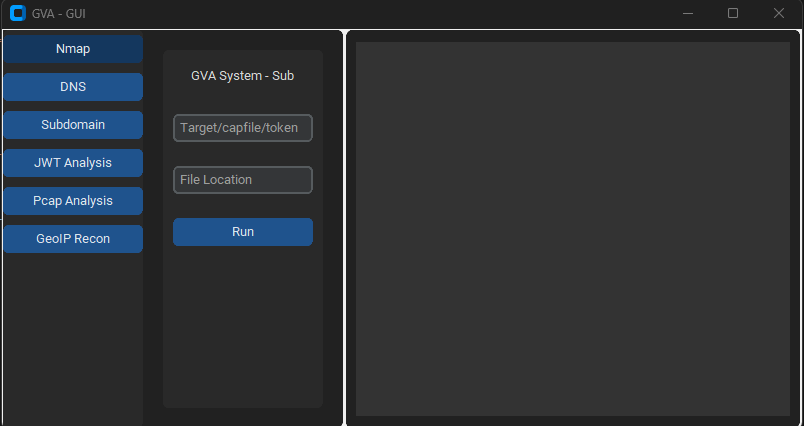
La GUI usa customtkinter para la ejecución del código. La interfaz es directa, lo único que hay que recordar es:

  • Cuando se usa el ataque dns, no especifiques el perfil```bash python GVA_gui.py
root@kitploit:~
### Ventana inicial

![init](https://assets.kitploit.com/production/public/readmes/5784/03469f428403c0d8ea05932b8b8854649e26d8b325f5468a7af7358d658464a7.png)

### Ventana NMAP

![nmap](https://assets.kitploit.com/production/public/readmes/5784/d795e0f39f8eda944ea6d76b5a150ef73bb4cce3f070e7bbcc76623f433b217a.png)

### Ventana DNS

![dns](https://assets.kitploit.com/production/public/readmes/5784/8420ce56819a0063f3268ca1650645fdd1faa3440c11b0cd699c6b66be67c00e.png)

### Ventana GEOIP

![geoip](https://assets.kitploit.com/production/public/readmes/5784/309b00715f1b645259b2d80f153f0b6be45622b34a4c4321cbd17cdaf707d1d8.png)

### Ventana PCAP

![pcap](https://assets.kitploit.com/production/public/readmes/5784/c25ebeee2e87706c1145382ade9142ca8449cfd77412000c849c1f000f115de0.png)

### Ventana SUBDOMINIO

![subdomain](https://assets.kitploit.com/production/public/readmes/5784/5ecffc756794097d6f77939aefbd029078575eb77ee3512add7174f03e7aacc2.png)

### Ventana JWT

![jwt](https://assets.kitploit.com/production/public/readmes/5784/f00ff0ff586b10ab3523a92bc62808875fcb4bb48fa3024f482614dc7dfdb3ef.png)
Descargar herramienta
-Pn -sU -T4
p11jsonDetección de servicio y versión para los puertos top-Pn -sV --top-ports 100
p12jsonEscaneo agresivo con scripts NSE para vulnerabilidades-Pn -sS -sV -T4 --script=default,discovery,vuln
p13jsonEscaneo rápido para puertos comunes-Pn -F