 medbenali/cyberscan
Kit de herramientas forenses de red de código abierto para análisis de paquetes, escaneo de puertos, descubrimiento de hosts y geolocalización IP. Admite pings ARP, ICMP, TCP, UDP y decodificación de pcap.




CyberScan es una herramienta de prueba de penetración de código abierto que puede analizar paquetes , decodificar , escanear puertos, hacer ping y geolocalización de una IP incluyendo (latitud, longitud , región , país ...)
Puedes instalar CyberScan con pip o descargar el repositorio.
$ pip install cyberscan
Puedes descargar CyberScan clonando el repositorio Git:
git clone https://github.com/medbenali/CyberScan.git
cd CyberScan/
python CyberScan.py -v
CyberScan funciona de inmediato con Python versión 3.0.x.
CyberScan es capaz de enviar y capturar paquetes de varios protocolos, forjándolos y decodificándolos para ser utilizados en la mayoría de las tareas de red como escaneo, ping, sondeo y ataques.
Puedes probar la instalación de CyberScan en tu máquina:
$ cyberscan -h
Podemos realizar operaciones de ping con varios protocolos usando CyberScan. La forma más rápida de descubrir hosts en una red Ethernet local es usar ARP:
$ cyberscan -s 192.168.1.0/24 -p arp
[*] Starting Ping ARP for 192.168.1.0/24
Begin emission:
Finished to send 256 packets.

Received 0 packets, got 0 answers, remaining 256 packets
En otros casos podemos usar ping ICMP:
$ cyberscan -s 192.168.1.1-254 -p icmp
[*] Starting Ping ARP for 192.168.1.0/24
Begin emission:
Finished to send 256 packets.

Received 0 packets, got 0 answers, remaining 256 packets
En caso de que las solicitudes de eco ICMP estén bloqueadas, aún podemos usar TCP:
$ cyberscan -s 192.168.1.1-254 -p tcp -d 80
O incluso UDP (que produce errores de puerto ICMP inalcanzable desde hosts activos). Podemos elegir cualquier puerto que probablemente esté cerrado, como el puerto 0:
$ cyberscan -s 192.168.*.1-10 -p udp
En la herramienta CyberScan podemos escanear especificando o no el puerto de inicio y fin
$ cyberscan -s 192.168.1.1 -p scan -d 1 -t 100
WARNING: No route found for IPv6 destination :: (no default route?)
[*] CyberScan Port Scanner
[*] Scanning 192.168.1.1 From Port 1 To 100:
[*] Starting CyberScan 1.01 at 2017-07-14 14:00 CEST
[*] Scan In Progress ...
[*] Connecting To Port :  100
[*] Scanning Completed at 2017-07-14 14:00 CEST
[*] CyberScan done: 1IP address (1host up) scanned in 0.32 seconds
[*] Open Ports:
	23 TELNET: Open
	53 DNS: Open
	80 HTTP: Open
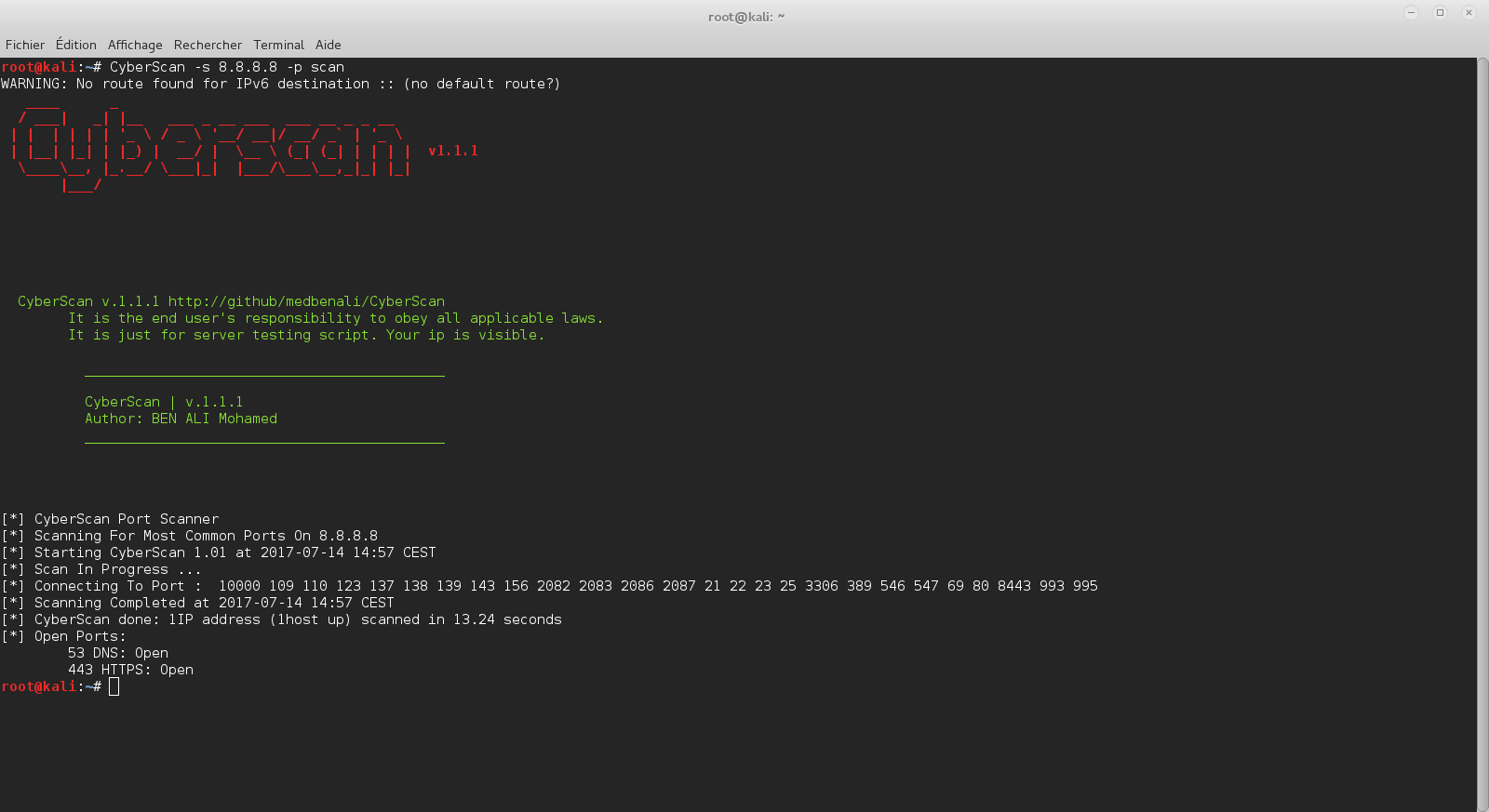
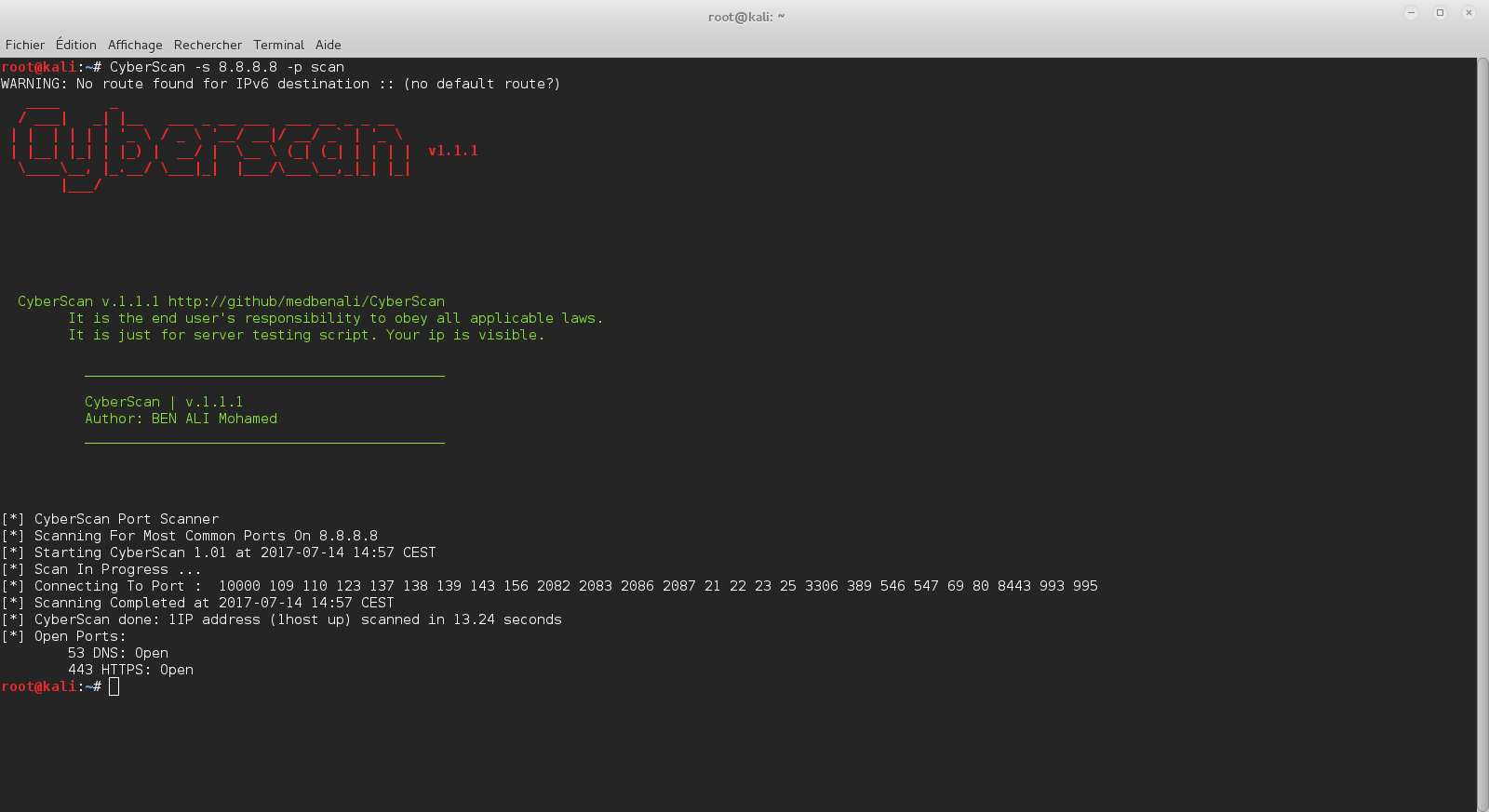
$ cyberscan -s 8.8.8.8 -p scan
WARNING: No route found for IPv6 destination :: (no default route?)
[*] CyberScan Port Scanner
[*] Scanning For Most Common Ports On 8.8.8.8
[*] Starting CyberScan 1.01 at 2017-07-14 14:03 CEST
[*] Scan In Progress ...
[*] Connecting To Port :  10000 109 110 123 137 138 139 143 156 2082 2083 2086 2087 21 22 23 25 3306 389 546 547 69 80 8443 993 995
[*] Scanning Completed at 2017-07-14 14:03 CEST
[*] CyberScan done: 1IP address (1host up) scanned in 13.11 seconds
[*] Open Ports:
	53 DNS: Open
	443 HTTPS: Open
$ cyberscan -s 72.229.28.185 -p geoip
WARNING: No route found for IPv6 destination :: (no default route?)
[*] IP Address:  72.229.28.185
[*] City:  New York
[*] Region Code:  NY
[*] Area Code:  212
[*] Time Zone:  America/New_York
[*] Dma Code:  501
[*] Metro Code:  New York, NY
[*] Latitude:  40.7605
[*] Longitude:  -73.9933
[*] Zip Code:  10036
[*] Country Name:  United States
[*] Country Code:  US
[*] Country Code3:  USA
[*] Continent:  NA
CyberScan puede analizar archivos pcap para extraer y decodificar cabeceras ethernet, ip, tcp, icmp, udp.
$ cyberscan -f test.pcap -p eth
WARNING: No route found for IPv6 destination :: (no default route?)
----------------------------------------
[*] Packet : 1
[+] ### [ Ethernet ] ###
[*] Mac Destination : 00:1f:f3:3c:e1:13
[*] Mac Source : f8:1e:df:e5:84:3a
[*] Ethernet Type : 2048
$ cyberscan -f test.pcap -p ip
WARNING: No route found for IPv6 destination :: (no default route?)
----------------------------------------
[*] Packet : 1
[+] ###[ IP ] ###
[*] IP Source : 172.16.11.12
[*] IP Destination : 74.125.19.17
[*] IP Version :  4
[*] IP Ihl :  5
[*] IP Tos :  0
[*] IP Len :  79
[*] IP Id :  56915
[*] IP Flags :  2
[*] IP Frag :  0
[*] IP Ttl :  64
[*] IP Protocol :  6
[*] IP Chksum :  18347
[*] IP Options :  []
[*] IP Dump :
0000   45 00 00 4F DE 53 40 00  40 06 47 AB AC 10 0B 0C   E..O.S@[email protected].....
0010   4A 7D 13 11 FC 35 01 BB  C6 D9 14 D0 C5 1E 2D BF   J}...5........-.
0020   80 18 FF FF CB 8C 00 00  01 01 08 0A 1A 7D 84 2C   .............}.,
0030   37 C5 58 B0 15 03 01 00  16 43 1A 88 1E FA 7A BC   7.X......C....z.
0040   22 6E E6 32 7A 53 47 00  A7 5D CC 64 EA 8E 92      "n.2zSG..].d...
$ cyberscan -f test.pcap -p tcp
WARNING: No route found for IPv6 destination :: (no default route?)
----------------------------------------
[*] Packet : 1
[+] ###[ TCP ] ###
[*] TCP Source Port :  64565
[*] TCP Destination Port :  443
[*] TCP Seq :  3336115408
[*] TCP Ack :  3307089343
[*] TCP Dataofs :  8
[*] TCP Reserved :  0
[*] TCP Flags :  24
[*] TCP Window :  65535
[*] TCP Chksum :  52108
[*] TCP Urgptr :  0
[*] TCP Options :  [('NOP', None), ('NOP', None), ('Timestamp', (444433452, 935680176))]
[*] TCP Dump :
0000   FC 35 01 BB C6 D9 14 D0  C5 1E 2D BF 80 18 FF FF   .5........-.....
0010   CB 8C 00 00 01 01 08 0A  1A 7D 84 2C 37 C5 58 B0   .........}.,7.X.
$ cyberscan -f test.pcap -p udp
WARNING: No route found for IPv6 destination :: (no default route?)
----------------------------------------
[*] Packet : 1
[+] ###[ UDP ] ###
[*] UDP Source Port :  54639
[*] UDP Destination Port :  53
[*] UDP Len :  47
[*] UDP Chksum :  30084
[*] UDP Dump :
0000   D5 6F 00 35 00 2F 75 84  13 A2 01 00 00 01 00 00   .o.5./u.........
0010   00 00 00 00 04 65 38 37  32 01 67 0A 61 6B 61 6D   .....e872.g.akam
0020   61 69 65 64 67 65 03 6E  65 74 00 00 01 00 01      aiedge.net.....
$ cyberscan -f test.pcap -p icmp
WARNING: No route found for IPv6 destination :: (no default route?)
----------------------------------------
[*] Packet : 1
[+] ###[ ICMP ] ###
[*] ICMP Type :  3
[*] ICMP Code :  3
[*] ICMP Chksum :  5296
[*] ICMP Id :  None
[*] ICMP Seq :  None
[*] ICMP Dump :
0000   03 03 14 B0 00 00 00 00  45 00 00 43 C1 80 00 00   ........E..C....
0010   40 11 4A FC AC 10 0B 01  AC 10 0B 0C 00 35 E7 E8   @.J..........5..
0020   00 2F 00 00                                        ./..

