 infobyte/cve-2023-21036
Detección y sanitización para Acropalypse Now - CVE-2023-21036

Puedes usar el script de Python acropalypse_detection.py o la regla de YARA acropalypse_detection.yar para detectar imágenes recortadas afectadas por acropalypse:
$ for i in test_imgs/*; do python3 acropalypse_detection.py $i; done
test_imgs/windows10_snipping_tool_1_cropped.png
test_imgs/windows10_snipping_tool_2_cropped.png
test_imgs/windows10_snipping_tool_3_cropped.jpg
test_imgs/windows11_1_cropped.png
test_imgs/windows11_2_cropped.png
test_imgs/windows11_3_cropped.jpg
$ yara acropalypse_detection.yar -r test_imgs/
warning: rule "acropalypse_jpeg" in acropalypse_detection.yar(31): string "$a" may slow down scanning
acropalypse_jpeg test_imgs//windows11_3_cropped.jpg
acropalypse_png test_imgs//windows10_snipping_tool_1_cropped.png
acropalypse_png test_imgs//windows10_snipping_tool_2_cropped.png
acropalypse_png test_imgs//windows11_2_cropped.png
acropalypse_png test_imgs//windows11_1_cropped.png
acropalypse_jpeg test_imgs//windows10_snipping_tool_3_cropped.jpg
Las imágenes recortadas son imágenes PNG válidas que finalizan con un chunk IEND. Pero los datos de la imagen original permanecen después de este chunk. El script de detección y la regla buscan otro chunk IEND al final del archivo que corresponda a la imagen original.
Puedes sanitizar las imágenes afectadas usando acropalypse_sanitizer.py:
$ for i in test_imgs/*; do python3 acropalypse_sanitizer.py $i; done
Saving sanitized file as test_imgs/windows10_snipping_tool_1_cropped_sanitized.png
test_imgs/windows10_snipping_tool_1_cropped_sanitized.png has no trailing bytes or original IEND chunk!
This file is not affected by acropalypse.
test_imgs/windows10_snipping_tool_1.png has no trailing bytes or original IEND chunk!
This file is not affected by acropalypse.
Saving sanitized file as test_imgs/windows10_snipping_tool_2_cropped_sanitized.png
test_imgs/windows10_snipping_tool_2_cropped_sanitized.png has no trailing bytes or original IEND chunk!
This file is not affected by acropalypse.
test_imgs/windows10_snipping_tool_2.png has no trailing bytes or original IEND chunk!
This file is not affected by acropalypse.
Saving sanitized file as test_imgs/windows10_snipping_tool_3_cropped_sanitized.jpg
test_imgs/windows10_snipping_tool_3.jpg has no trailing bytes or original EOI marker!
This file is not affected by acropalypse.
Saving sanitized file as test_imgs/windows11_1_cropped_sanitized.png
test_imgs/windows11_1_cropped_sanitized.png has no trailing bytes or original IEND chunk!
This file is not affected by acropalypse.
test_imgs/windows11_1.png has no trailing bytes or original IEND chunk!
This file is not affected by acropalypse.
Saving sanitized file as test_imgs/windows11_2_cropped_sanitized.png
test_imgs/windows11_2_cropped_sanitized.png has no trailing bytes or original IEND chunk!
This file is not affected by acropalypse.
test_imgs/windows11_2.png has no trailing bytes or original IEND chunk!
This file is not affected by acropalypse.
Saving sanitized file as test_imgs/windows11_3_cropped_sanitized.jpg
test_imgs/windows11_3.jpg has no trailing bytes or original EOI marker!
This file is not affected by acropalypse.
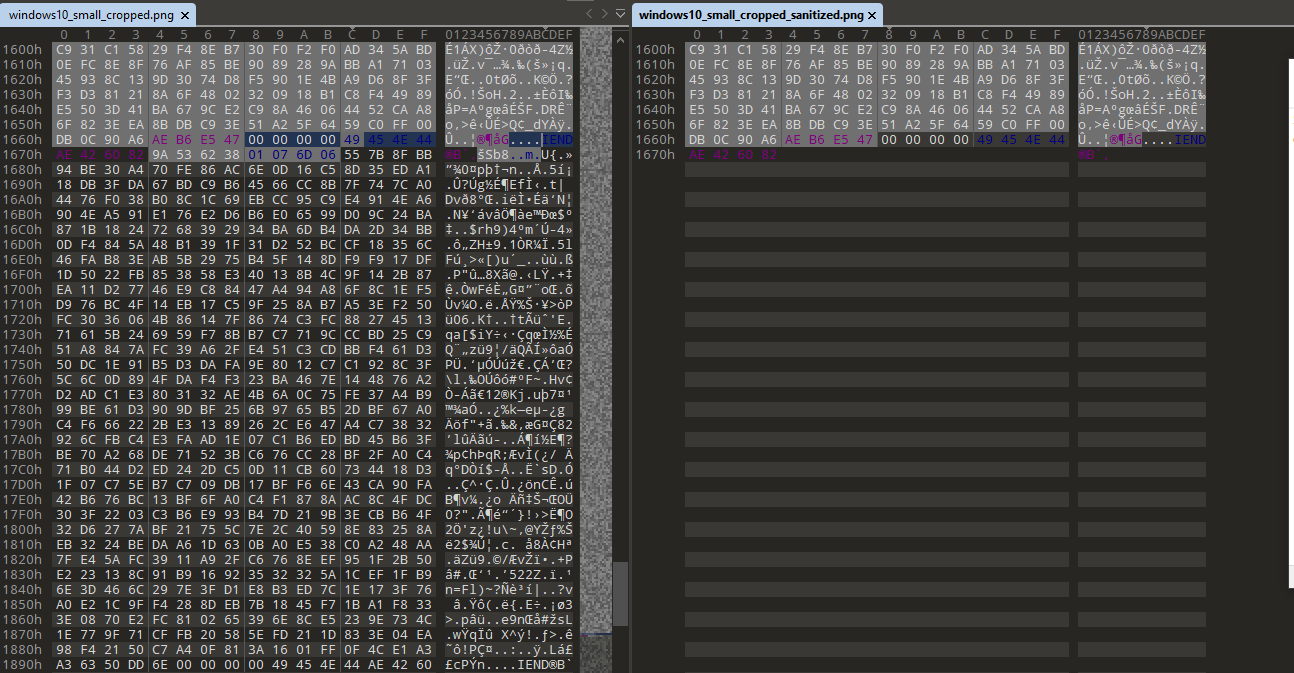
Este script elimina los datos originales después del final del archivo recortado, haciendo imposible recuperar el contenido original:
$ ls -la test_imgs/
total 1472
drwxrwxr-x 2 octa octa   4096 mar 23 15:08 .
drwxrwxr-x 4 octa octa   4096 mar 22 16:14 ..
-rw-rw-r-- 1 octa octa  45077 mar 22 09:44 windows10_snipping_tool_1_cropped.png
-rw-rw-r-- 1 octa octa   6886 mar 23 15:08 windows10_snipping_tool_1_cropped_sanitized.png
-rw-rw-r-- 1 octa octa  45077 mar 22 09:43 windows10_snipping_tool_1.png
-rw-rw-r-- 1 octa octa  34484 mar 22 09:44 windows10_snipping_tool_2_cropped.png
-rw-rw-r-- 1 octa octa   5065 mar 23 15:08 windows10_snipping_tool_2_cropped_sanitized.png
-rw-rw-r-- 1 octa octa  34484 mar 22 09:44 windows10_snipping_tool_2.png
-rw-rw-r-- 1 octa octa 226987 mar 23 10:18 windows10_snipping_tool_3_cropped.jpg
-rw-rw-r-- 1 octa octa 108791 mar 23 15:08 windows10_snipping_tool_3_cropped_sanitized.jpg
-rw-rw-r-- 1 octa octa 226987 mar 23 10:18 windows10_snipping_tool_3.jpg
-rw-rw-r-- 1 octa octa 195988 mar 22 11:18 windows11_1_cropped.png
-rw-rw-r-- 1 octa octa   5183 mar 23 15:08 windows11_1_cropped_sanitized.png
-rw-rw-r-- 1 octa octa 195988 mar 22 11:16 windows11_1.png
-rw-rw-r-- 1 octa octa 109834 mar 22 11:26 windows11_2_cropped.png
-rw-rw-r-- 1 octa octa   1365 mar 23 15:08 windows11_2_cropped_sanitized.png
-rw-rw-r-- 1 octa octa 109834 mar 22 11:24 windows11_2.png
-rw-rw-r-- 1 octa octa  46318 mar 23 15:02 windows11_3_cropped.jpg
-rw-rw-r-- 1 octa octa  13218 mar 23 15:08 windows11_3_cropped_sanitized.jpg
-rw-rw-r-- 1 octa octa  46318 mar 23 15:02 windows11_3.jpg
Por eso el tamaño de las imágenes sanitizadas es mucho más pequeño y las imágenes recortadas tienen el mismo tamaño que las originales.
Estos scripts están basados en https://gist.github.com/DavidBuchanan314/93de9d07f7fab494bcdf17c2bd6cef02
Si quieres intentar recuperar las capturas de pantalla originales, usa https://acropalypse.app
